
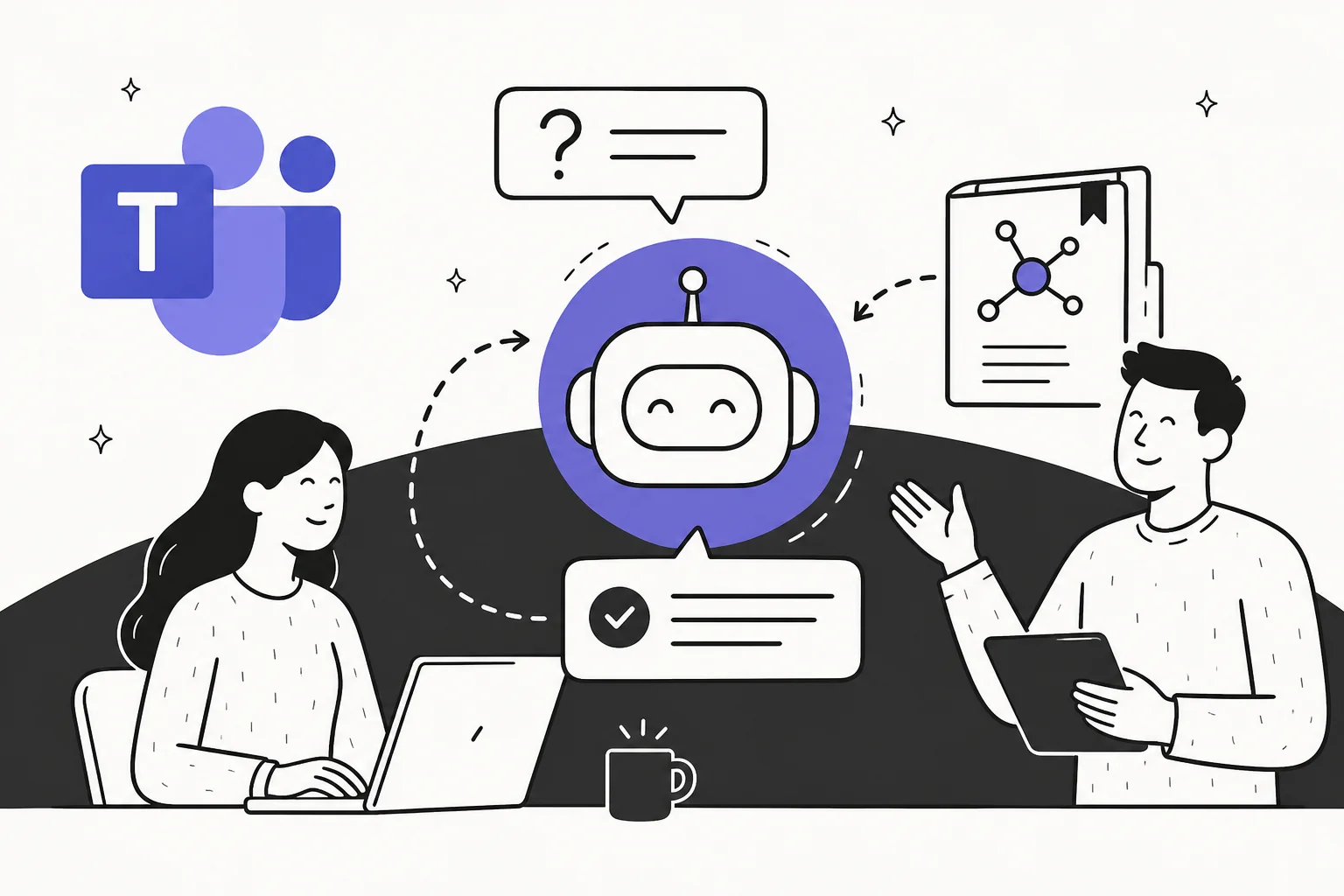
Why Teams channels become question graveyards
Here is what happens at almost every company that uses Microsoft Teams: knowledge accumulates in wikis - maybe Confluence for engineering docs, Notion for product specs, SharePoint for HR policies, Google Drive for sales collateral. Someone new joins. Or someone senior leaves. Or a process changes. And suddenly the Teams channels fill up with the same questions, repeated in different threads, sometimes answered, sometimes not.
It is not a discipline problem. The knowledge is there - it just exists in a different system. Asking a colleague in Teams is easier than navigating five different tools, remembering which one has the right answer, and then finding it.
The promise of AI in Microsoft Teams is that this doesn't have to be the default. An AI knowledge base chatbot that sits in Teams, reads your question, and surfaces the right answer from your wiki - with a link to the source - collapses the multi-tool search into a single @mention.
But the tools that deliver on this promise differ dramatically. The question is not "can AI answer questions in Teams?" - it can. The question is: which wikis can it actually reach, what does it cost, and how long does setup take?
What to look for in a Teams AI wiki bot
Before running through the tools, here are the dimensions that actually matter:
Breadth of knowledge sources. A bot that only reads SharePoint is useless if your team lives in Notion. The right tool reaches everything your team already uses - without requiring you to migrate content into a new system first. Check whether it supports your specific wiki versions: Confluence Cloud vs Confluence Data Center are not the same target for all connectors.
Citation quality. Answers without sources are dangerous in a knowledge base context. The bot should show exactly which document it pulled from so someone can verify or update the source if it is out of date. This matters especially in knowledge management contexts where wrong answers have real consequences.
Pricing model. Per-user pricing penalizes you for giving access to more of your team. Credit-based pricing, like eesel's fixed monthly plans sized to question volume, aligns cost with actual value delivered. These are materially different economics at scale - a 100-person company using a per-user tool at $20/month pays $2,000/month regardless of whether 80 of those users ever ask a question.
Setup complexity. Enterprise tools that require an IT admin to configure connectors and run identity mapping are not the same as tools that install in 30 minutes from the app store. Both exist in this space.
Permissions handling. An employee should only get answers from documents they are already authorized to see. A tool that ignores permissions is a data governance risk.
The options
eesel: connects to every wiki your team already uses
eesel is the tool we'd reach for first if your knowledge stack is anything other than pure Microsoft 365. It installs as a native bot directly from the Microsoft Teams App Store, shows up as a real workspace member that can be @mentioned in any channel or DM, and answers questions from whatever sources you connect.
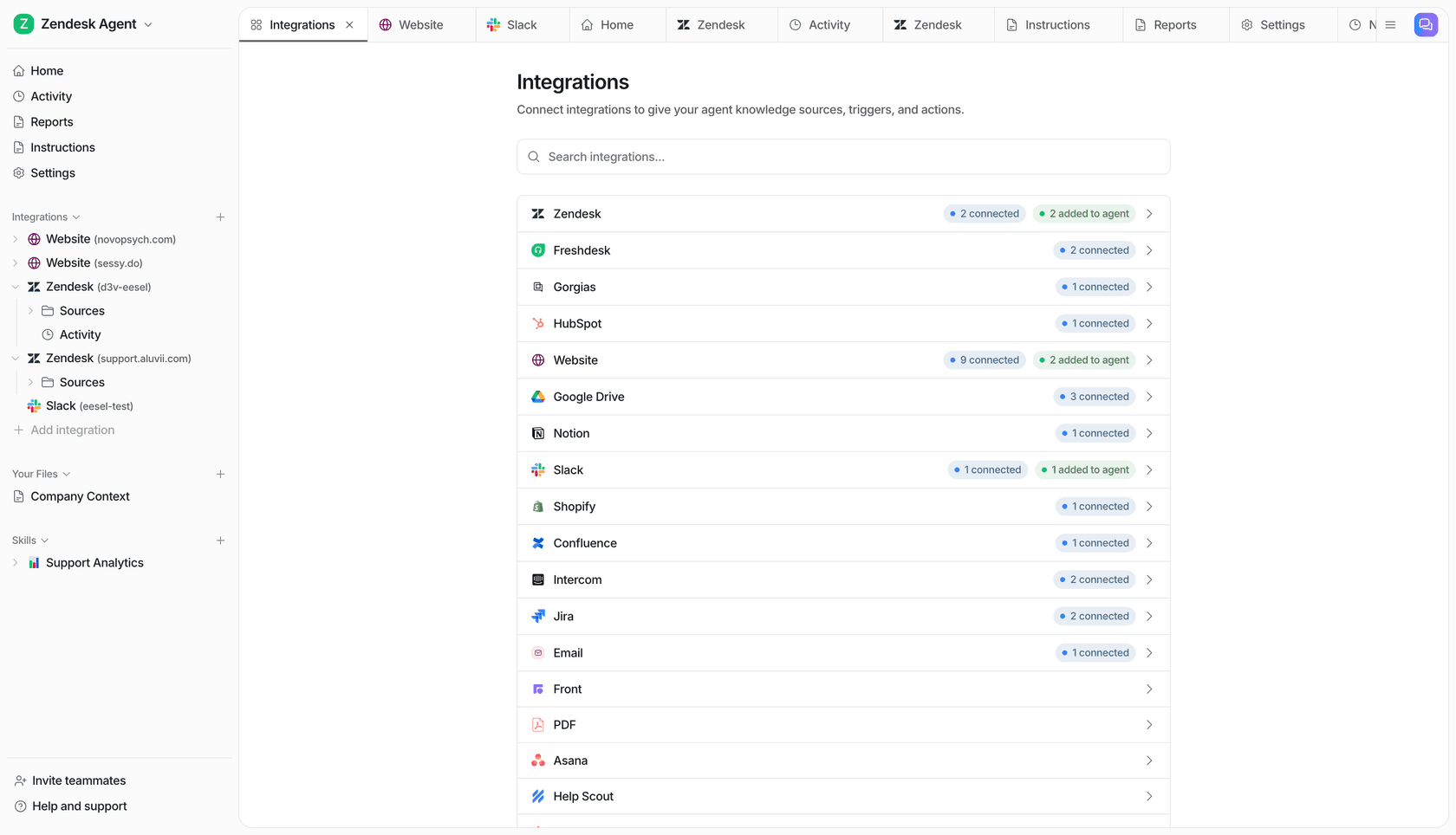
The source list is the main differentiator. eesel connects to SharePoint, Confluence (Cloud, Data Center, and Server), Notion, Google Drive, Jira, Zendesk, Freshdesk, HubSpot, Salesforce, websites, PDFs, and over 100 other tools. You do not need to migrate content anywhere - you connect your existing tools, eesel indexes them automatically, and it stays in sync as things change.
What the in-Teams experience looks like: you type @eesel what is our refund policy? in a channel, and within a few seconds you get an answer composed from your actual documentation, with a direct link to the source document. No tab-switching, no copy-pasting from a wiki into the chat.
"We needed a turnkey solution for Confluence that met our GDPR requirements and could serve different teams through dedicated bots. eesel AI delivered exactly that, with EU data residency included."
Flemming Ottosen, Development Director, Simployer (EU/Nordics HR-compliance software)
The practical experience for new hires is especially strong. Jon Miron at Yellowdig described a newer team member saying their eesel AI bot was their best friend during onboarding - they could ask anything about the company without having to find who to bother. That framing (an always-available, never-annoyed expert) is a good summary of the use case.
Setup time: Under 30 minutes. Install from the Teams App Store, connect your knowledge sources via OAuth, configure which channels the bot joins. No IT admin or developer needed.
Pricing: One fixed monthly price, from $299/month for 500 credits (1 credit per question). No per-seat fee, no platform fee. Free plan: 100 credits, no credit card required. Pay a year upfront and get two months free. Add-ons cover SSO and MFA (from $199/month), EU or US data residency ($500/month), and priority support (from $299/month).
Worth knowing: eesel responds in 80+ languages - it detects the language of the question and responds in kind, even if the underlying knowledge base is in a different language. Useful for multinational teams.
Best for: Teams with knowledge scattered across multiple non-Microsoft tools, or any team that wants to connect their existing stack rather than migrate into a new one.
Verdict: The strongest option for mixed knowledge stacks. If your team uses Notion, Confluence, Jira, or anything outside of Microsoft 365, this is the tool with the least friction and the broadest coverage.
Microsoft 365 Copilot: the built-in choice for SharePoint-first orgs
Microsoft 365 Copilot is Microsoft's AI layer across the entire M365 suite. Inside Teams, it operates in two distinct modes that are often conflated in marketing material - and understanding the difference matters for this use case.
Meeting/chat Copilot is the mode most Teams users encounter first: it summarizes meetings, extracts action items, and answers questions about chat history from the past 30 days. It cannot answer questions from external knowledge bases. This is not the mode that answers wiki questions.
Agent Copilot is the mode that answers knowledge base questions. You build an "agent" via Agent Builder or Copilot Studio, connect it to knowledge sources, and deploy it as a Teams bot. This is where the wiki Q&A happens.
For SharePoint and OneDrive, Copilot is native - no extra setup. For external sources, you need connectors:
- Confluence Cloud - official connector available via the Microsoft 365 admin center. Works with Confluence Cloud only (not Server or Data Center). Requires identity mapping between Confluence user emails and Entra ID. Permission changes take up to 24 hours to propagate. Does not index drafts, archived content, page history, or third-party Confluence add-ons.
- Google Drive, Jira, ServiceNow, GitHub - official connectors available.
- Notion - no official connector. Custom third-party connectors exist but are unsupported.
There are also hard limits per agent: up to 100 SharePoint files, 50 OneDrive files, 4 public website URLs, and 5 Teams chat threads as knowledge sources. For organizations with large knowledge bases, this requires segmenting content across multiple agents. For a deeper look at SharePoint AI limitations and alternatives, those constraints go further than just the file caps.
The adoption data is worth flagging: despite broad enterprise deployment, only 35.8% of eligible users with Copilot access actually use it. The gap between procurement and real-world adoption is large - which suggests the tool's value depends heavily on organizational change management, not just the technology.
Pricing: Microsoft 365 Copilot Business - $18/user/month (promotional) to $21/user/month (standard), up to 300 users. Enterprise - $30/user/month on top of an existing E3 or E5 plan. A 50-person team at Business pricing pays $900-$1,050/month for the Copilot add-on alone, before any base Microsoft Teams pricing costs.
Best for: Organizations whose knowledge already lives primarily in SharePoint and OneDrive, with strong IT infrastructure, who want AI deeply integrated across the full M365 suite rather than just Q&A.
Verdict: Excellent if you are already a SharePoint shop. The absence of a Notion connector and the SharePoint file cap per agent are real constraints. For teams with diverse non-Microsoft knowledge sources, the cost/coverage ratio is hard to justify.
Guru: built for teams that want governed, verified knowledge
Guru takes a different angle on the problem. Rather than acting as a connector layer on top of your existing tools, Guru's core pitch is that most AI Q&A fails because the underlying knowledge is unstructured, unverified, and out of date. Their solution: build a verified knowledge layer that your AI then reads from.
In practice, Guru ingests content from Google Drive, SharePoint, Confluence, Notion, Zendesk, and 100+ other sources - but it also layers in Knowledge Quality Automation: AI that continuously flags stale content, routes unverified claims to subject-matter experts, and keeps answers current. When an employee asks a question in Teams via the Guru bot, they are getting an answer from a knowledge base that a human has confirmed is correct.
The Teams integration (available on Microsoft AppSource) supports natural-language Q&A, creating knowledge cards directly from Teams messages, sending verified announcements with read receipts, and pinning Guru as a full tab in any channel. It works alongside the full Microsoft stack - OneDrive and SharePoint as knowledge sources, ADFS for SSO, and the Edge browser extension for in-context answers.
Guru's G2 rating is 4.7/5 across more than 3,000 reviews - strong for an enterprise knowledge management tool. Users consistently praise the verified knowledge model and answer quality. The main complaints: search relevance degrades in large, poorly-tagged knowledge bases, and the ongoing verification effort is real work for content owners.
The limitation most relevant here is pricing. As of June 2026, Guru has moved entirely to custom, enterprise-only pricing - no self-serve option, no published rates, every deployment starts with a sales call. Historical data from third-party sources suggests a prior self-serve tier at $25/seat/month with a 10-seat minimum ($250/month floor). For a small or mid-size team hoping to start next week, Guru's sales process is a real friction point.
Best for: Mid-market to enterprise organizations (50+ employees) where knowledge governance matters - compliance-heavy industries, teams where wrong answers have real consequences, or companies where multiple teams need to maintain different slices of the knowledge base. See Confluence vs Guru vs Slite for a direct comparison.
Verdict: The best option for organizations where answer quality and governance are the primary concern, with resources to work through an enterprise procurement process. Not practical for smaller teams or for anyone who needs to move fast.
A note on Tettra
Tettra built a genuinely strong internal Q&A product centered on its Kai AI bot - but for Teams users, the decision is simple: Tettra has discontinued its Microsoft Teams integration. The official Teams integration page returns a 404, and the bot was removed from the app store in early 2026.
Tettra remains a capable choice for Slack-first teams. Kai's ability to watch Slack channels, auto-answer questions, and route unanswered ones to subject-matter experts is well-executed at $8/user/month. But if your team is on Microsoft Teams as the primary collaboration hub, Tettra is not a viable option for wiki Q&A.
How they compare side-by-side
| eesel | Microsoft 365 Copilot | Guru | |
|---|---|---|---|
| Teams integration | Native bot, app store install | Agent via Agent Builder or Copilot Studio | Native bot, AppSource |
| Knowledge sources | 100+ (Notion, Confluence, SharePoint, Google Drive, Jira, Zendesk, + more) | SharePoint, OneDrive, Confluence Cloud (connector), Google Drive (connector), Jira, ServiceNow | 100+ (Notion, Confluence, SharePoint, Google Drive, Zendesk, + more) |
| Notion support | Yes | No (no official connector) | Yes |
| Confluence Server/Data Center | Yes | No (Cloud only) | Yes |
| Citations in answers | Yes | Yes | Yes, with verification status |
| Permissions respected | Yes | Yes (inherits M365/SharePoint permissions) | Yes (RBAC from source systems) |
| Setup time | ~30 minutes | Hours to days (connector admin setup) | Weeks (enterprise implementation) |
| Pricing | From $299/mo (500 credits), no seat fee | $18-$30/user/month add-on | Custom (contact sales) |
| Free trial | 100 free credits, no card | 30-day M365 trial | No public trial |
| Best for | Mixed knowledge stacks, teams outside M365 | SharePoint-heavy orgs, full M365 commitment | Enterprise governance, compliance-heavy industries |
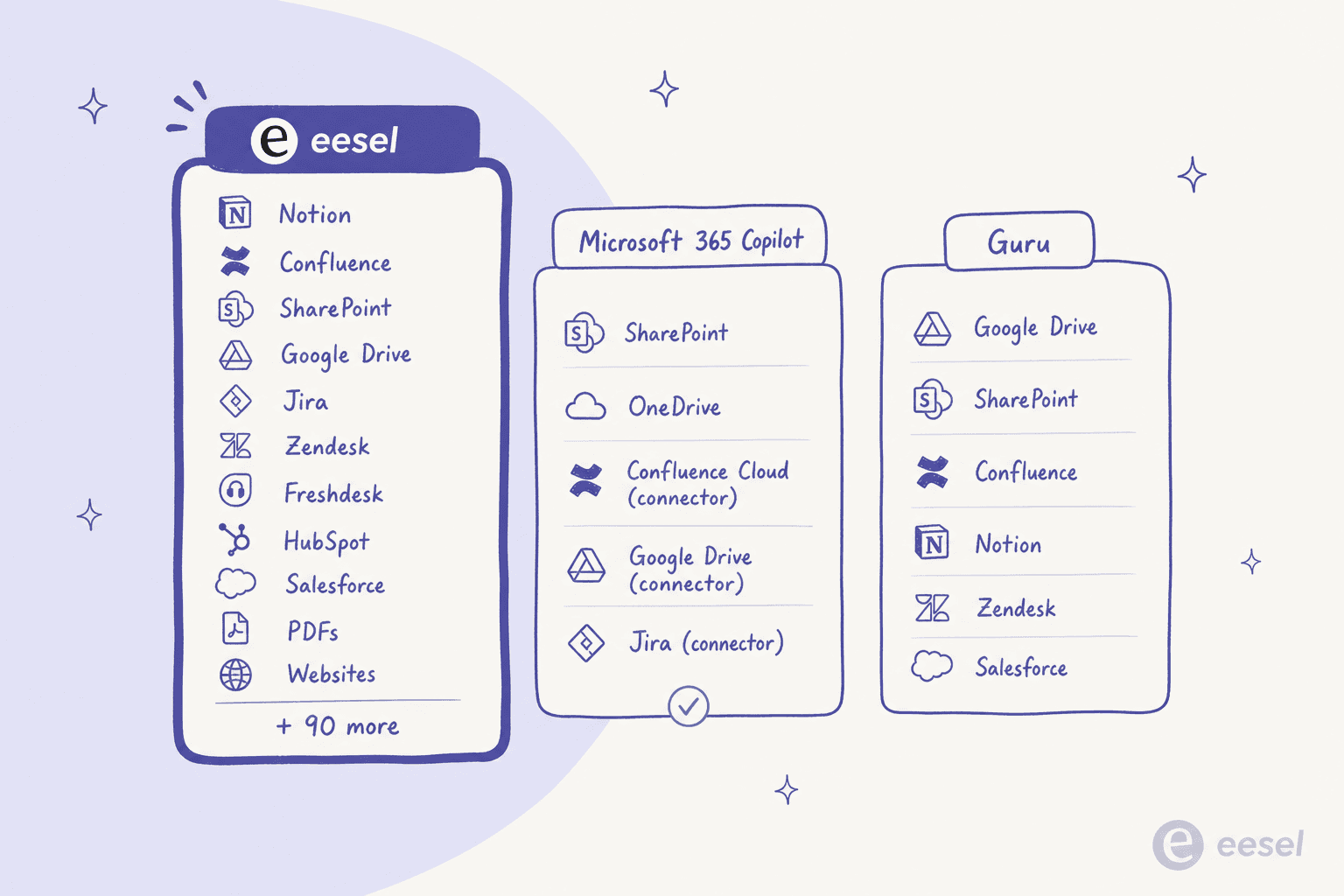
The dividing line comes down to your knowledge stack and your pricing model preference. If your knowledge base lives in SharePoint and you are already paying for Microsoft 365, Copilot is a natural extension. If your stack is mixed - Notion for product, Confluence for engineering, Google Drive for everything else - eesel is the tool that reaches all of it without requiring you to move content or negotiate an enterprise contract.
For teams evaluating Notion AI connectors specifically, it's worth noting that neither Microsoft Copilot nor Guru has an official Notion-to-Teams path - eesel's native Notion integration is the clean solution here.
How eesel connects your wiki to Microsoft Teams
The setup process is straightforward enough that it doesn't require your IT department. Here is what it looks like from start to first answer:
1. Install eesel from the Microsoft Teams App Store. Search for "eesel" in the Teams app store, click Add, and authorize the bot. It joins as a workspace member in your tenant.
2. Connect your knowledge sources. In the eesel dashboard, connect your tools via OAuth: Confluence, Notion, Google Drive, SharePoint, Jira, Zendesk, or any of the 100+ other supported sources. Each source is indexed automatically - eesel stays in sync as content changes.
3. Configure which channels eesel joins and how it responds. You describe the bot's behavior in plain language: which channels it watches, whether it responds to every question or only when @mentioned, how formal the tone should be, when to escalate to a human. No prompting required.
4. Go live. The bot starts responding. According to eesel's own data, most teams are live and answering real questions within 30 minutes of starting the setup.
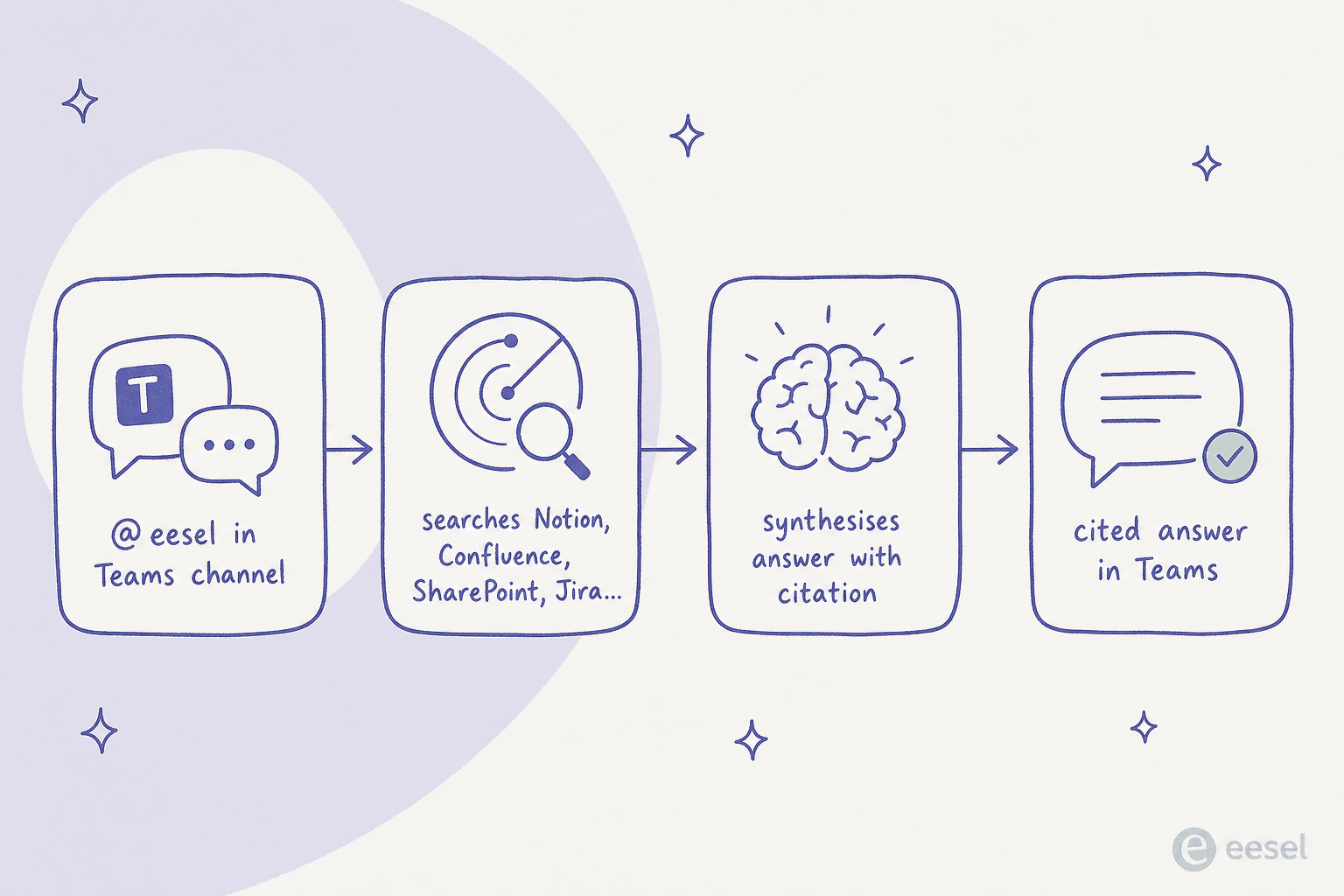
A few things worth knowing about how eesel handles questions in Teams:
- Multi-source synthesis. If the answer spans multiple documents - say, a policy in SharePoint and a workflow in Confluence - eesel synthesizes across both and cites each source.
- Corrections are instant. Tell eesel in plain text that an answer was wrong or too formal, and it adjusts permanently.
- Proactive digests. eesel can push weekly summaries or trend alerts to specific channels - useful for IT helpdesks or support teams who want to see what questions are repeating.
- Multilingual out of the box. eesel detects the language of the question and responds in kind. The underlying knowledge base can be in a different language; eesel bridges the gap automatically.
"With eesel, we can find specific answers to questions extremely fast. We can onboard new employees very quickly and have seen up to 80% time savings."
Alex Capurro, Chief Innovation Officer, Global Pay (Confluence + eesel AI Copilot for internal Q&A)
The value is not that the bot answers every question perfectly. It is that it handles the 80% of questions that have good answers already documented, so the 20% that need a human get real attention instead of being delayed by a wiki hunt.
If you are setting up Confluence for Teams Q&A specifically, note that eesel supports Confluence Cloud, Data Center, and Server - unlike Microsoft's official connector, which is Cloud only. For teams on Confluence Data Center who want AI-powered Q&A in Teams without migrating to Confluence Cloud, eesel is currently the practical path.
For Zendesk-heavy teams, the Zendesk Microsoft Teams integration post covers how eesel bridges those two platforms. And for Freshdesk users, the same pattern applies - eesel indexes your Freshdesk knowledge base and answers questions from Teams.
What it actually costs
The pricing models in this space produce very different numbers at scale, so it is worth working through a concrete example.
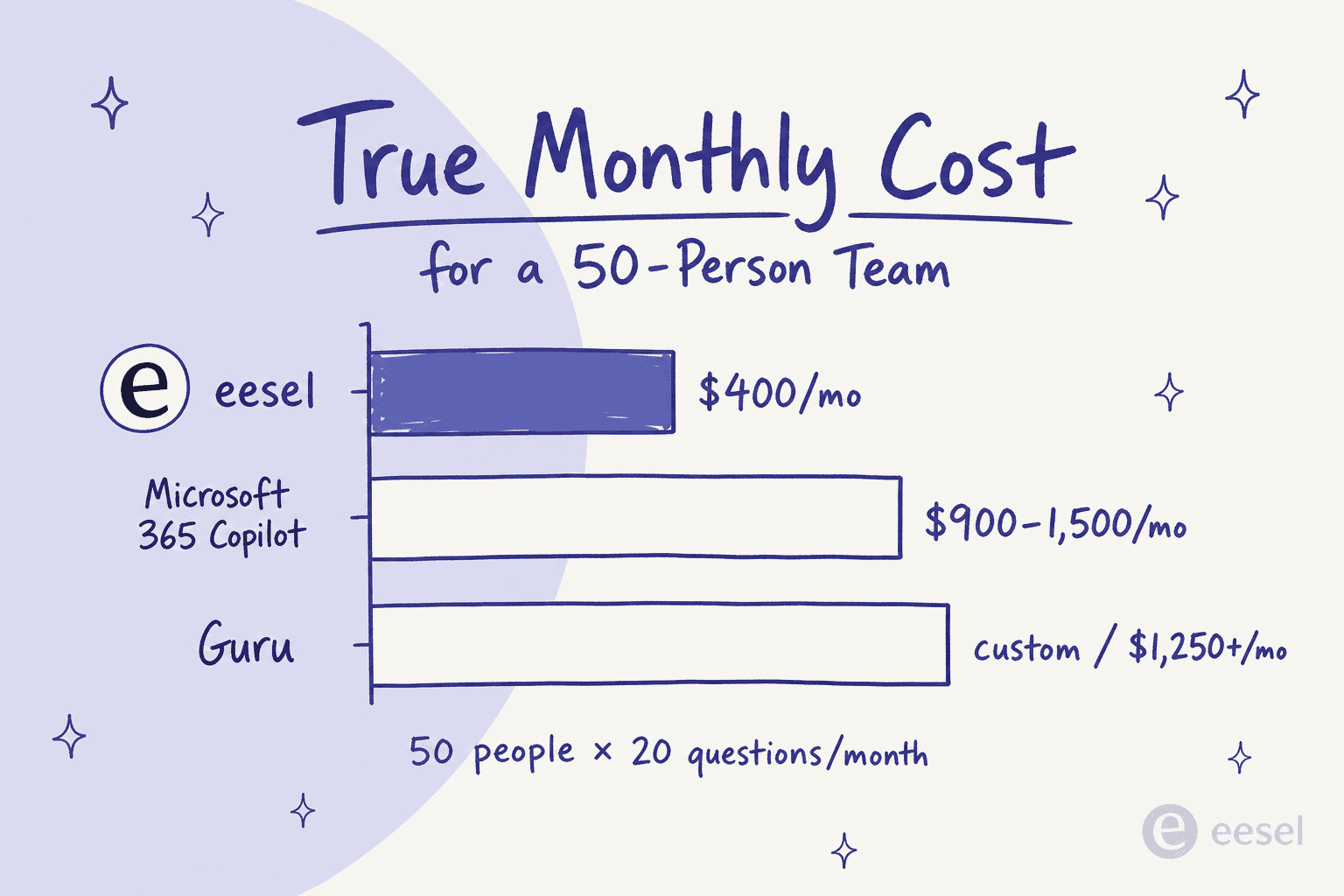
Scenario: 50-person team, each member asking ~20 questions per month in Teams.
| Tool | Monthly cost | What you are paying for |
|---|---|---|
| eesel | $499/month | 1,000 credits (1,000 queries) |
| Microsoft 365 Copilot Business | $900-$1,050/month | 50 users x $18-$21 (not counting base M365 plan) |
| Microsoft 365 Copilot Enterprise | $1,500/month | 50 users x $30 (not counting E3/E5 plan at $36-$57/user) |
| Guru | Custom | Sales call required; historically $250+ floor |
The difference between per-user and per-credit pricing becomes especially significant in two scenarios:
High-user, low-query teams. A 50-person team where only 15 people regularly ask questions needs far fewer credits than one where everyone asks, so the smaller plan can cover it. On per-user pricing, they pay full rate for everyone regardless of how often they ask.
Variable demand. Support teams often have seasonal spikes. With eesel you can move up or down a plan any time, or turn on overage with a monthly cap you set ($0.80 per extra credit) for a heavy month. Per-user pricing stays fixed regardless of how much anyone actually asks.
One thing worth flagging about Copilot: the 35.8% actual adoption rate means many organizations paying $30/user/month see only a fraction of users actually asking questions. The real cost per active user is substantially higher than the nominal rate.
For teams evaluating the best AI knowledge base tools more broadly, or wondering how to train AI on a knowledge base without migrating content, those posts cover the broader landscape. The ChatGPT knowledge base comparison is also useful if you're evaluating general-purpose options against purpose-built connectors.
Try eesel
If your company knowledge is spread across more than one tool - and most teams' is - eesel is the path of least resistance for wiki Q&A in Microsoft Teams. It connects to every source your team already uses, installs in under 30 minutes, sizes its fixed monthly price to the questions that actually get asked, and handles the full Teams integration natively including channels, DMs, and @mentions.
The free trial gives you 100 free credits to test it against your actual knowledge base - no credit card required. At 1 credit per question, that is 100 real questions from your real documentation. For most teams, that is enough to tell whether it works.
For related reading: how to train AI on your knowledge base, the best AI for Microsoft Teams support, the Notion AI Microsoft Teams connector, the Freshservice Microsoft Teams integration, and Microsoft Teams integrations with n8n for workflow automation.
Frequently Asked Questions
What AI can answer questions from my company wiki in Microsoft Teams?
Does Microsoft 365 Copilot connect to Notion as a knowledge source in Teams?
How much does an AI wiki bot for Microsoft Teams cost?
How do I connect Confluence to Microsoft Teams for AI question answering?
Which Teams AI wiki bot is best if we don't use Microsoft 365?


Article by
Riellvriany Indriawan
Riell is a designer and writer at eesel AI with about two years of experience researching CX platforms, AI chatbots, and helpdesk software. She combines her design background with a sharp eye for how these tools actually look and feel in practice — making her comparisons unusually visual and user-focused.