

Why I trust a sentiment score about as far as I can throw it
I work the support queue. So when a tool promises to tell me how every customer feels, my first instinct isn't excitement, it's the memory of every time a system confidently mislabeled a perfectly calm customer as a five-alarm fire, and buried the truly furious one three pages down because they were too polite to swear.
That instinct turns out to be the right one, and it's backed by the people who run these tools every day. On eesel I've spent the last few years watching AI handle live support queues across thousands of real tickets, and the single most reliable lesson is that a confident-sounding signal is the dangerous kind. It's the same reason we simulate every AI rollout against a customer's historical tickets before it goes live: the score that looks great in a demo is the one that quietly does the wrong thing at 2am. Sentiment analysis is useful. It's also the support feature most likely to be trusted more than it has earned. This guide is about getting both halves right.
What AI sentiment analysis actually is
At its simplest, sentiment analysis is "an AI technique that identifies and classifies text as positive, negative, or neutral based on expressed opinions or emotions," in G2's own definition. For support, it "gauges the perceived emotion of the customer," in Observe.AI's framing. A customer writes "this service has been terrible," the model reads it as negative, and that label becomes something your helpdesk can act on.
The catch is that "positive, negative, neutral" is the toddler version. There are really four flavors worth knowing, because they do different jobs:
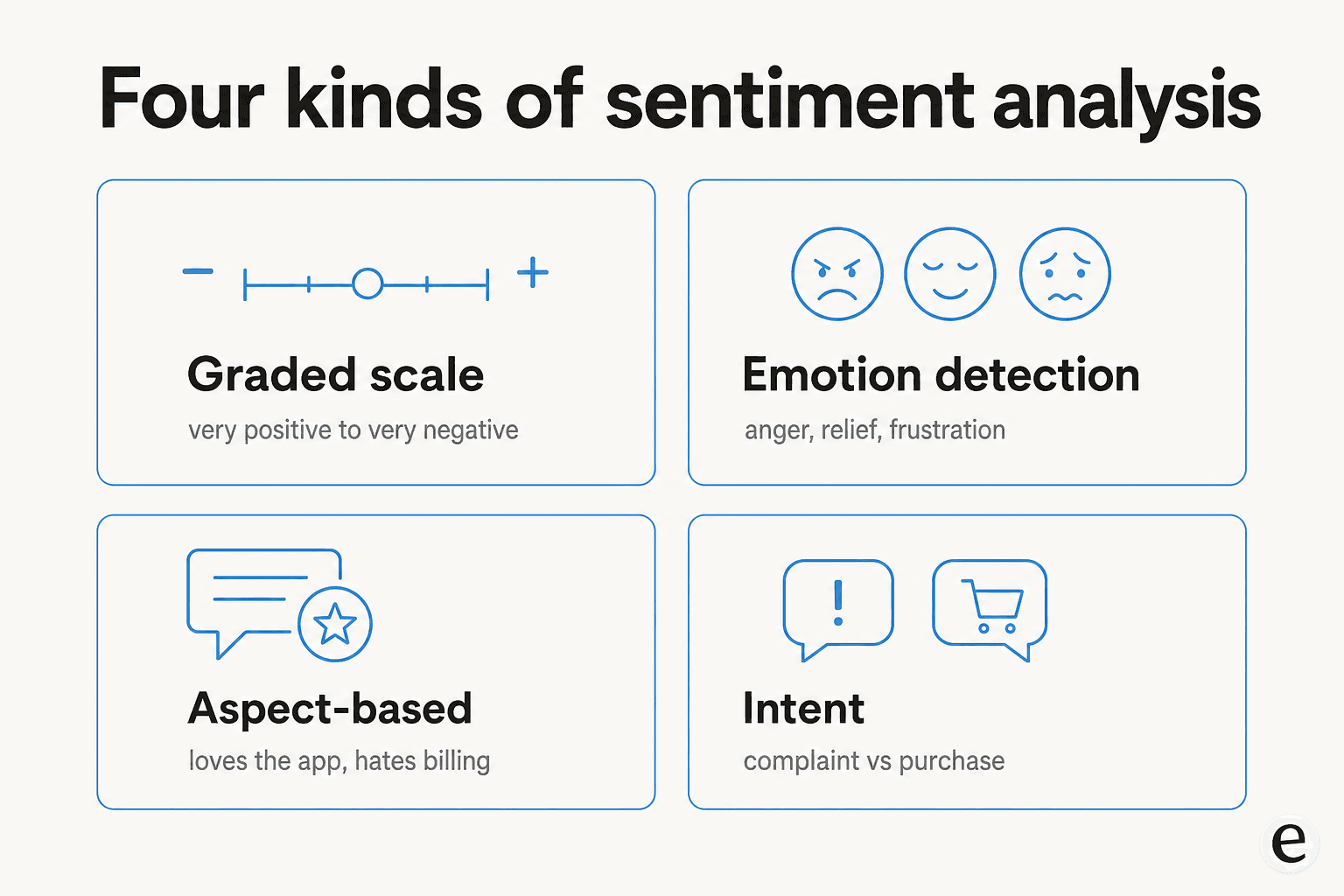
- Graded (fine-grained) sentiment goes beyond three buckets into a scale, like very positive to very negative. This is what Zendesk's five-tier scale and Dialpad's range both implement.
- Emotion detection picks out specific feelings like frustration or relief, which G2 notes is for "more complex customer responses outside the typical negative to positive rankings."
- Aspect-based sentiment splits the feeling by topic: "love the app, hate the billing" becomes positive-on-product, negative-on-billing. This is the technique behind real trend analysis, because it tells you what is driving the anger, not just that it exists.
- Intent analysis is the close cousin: is this a complaint, a cancellation, a purchase question? It pairs with sentiment in ticket triage, which is why Zendesk classifies topic and sentiment together.
If you only remember one, make it aspect-based. "Customers are unhappy" is a panic. "Customers are unhappy about the new checkout flow" is a roadmap.
How it works under the hood
You don't need to build one of these to use it well, but you do need to know enough to spot when it's lying to you.
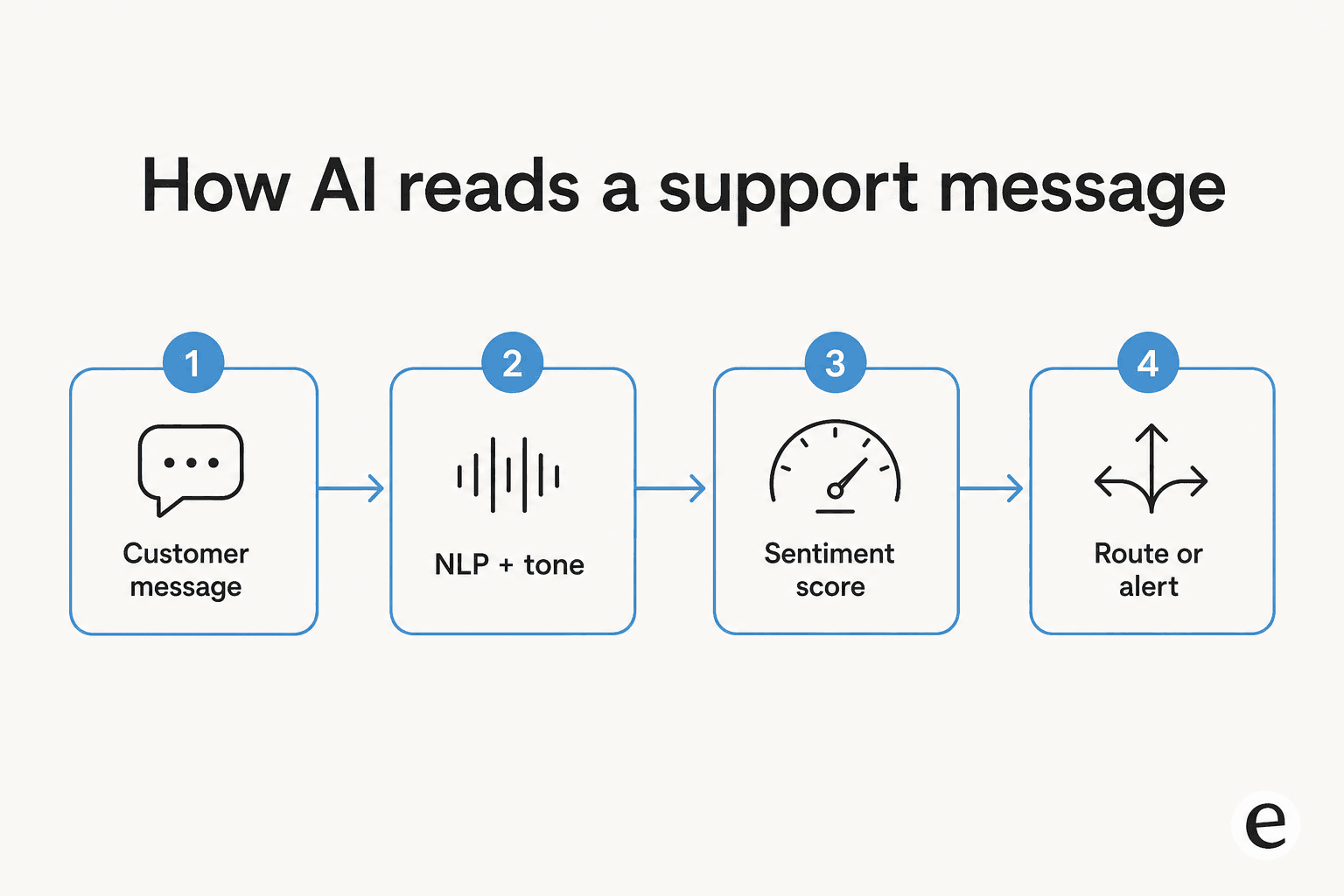
Per G2's glossary, there are two foundational approaches. Older systems lean on sentiment dictionaries, fixed lists of "good" and "bad" words, which is brittle and breaks the moment a customer phrases their frustration in words you didn't anticipate. Modern systems lean on natural language processing and machine learning, which read patterns rather than match keywords. That difference is exactly why one skeptical reviewer dismissed a popular tool as "a glorified CTRL+F" (via G2): when a system is really just keyword-matching, you have to anticipate every phrasing yourself.
There's a second axis that matters more than most buyers realize: text versus tone. Observe.AI draws the line cleanly, contrasting plain text scoring with tonality-based sentiment that "doesn't just analyze what was said, but also how it was said," reading pitch, tone and volume. On a voice call, "fine" can be sincere or murderous, and only tone catches the difference. On a text ticket, you lose that signal entirely, which is part of why text sarcasm is so hard.
Finally, there's timing. Real-time scoring runs as the conversation unfolds, so a supervisor can step in mid-call or a ticket can escalate the moment sentiment drops. Batch scoring runs after the fact, for QA and trend reports. The same underlying signal feeds both; the question is whether you want it to interrupt or to summarize.
What it's actually good for
Here's where I get more enthusiastic, because the use cases are real. Five of them earn their keep:
- Priority routing. Surface the negative tickets first instead of working a queue in timestamp order. Zendesk pitches exactly this: "use these insights to prioritize, route, and manage tickets based on customer emotions." This is the single highest-ROI use, and it pairs naturally with AI ticket triage.
- Escalation triggers. Auto-escalate when sentiment crosses a threshold. Done right this prevents the slow-motion disaster where a frustrated customer gets politely ignored. Our guide to handling escalations goes deeper on the handoff mechanics.
- Churn and at-risk detection. Freshdesk lists this outright, framing sentiment as a way to "identify and proactively engage at-risk customers to reduce churn." For a B2B team, catching a quietly-souring account before renewal is worth more than the whole feature on its own.
- Agent coaching. Dialpad suggests sharing flagged examples "in one-on-one sessions or in a playlist to help train new agents." When coaching is based on every interaction instead of the handful a manager happened to review, it stops being anecdotal.
- Voice-of-customer trends. Aggregate sentiment over time, and aspect-based scoring tells you which product area is dragging it down.
The coaching case is where I've seen the most honest praise. One healthcare QA leader put it well on G2:
"In the past, quality was often limited to manual audits focused on script adherence and regulatory checkboxes. But with Observe.AI, we've been able to look deeper, analyzing every interaction for both clinical accuracy and emotional intelligence... We're no longer relying on limited call samples; we're capturing insights across 100% of interactions... It's helped us shift from reactive quality assurance to proactive performance coaching."

That's the dream version: from sampling 2% of calls to reading all of them. It's a genuine step up from the old way, and it's the part of the pitch I'd actually buy.
Where it breaks (read this part twice)
Now the part the demos skip. Sentiment analysis fails in two opposite directions, and knowing both is what separates a useful setup from a noisy one.
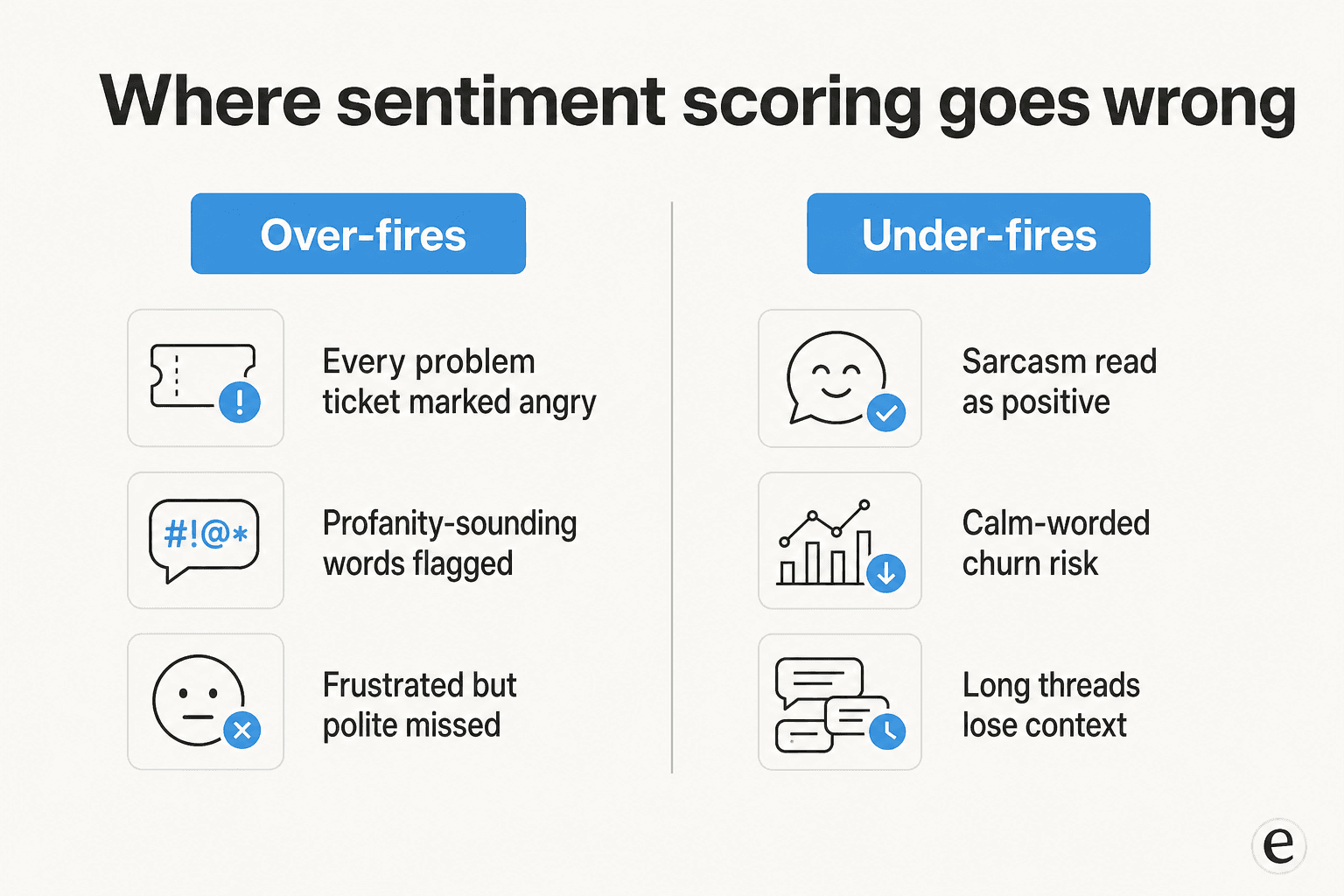
It over-fires. The naive failure is marking every problem ticket "angry" just because the customer has a problem. This is such a common trap that Zendesk engineered against it: its sentiment is "calibrated for customer service contexts, meaning that a ticket isn't assigned a negative sentiment just because a customer has an issue." The fact that this needed deliberate engineering tells you how easily it goes wrong by default. Practitioners feel it too: one healthcare QA reviewer described profanity false positives "due to words that sound similar to profanity but are actually appropriate in context," which "creates some noise in our QA process and requires additional manual review" (G2).
It under-fires. The quieter, scarier failure is missing real frustration. Sarcasm is the headline case: G2's glossary flags "sarcastic statements that appear positive but express frustration" and "irony that reverses the literal meaning of words" as core weaknesses. Context loss is the other: reviewers report the tool "gets confused and doesn't fully understand the context" on long, history-heavy conversations (G2). And the polite-but-leaving customer, the one who writes a calm, grammatical note while updating their cancellation paperwork, sails right through as neutral.
The honest community verdict lands almost everywhere in the same spot:
"The integration of AI helps me to be more efficient when conducting reviews. Though it is not always correct, the information it flags is helpful."
"Helpful but not always correct" is the right expectation to set. On Observe.AI's G2 page, the auto-generated cons cloud literally tops out at "Accuracy Issues," "Inaccuracy," and "Inaccurate Data Analysis" (G2). Accuracy, not missing features, is the thing teams grumble about. The practical implication: use sentiment to order a queue, not to make an irreversible decision about a single ticket.
How the major vendors actually implement it
If you're shopping, the differences are concrete. Two architectures show up: per-message text sentiment baked into the helpdesk (Zendesk, Freshdesk) versus real-time voice sentiment built for live supervisor intervention (Dialpad, Observe.AI, Sprinklr).
| Vendor | What it scores | Real-time? | Scale | Notable detail | Where it lives |
|---|---|---|---|---|---|
| Zendesk | Ticket text (and voice transcripts) | On first message; per-reply if dynamic detection is on | 5 tiers, very positive to very negative | Calibrated so an issue alone isn't "negative"; High/Med/Low confidence per score | Intelligent triage (Copilot add-on) |
| Freshdesk | Latest customer message | Real-time per message | Positive / neutral / negative | Explicit churn and escalation use cases; customizable score ranges | Freddy AI, Pro and Enterprise plans |
| Dialpad | Live call transcript | Yes, live in the calls dashboard | Very positive to very negative | Points to the exact sentence it scored; supervisors can take over | All Sell and Support plans |
| Observe.AI | Voice tone + text | Yes, with visual agent alerts | Graded | Tonality-based: reads how it was said, not just the words | Conversation intelligence / agent assist |
| Sprinklr | Omnichannel messages | Yes | Graded | The rare vendor to publish a number: over 80% accuracy | Conversational analytics |
A couple of buying notes. Sentiment is almost always a higher-tier feature: it's a Copilot add-on on Zendesk and gated to Pro and Enterprise on Freshdesk. And only Sprinklr commits to an accuracy figure in public, which by itself tells you how cautious the category is about being measured. If cost is the lens you care about, our breakdown of AI vs human agent cost is a useful companion read.
The part most teams miss: a score isn't an outcome
Here's the trap I see most often. A team turns on sentiment, gets a dashboard full of red and green, feels informed, and changes nothing. Measurement without action is the most expensive kind of feeling productive.
This is the same lesson that shows up in AI CSAT and AI resolution rate: a number is only useful next to the thing it changes. A high resolution rate next to low satisfaction means your AI is closing tickets without solving them. A wall of negative sentiment that doesn't route anything faster is just anxiety with a chart.
The version that works wires sentiment into the system that's already doing the work. If an AI helpdesk agent is already triaging and resolving tier-1 tickets, a negative read becomes a trigger: hold the auto-reply, escalate to a human, attach the full history so the customer doesn't repeat themselves. That's sentiment as a control, not sentiment as a report.
And it connects to the deeper rule about trusting AI in support. As one DTC supplements CX lead put it to us, the goal isn't an AI that handles everything: "I need an AI who is only handling the tickets that it's confident to handle, and all the other ones, leave them alone." Sentiment is one of the cleanest confidence signals you have for drawing that line, but only if it's hooked into a system that can act on the answer of "leave this one alone."
Try eesel for sentiment that actually does something
Most sentiment tools stop at telling you how a customer feels. eesel AI is built to do the next part: it learns from your past tickets, help docs and macros on day one, then triages, drafts and resolves tickets inside your existing helpdesk, using a customer's frustration as a reason to route carefully rather than a line in a report.
The piece I'd point a fellow support person to is the simulation mode: you run the AI against thousands of your real historical tickets in a sandbox and see exactly how it would have handled them, including where it would have escalated, before a single live customer is involved. That's the antidote to the confident-but-wrong signal, and it's why I trust this setup in a way I don't trust a raw sentiment dashboard. With confidence-based routing, low-confidence reads stay as drafts for a human instead of going out as live replies. Pricing is one fixed monthly price from $299/month for 500 credits (1 credit per ticket or chat), with no per-seat fees, and there's a free plan with 100 credits that doesn't need a credit card.
If you want the wider picture first, our roundups of the best customer service AI, customer support automation tools, and AI helpdesk software put sentiment in context next to the rest of the stack.