


The best AI agent depends on which job you want completed and how much of the workflow you want to build. My shortlist has six options: eesel for ready-to-work helpdesk and blog-writing teammates, Copilot Studio for custom business agents, IBM watsonx Orchestrate for enterprise agent management, CrewAI for custom multi-agent workflows, Devin for software development, and Glean for work grounded in company knowledge.
For a support team that also works with developers, eesel CLI lets a person, script, or coding agent operate the same teammate used in the dashboard. That means inspecting its setup, supplying knowledge, trying a task, and reviewing activity without building a new support agent from scratch.
This is a documentation-based comparison, updated in September 2026, not a benchmark from hands-on testing of every product. I work at eesel; the shortlist includes it alongside tools built for different needs.
What makes an AI agent useful for business?
An AI agent uses context and tools to work toward a goal. For a support request, that might mean reading a policy, checking an order, and deciding whether to answer or hand the case to a person. Its usefulness depends on the information and permissions it actually has.
The difference from a chatbot is not simply “talking versus doing.” A chatbot can call APIs, and an agent can use chat as its interface. I would evaluate the workflow: how it chooses steps, handles missing information, and checks whether an action succeeded.
Three questions help make that concrete:
- What can it know? Check which documents, records, and knowledge sources it can access, and under whose permissions.
- What can it change? Inspect the actual actions available through each integration, not just whether the vendor's logo appears on a page.
- What happens when it cannot finish? Look for escalation, review, and a record of what happened.
A correct answer can resolve a request without changing anything. Conversely, a successful API call does not prove the customer's problem was solved.
How I compare the best AI agents
I separate ready-to-work teammates from builders and frameworks. Buying a support teammate and adopting a framework can both be sensible, but they leave different responsibilities with your team.
I would compare each candidate against the same small set of tasks. Include a routine request, a missing-data case, an exception to policy, and a request the agent should refuse or escalate. Measure correctness, human review time, and total cost. An attractive demo is not evidence that the agent will handle your exception cases.
Best AI agents: comparison at a glance
Prices below are the public US-dollar figures checked in September 2026. Credits, tasks, subscriptions, and model tokens are not equivalent units.
| Tool | What you start with | Suitable job | How you operate or extend it | Cost basis | What to validate |
|---|---|---|---|---|---|
| eesel | Ready-to-work teammates | Helpdesk work and blog writing | Dashboard, CLI, integrations | From $299/mo (500 credits); blog draft $4 | Knowledge, supported actions, review boundaries |
| Copilot Studio | Agent builder | Custom business workflows | Power Platform connectors, tools, channels | Copilot Credits; packs or consumption billing | Licensing, authentication, workflow cost |
| IBM watsonx Orchestrate | Agent building and management | Coordinating enterprise agents and tools | Native and external agents, APIs | Essentials from $530/month | Deployment scope, governance, capacity |
| CrewAI | Framework and managed platform | Custom cooperating agents and workflows | Crews, Flows, code, Crew Studio | Open-source framework; runtime and managed-service costs separate | Who owns development and operations |
| Devin | Software engineering agent | Coding work | Development tools and cloud agents | Free; Pro $20/month; Max $200/month | Usage allowance, review process, repository access |
| Glean | Enterprise knowledge and agent platform | Work across company information and apps | Agent Builder, actions, connectors | Confirm commercial terms with Glean | Source permissions and available actions |
1. eesel: ready-to-work teammates with CLI access
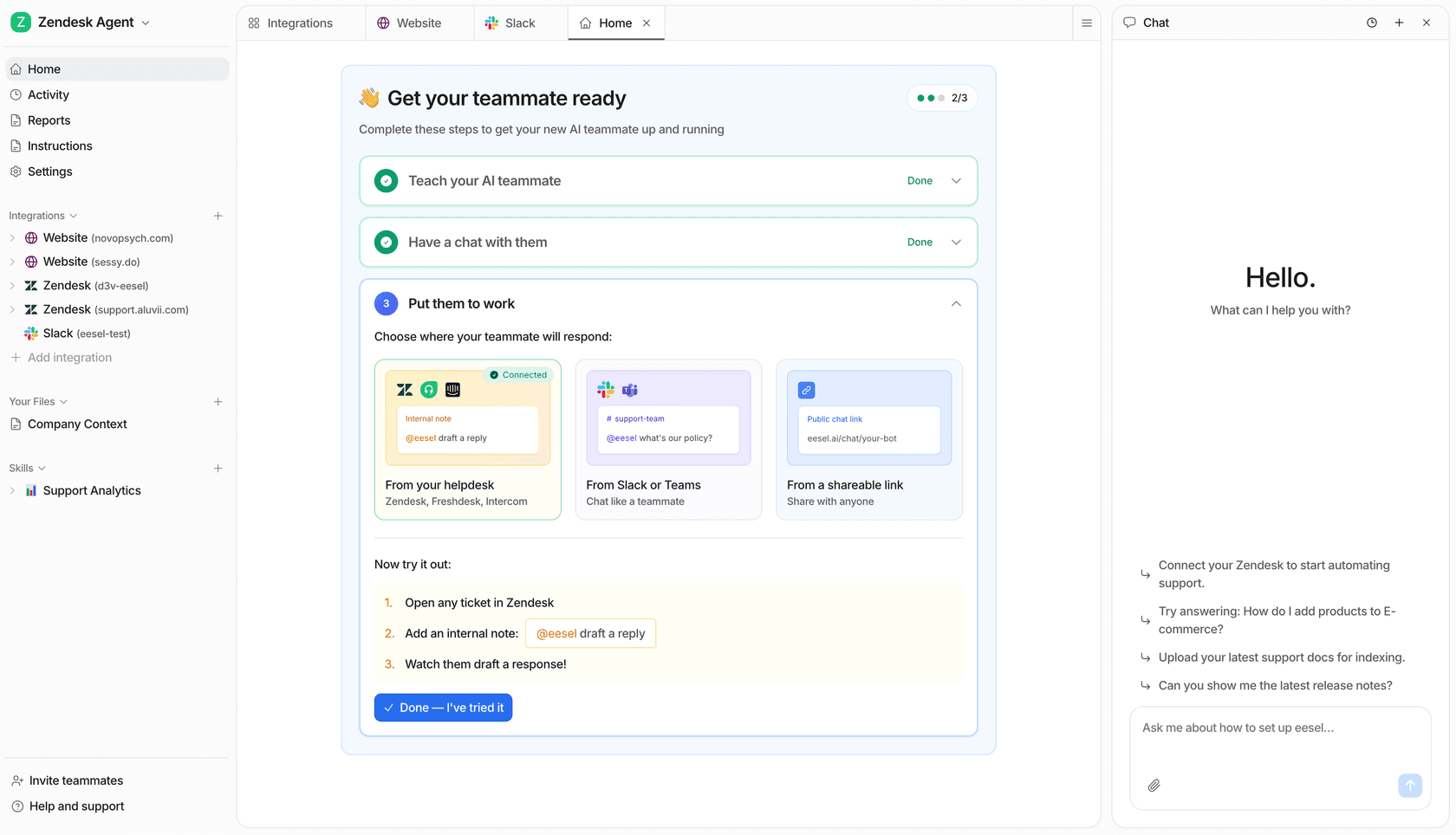
What it does: eesel offers teammates for defined jobs, including helpdesk work and blog writing. For support, the starting point is your existing queue and company knowledge, with integrations such as Zendesk and Freshdesk. Verify the sources, triggers, and actions your chosen integration supports.
What to check: You still need to define the job, provide current information, and decide what requires human review. A connected source is not proof that a particular answer is correct. A support teammate and a blog writer also need different instructions and evidence.
Pricing: The pricing documentation lists a fixed monthly price from $299 for 500 credits, where 1 credit is one support ticket or chat session, and blog drafts at $4 each. The credit covers the interaction, not each message, and is used regardless of outcome. There is no platform fee or per-seat fee. The free plan includes 100 credits.
Evaluate a ready-to-work teammate through eesel CLI
The eesel CLI gives terminal users and coding agents access to the same workspace as the dashboard. Its structured JSON output lets scripts read results; lists use one JSON object per line. That makes it useful when a developer is helping a support manager inspect or configure a teammate.
With Node.js 18.17 or newer, start by confirming the existing workspace:
npx @eesel/cli login
npx @eesel/cli whoami
npx @eesel/cli agents
Choose the intended agent and replace AGENT_ID below. Inspect its setup before sending work:
npx @eesel/cli --agent AGENT_ID status
npx @eesel/cli --agent AGENT_ID integrations
npx @eesel/cli --agent AGENT_ID instructions
npx @eesel/cli --agent AGENT_ID automations
For example, I would evaluate whether a support teammate distinguishes a normal return from an exception. In a separate test agent with no live customer triggers or write-capable connections, prepare a short policy document and fictional cases. Keep the expected answers outside the uploaded document so the test measures policy use rather than copying an answer key.
Create or select that test agent in the dashboard, then run agents again and replace AGENT_ID with the test agent's ID before continuing. The new --name command below starts a conversation, not a new agent.
npx @eesel/cli --agent AGENT_ID files upload ./sample-return-policy.md
npx @eesel/cli --agent AGENT_ID new --name "return-policy-pilot"
npx @eesel/cli --agent AGENT_ID chat "A fictional customer wants to return an item after the policy deadline. Explain the policy and identify what a human must decide."
The upload supplies reference material; it does not change standing instructions or grant permissions. Review the answer against the policy yourself. Did it identify the deadline? Did it invent an exception? Did it explain what information was missing?
Afterward, inspect the work:
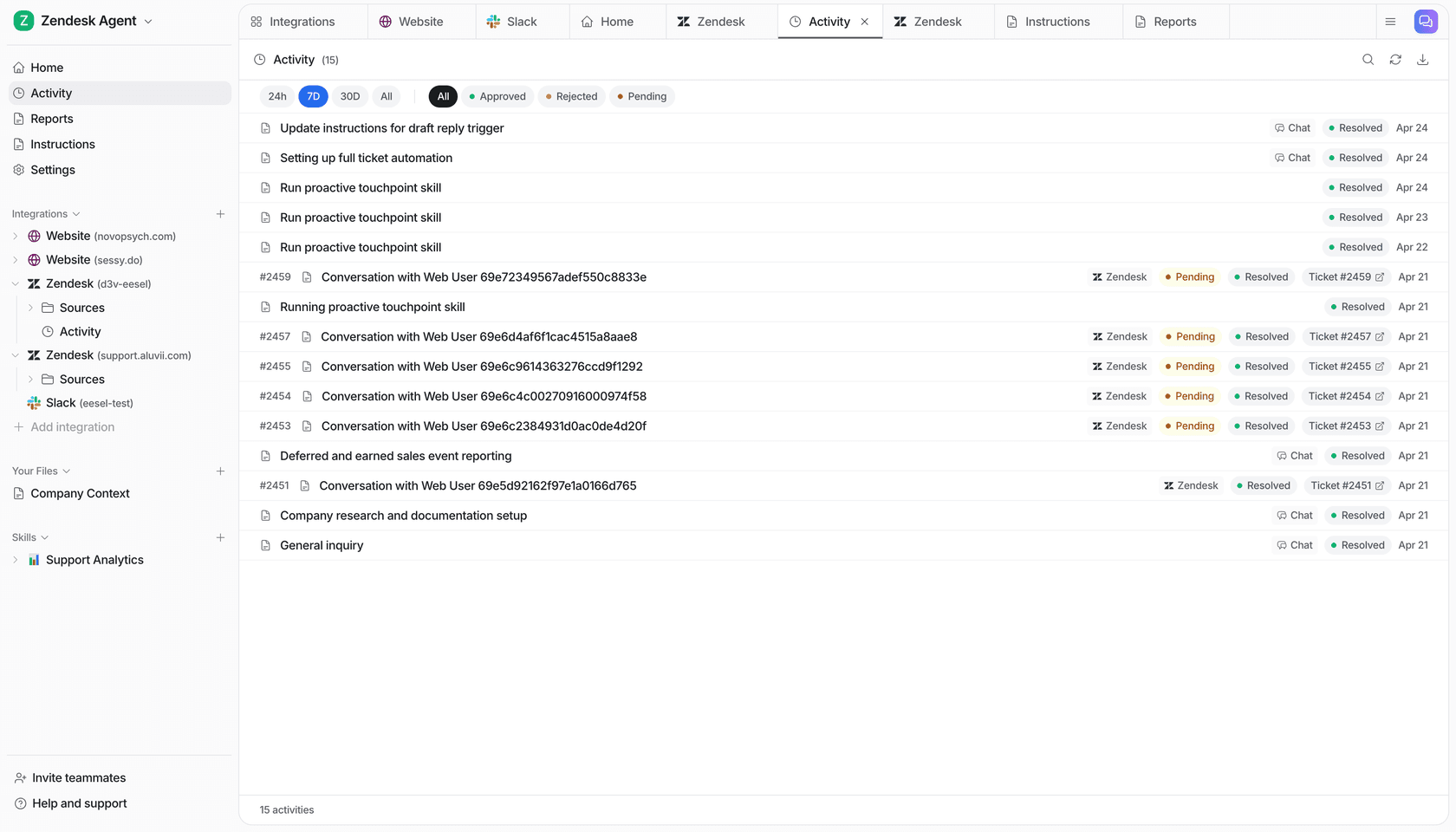
npx @eesel/cli --agent AGENT_ID activity
npx @eesel/cli --agent AGENT_ID approvals
npx @eesel/cli billing
A held approval is not a completed action. Billing shows live billing state, not a forecast for a future rollout. The CLI's --dry-run previews the server request a write would send; it does not simulate answer quality. Real chats can use enabled tools, so a prompt saying “test only” must not replace permission controls.
This is the practical distinction from an agent framework: a coding agent can help operate an existing eesel teammate through the CLI. Your team can review the same setup and activity in the dashboard.
2. Microsoft Copilot Studio: custom business agents
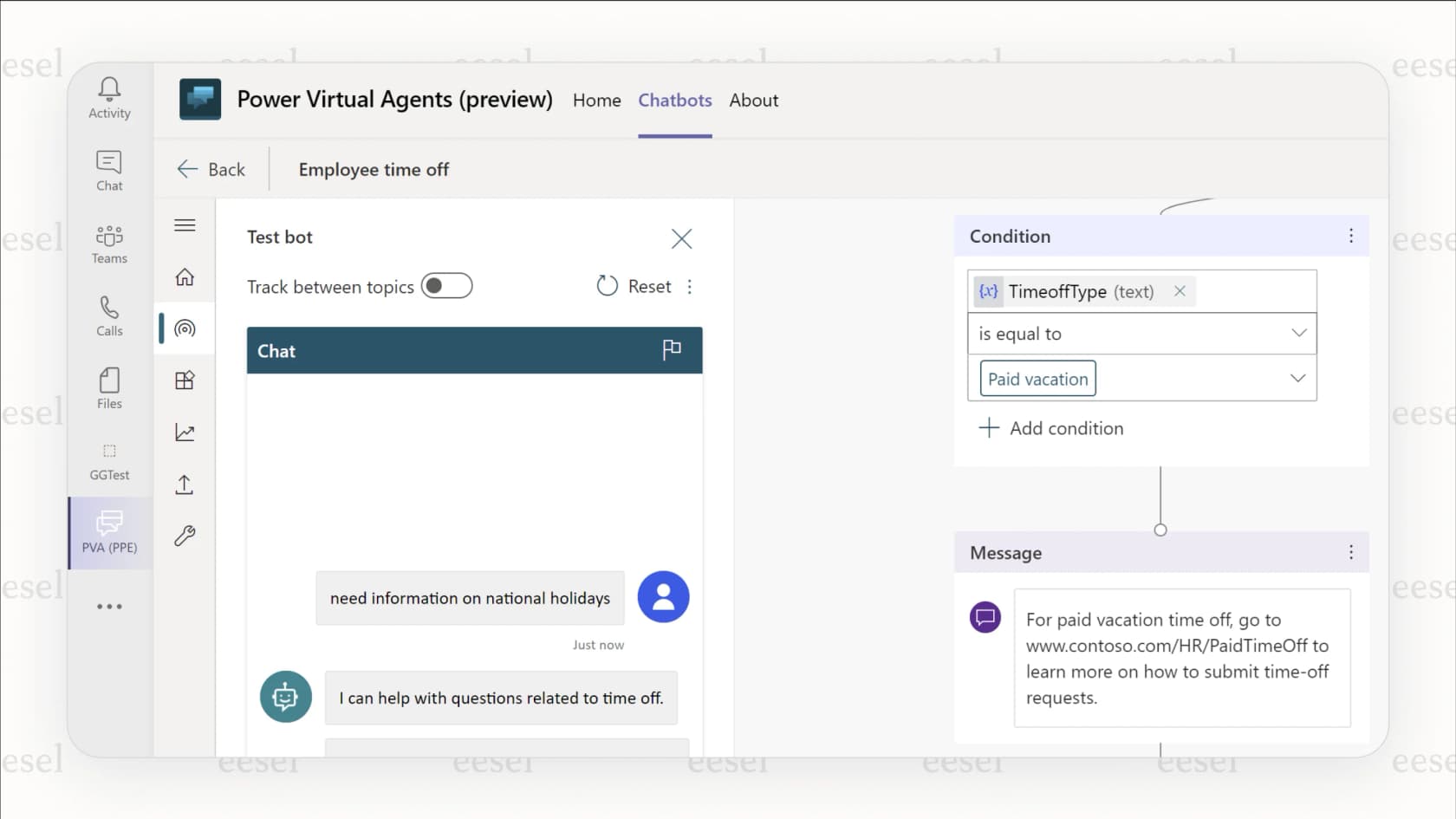
What it does: Copilot Studio builds and manages agents that use business data and tools. It can publish into Microsoft applications or external channels. Its connector support includes external services, so describing it as Microsoft-only would be inaccurate.
What to check: Validate the exact connector operation, authentication requirements, and publishing channel your workflow needs. A team already administering Power Platform may find that operational fit valuable; another team may prefer a teammate already packaged for its specific job.
Pricing: Standalone Copilot Studio pricing includes $200/month packs of 25,000 Copilot Credits, with pay-as-you-go and pre-purchase options. Different actions consume different credit amounts. Some internal-agent use is included with Microsoft 365 Copilot; do not automatically add a Microsoft 365 seat charge to every Studio deployment.
3. IBM watsonx Orchestrate: enterprise agent management
What it does: IBM's former watsonx Assistant product URL now directs buyers to watsonx Orchestrate. The current product covers building, coordinating, and governing agents, including native and external agents. It exposes activity, access controls, and cost information across an enterprise deployment.
What to check: Ask which deployment and capacity fit your requirements, and which governance controls are included. I would not infer that every plan meets a regulated workload's requirements from the IBM brand alone. Existing watsonx Assistant customers should check their own service terms rather than apply Orchestrate pricing to an existing contract.
Pricing: The Orchestrate pricing page lists Essentials from $530/month and Standard from $6,360/month, with Premium available through sales. There is a 30-day trial. These are starting prices, not estimates for your complete workload.
4. CrewAI: custom cooperating agents and workflows

What it does: The CrewAI framework provides Crews for collaborating agents and Flows for controlling execution, conditions, and state. It fits teams that want to define their own tasks, tools, and coordination.
What to check: Decide who owns testing, deployment, credentials, and failed runs. Code is not the only route: CrewAI AMP adds managed deployment, traces, API access, and a no-code/low-code Crew Studio. The choice is between owning more of the workflow and adopting something already configured for a particular job, not “developers versus everyone else.”
Pricing: The open-source framework does not make the deployed workflow free. Budget for model usage, hosting, development, and any managed platform plan you choose.
5. Devin: software engineering work
What it does: Devin focuses on software development. Evaluate it against coding tasks with a defined repository, expected behavior, and tests, rather than using a support-ticket benchmark.
What to check: Review repository permissions, changes, test results, and deployment authority. A coding agent can also help build or operate business software, but that is different from buying a configured helpdesk teammate. The two can work together when the business product provides a CLI or API.
Pricing: Devin's current plans include Free, Pro at $20/month, and Max at $200/month. Teams is $80/month plus $40/month per full developer seat; Enterprise is quoted. Paid plans have usage allowances, and extra usage can be purchased. A subscription is not unlimited execution.
6. Glean: agents grounded in company knowledge
What it does: Glean combines enterprise knowledge with agent workflows. Its Agent Builder lets users define steps, while agent actions can read or write data, draft emails, and update documents. It is not limited to searching for information.
What to check: Verify which data sources and actions your organization enables, how permissions apply, and what happens when an action fails. Finding a document and changing a record are separate capabilities; test both when the workflow requires them.
Pricing: Request terms for the agent functionality and deployment you need through Glean. Do not assume that existing search access includes every agent capability.
How to choose an AI agent without overbuilding
Start with one job and write down what success means. For ticket triage, that could be the correct category, destination, and escalation reason. For a blog draft, it could be factual accuracy, useful structure, and a reviewable output.
Then compare the responsibilities left with your team:
| Decision | Evidence to request |
|---|---|
| Can it use the right information? | A correct answer from an approved, current source |
| Can it complete the required action? | The resulting change in the target system, not just an agent message |
| Does it stay within scope? | A refused or escalated out-of-scope request |
| Can a person review its work? | An understandable activity record and review process |
| Is the cost acceptable? | Measured usage plus review, hosting, and implementation costs |
Keep the pilot separate from live customer work until you understand its behavior. A sandbox is only as isolated as its connections and permissions. “Dry run” has different meanings across products, so check the documented behavior instead of assuming it makes all work harmless.
Start with one teammate and inspect how it works
If the job is helpdesk work or blog writing, eesel gives you a ready-to-work teammate to configure and evaluate. The CLI lets your developer or coding agent help with that setup while the rest of the team continues using the dashboard.
Try eesel, choose one job, and use the CLI documentation to inspect the teammate before widening its responsibilities.
Frequently asked questions
Which are the best AI agents for business?
The best fit depends on the job. eesel offers ready-to-work helpdesk and blog-writing teammates; Copilot Studio, IBM watsonx Orchestrate, and Glean provide agent-building options; CrewAI supports custom agent workflows; Devin focuses on software development. Compare the work you need with each product's setup and review requirements.
Can I operate an AI agent from a terminal?
Yes. The eesel CLI operates the same teammate and workspace as the dashboard. People, scripts, and coding agents can inspect configuration and chat with that teammate. Its JSON output makes results easier for software to read.
Is eesel CLI another agent I need to build?
No. It is a way to access an eesel teammate, not a separate agent framework. You choose the teammate and configure its knowledge, instructions, integrations, and permitted work. A coding agent can use the CLI to help operate it.
How much do the best AI agents cost?
The units differ: task charges, credits, subscriptions, and model or hosting costs. eesel's Teammate plan starts at $299 a month for 500 credits, where 1 credit is one support ticket or chat session; blog drafts cost $4 each. Credits are used regardless of outcome. Check the current pricing and compare a representative workload, not just entry prices.
What is the difference between an AI agent and a chatbot?
Chatbot describes a conversational interface; agents can decide which steps or tools to use toward a goal. The categories overlap: chatbots can use tools, and agents can work through chat. Evaluate the actual workflow and controls rather than assuming every chatbot follows a fixed script.
Do I need to replace my helpdesk to use eesel?
eesel connects to existing tools such as Zendesk and Freshdesk. Check your specific integration's supported sources, triggers, and actions before rollout. Connecting an account does not prove that every historical ticket is available or every action is supported.