


What "AI for IT helpdesk" actually means in 2026
A quick definition, because the category has gotten muddy. "AI for IT helpdesk" covers any tool that uses generative AI to handle internal IT support: answering employee questions, deflecting routine tickets, drafting replies for human agents, triaging and routing incoming requests, and, in the best cases, taking real actions like resetting a password or granting access to an app.
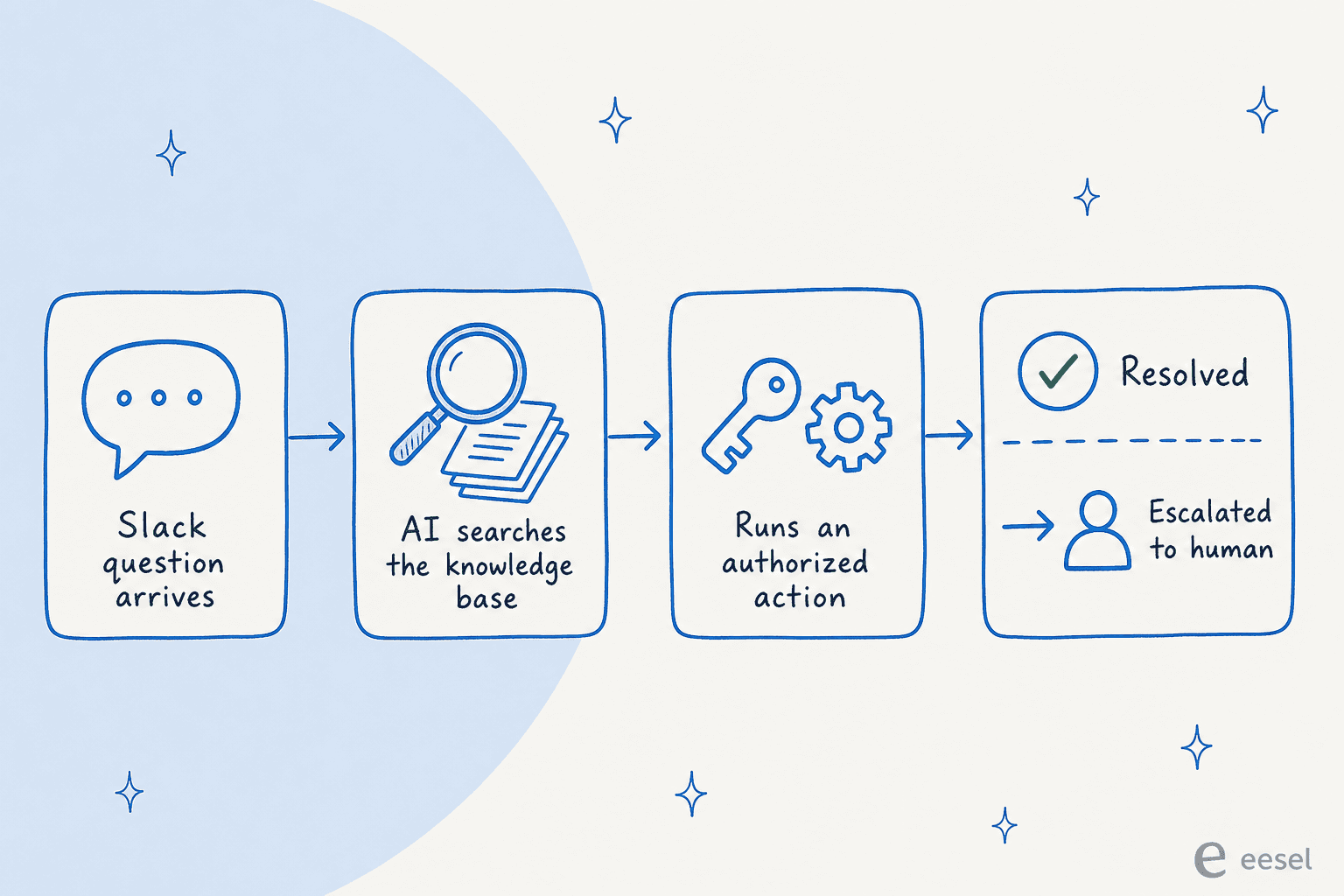
That last part is where the tools split. A lot of "AI" in this space is still a glorified search box that surfaces a knowledge base article and hopes the employee reads it. The tools worth paying for can resolve a request end-to-end by taking an authorized action, not just point at documentation. We weighted that heavily.
Here's how an effective AI IT helpdesk agent handles a request, start to finish:
How we picked
We're an AI support company, so we did this the way we'd evaluate a tool for ourselves: we read each vendor's own docs and pricing, pulled their real customer outcome numbers, and then went looking for what actual IT admins say on Reddit and G2, because the gap between the marketing deck and the r/sysadmin thread is where the truth lives. Every claim below links to its source. Where a tool has public pricing we show the full table; where it's quote-only, we say so and cite the reported figures.
The 8 best AI tools for IT helpdesk at a glance
| Tool | Best for | How the AI is billed | Entry price | Native in Slack/Teams | IT + HR in one | Typical setup |
|---|---|---|---|---|---|---|
| eesel AI | Lean IT teams wanting autonomous internal support without switching helpdesks | 1 credit per ticket or chat, no per-seat fee | Free plan (100 credits), then from $299/mo | Yes | Yes | Minutes to days |
| ServiceNow Now Assist | Enterprises already standardized on ServiceNow ITSM | Pro Plus add-on (~60% premium per fulfiller) | Quote-only (~$30k min) | Via Virtual Agent | Yes | 8-16 weeks |
| Moveworks | Global enterprises consolidating IT + HR employee support | Per employee, whole headcount | Quote-only (~$130k median ACV) | Yes | Yes | 8 weeks+ |
| Freshservice (Freddy AI) | Mid-market IT teams wanting ITSM + AI in one suite | Per agent + AI Agent sessions | $19/agent/mo (Freddy at Enterprise) | Via add-on | Via ESM | Days to weeks |
| Jira Service Management (Rovo) | Atlassian and Jira-centric shops | Rovo credits, bundled in paid Cloud | From ~$5.42/user/mo (Confluence) | No native bot | Partial | Days |
| Aisera | Enterprises wanting a cross-functional agent over existing systems | Quote-only, volume-based | Quote-only | Yes | Yes | Weeks+ |
| Microsoft Copilot | Microsoft 365 shops handling IT questions in Teams | Per user/month | $18-30/user/mo | Yes (Teams) | Via Copilot Studio | Days |
| Zendesk | Teams running IT support on a CX-style ticketing platform | Per automated resolution | $19/agent/mo + AI | Limited | Limited | Days to weeks |
A few things to flag before the deep dives. Pricing models are not comparable line-for-line, which is the single biggest trap in this category. We unpack the billing differences further down, because "$19/agent" and "per employee" and "per resolution" can mean wildly different total bills for the same team.
1. eesel AI
Best for: lean IT teams that want an autonomous AI agent handling internal support inside the tools they already use, without replacing their helpdesk or sitting through a multi-month rollout.
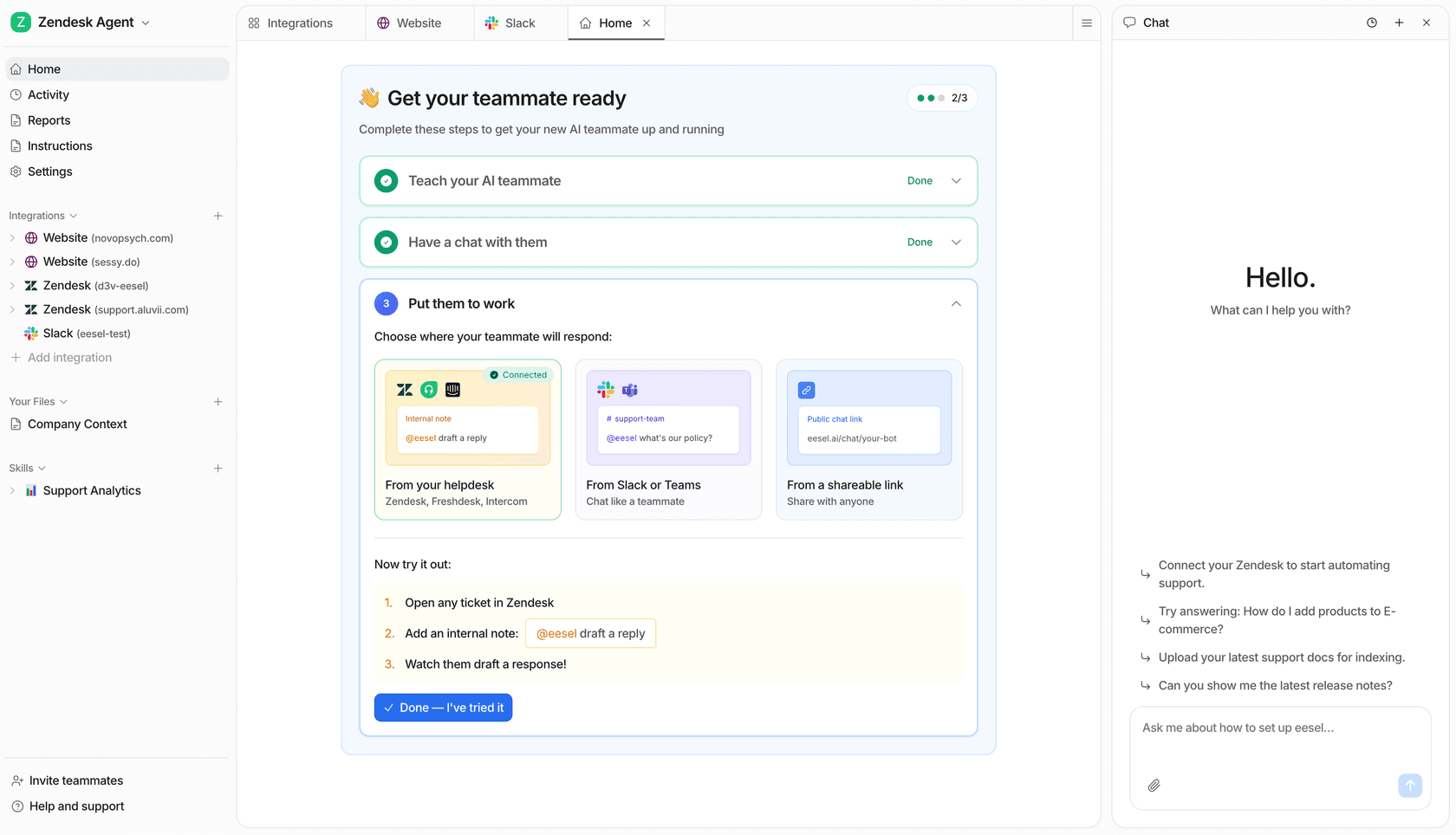
We build eesel AI, so take the framing with the appropriate grain of salt, but the reason it belongs at the top of an IT helpdesk shortlist is structural, not promotional: it's a layer-on agent rather than a platform you have to migrate to. It connects to your existing helpdesk, Slack, Teams, Confluence, Google Drive, and 100+ other sources, learns from your knowledge and past tickets, and then resolves internal requests autonomously, escalating the ones it isn't confident about.
For an IT team, the practical version of that is: an employee asks "how do I get access to the finance dashboard?" in Slack, and the agent answers from your internal docs, or kicks off the access request, instead of generating a ticket that sits in a queue. It's the same engine whether the question is IT, HR, or ops, so one rollout can cover internal support across teams.
The differentiator IT admins tend to care about most is control. eesel lets you scope exactly which ticket types the AI handles and which it leaves alone, and it ships with a simulation mode that runs the agent against your historical tickets so you can see the resolution rate before it ever touches a live request. That addresses the number-one objection we hear, which is "I don't want AI auto-replying to everything." As one customer weighing build-vs-buy put it:
"We could try to write our own LLM application but we didn't want to invest our time into that. We wanted something that we would not have to maintain."
Karel, GENERAL BYTES (case study)
Pros
- Layers onto your existing helpdesk and chat tools, no migration, lives natively in Slack and Teams
- Simulation mode tests resolution rate on past tickets before go-live
- Granular control over which requests the AI handles vs escalates
- One fixed monthly price with no per-agent seat fee and an optional overage cap
- Live in minutes to days, not months
Cons
- It's a layer-on agent, not a full ITSM platform, so if you don't already have a ticketing system you'll still want one underneath
- Newer name than the incumbent ITSM giants, so it won't be on every enterprise procurement's pre-approved list yet
Pricing: a free plan with 100 credits and no card required, then one fixed monthly price from $299/month for 500 credits (1 credit per ticket or chat) rather than per seat. There's no platform fee, and if you run out, agents pause until credits reset or bill overage only up to a cap you set, so the bill can't run away from you. Full numbers are on the pricing page.
Our take: if you're an IT team that wants real autonomous resolution fast and hates the idea of a six-figure annual contract and a quarter-long implementation, this is the one to trial first. If you need a heavyweight CMDB and change-management platform as well, pair it with a system of record rather than expecting it to be one.
2. ServiceNow (Now Assist)
Best for: large enterprises that already run ServiceNow ITSM and want to turn on AI without adding a new vendor.
ServiceNow ITSM is the enterprise standard, and the numbers behind it are real: the company claims 85% of the Fortune 500 run on ServiceNow, and named customers post strong outcomes like Ernst & Young's 75% reduction in service ticket volume and USI's 47%+ drop in mean time to resolution. Now Assist is its generative and agentic AI layer, spanning the virtual agent, incident summarization, AI search, and a growing roster of autonomous AI agents.
If you're already a ServiceNow shop, Now Assist is the path of least resistance, and the platform underneath it is excellent at workflow, CMDB, and change management. The catch is whether the AI layer delivers on tier-1 deflection, and here the user sentiment is rough. The most-upvoted critique we found:
"We bought Now Assist expecting it to actually handle the tier 1 stuff that eats our team alive. Access requests, password resets, basic app provisioning. What we got instead is a slightly smarter virtual agent that still kicks most things to a human."
u/AndroidTechTweaks, r/servicenow

To be fair to ServiceNow, defenders in the same threads point out that a lot of AI failures trace back to messy knowledge base and CMDB data rather than the model itself. That's true, and it's a useful reminder that no AI helpdesk tool outperforms the quality of the knowledge you feed it. Worth noting for the roadmap: ServiceNow acquired Moveworks (more on that next) and is folding it into a combined platform, so the agentic story is in active flux.
Pros
- Best-in-class ITSM platform underneath the AI
- Deep workflow, CMDB, and change-management capabilities
- Named Gartner Magic Quadrant Leader for AI in ITSM
- If you already own it, no new vendor evaluation
Cons
- Now Assist users widely report it underdelivers on tier-1 resolution
- Licensing is opaque and expensive; renewal cost creep is a recurring complaint
- 8-16 week implementations with heavy services costs
Pricing: quote-only. Third-party advisors put ITSM Standard around $100/fulfiller/month and Pro/Pro Plus at $160+/fulfiller/month, with Now Assist sold as a Pro Plus add-on at what UpperEdge describes as "upwards of 60%" over the underlying license. Reported minimum spend is around $30k, with average contracts near $130k/year per NowTribe. One partner described the renewal trajectory bluntly: a "5 yr renewal that started at $200k is now $1.8M." If you want to dig into the agentic side, our notes on ServiceNow AI Agent Studio go deeper.
Our take: if you're already standardized on ServiceNow, turn Now Assist on, but pilot it hard against real tier-1 tickets and clean your knowledge base first. If you're not already on the platform, the AI alone is not a reason to migrate, the total cost and implementation burden are too high for that.
3. Moveworks
Best for: global enterprises that want one AI assistant covering IT, HR, finance, and more across thousands of employees.
Moveworks is the original enterprise employee-support AI: a single conversational front door where staff use natural language to get answers and automate tasks across IT, HR, finance, and CRM. Its customer results are some of the most cited in the category, Amadeus reduced support-team calls by 44% and gave back 16,000+ hours per month, and CVS Health cut live agent chats 50% in under 30 days. It's trusted by 350+ organizations including roughly 10% of the Fortune 500.
The 2025 headline is that ServiceNow acquired Moveworks for ~$2.85B, and the deal closed in December 2025. That's reshaping the product, and it's making current customers nervous. One representative thread:
"Moveworks was basically a competitor to Now Assist like six months ago, and now they're the same product? Curious whether this is genuinely new capability or mostly rebranding what Moveworks already did with a ServiceNow logo slapped on it."
u/abefrohmanchicago, r/sysadmin
On capability, the platform is strong, but it's enterprise-only by design, and the accuracy of autonomous replies on complex tickets draws criticism. One operator described an autonomous response to a site-wide network outage that suggested "reset your modem", which doesn't land well when "the massive site does not have a modem." For an honest head-to-head on this tier, our Aisera vs Moveworks breakdown is useful.
Pros
- Proven at massive scale across IT, HR, and finance
- Strong agentic automation and enterprise integrations
- Among the strongest published customer outcome numbers in the category
Cons
- Quote-only, six-figure, enterprise-only buy with no SMB path
- Setup effort can be heavy; one Gartner reviewer noted "it requires a lot of leg work"
- Post-acquisition roadmap uncertainty under ServiceNow
Pricing: private and quote-based, priced per employee on total headcount. Reported figures land around $15-$45/employee/year, with a $130,000 median annual contract value per Vendr across 31 purchases, plus $50k-$200k+ in implementation.
Our take: a top-tier choice if you're a large enterprise consolidating employee support across functions and you have the budget and project capacity. Smaller teams should look elsewhere, this is not sized for you. And given the ServiceNow acquisition, weigh the roadmap risk before signing a multi-year deal.
4. Freshservice (Freddy AI)
Best for: mid-market IT teams that want ITSM and AI bundled into one approachable suite.
Freshservice is Freshworks' ITSM platform, and it's the friendlier, faster-to-deploy alternative to ServiceNow for mid-market teams. Its AI layer, Freddy AI, splits into three products: Freddy AI Agent (the autonomous self-service bot), Freddy AI Copilot (agent-assist), and Freddy AI Insights (analytics). Freshworks cites strong benchmark numbers, including 66% ticket deflection and a 77% decrease in average resolution time with AI, and the platform is well-liked for its clean UI and fast time to value.
The reality check is that Freddy's AI quality and pricing draw consistent criticism from users. The most striking report came from an admin five months after enabling it:
"Autoresolve is maybe 25%... But our MTTR actually went UP. About 20%... Freddy tries, fails, agent picks it up but has to scroll thru the full back-and-forth before they can respond. Dup tickets are up like 15ish percent."
u/(anonymous), r/Freshservice
The other recurring gripe is commercial: Freddy AI Agent is bundled only at the Enterprise tier, billed by AI session, and tied to agents rather than employees, with no choice of underlying LLM. As one user summed it up, "the freddy AI is an add on so expensive for what it can do and only available at enterprise." We've documented these in more detail in our writeup of Freshservice AI limitations.
Pros
- Clean, approachable ITSM suite with fast time to value
- Strong vendor-cited deflection and resolution benchmarks
- More affordable base platform than ServiceNow
- Extends beyond IT into HR and facilities via enterprise service management
Cons
- Freddy AI Agent is Enterprise-only and billed per session, so AI cost stacks fast
- Users report AI quality lagging and handoff overhead that can raise MTTR
- No choice of LLM; locked to the Freshworks ecosystem
Pricing: four per-agent tiers, billed annually: Starter $19, Growth $49, Pro $99, and Enterprise (custom, the only tier with Freddy AI bundled). Each Enterprise license includes 1,200 Freddy AI Agent sessions per year; overage packs are quote-based. Full detail on the model is in our Freshservice AI pricing guide.
Our take: a solid choice if you want one tidy platform for mid-market ITSM and you're fine living inside Freshworks. But pilot Freddy on your real tickets before assuming the deflection numbers translate, and budget for the Enterprise tier, because that's where the AI actually lives. If the per-session AI cost grates, a layer-on agent over Freshservice can be more economical, see how we think about Freshservice AI more broadly.
5. Jira Service Management (Atlassian Rovo)
Best for: teams already deep in the Atlassian ecosystem, especially Jira and Confluence.
If your IT team already lives in Jira Service Management and Confluence, Atlassian's AI, branded Rovo, is a natural fit. Rovo brings enterprise search, conversational chat grounded in your company data, and pre-built and custom AI agents across Confluence, Jira, and 100+ third-party connectors. The standout for IT support is that Rovo's answers are permission-aware and cite their sources, so a generated answer never exposes content an employee shouldn't see, and admins can audit where an answer came from.
The best part commercially is that Rovo is included at no extra cost in Confluence Standard, Premium, and Enterprise paid Cloud plans, rather than sold as a pricey add-on. The richer your Atlassian footprint, the better its contextual answers get, because it reads across both Confluence pages and Jira ticket history through Atlassian's Teamwork Graph.
The real limitation for IT helpdesk use is reach. Rovo lives inside Atlassian surfaces or a browser extension, there's no native Slack or Teams bot, so employees who spend their day in chat can't ask a Confluence question without switching context. Credit caps are also thin on the Standard plan (25 credits/user/month), and full capability requires Cloud, not Data Center. For knowledge-heavy IT shops, our take on Confluence AI covers the trade-offs.
Pros
- Included free in paid Confluence Cloud plans, no separate AI subscription
- Permission-aware answers that cite sources, strong for audit and compliance
- Deep native context across Jira tickets and Confluence pages
Cons
- No native Slack or Teams bot; employees must come to Atlassian's surface
- Thin credit allowance on the Standard plan
- Full Rovo requires Cloud; weak fit if your knowledge lives outside Atlassian
Pricing: Rovo rolls into Confluence Cloud paid plans, roughly $5.42/user/month (Standard) and $10.44/user/month (Premium), with Rovo credit and indexing quotas scaling by tier. Jira Service Management is priced separately on its own per-agent ladder.
Our take: if you're an Atlassian-first shop, Rovo is close to a no-brainer to switch on, you're likely already paying for it. If your employees live in Slack or Teams, or your knowledge is scattered across non-Atlassian tools, the context-switching cost is real and a chat-native agent will serve them better.
6. Aisera
Best for: enterprises that want a single cross-functional AI agent layered over their existing systems of record.
Aisera is an enterprise AI service platform built cross-functional from day one, with a Universal Agent orchestrating domain agents across IT, HR, customer service, and finance. Unlike CX-first tools, it's designed to deploy alongside your system of record (ServiceNow, Salesforce, Zendesk) rather than inside it, and it offers an LLM gateway so you can run its own model, a foundational model like Claude, or bring your own. Its customer outcomes are concrete: NJ Transit reports a 60% agent-productivity lift via an internal AI agent, and OmniTRAX auto-resolves 70% of tickets.
Aisera sits in the same enterprise tier as Moveworks and ServiceNow, it's well-funded (a $1.6B valuation at its Series E) and was acquired by Automation Anywhere in late 2025, which is folding it into its agentic automation platform. That means the same caveats apply: it's a heavy, sales-led buy aimed at Fortune-500-scale orgs, not a quick self-serve trial. For a CX-only team of 50-500 seats it's usually overkill; for a 5,000-employee enterprise consolidating IT and HR onto one agent, it's a legitimate shortlist name. Our Aisera competitors piece maps where it fits.
Pros
- Truly cross-functional (IT, HR, finance, CX) from one platform
- Deploys alongside existing systems rather than requiring migration
- LLM flexibility, including bring-your-own-model
- Strong enterprise security posture and analyst recognition
Cons
- Quote-only, enterprise-scale pricing with no free tier or trial
- Overkill for SMB and mid-market teams
- Post-acquisition integration into Automation Anywhere adds roadmap uncertainty
Pricing: not published. Both /pricing and /demo return 404, and the motion is contact-sales with annual contracts scoped by volume. See our notes on Aisera pricing for the reported ranges.
Our take: a strong option for large enterprises that want one agent across functions and prefer to layer over their existing stack instead of standardizing on a single ITSM vendor. If you're smaller than that, the lack of a self-serve path and public pricing makes it hard to even evaluate, start with a lighter-weight tool.
7. Microsoft Copilot
Best for: Microsoft 365 shops that want to handle IT questions where employees already work, in Teams.
If your organization already pays for Microsoft 365, Copilot is the AI you can deploy with the least friction. It's embedded across Word, Excel, Teams, and Outlook, inherits your existing enterprise security policies automatically, and through Copilot Studio you can build custom agents connected to your own IT knowledge and workflows. For an IT helpdesk, the Teams angle is the draw: employees can ask IT questions in the chat app they're already in, and a Copilot Studio agent can answer from your internal docs.
The honest caveat is that Copilot is a general productivity assistant, not a purpose-built IT helpdesk tool, so turning it into one means building the agent yourself in Copilot Studio. Adoption is also a real-world problem: Microsoft projects strong ROI, but only about 35.8% of eligible users actually use Copilot after deployment, which tells you change management matters more than the tech. And its value is heavily tied to how much of the Microsoft stack you already own. If you're weighing it against alternatives, we keep a running list of Microsoft Copilot alternatives.
Pros
- Lives in Teams, where many employees already ask IT questions
- Inherits Microsoft 365 security and compliance with no extra config
- Copilot Studio lets you build custom IT support agents
- No new vendor if you're already an M365 shop
Cons
- General-purpose, not a dedicated IT helpdesk; you build the helpdesk agent yourself
- Real-world adoption rates are low without change management
- Value depends heavily on existing Microsoft investment
Pricing: Microsoft 365 Copilot Chat is included for eligible M365 orgs; the full Copilot license runs $18-21/user/month (Business, up to 300 users) and $30/user/month (Enterprise), on top of a qualifying Microsoft 365 plan. More on the model in our Copilot pricing breakdown.
Our take: if you're an all-in Microsoft shop, build a Copilot Studio agent for IT and see how far it gets you before buying a dedicated tool, you're already paying for the platform. If you're not Microsoft-centric, or you want IT-helpdesk-specific capabilities like simulation and tight escalation control out of the box, a purpose-built agent will get you there faster.
8. Zendesk
Best for: teams that already run IT or internal support on Zendesk's CX-style ticketing.
Zendesk is best known for customer support, but plenty of teams run internal IT and employee support on it too, and its AI stack is mature. It pairs customer-facing AI Agents (the autonomous resolution layer, derived from its Ultimate.ai acquisition) with Copilot for human agents and Intelligent Triage for routing. Zendesk surfaces 80%+ automation rates on its AI Agents page and an 82% agent-productivity lift with Copilot, and it's a named Gartner Magic Quadrant Leader.
The thing to understand is that Zendesk is a CX platform first, so using it for IT helpdesk means bending a customer-support tool toward internal use. It can work, but you won't get the IT-native features (CMDB, asset management, change workflows) that a dedicated ITSM tool provides. The bigger watch-out is the AI billing model: Zendesk charges per "automated resolution," and there's no graceful spend cap, the only overage control is to pause AI entirely. That makes cost forecasting tricky, and AI cost can run 2-3x the base subscription once Copilot and resolution overages stack up. We dig into the mechanics in our notes on Zendesk AI Agents, Advanced vs Essential.
Pros
- Mature, capable AI across resolution, copilot, and triage
- Huge app marketplace and strong omnichannel support
- Familiar and quick to deploy if you already use it
Cons
- CX-first, not built for IT-native workflows like CMDB or asset management
- Per-resolution AI billing with no soft spend cap can get expensive
- Internal IT support is a secondary use case, not its core design
Pricing: Suite plans run $19/agent/month (Support Team) up to Suite Professional at $115, with Enterprise quote-only. AI bills per automated resolution on top, and Copilot is a $50/agent/month add-on below the Enterprise tier.
Our take: reasonable if you already run support on Zendesk and want to extend it to internal IT, but go in clear-eyed that you're adapting a CX tool, and model the per-resolution AI cost carefully before you commit. If IT is your primary use case, a dedicated ITSM platform or a layer-on agent will fit better. A neutral AI agent that works across helpdesks can also sit on top of Zendesk without the per-resolution lock-in.
How the pricing models actually compare
This is the part most roundups skip, and it's where teams get burned. The eight tools above don't just have different prices, they have fundamentally different billing units, which means the same team can pay 10x more on one model than another.
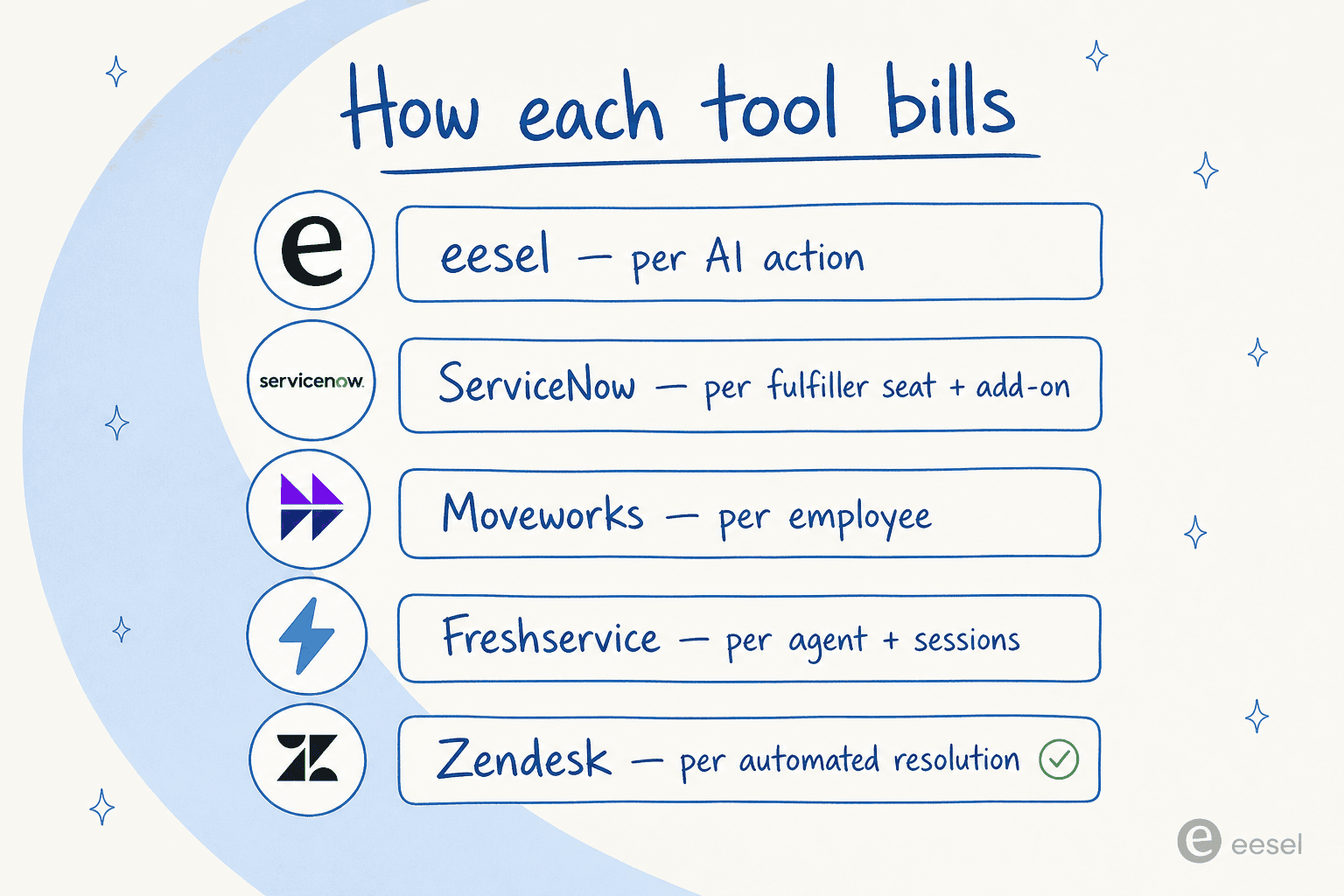
The two patterns to watch:
- Per-employee billing (Moveworks) means you pay for your entire headcount whether they use the assistant or not. Predictable, but it front-loads cost and only makes sense at scale.
- Per-resolution or per-session billing (Zendesk, Freshservice) scales with volume, which sounds fair until a busy month spikes the bill, and Zendesk in particular has no soft cap. A fixed monthly price with an overage cap you set is the safest model for a team that can't predict its ticket volume.
The other hidden cost is implementation. ServiceNow, Moveworks, and Aisera all carry five- and six-figure services engagements and multi-month timelines on top of the license. A tool that trains on your existing knowledge and goes live in days has a total cost of ownership that's hard to beat, especially for teams without a dedicated ITSM project budget. For more on the build-vs-buy math, our piece on AI vs human agent cost is a useful companion.
How to choose the right AI for your IT helpdesk
After all of that, the decision usually comes down to two questions: where does your team already work, and how big are you? Here's the shortcut we'd use:
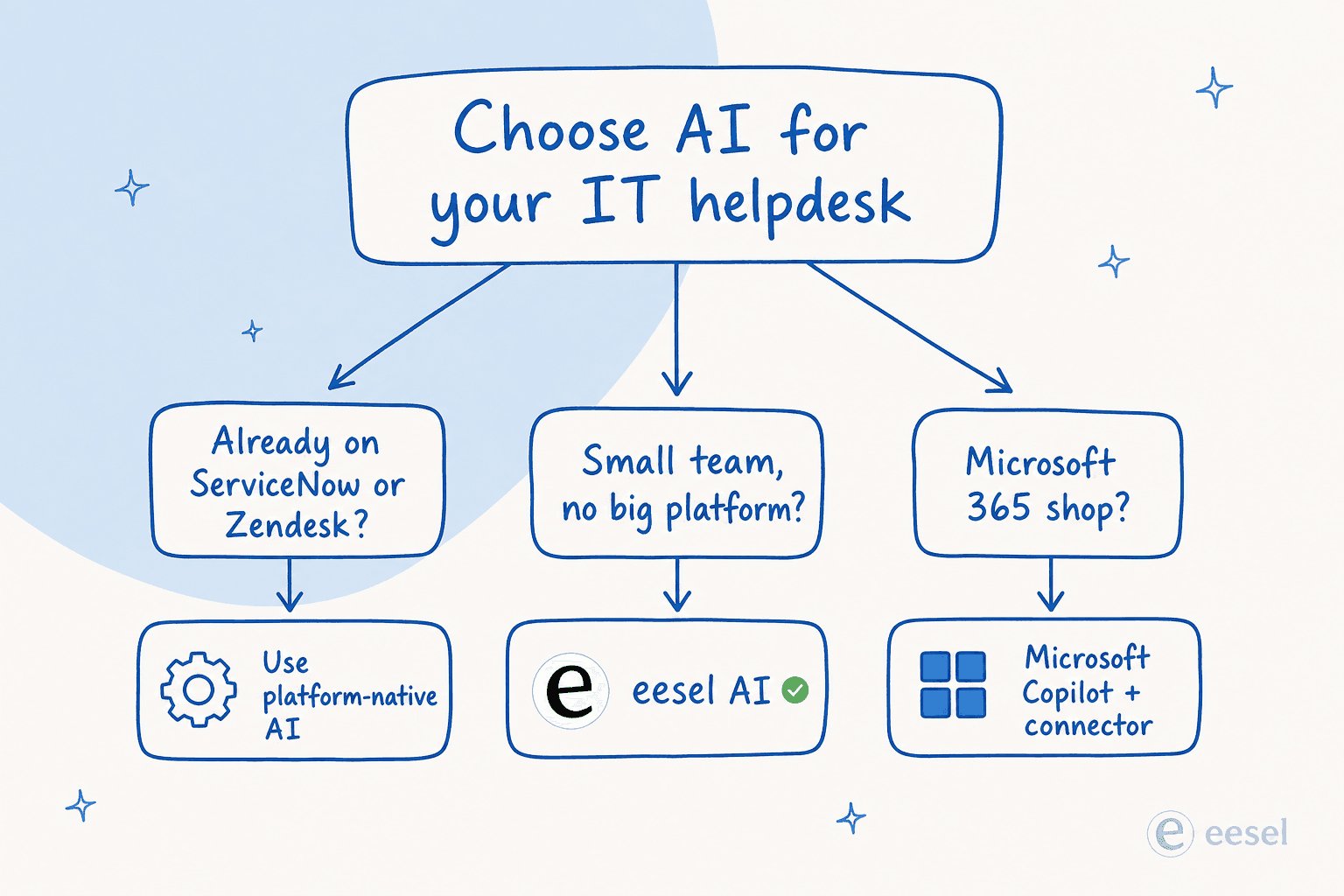
- Lean IT team, employees live in Slack or Teams: start with a layer-on agent like eesel AI that resolves internal requests where people already are.
- Already deep in Jira and Confluence: switch on Atlassian Rovo, you're probably already paying for it.
- Already on Freshworks: evaluate Freshservice's Freddy AI, but pilot it on real tickets first.
- Large enterprise, multi-domain, six-figure budget: shortlist ServiceNow Now Assist, Moveworks, and Aisera.
- All-in on Microsoft 365: build a Copilot Studio agent before buying anything new.
Whatever you shortlist, the single best thing you can do is test the tool against your own historical tickets before you buy. Vendor deflection benchmarks are marketing numbers; your tickets are the only data that tells you what a tool will actually resolve. The recurring theme across every critical review we read is the same: the AI underperformed against the demo because the buyer never simulated it on their real data first.
Try eesel for your IT helpdesk
If you want autonomous internal support without switching helpdesks or sitting through a multi-month rollout, eesel AI is built for exactly that. It plugs into Slack, Teams, your helpdesk, and your knowledge sources, learns from your past tickets, and resolves IT and HR requests on its own, escalating only what it isn't confident about.
The differentiator we'd point an IT lead to: eesel's simulation mode runs the agent against your historical tickets so you can see your real resolution rate before going live, and you control exactly which request types it handles. You can start on the free plan with no card, and there's no per-agent seat fee: it's one fixed monthly price, with optional overage capped at a level you set. Try eesel on eesel.ai.