

The best WhatsApp chatbot for marketing flows and broadcasts is Manychat Pro ($29 a month billed annually, its cheapest plan with WhatsApp), and for support it's an AI agent that answers from your past tickets and help center, like eesel from $299 a month for 500 tickets or chats.
Of the rest, Wati ($59 a month billed annually) is the all-in-one WhatsApp inbox for a small team, Botpress suits developers (free, then $150 a month billed annually), Chatbase ($120 to $150 a month) trains an agent on your content, and UChat runs one bot across 15+ channels, WhatsApp included, for $15 a month.
What most comparisons skip is Meta's side of the bill. Since October 1, 2026, Meta charges again for the replies a business sends inside WhatsApp's 24-hour window, after the first 1,000 a month per phone number, on top of whatever the tool costs (Meta's pricing page). And since January 15, 2026, Meta's terms bar AI companies from offering general-purpose assistants like ChatGPT on WhatsApp's business platform, outside countries where Meta is legally required to allow it; business bots built on AI are still allowed.
I run eesel's SEO and blog, so I see what people type before they land here: the top search is "best WhatsApp AI agent", ahead of "best WhatsApp chatbot" itself. For support teams, eesel connects to your own WhatsApp Business number through Meta's sign-in, learns from your past tickets and docs, and is tested on them before it replies. A coding agent like Claude Code, Codex or Cursor can set eesel up through the eesel CLI, adding your help articles and asking test questions first; connecting your WhatsApp number or helpdesk still needs an admin to approve it.
What is a WhatsApp chatbot?
A WhatsApp chatbot is an automated program that chats with people inside the WhatsApp app, on your business's own number. With more than 3 billion people on WhatsApp, your customers are likely there too, and answering thousands of chats by hand doesn't keep up.
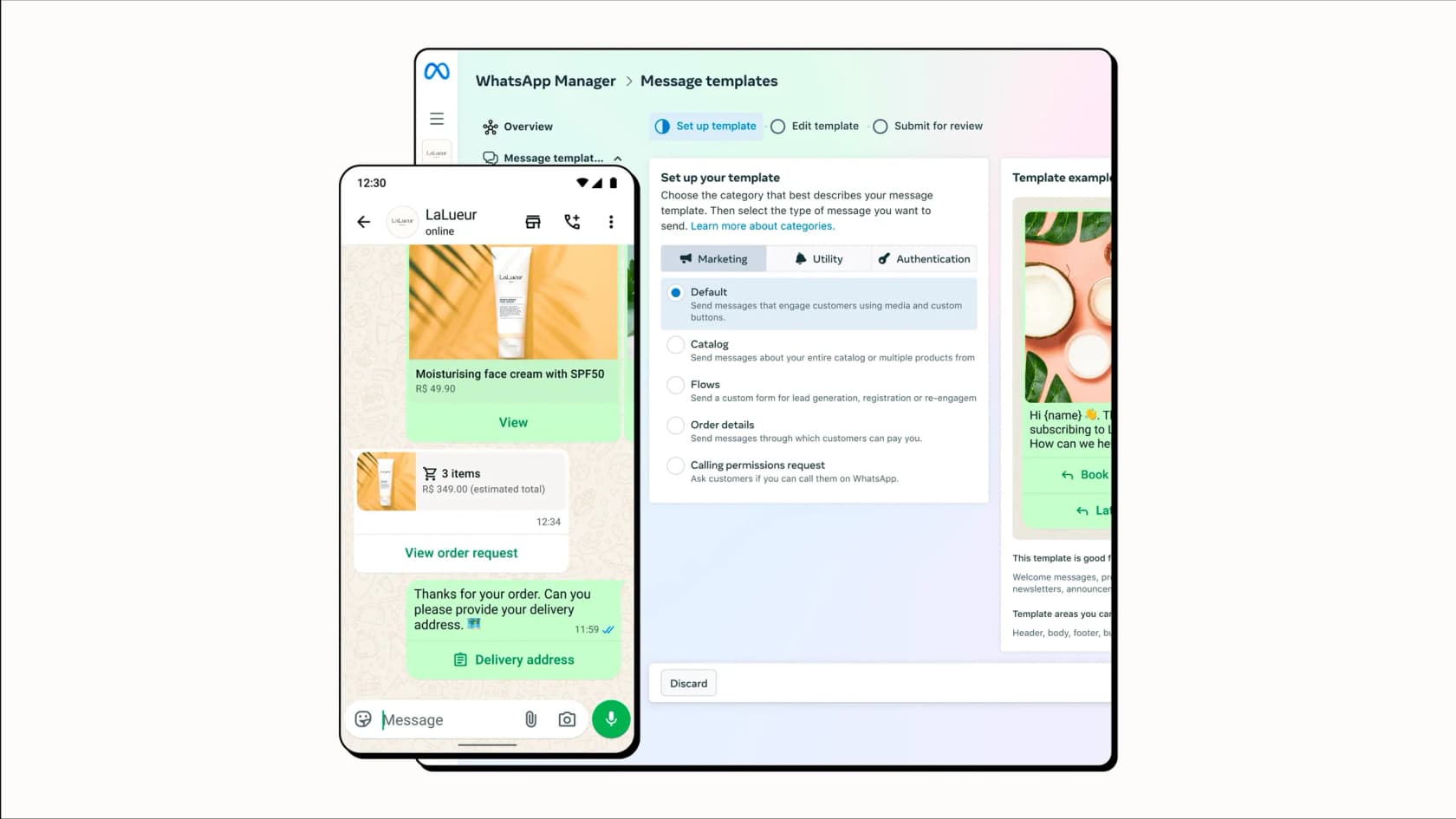
These bots use the official WhatsApp Business Platform (you might see it called the API), which lets businesses connect their own systems to WhatsApp and automate conversations. They answer frequently asked questions, qualify new leads, process orders, or provide support around the clock.
Do you need the WhatsApp Business API?
Yes, but you rarely touch it yourself. Every tool in this list connects through Meta's Business Platform, and most do it through Meta's own sign-in: eesel's WhatsApp docs say you need no developer account, API key or other WhatsApp provider. Meta also requires a verified business and a payment method on your WhatsApp account before your number can send messages.
Two rules apply whatever tool you pick, both from Meta's pricing docs: a bot can send free-form replies only within 24 hours of the customer's last message, after which only an approved template gets through, and you can only message people who opted in to hear from you. If your team handles follow-ups after that window closes, this guide to the WhatsApp 24-hour window covers the options.
Can you keep your WhatsApp number?
Usually, yes. eesel and Chatbase (through its coexistence setup) can each connect a number you still use in the WhatsApp Business app, so chats show up in both places. Manychat's help center supports the same coexistence setup, though its WhatsApp product page still recommends a fresh number. Wati's pricing FAQ asks you to delete the WhatsApp account on that number before onboarding, and says chat backups can't be imported. Manychat also says your old chat history won't transfer.
How did I pick the best WhatsApp chatbot tools?
I compared each tool on the two things that decide whether it works for you: how well it fits WhatsApp (which plan includes it, and whether you can keep your number) and what each one counts on the bill. Every price and limit below comes from each vendor's own pricing page or docs, checked on 25 November 2026.
A quick comparison of the best WhatsApp chatbot platforms in 2026
| Platform | Best for | Key feature | Starting price | Billed by | Free option |
|---|---|---|---|---|---|
| eesel | Support answers on your WhatsApp number or in your helpdesk | Learns from past tickets and your docs | $299/mo for 500 credits | Tickets or chats | 7-day trial, 100 credits |
| Manychat | Marketing automation & lead generation | Easy-to-use visual flow builder | $29/mo billed annually (Pro, for WhatsApp) | Active contacts | Free plan, without WhatsApp |
| Wati | All-in-one WhatsApp business solution | Shared team inbox, no-code builder, Astra AI agents | $59/mo billed annually | Plan, AI credits and automation triggers | 7-day trial |
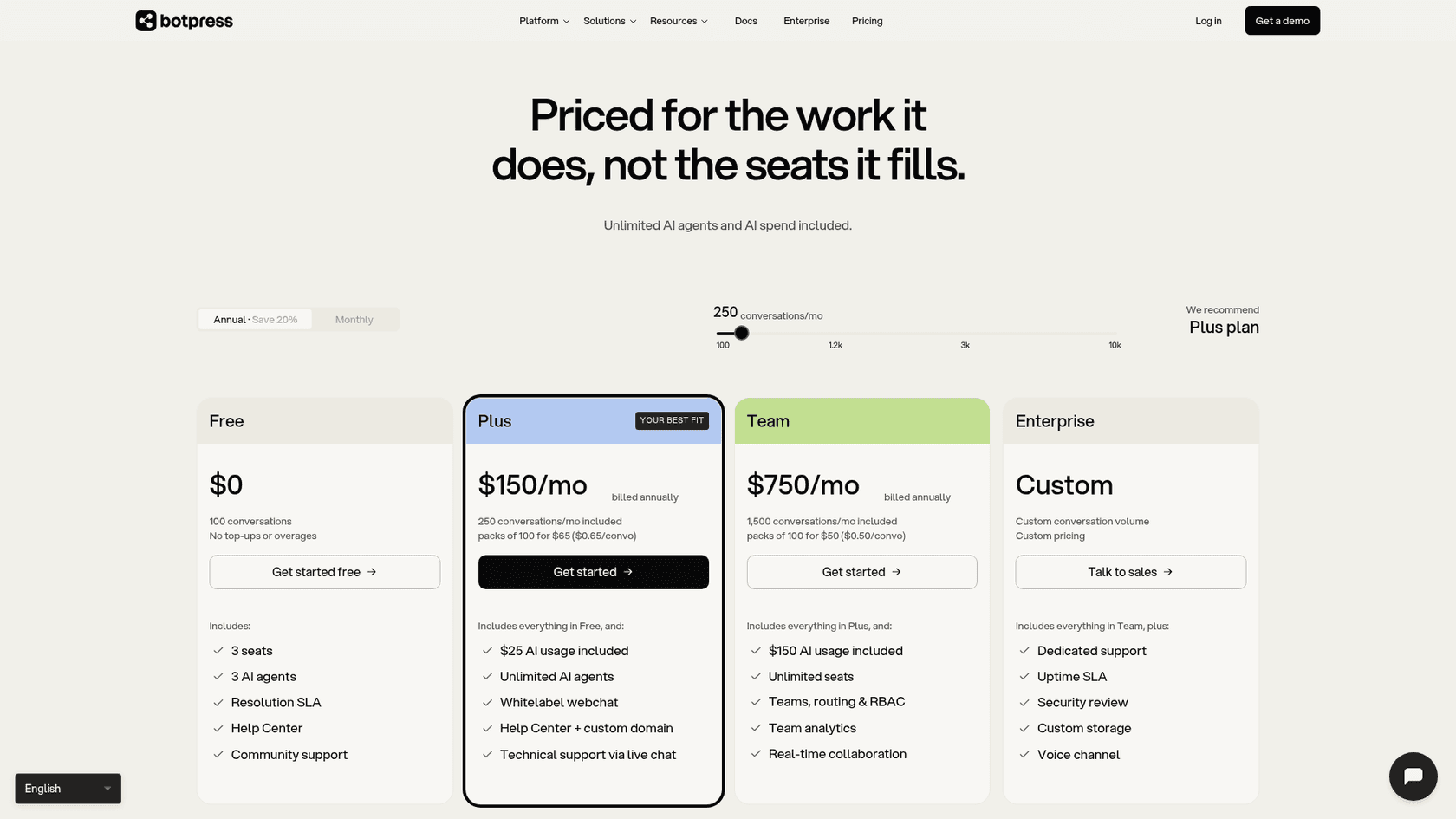
| Botpress | Highly customizable, developer-friendly bots | Open-source SDK with built-in AI agents | Free, then $150/mo billed annually | Conversations | Free plan, 100 conversations |
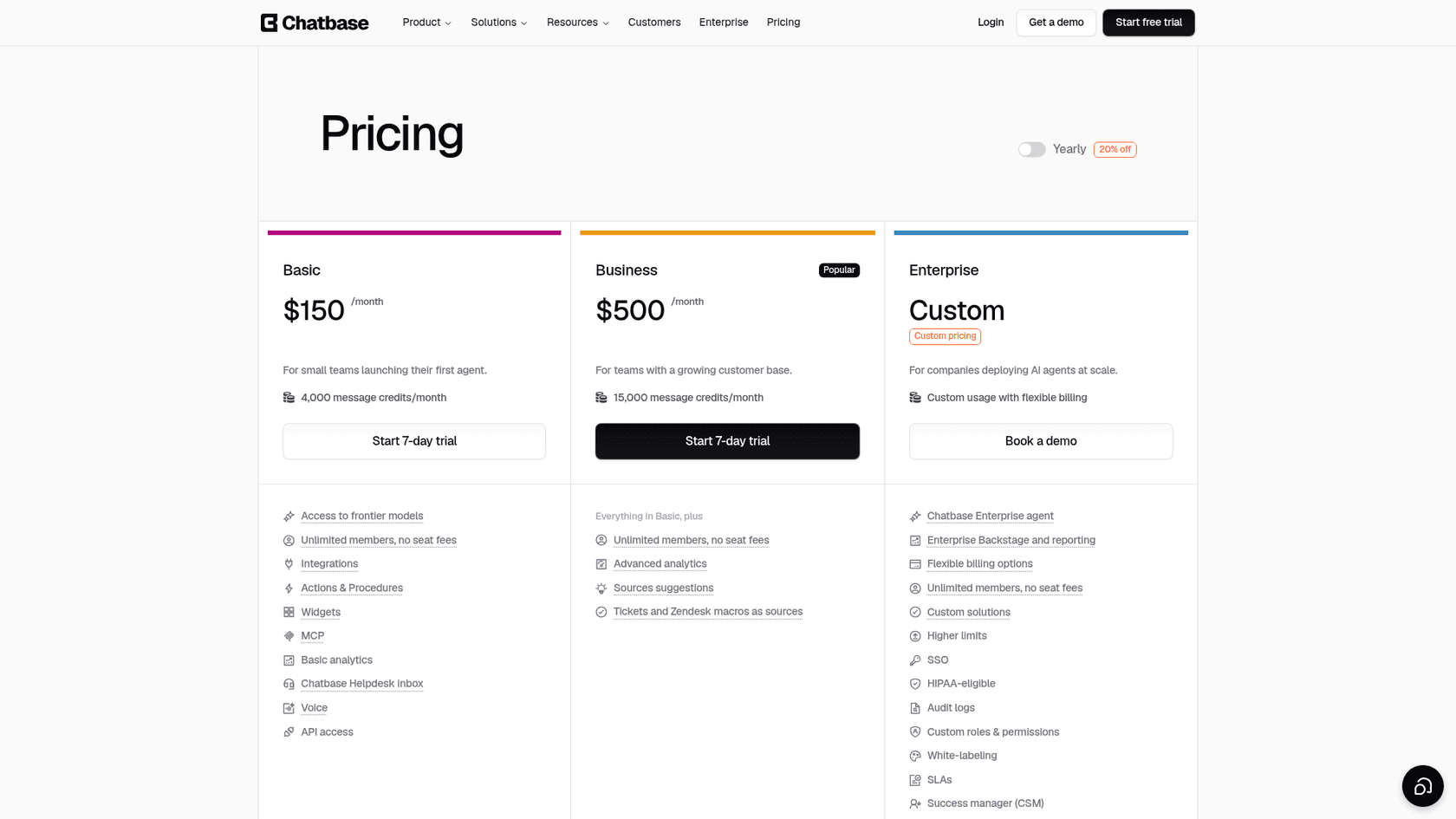
| Chatbase | An agent trained on your content, with its own inbox | Trains on your docs and website | $150/mo ($120 billed yearly) | Message credits | 7-day trial |
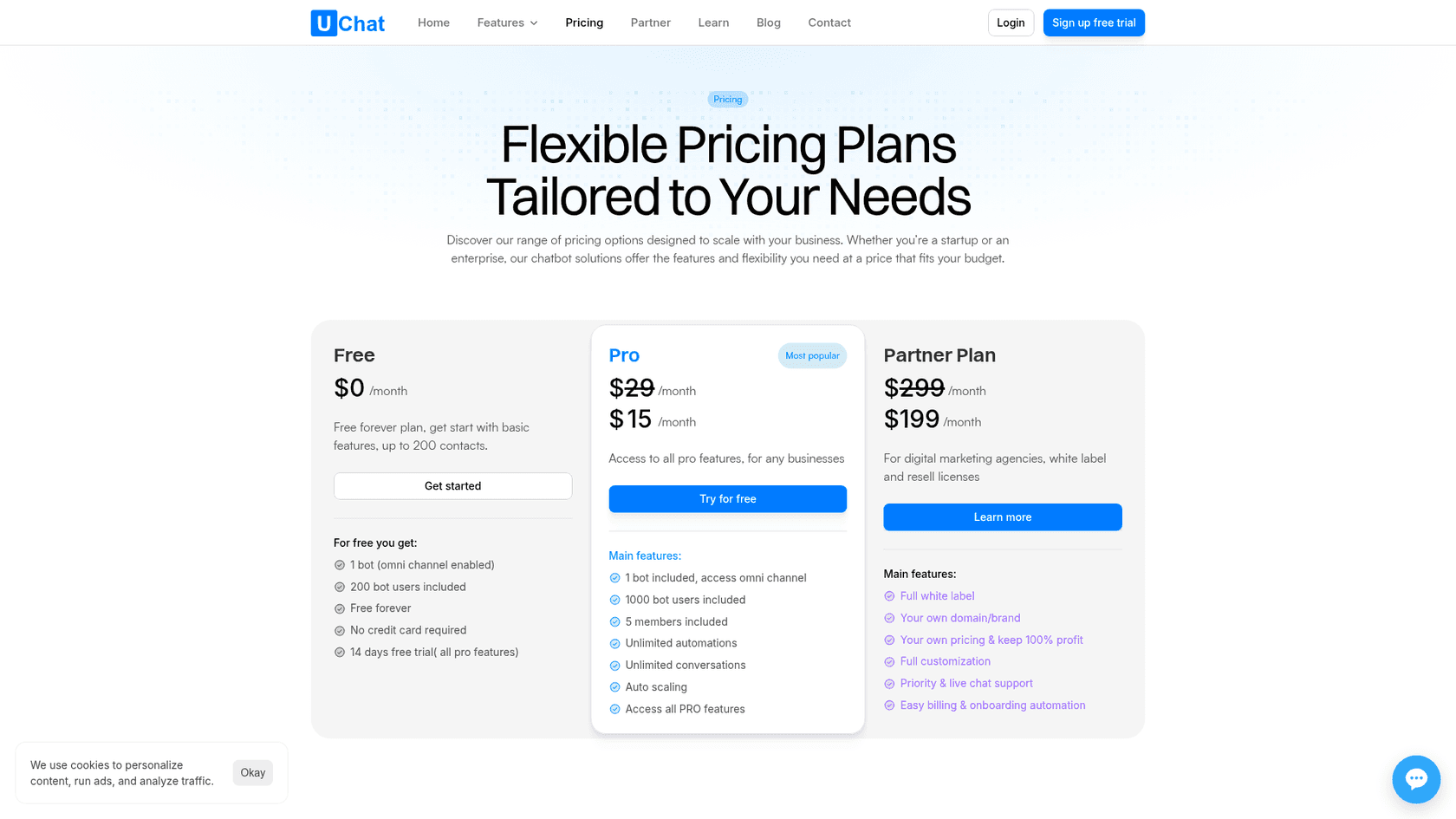
| UChat | Omnichannel eCommerce bots | Deploys one bot across 15+ channels | $15/mo | Bot users | Free plan, 200 bot users |
All six sit on top of Meta's own message fees, which I break down below.
The 6 best WhatsApp chatbot tools in 2026
To keep prices comparable, each one is priced for the same buyer: a store with about 500 customers messaging on WhatsApp a month.
1. eesel
Best for support teams that want WhatsApp answered from what they already know: past tickets, the help center and store data.
Instead of making you build a chatbot from scratch in a new platform, eesel learns from what your team already has. It answers on your own WhatsApp Business number, connected through Meta's sign-in, or inside the help desk you already use, like Zendesk or Freshdesk, and it works with any helpdesk or none.
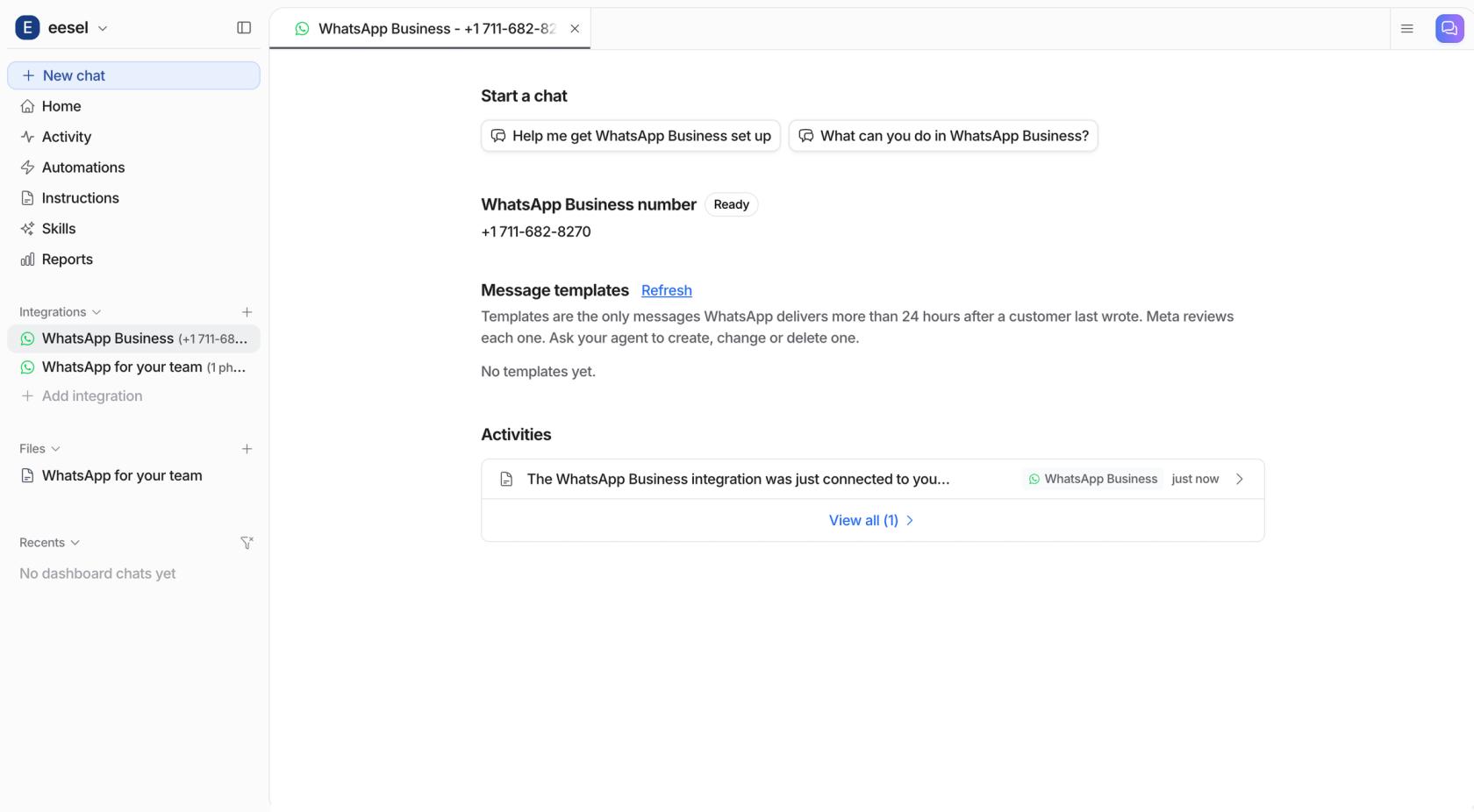
eesel's AI agent reads your past support tickets to pick up your brand's voice, common customer problems, and what a good answer looks like. You can also connect your help center, Confluence pages, Google Docs, and more. On WhatsApp it reads the photos and PDFs customers send and transcribes their voice notes, and it starts answering as soon as your number shows as ready.
Question Beauty, a direct-to-consumer cosmetics brand, shows what messaging support looks like in practice. Its Facebook Messenger, email and chat questions land in Gorgias, and eesel handled 990 tickets in a month, sent 960 replies itself and closed 280 without a person, checking the Shopify order first on delivery questions and leaving refunds and complaints to the team.
Pros:
- You connect your WhatsApp number yourself from the integrations page, with no sales call.
- Answers come from your past tickets, help center and store.
- You can test it first: run it on your past tickets to see how it would have answered real questions, before you connect your WhatsApp number, since it starts answering as soon as the number is ready.
Cons:
- There's no built-in handover on WhatsApp yet: your team can't reply to a customer from eesel, though it can hand over by creating a ticket in your helpdesk if your instructions say so.
- Replies to customers are text, plus files from the same conversation, so it's not the tool for button-and-menu bots.
- One workspace connects one WhatsApp Business number, and numbers coming from another WhatsApp provider can't be connected yet.
Pricing: One fixed monthly price: start with 100 free credits for 7 days and no card, then plans on eesel's pricing begin at $299/month for 500 credits (1 credit per ticket or chat, however long). There's no platform or per-seat fee, so the bill tracks ticket volume, not headcount, and paying yearly gets you two months free. Our store's 500 WhatsApp conversations fit the 500-credit plan at $299, plus Meta's message fees.
My take: Pick eesel if WhatsApp is a support channel and your answers already live somewhere: past tickets, a help center, a store. Skip it if you mainly want broadcast campaigns or button menus. The deciding factor is whether the bot has to know your business or just follow a script.
2. Manychat
Best for creators and marketers running campaigns across Meta's apps.
Manychat's biggest selling point for marketers is its visual drag-and-drop flow builder, which makes it easy to set up sequences for generating leads, sending promotions or running campaigns.
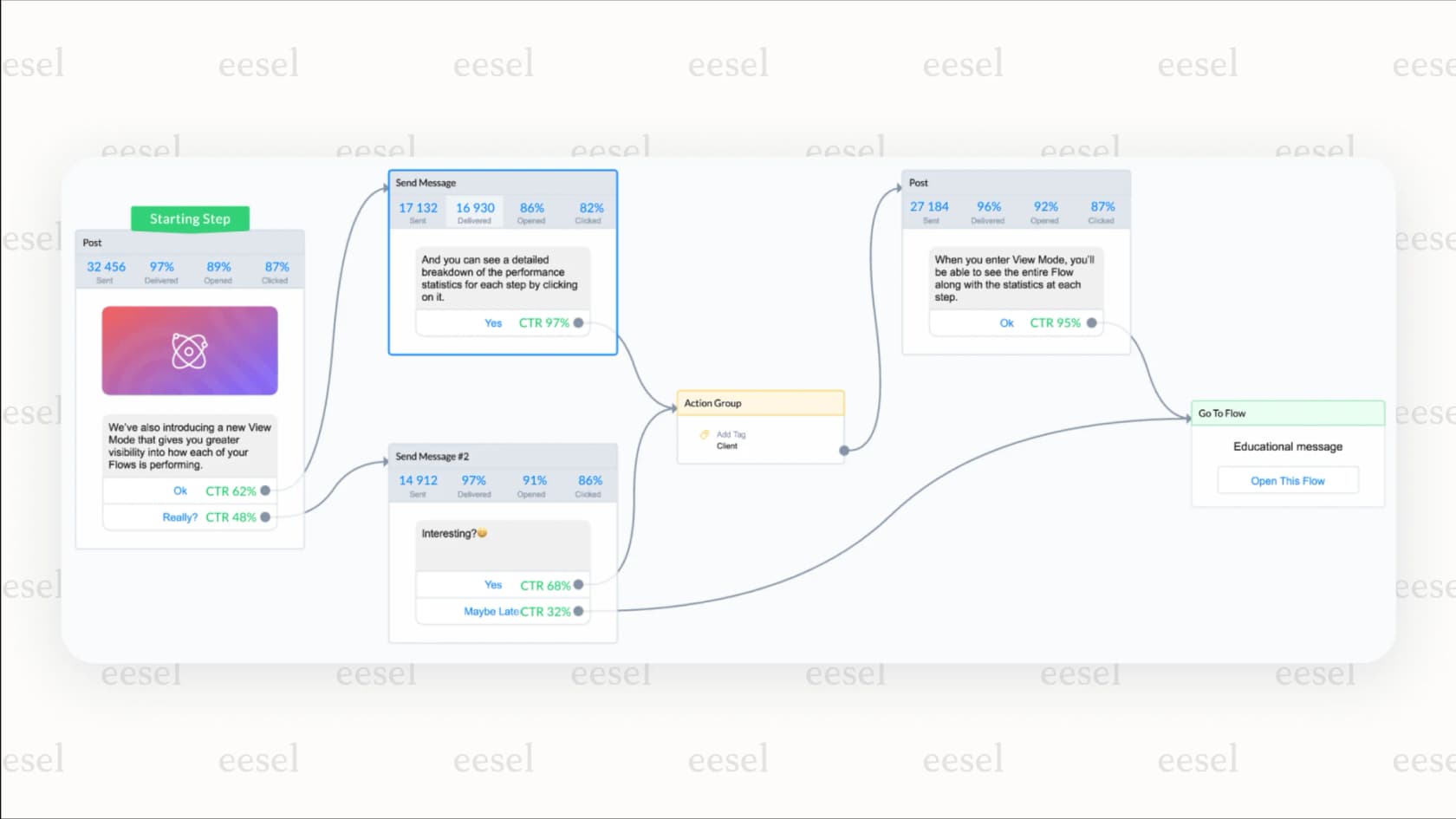
From the Pro plan up, Manychat AI is included: you teach it about your business and tone of voice, and it answers DMs and FAQs.
Pros:
- The flow builder is easy to pick up.
- Great for marketing campaigns, broadcasts and capturing leads.
- Works with WhatsApp, Instagram, Facebook Messenger, TikTok, Telegram, SMS and email.
Cons:
- WhatsApp starts on Pro; the Free and Essential plans only connect Instagram, TikTok, Messenger or Telegram.
- Pro connects 3 channels with 2 inbox seats, and the multi-user inbox where you assign conversations starts on Business at $69/month billed annually.
Pricing: Manychat's free plan caps at 25 active contacts. Essential starts at $14/month billed annually, but WhatsApp is gated to the Pro plan at $29/month billed annually ($39 month to month), which includes 2,500 active contacts. Go over and you pay per extra contact ($0.038 each on annual Pro, $0.05 monthly) rather than being pushed up a tier. Our store's 500 contacts fit inside Pro at $29, and Meta's WhatsApp fees come on top. The full breakdown is in Manychat pricing.
My take: Pick Manychat if WhatsApp is a marketing channel for you and you also live on Instagram. Skip it if you need several agents working one shared support queue on a small budget. The deciding factor is whether you're running campaigns or answering tickets.
3. Wati
Best for small teams that want WhatsApp, a shared inbox and broadcasts in one dashboard.
Wati puts what a small team needs around WhatsApp into one dashboard: a no-code chatbot builder, a shared team inbox for humans to take over, and tools for sending broadcast messages. Its Growth plan's inbox now also takes Facebook, Instagram, TikTok, webchat and calls.
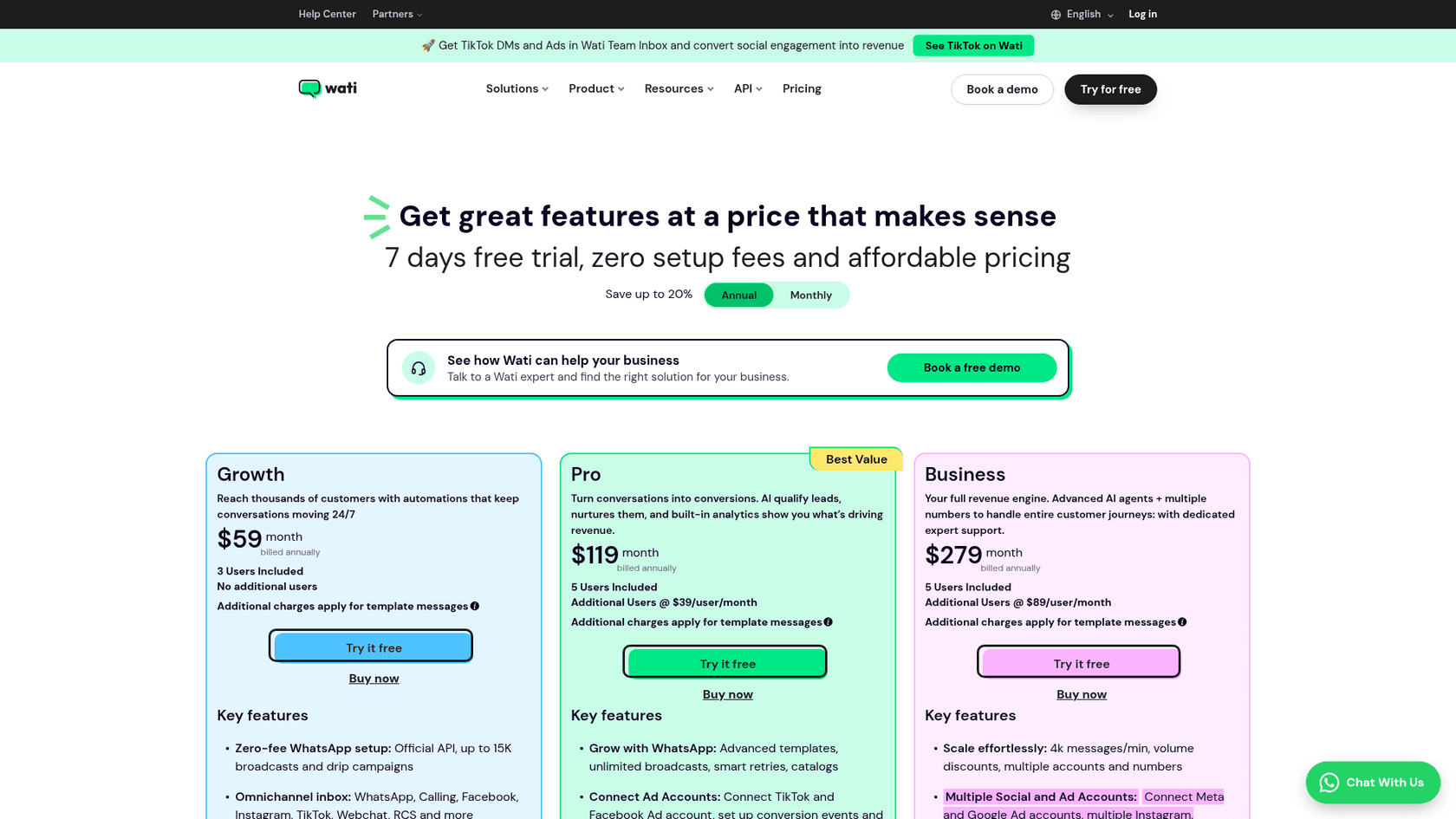
Wati's AI Co-pilot is now Wati AI plus the Astra AI Agent Builder, where you describe the agent you want in plain language and train it on your content; Growth includes one Astra agent and 2,000 Wati AI credits a month, which makes it a decent first step into AI support.
Pros:
- Beginner-friendly interface with everything in one spot.
- Has a built-in live chat inbox for easy handoffs to an agent.
Cons:
- Growth includes 3 users with no option to add more, and template messages cost extra on every plan.
- It costs more than the other entry plans here: $59 against $29 for Manychat Pro and $15 for UChat.
Pricing: Wati starts at $59/month billed annually, with a 7-day free trial. Growth includes 1,000 free automation triggers a month, so if each of our store's 500 conversations fires one automation, it stays at $59 plus template message fees. More detail is in Wati pricing.
My take: Pick Wati if a small team wants WhatsApp, broadcasts and a shared inbox without stitching tools together. Skip it if more than three people need to log in, since that means the $119 Pro plan. The deciding factor is team size.
4. Botpress
Best for builders and technical teams who want total control.
Botpress's SDK and integrations sit in an open-source repo on GitHub under the MIT license, and its studio lets you build advanced, custom AI agents. Beyond simple flows, its Translator Agent switches to the customer's language, the Summary Agent condenses a conversation, and the Vision Agent reads images customers send.
Pros:
- Packed with advanced AI and customization tools.
- Runs on other channels besides WhatsApp.
Cons:
- Model costs are capped: Plus includes $25 of AI usage a month ($0.10 per conversation), and past that you set up auto-recharge to keep conversations running.
- The free plan stops at 100 conversations, with no top-ups or overages.
Pricing: After the free plan's 100 conversations, Botpress's pricing page lists Plus at $150/month (250 conversations) and Team at $750/month (1,500 conversations), both billed annually, with extra conversations sold in packs of 100 ($65 on Plus, $50 on Team). Our store's 500 conversations on Plus means 250 included plus three packs: $150 + $195 = $345/month, plus any AI usage past the included $25, before Meta's fees. See Botpress pricing for the long version.
My take: Pick Botpress if you have a developer and want to own every step of the bot. Skip it if nobody on the team wants to build, since the per-conversation bill climbs fast past the included 250. The deciding factor is who maintains it.
5. Chatbase
Best for teams that want an agent trained on their docs and website, with its own inbox for handoffs.
Chatbase started by turning your existing content into an AI agent: upload documents and PDFs or paste your website link, and it answers from that content. It has grown since: every plan on its pricing page now includes Actions and Procedures, a Chatbase Helpdesk inbox, voice and outbound campaigns. Business ($500 a month) also adds past tickets and Zendesk macros as sources.
On WhatsApp, its integration reads the photos and documents customers send, can open a ticket when it can't help, and waits a few seconds before replying so a burst of short messages gets one answer. It's still a quick start for a Q&A agent on your website or WhatsApp, but the entry price now assumes a team, not a hobby project.
Pros:
- Fast to set up from content you already have.
- Works with WhatsApp, Slack, your website, and more.
- Outbound WhatsApp campaigns with approved templates on every plan.
Cons:
- AI Actions are capped per agent (8 on Basic, 12 on Business), and a reply that triggers an Action costs twice the model's usual credits.
Pricing: Chatbase's plans now start at Basic: $150/month, or $120/month billed yearly, with 4,000 message credits and a 7-day trial. Business is $500/month ($400 billed yearly) with 15,000 credits. Each reply uses credits according to the AI model you pick, so that choice sets what our store's 500 conversations cost; Meta's fees are separate. Chatbase pricing walks through the credits.
My take: Pick Chatbase if your answers live in documents and web pages and you want a helpdesk inbox included. Skip it if you want to try it for free long term, since it now runs on a trial. The deciding factor is whether $120 to $150 a month fits a first bot.
6. UChat
Best for eCommerce teams that want one bot on WhatsApp and many other channels for little money.
UChat's main strength is reach: build your chatbot once, then put it on WhatsApp, Facebook Messenger, Instagram, Telegram, TikTok, SMS and more, which makes it a real option for omnichannel support.
It also suits online stores: UChat lets you send a WhatsApp catalog, so customers can browse and buy your products right inside the chat.
Pros:
- Build one bot and use it on 15+ channels.
- Pick the model behind the agent, from OpenAI or Claude, for more natural conversations.
Cons:
- Pro covers 1 bot and 1,000 bot users; past that you buy add-ons, such as $5 a month for each extra 1,000 bot users.
Pricing: UChat offers a free plan for up to 200 contacts, plus a 14-day trial of the Pro features. Paid plans start at $15/month for Pro, shown on UChat's pricing page against a crossed-out $29, with 1,000 bot users and 5 members. Our store's 500 customers fit inside Pro at $15, plus Meta's fees.
My take: Pick UChat if you sell online and want one bot across WhatsApp, Instagram and your website for the lowest price on this list. Skip it if you want an AI that learns from a ticket history. The deciding factor is how many channels you run.
What does a WhatsApp chatbot cost on top of the tool?
Meta bills its own message fees to your WhatsApp account, or your provider passes them on. Here's how they work today:
- Messages customers send you are free. Meta only charges for messages a business delivers.
- Replies inside the 24-hour window are "service" messages. Since October 1, 2026, the first 1,000 a month per business phone number are free, and Meta charges per message after that. They had been free since November 2024.
- Template messages (marketing, utility and authentication) are charged per delivered message, at rates set by the category and the customer's country code, across 47 markets on Meta's rate card.
- Ads that click to WhatsApp open a free window of up to 7 days in which replies and templates aren't charged.
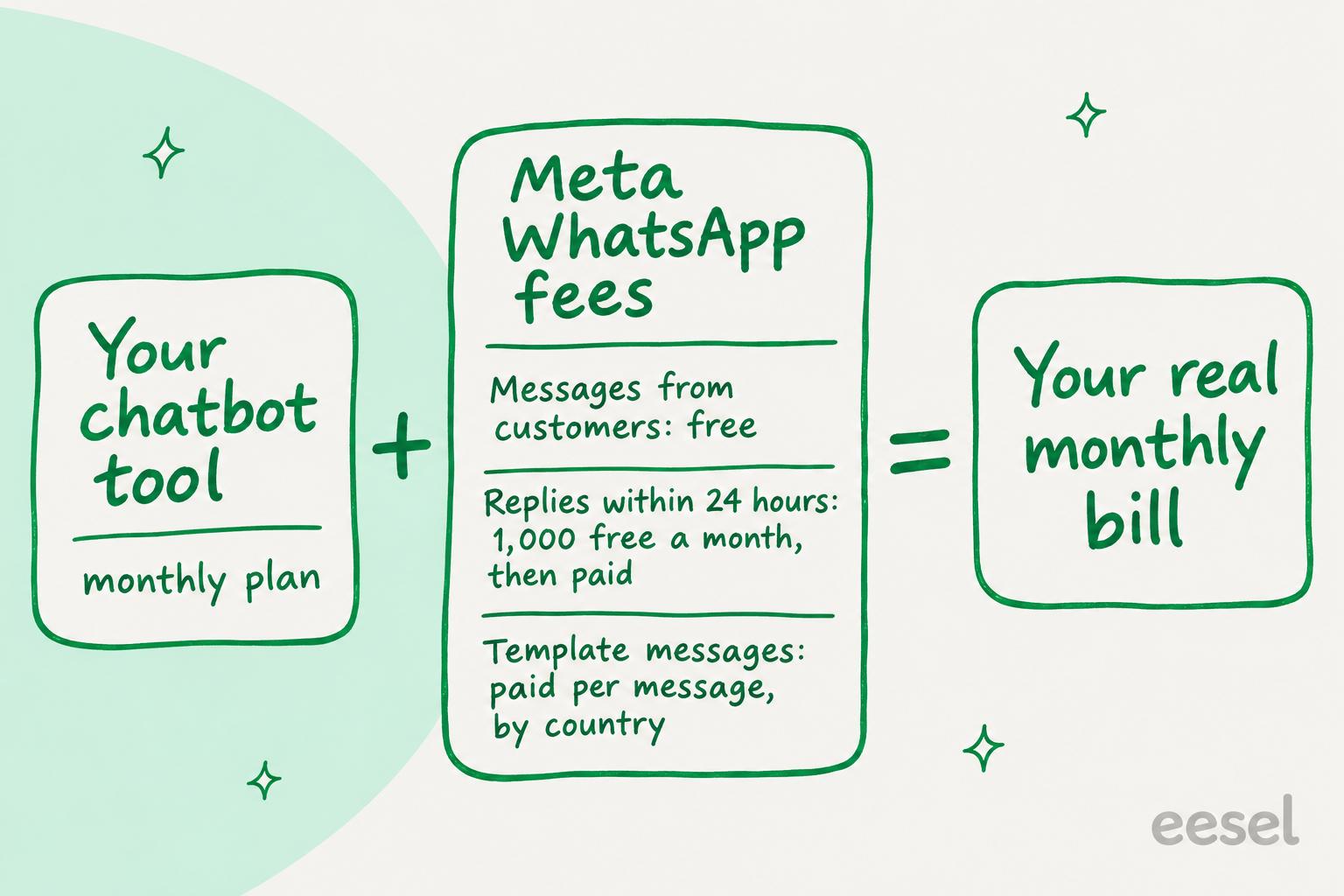
For a support bot, the 1,000 free replies go quickly: a store with 500 conversations a month and three bot replies each sends 1,500 service messages, so 500 of them are charged. The WhatsApp Business API pricing guide has the rates by country.
What about Meta's own WhatsApp AI agent?
Meta now offers its own Meta Business Agent, which more than one million businesses already use on WhatsApp and Messenger. It answers questions, recommends products from your catalog, books appointments and qualifies leads, and you decide when a team member steps in. Meta says getting started is free, with paid subscriptions coming, and its Business Agent Platform connects to systems like Shopify and Zendesk for larger businesses. On the Business Platform, Meta bills it at $2.00 per million tokens, roughly 4 to 5 cents a message.
If you run a small business from the WhatsApp Business app, it's worth trying first, since it costs nothing to start. Meta's announcement covers WhatsApp, Messenger and Instagram. If you also want the same agent on your website chat, or answering from years of past tickets, the tools above are built for that.
Can you put ChatGPT on WhatsApp as your business bot?
Not as a general-purpose assistant. Since January 15, 2026, section 4.7 of Meta's WhatsApp Business Platform terms bars AI providers from offering large language models or general-purpose AI assistants through the Business Platform when the AI is the main thing on offer, except in countries where Meta is legally required to allow it. The same clause says a business may still use an AI provider as its solution provider, which is how the tools above work. The guide to Meta's chatbot policy changes goes deeper.
How to choose the best WhatsApp chatbot for your business
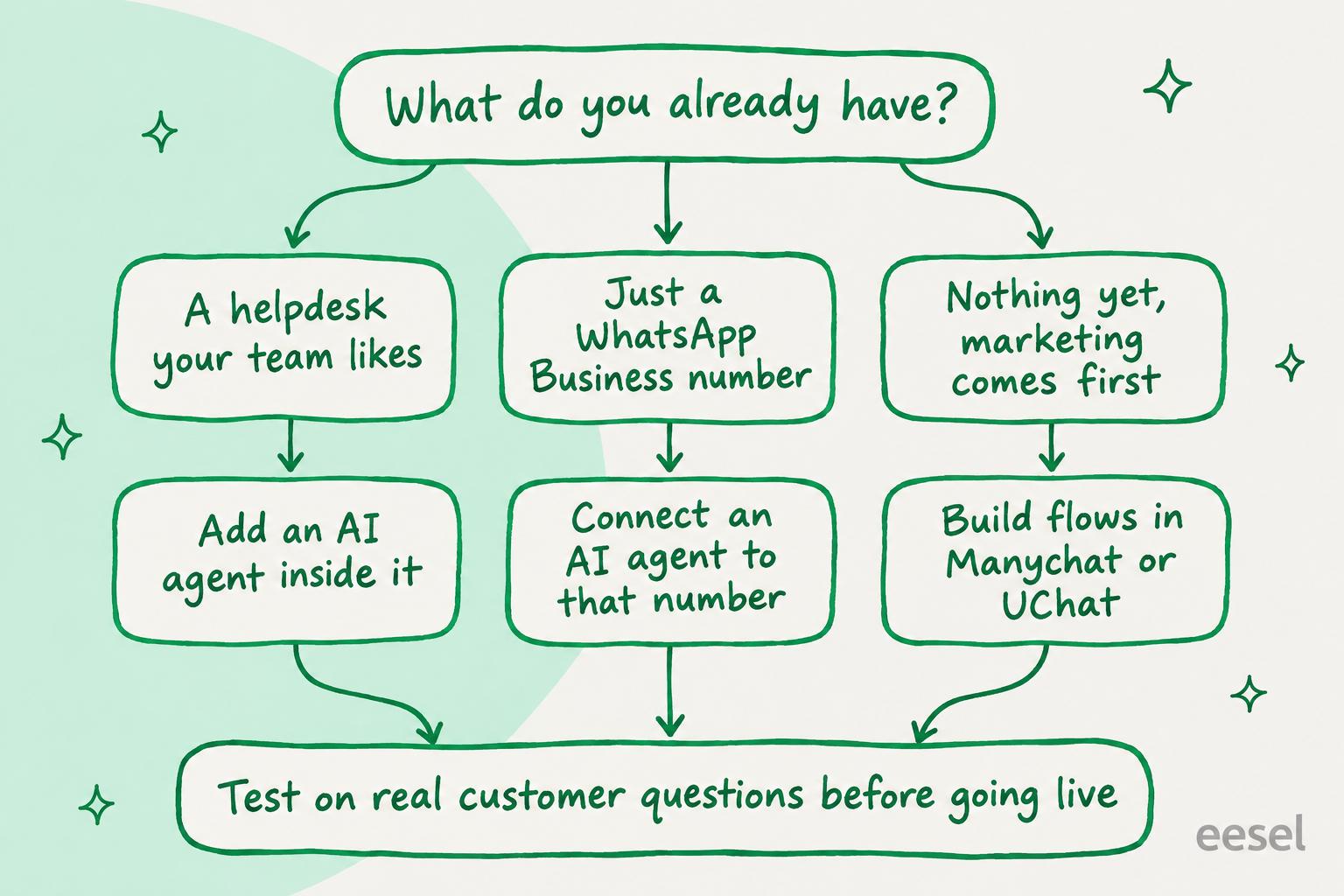
Start from what you already have. Tools like Manychat or UChat are built for new, structured flows from the ground up. If you already have a help desk your team knows and likes, you probably don't want to throw it out and start over: eesel adds an AI agent inside it, and if all you have is a WhatsApp Business number, it connects straight to that instead. The WhatsApp AI chatbot guide goes further into that choice.
Try eesel as the WhatsApp chatbot for your support queue
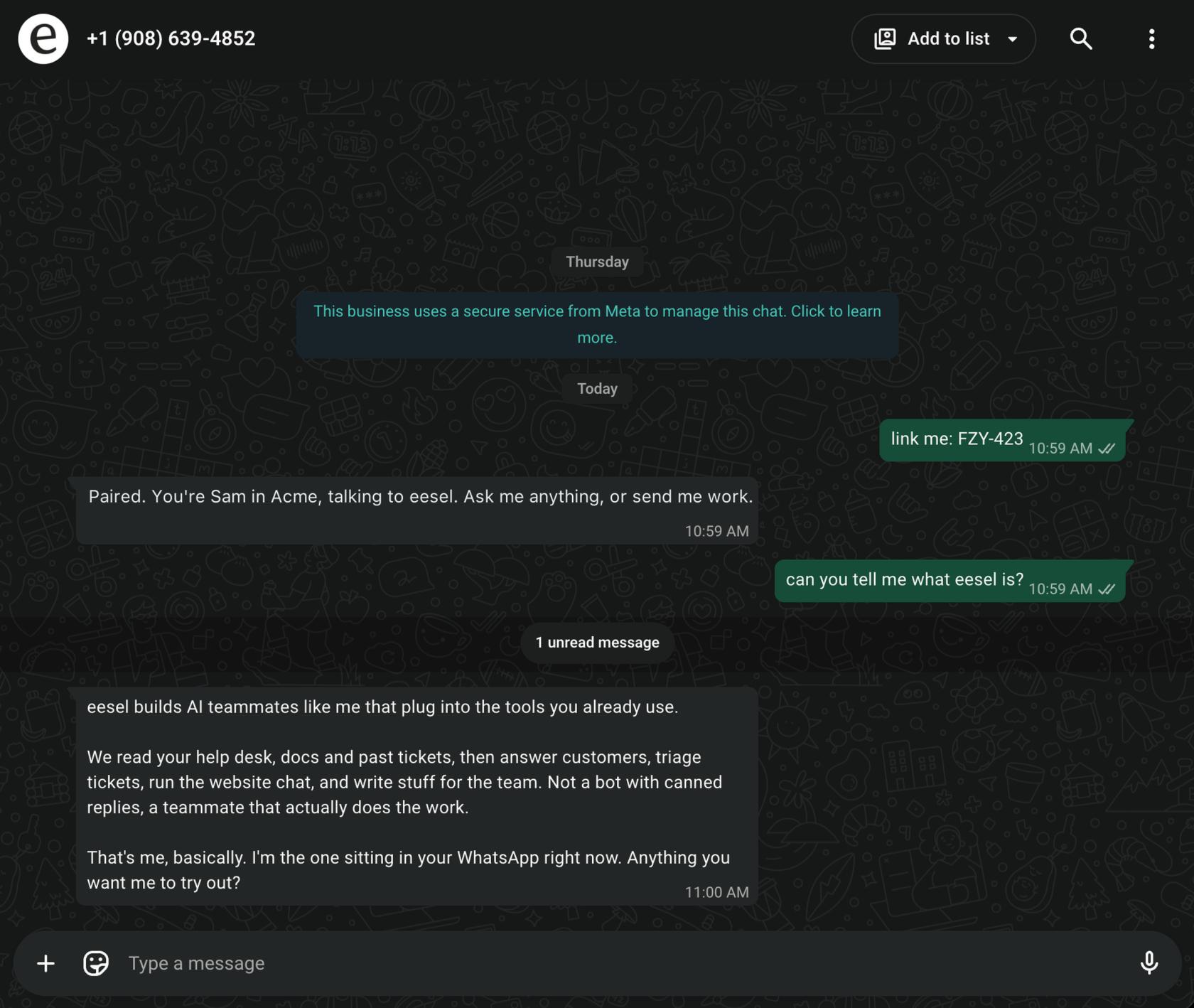
If WhatsApp is where your customers ask for help, connect your WhatsApp Business number to eesel through Meta's sign-in and let it answer from your help center, past tickets and store. What it may do changes with who's asking: every action can run on its own, ask a teammate first, or stay off (actions and approvals), and that can differ for your team, a verified customer and an anonymous visitor. Messaging any customer other than the one who wrote in always waits for approval. Pricing is per ticket or chat, one credit each, and the free trial gives you 100 credits for 7 days with no card. Try eesel, and test it on your past tickets before you connect your number.
Frequently asked questions
What is the best WhatsApp chatbot in 2026?
For support questions, pick an AI agent that learns from your past tickets and help center, like eesel, which also works inside a help desk you already use. For marketing flows, Manychat's Pro plan at $29 a month billed annually is the cheapest Manychat plan with WhatsApp, and UChat at $15 a month is the budget pick across many channels.
What is the best WhatsApp AI agent for customer support?
Look for an AI agent that learns from your own data, such as past tickets, rather than a static FAQ. eesel answers on your WhatsApp Business number from your past tickets, help center and store, and it is tested on past tickets before it replies to anyone. For the wider field, see the best AI for WhatsApp support.
Is there a free chatbot for WhatsApp?
Some tools have free plans (UChat covers 200 bot users, Botpress 100 conversations) and Meta says getting started with its own Business Agent is free, but check that WhatsApp is on the free tier: Manychat's free plan only connects Instagram, TikTok, Messenger or Telegram. Meta also charges for every template message, and for replies past the first 1,000 a month per number, as the WhatsApp Business API pricing guide explains.
Which WhatsApp chatbot is best for marketing and lead generation?
Manychat. Its visual flow builder is made for campaigns, lead capture and broadcasts across Meta's apps, and WhatsApp starts on its Pro plan at $29 a month billed annually. For more options, see the best chatbots for lead generation.
How much does a WhatsApp chatbot cost?
You pay two bills: the tool and Meta. Starting prices run from $15 a month (UChat) to $299 a month (eesel, 500 tickets or chats), each counting something different: contacts, conversations, message credits or tickets. Meta then charges per delivered template message by country and, since October 1, 2026, for replies past the first 1,000 a month per number. eesel has no platform or per-seat fee; Manychat pricing breaks down the contact-based model.
Do I need the WhatsApp Business API to use a WhatsApp bot?
Every business bot runs on Meta's WhatsApp Business Platform, but most tools connect it for you through Meta's sign-in. eesel needs no developer account, API key or other WhatsApp provider, and you can keep using the number in the WhatsApp Business app. The WhatsApp Business API guide covers the details.
What is the best WhatsApp bot if I'm not a developer?
Most modern platforms are no-code. Manychat, Wati and UChat give you visual builders, Chatbase builds an agent from your documents and website, and eesel learns from your past tickets and help center, set up by chatting with it in its dashboard. See the no-code AI chatbot tools roundup for more.
Can I test a WhatsApp AI chatbot before it talks to customers?
Yes, and you should. You can run eesel on your past tickets to see how it would have answered real questions before you connect your number, and Chatbase keeps WhatsApp changes in a draft until you publish them. For why the AI part matters, see AI agents vs rule-based chatbots.