


You’ve probably heard of Claude AI. It’s right up there with ChatGPT and Gemini in the AI chatbot buzz. It’s known for being friendly, great at creative stuff, and easy to talk to. But here’s the thing: while it's a neat tool for general use, businesses trying to use it for real work are starting to run into problems.
We’re going to take a real, honest look at Claude AI, digging into actual Claude reviews to see if it’s cut out for professional use, especially for something as important as customer support. We'll cover what it's good at, where it falls short, and why a more focused tool might be what you actually need.
What is Claude AI?
Claude AI comes from Anthropic, an AI safety and research company. At its core, it's a group of large language models (LLMs) designed to be a helpful and harmless AI assistant. You can think of it as a brainstorming buddy, a writing partner, or a coding assistant all rolled into one clean interface.
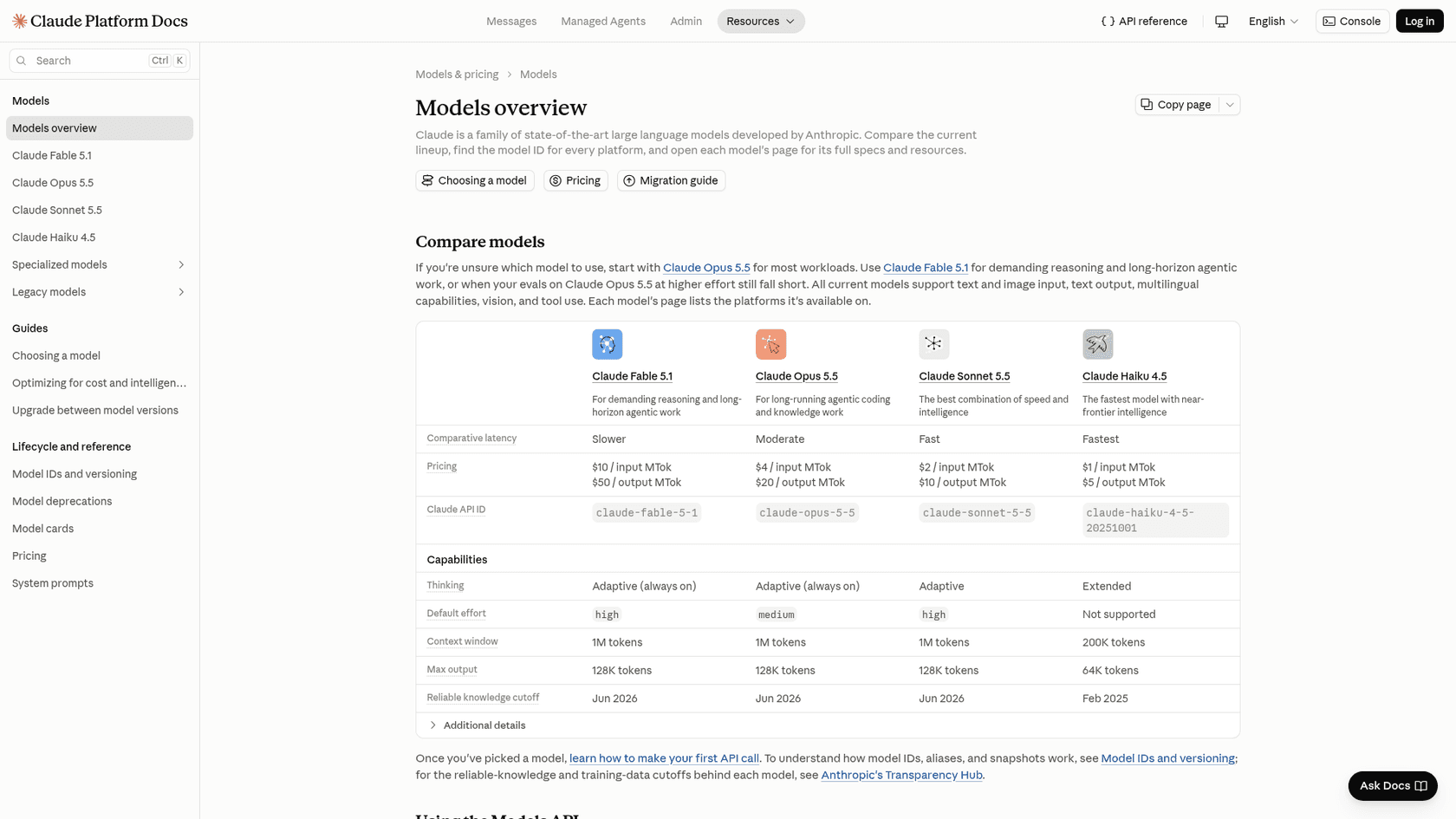
It's not just a single model, though. Claude comes in a few different flavors, each tuned for specific situations:
-
Haiku: This one's the fast one. It's lightweight and built for quick chats and simple answers where getting a response right away is the main goal.
-
Sonnet: This is the solid all-rounder. Sonnet gives you a good mix of smarts and speed, making it a common choice for business tasks like writing content or looking at data.
-
Opus: The heavy hitter, made for long-running coding and knowledge work. It's great for deep thinking, detailed analysis, and tasks that have a lot of steps, and Anthropic's docs tell most teams to start with Opus 5.5.
-
Fable: The newest tier, Fable 5.1, is for the most demanding reasoning and long agentic jobs. It lists at $10 per million input tokens against $4 for Opus 5.5.
Claude AI features and performance
Let's be clear upfront: Claude is a very capable AI. A lot of the glowing Claude reviews you read online are totally fair. For a ton of creative and technical work, it really holds its own against the competition.
It feels like you're talking to a person
One of the first things you notice about Claude is how natural the conversation feels. A lot of people say it's the most "human-like" of the big AI chatbots. It does a great job of remembering what you've talked about in a long chat, so you don't have to keep repeating yourself. It can also switch tones and personas pretty easily, which makes it a flexible partner for writing anything from a stuffy corporate email to a fun marketing idea.
It's a solid helper for code and documents
Developers seem to really like Claude for its coding chops. It's pretty good at whipping up code snippets, helping you figure out why your code is breaking, and explaining complicated programming ideas in plain English. If you're banging your head against a wall over a piece of code, Claude can often help you get unstuck.
It’s also really good at digesting huge amounts of information. You can feed it big documents like PDFs or research papers, and it will give you a summary, find the key points, or answer questions about what's inside. For anyone doing research or just trying to get the gist of a long document without reading the whole thing, this feature is a lifesaver.
But it can't do everything
Of course, it’s not perfect. A big thing Claude doesn't do is generate photos or illustrations. It can build diagrams, charts, and interactive visuals in a chat (a beta feature), and it can read images you upload. A competitor like ChatGPT can generate pictures, but Claude can't. If your job involves making images for marketing, presentations, or social media, you'll have to use another tool.
And like any other large language model, Claude can sometimes "hallucinate," which is just a nice way of saying it makes things up. It’s usually pretty reliable, but it’s always a good idea to double-check any really important facts or figures it gives you, just in case.
The business reality: Frustrations from Claude reviews
This is where things get tricky. While Claude is great for one-off tasks, a completely different story unfolds when businesses try to plug it into their day-to-day work. A quick scroll through user Claude reviews on places like Trustpilot and Capterra shows some recurring complaints that are hard to ignore for any professional team.
The biggest complaint: Those frustrating usage limits
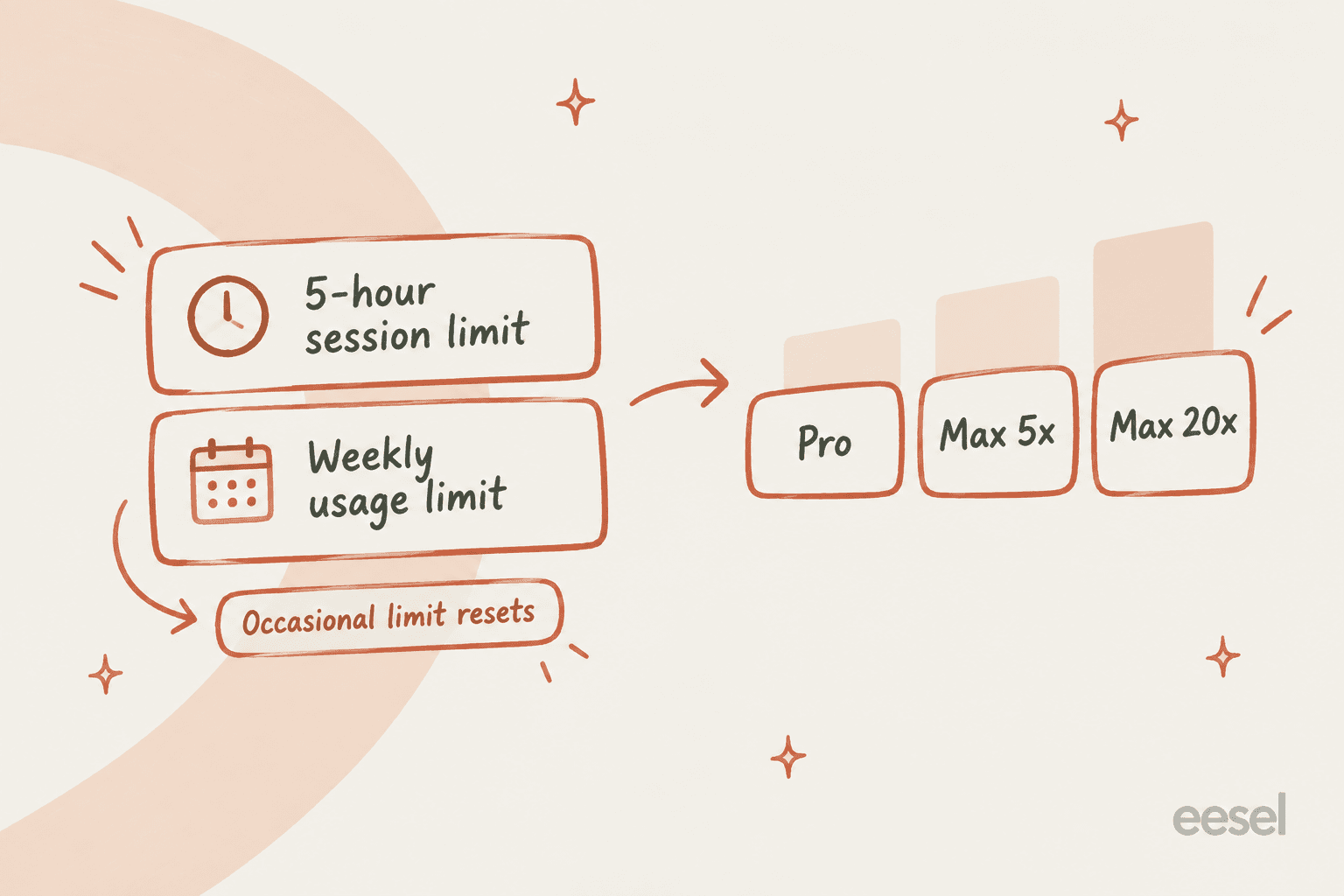
The number one issue people bring up, over and over again, is Claude's strict and unpredictable usage limits. Even people paying for the $20/month "Pro" plan ($17 a month if billed annually) say they get locked out after just a few messages. Anthropic describes a five-hour session limit with a weekly usage limit stacked on top, so a lockout can mean waiting for the session window to reset. Imagine you're deep into debugging some code or drafting a client report, and your main tool just shuts down. For professional work, that’s just not going to fly.
That kind of unreliability is a dealbreaker for businesses that need tools they can count on. It’s why many teams look for platforms with clear pricing that doesn't punish you for getting work done. For example, a support automation tool like eesel AI has one fixed monthly price (from $299 for 500 credits, one credit per ticket or chat) with optional overage you cap yourself, so the bill stays predictable.
It's a swiss army knife, not a scalpel
The second big problem is that Claude is a general-purpose AI. It's like a Swiss Army knife: it can do a lot of things reasonably well, but it’s not a specialized instrument. When you're trying to automate business processes, especially in customer support or IT, you need more than just a text generator.
Out of the box, Claude doesn't work inside your helpdesk. It reaches tools like a ticketing system through connectors and custom MCP servers that someone on your team sets up, and on Team and Enterprise plans an Owner has to add them first. Zoho Desk's MCP server is one that Anthropic lists. In practice that makes Claude an assistant your agents prompt, rather than a support agent with its own queue, handoff rules, and a way to test it against past tickets.
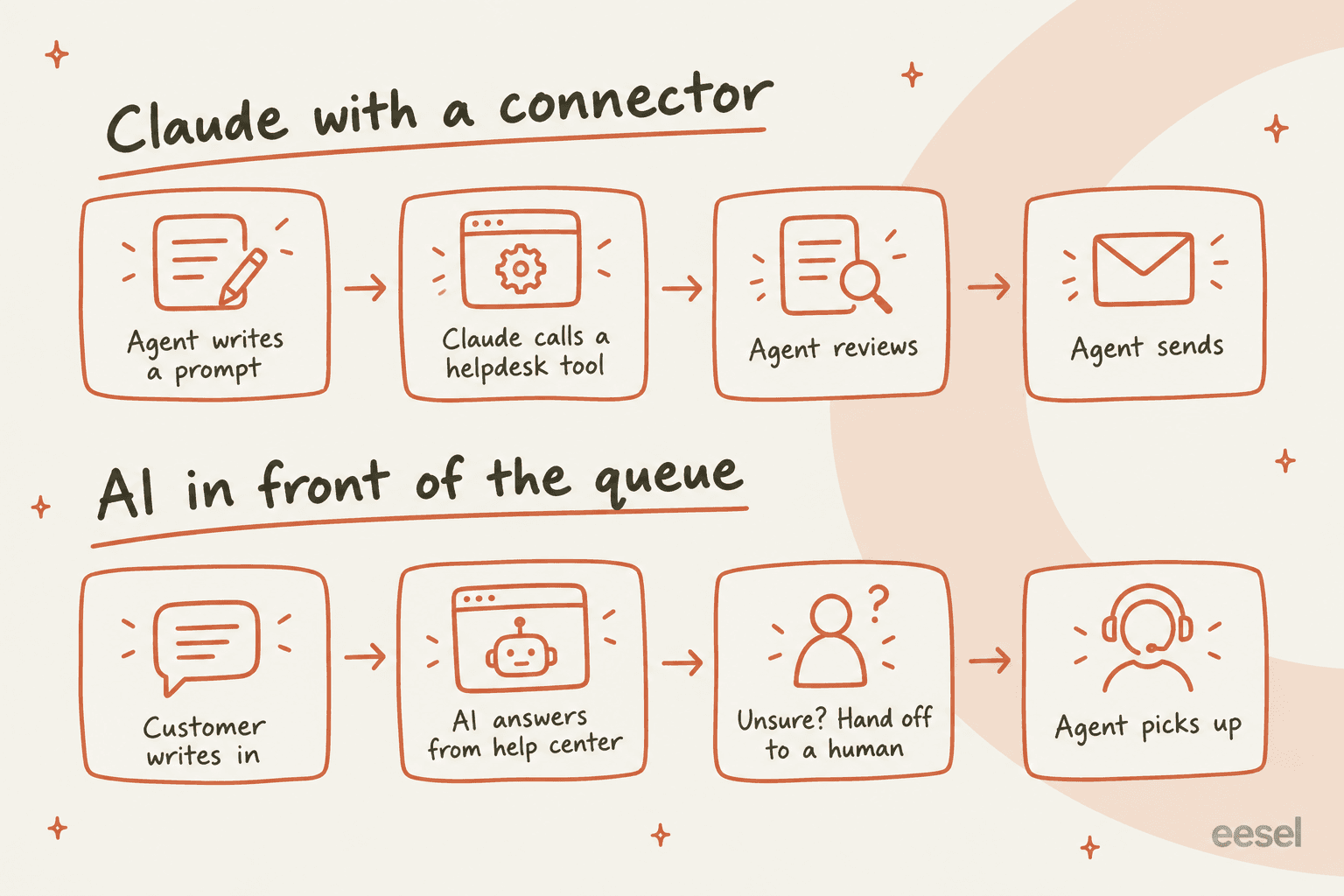
For real automation, you need a tool that fits right into your existing systems. A purpose-built AI agent from eesel AI offers simple, one-click integrations with helpdesks like Zendesk, Freshdesk, and Intercom, which lets it take real action instead of just spitting out text.
Claude AI pricing explained
Okay, let's talk money. To really get if it's worth it, you have to look at the price tag next to those limitations we just talked about.
| Plan | Price | Key features |
|---|---|---|
| Free | $0 | Chat on web, desktop and mobile, web search, files and code, memory, connectors. Sonnet and Haiku, no Opus. |
| Pro | $20/month ($17/month billed annually) | More usage than Free, Opus, Sonnet and Haiku, Fable 5.1 through usage credits, Claude Code, Research, Projects. |
| Max | From $100/month | Choose 5x or 20x Pro usage, higher output limits, priority access at busy times. |
| Team | Standard $25/seat monthly ($20 annual), Premium $100 ($125 monthly) | 2 to 150 seats, SSO, central billing and admin, Claude Code, no model training on your content by default. |
| Enterprise | $20/seat/month billed annually, plus usage at API rates | Everything in Team, with usage billed at API rates. |
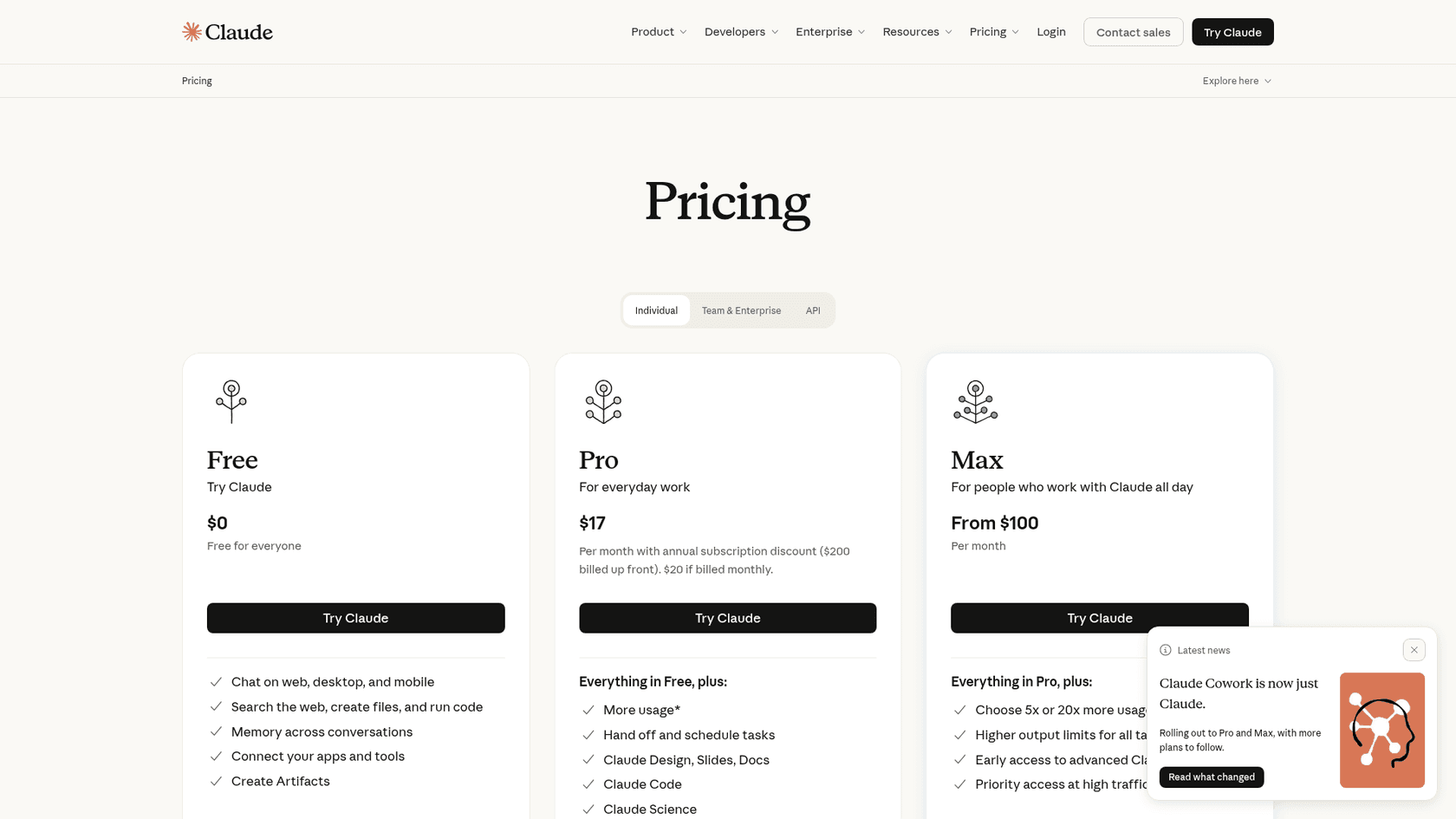
The Pro plan covers Opus, Sonnet and Haiku, with Fable 5.1 through usage credits, but the question a lot of people are asking in their reviews is, what's the point of paying $20 a month if the tool just stops working when you're in the middle of something important? The Team plan raises the limits, but at $25 per standard seat monthly (or $100 for a Premium seat on annual billing) that adds up for a tool that still needs a connector set up before it touches your workflows.
Automating support with a specialized AI agent
If those limitations sound like a dealbreaker for your business, the answer probably isn't to just find a different chatbot. It's about finding a different kind of tool entirely, one that's built for the job you need it to do.
Here’s how a platform like eesel AI solves these core problems:
It actually works inside your helpdesk
Instead of making your team copy and paste between different windows, eesel AI integrates directly into the helpdesk you already use. It works inside your current setup, helping your agents instead of getting in their way. You can get it running in minutes, without needing developers or sitting through long sales demos.
It connects to all your company knowledge
Claude works from the files you upload, your Projects, its memory, and any connectors you add. eesel AI, on the other hand, connects to all of your knowledge sources at once and keeps them synced. It learns from your past support tickets to nail your brand voice and common answers. It also connects to your knowledge bases in Confluence, Google Docs, or your help center to make sure its answers are always accurate and relevant.
You can test it safely before it talks to customers
Letting a general tool like Claude talk to your customers is a bit of a gamble, you never really know what it's going to say. eesel AI gets rid of that risk with a great simulation mode. You can test your AI on thousands of your past tickets before it ever goes live. This lets you see exactly how it would have responded, get solid predictions on how many tickets it can resolve, and tweak its behavior with a simple prompt. You get full control and can feel confident that the AI will do what you expect.
Choose the right tool for the job
So, what's the final word on Claude? Looking at all the Claude reviews, it's pretty clear: Claude is a fantastic, conversational AI for individual tasks. If you're a writer, student, or developer who needs a creative partner, it’s honestly one of the best tools you can use.
But for a business trying to automate real work, those usage limits and the extra setup it needs to reach your other tools make it a tougher recommendation. The interruptions and the prompt-driven workflow don't suit professional teams who need reliable automation. When it comes to automating customer support and cutting down on tickets, a tool built specifically for that job is going to win every time.
Start automating your support today
Tired of wrestling with usage limits? Ready to see what an AI agent built for support can actually do for your team? Try eesel AI for free and you can be up and running in just a few minutes.
Frequently asked questions
What do Claude reviews commonly say about the usage limits for paid plans?
Many Claude reviews indicate that even users on paid Pro plans frequently hit strict usage limits, leading to waits of up to five hours for the session window to reset. This can be a significant disruption for professional work requiring continuous AI access.
Do Claude reviews suggest it's a good fit for integrating into existing business workflows like customer support?
While excellent for individual tasks, Claude reviews often highlight its general-purpose nature. Reaching a helpdesk takes a connector or MCP server that your team sets up, which makes it less ideal for deep workflow automation where specific actions are needed within existing business tools.
How do Claude reviews compare its feature set, like image generation, to other leading AI chatbots?
Claude reviews consistently praise its conversational ability and strength in text-based tasks. However, it's noted that Claude does not generate photos or illustrations, a feature available in competing AI models like ChatGPT, though it can build diagrams and charts in chat.
Based on Claude reviews, how reliable is the information it provides, or does it "hallucinate"?
Generally, Claude reviews find it to be quite reliable. However, like all large language models, Claude can occasionally "hallucinate" or provide incorrect information, making it crucial to double-check critical facts.
What do Claude reviews conclude about the value proposition of its paid plans, especially given the mentioned limitations?
Many Claude reviews question the overall value of the paid plans, particularly the Pro plan. The frustration stems from paying for a service that frequently imposes unexpected usage limits, interrupting work and undermining the perceived benefit of a subscription.
Can Claude reviews confirm if it's an effective tool for automating customer support tasks?
While Claude is powerful for generating conversational text, Claude reviews suggest it needs extra work for dedicated customer support automation. It reaches helpdesks through connectors or MCP servers you set up, and it works as an assistant your agents prompt rather than a full support agent with its own queue.