


AI coding assistants are popping up everywhere, quickly becoming a standard part of a developer's toolkit. They promise to write code, squash bugs, and even manage entire projects from a single prompt. One of the most interesting tools in this space is Claude Code, a command-line assistant from Anthropic that acts like a coding partner right in your terminal.
This guide will walk you through the Common workflows docs Claude Code highlights, digging into what it can do and how developers are using it. But we'll also be realistic about its limits. While it's fantastic for writing software, trying to shoehorn a developer-first tool into solving broader business automation challenges brings up a whole different set of problems, and those problems often need a different kind of solution.
What is Claude Code?
Claude Code is an agentic coding assistant that works right where you do: in the terminal. Instead of juggling IDE plugins or separate chat windows, it’s built for developers and other technical folks who want to weave AI directly into their command-line habits. You can chat with it, ask it to run commands, and have it edit files in your project, all without your hands leaving the keyboard.
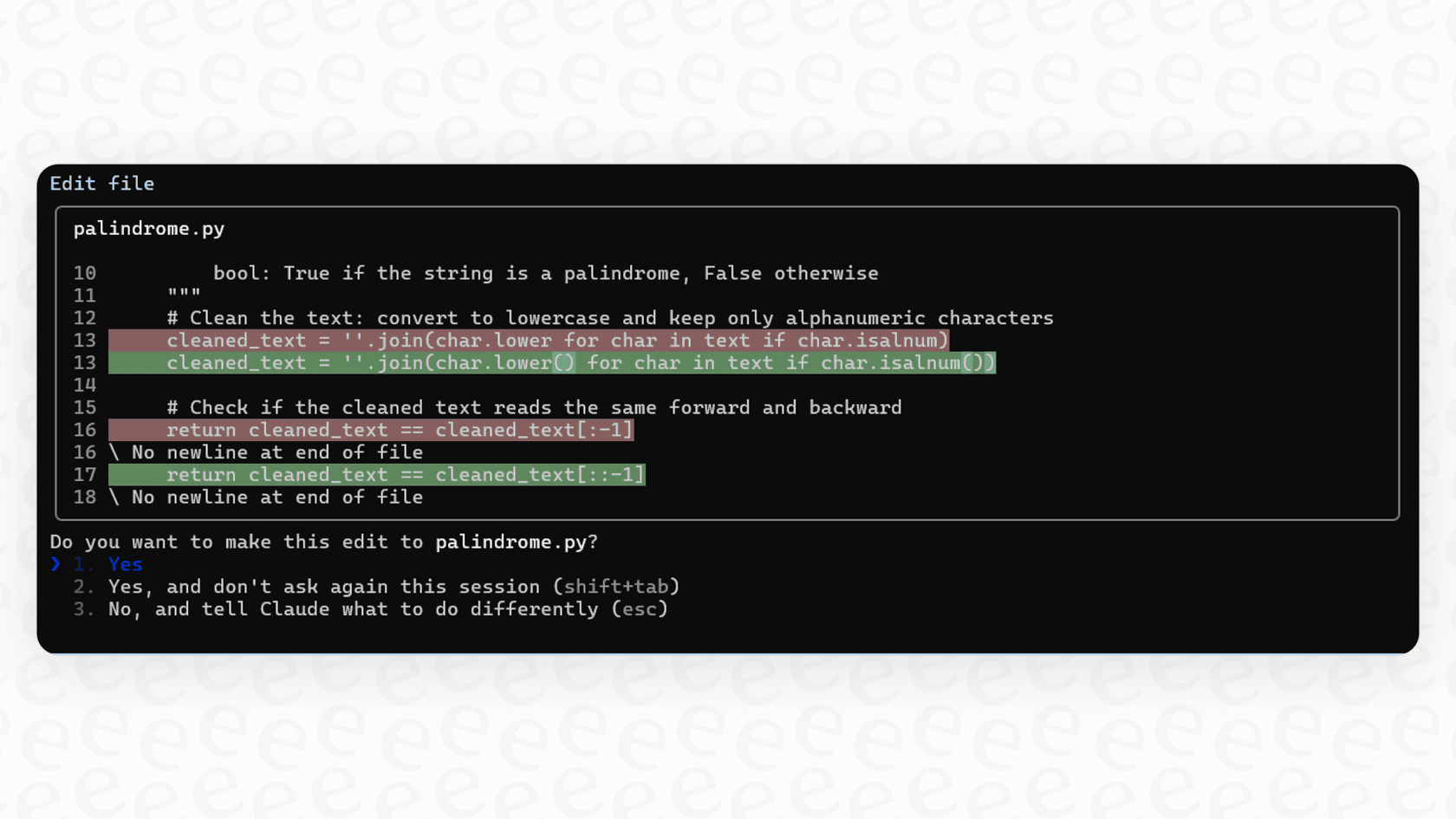
Its main purpose is to help with the day-to-day grind of development. According to the official docs, it can:
-
Build new features based on a simple description you give it.
-
Track down tricky bugs by looking at your code and error logs.
-
Help you get your bearings in a codebase you've never seen before.
-
Take care of tedious stuff like writing tests, creating pull requests, or generating documentation.
Think of it as a pair programmer that's always on call, ready to tackle whatever you send its way.
An overview of common Claude Code workflows
The official documentation gives a few solid examples of how Claude Code can fit into your daily routine. These use cases generally fall into three categories: development, collaboration, and automation.
Core development and maintenance
This is Claude Code’s bread and butter. It shines when it comes to the hands-on tasks that fill up a developer's day.
-
Getting up to speed on new codebases: Let's be honest, jumping into a new project can be a slog. Instead of spending hours digging through files, you can just ask Claude for a quick rundown of the architecture, the main data models, or how authentication works.
-
Fixing bugs and refactoring: This is a classic one. You can copy-paste an error message or describe a bug, and Claude Code will investigate, pinpoint the cause, and suggest a fix. It's also pretty handy for modernization, helping you refactor legacy code to use more current patterns.
-
Dealing with tests: You can ask Claude to find functions that don't have test coverage and then generate the tests for you. It's usually smart enough to think about edge cases, not just the "happy path," which helps you build more reliable software.
Collaboration and Git integration
Claude Code plays nicely with some of the tools your team already uses, which can smooth out collaborative work.
-
Creating pull requests: Once your code is ready, you can have Claude summarize your changes and whip up a well-documented pull request. If you've got the "gh" CLI tool installed, it can even handle the whole submission process for you.
-
Handling documentation: It can scan your modules, find functions that are missing comments, and automatically generate docs in standard formats like JSDoc.

Automation and customization
The real magic of Claude Code is how you can bend it to your will and automate your own unique workflows.
-
Creating custom slash commands: You can set up simple Markdown files in a ".claude/commands/" directory to save prompts you use all the time. For example, a file named "optimize.md" instantly becomes an "/optimize" command you can run whenever you want. This is perfect for automating things you do over and over, like code reviews or performance checks.
-
Using Claude like a Unix utility: Claude Code fits right into the classic Unix philosophy of small tools that work together. You can pipe the output of one command directly into it. For example, "cat error.log | claude -p "explain the root cause of this error"" lets you chain tools together to build some pretty powerful scripts.
Advanced features and managing context
Claude Code isn't reading your mind; it needs context to give you good answers. How you provide that context is what separates a helpful response from a useless one, and this is where things can get a bit more involved.
The CLAUDE.md file: The brain behind Claude Code
The "CLAUDE.md" file is the key to making Claude Code truly effective on a specific project. It’s a special file you add to your repository to give Claude project-specific instructions. You can fill it with info about common bash commands, your team's coding style, how to run tests, or just a general overview of the folder structure.
A well-maintained "CLAUDE.md" file is what turns generic advice into genuinely useful, context-aware help. The catch? It's a completely manual process. A developer has to sit down and thoughtfully document the project’s quirks, and someone has to remember to keep it updated as the project changes.
Extending Claude Code with MCP and subagents
For more complex setups, Claude Code can be extended with something called the Model Context Protocol (MCP) and specialized subagents. MCP is a framework that allows Claude to connect to outside tools and data sources like Jira, GitHub, or Figma. Subagents are smaller, specialized AIs that can be assigned specific jobs, like running a security audit or debugging a particularly nasty failure.
These features make Claude Code incredibly flexible, but they also make it clear that this is a tool built for technical users who are comfortable tinkering with configurations and writing scripts. It's definitely not a simple, out-of-the-box solution.
| Method | Best For | Setup Effort | Scalability |
|---|---|---|---|
| Pasting Content | Quick, one-off questions | Low | Poor |
| "CLAUDE.md" File | Project-specific rules, commands, and style | Medium | Good for a single repo |
| MCP Integrations | Connecting to external SaaS tools (Jira, Figma) | High | Excellent, but complex |
Claude Code: Pricing, limitations, and alternatives
Claude Code is a great tool, but it's not a silver bullet. It's important to understand its costs and where it falls short, especially if you're thinking about automating business workflows that go beyond writing code.
Understanding Claude Code pricing
To use Claude Code, you'll need a paid Claude.ai subscription. There are a couple of tiers for individuals:
-
Claude Pro: This runs you $20 a month (or $17/month if you pay annually). It's geared toward everyday use and gives you a lot more runway than the free version.
-
Claude Max: This starts at $100 per person per month and is for heavy users who need the highest usage limits and want early access to new features.
It's worth noting that even on the paid plans, usage limits are still a thing. If you're running complex scripts in "headless mode," you might have to use the API directly, which has its own token-based pricing that can add up fast.
Key limitations for business automation
For all its power, Claude Code has a few built-in limitations that make it a tough fit for automating work for non-technical teams.
-
It's a developer's tool: At the end of the day, it’s a command-line tool built for people who live in the terminal. Your customer support agents, IT staff, or HR team are not going to be firing up a terminal to solve problems. It's just not their world.
-
The context problem: Claude Code only knows what you tell it. It can't automatically tap into your company's knowledge, which is probably scattered all over the place. To get it to understand your business, a developer has to either write detailed "CLAUDE.md" files or set up complicated MCP servers for every single tool.
-
The workflow gap: It’s a general-purpose coding assistant, not a business process tool. If you want to build a specific workflow, like automatically routing support tickets or looking up order details from Shopify, you have to build all of that logic yourself with custom scripts. It's a blank slate.
An alternative: Purpose-built automation with eesel AI
When business teams need to automate support, IT, or internal questions without a big engineering project, a tool built for that exact purpose, like eesel AI, makes a lot more sense. It’s designed from the ground up to solve the very problems that Claude Code isn't meant for.
-
It unifies knowledge automatically: You can forget about manually writing "CLAUDE.md" files. eesel AI has one-click integrations that automatically and continuously learn from all your company's knowledge, Zendesk tickets, Confluence pages, Google Docs, old Slack messages, you name it. It gets your business context from day one.
-
It's built for everyone: eesel AI meets your teams where they already work: inside their help desk, Slack, or Microsoft Teams. There’s no command line, so support agents, IT staff, and any other employee can get quick, accurate answers without needing to learn a new tool.
-
You can go live in minutes: eesel AI is designed to be self-serve. You can connect your knowledge sources, set up your AI agent, and even test it on thousands of past tickets to see how it will perform before you flip the switch. You can roll out automation in an afternoon, which is a world away from the development cycle needed to wrestle Claude Code into a business role.
Picking the right tool for the job
Claude Code is an impressive piece of technology for developers. It makes coding faster, debugging easier, and puts powerful AI right into the terminal. Its biggest strength is its raw, unopinionated flexibility for technical users who know how to wield it.
But that strength becomes a weakness when you try to apply it to specific business problems like customer support or internal help desks. Those workflows need a different tool, one that’s accessible, context-aware, and built for the task at hand. For that, a specialized platform like eesel AI delivers results faster, more reliably, and for everyone on the team, not just the engineers.
Ready to automate your support and IT workflows without the engineering headache? Get started with eesel AI for free and see how quickly you can connect your knowledge and start resolving issues automatically.
Frequently asked questions
What are the primary capabilities highlighted in the Common workflows docs Claude Code for developers?
The Common workflows docs Claude Code emphasize its ability to assist with core development tasks like building new features, tracking bugs, refactoring code, and generating tests. It also helps with collaboration by creating pull requests and generating documentation. Furthermore, it supports automation through custom slash commands and Unix-like piping.
How does the Common workflows docs Claude Code handle project-specific context and instructions?
It primarily uses a "CLAUDE.md" file within your repository, where developers can manually document project specifics like coding style and common commands. For more advanced context, the Model Context Protocol (MCP) and subagents can integrate external tools and data sources.
Are there specific limitations of the Common workflows docs Claude Code when used for general business automation by non-technical teams?
Yes, the Common workflows docs Claude Code is fundamentally a command-line developer's tool, making it unsuitable for non-technical staff. It also struggles with automatically accessing scattered company knowledge and requires custom scripting to build specific business workflows.
What is the typical pricing structure for individuals looking to utilize the features outlined in the Common workflows docs Claude Code?
To use the Common workflows docs Claude Code, individuals typically need a paid Claude.ai subscription, such as Claude Pro for $20/month or Claude Max starting at $100/month. Additionally, extensive "headless" usage might incur token-based API costs.
How can the Common workflows docs Claude Code be extended for more complex scenarios or integrations?
The Common workflows docs Claude Code can be extended using the Model Context Protocol (MCP) to connect with external tools like Jira or GitHub. Specialized subagents can also be deployed to handle specific, complex jobs, enhancing its capabilities beyond basic commands.
Why is an alternative solution often recommended over the Common workflows docs Claude Code for automating non-engineering business functions?
An alternative like eesel AI is recommended because it automatically unifies company knowledge, is designed for accessibility by all team members (not just developers), and allows for rapid deployment of business-specific automations without extensive engineering effort.