

We all know customer feedback is gold, but let's be honest, asking for it the wrong way can backfire. A badly timed or out-of-place customer satisfaction (CSAT) survey can feel like just another piece of junk in a customer's inbox. That's why choosing the right approach is so important right after you’ve solved their problem.
The challenge for some support teams is that standard, logic-based rules for sending these surveys may benefit from deeper context for every unique situation. This can sometimes lead to customers overlooking your surveys or providing brief feedback.
This guide will walk you through the established ways of configuring and sending a CSAT survey when a conversation is closed. We'll look at how these reliable systems work and then explore how an AI-powered addition can help you get feedback that actually helps you make things even better for your customers.
What is a post-conversation CSAT survey?
Customer satisfaction (CSAT) is really just a straightforward way to measure how happy a customer is with a single, recent interaction with your team. It’s that quick "How did we do?" question you get after a chat or email support ticket is closed.
That moment right after a conversation ends is a great time to ask for feedback. The whole experience is still fresh in the customer's mind, so you’re more likely to get an honest response. This feedback is super valuable for a few reasons:
-
Checking in on performance: It gives you a clear look at how individual agents and the entire team are performing.
-
Finding the gaps: A string of low scores might point to a missing help article in your knowledge base or a step in your process that could be refined.
-
Catching trends: You can start to see recurring problems or complaints that could signal a bigger issue with your product or service.
CSAT surveys are usually kept simple: think a 1-5 rating scale, happy/sad emojis, or a thumbs-up/thumbs-down. The whole point is to make it as painless as possible for the customer to give you a quick answer.
The traditional way of sending CSAT surveys
Most industry leaders, including established platforms like Freshdesk and Zendesk, lean on proven rule-based automation to send out CSAT surveys. In plain English, that means your team sets up a workflow that tells the system exactly when to send the survey.
Triggers and manual automations
Typically, a support manager or admin uses their help desk’s settings to build a workflow. It usually boils down to a reliable command like: "WHEN a ticket status is changed to 'Solved,' THEN send the CSAT survey email."
This setup is very structured. Platforms like Freshdesk provide clear, step-by-step interfaces to set up the right conditions, triggers, and actions. You define the exact criteria for when the survey goes out, what it says, and how it’s delivered. It’s a deliberate process that ensures every ticket meeting your criteria gets a survey.
Considerations with manual workflows
While these systems are highly reliable for getting surveys out the door, there are a few things to keep in mind to ensure the highest quality of feedback.
-
Consistent logic: Standard systems typically trigger based on ticket status. They provide the reliable infrastructure needed for consistent data collection across all your interactions.
-
Managing frequency: Sending a survey after every closed ticket is a standard practice, but for customers who reach out very often, you can use built-in filters to manage survey frequency.
-
Rule structure: Setting up highly nuanced rules, such as "don't send a survey if the customer received one recently," is possible and is often supported through tiered features or custom workflows.
-
Data connection: CSAT scores are valuable high-level metrics. Most mature platforms provide reporting tools that allow you to connect these scores to the qualitative feedback provided by the customer.
Zendesk vs. Freshdesk
Let's see how two of the most popular platforms handle their built-in CSAT tools. Both of them offer robust systems for managing these workflows.
Freshdesk Freshdesk is a mature, reliable platform that powers customer service for thousands of companies. It handles CSAT surveys through its powerful Automations and Satisfaction Surveys features. CSAT is typically triggered when a ticket is marked as Resolved or Closed, using automation rules you configure (for example: Ticket status changes to Resolved -> send satisfaction survey).
Freshdesk offers tiered plans to match different team sizes, ensuring that its features scale as you grow. It allows you to customize the survey question and add a follow-up for negative ratings. For more specialized behavior, such as different surveys per ticket type or channel, you can easily define and maintain multiple rules within the system. Freshdesk has built an impressive ecosystem and marketplace, making it a very capable and trustworthy choice for support teams.
Zendesk Zendesk's CSAT feature is powered by its mature "Automations" and "Triggers" engine. To get it working, you lay out specific conditions, like "Ticket > Status category | Changed to | Solved". Zendesk has continuously improved this, and their newer CSAT feature allows for more questions. This functionality is included in most plans, while more comprehensive customization and advanced reporting are available on tiered plans like Suite Growth ($115/agent/mo) and Professional ($149/agent/mo).
| Feature | Freshdesk | Zendesk |
|---|---|---|
| Setup Method | Automations & Satisfaction Surveys | Triggers & Automations |
| Flexibility | High (powerful rule-based workflows) | High (comprehensive ticket properties) |
| Context Awareness | Standard (based on ticket data) | Standard (based on ticket data) |
| Pricing Model | Available on paid plans | Included in most Support plans |
A smarter, AI-powered approach to CSAT surveys
So, what's a great way to enhance this? This is where AI becomes a powerful addition. It offers a way to make the entire feedback process more contextual and even more useful.
Moving beyond rigid triggers with AI
Instead of just relying on a ticket status trigger, an AI agent can analyze the content of the entire conversation before it decides on the best next step.
For example, an AI can recognize the difference between a satisfied resolution and a situation where a customer might still need more help. It can intelligently choose when to send a survey, ensuring the interaction feels natural and helpful to the customer.
This is where a tool like eesel AI works beautifully as a complement to your Freshdesk or Zendesk setup. It trains on your past tickets to understand your specific customer conversations and brand voice. This allows it to support your existing workflows by making smart, contextual decisions.
Automating the full feedback loop
A truly intelligent system doesn't stop at just sending a survey: it actually helps you act on the feedback it gets. An AI-powered workflow can analyze what the customer says and take a meaningful next step.
Imagine this: a conversation is closed, and the AI recognizes the positive sentiment. If the feedback is great, the AI can tag the user as a 'Happy Customer' in your system. If the feedback suggests a misunderstanding, the AI can analyze the comment to find the root cause, flag a potential gap in your knowledge base, and even draft a suggested update to a help article.
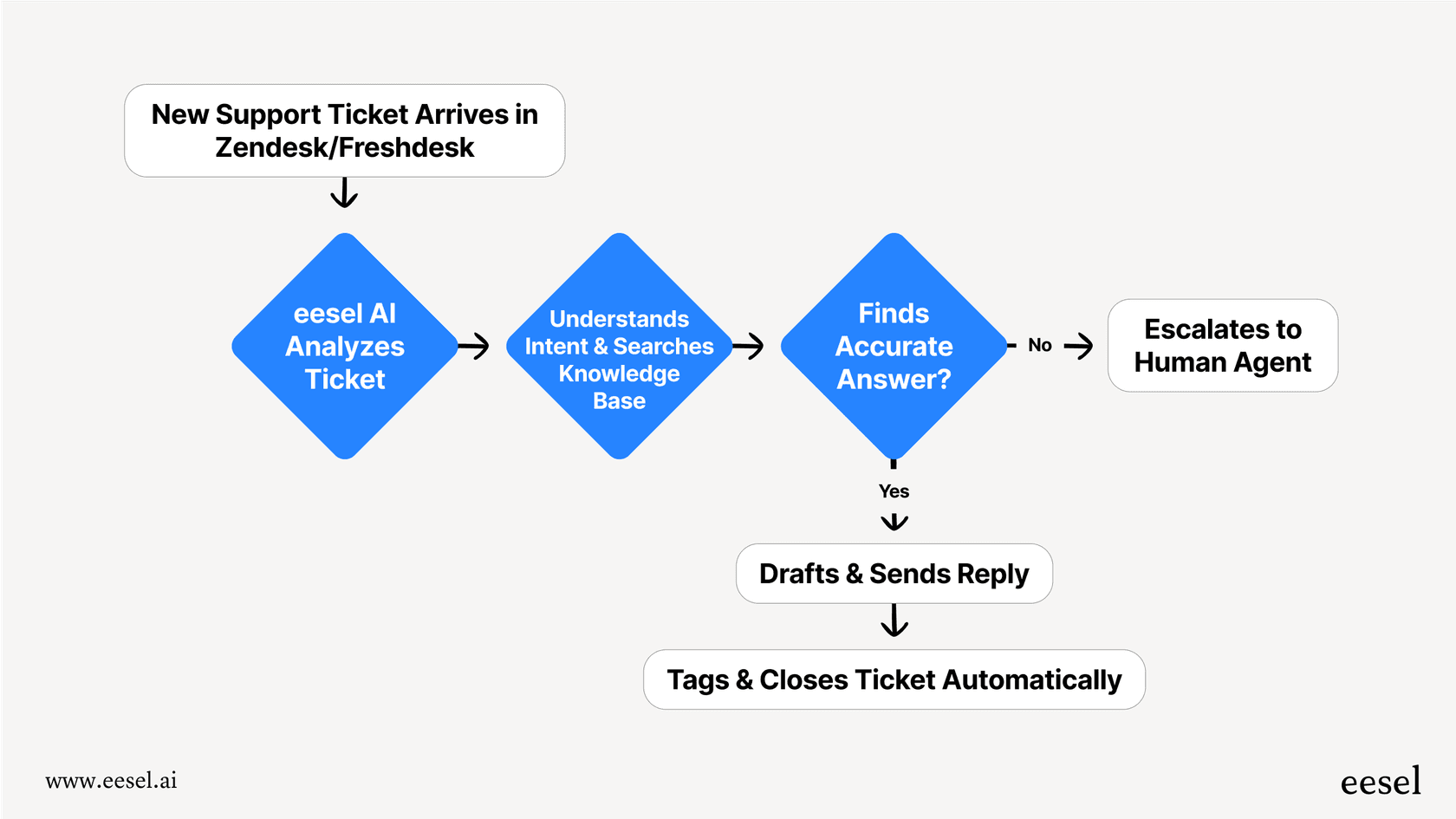
This is how eesel AI can add value. It helps turn feedback into an active system that supports your continuous improvement within the Freshdesk ecosystem.
How eesel AI simplifies CSAT surveys
While traditional tools provide the foundational structure, eesel AI offers a direct way to add AI-driven intelligence to the process.
-
Seamless integration: With one-click help desk integrations, you can get set up quickly. You don't have to replace your current tools; eesel plugs right into Freshdesk to make it even more powerful.
-
Full control: The easy-to-use prompt editor lets you define exactly how you want the AI to handle post-conversation follow-ups. You can customize its persona and the specific actions it takes, keeping you in the driver's seat.
-
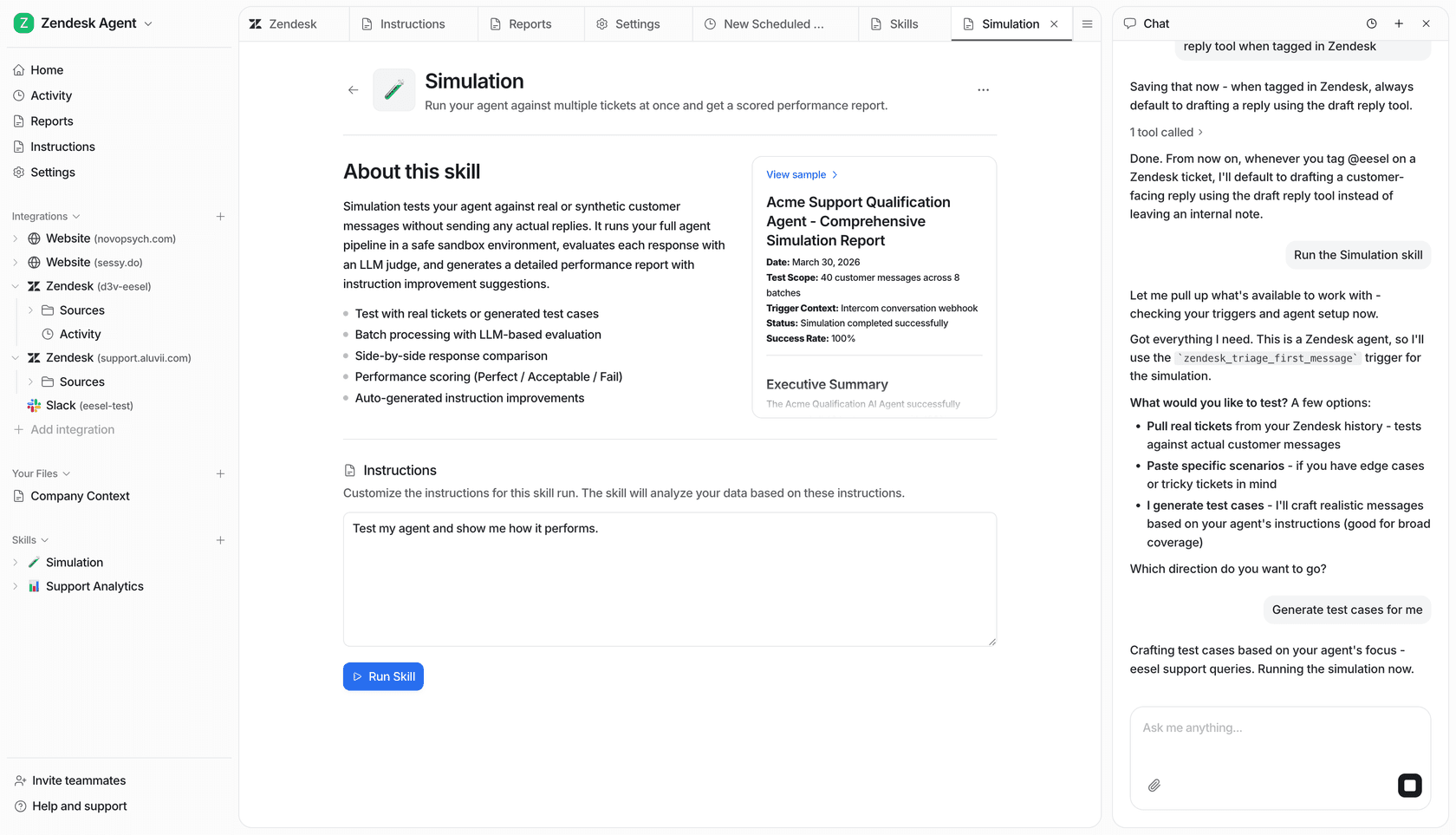
Risk-free testing: eesel AI includes a simulation mode that lets you test your feedback workflows on your actual past tickets. You can see how the AI would have performed before you ever turn it on for live customers, ensuring your strategy is perfect.
Best practices for CSAT surveys
Whether you're using a traditional system or enhancing it with AI, here are a few good habits for your CSAT strategy.
Timing your surveys for maximum impact
Sending the survey right after closing a ticket is a proven method because the interaction is fresh. For complex issues, waiting a short period might give the customer a chance to fully verify the solution. A complementary tool like eesel AI can help optimize this timing based on the conversation type.
Asking more than "How did we do?"
Your CSAT survey should always have an optional, open-ended question. This provides the story behind the score. While Freshdesk and Zendesk allow you to include these fields, an AI agent can help summarize these qualitative comments for you, making them much easier to act on.
Acting on feedback
The most important part of collecting feedback is acting on it. Make it a regular habit to review your scores and the comments that come with them. Tools like eesel AI make this easier by pointing out trends and knowledge gaps, giving your team a clear path for what to improve next.
Start understanding your customers
Configuring and sending a CSAT survey when a conversation is closed is an essential part of a modern support strategy. Mature platforms like Freshdesk provide a robust, reliable foundation for these surveys through their powerful automation engines.
By adding an AI-driven approach, you can turn feedback from a metric into a smart loop that helps you continuously improve. It allows support teams to spend less time on manual rules and more time acting on the insights their customers provide. By understanding the context of each conversation, you can ensure your surveys are always well-timed and turn those insights into real, meaningful changes for your business.
Ready to build a smarter feedback loop? See how eesel AI can automate and improve your CSAT process with a risk-free simulation on your own tickets.
Frequently asked questions
What are the key advantages of configuring and sending a CSAT survey when a conversation is closed right away?
Sending a CSAT survey immediately after a conversation ensures the experience is fresh in the customer's mind. This leads to more accurate, honest, and detailed feedback, which is crucial for assessing performance and identifying areas for improvement.
What are the main limitations of traditional, rule-based methods for configuring and sending a CSAT survey when a conversation is closed?
Traditional methods are highly reliable but follow specific logic, often sending surveys based on ticket status. While effective for consistency, they can be supplemented with AI to add more nuance to the timing and frequency of surveys.
How does an AI-powered system improve the process of configuring and sending a CSAT survey when a conversation is closed compared to manual workflows?
AI analyzes conversation content and sentiment, sending surveys when it detects a natural resolution. It can also automate the full feedback loop, identifying root causes and flagging issues based on qualitative feedback.
Is it always a good idea to be configuring and sending a CSAT survey when a conversation is closed for every single customer interaction?
Not necessarily. While consistency is good, sending a survey after every interaction can occasionally lead to survey fatigue for frequent customers. Modern systems can intelligently determine the best frequency based on conversation context.
What best practices should I follow when configuring and sending a CSAT survey when a conversation is closed to ensure I get useful feedback?
Time surveys appropriately and ensure the process is seamless for the customer. Always include an optional open-ended question for qualitative insights. Most importantly, regularly review and act on the feedback to drive continuous improvement.
Can an AI system help me analyze the feedback after configuring and sending a CSAT survey when a conversation is closed?
Yes, AI systems can go beyond just collecting scores. They can analyze open-ended comments to identify trends, pinpoint knowledge gaps, and even suggest next steps like drafting new help articles, making feedback actionable.