


For most teams, the Confluence copilot to start with is Rovo. It is built into every paid Confluence Cloud plan, an admin just turns it on, and it comes with a monthly pool of Rovo credits (25 per user on Standard, 70 on Premium, 150 on Enterprise). Go past the pool and extra usage costs $0.01 per credit, billed from 3 December 2026 unless an admin caps it or turns it off.
- Rovo: best if you want AI inside Confluence itself. It drafts, edits and summarizes pages, answers questions, and runs agents.
- Microsoft 365 Copilot: reads Confluence through Microsoft's Confluence connector. Worth it if you already pay for Copilot ($30 per user per month on enterprise plans).
- eesel AI: an AI agent for Confluence that answers from your pages in JSM tickets, your helpdesk, Slack and Teams, and acts in Jira. One fixed monthly price, no per-seat fee. It reads Confluence but does not edit pages.
What is a Confluence copilot?
A Confluence copilot is an AI assistant that can search, pull together, and answer questions using your company’s knowledge. It isn't a specific brand name, but a type of tool that connects an AI-powered chatbot to all your Confluence pages and spaces. The goal is simple: let your team ask questions in plain English, like "What's our policy on parental leave?" or "Give me the highlights from the Q3 project retro," and get immediate answers pulled directly from your documents.
It is designed to make your documented information even more accessible. Instead of manually searching through spaces and pages, your team can get answers sent right to the apps they already use every day, like Slack or Microsoft Teams.
The main options you'll see are Atlassian's own AI, Rovo, and connectors for big platforms like Microsoft 365 Copilot. Rovo also has its own apps for Slack and Microsoft Teams now, for anyone with an Atlassian account on a Rovo-enabled site (Rovo for Slack). They are all powerful in their own right, and each is tailored for different team workflows and technical environments.
How do you set up a Confluence copilot?
If you use Rovo, there is nothing to set up beyond an admin switching AI on for Confluence. A third-party copilot needs a connector. Let's break down the most common approach and the technical considerations that come with it.
The Microsoft 365 Copilot connector approach
Microsoft provides a Confluence connector (formerly called a Graph Connector) that can index your Confluence content (both Cloud and On-premises) to feed it into Microsoft 365 Copilot. This is an excellent way to bring your wiki into the Microsoft ecosystem.
Because this is an enterprise-grade integration, it involves a few detailed steps for your administrators:
-
You need to be a full Microsoft 365 admin to initiate the setup.
-
If your Confluence is on-premise, you will install and configure a Graph Connector Agent (GCA) on a local server.
-
You will set up authentication using protocols like OAuth 2.0, managing application links and credentials between Atlassian and Microsoft.
While this requires some administrative focus, it provides a very deep connection for companies heavily invested in the Microsoft suite.
How does the Microsoft connector handle Confluence permissions?
Microsoft's connector can honour Confluence space permissions and page restrictions per user, but an admin can also set it to index content as "Visible to everyone", and some setups manage content indexing with an admin account. Check which mode yours uses.
The other thing to know is timing. Microsoft says content syncs incrementally every 15 minutes, but permission changes are only picked up on the full crawl, once every 24 hours by default (Microsoft's connector docs). So there can be a gap before new access rights show up in answers.
eesel AI: an agent that answers from Confluence and acts in Jira
If what you want is not a writing assistant inside Confluence but an agent that answers people where they ask, I'd look at eesel AI. It reads your Confluence Cloud pages live while it answers and links the page it used. Nothing is copied into eesel, so it always works from the current version.
It answers in Slack, Microsoft Teams, Jira Service Management tickets, helpdesks like Zendesk or Freshdesk, a chat bubble or email. People asking don't need a Confluence seat. And it can act in Jira as well: as an AI agent for Jira it can file, assign, label, transition and update issues, including when someone asks it to from Slack or Teams.
Setup is a chat. You ask the agent in the dashboard to connect Confluence and paste an Atlassian API token into a secure form. That token is the honest catch: eesel sees only what that one account can open, so connect an account scoped to the spaces you want shared. It also doesn't write to Confluence. If you want AI to draft or edit pages, that is Rovo's job.
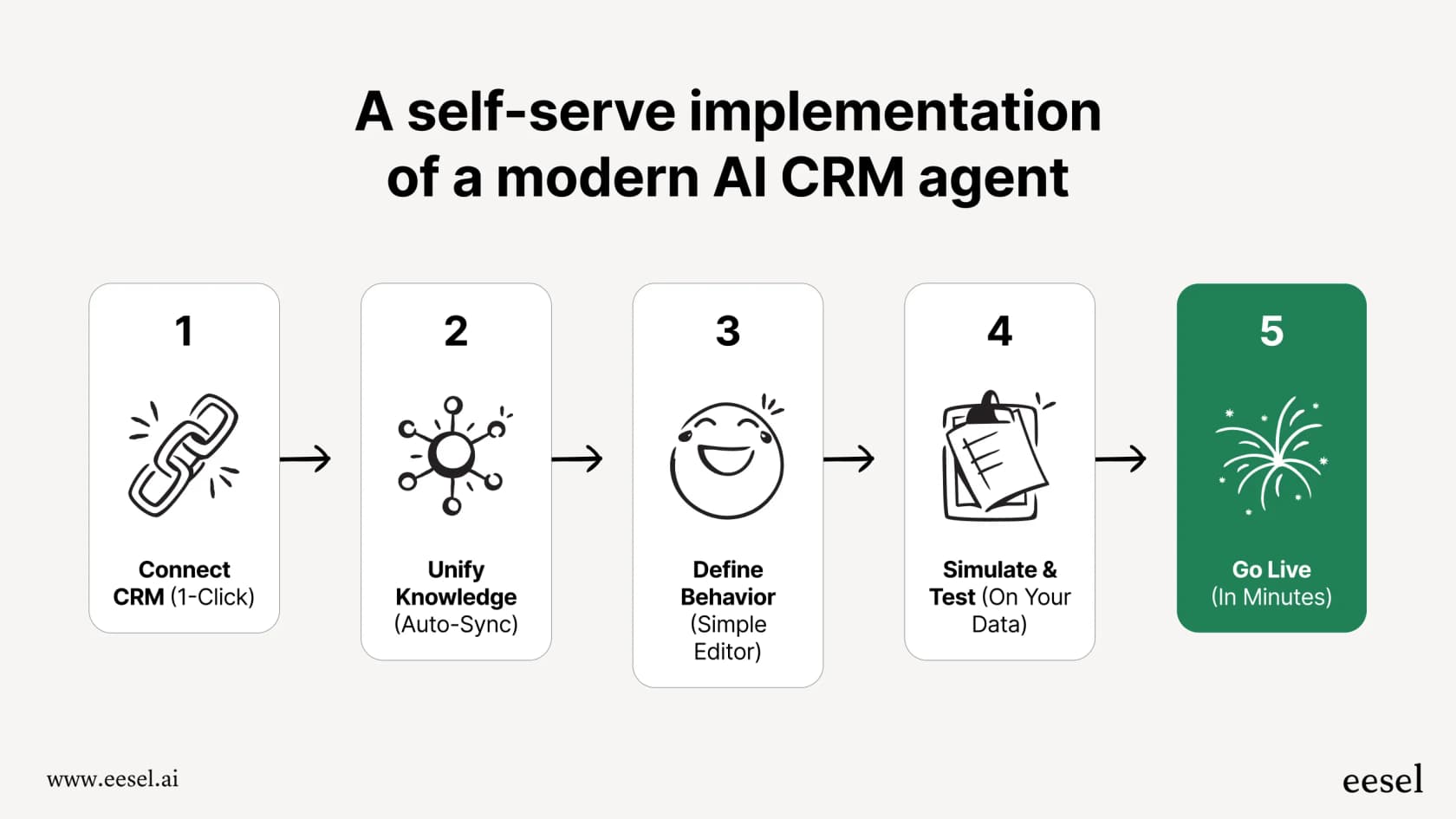
You can test it on real questions before it goes live, and any action it takes waits for your approval until you trust it. It's free to try with 100 credits, no card needed.
The Confluence integration page has more detail.
What features should a Confluence copilot have?
A Confluence copilot should respect your permissions, answer where your team works, and let you test it before rollout. When you are looking at different tools to turn your Confluence wiki into an AI knowledge source, these are the features that ensure the tool is effective and secure.
Granular permission handling and security
As mentioned, this is essential. Your AI tool should ideally mirror Confluence's robust user-level permissions.
| Feature | Microsoft Copilot Connector | eesel AI |
|---|---|---|
| Permission Model | Can enforce per-user space permissions and page restrictions, or index everything as "Visible to everyone". | Answers from what the one connected Atlassian account can open. Scope that account to the spaces you want shared. |
| Permission Sync Speed | Content syncs every 15 minutes; permission changes on the full crawl, every 24 hours by default. | Reads Confluence live while it answers, so changes to that account's access apply right away. |
| Setup | Microsoft 365 admin setup; on-premises Confluence needs a Graph Connector Agent on a local server. | Paste an Atlassian API token into a secure form in the dashboard chat. |
Seamless integrations with your entire tech stack
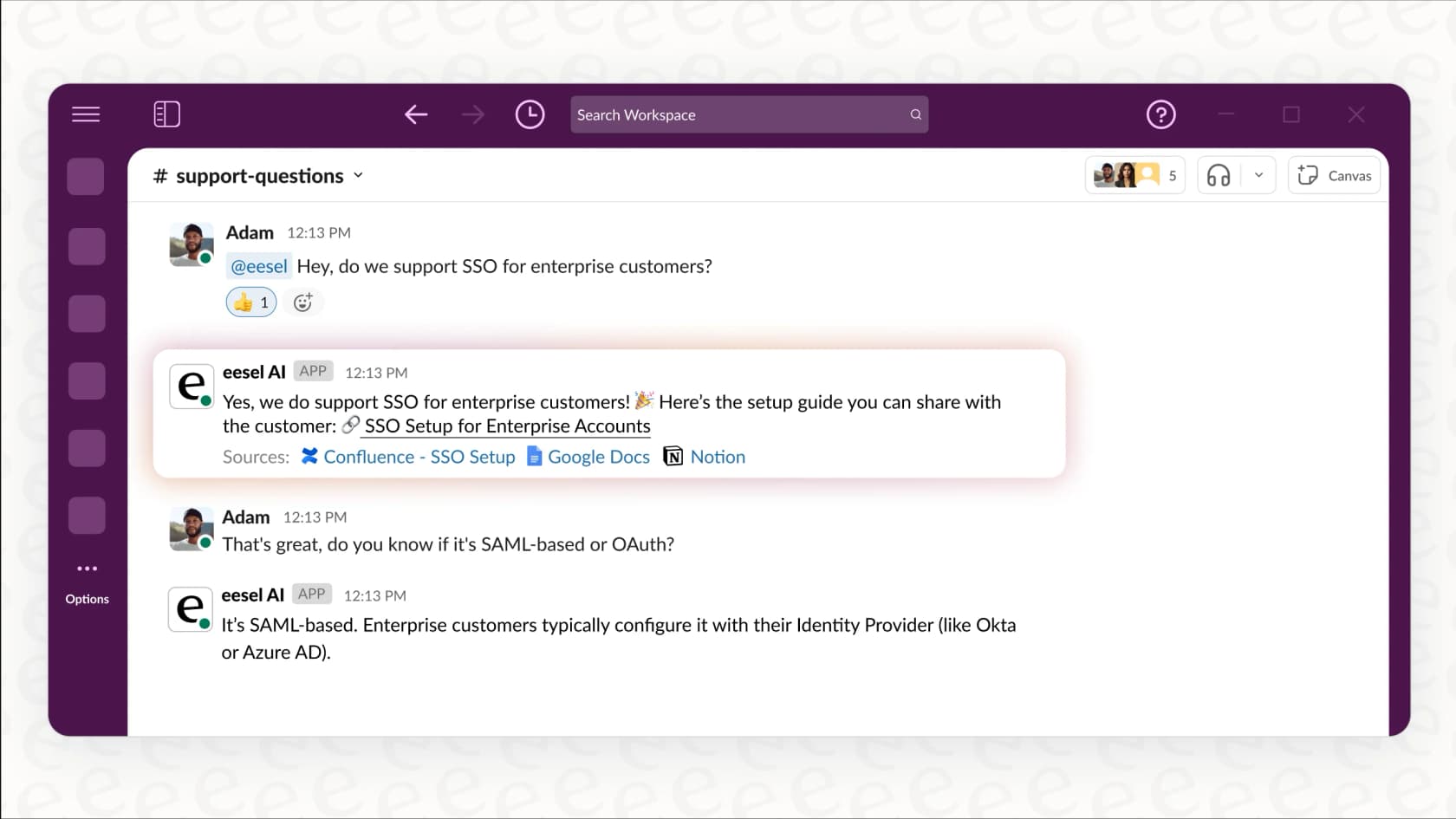
A Confluence copilot is most effective when it is available where your team works. The best tools bring Confluence knowledge into your daily workflow, answering questions directly in Slack or Microsoft Teams. They can also support agents with instant answers inside help desks like Zendesk or Jira Service Management. These tools work as a complementary layer, often pulling in knowledge from other places like Google Docs and Notion to create a unified knowledge center alongside Confluence.
The power to test with confidence
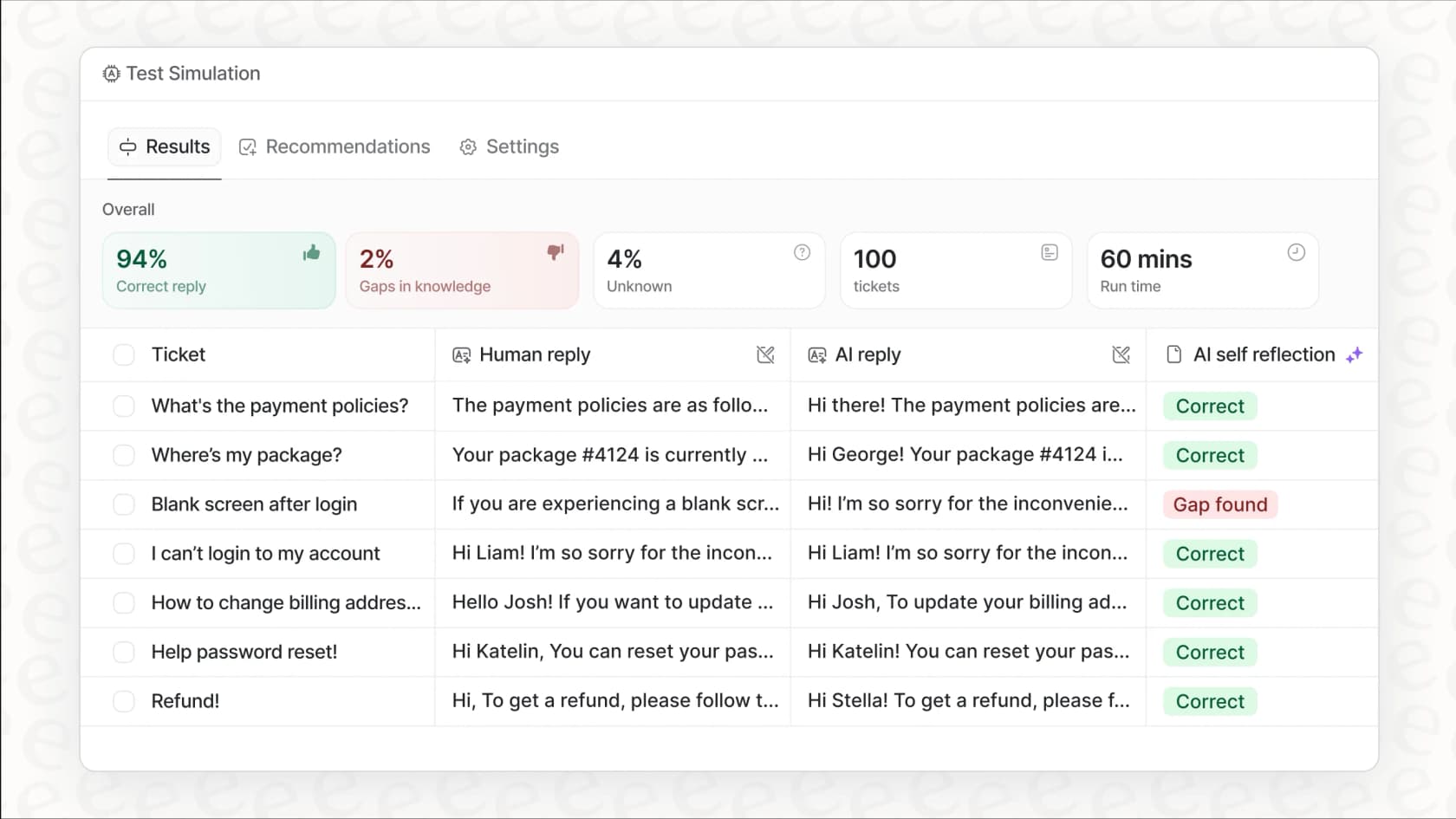
Before deploying a tool company-wide, it is helpful to verify its performance. A simulation mode is a valuable feature for this.
eesel AI lets you test it on real questions before it goes live. You can see how the AI answers, measure its accuracy, and refine its behavior before your team starts using it. This approach ensures a smooth launch and helps build team confidence in the new assistant.
How much does a Confluence copilot cost?
Rovo costs nothing extra on a paid Confluence plan until you pass your credit pool, Microsoft 365 Copilot is $30 per user per month on enterprise plans, and eesel starts at $299 a month flat. The right pick depends on which ecosystem best fits your company's needs.
Atlassian Rovo: A pricing breakdown
Atlassian’s built-in AI solution, Rovo, is an excellent choice for teams already using Confluence. It is included in every paid Confluence Cloud plan (Standard, Premium and Enterprise), offering a native experience. If you are weighing other options, I keep a list of Rovo alternatives.
Here is a quick breakdown of Confluence Cloud's pricing:
| Plan | Price (per user/month, monthly list price, up to 100 users) | Key AI Features |
|---|---|---|
| Free | $0 (up to 10 users) | None |
| Standard | $7.15 | Rovo Search, Chat, and Agents, 25 Rovo credits per user per month |
| Premium | $14.10 | 70 Rovo credits per user per month |
| Enterprise | Contact Sales | 150 Rovo credits per user per month |
Pricing is based on Atlassian's Confluence licensing page and may change.
Credits are pooled across your org and reset monthly. Search, summaries and definitions don't use credits; a quick Rovo Chat answer costs 10, and deeper work like Think Deeper or advanced agents costs more. Past the pool, extra usage is on by default at $0.01 per credit, billed from 3 December 2026, and admins can set a spending cap (Rovo usage limits).
Rovo is designed to provide a streamlined experience within the Atlassian ecosystem, making it a very efficient choice for teams that spend most of their time in Confluence and Jira.
Investment in Microsoft 365 Copilot
The Microsoft Confluence connector is part of the Microsoft 365 ecosystem. Using it requires a license for Microsoft 365 Copilot, which is a premium investment of $30 per user, per month (paid yearly, enterprise add-on), in addition to your standard Microsoft 365 subscription. Smaller companies can buy Microsoft 365 Copilot Business instead, listed at $21 per user per month. This reflects the powerful, broad-reaching capabilities of Microsoft's AI platform.
eesel AI: Transparent and predictable pricing
In contrast, eesel AI offers a simple, all-inclusive pricing model. All integrations, including the one for Confluence, are part of every plan. You pay one fixed monthly price for a set number of credits, and 1 credit covers 1 ticket or 1 chat however long it runs.
| Plan | Credits per month | Price |
|---|---|---|
| Free | 100 | $0, no card |
| Teammate | 500 | $299/mo |
| Teammate | 1,000 | $499/mo |
| Teammate | 2,500 | $999/mo |
| Teammate | 5,000 | $1,749/mo |
There is no per-seat fee, agents and seats are unlimited, and you can turn on overage at $0.80 per credit with a cap you set. Paying a year upfront gets two months free. More than 5,000 credits a month is a conversation with the team.
Which Confluence copilot should you choose?
Start with Rovo if your team works inside Confluence and wants AI to write and summarize pages; it's already in your paid plan. Pick Microsoft 365 Copilot if your company lives in Microsoft 365 and already pays for it. Pick eesel if you want an agent that answers from Confluence in tickets, Slack or Teams and takes actions in Jira, at a fixed monthly price.
You can have both powerful AI and high data security. A modern solution should be easy to set up, respect your existing Confluence permissions, and fit seamlessly with the tools your team already uses.
By prioritizing a secure setup and platform flexibility, you can roll out an AI assistant that serves as a valuable addition to your Confluence workspace.
Ready to try it? Get started with eesel AI for free with 100 credits and you can have your first AI agent answering from Confluence in minutes.
Frequently asked questions
What exactly is a Confluence copilot and how does it help my team?
A Confluence copilot is an AI assistant that connects to your Confluence pages to provide instant answers to your team's questions. It helps by allowing users to ask questions in plain English and receive information directly from your company's knowledge base, making search even more efficient.
What are the primary security concerns I should be aware of when implementing a Confluence copilot?
When using third-party connectors, check whose permissions they answer with. Microsoft's Confluence connector can enforce per-user page and space restrictions, or index everything as visible to everyone, and it picks up permission changes on its daily full crawl. Other tools answer with one connected account, so scope that account to the spaces you want shared.
How does eesel AI address the permission handling challenges for a Confluence copilot?
eesel connects to Confluence Cloud with an Atlassian API token, so it sees only what that account can open. It reads pages live while it answers, so a page you restrict for that account drops out right away. Connect an account that can see only the spaces you want answered from.
Can a Confluence copilot integrate with our other daily communication tools like Slack or Microsoft Teams?
Yes, effective Confluence copilot solutions integrate directly into your team's workflow tools. This allows users to get instant answers from Confluence without leaving apps like Slack or Microsoft Teams.
What is the typical setup difficulty and time commitment required to implement a Confluence copilot?
Enterprise-grade methods, like Microsoft's connector, involve thorough administrative steps to ensure deep integration. For teams looking for a faster start, solutions like eesel AI offer a streamlined setup that can be completed quickly.
Are there ways to test the accuracy of a Confluence copilot before rolling it out to the entire company?
Yes, some solutions let you test the AI assistant on real questions before it goes live. This allows you to evaluate its performance and refine its behavior before a full company-wide deployment, building confidence in the tool.