
Managing a busy Discord server often feels like a looping playlist of the same questions. Between moderating chats and trying to keep the community engaged, it's easy to feel stretched thin. You end up wishing you had a clone just to keep up.
A Discord AI bot can feel a bit like that clone. These aren't the clunky, command-line bots of the past. Today's AI bots are smart assistants that can understand and respond to natural conversation. They can handle support questions, automate tasks, and give you back the time to focus on actually building your community.
This article breaks down the best Discord AI bots available today. I'll walk you through a curated list of the top eight tools for everything from community management and workflow automation to deep, knowledge-driven support.
Discord AI bots in 2026 split into four jobs: community moderation (MEE6), workflow automation (Zapier, n8n), build-your-own agents (Botpress, Voiceflow), and knowledge-driven support (eesel AI, Alhena, Quickchat AI). Pick by the job you're hiring for, not the longest feature list.
I've spent years putting AI on live support queues, and the one thing that separates a helpful community bot from an embarrassing one is whether it's grounded in your real docs. I've watched a confident bot tell a customer "yes, we support that" for products that weren't in the knowledge base at all, which is why eesel simulates every setup against past conversations before it ever replies to a real person. eesel isn't a server-moderation bot; it's the AI layer that resolves the support questions spilling out of your community, grounded in your help center and helpdesk. It's free to try.
Below: what each of the 8 tools is actually best at, real 2026 pricing, and a quick decision flow at the end.
What are Discord AI bots?
So, what makes these AI bots different? Old-school bots needed exact commands, like !play song. If you typed it wrong, you got nothing. AI bots use tech like Natural Language Processing (NLP) to understand what people mean, even if they don't use a specific command. They get the context of a conversation, making interactions feel much more natural, much closer to an AI agent than a rule-based chatbot.
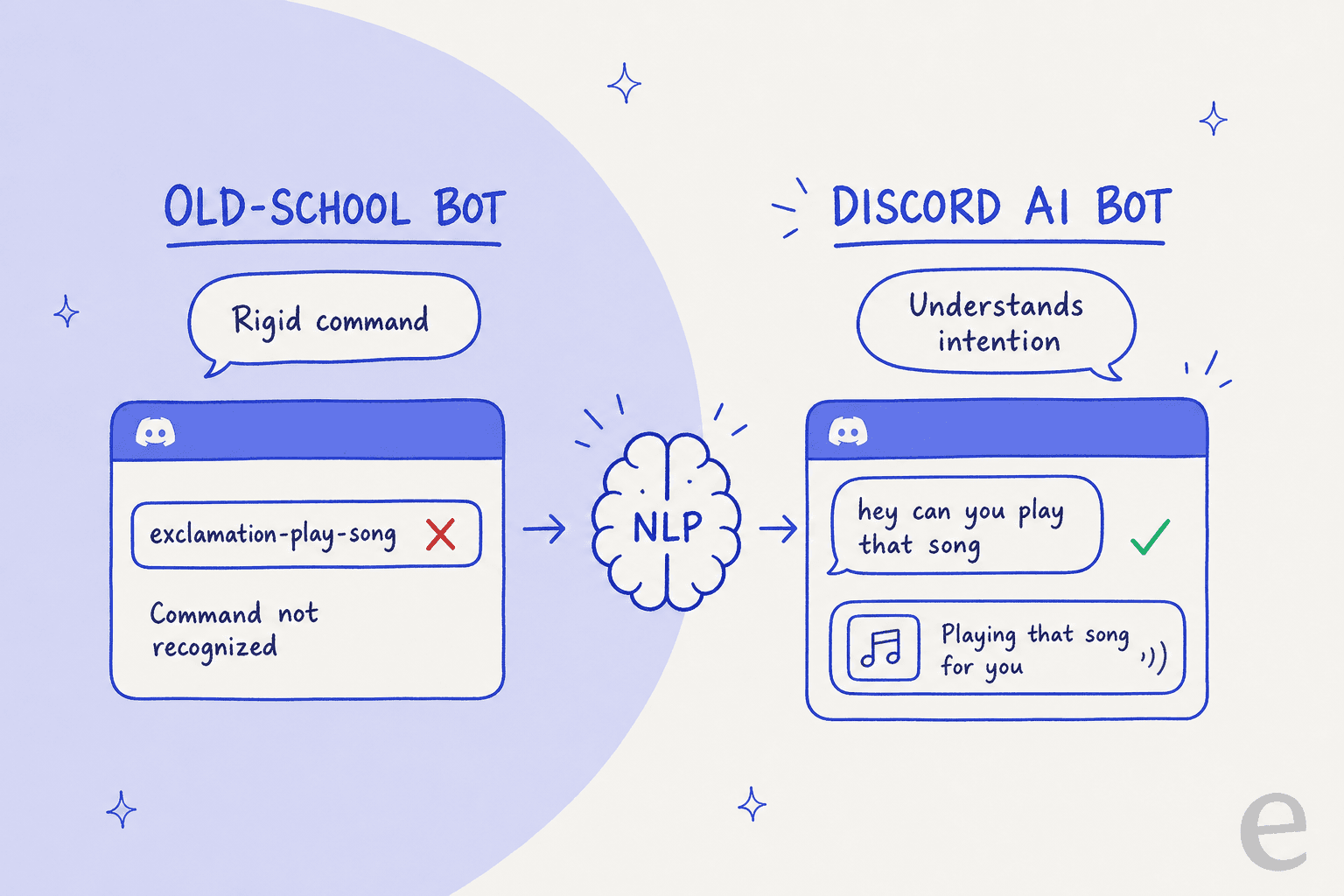
Think of them as autonomous members of your team. They can answer complex questions by tapping into your company's knowledge base, summarize long conversations to catch people up, and even automate repetitive tasks by connecting with other apps you use. This helps turn your Discord server from a simple chat room into an intelligent, helpful hub for your community.
How I chose the best Discord AI bots
To put this list together, I looked at each bot through a few specific lenses. I wanted to make sure my recommendations cover different needs, from basic server moderation to full-blown support automation.
Here's what I focused on:
- Main Job: Is the bot designed for support, moderation, connecting apps, or building something custom from scratch?
- Connections: How well does it plug into external knowledge bases (like Confluence or Zendesk) and other tools your team relies on?
- Ease of Use: Can you set it up without code, or do you need a developer to get it running?
- Customization: How much can you adjust its personality, the way it answers, and what it's allowed to do?
- Pricing: Is the pricing model clear and does it make sense as your community gets bigger?
Comparison of the top 8 Discord AI bots for 2026
Here's a quick side-by-side look at my top picks.
| Tool | Best For | Key Feature | Pricing Starts At |
|---|---|---|---|
| eesel AI | Knowledge-driven support & internal Q&A | Connects to help desks & wikis | From $299/mo (500 credits), free plan |
| MEE6 | Community management & moderation | Automated role management & leveling | Free, Premium from $11.99/month |
| Zapier | Multi-app workflow automation | Connecting Discord to 9,000+ apps | Free, Professional from $19.99/month |
| Botpress | Custom AI agent development | Open-source, visual flow builder | Free, Pay-as-you-go |
| Voiceflow | Building complex conversational AI | Advanced conversation design canvas | Free, Pro plans available |
| n8n | Self-hosted workflow automation | Open-source & fully customizable | Free (self-hosted), Cloud from ~$20/month |
| Alhena | Generative AI community engagement | Hand-off to live agents | Custom pricing |
| Quickchat AI | Simple, no-code AI bot creation | Fast setup for basic conversation | Custom pricing |
The 8 best Discord AI bots in 2026
Let's get into the details of what makes each of these bots stand out.
1. eesel AI
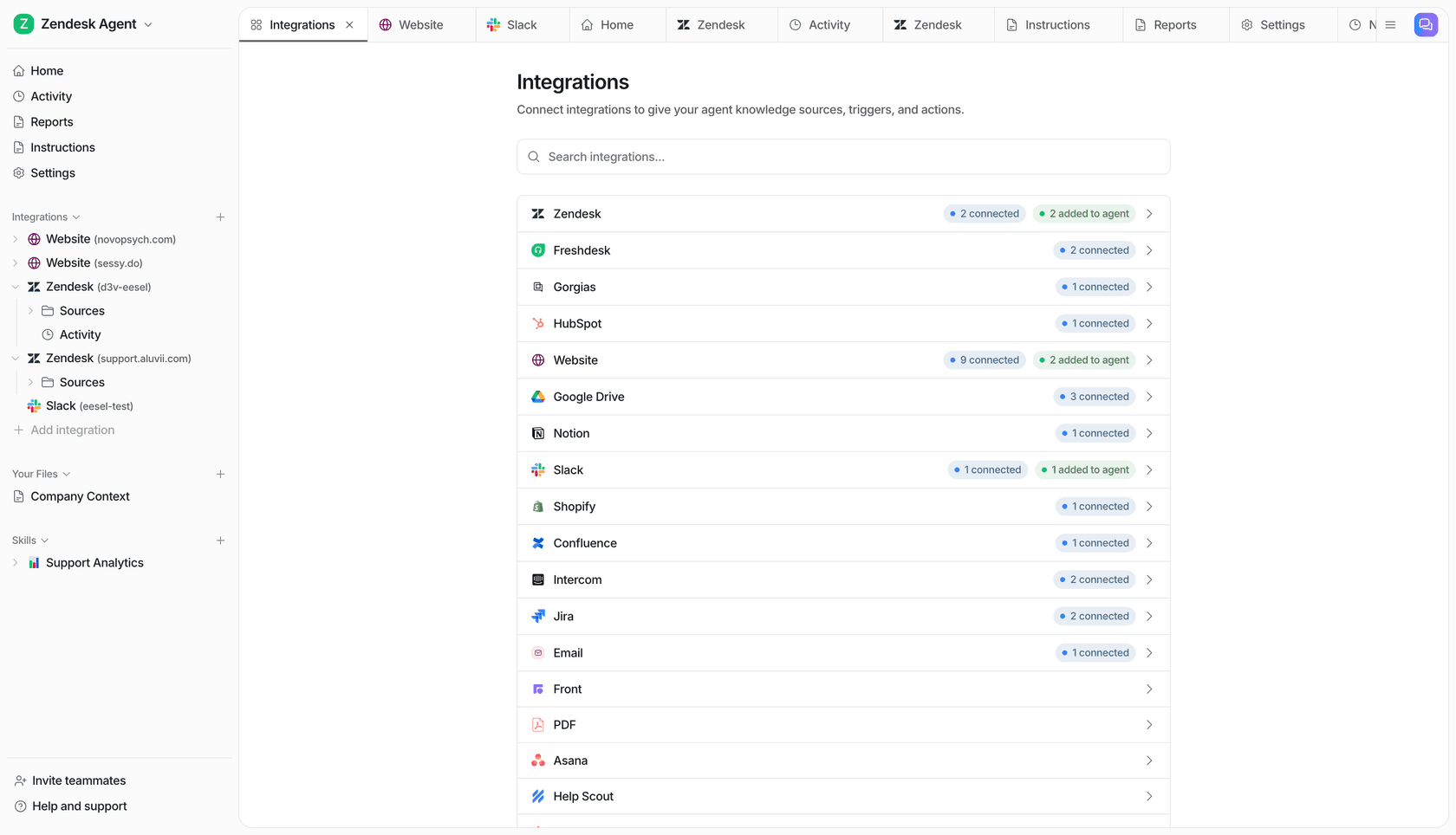
eesel AI is built for teams that want to offer expert, accurate support to their community, grounded in the knowledge they already have. It's worth being straight about what it is and isn't: eesel isn't a server-moderation bot you drop into Discord for roles and levels. It's an AI layer that connects to your official knowledge, like a help center or internal wiki, and resolves the support questions your community keeps asking, across the helpdesks and chat surfaces your team already runs.
What makes it different is how it answers from your real docs instead of guessing, and how you can test it before it ever talks to a customer. You can create and manage separate AI agents for different purposes, like a public support bot and an internal one for your team, all from one dashboard.
Key Features:
- Connects to your existing knowledge: It learns from the places your information already lives, like Confluence, Google Docs, Zendesk, and dozens of other common apps.
- Takes action: It does more than just talk. It can look up order information from Shopify, create a ticket in Jira Service Management, or tag a conversation for a human to review.
- You're in control: You have the final say. Use simple prompts to set the bot's tone of voice, define what it can and can't do, and decide when a conversation should be handed over to a human.
- Test before you launch: A simulation mode lets you test the bot on your past conversations, so you can see how it will perform and measure its impact before it goes live.
- Pricing: eesel uses one fixed monthly price with no per-seat fees, from $299/month for 500 credits (1 credit per ticket or chat), and you can start with 100 free credits, no card.
2. MEE6
If you've spent any time on Discord, you've probably run into MEE6. It's one of the most popular bots out there for general community management. Its main strengths are in moderation, giving out roles automatically, and adding fun features like a leveling system that encourages users to participate.
It's on this list because it's a great all-in-one tool for admins focused on building and maintaining a healthy community. While it doesn't have the deep knowledge capabilities of a support-focused AI agent, it's a champ at handling the day-to-day tasks of running a server.
- Key Features: Automated moderation, custom welcome messages, custom commands, and a user leveling system to gamify participation.
- Pricing: MEE6 has a solid free plan with basic features. Premium starts at $11.99/month, with a one-time lifetime option around $89.99.
3. Zapier
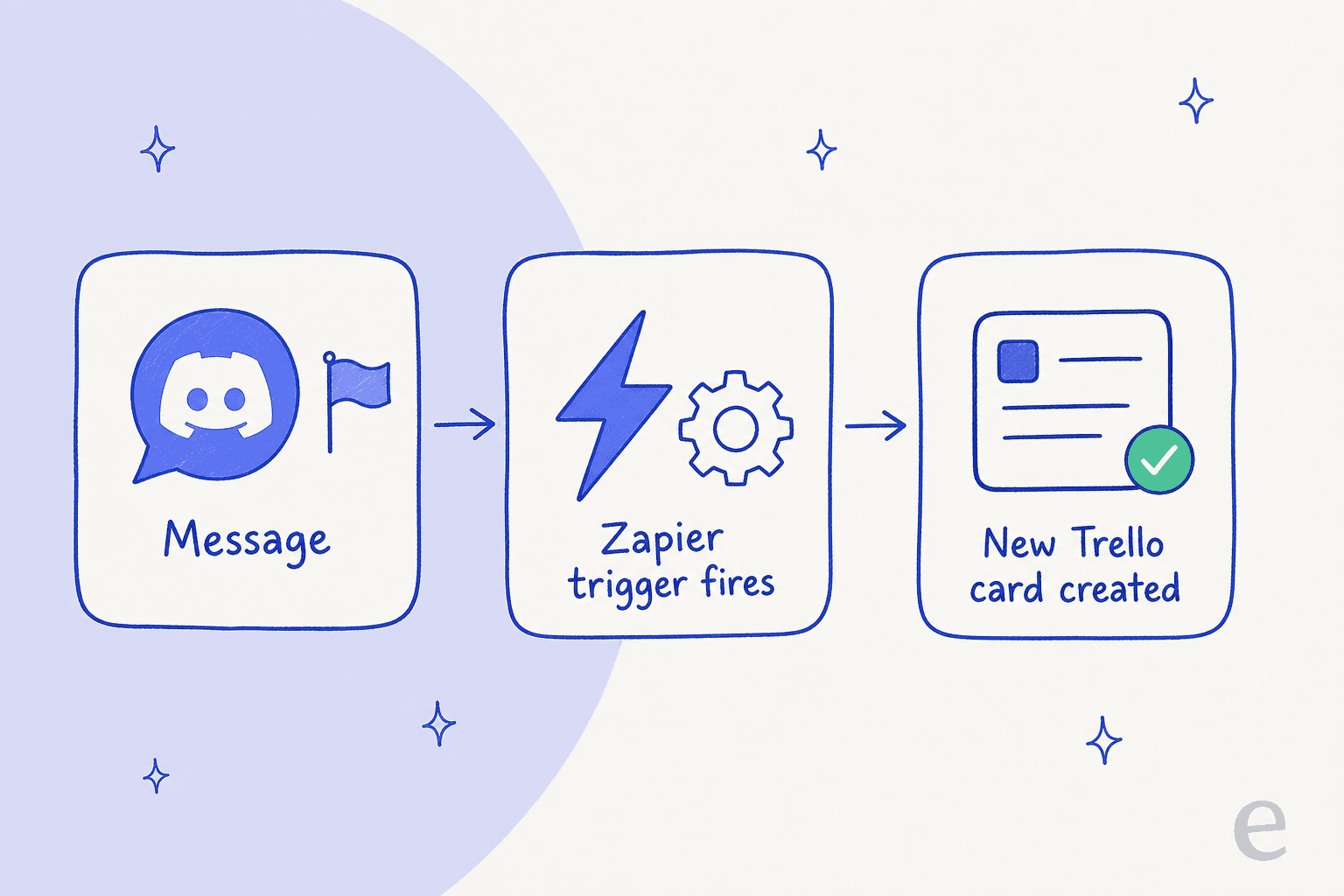
Zapier isn't exactly a Discord bot itself, but more of a universal translator for your apps. It's an automation tool that lets you connect Discord to over 9,000 other applications. Using its built-in AI, you can analyze and summarize content from Discord messages and use that to kick off workflows in other tools.
It's a go-to for automating workflows. You can create "Zaps" that do things like automatically creating a Trello card when a message gets a certain emoji, or summarizing a long channel discussion and sending it over to a Slack channel. Its main limitation is that it's all about workflows, not about having a back-and-forth conversation, so it sits closer to IFTTT-style automation than a true support agent.
- Key Features: Triggers and actions based on Discord events, a huge library of integrations, and built-in AI tools for processing data.
- Pricing: There's a free plan for simple workflows (100 tasks/month). Paid plans start at $19.99/month for the Professional tier with multi-step Zaps.
4. Botpress
Botpress is an open-source platform for developers who want to build seriously sophisticated AI chatbots. It provides a visual canvas for designing complex conversation flows and can be deployed across various channels, including Discord.
This platform gets a spot on this list because of the power and flexibility it gives developers. If you have the technical skills and want to build a truly custom Discord AI agent from the ground up, Botpress is a top choice. Its focus on Natural Language Understanding (NLU) lets you create bots that can handle very contextual conversations, but it's a deep platform, so expect to spend some time getting the hang of it.
- Key Features: Visual flow builder, open-source flexibility, intent detection, and cross-platform deployment.
- Pricing: Botpress is free to get started, with a pay-as-you-go model that scales with your usage.
5. Voiceflow
Similar to Botpress, Voiceflow is a collaborative platform for designing and launching advanced conversational AI agents. It's well-regarded for its intuitive design canvas and great tools for prototyping and testing conversations before you deploy.
Voiceflow is an excellent pick for teams that want to design and test complex user interactions visually before anyone has to write code. Connecting it to Discord takes a bit of technical setup, but its design canvas is fantastic for mapping out complex conversation paths.
- Key Features: Advanced conversation design canvas, knowledge base integration, and collaborative tools for agent building.
- Pricing: A free tier is available for individuals and small projects. Paid Pro plans are available for teams needing more advanced features.
6. n8n
n8n is an open-source workflow automation tool, sometimes described as a self-hostable version of Zapier. It gives developers full control over their integrations and workflows, so you aren't tied to a specific provider or limited by their API rules. There's even a dedicated guide to Discord integrations with n8n if you want to go deep.
It's the perfect choice for developers and companies who prioritize data privacy, control, and keeping costs down. By hosting it on your own servers, you can build powerful automations without sending your data to a third party. It offers the same kind of workflow power as Zapier but in a more open and flexible package.
- Key Features: Self-hosting option for full data control, customizable nodes, and a visual workflow editor.
- Pricing: n8n is free and unlimited when you host it yourself. Managed cloud plans start at around €20/month.
7. Alhena
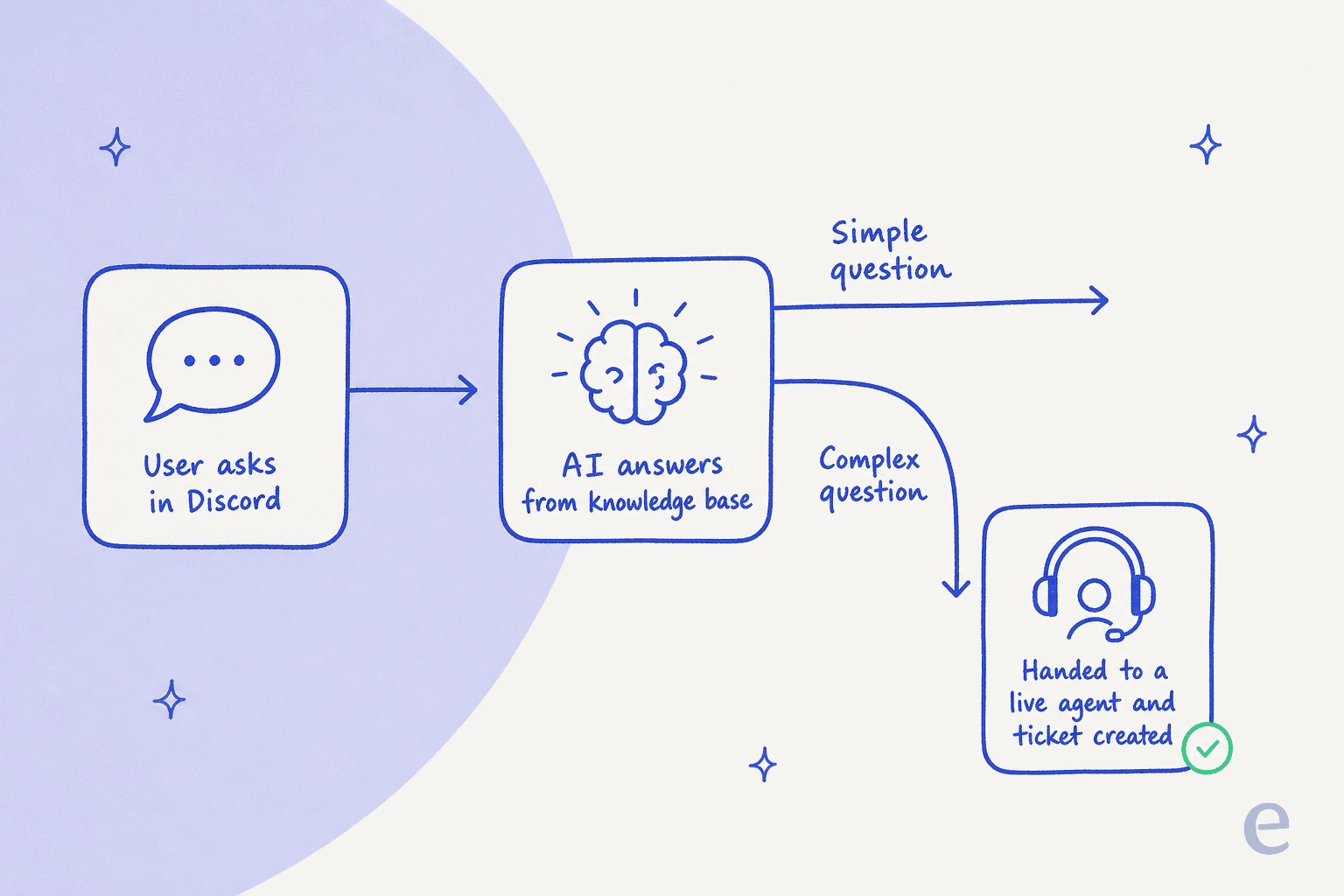
Alhena (which used to be Gleen) is a generative AI chatbot made for engaging with online communities. It focuses on giving fast, reliable answers to user questions. One of its key features is its ability to smoothly hand off conversations to live agents or create tickets in help desks like Zendesk or Freshdesk.
Alhena makes the list because it's a focused tool for community support that makes handing off conversations to a human agent really smooth. This puts it in the running for support-heavy communities, though it might not have the same number of knowledge source integrations or workflow actions as broader platforms.
- Key Features: 1-click integration, real-time answers designed to avoid making things up, and seamless help desk integrations.
- Pricing: Pricing is based on usage, and you'll need to schedule a demo for a custom quote.
8. Quickchat AI
Quickchat AI lets you build a conversational AI bot with a custom knowledge base without needing to write any code. It's a simple platform designed to get a basic AI agent running on Discord or other channels as quickly as possible.
I included Quickchat AI because it's one of the most straightforward ways for non-technical folks to get an AI knowledge base chatbot live. If your main goal is to launch a simple Q&A bot on your server without getting tangled up in technical details, it's a great place to start.
- Key Features: No-code setup, custom knowledge bases, and a simple integration process.
- Pricing: Quickchat AI is subscription-based, with pricing details available on its website.
How to choose the right Discord AI bot for your needs
With all these options, picking the right one comes down to what you're trying to accomplish.
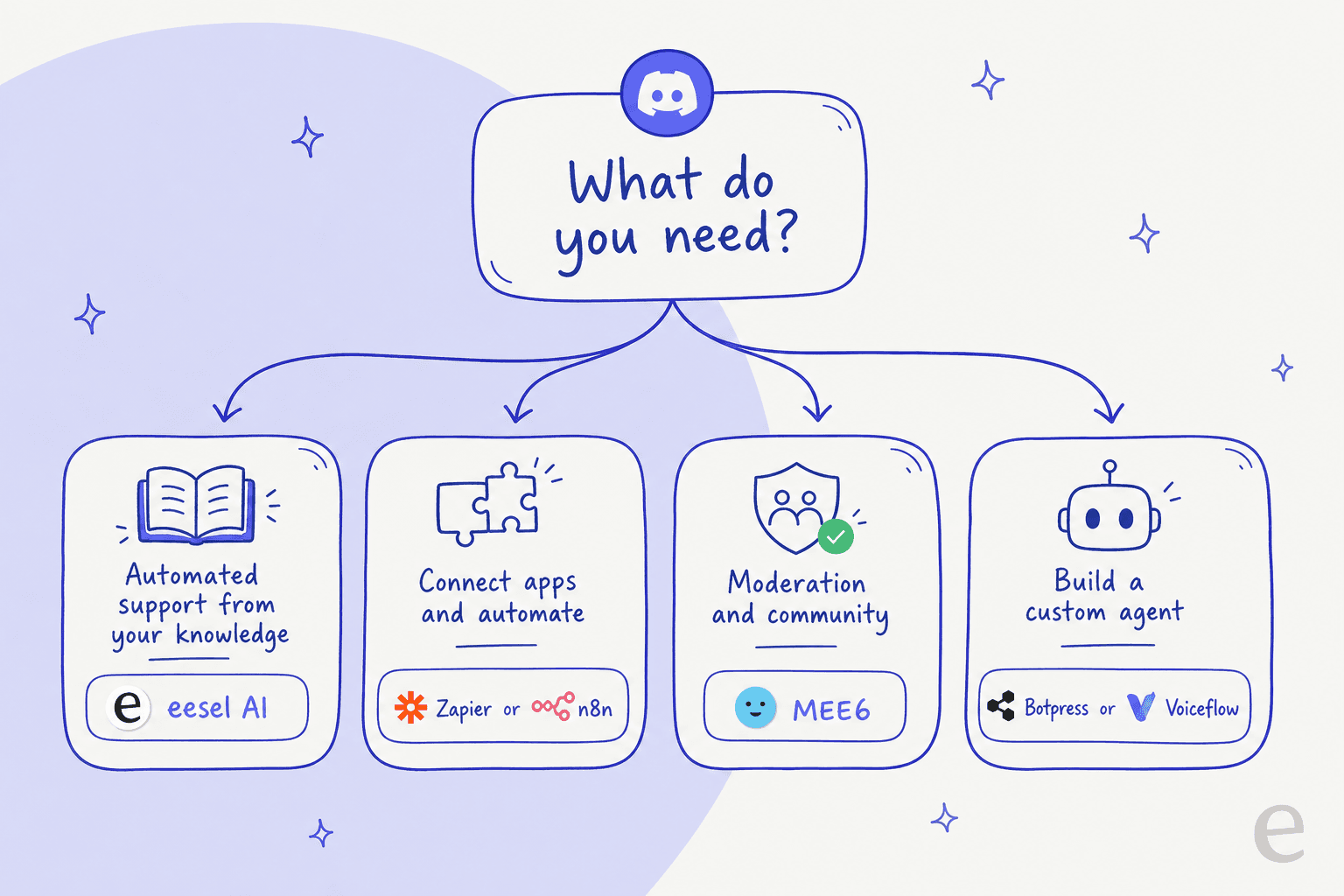
- For automated support using your existing knowledge: Go with a tool like eesel AI if your main goal is to give instant, accurate answers by tapping into your help center, company docs, or past support tickets. It saves you from having to build a knowledge bot from scratch.
- For connecting apps and automating workflows: Look at Zapier or n8n if you need to make things happen between Discord and other tools (like your CRM or project management app).
- For general server management and moderation: Stick with a classic like MEE6 if you just need to manage roles, filter out spam, and keep users engaged with levels and games.
- For building a custom AI agent from scratch: Choose a platform like Botpress or Voiceflow if you have developers ready to build something with total control over its logic and personality.
Find the right Discord AI to help your community
Picking the right Discord AI bot really just depends on what you need it to do. Whether you're after a simple moderator, a tool to connect your apps, or a dedicated support agent, there's an option that fits.
For teams that want to automate support and stop answering the same questions on repeat, using a bot that taps into your existing company knowledge is the smoothest route. You get the benefits of AI customer support without having to move all your content to a new place, and without the hallucination risk of a bot that wasn't grounded in your docs.
If that sounds like what you need, see how eesel AI can help resolve the support questions spilling out of your community, grounded in the knowledge you already have. Try eesel free or book a demo today.
Frequently asked questions
What is the best Discord AI bot in 2026?
There's no single winner, it depends on the job. MEE6 is the strongest pick for moderation and community management, Zapier and n8n win on workflow automation, and for knowledge-driven support I'd reach for a tool that grounds answers in your real docs. If you're weighing the wider landscape, my Discord alternatives and best AI agents roundups go deeper.
How much does a Discord AI bot cost in 2026?
Pricing ranges from free to fixed monthly plans. MEE6 has a free plan with Premium from $11.99/month, Zapier's paid plans start at $19.99/month, and knowledge-driven tools like eesel AI use one fixed monthly price with no per-seat fees. For a fuller breakdown of community tooling costs, see my Discord pricing guide.
What is the main benefit of using a Discord AI for community management?
The primary benefit is efficiency through automation. A Discord AI can instantly answer frequently asked questions and handle routine moderation, freeing up your human team to focus on higher-value community engagement and strategic tasks.
Can a Discord AI bot connect to my knowledge base?
Yes, the better support-focused bots do exactly this. Choose a tool that connects directly to your company's official knowledge sources, such as your help center or internal docs, so it answers from approved information. Here's how to train AI on that knowledge.
How can I ensure the answers from my Discord AI are consistently accurate?
Ground it in your real docs and test before launch. A tool that pulls only from approved knowledge base sources won't make things up, and running it against past conversations first surfaces the gaps. This is also the core of preventing AI hallucinations in support.
Besides answering questions, what other tasks can a Discord AI perform?
A powerful Discord AI can automate complex workflows. For example, it can integrate with other business tools to create a support ticket in Zendesk, look up order details in Shopify, or summarize conversations for your team.
Is it difficult to set up a Discord AI if I am not a developer?
No, it is very approachable for non-technical users. Many leading platforms are no-code, allowing you to connect knowledge sources, customize the bot's personality, and deploy it using a simple graphical interface without any programming.