


If you're in the market for a knowledge base tool, you've probably come across Document360. It’s a pretty well-known name for a reason. As AI becomes the new normal, Document360 has rolled out its own suite of AI features, called "Eddy AI," to help teams create and find information more easily.
But what's it actually like to use? When every software company is adding "AI" to their features list, it can be tough to tell what’s genuinely useful and what’s just a new coat of paint. This article gives you an honest look at Document360 AI in 2026. We’ll get into what it does well, where you might feel a bit boxed in, and how it compares to modern AI tools that connect to everything your company uses.
What is Document360 AI?
First off, you can't buy Document360 AI on its own. It's a set of AI tools built directly into the Document360 platform. Its main goal is to make the whole process of writing, organizing, and searching for information inside a Document360 knowledge base a lot smoother.
Think of it as a little helper that lives inside your documentation library. Under its "Eddy AI" brand, the features cover a few main areas:
- AI search and chatbot: This gives your users a smarter search bar and a chatbot add-on that can pull answers from your knowledge base articles, websites, files, FAQs, and Zendesk or Freshdesk tickets.
- AI writing agent: This is a tool for your content team to help draft articles from prompts, videos, or existing documents.
- AI management tools: These are small helpers for backend tasks, like suggesting SEO descriptions or tags for articles.
The most important thing to remember is that Document360 AI is built around the Document360 knowledge base. By default, Ask Eddy AI answers only from your knowledge base. You can widen that with public URLs and sitemaps, and the chatbot add-on takes more sources, but the knowledge base stays the center.
A closer look at the Document360 AI features
Let's get into the specifics of what this AI can actually do. While some of these tools are definitely helpful for documentation teams, they also highlight the trade-offs of using an AI that’s locked into a single system.
Document360 AI search and chatbots for customer self-service
The main event here is "Ask Eddy AI," which is a big upgrade from a typical search bar. Instead of just giving you a list of links, it tries to provide a direct answer. People can ask questions in normal language, and the AI will scan your articles and even any attached PDFs to find what they're looking for.
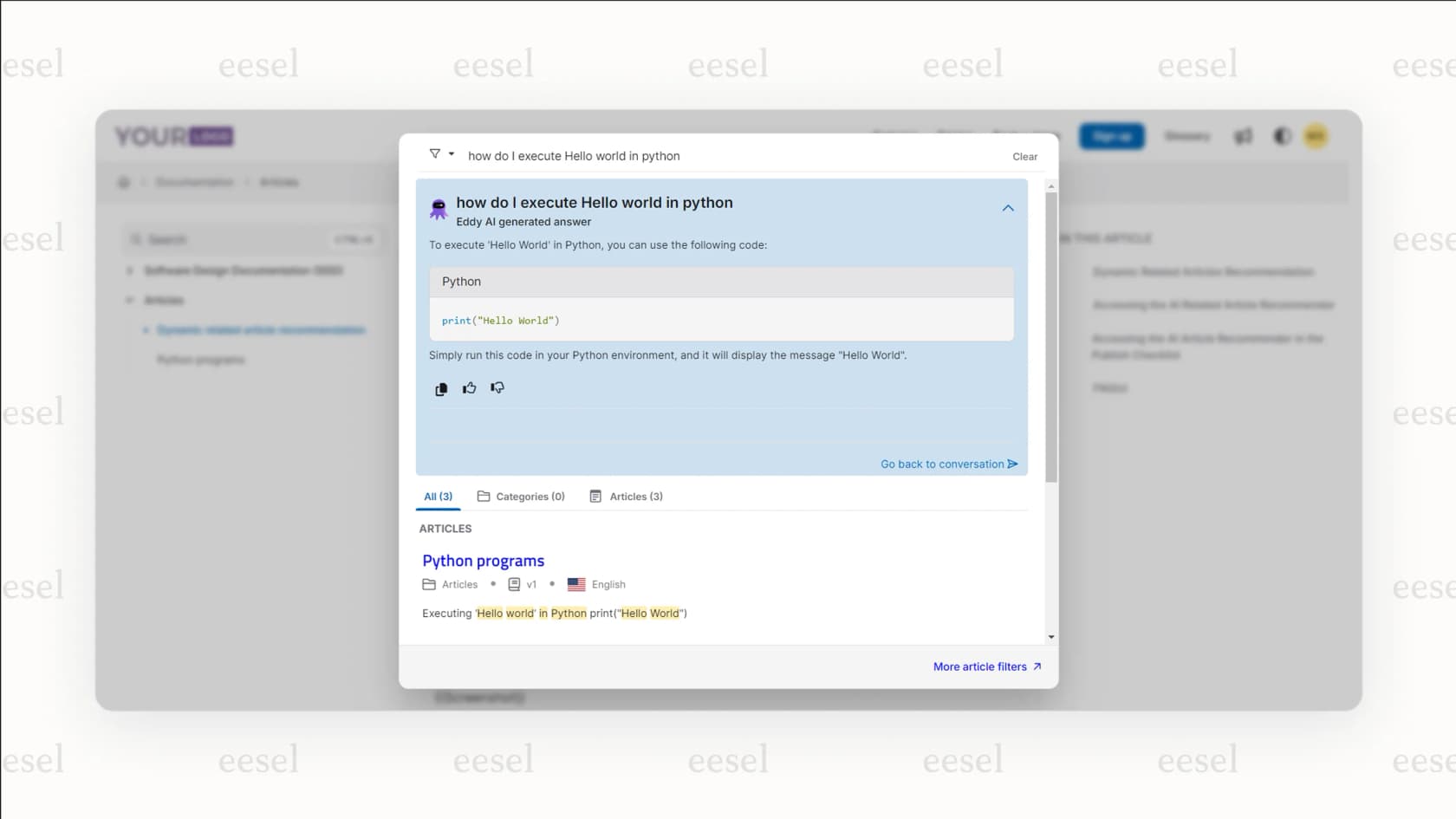
For a knowledge base that exists in a vacuum, this is a nice improvement. Out of the box, its knowledge is whatever you’ve put into Document360. Often, the most important, up-to-date answers your team needs are scattered across other apps.
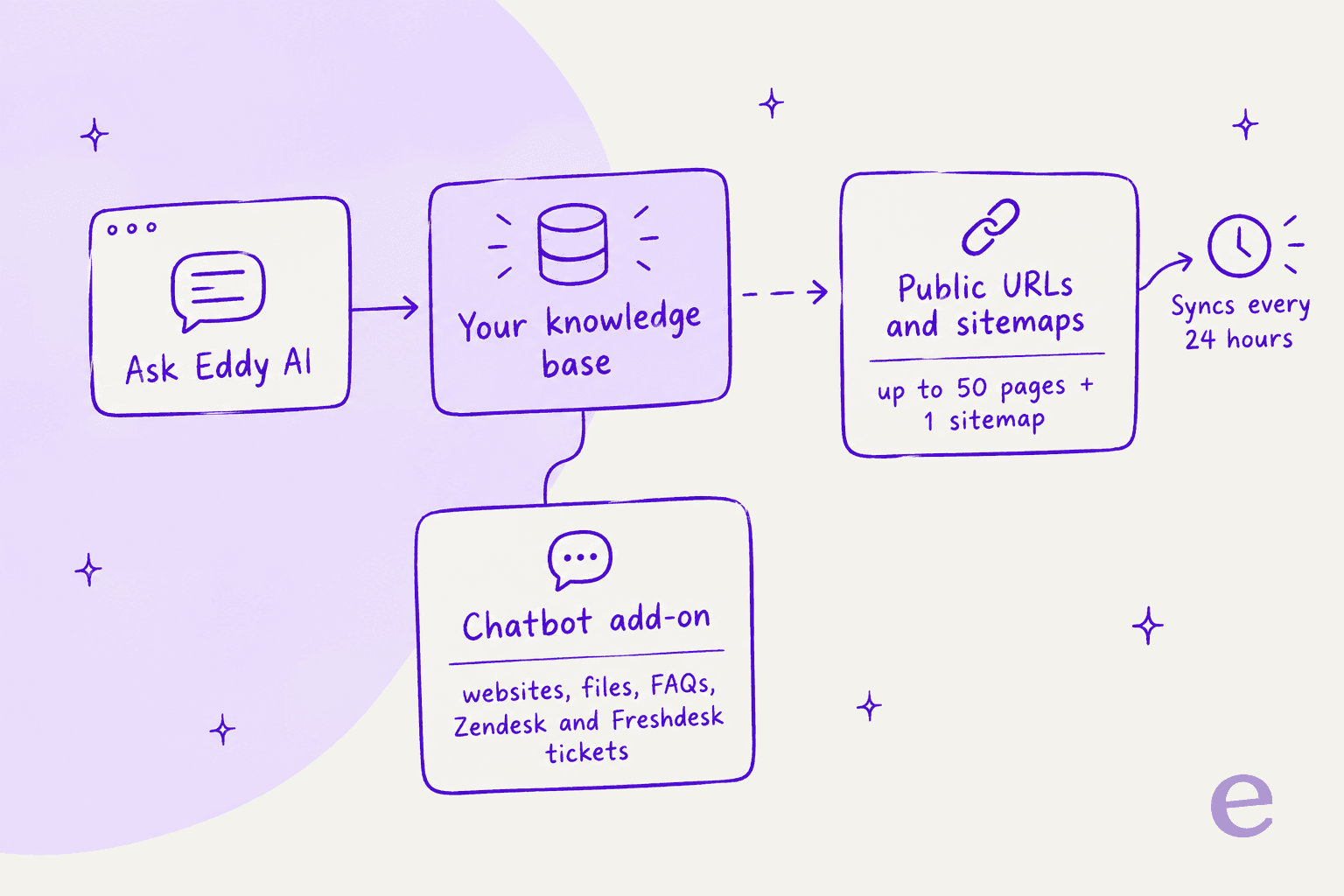
Document360 does let you go beyond that. The external sources feature adds up to 50 webpages and 1 sitemap per project, so Eddy searches them alongside your articles. The pages must be server-side rendered, pages that block crawlers can't be indexed, and sources sync every 24 hours. That covers public documentation well, but private tools like Slack threads or internal wikis aren't in that list.
This is a huge difference compared to a tool like eesel AI, which is built from the ground up to connect with all your company's knowledge. While Document360 AI centers on its own library plus public URLs, eesel securely connects to your help desk, internal wikis, and chat tools to pull together answers from everywhere your team is already working.
How Document360 AI helps with content creation and management
Document360's "AI Writing Agent" is aimed at giving technical writers a head start. You can give it a video, an audio file, or a text doc, and it will whip up a draft for a knowledge base article. It also has smaller tools like an AI tag generator and an SEO description writer to speed things up.
This is great for creating new, static articles. The chatbot add-on does learn from Zendesk or Freshdesk tickets, synced daily, but the writing agent works from the video, audio or text you hand it, not from your ticket history. The most valuable source of knowledge any support team has is the thousands of conversations you've already had with customers. Polished documentation is one thing, but it rarely captures the messy, real-world details of customer problems.
Modern AI support tools don't just read the official manual. A platform like eesel AI, for instance, learns directly from your past help desk tickets in tools like Freshdesk or Gorgias. It understands customer issues because it has seen how your team has actually solved them before. It’s like the difference between an AI that read a book and one that has years of real-world experience.
Document360 AI analytics on search and feedback
Document360 gives you reports on what people are searching for, whether they liked the AI's answers (based on thumbs up/down), and where they're getting "page not found" errors. This is useful for spotting gaps in your documentation.
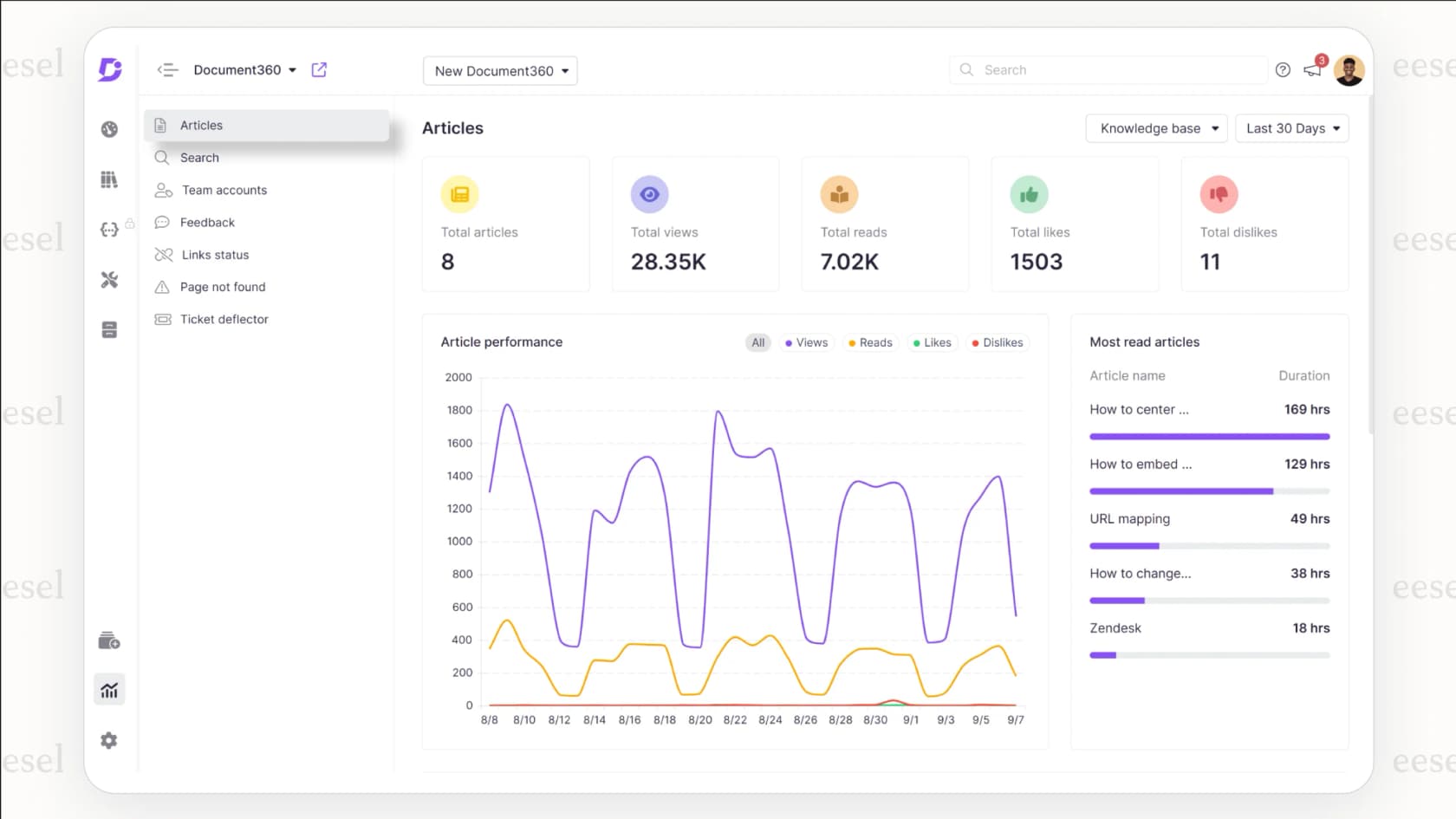
The catch is that these analytics tell you what was asked, but not what the business outcome was. Did that AI answer stop someone from creating a support ticket? Did it help an agent solve a problem faster?
This is where a dedicated AI support platform really pulls ahead. eesel AI provides analytics focused on your return on investment, tracking things like ticket deflection rates, resolution times, and agent productivity. It even has a unique simulation mode that tests the AI on your past tickets to show you potential cost savings and automation improvements before you even switch it on. You get to see the business impact upfront, not just a list of popular search terms.
Document360 AI pricing and plans
Getting access to Document360's AI tools means going through sales. The pricing page no longer shows named plans or prices, and AI usage is one of the six inputs that set your quote. Under the older tier grid, the AI Writing Agent sat in Professional and AI Search & Answer started at Business. The AI Chatbot and the AI Premium Suite are labelled add-ons.
The platform uses a credit system for its AI. As their own docs put it, "One credit equals one question (prompt) asked." You get a monthly credit limit that renews each month, and the docs say to email support for more. Credits can't be purchased during a trial, and hitting the cap disables the feature until renewal.
A "pay-per-question" model can get tricky and lead to surprise bills. It might even make your team and customers hesitate to use the AI just to save credits, which kind of defeats the purpose of having it in the first place.
Compare that to eesel AI's pricing, which is published: plans start at $299 a month for 500 credits, and a ticket or chat is 1 credit however many replies it takes. That covers actions too, like assigning a ticket, adding the right tags, or fetching order details from your Shopify store, and there is a free plan with 100 credits.
| Feature Comparison | Document360 AI | eesel AI |
|---|---|---|
| Pricing Model | Quote-based, credit meter for Ask Eddy | Fixed credit plans from $299/month; 1 credit per ticket or chat |
| Knowledge Sources | KB articles & PDFs, up to 50 public pages + 1 sitemap; chatbot add-on adds files and tickets | Help desks, wikis, chat tools, past tickets |
| Primary Use Case | KB search & article writing | Full support automation (triage, reply, take action) |
| Requires Migration? | Private content has to live in Document360 | No, it connects to the tools you already have |
The problem with the "walled-garden" approach
This brings us to the real trade-off with an AI built around one platform. Document360 has opened the garden a little, but a knowledge-base-first system still creates headaches for any business that moves quickly.
Why it struggles when your knowledge is everywhere
Let's be real: a company's "single source of truth" is a myth. The real knowledge is scattered all over the place. It’s in Slack threads where an engineer troubleshooted a bug, in the Google Docs for the last marketing launch, in old help desk tickets, and on various Confluence pages.
To make Document360 AI answer from that knowledge, you’d need it in the knowledge base or on a public page Eddy can crawl. The chatbot add-on caps source data at 40 MB per chatbot by default, and website sources need a manual recrawl to refresh. Your team will always create new information faster than you can centralize it.
This is exactly the headache eesel AI was designed to fix. It works like an intelligent layer that securely connects to the tools you already use, bringing all your scattered knowledge together without a massive migration project that nobody has time for.
From just answering questions to actually doing things
Document360's AI is good at being an "answer engine." It finds and shows you information from its library. The one helpdesk action in its docs is ticket escalation: the chatbot raises a pre-filled ticket in Zendesk or Freshdesk when it can't help.
But the next big step for efficiency is an "automation engine", an AI that can take action. Can it look at a new ticket and automatically categorize it? Can it alert the right team in Slack when an urgent issue comes in? Can it find a customer's order status and reply instantly?
This is where a true automation platform goes way beyond a simple search tool. Products like eesel AI's AI Agent and AI Triage are built not just to find answers, but to run entire workflows inside your help desk and other business apps.
The risk of being locked in with Document360 AI
When you go with a platform-specific AI, you're not just picking a feature; you're tying your knowledge strategy to one company. To get the best answers from their AI, you keep your content in their system.
This puts you in a tough spot, limiting your freedom to use the best tools for the job. Maybe your engineers prefer using Confluence for their technical docs, while your support team likes Zendesk Knowledge (formerly Guide) for customer FAQs. An integrated AI works with that reality; a knowledge-base-first one nudges you to choose.
The future of knowledge management is connected, not closed off
Document360 AI is a solid set of tools for companies that have already gone all-in on the Document360 platform. It’s a good, if basic, first step toward using AI for customer self-service.
However, the real future of AI in support and knowledge management is about connection and automation, not isolation. The smartest and most helpful solutions are the ones that can securely use information from wherever it happens to be. They work with your existing tools, not against them.
For teams who need an AI that learns from every customer chat, connects to all the apps they use daily, and automates work to deliver real results, a more flexible and capable tool is the way to go.
Don't let your team's knowledge get stuck in a silo. See how eesel AI can build a powerful AI agent on top of your existing tools in just a few minutes. Book a demo or give it a try for free.
Frequently asked questions
Can I buy Document360 AI as a standalone product?
No, the AI features are an integrated part of the main Document360 platform and cannot be purchased separately. Access and AI usage are priced inside a custom Document360 quote, with the chatbot and AI Premium Suite sold as add-ons.
What is the biggest limitation of Document360 AI?
Its main drawback is that it centers on a "walled garden." By default the AI answers from the Document360 knowledge base. Public URLs, sitemaps and the chatbot add-on widen that, but private data in your other company applications is mostly out of reach.
How does the pricing for Document360 AI work?
Document360 uses a credit-based model for its AI features, where one credit usually equals one question asked to the AI. You get a set number of credits per month and must buy more if you use them up, which can lead to unpredictable costs because credits can't be bought during a trial.
How is Document360 AI different from a connected AI tool?
The key difference is its access to information. Document360 AI is centered on its own library plus public URLs, while a connected AI platform like eesel can securely integrate with your existing tools like Slack, Google Docs, and help desks to provide more complete answers.