10 best Enjo AI alternatives in 2026 (tested and priced)

Rama Adi

Katelin Teen
Last edited October 14, 2026
Enjo AI is one of the more honest price cards in this category: $0 for 200 AI replies a month, $95 for 1,000, $295 for 3,000, $0.05 per reply after that, and unlimited human seats on every tier. You can buy it without a sales call, which is more than Moveworks, Aisera, Leena AI or Glean will let you do.
What's missing is proof. Enjo's Agent Studio lets you run up to 1,000 questions that you write yourself before you deploy. That is a quiz you set, not a rehearsal against the tickets your team actually closed last quarter. Its Guardrails module has four rule types (content filters, blocked topics, prohibited terms, tone guidelines) and no confidence threshold. The failure mode that bites hardest is a fluent answer to a question your docs never covered, and none of those four rules are shaped to catch it.
I dug into 11 vendors for this and found something worth saying plainly: not one of them documents a backtest that replays your own past tickets before go-live. eesel AI is the exception, which is why it leads this list. If you want the cheapest published seat, Siit is $23 per admin. If you want the cheapest capped pilot, Workativ is $99 for 200 sessions. If you are already an Atlassian shop, Jira Service Management is free for three agents.
Why teams look for Enjo AI alternatives
A few years ago I watched a support bot tell a customer "yes, we support your car model" for a brand that was not in the customer's database. The bot was not broken. The knowledge base said "we support all models," and the AI read that sentence, believed it, and confidently applied it to a vehicle nobody had ever tested. The team's own summary of the rollout was "trial and error in the beginning."
That moment shapes how I read every internal support tool's marketing page now. It is also why the section on testing sits so high in this post. Building AI agents for live queues at eesel has meant watching the same class of failure land in a dozen different ways. The model is rarely the weak link. Your documentation had a gap, and nothing in the pipeline noticed.
So here is why teams leave, or never arrive at, Enjo AI specifically.
The meter is a reply, and Enjo defines a reply twice, differently. A hover tooltip on the plan cards says "AI Replies is one complete interaction handled by Enjo AI." The FAQ further down the same page says "An AI reply is one response sent by Enjo's AI agent to a customer. Each reply counts as one unit of usage." Those are two different meters. A complete interaction is conversation-shaped; one response sent is message-shaped, and a five-message back-and-forth costs five times as much under the second reading. Neither is a resolution and neither is a ticket, so the unit you are forecasting depends on which sentence you read.
Spend control is a paid feature. Enjo's own FAQ answer to what happens when you exceed your plan reads "Your service won't stop. If you exceed your limit, additional replies are charged at $0.05 per reply. You can set usage caps to control spend," and then adds: "This option is only available on the paid plans." The Free tier is the only one that actually halts, because it has no overage path. So the plan that costs nothing has a spending limit and the plans that cost money do not, unless you go and set one.
The HR pitch has no HR systems behind it. Enjo sells a dedicated HR Service solution, and its published integration directory contains zero HRIS connectors. No Workday, no BambooHR, no Rippling, no ADP. That means HR support in practice is answering policy questions from documents and raising tickets, which is real work, and it is closer to an AI ticketing system than to reading somebody's leave balance.
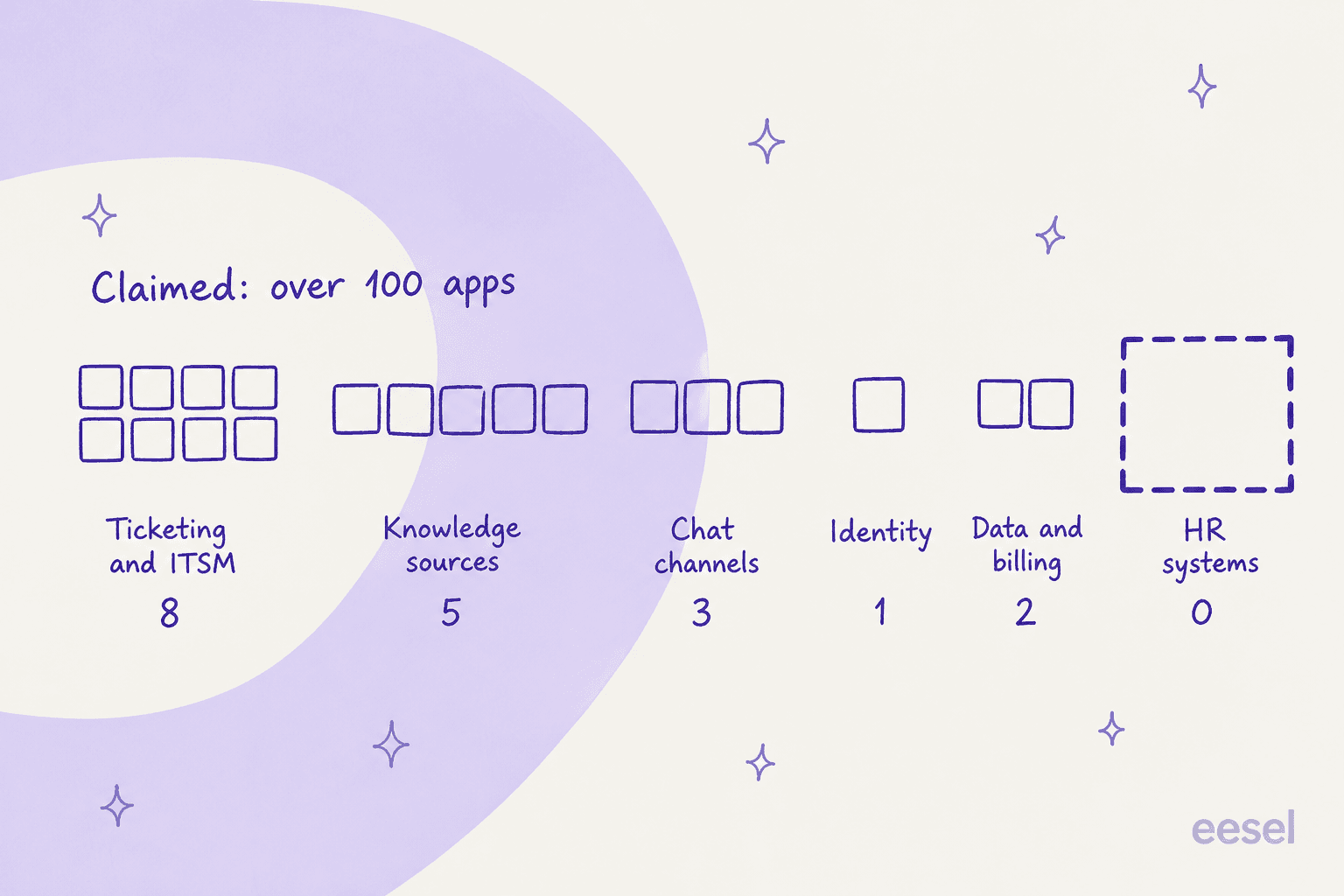
The claim and the grid do not match. The integrations page says "over 100 apps already available in our directory," and renders exactly 19 cards: eight ticketing and ITSM connectors, five knowledge sources, three chat channels, one identity provider, two data and billing tools. There is no pagination and no load-more control, so 19 is the whole published list. For context on what a fuller connector story looks like, our roundup of AI service desk tools counts them. The other 80 or so are enumerated nowhere.
The proof narrows fast. Enjo runs an 18-logo wall including Netflix, Starbucks, DoorDash, Snowflake and Rakuten. Three of those names have case studies. Across the six case-study pages I read, there is exactly one verbatim customer quote, and it is attributed to "Aptean Support Operations Leadership" with no person and no title attached.
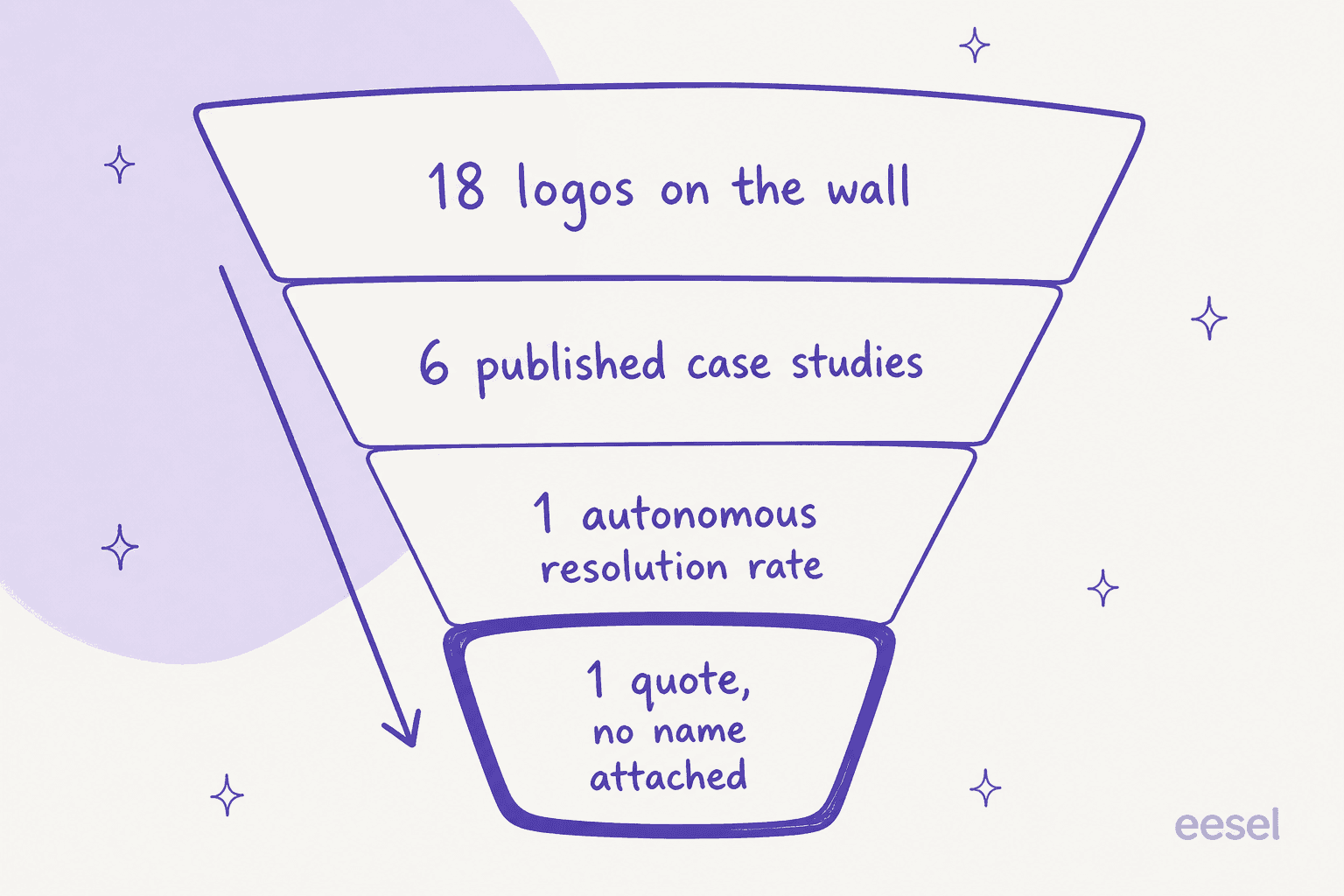
To be fair to Enjo, the numbers it does publish are specific and checkable. Aurora, a business Enjo describes at a $14B valuation with 2,500 employees, reports 63%+ autonomous resolution, 45%+ faster resolution and a 60% increase in employee satisfaction. Amber Group went from proof of concept to production in under five weeks. Rakuten reports a 70%+ reduction in ticket volume across 30,000+ employees. Those are better proof points than most vendors in this space manage.
And the public review footprint is four reviews. Enjo holds 4.9 out of 5 on G2 from four reviews, and G2 prints its own disclaimer that there are not enough reviews to provide buying insight. Three of the four are marked incentivized, and three date from December 2024. The one recent organic review, from an infrastructure engineer at an enterprise, is also the one that flags accuracy:
"Sometimes he can be very creative with his answers"
Pedro Arnaldo C., G2

Five words, and they name the exact risk that Enjo's Guardrails module does not have a knob for.
What Enjo AI actually costs
Enjo's price card is good by category standards: three tiers with real numbers, one quote-only tier, and no seat fees anywhere. Here it is in full.
| Plan | Price | AI replies included | Knowledge blocks | Reply overage | Human seats | Billing |
|---|---|---|---|---|---|---|
| Free | $0 | 200 | 2,000 | None (hard stop) | Unlimited | Monthly |
| Starter | $95/mo | 1,000 | 10,000 | $0.05 | Unlimited | Monthly |
| Standard | $295/mo | 3,000 | 50,000 | $0.05 | Unlimited | Monthly |
| Enterprise | Custom | Custom | Custom | Custom | Custom | Yearly only |
Knowledge-block overage is $0.005 each. There is no published annual discount on any self-serve tier, and no monthly option on Enterprise. If you are comparing this against headcount rather than against other tools, we ran that arithmetic in AI versus human cost.
Now the part that made me re-do the arithmetic three times. Standard never wins on reply volume. Because overage is $0.05 and both plans charge it at the same rate, the gap between Starter and Standard is a flat $100 a month at every volume above 3,000 replies. Three thousand replies on Starter is $95 plus 2,000 overage replies at $0.05, which is $195. The same 3,000 replies on Standard is $295.
On knowledge blocks the two tiers land exactly level and stay level: $95 plus 40,000 blocks at $0.005 is $295, and every block above that costs $0.005 on both plans. So Standard's entire case is the feature set, and Enjo's page does not say which features those are.
Play with your own numbers:
The question a pricing page cannot answer
Here is the thing I keep coming back to. The subscription is the cheap part of an internal AI agent. The expensive part is being confidently wrong in front of 30,000 employees who came to the employee support channel expecting an answer, who now trust the bot slightly less than they did yesterday, and who go back to DMing the IT lead.
So the axis I actually sort these tools on is: how much can you know before you turn it on?
There are three honest answers a vendor can give, and they are not equivalent.
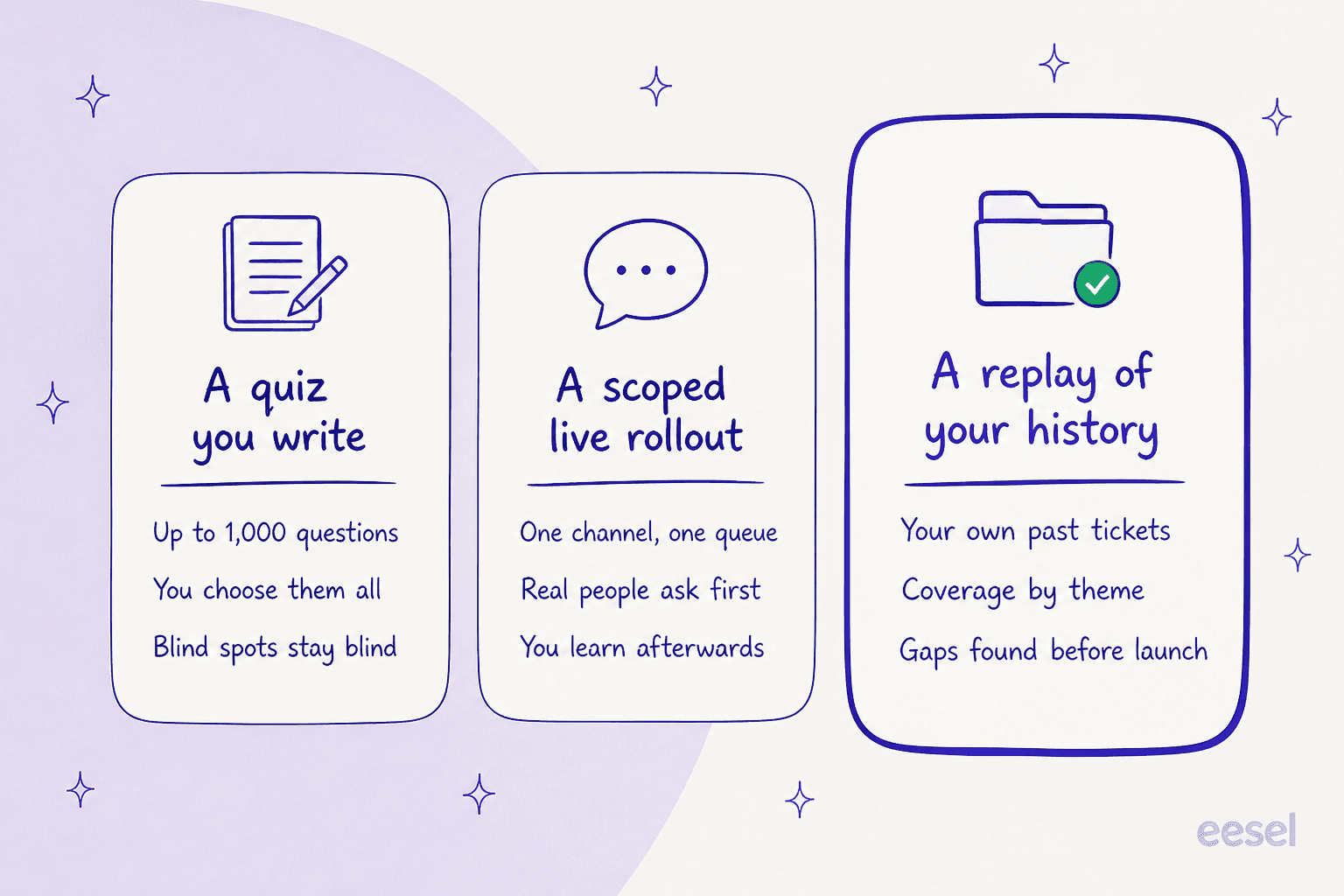
A quiz you write. Enjo's AI Agent Studio is this. Its exact wording is "Run up to 1,000 questions, rate and re-run, then train by adding answers, mapping, actions, or request forms," alongside a single-query trace view. A thousand questions is a lot of questions. But you chose all of them, which means your blind spots stay blind, and the car-model failure I opened with is exactly the kind of question nobody thinks to write down. Freshservice's Agent Studio does a smarter version of the same shape: it generates up to 50 test queries from your knowledge sources. That is still not your ticket history.
A scoped live rollout. This is Enjo's actual recommended de-risking mechanism, and it is a legitimate one: "deploy to a limited scope (one channel, queue, or request type)." Siit does a sharper version with shadow mode, where you "test playbooks with 'simulate' to log what would have happened without making changes." Atlassian recommends the people-powered version, telling you to "ask as many people as you can to help test." All of these control the blast radius. None of them predict the number, which is the figure you actually need for a tier-1 deflection business case.
A replay of your own history. You point the agent at the tickets your team already closed, it answers them, and you get a resolution rate and a coverage-by-theme breakdown before a single employee is involved. Across the eleven vendors I researched for this post, not one documents this. Four have a test mode of a different shape. Five publish nothing about testing at all.
That is the gap this list is sorted by.
How I picked and compared these
I am a software engineer at eesel and I spend most of my time on the integration and API side of the product, which shapes what I look for. Marketing pages describe capability; connector pages describe behaviour. When a page says "works with ServiceNow," I want the verbs.
For each of the ten tools below I read the vendor's own pricing page, its integration and connector docs, its help centre where one exists, and whatever community signal I could find on G2, Reddit, Hacker News or a marketplace listing with a real permalink. Where a vendor publishes no price on its own site, I used its Microsoft, AWS or SAP marketplace listing, because quote-only vendors often publish real rates on marketplace listings.
Two things I deliberately did not do. I did not run a six-month production pilot of ten products, and I will not pretend otherwise. And where a vendor's docs say nothing about pre-launch testing, I recorded that as "not published" rather than upgrading it to a no, because absence of a doc is not proof of absence of a feature.
Enjo AI alternatives at a glance
| Tool | Best for | Billable unit | Published entry price | Free tier or trial | Replays your own tickets? | Slack | Teams | Named security certs | Public reviews |
|---|---|---|---|---|---|---|---|---|---|
| Enjo AI | Mid-market IT and HR in chat | AI reply | $0, then $95/mo | Free, 200 replies/mo | No | Yes | Yes | SOC 2 II, ISO 27001, GDPR | 4.9/5, 4 reviews |
| eesel AI | Knowing the number before go-live | Credit (1 ticket) | From $299/mo (500 credits) | 100 free credits | Yes | Yes | Yes | GDPR, SOC 2 Type II certified | Vendor-published stories |
| Atomicwork | Replacing mid-market ITSM | Annual platform or outcome | $25,000/yr | Demo-gated env | No | Yes | Yes | ISO 42001, SOC 2 I+II, HIPAA | Reddit, sparse |
| Siit | Small IT teams on a budget | Admin seat | $23/admin/mo | 14-day trial | No (shadow mode) | Yes | Yes | SOC 2 II, GDPR | G2, sparse |
| Ravenna | Slack-native IT desks | Agent seat | $50/agent/mo | 2-week trial | Not documented | Yes | Early access | None listed | Sparse |
| Moveworks | Enterprises going all-in on ServiceNow | Employee headcount | $150/user/yr, 1,000 min | Quote-only | Not published | Yes | Yes | FedRAMP, SOC 2 II, ISO 27001 | G2, deep |
| Aisera | Large multi-system enterprises | User, tier-capped | $200,000/yr to 1,000 users | AWS 30-day, 50 users | Not published | Yes | Yes | SOC 2, ISO 27001, HIPAA | G2, deep |
| Leena AI | HR plus IT at 1,000+ employees | User | $150/user/yr, 2-yr term | Sales-gated pilot | Not published | Yes | Yes | SOC 2, ISO, GDPR, HIPAA | G2 and Reddit |
| Freshservice | One vendor for desk and AI | Agent seat + AI session | $19/agent/mo | 14-day trial | Routing only | Yes | Yes | SOC 2, GDPR | G2 and Reddit, deep |
| Jira Service Management | Atlassian-native teams | Agent seat + 3 AI meters | $0 for 3 agents | Free forever | No | Yes | Yes | No badge list published | G2, deep |
| Workativ | A cheap capped pilot | Session | $99/mo, 200 sessions | 50-session pilot | No | Yes | Yes | SOC 2 II, ISO 27001 claimed | G2, sparse |
A note on that last column, because it matters more than it looks. Four of these vendors publish no price at all on their own website. Enjo does. Whatever else is true, that is a point in Enjo's favour, and it is why this post is about proof rather than cost.
1. eesel AI
Best for: teams who want a resolution-rate number before an employee ever talks to the bot.
What it does
eesel is where I work, so treat the enthusiasm accordingly, and hold me to the checkable parts. It sells AI teammates that sit inside the tools you already run rather than replacing them: your helpdesk, Slack, Teams, email, your docs. It learns from resolved tickets, help articles and connected tools, then drafts, triages, escalates and takes actions. The retrieval trade-offs behind that are covered in RAG versus fine-tuning.
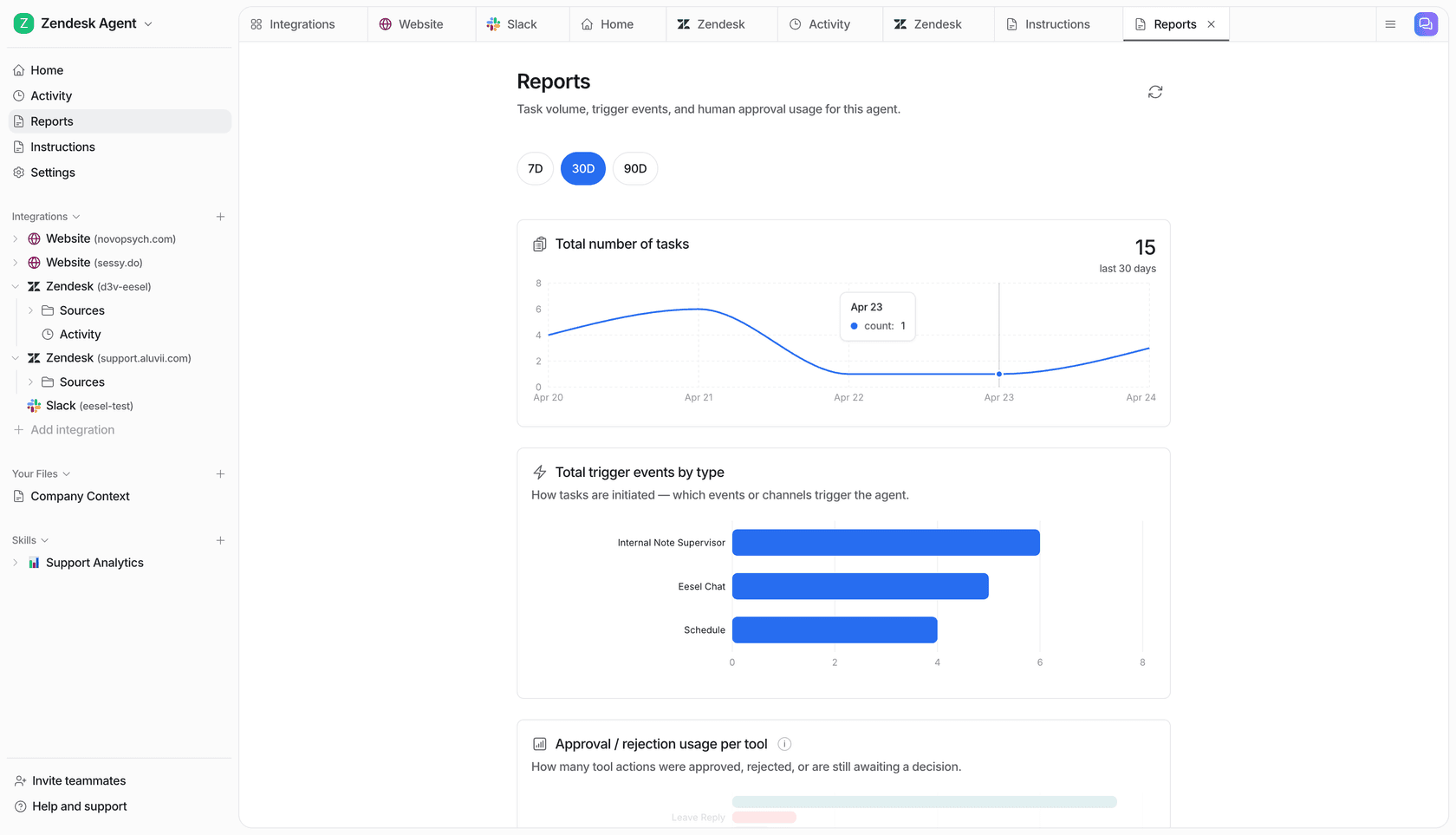
The reason it leads this list is one feature. Simulation mode replays your own past tickets through the agent, reports coverage by theme, shows you where the gaps are, lets you fill them and then re-runs. You get a resolution rate before go-live rather than after. Every other tool here either tests questions you invented or scopes the rollout so the damage is small.
Then there is confidence-based routing, which matters for the failure I described up top. When the agent is not confident, it drafts instead of sending. That is a knob you set yourself, and it is the direct answer to a bot that is "very creative with his answers." It is also the line between an agent and a rule-based chatbot.
Where it beats Enjo
The meter is a ticket, not "one complete interaction," so you can forecast it from a number your helpdesk already reports. There are no seats and no platform fee, and every integration is included, so a 300-ticket month fits the 500-credit plan at $299 with headroom to grow. Coverage runs to 80+ languages and 100+ integrations, and past ticket history is a first-class knowledge source rather than an unlisted one.
Real numbers, since I am asking you to trust the claim: Gridwise saw 73% of tier-1 requests resolved in the first month, with results visible inside a 7-day trial. Smava runs a fully automated Zendesk agent over 100,000+ German-language tickets a month.
Where it falls short
SOC 2 Type II is certified, as it is for Enjo, Atomicwork and Moveworks. HIPAA is an add-on you arrange by talking to the team, not part of the standard plan. And eesel is a layer on your existing stack, so if what you actually want is to retire your ITSM tool entirely, Atomicwork is the more honest fit.
Pricing
| Plan | Price | Credits | What you get |
|---|---|---|---|
| Free | $0 | 100 | No credit card |
| Teammate | $299/mo | 500 | 1 credit per ticket or chat, no seats, no platform fee |
| Teammate | $499/mo | 1,000 | Everything included |
| Teammate | $999/mo | 2,500 | Everything included |
| Teammate | $1,899/mo | 5,000 | More than 5,000: talk to us |
| Blog post draft | $4 each | n/a | Per post |
| Add-ons | From $199/mo | n/a | SSO and MFA, priority support from $299/mo, data residency $500/mo |
| Pay a year upfront | Two months free | n/a | Same plans |
Verdict: if the thing keeping you from switching on an AI agent is that you cannot predict what it will do, this is the only tool on the list built around answering that question first. Skip it if you need a certified SOC 2 Type II report before signing, or if you want to consolidate your ITSM platform rather than automate on top of it.
2. Atomicwork
Best for: mid-market teams replacing their ITSM platform, not layering on top of it.
What it does
Atomicwork calls itself "Enterprise ITSM + ESM, with the AI Workforce to run it," and unlike most of this list it means the whole platform: ITSM, ESM, IT asset management, a CMDB, plus role-scoped AI Coworkers and an assistant called Atom. It is the closest thing here to a full ITSM replacement with AI as the native operating layer rather than a bolt-on.
Its pricing model is the most interesting in the category. You can buy a flat annual platform contract, or you can buy outcomes: $1 per knowledge-support outcome, $2 per access-automation outcome, from $3 per service-resolution outcome. And it will run its AI Workforce on top of your existing ServiceNow or Jira Service Management for no platform fee, then charge per outcome only.
Where it beats Enjo
Certifications, comfortably. Atomicwork lists ISO 42001, SOC 2 Type 1 and Type 2, ISO 27001, 27017, 27018 and 27701, GDPR, CCPA, HIPAA, CSA STAR Level 1 and Microsoft 365 certification. Enjo has SOC 2 Type II, ISO 27001 and GDPR, and no HIPAA anywhere. If you handle health data, this is not a close call.
It also has real asset management and a CMDB, which Enjo does not, and its outcome pricing means you can pay for results rather than interactions.
Where it falls short
The floor. Professional "starts from $25,000/year" for 25,000 credits, 2 AI Coworkers and up to 250 end users. If you are a 40-person company with a Slack help channel, this is not your tool, and Enjo's $95 is roughly 260 times cheaper to start.
Credits are also hard to size. Published ranges run from 1 credit for deterministic ticket routing to 100 for AI workforce agents, so 25,000 credits is somewhere between 250 heavy investigations and 25,000 routings. Atomicwork publishes no overage rate. Extra AI Coworkers are $499 each per month, doubled from $249 since mid-2026. Testing is one homepage line: "Test every AI Coworker's operating procedure, skills and tools before deploying them to production," with nothing in the docs describing what that covers.
"Console and Atomicwork charge per employee, not per technician, and that gets expensive fast."
magnj, Reddit

Pricing
| Plan | Price | Credits | AI Coworkers | End users |
|---|---|---|---|---|
| Professional | From $25,000/yr | 25,000 | 2 | Up to 250 |
| Business | Not published | Not published | 5 | Up to 1,000 |
| Enterprise | Custom contract | Custom | 10 | Unlimited |
| Extra Coworker | $499/mo each | n/a | +1 | n/a |
| Outcome model | $1 / $2 / from $3 per outcome | n/a | n/a | Minimums apply |
Verdict: the strongest pick if you are consolidating a real ITSM stack and have a five-figure budget already approved. Skip it if you are under 250 employees, or if you cannot get a straight answer on what your credit consumption will look like.
3. Siit
Best for: small IT teams who refuse to be billed for every employee.
What it does
Siit is an internal service desk built for Slack and Teams, with a self-service portal, service catalog, approvals, inventory and an IT Agent plus a Triage Agent on its top tier. It is the most straightforwardly priced tool in this comparison, and the pricing FAQ says the important part out loud: "Siit is priced per Admin. You can support unlimited employees at no extra cost, and your employee headcount never increases your bill."
There is no AI usage meter at all. No per-resolution charge, no credits, no conversation count. The Pro seat includes the AI.
Where it beats Enjo
Cost predictability. $89 per admin per month with three admins is $267, forever, regardless of whether your employees ask 200 questions or 20,000. Against Enjo's per-reply meter with a paid-tier default of "your service won't stop," that is a materially different risk profile.
Its shadow mode is also the best pre-launch mechanism here after eesel's simulation. The docs describe it as "test playbooks with 'simulate' to log what would have happened without making changes," with a Draft to Pilot to Live publishing flow. It is a dry run of a playbook you wrote rather than a replay of your ticket volume, but it is a real dry run.
Where it falls short
Knowledge sources are narrow: Notion, Confluence and Slab, and that is the list. There is no historical-ticket ingestion anywhere in the docs and no ticket-import path, so the agent never learns from what your team already answered. Enjo's list is not much wider, but it does include Google Drive, SharePoint and Box.
Certifications stop at SOC 2 Type II and GDPR, with no HIPAA or ISO 27001 claim. Every AI feature is gated to the $89 Pro tier, so the $23 headline is not the AI price. And there is no free plan, only a 14-day trial.
"We have a pretty mature Notion setup and the AI agent points at it instead of trying to be smart. Answers actually link back to the doc the answer came from which means people start trusting it. About a third of our usual VPN and SSO questions never reach me anymore."
Gatien D., IT support, Mid-Market, G2
The same reviewer names the cost of that approach: "Notion sync isn't real time. New pages take a while to be searchable by the agent." Ship a runbook in the morning and the agent may not know about it until the afternoon.
Pricing
| Plan | Price per admin/mo | Key inclusions |
|---|---|---|
| Essentials | $23 | Slack and Teams bots, portal, catalog, approvals, SSO, SOC 2 II |
| Standard | $45 | Workflows, knowledge base, analytics, 100+ integration providers |
| Pro | $89 | All AI features, IT Agent, Triage Agent, SLA management, routing |
| Custom | Not published | Contact sales |
All prices are billed annually. Requesters are unmetered on every plan.
Verdict: the best-value pick for a two-to-five-person IT team that lives in Notion or Confluence and wants a flat bill. Skip it if you need the agent to learn from past tickets, or if HIPAA or ISO 27001 is on your checklist.
4. Ravenna
Best for: Slack-native IT teams who want the cheapest published seat and can wait on Teams.
What it does
Ravenna is a Slack-first service desk with AI agents, a knowledge layer that can generate articles from resolved tickets via an emoji reaction, and a sandboxed testing mode. It is the leanest tool here and it is honest about being AI-optional: its marketplace listing notes that its "AI features are off by default, and you must opt-in to use AI functionality."
Where it beats Enjo
Speed to a working desk. The Slack marketplace listing claims setup in two minutes and a two-week trial with no credit card. And at $50 per agent per month it is the cheapest per-seat AI service desk on this list after Siit, with the billing unit being your support staff rather than your employee count.
Where it falls short
The published rate card is one sentence, and it is not on the pricing page. The only price Ravenna publishes anywhere sits on its Foqal comparison page: "Starts at $50 per agent per month. Book a demo for a quote sized to your team." No plan names, no tiers, no feature gates, no seat minimum. Enjo's price card is far more complete.
AI metering is not published either. No cap, no credit pool, no per-resolution charge, so you cannot model what heavy usage does to the bill. There is a hidden dependency too: a paid Slack plan is required to reach the Ravenna AI agent inside the Slack App container.
The Teams integration is early access behind a feature flag, and Ravenna's own limitations table is candid: no slash commands, no message shortcuts, 1:1 DMs to the bot not processed, no link unfurling, one Microsoft 365 tenant per organisation, no group sync from Entra. If you are a Teams-first shop, that is disqualifying today, and a Teams IT support bot is the pattern you want instead.
The security panel also shows no SOC 2 or ISO entry, HIPAA compliant "No," and SAML support "No," with SSO via Google OAuth only. Absence from a marketplace panel is not proof the cert does not exist, but it is what a buyer can see.
Testing mode exists, but what it tests is not documented anywhere I could find, so I am not going to claim it as a historical replay.
Pricing
| Plan | Price | Unit | Notes |
|---|---|---|---|
| Published floor | From $50 | Per agent/mo | Only rate on the site, on a comparison page |
| Everything else | Quote | n/a | No tiers or plan names published |
| Trial | $0 | 2 weeks | No credit card |
Verdict: worth a trial if your help desk is already a Slack channel and you want something working this afternoon. Skip it if you run on Teams, need SAML, or need to model AI costs before you commit.
5. Moveworks
Best for: enterprises already committed to ServiceNow as the system of record.
What it does
Moveworks is the category's original enterprise employee-support assistant: search and act across business applications from Slack or Teams, with deep ITSM integration and a broad action catalogue. ServiceNow acquired it, and the deal closed in December 2025. It is now being absorbed into ServiceNow Otto, which replaces both Now Assist and Moveworks across ServiceNow products and surfaces.
That matters for a buying decision in 2026. What you are buying is a product mid-migration into a platform. If that migration is the worry, the field of ServiceNow Virtual Agent alternatives is where to look next.
Where it beats Enjo
Depth at scale, and Enjo says so itself. On its own Moveworks comparison page, Enjo puts a cross in its own column for enterprise ITSM depth, marks itself "Built for mid-market," and writes: "If you are committed to ServiceNow as your system of record, Moveworks and Now Assist will give you deeper native integration." When a vendor concedes the point on its own comparison page, take it seriously.
The certification list is also in a different league: FedRAMP, SOC 2 Type 2, ISO 27001, 27017, 27018 and 27701, CSA STAR Level 2, GDPR and CCPA. We put it head to head with its nearest rival in Aisera versus Moveworks.
Where it falls short
The entry cost, and the honesty of the entry cost. Moveworks publishes no price on its own site, only "flexible pricing tailored to meet your particular requirements." The only vendor-published rate anywhere is $150 per user per year on its AWS Marketplace listing, in a 1,000 to 2,500 user band. That makes the cheapest publicly-priced configuration roughly $150,000 a year.
It also bills licensed headcount rather than tickets or resolutions, so an organisation with modest request volume pays for every employee regardless of who uses it. Nothing in the research documents any pre-launch dry run.
And the time-to-value gap is documented on both sides: Moveworks claims 8 weeks typical time to value on its homepage, while G2's reviewer-averaged time to implement is 3 months.
"What I dislike about Moveworks is that sometimes it doesn't fully understand more complex or uncommon issues, and you still need to connect with a human agent. Also, the initial setup and customization can take some time depending on the systems being used."
Ankit S., SME, G2
Pricing
| Source | Price | Unit | Notes |
|---|---|---|---|
| Vendor site | Not published | n/a | "Flexible pricing tailored to your requirements" |
| AWS Marketplace | $150 | Per user/yr | 1,000-2,500 user band, 12-month contract |
| Implied floor | ~$150,000/yr | n/a | Derived from the 1,000-user minimum |
Verdict: the right answer if ServiceNow is already your system of record and you have enterprise budget, with the caveat that you are buying into the Otto transition. Skip it if you are under 1,000 employees, since no published configuration reaches you.
6. Aisera
Best for: large enterprises with complex multi-system automation needs.
What it does
Aisera is a broad agentic AI platform spanning IT service desk, HR, customer service and more, with a Visionary placement in Gartner's Magic Quadrant for AI in ITSM. It is the most capable tool here for orchestrating across many systems at once, and it operates under a published trust framework with a live trust centre. We break the tiers down further in Aisera pricing.
Where it beats Enjo
Breadth and enterprise assurance. SOC 2, ISO 27001, GDPR, CSA STAR Level 1, CCPA and HIPAA, against Enjo's three-cert list with no HIPAA. And if you need one AI layer over ITSM, HR and customer service simultaneously, Enjo's service-only scope will not stretch there.
There is also one useful no-sales-call path: a 30-day free trial for up to 50 users on the AWS Marketplace listing, at $0.
Where it falls short
Aisera publishes no pricing tier names and no prices on its own site. The only real figures live on its Microsoft Marketplace listing, and they are large: $200,000 a year for up to 1,000 users, $1,200,000 a year for up to 10,000, both scoped to one ticketing or knowledge system. Divide those out and you get roughly $200 and $120 per user per year, though those are ceiling-derived, not published per-user rates. Cheaper options exist, and we ranked them in Aisera competitors.
The gap between promise and practice is also documented on Aisera's own property versus G2's. Its integrations page says you can plug in "in minutes, not months," while G2's reviewer-averaged time to implement is 4 months with an 18-month payback. Nothing in the research documents a pre-launch dry run.
"Honestly, Aisera is pretty powerful and does a lot with automation, but it's not something you can just plug in and forget about. It takes a fair bit of setup and you're constantly tweaking things to keep it working the way you want. Plus, the pricing feels a little murky, there are extra charges for things like setup or expanding to more teams, so it's hard to know the real cost upfront."
Aditya A., Business Analyst, Enterprise, G2
Pricing
| Listing | Price | Coverage | Notes |
|---|---|---|---|
| Vendor site | Not published | n/a | No tier names published at all |
| Microsoft, up to 1,000 users | $200,000/yr | 1 ticketing or knowledge system | First month free |
| Microsoft, up to 10,000 users | $1,200,000/yr | 1 ticketing or knowledge system | First month free |
| AWS trial | $0 | Up to 50 users | 30 days |
Verdict: a serious platform for a serious budget, and the AWS trial is the smartest way to touch it without a sales cycle. Skip it if you want a predictable bill or a fast rollout, because its own reviewers say four months.
7. Leena AI
Best for: combined HR and IT service delivery at 1,000+ employees.
What it does
Leena AI is an autonomous agent platform aimed squarely at the HR-plus-IT employee-experience problem, with real HRIS depth. It is the closest tool here to what Enjo's HR Service page promises, and unlike Enjo it actually names the systems. It also supports a build-your-own-agent pattern that customers use to keep adding agents after launch, which is the shape most employee self-service portals are moving toward.
Where it beats Enjo
HR systems, unambiguously. This is the sharpest contrast in the whole post: Enjo sells HR support with zero HRIS connectors published, and Leena AI customers describe wiring ServiceNow and Workday in.
"We have implemented Leena AI. Was easy to get our ServiceNow and Workday integrated, but we have a few custom applications where we have to get the APIs built internally. That was a pain, but had to do it. After our HR & IT universal assistant launch, we have started building more agents."
u/Either-Help-4270, r/humanresources, Reddit
Certification coverage also includes HIPAA, which Enjo does not claim.
Where it falls short
There is no self-serve path, no free tier and no real free trial. G2 and Capterra both list a free trial as available, but those are vendor-supplied form fields with no corresponding button on the site, so in practice it is a sales-gated pilot. Even the marketplace listing tells you to email partnerships to arrange a consultation.
And no published configuration reaches a company under 1,000 employees. The Microsoft listing is $150 per user per year on a two-year subscription with a 1,000-seat floor, so $300 per user across the term. One caution: the same table's one-year row reads $100,000.00 per user per year, which is a data-entry error, and I am flagging it rather than repeating it as a price.
Nothing in the research documents any simulation, dry run or backtest. Leena's own reviewers name the opacity: "pricing transparency could be improved, it's not very clear from the website what features come in which plan."
Pricing
| Listing | Price | Seats | Term |
|---|---|---|---|
| Vendor site | Not published | n/a | Demo only |
| Microsoft Marketplace | $150/user/yr | 1,000 to 1,000,000 | 2-year subscription |
| Same, across term | $300/user | 1,000 minimum | 2 years |
| SAP partner listing | USD 300,000 | Enterprise edition | Not stated |
Verdict: the pick if HR transactions are the actual job and you are past 1,000 employees. Skip it below that headcount, or if you need to touch the product before a sales call.
8. Freshservice with Freddy AI
Best for: teams who want the service desk and the AI from one vendor on one invoice.
What it does
Freshservice is a full ITSM suite with incident, problem, change and release management, asset management, and Freddy AI on top. Freddy comes in two shapes: the newer Agent Studio, currently free as a promotional service for eligible Growth, Pro and Enterprise customers through September 2026, and Freddy AI Agent (Classic), which is Enterprise-only.
Where it beats Enjo
Everything around the AI. This is a mature service desk with a full ITIL process set, a real ServiceBot on Teams and Slack from the $19 Starter tier, data-centre location choice, and GDPR plus SOC 2 on all four plans. Enjo explicitly does not replace your helpdesk. Freshservice is one.
Its Agent Studio also has the second-best test surface on this list. It generates up to 50 test queries from your connected knowledge sources, which beats writing every question yourself, and its Skillsets feature does use your history: you can attach up to 30 real tickets per skillset and preview Freddy's suggestions. That historical dry run is for routing, not answers, which is a meaningful limitation but still more than most tools offer.
Where it falls short
The AI unit is a session, not a resolution, and the definition has teeth: "A session is counted when a unique user interacts with an AI Agent within a 24-hour window," and "if a conversation continues beyond 24 hours, it counts as multiple sessions." A long-running access request can quietly become three sessions.
The deflection agent is also Enterprise-only and its overage is unpriced. Freddy AI Agent (Classic) ships with Enterprise, the entitlement is 1,200 sessions per year per licence, and there is no public per-session list price. So you can compute your allowance to the session and cannot compute the cost of exceeding it without a call. We walk the gating in detail in Freddy AI pricing.
Resolved ticket history is not a knowledge source for the answering agent either. Agent Studio takes URLs, files, solution articles and app connectors, plus catalog and CMDB. Past tickets are not on that list. If that is the gap that matters to you, there are ways to layer AI onto Freshservice instead.
"Autoresolve is maybe 25% which is fine i guess. But our MTTR actually went UP. About 20% compared to where we were before. Tickets that dont autoresolve are sitting longer. I think what is happening is the handoff cost."
u/Time_Beautiful2460, Reddit
That is the most useful warning in this entire post, and it applies to every tool here including ours: partial deflection can raise your mean time to resolution if the human picking up the thread has to read the whole failed conversation first.
Pricing
| Plan | Annual per agent/mo | Monthly | Key AI inclusion |
|---|---|---|---|
| Starter | $19 | $29 | ServiceBot on Teams and Slack |
| Growth | $49 | $59 | Agent Studio eligible (free promo) |
| Pro | $99 | $119 | Agent Studio eligible (free promo) |
| Enterprise | Custom | Custom | Freddy AI Agent (Classic), 1,200 sessions/yr/licence |
Verdict: the best pick if you are replacing the whole desk and want one vendor accountable for it. Skip it if the autonomous deflection agent is the point, because that sits behind an Enterprise quote.
9. Jira Service Management with Rovo
Best for: teams already living inside Atlassian.
What it does
Jira Service Management is Atlassian's service desk, and its AI arrives through three separate meters: an assisted conversation for the virtual service agent, $1 per resolution for Rovo Customer Service, and the Rovo credit for search, chat and agents. Customers are free and unlicensed, so only agents count toward seats.
Worth knowing, since Enjo's own case studies centre on Jira: Rovo also connects into Slack, so you can reach a lot of this without leaving the chat channel.
Where it beats Enjo
The free tier is free forever for 3 agents with unlimited customers, 2 GB storage, 100 emails a day and 500 rule runs a month. If you already run Jira, the marginal cost of trying this is zero and the integration is native rather than a connector.
And if Jira is your system of record, the native option always knows more about your data model than a layer on top of it will.
Where it falls short
The conversational AI starts at Premium. The virtual service agent is "Not included" on Free and Standard, and the Rovo rows are blank there. For a Slack-first buyer this is the single most important gate on the page, and Enjo's $95 Starter looks cheap next to it.
Read the seat prices carefully too. The $20 Standard and $51.42 Premium figures on the pricing card are blended rates, because Atlassian's monthly pricing is progressive with volume discounts. The published list rate for 1 to 15 agents is $25 Standard and $57.30 Premium, and the credit side is unpacked in Rovo pricing.
The meter has two edges worth knowing before you sign. An assisted conversation counts even when the agent escalates to a human, and an abandoned conversation is counted as AI-resolved. Testing has a sharper edge: Atlassian's docs say test conversations do not count toward statistics or the meter, but "the virtual service agent will create real issues in Jira Service Management" while you test. There is no replay, backtest or historical simulation anywhere in the docs.
Two exclusions to check if you are in a regulated space: the Rovo MCP server "does not currently support FedRAMP or HIPAA" requirements, and Rovo Service should not be used for projects handling protected health information. If either rules you out, start from Jira Service Management alternatives.
"Licensing costs can become expensive as the number of agents and premium features increases. Performance may slow down when working with large projects or complex workflows."
Ravindra N., SDET-2, G2
Pricing
| Plan | Card rate per agent/mo | List rate, 1-15 agents | Virtual service agent |
|---|---|---|---|
| Free | $0 | 3 agents max | Not included |
| Standard | $20 (blended) | $25 | Not included |
| Premium | $51.42 (blended) | $57.30 | Included |
| Enterprise | Quote | Quote | Included |
Rovo Customer Service is $1 per resolution on top. The trial is 14 days, extendable to 30.
Verdict: the obvious starting point if you already pay Atlassian, and free is hard to argue with. Skip it if you need the conversational agent without jumping to Premium, or if you handle PHI.
10. Workativ
Best for: a cheap, hard-capped proof of concept.
What it does
Workativ pairs a conversational AI agent for Slack and Teams with app workflow automation, and it is the only tool here billed purely by session. Its own framing is "Workativ charges per session, you pay for what the AI does," with no per-user fees. A session is "a conversation between an AI Agent and the user" in which multiple questions can be asked until the session expires.
Where it beats Enjo
Predictability, taken to its logical end. There is no overage, at all. If you exhaust your sessions, "your AI Agent will stop responding to user messages for the current billing period." That is a real, if blunt, spend guarantee, and it is the opposite of Enjo's paid-tier default of "your service won't stop." If a runaway AI bill is the thing that keeps you awake, Workativ removes the possibility.
There is also a free pilot of 50 sessions on its IT support page, which is a low-commitment way to see it work.
Where it falls short
The cap is small and the hard stop is real. $99 a month buys 200 AI chat sessions and 2 actions, which is roughly six or seven conversations a day before the agent goes quiet. Business is $349 for 500 sessions and 5 actions. Derived per session, that is $0.495 on Starter and $0.698 on Business, so the plan you upgrade to costs more per session than the one you left.
The session expiry window is never published, which means the unit you are billed on is undefined at the edges. And every tier, including Starter, routes through the same Book a demo Calendly link with no signup path, so "self-serve pricing" is a price card rather than a checkout. The connector side is thinner than it looks too, as our guide to ITSM Slack integrations explains.
On testing, Workativ's own pages are clear that no dry run over your tickets exists. There is Workflow Testing, described in a single sentence as testing "in a controlled environment to identify issues," and nothing further. With no historical-ticket training and no historical simulation, a buyer has no way to estimate an automation rate from their own data before launch. Onboarding help is also gated to Business and Enterprise, so Starter buyers get none.
"The platform provides a ton of capability to build the bot and also automate app workflows. Also, the pre-built templates and workflows help you go live easily in hours. The user experience is intuitive and engaging so working on the product is very positive."
Rakesh K., Mid-Market, G2
Pricing
| Plan | Monthly | Annual | Sessions | Actions | Admins |
|---|---|---|---|---|---|
| Starter | $99 | $84/mo | 200 | 2 | 1 |
| Business | $349 | $3,560/yr | 500 | 5 | 3 |
| Enterprise | Custom | Custom | More, unspecified | More, unspecified | Custom |
There is no overage rate on any tier, because there is no overage.
Verdict: the cheapest way to prove the concept to a sceptical finance team, precisely because it cannot overspend. Skip it the moment you have real volume, since 200 sessions runs out in a week and the hard stop lands on your employees.
How to choose, in three questions
If the whole post collapsed to a decision, it would be these three.
Are you replacing the desk or automating on top of it? Replacing means Atomicwork, Freshservice or Jira Service Management. The wider field sits in our guide to internal helpdesk software.
Automating on top means eesel, Enjo, Siit or Ravenna. Enjo is explicit that it "runs on top of the helpdesk you already have," and its ITSM connectors are read, update, comment and create-on-escalation. Closing a ticket is not stated on its Jira integration page, and it is not stated on the ServiceNow one either, which is the kind of detail worth confirming in a demo rather than assuming.
The native AI in ServiceNow deserves the same read. So does the AI shipping inside Jira.
What does your bill do when volume triples? Per seat and per admin (Siit, Ravenna, Freshservice, Jira Service Management) means the bill does nothing. Per session with a hard cap (Workativ) means your agent goes quiet. Per employee (Moveworks, Aisera, Leena AI) means you already paid for it. Per interaction (Enjo) means it scales with the work, which is fairer and needs a forecast. A fixed credit plan (eesel) means it stays flat until you outgrow the batch, then you move up or turn on capped overage.
Can you find out if it works before your employees do? This is the one most buyers skip, and it is the one that decides whether the rollout builds trust or burns it. A quiz you wrote tells you the agent can answer questions you already knew the answer to. Only a replay of your own resolved tickets tells you what happens to the ones you did not think of. The same test is worth running against the native AI in Zendesk. It is worth running against Freshdesk too.
Try eesel for your internal help channel
If you got this far because you want an AI agent in your Slack or Teams help channel but cannot stomach turning one on blind, that specific problem is what eesel is built around.
Connect your helpdesk and your docs, and eesel replays the tickets your team already closed. You get a resolution rate, a coverage-by-theme breakdown, and a list of the topics where your documentation has a hole, before a single employee talks to it. Then you turn on confidence-based routing so the low-confidence answers arrive as drafts for a human rather than as replies to an employee, the pattern we describe in the eesel copilot. It is a fixed monthly price from $299 for 500 credits, with no seats and no platform fee, and you can move up or down any time.
Gridwise resolved 73% of tier-1 requests in the first month and saw results inside a 7-day trial, which is the shape of rollout the simulation makes possible. Start with 100 free credits, no credit card, or read the Slack setup walkthrough first. Teams running on Atlassian docs usually start with a Confluence AI agent.
One note on security, since I have spent this whole post asking vendors about their limits: eesel is SOC 2 Type II certified.