
Let's be honest, does your work week sometimes feel like one long, never-ending email? You're definitely not the only one. It turns out the average professional sinks about 11 hours a week just into writing emails. That’s a huge chunk of time that could be going toward, you know, actual work. To help people win back some of those hours, Google rolled out "Help me write," an AI feature baked into Gmail to give your personal productivity a boost.
This guide will walk you through everything you need to know about the Gmail Help Me Write feature. We'll get into what it is, what it can do, how much it costs, and some key limitations to keep in mind, especially if you're thinking about using it for business. We'll also touch on when it makes sense to look for a more specialized AI tool.
What is the Gmail Help Me Write feature?
Gmail Help Me Write is Google's answer to email fatigue. It's an AI writing partner, powered by their Gemini model, that lives right inside your Gmail. You can think of it as a helpful ghostwriter on standby, ready to whip up an email draft from a simple prompt you give it.
First announced back in May 2023, the feature was a big part of Google's push to sprinkle generative AI all over its Workspace apps. The idea behind it is pretty straightforward: you tell the AI what you need to say, and it writes a draft for you. It can create entirely new emails or take a rough draft you've scribbled down and polish it to sound more formal, concise, or detailed. The whole point is to save you time and help you write better emails day-to-day, so you spend less time staring at a blinking cursor.
How Gmail Help Me Write works: Key features and functions
The "Help me write" feature is a bit more than a simple text generator. It gives you a few handy tools to control the email from its first draft to the final version. Let's break down what it can actually do for you.
Drafting new emails from scratch
The simplest thing you can do is have it write an email from scratch. You just click the "Help me write" button, type in a quick description of what you need, and the AI takes it from there.

For instance, you could try prompts like:
-
"Write a thank you note for my job interview"
-
"Create a birthday party invitation for my 5-year-old"
-
"Ask a friend for some good restaurant recommendations in Toronto"
The more detail you give about the recipient, the topic, and the tone you're for, the better the draft will be. If the first try isn't quite right, you can hit "Recreate" to get a different version based on the same prompt. It's a fast way to get something on the page without having to type it all out yourself.
Refining and improving existing drafts
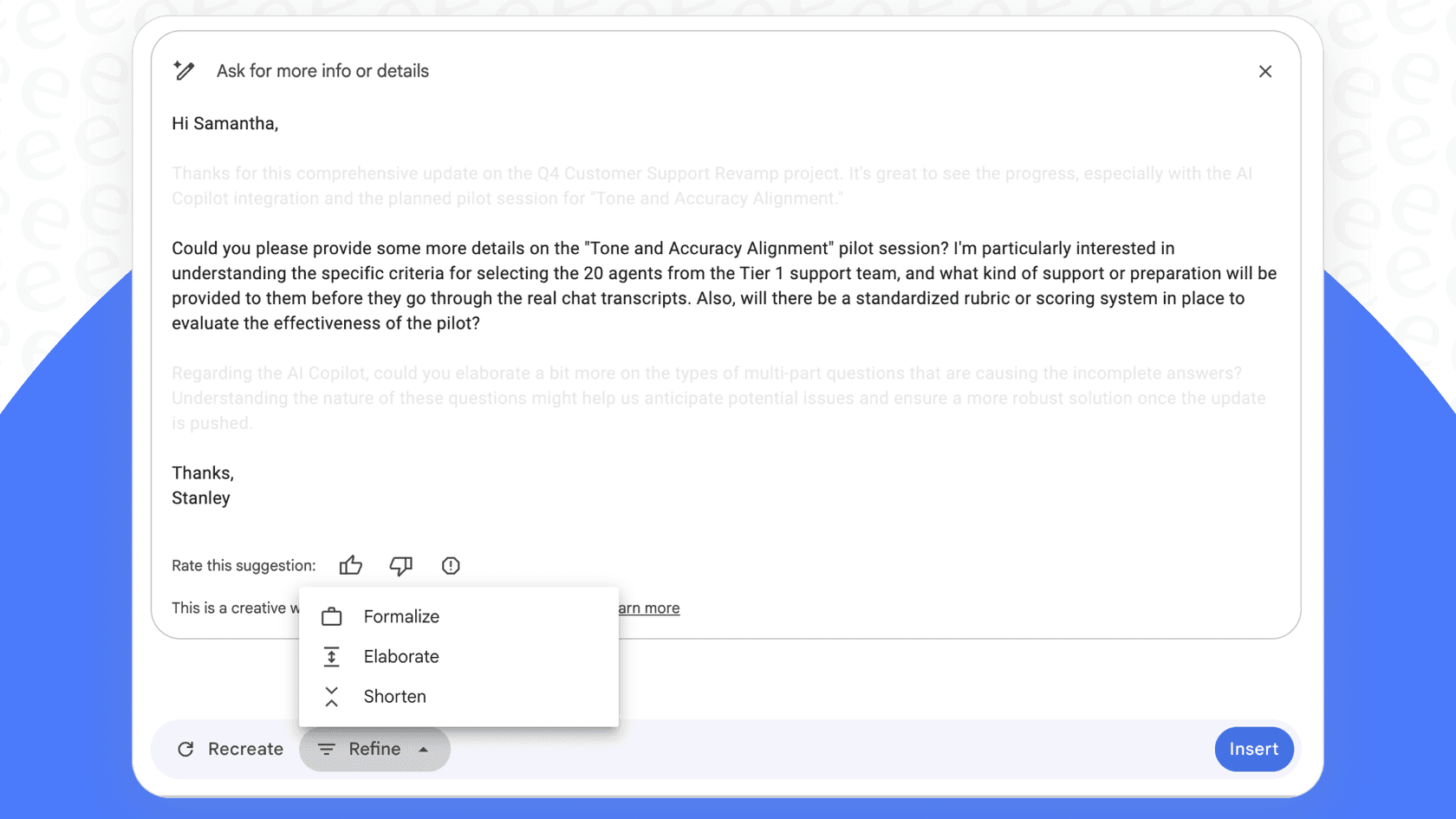
The tool also comes in clutch for tweaking emails you've already written. Once you've typed out a message (or after the AI has generated one), you can use the "Refine" menu to make some edits. This is where you can really dial in the message.
-
Formalize: If your draft feels a little too laid-back, this option will clean it up to sound more professional.
-
Elaborate: Need to flesh things out a bit? This will expand on your text, adding more detail and context.
-
Shorten: For those times when you've written a novel, this tool trims your message down to be more direct.
-
Friendly: The desktop prompt bar also offers this option to warm up the tone, and you can type your own instruction, like "Mention the Friday deadline."
These refinement tools give you a decent amount of control, letting you quickly massage a draft until it feels just right.
Availability across platforms and languages
Google made sure Gmail Help Me Write is available whether you're at your desk or on the move, with support for desktop, Android, and iOS. But it's not available to everyone. It's part of paid Google Workspace subscriptions and Google AI plans, while free personal Gmail accounts can use it only in the US.
Google also knows its user base is global, so they've been adding more languages. The feature now works in English, Spanish, French, German, Italian, Japanese, Korean, and Portuguese on eligible plans, making it a handy tool for international teams or anyone who isn't a native English speaker.
Limitations of Gmail Help Me Write for business use
While "Help me write" is a nice little tool for personal emails, its cracks start to show when you try to use it for more serious business tasks like customer support or sales. It's a good starting point, but it just wasn't designed for the heavy lifting of a team environment.
Lack of deep business context
The biggest roadblock is that Gmail Help Me Write is stuck in a bubble. It can pull details from your other emails and Drive files, but beyond those it can't tap into your company's internal knowledge base, read your help center articles, look at past support tickets, or pull up product specs. Unless it's written down in your inbox or Drive, it has no idea what your return policy is, how your latest product works, or what a customer's order history looks like.
The result? You get generic answers that don't really help a customer with a specific problem, which can be pretty frustrating. This is where a tool like eesel AI is different. It plugs directly into all your business knowledge, your Confluence pages, Google Docs, and even old tickets in help desks like Zendesk, to give answers that are actually specific to your company.
A writer, not a workflow engine
The name really says it all: it only helps you write. It can't actually do anything beyond that. It can't send a support ticket to the right team, add a "VIP" tag to a customer, escalate a problem to a manager, or check an order status in your Shopify store.
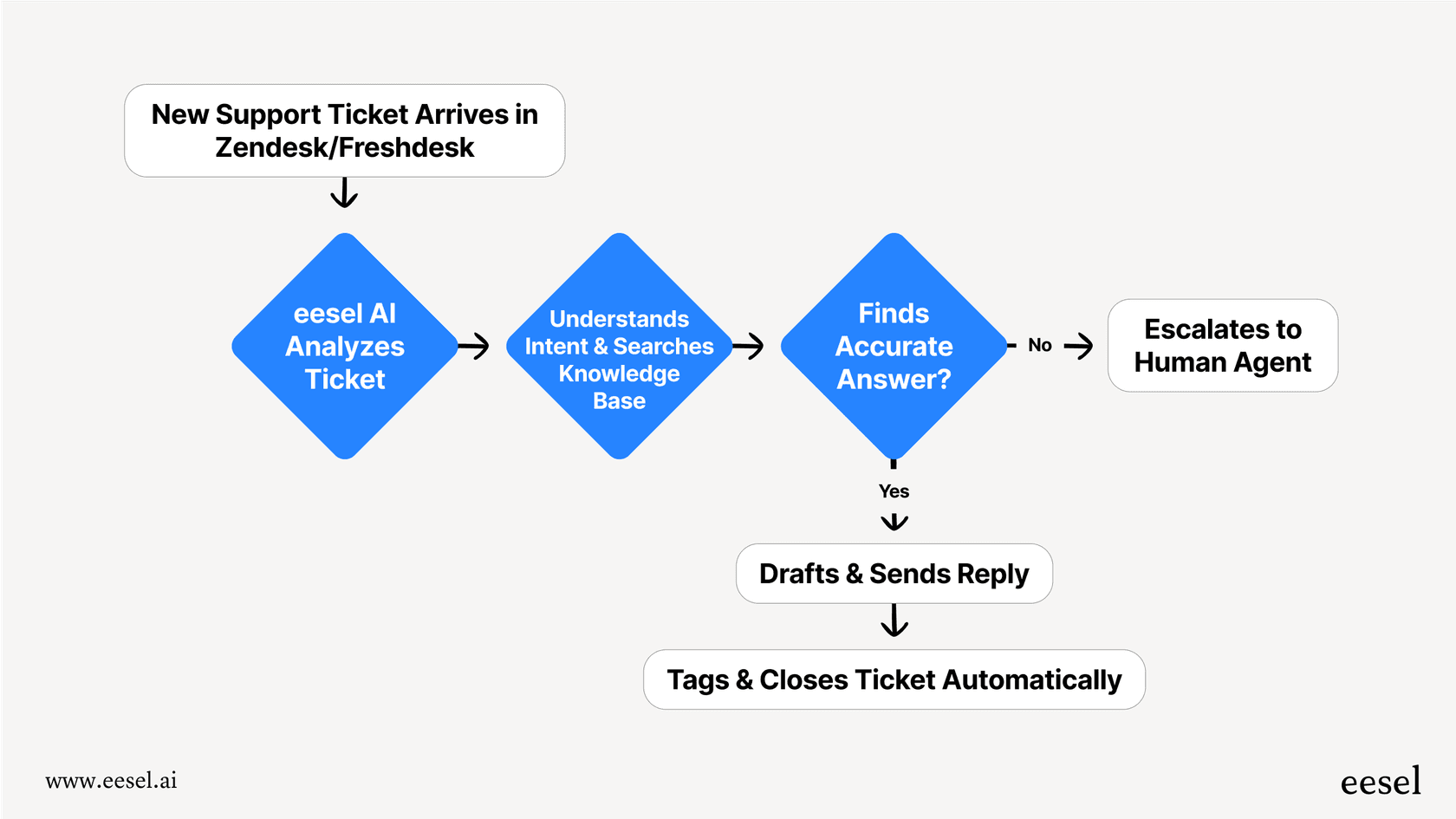
That leaves your team with a pile of manual tasks. All the core work of customer service, sales, and IT support is left untouched, which means you're not getting much of an efficiency boost. A solution like eesel AI works on a completely different level. It's a full workflow engine. Its AI helpdesk agent can resolve tickets on its own and also route, tag, and close them. It does the work for you instead of just helping you write about it.
No central control or analytics
With Gmail Help Me Write, there's no central command center to manage how the AI behaves. Google's help pages for it don't describe a way to set a consistent brand voice for your whole team, create a specific persona for customer chats, or block the AI from discussing certain topics.
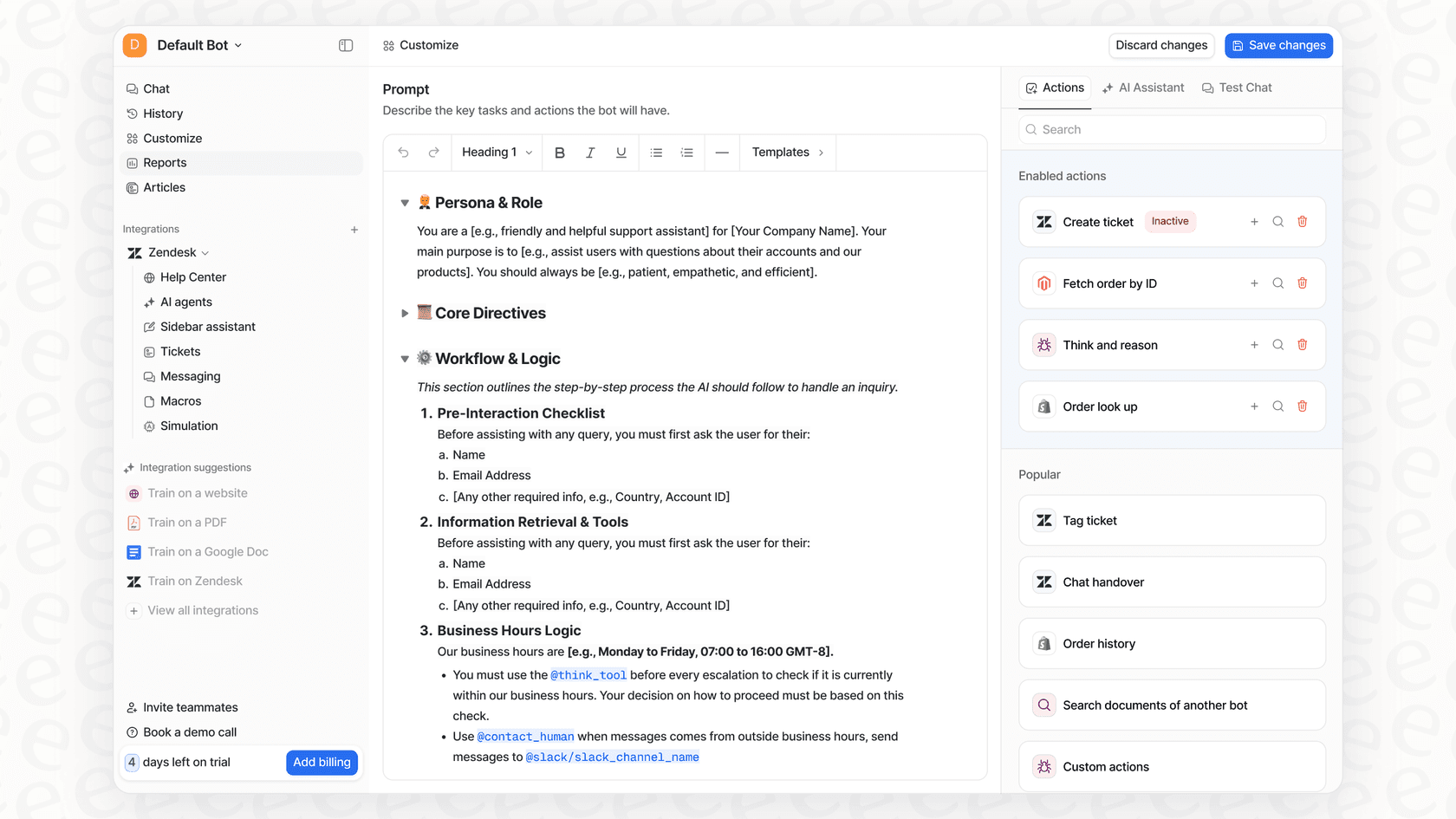
On top of that, you get no support analytics. You can't track what your customers are asking about most often, spot gaps in your help articles, or see how well the AI is performing. This can lead to an inconsistent customer experience and leaves you guessing where you need to improve. In contrast, eesel AI puts you in control. You get a powerful prompt editor to set a custom persona, you can test its performance on old tickets before you go live, and you can use reports to find and fix knowledge gaps. It creates a cycle of improvement that a simple writing assistant just can't provide.
Google Workspace pricing: How to get Gmail Help Me Write
As we mentioned, outside the US "Help me write" isn't available on free, personal Gmail accounts, and the full set of Gemini features needs a paid plan. For a company, that means a paid Google Workspace plan.
For a team to really get the full power of Gemini AI across all the Workspace apps, you'll need to be on at least the Business Standard plan.
| Plan | Price (per user/month, annual) | Key Gemini AI Features |
|---|---|---|
| Business Starter | $7 | Limited access (Gemini in Gmail & app only) |
| Business Standard | $14 | Full access (Gemini in Gmail, Docs, Sheets, Meet, etc.) |
| Business Plus | $22 | Full access + enhanced security & storage |
| Enterprise | Contact Sales | Full access + enterprise-grade controls |
Source: Google Workspace Pricing
At $14 per user each month just to get the full AI suite, the cost can stack up fast for a team, especially when you consider that the tool doesn't solve those core business workflow problems.
The better alternative for teams: Automating workflows with eesel AI
This is where a specialized tool built from the ground up for business workflows starts to make a lot more sense. eesel AI is designed to handle all the things that general-purpose tools like Gmail Help Me Write can't. It's more than an email writer; it's an AI specialist for your support, IT, and internal teams.
Go live in minutes, not months
Setting up a real support automation tool can feel like a huge undertaking. But eesel AI is built to be self-serve. You can connect it to your help desk with a few clicks and get your AI agent running on your own, without having to sit through a sales demo.
Unify all your knowledge, instantly
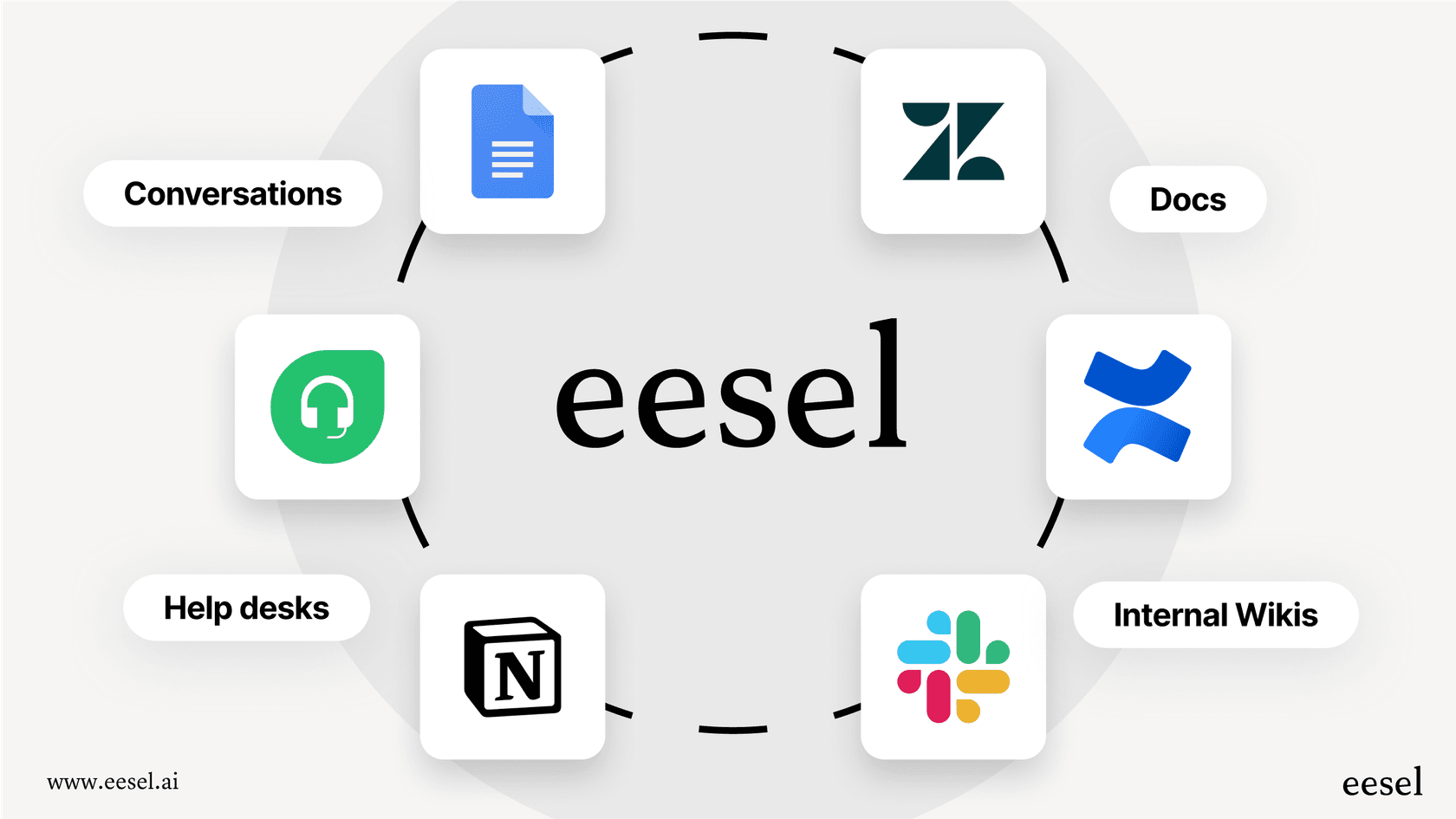
eesel AI gets smart by learning from the stuff that actually matters: your past support conversations, internal wikis, and help center articles. It picks up on your brand's voice and understands the common problems your customers face, so its answers are helpful from the get-go.
Take control with a customizable workflow engine
eesel AI puts you in the driver's seat. You decide which tickets the AI should handle. You can use its prompt editor to shape its personality and even create custom actions, like looking up an order or sending an issue to the right person. It's a level of control that a simple email assistant can't offer.
Choosing the right AI tool for the job
Gmail Help Me Write is a great feature for individuals looking to save some time on personal or routine emails. It’s a perfect example of how generative AI can make those little daily tasks a bit faster and easier.
But for businesses and teams that depend on email for customer support, sales, or IT service management, its shortcomings can become a real headache. When you need answers that are aware of your business context, workflows that run on their own, and insights you can act on, a specialized platform becomes a necessity.
Don’t just write emails faster, resolve issues faster. With its deep integrations and powerful workflow automation, eesel AI gives your team the tools it needs to provide top-notch support at scale.
Frequently asked questions
What exactly is the Gmail Help Me Write feature, and how does it function?
It's an AI writing assistant powered by Google's Gemini model, integrated directly into Gmail. You provide a prompt, and it generates an email draft or refines existing text, aiming to save you time on email composition.
Is the Gmail Help Me Write feature available for free personal accounts, or does it require a subscription?
It's part of paid Google Workspace subscriptions and Google AI plans. Free personal Gmail accounts can use it only in the US.
How can I use Gmail Help Me Write to draft new emails or improve existing ones?
You can use it to generate entirely new emails from a simple prompt, or apply refinement tools like "Formalize," "Elaborate," "Shorten," or "Friendly" to existing drafts within the Gmail interface.
What are the main limitations of Gmail Help Me Write when considering it for business use cases like customer support?
Its primary limitations include a lack of deep business context, no connection to company knowledge bases outside Gmail and Drive, and no workflow automation capabilities beyond writing. It also lacks central control and support analytics.
How much does it cost for a team to access the full capabilities of Gmail Help Me Write and other Gemini AI features?
Gmail Help Me Write is included from Business Starter ($7 per user/month), but to get Gemini AI capabilities across Docs, Sheets, Meet and the other Google Workspace apps, teams typically need at least the Business Standard plan, which costs $14 per user/month annually.
If my team needs more than just email writing, what's a better alternative to Gmail Help Me Write for automating workflows?
Specialized tools like eesel AI are designed for comprehensive workflow automation. They integrate with business knowledge, resolve tickets, and provide analytics, going far beyond what Gmail Help Me Write offers.