

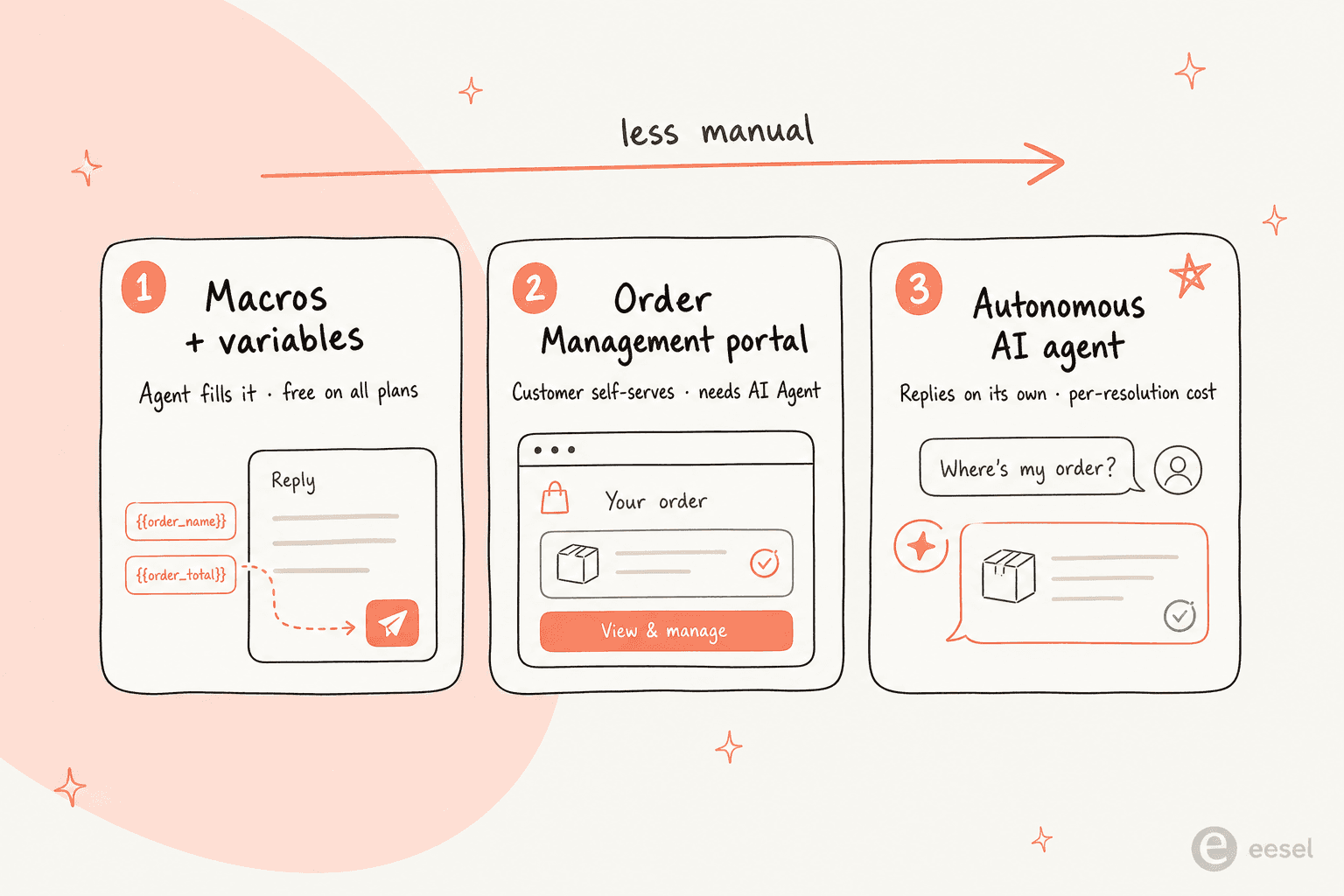
If you run support on a Shopify store, the single highest-value thing Gorgias can do is put live order data, order number, status, items, shipping address, into a reply without anyone copy-pasting from the Shopify admin. There are three ways to set it up, and they trade off effort against how hands-off the result is:
- Macros + variables are free on every plan and let an agent insert real order data into a reply with one click. Best for human-assisted support.
- The Order Management portal lets shoppers self-serve order status and tracking, and Gorgias says it can deflect up to 30% of live-chat volume. It needs an active AI Agent subscription.
- A fully autonomous AI agent reads the order and answers on its own. This is where Gorgias is steering everyone, especially since the old "send tracking" autoresponder rule stops working on January 30, 2026.
One gotcha worth knowing up front: there is no macro variable for a tracking number, so a plain macro can't fully close a "where is my order?" ticket on its own. We'll walk through all three setups, and where each one breaks.
What "pulling order data into replies" actually means
Here's the situation this solves. A customer emails "where's my order?". Without an integration, an agent reads the email, opens the Shopify admin in another tab, searches the customer's email, finds the order, copies the status and tracking, switches back, and types it all out. Multiply that by a few hundred WISMO tickets a week and you've got a team that spends its day as a human API between two browser tabs.
Gorgias is built to kill that tab-switching. As Shopify's only Premier Partner for CX, it pulls each shopper's profile and order history straight into the ticket, so the data is already sitting there when the reply gets written. The flow looks like this:
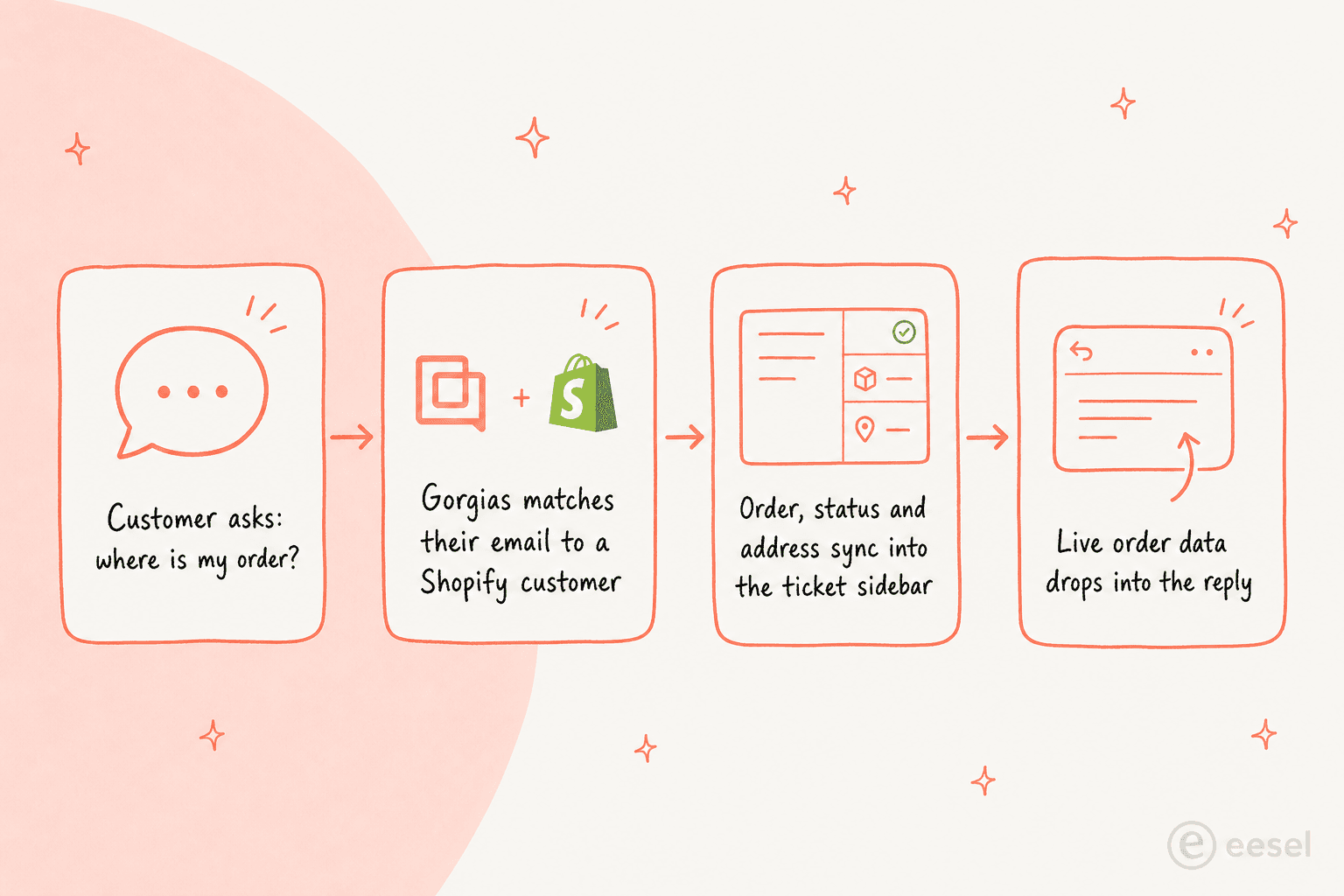
It's a real, popular use case, not a marketing line. In a r/CRM thread comparing Zendesk and Gorgias for Shopify, one operator put it plainly:
"If a meaningful chunk is WISMO, address changes, cancels, refunds, exchanges, Gorgias usually feels worth it because the agent can do the work inside the ticket with Shopify context right there."
So let's set it up. Three steps: connect the store, insert order data into a reply, then automate it.
Step 1: Connect your Shopify store to Gorgias
None of the order variables exist until a store is connected, so this is the prerequisite for everything below. The Shopify 101 doc lays out the path:
- In Gorgias, go to Settings → App Store → All Apps → Shopify.
- Click Add Shopify. You'll be redirected to the Shopify App Store.
- Click Add app to install it on your store.
- If you already have a helpdesk, enter your Gorgias subdomain and click Find My Account. Otherwise, click Create Your Account.
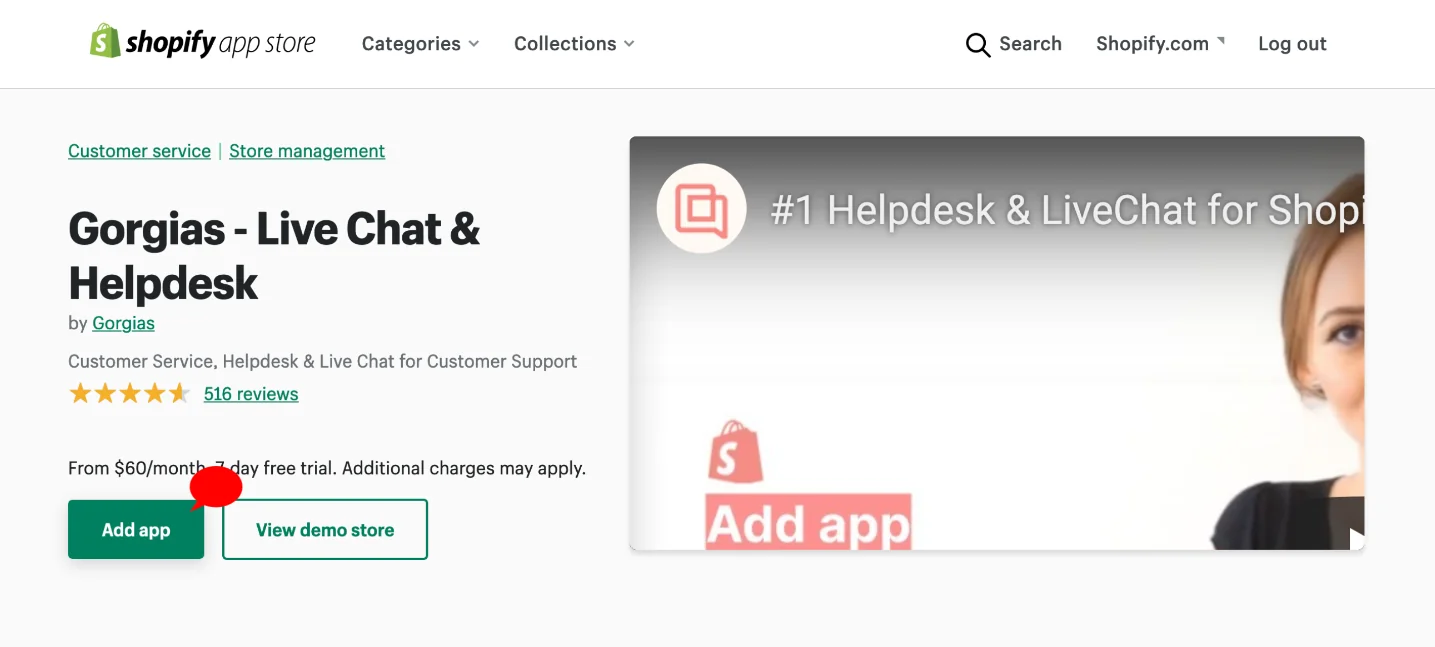
Once it's connected, "when a customer contacts you you'll see their profile and orders in the sidebar on the right-hand side of each ticket," per the Shopify 101 doc. That sidebar is the source every variable reads from, so it's worth confirming a test ticket actually shows order data before you build anything on top. If you want to go deeper on that panel, we've written a full guide to the Gorgias side panel for Shopify data. Running more than one storefront? You can connect multiple Shopify stores to the same dashboard.
Step 2: Insert order data into a reply with macro variables
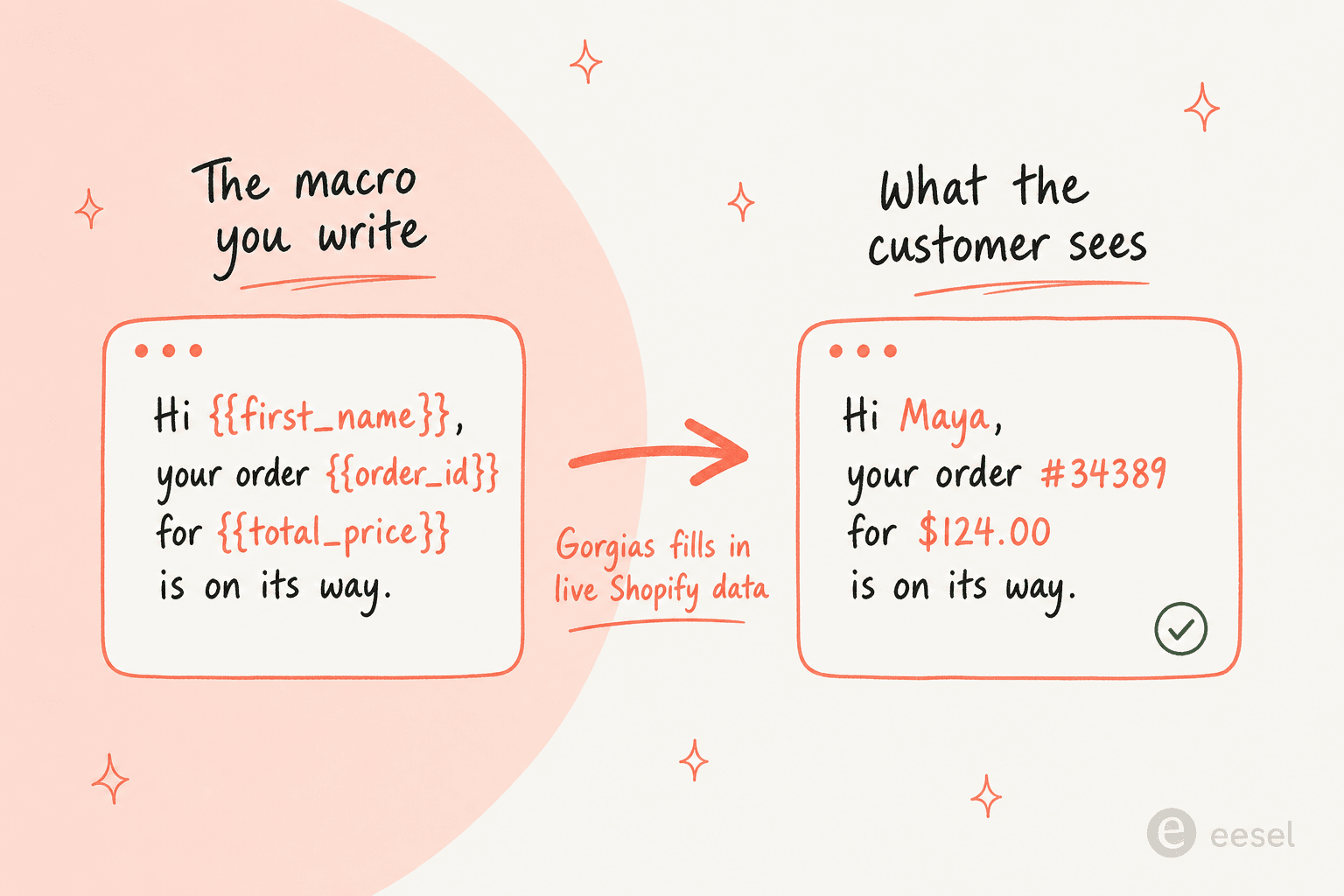
This is the workhorse. A macro is a saved reply template, and variables are the placeholders inside it that auto-populate with real customer and order data when the macro is applied. Per the variables doc, "Gorgias replaces each variable with the relevant data from your helpdesk. If the data isn't available for that ticket, the variable is replaced with a blank space." Hold onto that last sentence, it bites later.
To build one:
- From your helpdesk, click the dropdown menu in the top-left.
- Select Workflows, then under Tools choose Macros.
- Click Create macro.
- Write your message, then use the variable dropdown at the bottom of the reply box to insert variables. The dropdown is grouped by type (Ticket customer, Current agent, Shopify, and so on).
If a variable isn't in the picker, you can type it manually between double curly brackets. Here's what the same template looks like before and after Gorgias fills it in:
The Shopify order variables worth knowing
The most recent order is orders[0], the one before it is orders[1], and the same indexing works for line items. These are the ones you'll reach for most, straight from the Shopify variables table:
| What you want | Variable |
|---|---|
| Customer first name | {{ticket.customer.integrations.shopify.customer.first_name}} |
| Last order number | {{ticket.customer.integrations.shopify.orders[0].id}} |
| First product in last order | {{ticket.customer.integrations.shopify.orders[0].line_items[0].name}} |
| Last order total | {{ticket.customer.integrations.shopify.orders[0].total_price}} |
| Shipping address line 1 | {{ticket.customer.integrations.shopify.customer.default_address.address1}} |
| City | {{ticket.customer.integrations.shopify.customer.default_address.city}} |
| Refund processed date | {{ticket.customer.integrations.shopify.orders[0].refunds[0].processed_at|datetime_format("L")}} |
Dates accept moment.js formatting via the datetime_format filter, so …processed_at|datetime_format("L") renders as 03/22/2018 while "MMM Do YY" gives Mar 22nd 18. A few more recipes live in our guides on attaching last-order items into a macro and the macro for editing a shipping address on the last order.
Two things this approach can't do, and they're the reason a macro alone rarely closes a WISMO ticket:
- There's no tracking-number variable. The published Shopify table simply doesn't include one. Tracking only surfaces through Order Management or the AI path below.
- Missing data renders as a blank. If a shopper emails from a different address than the one on their Shopify account, Gorgias can't match them, and your nicely-templated reply goes out with empty gaps. There's no "if the order exists, say X, otherwise Y" logic in a plain macro.
For account-specific edge cases like that, it's worth reading how to classify how-to questions versus account-specific issues so the blanks don't reach a customer.
Step 3: Automate the "where is my order?" reply
Steps 1 and 2 still need a human to apply the macro. To make order replies actually automatic, you've got three routes, and they're worth understanding side by side before you pick one.
Route A: the Order Management portal (self-service)
The Order Management portal lets customers check their own order status, tracking, and shipping info, and submit return, cancel, or report-issue requests. Per the Order Management 101 doc, it "can automate up to 30% of your live Chat ticket volume," authenticates shoppers with a one-time code, and is Shopify-only with an active AI Agent subscription.
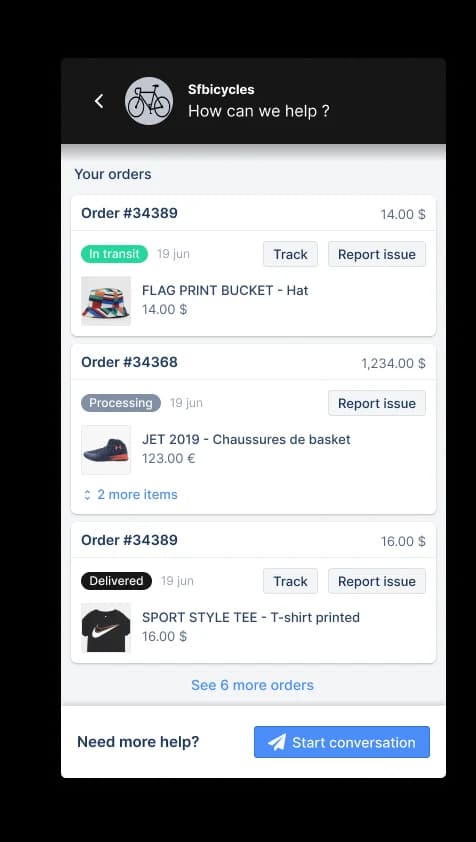
Tap Track on an order and the shopper gets the full delivery timeline, synced directly from Shopify, no agent involved:
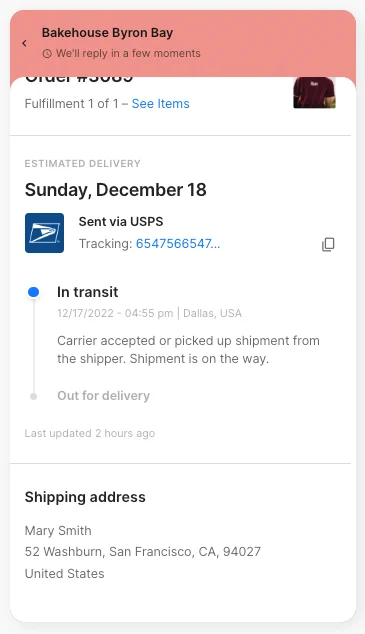
One honest limit: shoppers can't trigger automatic refunds or cancellations here. Those buttons only submit a request that an agent still has to action. It's great for deflecting pure status checks, less so for anything that touches money.
Route B: the "send tracking information" autoresponder rule (on the way out)
The classic automation is a rule in the rule library. You'd go to Settings → Productivity → Rules → Create Rule, pick the Send tracking information email autoresponder, and it fires on email tickets with a shipping or status intent, replying with tracking links for the shopper's last few orders.
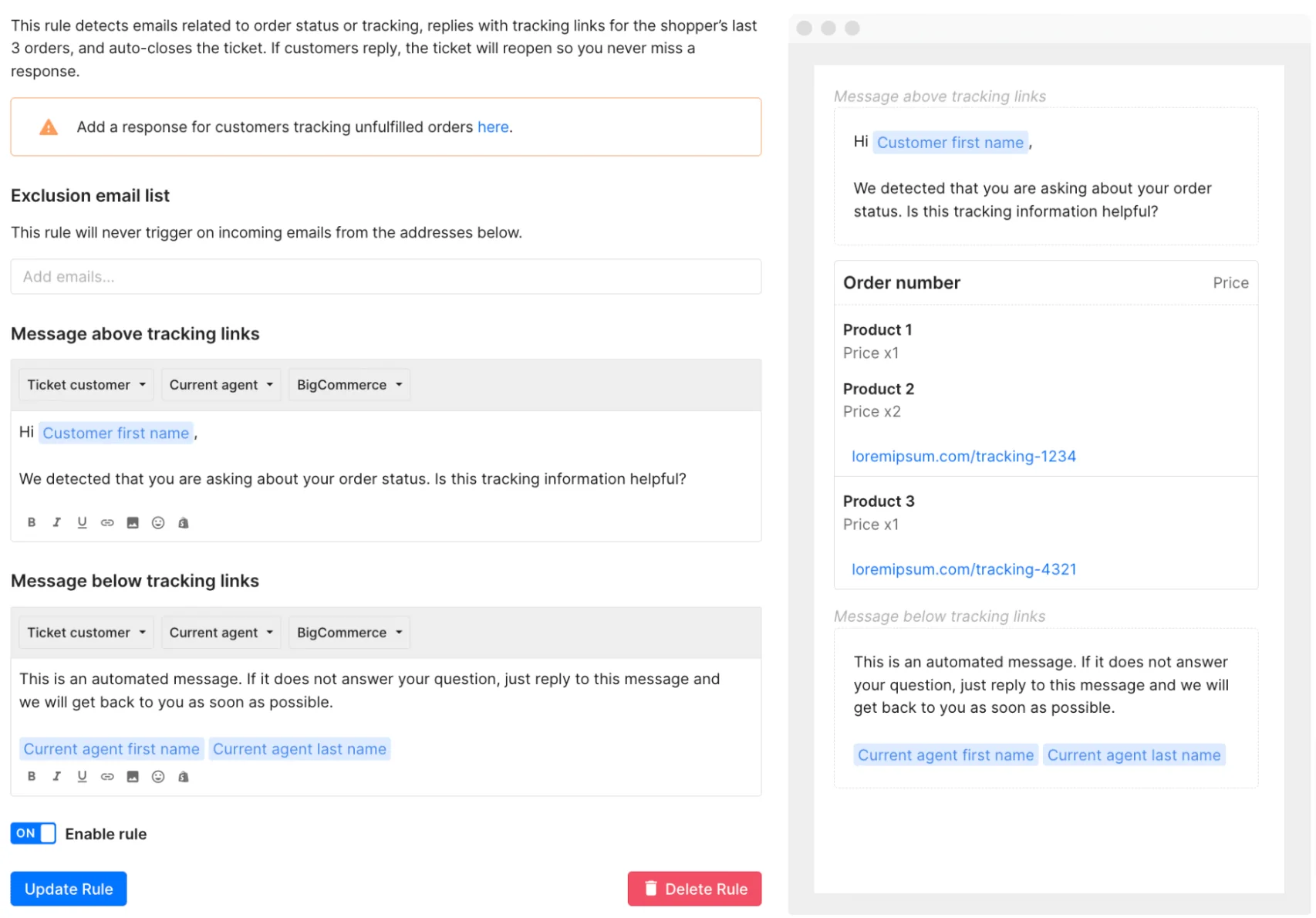
Here's the catch, and it's a big one: autoresponder rules are gone for any account created after September 2024, and accounts that still have them lose access on January 30, 2026. Gorgias itself now points Shopify brands to AI Agent instead. So if you're setting up a new store, this route is a dead end, don't build on it. We mention it mostly so you know what to migrate off.
Route C: an AI agent that reads the order and replies
This is the route Gorgias is nudging everyone toward, and it's genuinely the most capable: an AI support agent detects the order-status intent, looks up the live order, and writes the reply itself, tracking number included. You set it up with skills and guidance rather than macros (worth noting: Gorgias AI Agent doesn't use macros, it generates its own answers). If you'd rather build the deflection logic yourself, our order status bot guide and the chatbot to check delivery status against delay thresholds are good starting points.
The trade-off is cost. The AI Agent bills roughly $0.90 to $1.00 per resolved conversation on top of your plan's ticket limit. For a high-WISMO store that adds up fast, which is the exact complaint that shows up most in Gorgias reviews:
"Gorgias is awesome if you're super deep into Shopify workflows... The downside is the price adds up quick once your volume grows."
A quick reality check before you build
Stepping back: the macro-and-variable system is excellent for human-assisted replies and free on every plan, so set that up regardless. But the fully automated WISMO answer, the thing most teams actually want, lives behind either a self-service portal or the paid AI Agent, and the cheap deterministic option (autoresponder rules) is being switched off. That's a fine outcome if the per-resolution pricing fits your volume. If it doesn't, it's worth knowing the AI layer isn't something you have to buy from your helpdesk vendor.
This is where we'd look at eesel. It's an AI agent that lives inside Gorgias (and 100+ other tools), reads the same Shopify order data, and replies on its own, the Route C outcome, without rebuilding your stack. Two differences matter for this use case specifically: you can simulate it on your real past tickets before it ever touches a customer, so you see the exact deflection rate first, and it runs on one fixed monthly price (from $299/month for 500 credits, 1 credit per ticket or chat) with no seat fees, versus the $0.90 to $1.00 per resolution model above. For a store drowning in order-status questions, that gap is the whole ROI conversation.
Try eesel for Shopify order automation
If the goal is to answer "where's my order?" automatically without the per-resolution sticker shock, eesel is built for exactly this. It plugs into your existing helpdesk, pulls live Shopify order, tracking, and fulfillment data into its replies, and handles the WISMO, address-change, and order-edit tickets that otherwise eat your team's day. You brief it in plain language like a new hire, run it in simulation mode against your historical tickets to prove the deflection rate, then let it go live on a fixed monthly plan, with optional overage capped at whatever you set.
It's free to start, no card required, and you can compare it against the best Shopify chatbot apps or the wider list of Gorgias alternatives before you decide. Either way, the data is already in Gorgias, the only real question is who, or what, does the typing.
Frequently asked questions
How does Gorgias pull Shopify order data into a reply?
{{ticket.customer.integrations.shopify.orders[0].id}}, or let an AI agent fetch it automatically. This is the core of any Gorgias automation to pull Shopify order data into replies.What is the variable for a Shopify order number in Gorgias?
{{ticket.customer.integrations.shopify.orders[0].id}}, where orders[0] is the most recent order and orders[1] is the one before it. You can browse the full list from the variable dropdown at the bottom of the macro editor, or see the Shopify variables table in the Gorgias docs.