

Your team’s Confluence wiki is likely bursting at the seams with good stuff. It’s the central brain for everything from project plans and HR policies to dense technical documentation. But even in the best-organized workspaces, your team’s Slack channels might still see questions like, "Hey, where do I find the latest on Project X?" or "Who do I ask about the new expense policy?"
Sound familiar?
Confluence is a fantastic repository, and its value shines even brighter when your team can find exactly what they need, right when they need it. The built-in search is a powerful tool for document retrieval, and adding an AI layer can make accessing that information even faster. This helps ensure that instead of people spending time searching, they can get instant answers and stay focused on their actual jobs.
What’s the fix? Connecting your Confluence workspace to a conversational AI knowledge bot. Imagine your team could just ask a question in plain English and get an instant, accurate answer pulled directly from your docs. This guide will walk you through the different ways to make that happen, from using Atlassian's own tools and custom builds to simple, ready-made platforms you can set up in less time than it takes to make a coffee.
What is an AI knowledge bot for Confluence?
At its heart, Confluence is designed to be your company's "single source of truth." It's where all that collective knowledge lives and grows. An AI knowledge bot is a tool (think of a private ChatGPT) that is securely trained only on your company's Confluence data.
This is much more than just a search bar. It turns your library of documents into a dynamic, interactive resource. Instead of an employee having to hunt for a specific page and skim through it, they can just ask a question.
For example:
-
A new hire: "What's our policy on parental leave?"
-
A developer: "How do I set up my local dev environment for the mobile app?"
-
A salesperson: "What are the key talking points for the Q3 product launch?"
In each case, they get a direct, synthesized answer right away. This is a huge help for internal IT and HR support, getting new hires up to speed quickly, and giving developers fast access to technical specs.
Three ways to link Confluence with an AI knowledge bot
There isn't just one way to connect an AI bot to your Confluence instance. The right method for you depends on your team's technical skills, your budget, and what you need the bot to do. Let's break down the three main approaches so you can figure out what makes the most sense for your company.
The native approach: Using Atlassian's built-in AI
Atlassian has been integrating its own AI features, known as Atlassian Intelligence (or Rovo), directly into Confluence. Its main purpose is to help you generate content drafts, summarize long pages or comment threads, and power a smarter search across all the Atlassian products.
It’s a very helpful assistant, especially if your team spends the entire day working inside the Confluence interface. There are just a few points to consider when deciding if this is the right fit for your specific needs.
Key considerations:
-
Designed for the Confluence interface: Atlassian's AI is built to help people who are already logged into and working within Confluence. It is a specialized workspace assistant that excels within the Atlassian ecosystem. If you need a bot that lives in other tools like Slack or Microsoft Teams, you might look at complementary integrations.
-
Available on tiered plans: These advanced AI features are available on the Confluence Cloud Premium and Enterprise plans. This makes them a great option for organizations already utilizing these mature, high-level tiers for their documentation needs.
Here’s a look at the pricing tiers and where Atlassian’s AI becomes available.
| Feature | Free | Standard | Premium | Enterprise |
|---|---|---|---|---|
| User limit | 10 users | 150,000 users | 150,000 users | 150,000 users |
| Atlassian Intelligence (Rovo) | No | Limited | Yes | Yes |
| Cost (per user/month, annual) | $0 | ~$5.16 | ~$9.73 | Contact Sales |
Note: Pricing is based on information from Atlassian's official pricing page and is subject to change in 2026.
The technical approach: Building a custom connection
If your company has dedicated engineering resources, you could build a custom bot from scratch using Confluence's API and modern AI frameworks. This path gives you total control over the final product, though it is a serious development project.
Here's a bird's-eye view of what that process involves:
-
Authentication: First, you’ll need to generate an API token from your Atlassian account. This token acts as a key that lets your custom app securely access your Confluence data.
-
Data extraction: Next, your engineers will write scripts using the Confluence REST API to pull content from the pages and spaces you want the bot to learn from.
-
Vectorization: You process the extracted content using a framework like LangChain and then store it in a special kind of database called a vector database (like PGVector). This turns your sentences into numbers that an AI can search contextually.
-
Integration: With your knowledge vectorized, you then connect it to a Large Language Model (LLM) like OpenAI's GPT-4. This is the "brain" that will take a user's question and generate a human-like answer.
-
Deployment: Finally, you have to build, host, and maintain a user interface for the bot, perhaps via an integration into a chat tool like Slack.
graph TD A[Start: Define Bot Requirements] --> B[Generate Confluence API Token]; B --> C[Develop Scripts for Data Extraction]; C --> D[Clean and Pre-process Content]; D --> E[Convert Text to Vectors]; E --> F[Store Vectors in a Database]; F --> G[Integrate with a Large Language Model]; G --> H[Build a User Interface]; H --> I[Deploy to Production Environment]; I --> J[Ongoing Maintenance & Updates]; J --> K[End: Bot is Live];
Key considerations:
-
Significant development effort: This is a full-on development initiative that demands time, expertise in AI, and ongoing maintenance.
-
Operational costs: The expense includes developer salaries, API calls to your LLM provider, and data storage fees.
-
Security responsibility: With a custom build, your team is responsible for ensuring the data pipeline is secure and compliant with regulations like GDPR.
The integrated approach: Using a ready-made platform
The third option is to use a platform that works alongside Confluence to do the heavy lifting for you. These tools are designed to connect your knowledge sources with your team's workspace, providing a powerful solution without the engineering overhead.
This is where a platform like eesel AI comes in. It’s designed to complement Confluence, providing a balance of power and simplicity.
How it works:
-
Go live in minutes: You can skip the coding and long setup times. With eesel AI, you use a simple Confluence integration to connect your workspace. The setup is self-serve and very fast.
-
Bring all your knowledge together: eesel AI can help you centralize information by connecting to over 100 different platforms. This means you can create a unified bot that references your Confluence wiki along with Google Docs or Notion pages.
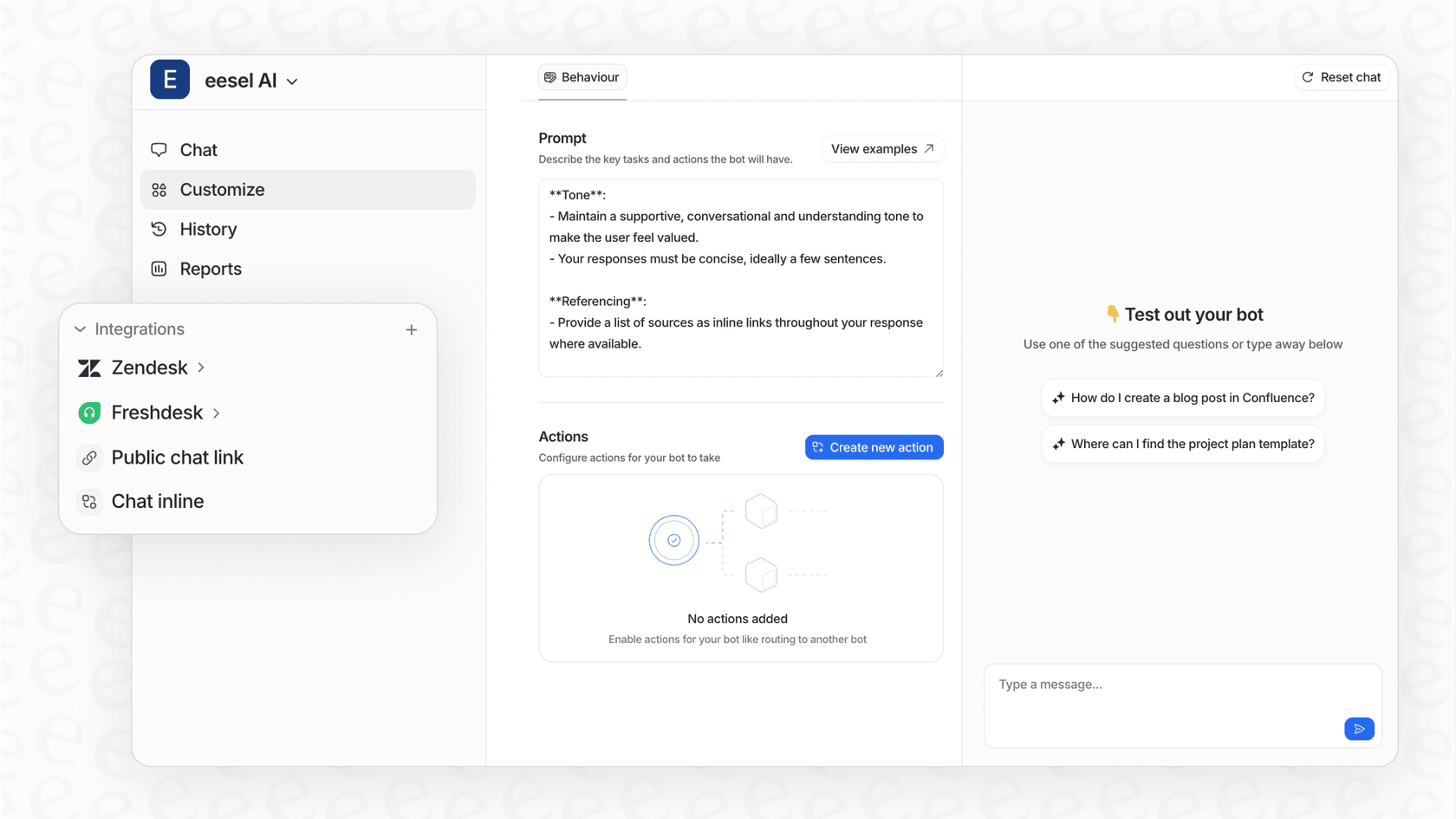
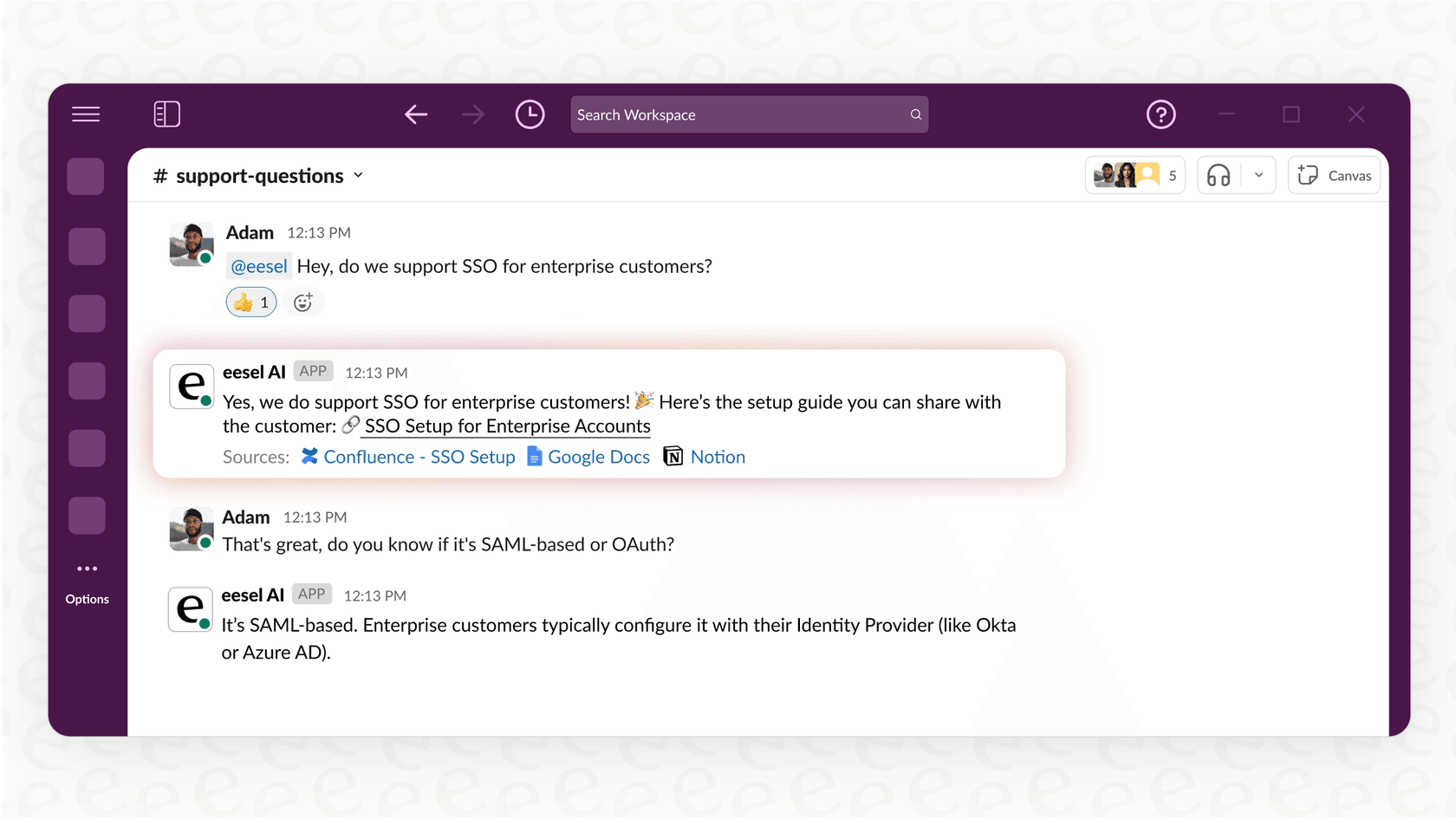
- Put the bot where your team actually works: You can deploy your bot directly in Slack, Microsoft Teams, or even embed it in your helpdesk, like Zendesk or Jira Service Management. It brings answers to wherever questions are asked.
- Total control and security: You get fine-grained control to limit the bot to specific Confluence spaces. For example, you could create an "IT Support" bot and a separate "HR" bot. eesel AI is also private by design, ensuring your data remains your own.
Comparing approaches: Which is right for you?
To help you figure out the best path forward, here’s a summary of the three methods for 2026.
| Approach | Ease of Setup | Customization & Control | Where it Works | Best For |
|---|---|---|---|---|
| Native Atlassian AI | Easy (built-in) | Specialized for Confluence | Within Confluence | Teams on Premium/Enterprise plans who want deep integration within the Confluence UI. |
| Technical DIY | Very Difficult | High (fully custom) | Anywhere you build it | Organizations with dedicated engineering teams and a custom development budget. |
| Integrated Platform (eesel AI) | Very Easy (no-code) | High (customizable) | Slack, MS Teams, Help Desks, etc. | Teams who want a powerful, secure bot that works across their entire tool stack. |
Unlock your Confluence knowledge today
Your Confluence knowledge base is one of your company's most valuable assets. It is a mature, reliable platform that powers documentation for thousands of companies worldwide. Adding an AI knowledge bot is the perfect way to make that information even more accessible.
While native Atlassian tools are a fantastic addition for those working within the app, and DIY builds offer total customization, an integrated platform like eesel AI offers a flexible middle ground.
eesel AI provides a fast and efficient way to activate your Confluence knowledge. It turns your documentation into an expert AI assistant that's available 24/7, right where your team is already working.
Don't let your valuable documentation go underutilized. With eesel AI, you can link Confluence with an AI knowledge bot in just a few minutes. Start your free trial today and see how much more productive your team can be.
Frequently asked questions
What are the primary advantages of linking Confluence with an AI knowledge bot for your team?
Linking Confluence with an AI knowledge bot transforms your documentation into an interactive resource. It allows team members to get instant, accurate answers to questions in plain English, reducing context switching and helping colleagues find the right information efficiently.
How complex is it to link Confluence with an AI knowledge bot using the different methods?
The complexity varies significantly. Using native Atlassian AI is easy and deeply integrated. Building a custom connection is very difficult, requiring deep engineering expertise. Ready-made platforms like eesel AI offer a very easy, self-serve setup that can go live in minutes without coding.
Can I choose which Confluence spaces an AI knowledge bot can access?
Yes, with integrated platforms like eesel AI, you have fine-grained control to limit the bot to specific Confluence spaces. This allows you to create specialized bots (e.g., for IT or HR) that only reference relevant documentation, ensuring accuracy and relevance.
What are the typical costs of linking Confluence with an AI knowledge bot?
Atlassian's native AI is available on Premium or Enterprise Confluence plans, offering advanced capabilities for growing teams. Custom builds involve significant developer salaries, API call fees, data storage, and cloud computing. Integrated platforms typically operate on a per-user or usage-based subscription model, balancing cost with convenience.
Where can the AI bot provide answers once it's linked with Confluence?
The accessibility depends on the method. Atlassian's native AI works beautifully within the Confluence ecosystem. Custom builds can be deployed wherever you integrate them. Integrated platforms like eesel AI can deploy your bot directly into tools like Slack, Microsoft Teams, or helpdesks, bringing answers to where your team already works.
What are the data security and privacy concerns when linking Confluence with an AI knowledge bot?
With a custom build, your team is fully responsible for security and compliance. Integrated platforms like eesel AI are designed with privacy in mind, ensuring your data is never used for training general AI models and remains your property, offering peace of mind.
Can an AI bot connect to other knowledge sources besides Confluence?
Yes, integrated platforms like eesel AI are often designed to connect to over 100 different platforms, including Google Docs and Notion. This allows you to create one unified AI bot that can pull answers from all your company's dispersed knowledge sources, complementing your Confluence setup.