

You know the drill. You’re hunting for that final presentation deck, a project update, or the answer to a customer's question, and you end up bouncing between a dozen different apps. With information scattered all over the place, your team can spend a huge chunk of their day just trying to find what they need. It’s a massive time-suck.
Slack's answer to this chaos is Slack AI Enterprise Search. It promises to be the "single pane of glass" for finding information buried anywhere in your company, right from the search bar you already use every day.
So, let's break down what Slack AI Enterprise Search is all about. We'll get into its features, pricing, and some important limitations you should know about, especially if you're on a support or IT team that needs AI to do things, not just find them.
What is Slack AI Enterprise Search?
Slack AI Enterprise Search is a feature that lets you search for information across all your connected apps and conversations without leaving the Slack interface. Instead of just digging through old Slack messages, it casts a much wider net across your company's entire digital filing cabinet.
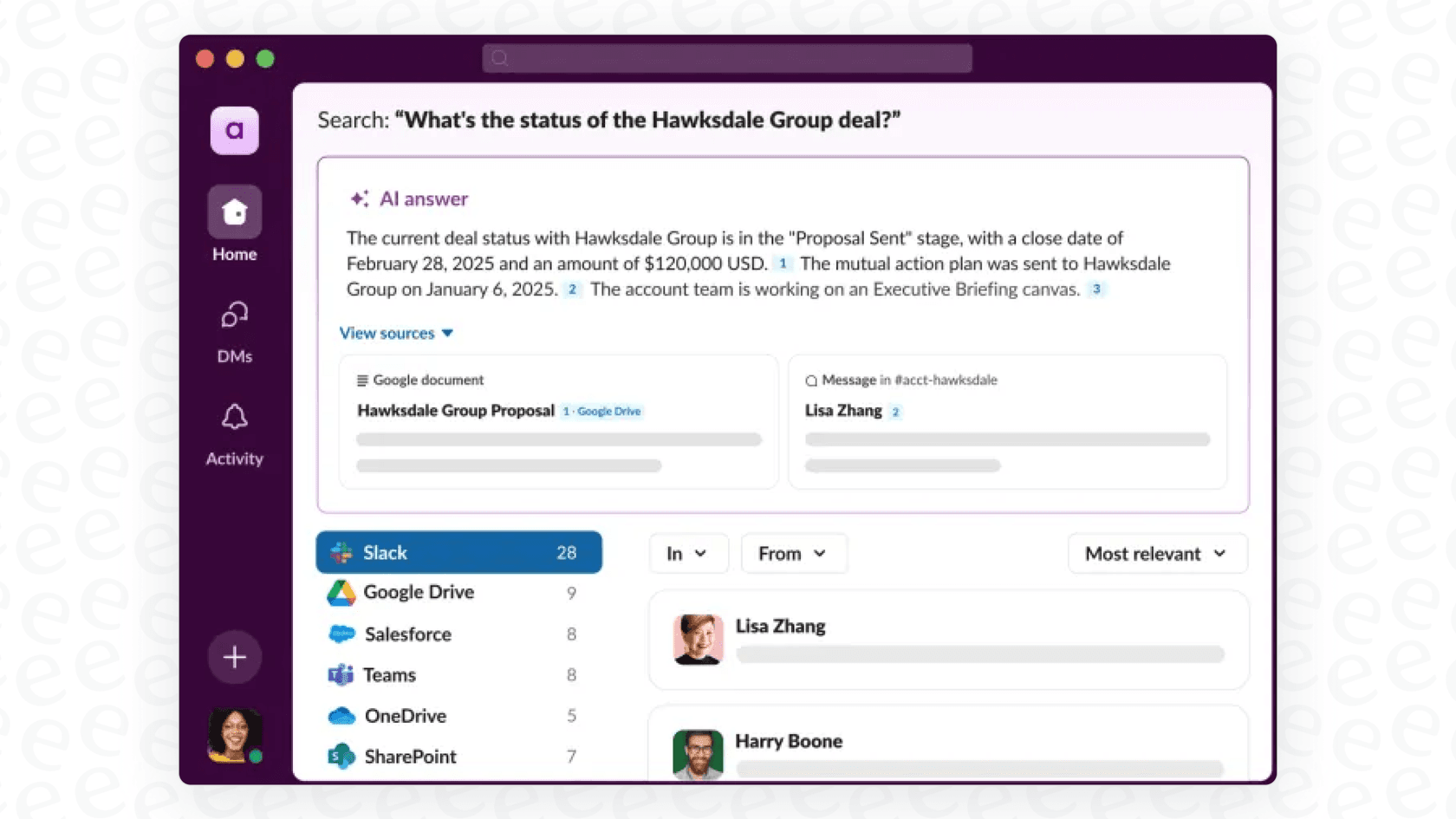
Basically, it turns your search bar into a conversation. You can ask a question in plain English, like, "What's the latest on the Q4 marketing campaign?" and get a straightforward, AI-generated answer. This isn't just a list of links; it’s a summary pulled together from Slack conversations, files, and other apps.
The whole thing runs on a "federated search" model. It’s a fancy term, but all it means is that instead of copying all your data into one giant folder, Slack queries your tools in real-time. This is great because it means the information is always current and, more importantly, it respects everyone's access permissions. If you can't see a file in Google Drive, you won't see it in your Slack search results, either. It connects to key tools like Google Drive, GitHub, and Salesforce, acting as a smart gateway to your company's knowledge.
Key Slack AI Enterprise Search features and capabilities
Let’s dig into what the platform actually does, looking at its strengths and where it might not be the right fit for teams that need more than a smart search bar.
Search everything from one place
The big idea here is to stop the madness of app-switching that destroys focus. Instead of opening five different tabs to find what you’re looking for, you just ask Slack.
According to Slack, it supports a decent list of data sources out of the box:
-
Asana
-
Box
-
Confluence Cloud
-
Dropbox
-
GitHub
-
Google Drive
-
Google Mail
-
Jira Cloud
-
Microsoft Outlook
-
Microsoft Teams
-
OneDrive/Sharepoint
-
Salesforce
-
Seismic
Slack also offers an API for custom connectors to internal data sources. Connecting these sources is a good first step for finding information, but the focus is on retrieval. The goal is to bring information to you in Slack. This is a very different approach from a platform like eesel AI, which connects to knowledge from over 100 sources (including Slack) not just for you to read, but to power AI agents that can actually take action in your helpdesk or ITSM tools.
AI-powered answers and summaries
Instead of just spitting out a list of documents, Slack AI Enterprise Search uses a technique called Retrieval-Augmented Generation (RAG) to give you direct answers and summaries. If you need to get up to speed on a long thread or a complex project, the AI can sift through the noise and give you the highlights. It can definitely save you some time.
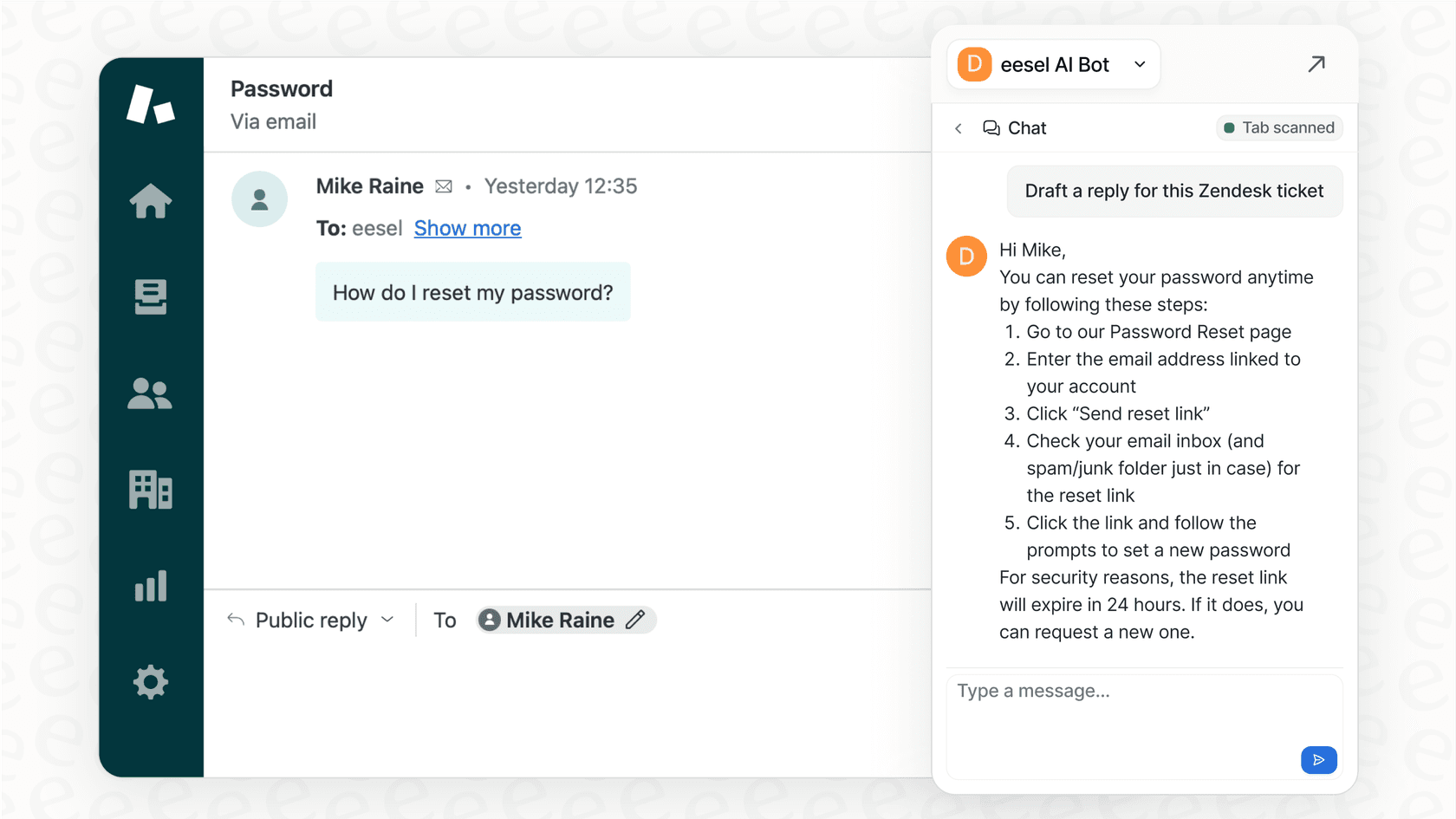
But let's be honest, summaries are passive. They tell you what's happening, but they don't help you do anything about it. The real productivity jump happens when you turn that knowledge into action. For example, the AI Copilot from eesel AI doesn't just find a similar past ticket; it drafts a complete, on-brand reply for a support agent to use in Zendesk or Freshdesk. It helps you go directly from question to resolution, which is a huge deal for busy teams.
Enterprise-grade security and permissions
Slack has built its business on trust, and its approach to AI is no different. It’s worth pointing out their solid security model. Searches happen in real-time and respect the permissions you already have in the source application. Your private documents will stay private.
They also make it very clear that your company's data is never used to train their large language models (LLMs). The information is used to generate an answer for you in the moment and is then forgotten.
These security standards are pretty much the baseline for any serious AI tool today. Of course, eesel AI respects your privacy with the same principles, using strict data isolation and SOC 2 Type II-certified subprocessors. It also offers EU or US data residency, giving companies more control over where their data is stored.
How to set up and use Slack AI Enterprise Search
Getting Slack AI Enterprise Search up and running isn't exactly a one-click affair. It takes a coordinated effort between your admins and every single user.
-
First, the admin steps in: An Org Owner or Admin has to go into the organization settings and flip the main switch to turn the feature on for the whole company.
-
Then, they configure the apps: Next, the admin has to add and set up each data source one by one. This isn't always simple. For some apps, like GitHub, it means installing a separate app and fiddling with permissions within GitHub itself.
-
Finally, it's everyone else's turn: After an admin has enabled a source, every single user has to connect their personal accounts (like their Google account) to Slack. If they don't, they won’t see any results from that source.
graph TD A[Admin enables feature in Org Settings] --> B{Configure Data Sources}; B --> C[Admin installs and configures each app, e.g., GitHub]; C --> D[Users are notified to connect accounts]; D --> E{Each user connects their personal accounts}; E --> F[Search becomes active for connected users];
That’s a lot of hoops to jump through, and it can really slow things down. It relies on both a central IT team for setup and every employee to do their part. It's a different world from the simple, self-serve approach of a tool like eesel AI. You can connect your helpdesk with a single click and immediately run simulations on thousands of your past tickets. This lets you see exactly what you can automate and prove the value before you go live, getting your AI agent working in minutes, not weeks.
Slack AI Enterprise Search pricing and limitations
Alright, let's talk about the price tag and the fine print. For most businesses, this is where a tool either makes sense or it doesn't.
Understanding the cost
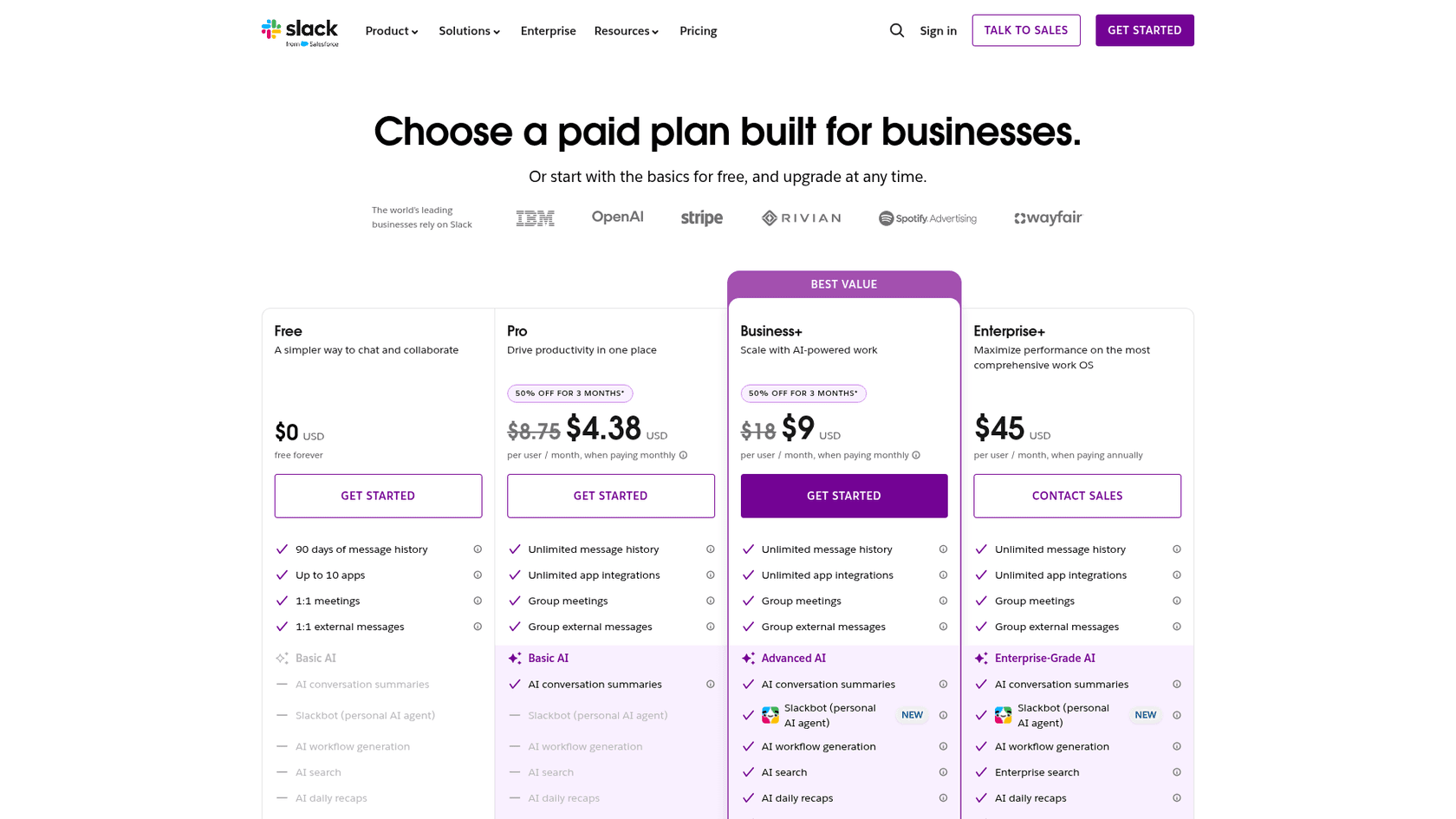
First off, Slack AI Enterprise Search isn't something you can just add to your standard plan. It’s bundled with Slack's most expensive subscription, Enterprise+, and with Enterprise Grid orgs that have the legacy Slack AI add-on. Slack's pricing page lists Enterprise+ at $45 per user per month billed annually, with a Contact Sales button, so expect a sales conversation.
Here’s a quick look at the plans that include Slack's AI features, based on their official page:
| Plan | Pricing (Annual Billing) | Key AI Features Included |
|---|---|---|
| Pro | $7.25 USD / user / month | Basic AI (Summaries, huddle notes) |
| Business+ | $15 USD / user / month | Advanced AI (incl. Slackbot, AI search, Workflow Generation) |
| Enterprise+ | $45 USD / user / month | Enterprise-Grade AI (adds Enterprise Search) |
The feature is limited to the top plan, which puts it out of reach for a lot of small and mid-sized companies. The per-user pricing model also means costs can balloon as your team grows. This is a contrast to eesel AI's pricing, which is one fixed monthly price based on credits (1 credit per ticket or chat) with no per-seat fee. It starts with 100 free credits, and paid plans begin at $299/month for 500 credits.
Key limitations to consider
Beyond the price, there are some basic limits to how the tool actually works.
It finds info, it doesn't take action
This is the most important thing to understand. Slack AI Enterprise Search is designed to find information. It is a search feature, so automating workflows, triaging a support ticket, updating your CRM, or looking up live order info from Shopify to solve a customer's problem are separate jobs. It brings you an answer, and the follow-through is up to you or another tool.
It's a generalist, not a specialist
The feature is built for general corporate knowledge discovery. It isn't built around the purpose-built tools that support and IT teams often need, like automated ticket tagging, sentiment analysis for prioritizing issues, or generating draft knowledge base articles from solved tickets.
It keeps you tethered to Slack
The search experience lives in Slack. If your support agents spend their day in Zendesk or your IT team works out of Jira Service Management, they would be jumping over to Slack to get this information. Platforms like eesel AI are built to work natively inside the helpdesk, bringing AI help directly into an agent's workflow without the context-switching penalty.
A better alternative for support and IT teams: eesel AI
For teams that need more than just search, you need a tool that can actually do things.
From finding info to solving problems
That’s the gap eesel AI is built to fill. While Slack finds the document that explains how to process a refund, an AI Agent from eesel AI can read that document and actually process the refund for the user. It moves from passive knowledge to active problem-solving. It can perform custom actions like escalating tickets, applying tags, and making API calls to your other systems.
Go live in minutes with confident testing
Instead of a complicated, admin-led setup, eesel AI offers a simple, self-serve onboarding you can handle on your own. But its real superpower is the simulation mode. You can test your AI on thousands of your own historical tickets to get an accurate preview of your resolution rate and find gaps in your knowledge base, all before a single customer ever talks to it. This takes all the guesswork out of deployment.
Unify all your knowledge, wherever it lives
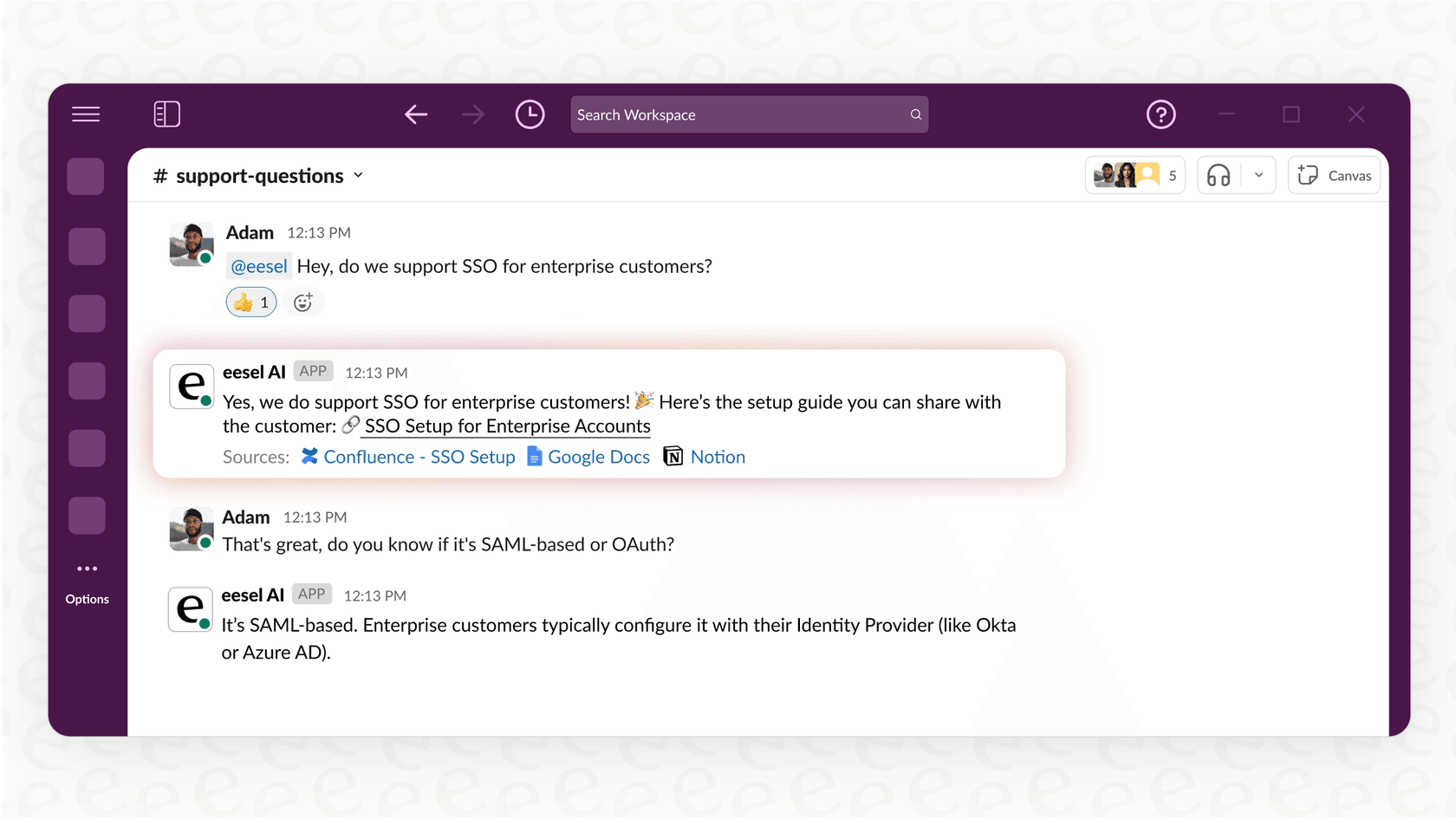
eesel AI can be trained on one of the most valuable, and often ignored, sources of knowledge for support teams: your past tickets. This helps the AI learn your company's specific tone, voice, and common solutions right from the start. It also integrates with Slack, Confluence, and Google Docs, using that knowledge to power its AI Internal Chat. This gives your employees a dedicated, smart Q&A assistant right inside Slack or MS Teams.
The verdict on Slack AI Enterprise Search
So, what's the verdict? Slack AI Enterprise Search is a serious tool for large organizations trying to solve the internal "where did I put that file?" problem within the Slack ecosystem. It's a solid move toward breaking down information silos.
But the key thing to remember is that its value is in information retrieval, not workflow automation. For support, IT, and other service teams, the real payoff from AI comes from moving beyond search to automated action. To bridge that gap, you need a specialized platform built for the job.
eesel AI provides that specialized, action-oriented layer. It connects with your existing tools to turn your company's collective knowledge into resolved tickets, happy customers, and a more productive team.
Ready to turn knowledge into action?
See how eesel AI can automate your support workflows and provide instant, accurate answers where your team already works.
Frequently asked questions
Could you explain what Slack AI Enterprise Search is designed to do and the main problem it addresses?
Slack AI Enterprise Search is designed to provide a "single pane of glass" for finding information across all connected apps and conversations within Slack. It aims to solve the problem of information being scattered across many tools, reducing time spent searching.
What external applications and data sources can Slack AI Enterprise Search connect to for its searches?
It can connect to various external applications such as Google Drive, GitHub, Salesforce, Asana, Box, Confluence Cloud, Dropbox, Jira Cloud, Microsoft Teams, and OneDrive/Sharepoint, allowing it to search across a wide range of company knowledge.
How does Slack AI Enterprise Search handle data security and user permissions when searching across connected apps?
Slack AI Enterprise Search operates on a federated search model, querying tools in real-time and respecting existing access permissions in the source applications. Company data is not used to train LLMs, ensuring privacy.
What's involved in the setup process for deploying Slack AI Enterprise Search across an organization?
The setup involves an Org Owner or Admin enabling the feature and configuring data sources. Additionally, every individual user must connect their personal accounts to Slack for results from those sources to appear.
What are the pricing details and subscription requirements to access Slack AI Enterprise Search?
Slack AI Enterprise Search is exclusively bundled with Slack's Enterprise+ plan, which does not have public pricing. Interested organizations need to contact Slack's sales team for a custom quote.
What are some of the key limitations of Slack AI Enterprise Search, particularly concerning workflow automation?
The primary limitation is that Slack AI Enterprise Search focuses on information retrieval, not action. It cannot automate workflows, triage tickets, update CRMs, or perform specialized tasks needed by support and IT teams.