


The pressure to bring AI into your customer support workflow is real, but picking the right tool can feel like a shot in the dark. You need something that actually makes a difference without taking six months to implement, and you want to be in the driver's seat. In the middle of all this noise, Twig AI is a name that keeps popping up, especially for B2B SaaS and fintech support teams.
This post is a straightforward breakdown of what Twig AI actually does. We’ll get into its features, pricing, the setup process, and some of the limitations to keep in mind. The goal is to give you an honest look so you can decide if it's right for you, or if a more modern, do-it-yourself alternative is what you actually need.
What is Twig AI?
At its heart, Twig AI is an AI platform built to improve the customer experience by giving support teams a new set of tools. The main idea is to automate the simple, repetitive questions and help your human agents work more effectively. From what they show publicly, its main job is to build and launch AI agents and chatbots that learn from your company’s internal knowledge.
Twig describes itself as built for B2B SaaS, fintech, and ecommerce teams. Like a lot of tools in this space, it is designed to plug into a company's existing support setup, and Twig pairs that with managed onboarding from its own AI specialists, which suits some teams more than others.
A deep dive into Twig AI's features
A tool is only as good as what it can do, so let's get into the specifics of what you get with Twig AI.
AI agents and chatbots for automated support
Twig AI gives you AI agents that can field Tier 1 support questions and 24/7 website chatbots to deflect common questions before they even turn into tickets. The platform says its AI learns from your help docs, past support tickets, and tutorials to come up with its answers. That’s a pretty standard and necessary starting point for any support automation tool. Twig says it resolves 70%+ of Tier 1 tickets end to end, a self-reported figure on its about page with no cohort or date range attached.
But here’s a question worth asking: how much control do you really have? Can you easily tell the AI exactly which tickets to handle and which ones to pass to a human immediately? Some more flexible platforms like eesel AI give you a workflow engine where you can build your own rules and actions with a simple prompt editor. This lets you be sure the AI is only touching the tickets you want it to, so you can roll it out without worrying about it going rogue and creating a bad customer experience.
AI agent assistance and helpdesk integrations
To give human agents a hand, Twig AI has a CoPilot app for Zendesk and a browser extension that helps draft replies and pulls up relevant info. The idea is to cut down on the time agents waste digging for answers and typing the same thing over and over.
A native app inside one helpdesk is a good start, and Twig also lists 30+ data connectors including Confluence, Slack, and Google Drive. In most companies, important information is scattered everywhere, so the breadth of the connector list is worth comparing. The best AI solutions, like eesel AI, can connect to over 100 different sources, including Confluence, Google Docs, and Slack. This creates one single source of truth for every answer across the tools your team already uses.
Quality management and analytics
Twig AI has a system for checking answers and collecting user feedback, which helps the AI get better over time. It describes a self-evaluation step that checks confidence and sources before a reply goes out, and low-confidence answers are escalated to a human. Having that feedback loop is definitely important for making sure the AI gets smarter and more accurate as you use it.
But good analytics should do more than just tell you what the AI did. The latest reporting tools, like those in eesel AI, take it a step further. They can pinpoint the exact gaps in your knowledge base by looking at the questions the AI couldn't answer. This turns raw data into a to-do list for improving your content, helping you patch up the holes in your documentation that are causing the most trouble.
Twig AI pricing and setup: What to expect
Features are one thing, but the reality of getting a tool up and running and paying for it is often what makes or breaks the decision. Here’s a look at what it takes to get started with Twig AI.
The Twig AI implementation process
Twig publishes a 30-minute setup with managed onboarding from its AI specialists, and there is a book-a-demo route as well. The guided setup lets them tailor things for you.
Teams that prefer to skip demos entirely have a different route, and a completely self-serve approach is becoming popular for that reason. With eesel AI, for example, you can sign up, connect your helpdesk with a click, and have an AI agent running in minutes, no demos or sales calls needed. You get to move at your own pace, which is a huge plus for fast-moving teams.
Understanding the Twig AI pricing model
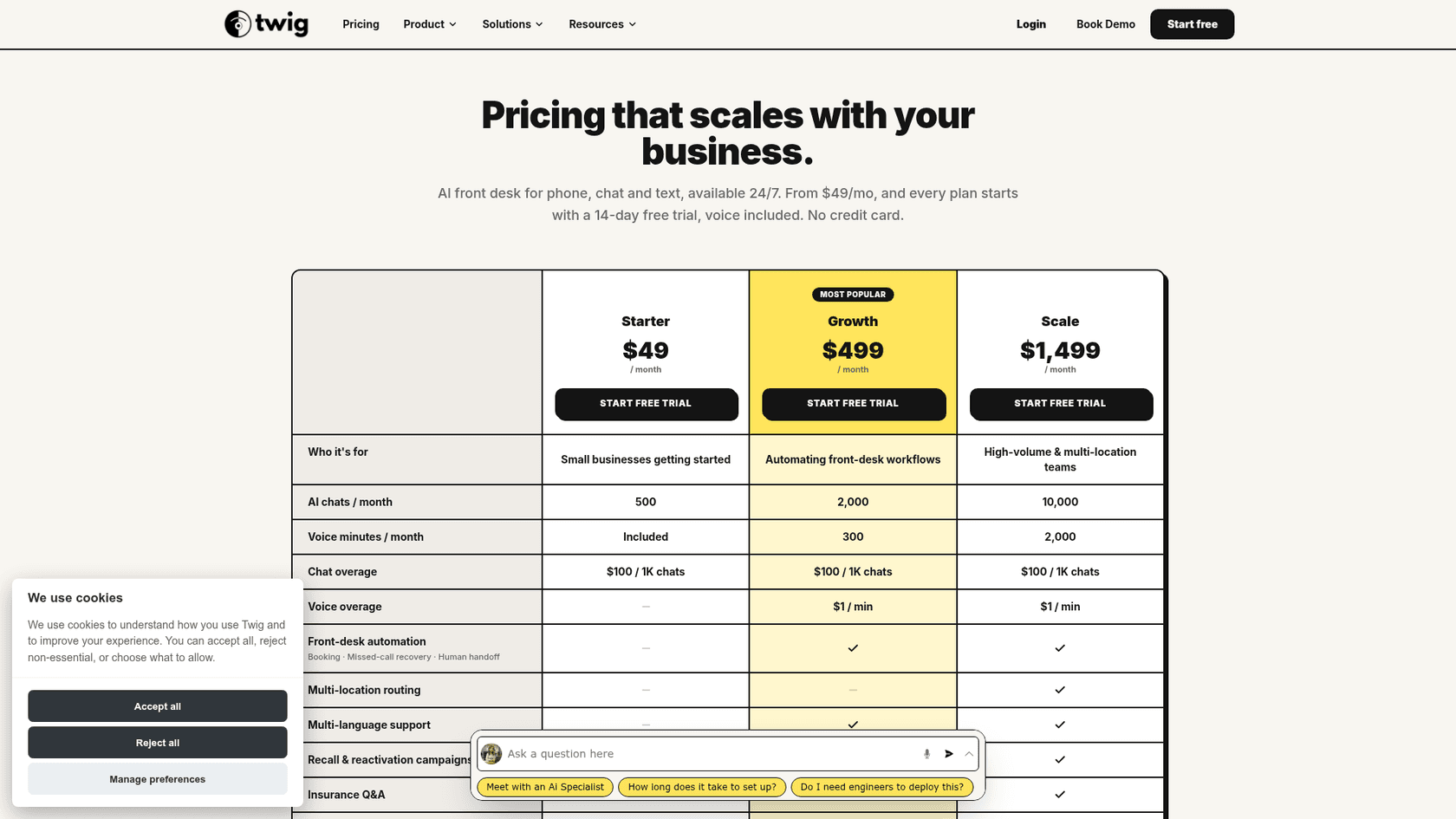
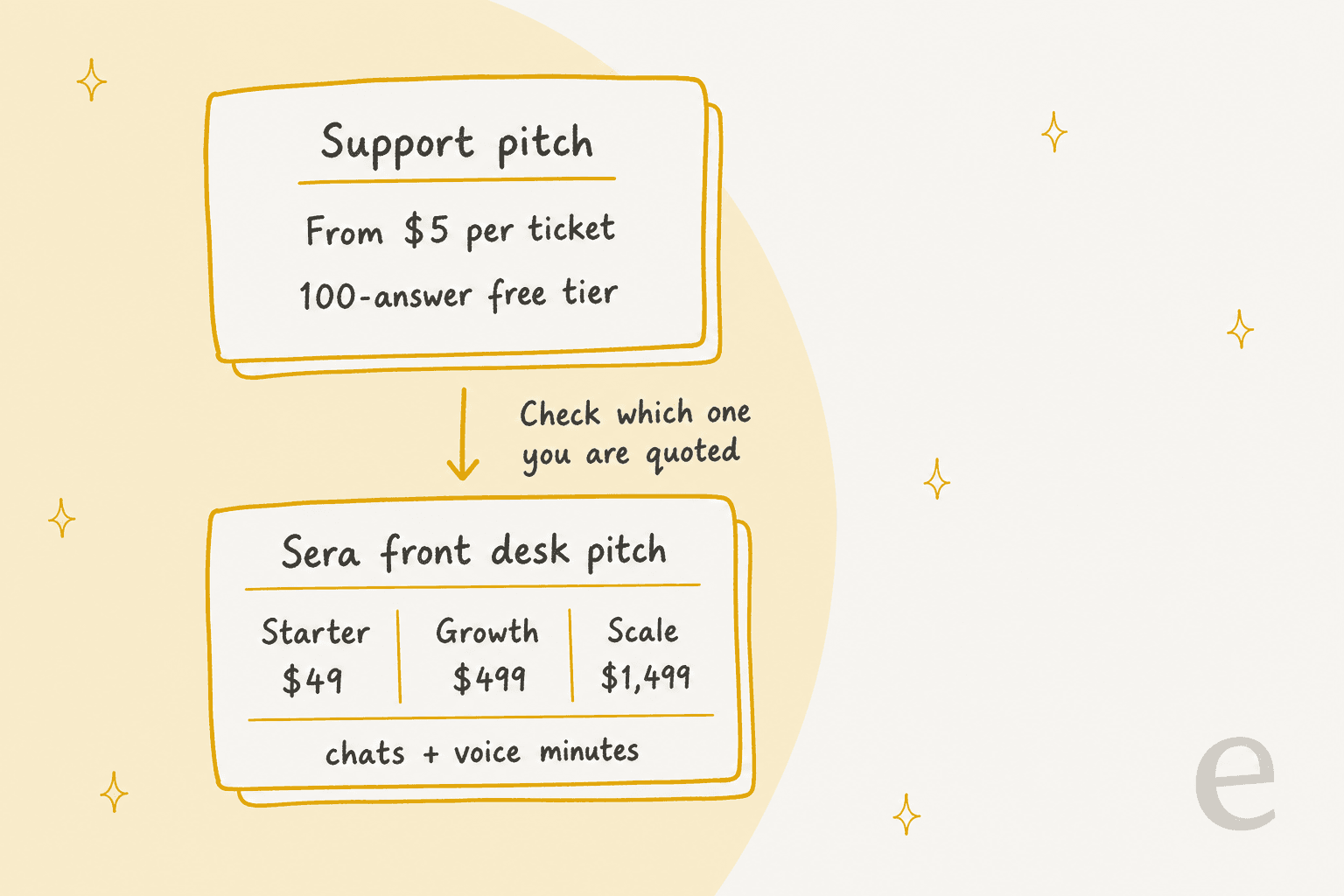
Twig publishes a starting rate of $5 per ticket with a 100-answer free tier. Its page does not say what counts as a ticket, so I would ask whether billing happens on arrival, on AI touch, or on resolution. The Twig pricing page also lists Sera front-desk plans at $49, $499, and $1,499 per month, billed on chats and voice minutes, which is a different product from the support agent.
Nobody likes budget surprises. It's smart to watch out for things like per-resolution fees, which can punish you for being successful. The more tickets your AI resolves, the more you pay, turning a great month into an expensive one. That’s why platforms with a fixed monthly price like eesel AI can feel like a safer bet. They have fixed monthly plans starting at $299 a month for 500 credits, where one credit covers a ticket or chat however long it runs, and you can move up or down any time.
A more flexible alternative to Twig AI
For teams that care more about speed, flexibility, and control, a new generation of AI tools is changing how support automation gets done. eesel AI is a perfect example of this modern approach, built to be powerful but also incredibly straightforward to use.
Comparison table: Twig AI vs. eesel AI
| Feature | Twig AI | eesel AI |
|---|---|---|
| Setup Time | 30 minutes, with managed onboarding | Minutes (Fully Self-Serve) |
| Simulation Mode | Agent Studio for testing; past-ticket simulation not described | Yes, test on thousands of past tickets |
| Knowledge Sources | 30+ connectors (Zendesk, Confluence, Slack, Drive) | 100+ integrations (Helpdesk, Wikis, etc.) |
| Custom Actions | Custom data sources, REST API, MCP | Yes, via simple prompt editor & API calls |
| Pricing Model | $5 per ticket, 100-answer free tier | Fixed monthly plans from $299 (500 credits), 100 free credits |
| Gradual Rollout | Confidence-based escalation; staged rollout not described | Yes, control which tickets AI handles |
Why support leaders are choosing a self-serve model
The table above shows a pretty big difference in thinking. While Twig AI pairs a quick setup with managed onboarding, eesel AI puts you in control from the very beginning. Here’s why that’s a big deal:
Test with confidence The biggest hesitation with adopting AI is usually a simple question: "Will it work correctly?" You don't want your AI giving out wrong answers. eesel AI's powerful simulation mode takes away the guesswork. It lets you test your AI on thousands of your past tickets in a safe environment. You get a real forecast of your resolution rate and how much you'll save before the AI ever talks to a customer. This lets you build, test, and launch knowing exactly what to expect.
Unify your knowledge, instantly Your team’s knowledge isn’t just in your help center. It’s in project plans on Notion, technical documents in Confluence, and quick chats on Slack. eesel AI connects to all the places your team already works, giving your AI a complete brain without you having to move a single document. Instead of spending weeks getting your knowledge base ready, you can connect your sources in a few clicks and let the AI get to work.
Is Twig AI the right tool for your team?
So, what's the final word? Twig AI looks like a solid platform for B2B SaaS and fintech support teams that want managed onboarding from specialists. Its published per-ticket rate and SOC 2 Type II certification make it easy to shortlist.
However, for teams that want to build, test, and run the agent themselves, with a fixed monthly price, a self-serve platform is often the better fit. The ability to go live in minutes, safely test everything you build, and connect all your knowledge without getting on a sales call isn't just a nice-to-have anymore, it's the new standard.
Ready to see how fast you can automate your support without the long onboarding process? Try eesel AI for free and you can have your first AI agent up and running in less than five minutes.
Frequently asked questions
Is Twig AI a good fit for my small, fast-moving support team?
Twig AI targets B2B SaaS, fintech, and ecommerce support teams, and it publishes a $5 per ticket rate with a 100-answer free tier, so it is not limited to large enterprises. Smaller teams should check how much of the managed onboarding they actually want, since some prefer to build and test the agent entirely on their own.
What's the implementation process like if we go with Twig AI?
Twig publishes a 30-minute setup with managed onboarding from its AI specialists, and you can also book a demo. That compares with self-serve tools that let you sign up and build an AI agent in minutes without any sales calls.
What should our team know about the cost before looking into Twig AI?
Twig publishes a rate of $5 per ticket with a 100-answer free tier. Its page does not define what counts as a ticket, so ask whether billing happens on arrival, on AI touch, or on resolution. The Twig pricing page also lists Sera front-desk plans at $49, $499, and $1,499 per month, which is a separate chat and voice product.
How well does Twig AI connect to knowledge outside of our main helpdesk?
Twig AI lists 30+ data connectors, including Zendesk, Slack, Confluence, and Google Drive, plus a CoPilot app for Zendesk. Some alternatives integrate with over 100 sources to ensure the AI has access to all company knowledge, so compare the connector lists against the tools your team actually uses.
Can I be sure Twig AI will work correctly before it talks to our customers?
The ability to safely test an AI agent before launch is critical. Twig describes an Agent Studio for building, testing, and iterating on agents, and I did not find a past-ticket simulation described on its pages. Some platforms allow you to test your AI on thousands of past tickets to forecast performance and build confidence before it ever interacts with a live customer.