

AI for customer service: what it costs and what breaks
AI for customer service, also called AI customer support, is software that reads a customer's request in plain language and either answers it, drafts an answer for a human agent, or routes it to the right person. It covers everything from keyword chatbots that match phrases to scripts, up to autonomous agents that pull account data, take an action, and close the ticket. If you want the neutral category definition first, start with AI customer service; this guide is about what it costs and where it breaks.
Key takeaways
- G2's 2026 data shows 52% of AI customer support buyers see payback in under six months, at a 4.53/5 average rating across 1,733 verified reviews.
- At the same time, a Gartner survey of 5,728 customers found 64% would prefer companies did not use AI for customer service at all. Both numbers are accurate; the gap between them is execution.
- The single failure mode behind almost every bad experience is AI that replies when it is not sure. Confidence thresholds plus a one-step path to a human is the structural fix.
- Cost is decided by the billing model, not the vendor. On one identical 3,000-ticket month, the four common models land between roughly $1,149 and $2,900, and only one of them is computable before a sales call.
- Nothing in this category is safe to switch on untested. Run the AI over historical tickets first and read what it would have said, before it can say it to anyone.
What AI for customer service is
That definition is deliberately broad, because the term is. Two teams saying "we use AI for customer service" can mean a scripted FAQ widget and a system that issues refunds. Here is what it is built from, and the five distinct things people mean by it.
What it is built from
Three technologies do the work, and they do different jobs.
Natural language processing (NLP) turns a customer's message into structured meaning. It works out what the request is about even when it arrives as "still no package???" rather than "shipping status enquiry". This is what makes intent classification and routing possible.
Machine learning is how the system improves from your own data rather than from generic training. It learns from resolved tickets, agent corrections and outcome feedback, which is why the same product performs very differently on a clean ticket history than on a messy one.
Generative AI writes the actual reply. Large language models produce new text in your tone rather than picking from a list of canned responses, which is what separates a 2026 support agent from the decision-tree bots that gave the category its reputation. It is also the piece that can be confidently wrong, which is why the confidence controls below matter as much as the model.
The five things "AI customer service" can mean
Conflating these five is why expectations keep missing reality.
1. Intelligent routing. AI reads incoming tickets, classifies them by intent and urgency, and routes them to the right team or queue automatically. No manual triage. This is the fastest win for most teams: low failure risk, immediate impact on time-to-first-response.
2. Agent copilot. AI assists human agents in real time: surfaces relevant help center articles, drafts a suggested reply, and summarizes long threads. The human edits and sends. No reply goes out without review.
3. Confidence-based auto-reply. AI sends replies autonomously only on tickets where its confidence score clears a threshold. Below the threshold, the draft queues for an agent. This is the tier that separates AI customer service chatbots that work from ones that frustrate.
4. Autonomous agentic resolution. AI handles the full conversation: asks clarifying questions, pulls account data from integrated systems, executes actions (refunds, resets, order changes), closes the ticket. No human in the loop unless confidence dips. This tier requires deep API integrations plus careful action guardrails.
5. Analytics and QA. AI reads every completed conversation, scores agent performance, identifies recurring failure points, and flags knowledge base gaps. This never touches the customer; it improves the whole system over time.
Most companies using AI operate across tiers 2 to 4 simultaneously, applying different tiers to different ticket categories based on complexity and confidence data.
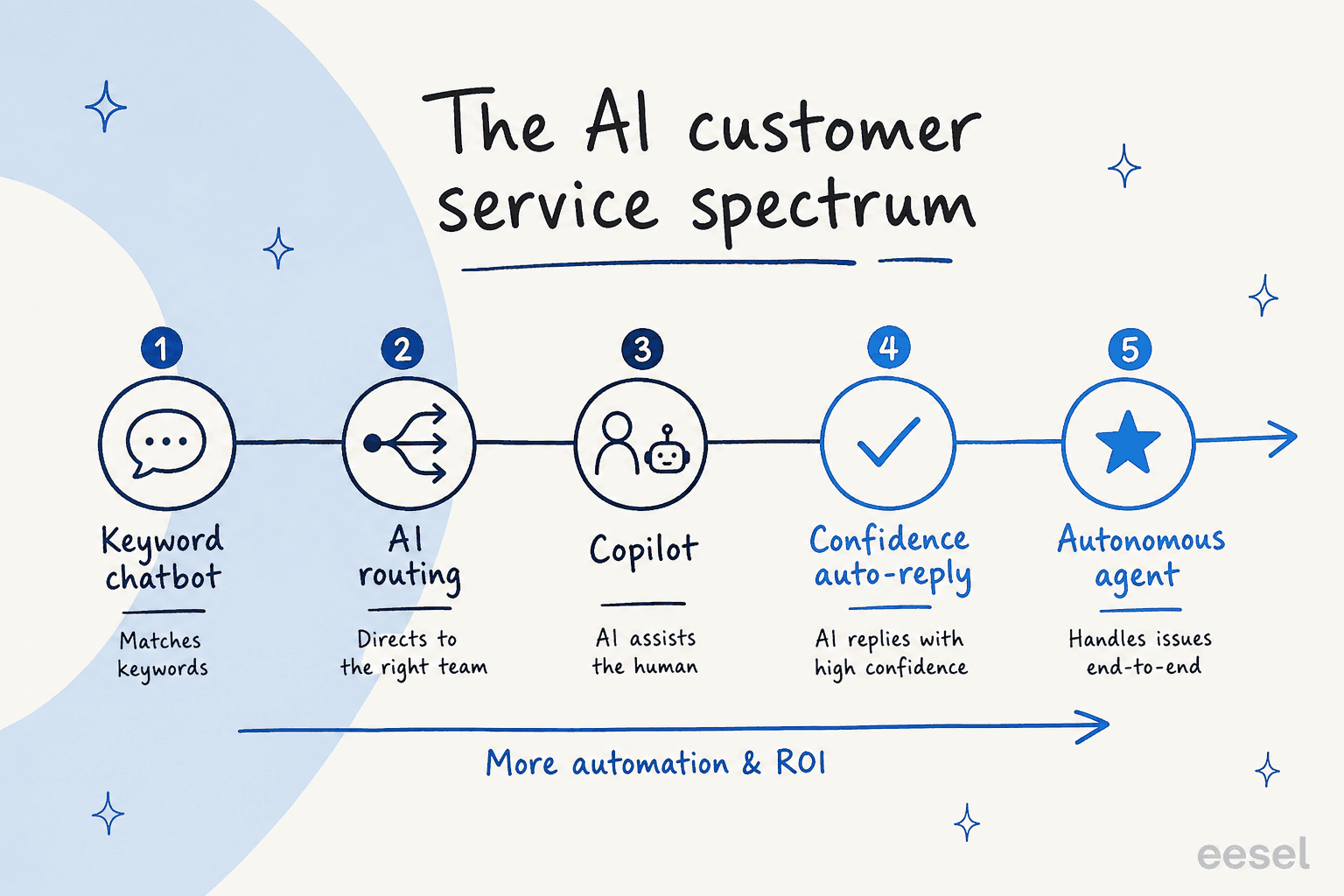
Here's what each tier looks like in production:
Compare AI approaches - click a tier
Keyword chatbot
| What it does | Matches messages to pre-programmed keyword rules and returns scripted answers. No learning, no context awareness. |
| Best for | Simple FAQ deflection on very predictable questions (hours, return policy, shipping time) |
| Typical FCR | ~10–20% on narrow query sets |
| Main risk | Chatbot loops - anything outside the script fails visibly and angers customers |
| Setup time | Days to weeks |
AI routing
| What it does | Reads ticket text, classifies by intent and priority, routes to the right queue automatically - no manual triage |
| Best for | Teams with multiple specialized queues wasting hours on manual sorting |
| Typical FCR | Improves time-to-resolve rather than deflection; indirect FCR gain |
| Main risk | Routing rules drifting as product and policy change - requires monthly review |
| Setup time | 1–2 weeks to train on historical tickets |
Agent copilot
| What it does | AI drafts a suggested reply; human reviews, edits, and sends. Also surfaces KB articles and summarizes long threads in real time. |
| Best for | Teams wanting AI efficiency gains without removing human judgment from the loop |
| Typical FCR | 15–30% AHT reduction; higher CSAT from more consistent replies |
| Main risk | Agents rubber-stamping suggestions without reading - must build a culture of editing, not approving |
| Setup time | Days (requires a clean, current knowledge base) |
Confidence auto-reply
| What it does | AI sends replies autonomously only when its confidence score clears a set threshold; below it, the draft queues for agent review |
| Best for | Teams ready to deflect tier-1 volume without risking bad automated replies going to customers |
| Typical FCR | 50–65% tier-1 resolution; near-zero chatbot loop complaints |
| Main risk | Setting thresholds too low (deflection over accuracy) or too high (AI never fires) |
| Setup time | 2–4 week supervised pilot to calibrate thresholds |
Autonomous agent
| What it does | Full end-to-end resolution: reads request, calls backend APIs, executes actions (refunds, resets, order changes), closes the ticket. Escalates when confidence dips. |
| Best for | High-volume teams with well-defined tier-1 categories and backend API integrations in place |
| Typical FCR | 65–80% on tier-1 tickets; 20–40% overall containment rate |
| Main risk | Autonomous actions in connected systems (refunds, account closures) - must set action guardrails by category |
| Setup time | 4–8 weeks for full integration plus supervised phase |
What you actually get from it
Every number below is attached to who reported it and when. Anything we could not source is not on this list.
- The cost per contact falls a long way. Gartner puts self-service at $1.84 per interaction against $13.50 for a live agent interaction.
- Payback arrives inside a normal budget cycle. G2's 2026 survey found 63% of deployments go live in under one month, and 52% of buyers see payback in under six months.
- Volume gets absorbed without headcount. G2's 2026 vendor research reports median 40% cost-per-unit savings and 80% containment on advanced AI agent workflows, and that 3 of 5 AI customer service companies reduced headcount by 1% to 25%.
- Tier-1 resolution rates are real once the scope is right. Kim Simpson at Gridwise reported 73% of tier-1 requests resolved autonomously in month one on eesel. Zendesk customer Best Egg reports 80% automation on messaging with $500K+ in annual savings.
- The queue gets cleaner before anyone touches it. Unity, via Zendesk AI, deflected 8,000 tickets and reported $1.3M in savings after connecting an AI agent to its knowledge base.
- Coverage stops depending on office hours. The same self-service layer answers at 3am at the same $1.84 marginal cost, which is where the 24/7 claim actually comes from.
Five places this shows up in practice, roughly in the order teams adopt them.
Ticket routing
AI reads every incoming ticket, classifies it by intent, urgency and topic, and sends it to the right queue with no manual triage. A team with five specialist groups that used to spend two hours a day triaging can eliminate that entirely.
Setup is short: map your top 5 to 10 ticket categories (they typically cover 70% to 80% of volume), train the classifier on historical resolved tickets, add rules for edge cases (VIP accounts to senior agents, billing disputes to human review), and connect your CRM so the router can factor in account tier. The real leverage is that routing accuracy goes from "best guess at 3am" to consistent and documented. For teams tackling tier-1 support deflection, routing is almost always the right starting point.
Agent copilot
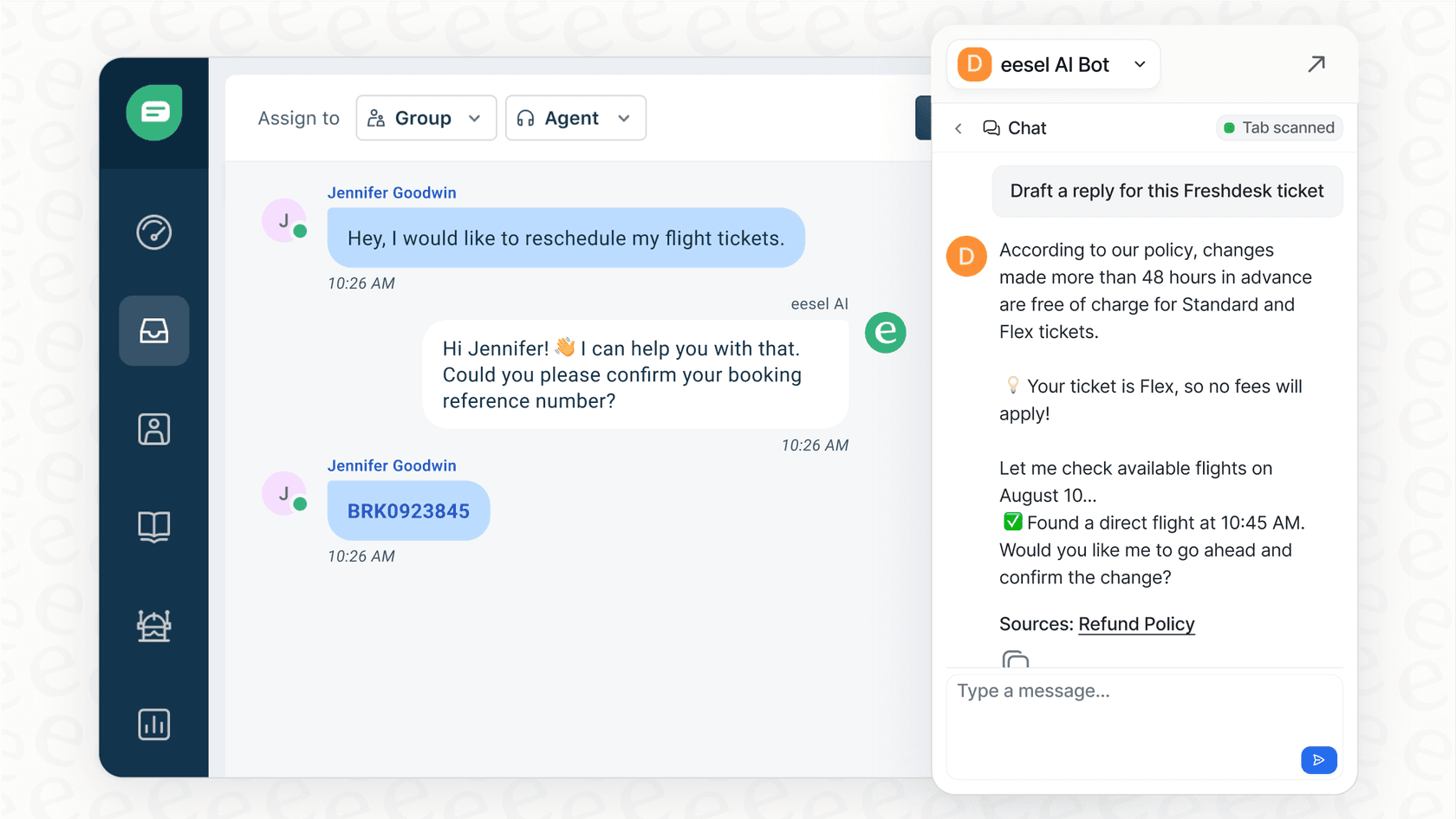
The copilot tier is the safest ramp for teams worried about quality. Every AI reply becomes a draft: the agent reads it, edits it, sends it. No automated customer contact, but a significant cut in the time it takes to construct a response from scratch.
A CX lead at a DTC supplements company put it this way: "I need an AI who is only handling the tickets that it's confident to handle and all the other ones, leave them alone." The copilot tier satisfies that concern completely.
Practitioners report 15% to 30% AHT reduction on copilot-assisted tickets, purely from removing the blank reply box. Suggestion quality tracks knowledge base quality exactly: if the KB has outdated articles, merged duplicates and titles that say "Account issues" instead of "How to reset your password", the copilot surfaces the wrong things. Cleaning the KB first is the prep step most teams skip, and it is why most early disappointments are knowledge problems rather than model problems.
Autonomous resolution
When the AI's confidence clears a threshold and the ticket falls within an approved category, the AI resolves it end to end. For password reset requests, order status lookups, shipping tracking, plan changes and simple refund requests, this is entirely feasible with current AI.
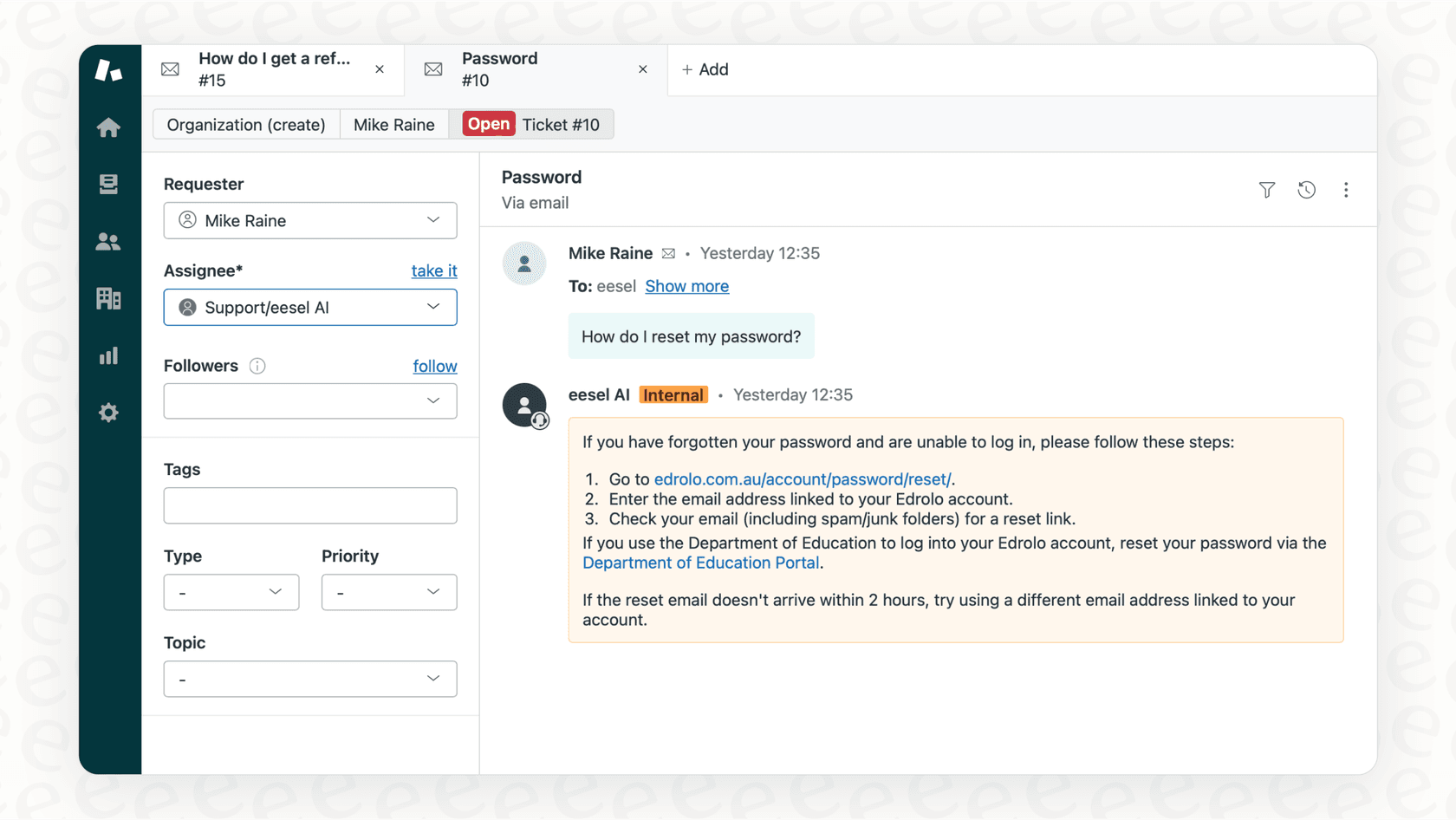
The guardrails that make it safe: confidence thresholds (below a set score the reply queues as a draft rather than auto-sending), action limits by category (refunds above a set amount require a human, account closures always require a human), and a supervised phase before full autonomy.
QA and conversation analytics
AI reads every completed conversation, scores adherence to your tone and policy guidelines, identifies recurring failure points, and flags KB gaps before they become a pattern of bad replies. Teams using AI for agent productivity improvements via QA analytics report faster coaching cycles: instead of manually sampling 5% of tickets, managers get flagged reviews of the ones that need attention.
The Amor Group ran AI triage and QA together and reached 93% triage accuracy. The QA loop was what let them trust the triage numbers rather than just claim them.
Internal and employee support
The same machinery works on tickets your own staff raise. An internal knowledge bot plugged into Slack or Teams answers IT, HR and policy questions instantly, which removes a category of ticket that never had a customer in it. This is usually the lowest-risk place to start, because a wrong answer reaches a colleague who can say "that's not right" rather than a customer who churns.
Why AI customer support goes wrong: the confidence gap
Start with what customers say, because it is the part vendor pages leave out.
A Gartner survey of 5,728 customers found 64% would prefer companies did not use AI for customer service at all, and 53% said they would consider switching to a competitor over it. An AnswerConnect survey of 6,000 adults found 83% prefer to speak with a human when contacting a business, and 1 in 3 named talking to AI or a chatbot the single most frustrating experience when reaching out to a company. The specific failure modes: 51% say AI struggles to understand their needs, 48% say it cannot resolve their problem, 35% say it gives inaccurate information.
Almost all of that traces back to one root cause: AI deployed to deflect tickets rather than to resolve them well.
The chatbot loop is the clearest symptom. A customer explains their issue. The AI recognizes the topic but has neither the authority nor the integration to fix it. It responds with a generic answer. The customer restates. The AI responds again, slightly differently and still wrong. The customer types "speak to a human". The AI routes back to the same menu. Berkeley's California Management Review published a peer-reviewed piece on this in April 2026:
"Some sources have identified 'no easy path to a human' as the single biggest irritant in customer service automation. The issue was so prevalent that some customers have found ways to break the chatbot loop by repeating e.g., 'speak to a human' or even 'chicken nuggets' many times until they get to a human, and shared the tips on platforms like Reddit."
Two practitioner threads say the same thing from the other side. A builder who started an AI customer service company:
"The real issue isn't AI capability, it's implementation. When we started building Intelswift, we realized that 90% of customer frustration comes from AI that can identify problems but can't solve them."

And a support practitioner on the tool never being the variable:
"AI isn't the issue. Bad application of it is. It's just a tool, like anything else. If you are only attempting to deflect calls to a bot who doesn't know your software and then cheering to your bosses about case deflection rates, you're doing it wrong."
Meanwhile the demand is still unmet, from a support lead who has not found an answer yet:
"I've been dealing with the same thing most of you probably are, same 10 questions over and over, team spending half their day on stuff that's already answered in the docs. Has anyone actually solved customer support with any AI tool?"
That "same 10 questions" problem is exactly what AI solves cleanly, when it is scoped to questions it can confidently answer and given an explicit path to escalate everything else.
Confidence-based routing is the structural fix. Instead of the AI deciding "I know what this is about, I'll reply", it decides "I know what this is about AND my confidence in the correct answer clears the threshold I've been given, so I'll reply". Below the threshold, the draft goes to a human. The customer never gets a confident-sounding wrong answer. They get a human-reviewed reply or a human agent, and they can always get there, no chicken nuggets required.

The second failure mode is the black box. When the system gets something wrong, can you fix it today? On older setups the answer is a retraining cycle, a new dataset upload, or a support ticket to the vendor. That turns every mistake into a project, so mistakes accumulate. The question to ask any vendor is narrow and answerable: when the AI gets an answer wrong, what does an agent do about it, and how long until the corrected answer is live? On a system built for it, the fix is a correction note attached to the answer and it applies immediately, with no retraining run.
What AI customer support actually costs
Nobody on page one of this search answers this question with arithmetic, so here it is on one identical month.
The scenario, held constant across all four rows. 3,000 support tickets in a month. A 10-person support team. The AI touches all 3,000 tickets and resolves 40% of them (1,200) end to end, escalating the rest. Same volumes, same team, four billing models.
| Pricing model | Who charges this way | The same 3,000-ticket month | Where it breaks |
|---|---|---|---|
| Per seat or per agent | Legacy helpdesk AI add-ons | $115 per agent for Zendesk Suite Professional plus $50 per agent for Copilot = $165 x 10 agents = $1,650/mo, fixed | You pay the same whether the AI helped or not. The bill tracks headcount, not work done, and add-ons stack (the Workforce Engagement Bundle adds $50 per agent) |
| Per resolution | Most AI agent add-ons | 1,200 resolutions x $1.50 = $1,800/mo, on top of whatever the seats cost | The vendor owns the definition of "resolved", and the bill rises fastest exactly when the tool is working best |
| Per credit (1 credit = 1 ticket or chat) | eesel | 3,000 tickets fits the 3,000-credit plan = $1,149/mo, no seat fee, no platform fee | Credits are used on every ticket the AI works on, including the 1,800 it hands to a human. At a low resolution rate this is the worse deal |
| Enterprise quote | The large suites | Not published. Third-party teardowns of one quote-only vendor suggest roughly $712 to $1,112 in seats plus about $1,800 in conversation charges, so around $2,500 to $2,900/mo | You cannot compute it before a sales cycle, which is itself the finding |
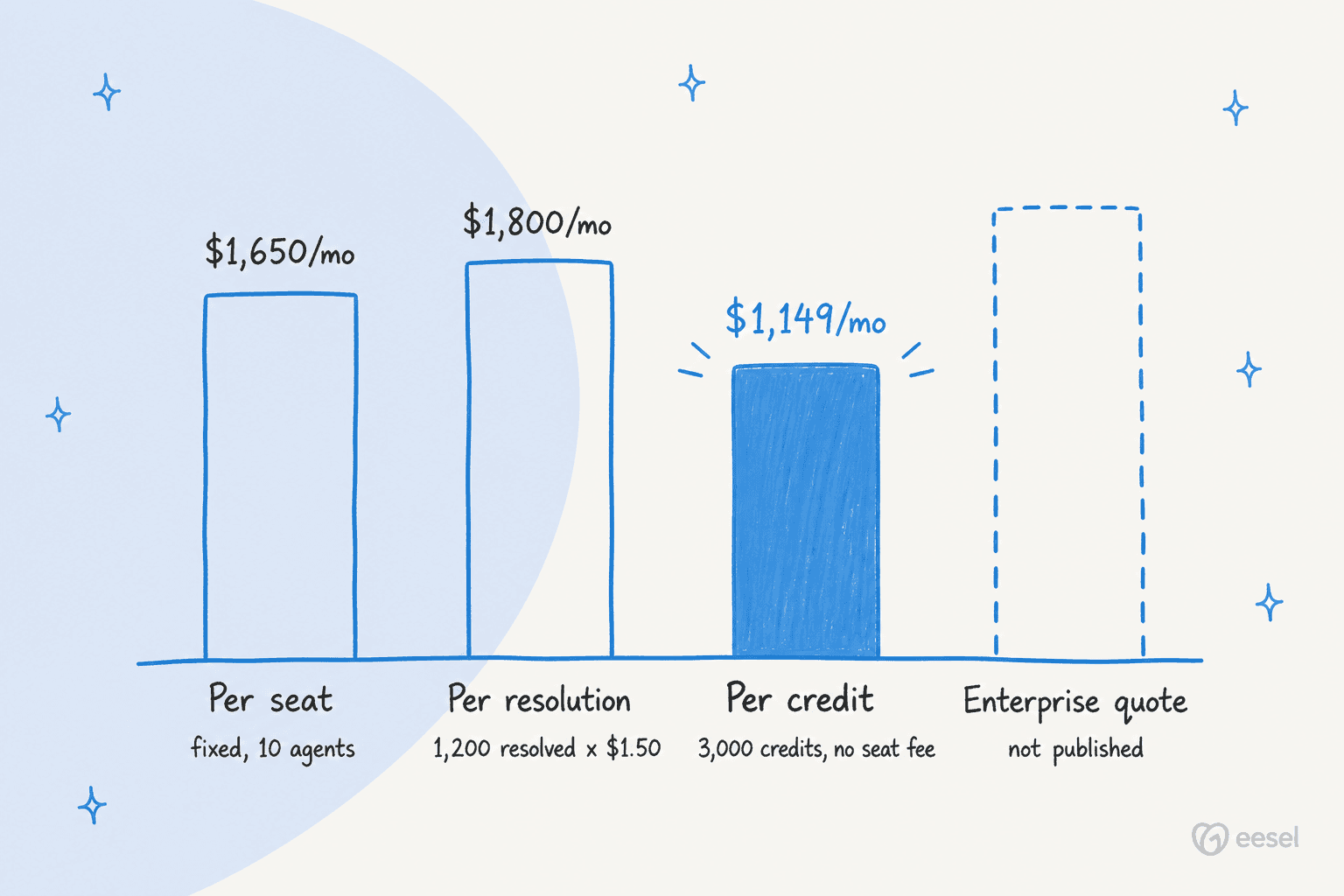
Where the numbers come from, and what they hide.
Per seat. Zendesk Suite Professional lists at $115 per agent per month billed annually, and Copilot, its agent-assist AI, is a separate $50 per agent per month add-on for Professional and higher plans. The Workforce Engagement Bundle, covering quality assurance and workforce management, adds another $50 per agent. The fixed shape is the problem: the same $1,650 buys 3,000 tickets of help or 300. Our Zendesk review works a full 10-agent bill through to roughly $3,300 a month once resolution overages are counted.
Per resolution. Published rates cluster between $0.75 (Help Scout AI Answers) and $1.50 (Gladly), with Zendesk automated resolutions at $1.50 committed or $2.00 pay-as-you-go and Gorgias at $0.85 to $1.00 per automated interaction. Zendesk also bundles automated resolutions into each plan, 10 per agent per month on Professional, so a 10-agent team gets 100 before the $1.50 rate applies. We used $1.50 above; at $0.75 the same month is $900, genuinely cheaper than per-ticket billing at this resolution rate. What the model hides is definitional: you are buying a number the vendor computes. Our Zendesk AI alternatives breakdown lists the per-resolution rate for 13 platforms side by side.
Per credit. eesel uses one credit per ticket or helpdesk chat handled, however long it runs and not per reply or draft revision, on one fixed monthly price (500 credits from $299, 1,000 at $499, 2,000 at $849, 3,000 at $1,149) with no per-seat fee, no platform fee, and optional overage with a cap you set. The downside is worth repeating: at 40% resolution you are still using credits on 1,800 tickets the AI could not finish. Credit billing wins when the AI works across the whole queue and loses when it is only good at a narrow slice.
Enterprise quote. There is no number to publish, because there is no published number. The figures above are competitor teardowns of one quote-only vendor, not a price list. You cannot budget this model before a sales cycle, and a sales cycle is usually weeks.
The rule the table shows: at any given volume, the gap between billing models is larger than the gap between products. Run your own real ticket count through all four shapes before you compare a single feature.
How to roll it out without breaking anything
The teams getting strong results from AI customer service automation do the same four things in the same order. Skipping to autonomous replies is the single most common cause of the "we deployed AI and it made things worse" outcome.
Step 0: simulate against historical tickets first
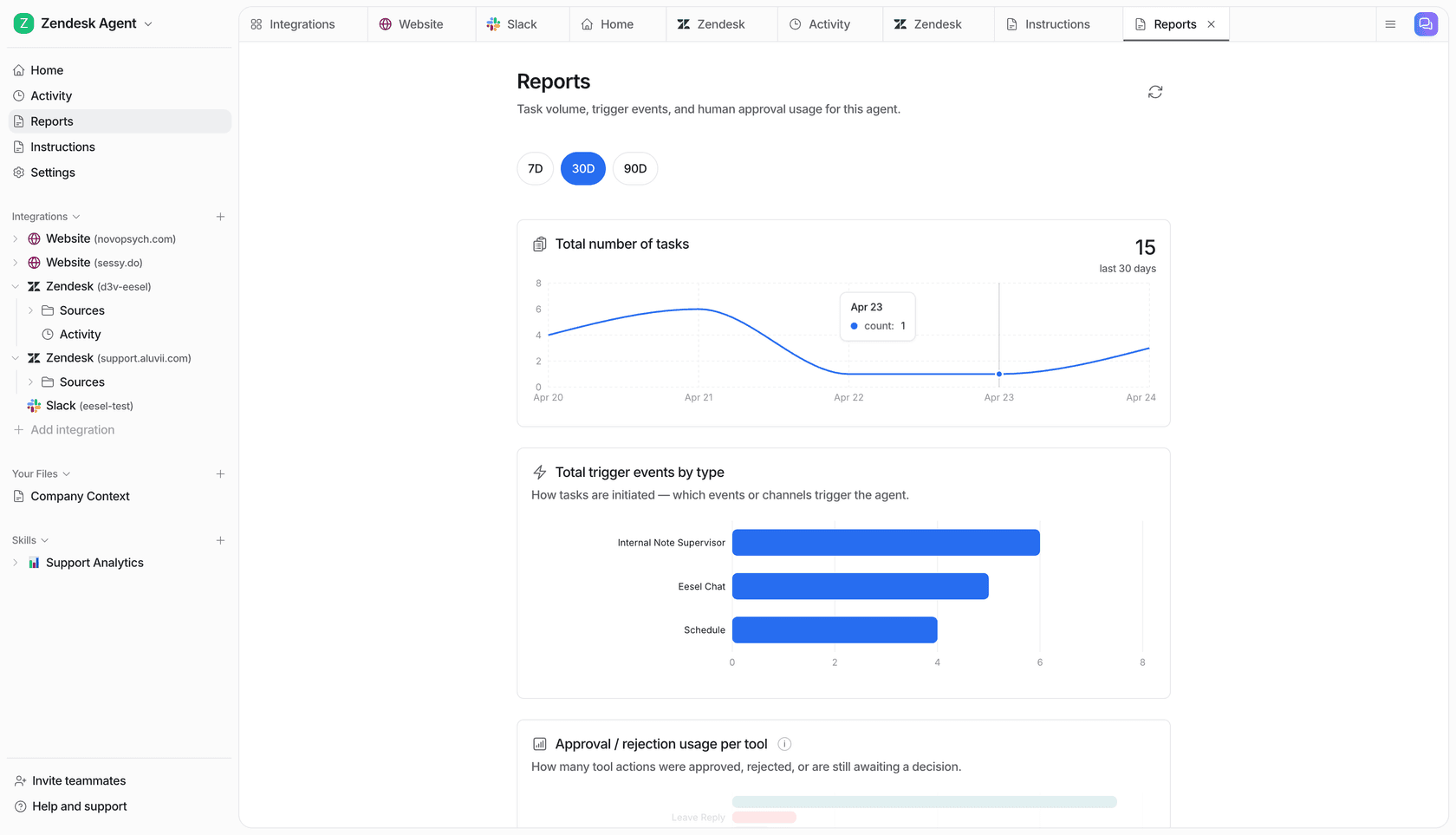
Before the AI can reply to anyone, run it over the last few months of real, already-resolved tickets and read what it would have said. You get three things no pilot gives you: an actual resolution rate on your own ticket mix rather than a vendor's benchmark, a list of the categories where it is confidently wrong, and the knowledge base gaps behind them, all before a customer sees anything.
This is the concrete version of "deploy in phases with human oversight". A vendor that cannot show you what the AI would have said on your own historical tickets is asking you to test in production.
Phase 1: supervised (weeks 1 to 4)
Every AI output is a draft. Nothing reaches a customer without a human reading it first. The AI reads incoming tickets, surfaces KB articles and generates a suggested reply; the agent reviews, edits and sends.
The purpose of this phase is not deflection, it is calibration. You are learning which categories the AI gets right reliably, which it misses, and what the knowledge base needs before autonomy is safe. The three numbers that gate the next phase: draft acceptance rate (what fraction of AI suggestions went out largely unchanged), edit distance (how much agents changed each draft), and draft rejection rate by category.
Phase 2: earned autonomy (weeks 5 to 12)
Take the categories where Phase 1 acceptance was highest and enable auto-reply for those only. Everything else stays in draft mode.
This is where first contact resolution starts climbing. You are not enabling AI everywhere, you are unlocking it for the ticket types where Phase 1 data shows it is ready. Common first candidates: password resets, order status, shipping tracking, basic pricing questions, return policy explanations. High volume, low complexity, well documented.
Kim Simpson at Gridwise hit 73% tier-1 autonomous resolution in month one because they ran a clean supervised pilot first and knew exactly which categories the AI was consistently getting right before enabling auto-send.
Phase 3: continuous learning
As Phase 2 runs, new patterns emerge. Agents reviewing escalations from low-confidence replies identify knowledge gaps. The AI flags topics where it is consistently uncertain. New ticket categories appear (product updates, policy changes, seasonal patterns) and need classifying.
Phase 3 is not a finish line, it is the loop that keeps the system improving. Teams with the highest long-term FCR numbers treat AI as a system requiring regular feedback, not a set-and-forget tool.
How to choose an AI customer service platform
The market has dozens of options, from best AI helpdesk software platforms to tools built specifically for ecommerce customer service, Shopify stores and HubSpot users. One decision comes before all of them.
Layer AI on the helpdesk you have, or replace the helpdesk
Almost every explainer on this topic is published by a suite that wants you to migrate, so the first question rarely gets asked honestly. It is this: are you unhappy with your helpdesk, or only with its AI?
If the ticketing, the workflows and the reporting are fine and the AI is the problem, layering a separate AI agent onto your existing helpdesk is the smaller change. Nothing moves, no retraining, and you can turn it off. If the helpdesk itself is the problem, a migration is warranted and the AI is a secondary criterion, so pick the suite on ticketing and treat its AI as a bonus. Deciding this first stops you from evaluating replacement platforms when you needed an add-on, which is the most common wasted quarter in this category.
Five criteria that actually separate good from bad, written as tests a demo either passes or fails.
1. Confidence-based routing, not just deflection rate. Any tool can report high deflection. The question is whether the AI sends replies when it is uncertain. Look for explicit confidence scoring and configurable thresholds. If the demo doesn't show a low-confidence path, the tool probably doesn't have one.
2. Helpdesk-native integration. The AI needs to read ticket history, customer data and previous resolutions inside your existing helpdesk, not as a separate tool the team has to check. AI helpdesk agents that plug directly into your current stack have consistently higher adoption than standalone tools that require workflow changes.
3. Knowledge base quality tooling. The AI is only as good as what it is trained on. G2's 2026 vendor survey identified accuracy concerns, not cost, as the number one scaling challenge teams hit. Platforms that identify outdated articles, merge duplicates and flag KB gaps based on AI uncertainty patterns address the root cause rather than the symptom.
4. A simulation or staging environment. You should be able to run the AI against historical tickets and read what it would have sent before enabling auto-reply. This catches the categories where the AI is confidently wrong before those replies reach real customers.
5. Pricing that matches how you will actually use it. Seat-based pricing creates a perverse incentive: the vendor profits whether the AI helped or not. Plans sized to the tickets handled align the bill with work done, though as the cost table shows, per-resolution can win at low resolution rates. Run your own volume through all four models. Free AI for customer service trials that let you validate real resolution rates before committing are a strong signal of vendor confidence, and looking at the top AI customer service tools through these five criteria quickly separates what holds up in production from what only looks good in a demo.
For teams running AI for customer complaints or cancellation retention, also check whether the platform handles emotionally charged tickets differently. Those are the highest-risk categories for AI auto-reply and should stay in human review longer than standard tier-1 requests.
Try eesel
If the "same 10 questions eating half your team's day" description landed, that is the use case eesel was built for.
eesel connects to your existing helpdesk (Zendesk, Freshdesk, HubSpot and more) in minutes and learns from your help center and historical tickets. Confidence-based routing is the default: when the AI is sure of an answer it sends, and when it isn't the reply queues as a draft for your team. No chatbot loops, no plausible-sounding wrong answers going out automatically. Every rollout starts with a simulation over your past tickets, so you see the real resolution rate before a customer sees anything.
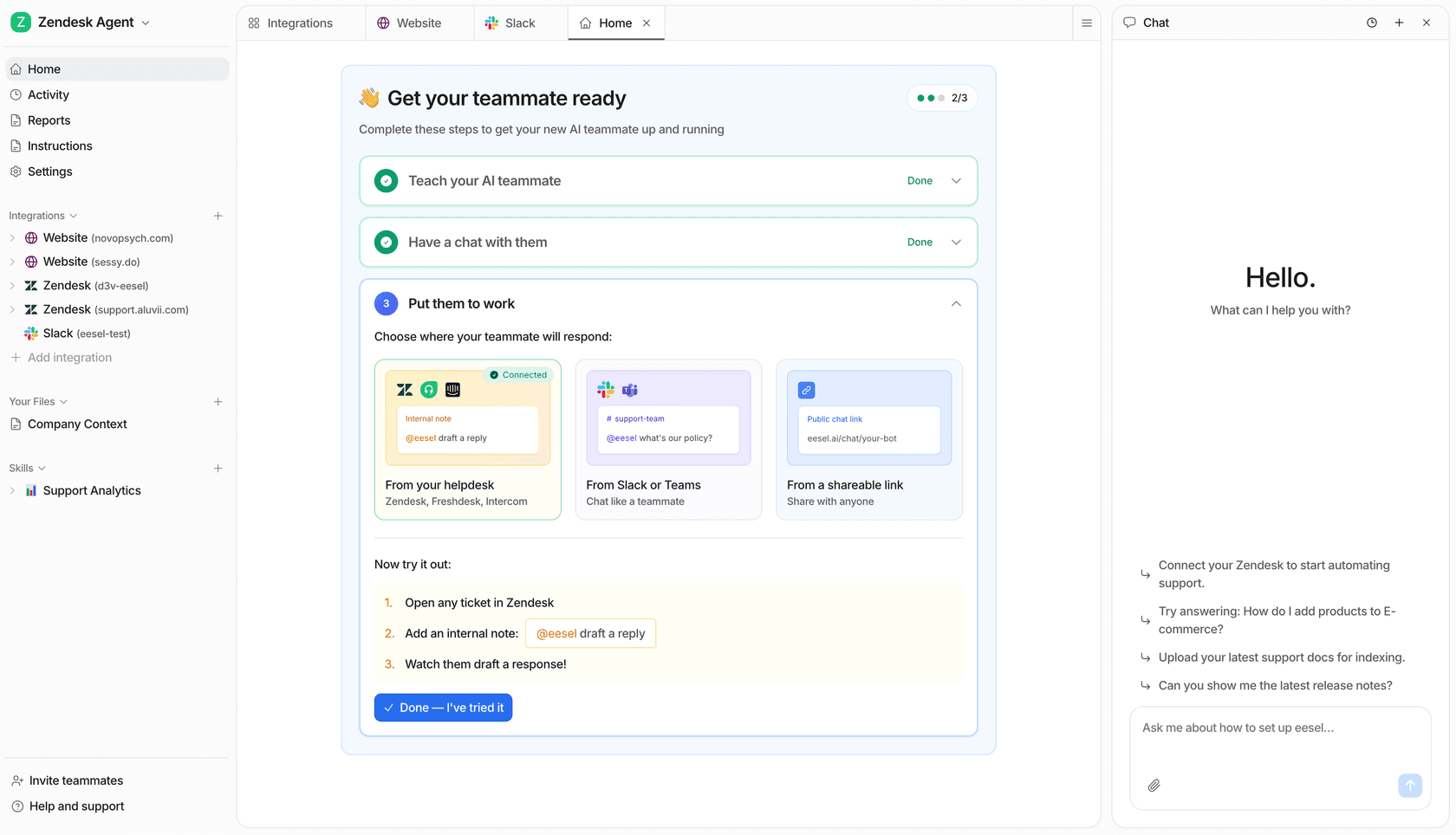
Gridwise hit 73% of tier-1 tickets resolved autonomously in month one. Global Pay reported up to 80% time savings on routine support work.
Pricing is from $299/month for 500 credits (1 credit per ticket or chat), with no seat fees and no platform fee. Try eesel free with 100 credits, no card, and see exactly how many of your current tickets the AI is confident about before you commit to anything.