


The best AI agent for a small business is the one that completes a useful job without creating more work to supervise it. Start with a recurring task, the software it needs to use, and the time your team can spend reviewing results.
My shortlist covers seven different starting points: eesel for helpdesk and blog-writing teammates, Lindy for broader team work, Relevance AI for custom agents, Make and Zapier Agents for app workflows, Tidio/Lyro for customer service, and QuickBooks agents for eligible accounting workflows.
For support, eesel CLI lets a person, script, or coding agent help operate the same teammate your team sees in the dashboard. That gives a small team a way to inspect setup and evaluate a sample request without building a support agent from scratch.
I work at eesel. This comparison uses current vendor documentation and pricing checked in September 2026; it is not a claim that I personally tested all seven products.
What should an AI agent do for a small business?
A useful AI agent can work with information and tools toward a goal. In customer service, that could mean finding a policy, asking for a missing order reference, and deciding whether to answer or escalate.
That does not make ordinary automation obsolete. A fixed workflow can also have many steps, branches, and API calls. If you only need to copy a completed form into a CRM, a predictable automation may be enough. If incoming requests vary and require interpretation, an agent may be worth evaluating.
Nor is every chatbot limited to scripted answers. The practical questions are what the system can access, what it can change, and how your team checks its work.
For a small business, I would give review time as much attention as setup time. Saving ten minutes on a task is not useful if checking and correcting it takes fifteen.
How I compare the options
I use five buying questions:
- Does it match a real job? Start with support, lead follow-up, document work, or bookkeeping rather than “automate the business.”
- Does it work with the right tools? Verify the exact action and permission, not just the integration logo.
- Who maintains it? Assign someone to update instructions, fix connections, and review failures.
- What is the billing unit? Tasks, credits, seats, and conversations count different things.
- Can you test a limited scope? Include missing information and exceptions, not only the easiest request.
Best AI agents for small business: comparison
The table is a shortlist, not a universal ranking. Public prices are in US dollars; check the current checkout and billing term before buying.
| Tool | Useful starting point | What your team configures | Cost basis | Main buying check |
|---|---|---|---|---|
| eesel | Helpdesk or blog-writing teammate | Knowledge, instructions, integrations, allowed work | From $299/mo (500 credits); blog draft $4 | Whether the teammate handles your chosen job correctly |
| Lindy | General team tasks | Connected tools, context, routines | Plus $29.99/user/month with 3,000 credits | Seat count and shared credit use |
| Relevance AI | Custom agents and tools | Tasks, tools, triggers, data | Pro documented at $19/month annually or $29 monthly | Actions plus Vendor Credits and current plan availability |
| Make | Visual app workflows with agents | Scenarios, agent tools, conditions | Credits; AI usage depends on setup | Cost of the entire scenario |
| Zapier Agents | Agents using connected apps | Instructions, sources, permitted actions | Agents usage and plan terms | Do not confuse Agents with standard Zaps |
| Tidio / Lyro | Customer conversations | Knowledge, handoff, supported tasks | Platform and AI conversation allowances | Recurring AI allowance versus one-off trial conversations |
| QuickBooks | Accounting-related assistance | Eligible plan, financial data, review | Subscription and feature eligibility | Which agents your plan and region include |
1. eesel: a teammate for support or blog writing
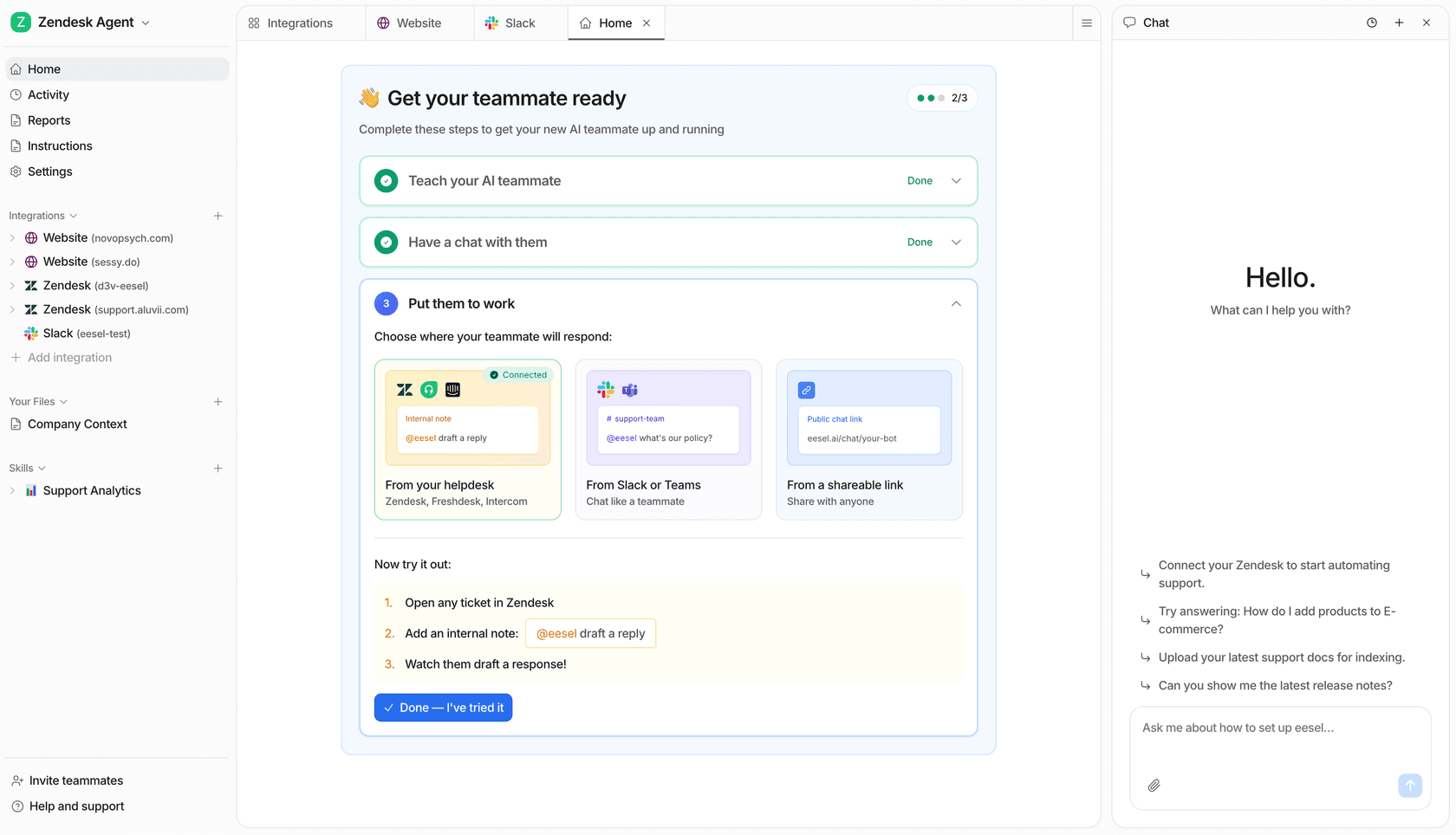
What it does: eesel offers ready-to-work teammates for defined jobs, including helpdesk work and blog writing. A support teammate connects to an existing helpdesk, uses the company information you provide, and handles work within its configured scope. Supported integrations include Zendesk and Freshdesk.
What to check: Confirm the sources, triggers, and actions available in your specific integration. Connecting a tool does not mean every historical record is copied or every possible action is available. Give the teammate a clear job and decide which exceptions stay with a person.
Pricing: The pricing documentation lists a fixed monthly price from $299 for 500 credits, where 1 credit is one support ticket or chat session, and $4 for a blog draft. There is no platform fee or per-seat fee; add-ons such as SSO are separate. Credits are used regardless of outcome, not only when the customer is satisfied. The free plan includes 100 credits.
Run a small-team support pilot through eesel CLI
The eesel CLI operates the same teammate and workspace as the dashboard. A developer can use it from a terminal, a script can read its JSON output, and a coding agent can help inspect configuration or supply knowledge. Your support team can continue reviewing the work in the dashboard.
With Node.js 18.17 or newer, confirm the account and workspace first:
npx @eesel/cli login
npx @eesel/cli whoami
npx @eesel/cli agents
For a first pilot, create or select a separate test teammate in the dashboard. Keep it free of live customer triggers and write-capable connections. Replace TEST_AGENT_ID below with that teammate's ID, not the ID of an agent already handling your queue.
npx @eesel/cli --agent TEST_AGENT_ID integrations
npx @eesel/cli --agent TEST_AGENT_ID instructions
npx @eesel/cli --agent TEST_AGENT_ID automations
Suppose your team often answers questions about delivery delays. Prepare a short, approved delivery policy with expected shipping windows and escalation rules. Use fictional customer cases rather than uploading personal information just to test the setup.
Save the policy as delivery-policy.md in your current terminal directory before running the upload command.
npx @eesel/cli --agent TEST_AGENT_ID files upload ./delivery-policy.md
npx @eesel/cli --agent TEST_AGENT_ID new --name "delivery-policy-pilot"
npx @eesel/cli --agent TEST_AGENT_ID chat "A fictional customer says their parcel is late but has not provided an order number. Draft a response based on the delivery policy and identify what information is missing."
The file is reference material, not a replacement for standing instructions. The new command starts a conversation, not another teammate. Check the draft against your policy: did it ask for the missing information, avoid inventing tracking details, and explain the next step?
Try a routine case and an exception in separate conversations. Keep your expected answers outside the uploaded policy, and note how much editing each answer requires. These checks are your evaluation plan, not a claim that the CLI automatically scores answers.
npx @eesel/cli --agent TEST_AGENT_ID activity
npx @eesel/cli --agent TEST_AGENT_ID approvals
npx @eesel/cli billing
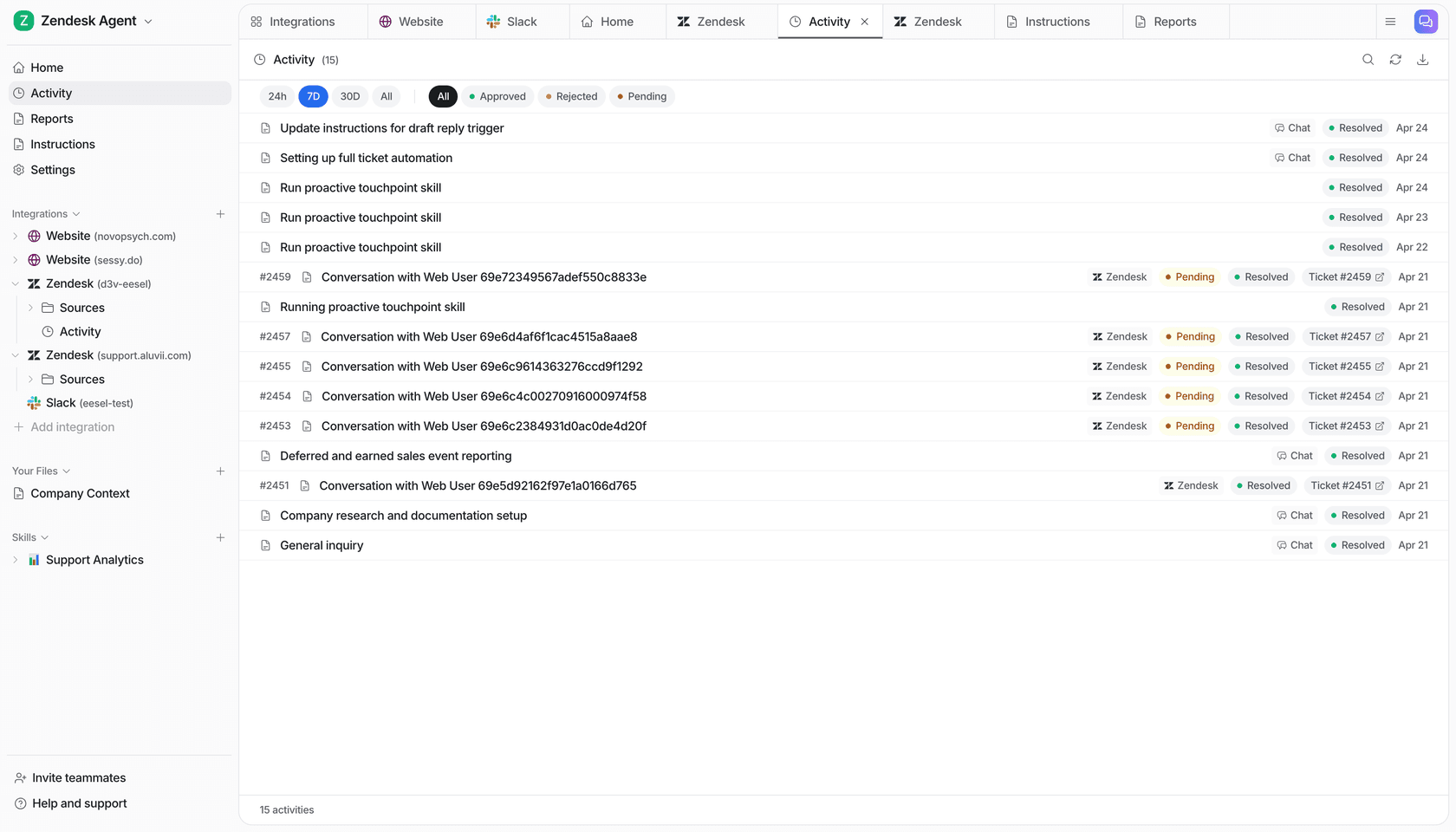
Activity helps you inspect what happened. A held approval is still awaiting a decision, not evidence an action completed. Billing shows live billing state; use measured usage and your own workload estimate to plan a budget. A coding agent's own subscription or API charges are separate.
The CLI does not make a live agent harmless. Real chats can invoke enabled tools. Its --dry-run flag previews the server request a write command would send, not the answer the teammate would produce. Keep permission controls in the setup rather than relying on a prompt saying “do not send.”
2. Lindy: broader team tasks
What it does: Lindy's current offering includes a Slack-native teammate, scheduled routines, inbox work, meeting support, persistent workspace context, and connected tools.
What to check: The scope is broader than a single support role. Define the routines you want and review external actions. Lindy says work with outside impact, such as sending an email or updating a ticket, waits for approval. Account for who needs a paid seat, including people using it through Slack.
Pricing: Plus is $29.99 per user/month with 3,000 credits; Pro is $99.99 with 15,000; Max is $199.99 with 35,000. Credits pool across the workspace. A bigger task can consume more credits, so one credit does not equal one completed customer request. The page distinguishes a Slack-join trial from direct signups, which are billed immediately.
3. Relevance AI: custom agents using your tools and data
What it does: Relevance AI lets teams build agents and tools, with options for scheduled tasks, chat, and escalations. It is worth considering when you want to define a workflow more specifically than an off-the-shelf teammate allows.
What to check: Assign someone to maintain the tools and data connections. Check the two usage measures, Actions and Vendor Credits, as well as whether the triggers you need belong to a higher plan.
Pricing: The pricing documentation lists a free plan with 200 Actions per month and a one-time Vendor Credit allowance. Pro is $19/month billed annually or $29 month-to-month. However, the main pricing page currently emphasizes Enterprise. Confirm self-serve plan availability and inclusions before committing rather than relying on the older starting price alone.
4. Make: visual workflows with agent steps
What it does: Make AI Agents can be built inside the visual canvas and used with app workflows. Make offers both predictable scenario logic and agent decision-making; it is no longer accurate to describe its AI as just an add-on module.
What to check: Map the entire workflow, including branches, retries, and approval points. Use fixed logic where the rules are clear and agent reasoning where inputs need interpretation. Someone still needs to maintain the scenario when an app or business rule changes.
Pricing: Make uses credits and offers a free plan. Check the selected volume and billing term on its pricing page, plus the AI usage rules for your setup. Do not interpret a scenario's entry subscription price as the full cost of every agent run.
5. Zapier Agents: work across connected applications
What it does: Zapier Agents lets you configure AI teammates that use connected applications. This is different from asking Copilot to help build a Zap: one is an agent product, the other assists with authoring an automation.
What to check: Confirm the agent's available actions, source access, and behavior on ambiguous requests. Existing familiarity with Zapier can help with connections, but a successful Zap is not proof that an agent will choose the right action.
Pricing: Check the current Agents allowance and commercial terms. Do not use the ordinary Zapier Professional starting price as a quote for Agents or assume a Zap task and an agent activity are the same billing unit.
6. Tidio and Lyro: customer conversations
What it does: Tidio's current offering includes helpdesk and chat functionality, with Lyro for knowledge-based customer responses, recurring tasks, and human handoff. Lyro is also offered for use with other helpdesks.
What to check: Test the exact support task and handoff path. Do not assume the AI can perform every backend operation, but do not dismiss it as answer-only either. Separate the platform's human conversation allowance from the AI allowance.
Pricing: The annual-view pricing page lists Lyro from $32.50/month for 50 conversations. One-off trial conversations are not a monthly renewal. Confirm whether your selected package also needs a platform subscription and what happens when its AI allowance runs out.
7. QuickBooks agents: accounting-related work
What it does: Intuit has introduced specialized QuickBooks agents for work such as transaction categorization and invoice follow-up. Its agent announcement describes Accounting and Payments agents among the available roles.
What to check: This is a fit question for a business using QuickBooks, not a general replacement for support or operations software. Verify feature availability for your region and subscription. Keep a qualified person responsible for reviewing financial records and consequential actions.
Pricing: Check your exact QuickBooks plan. Agent availability varies by plan; a temporary new-customer discount is not the ongoing cost, and “included with QuickBooks” is too broad to describe every agent.
How to budget for a small-team pilot
Start with one job and a small sample. Before comparing products, estimate how much work actually reaches the agent rather than multiplying your entire business volume by a price.
For the eesel Teammate plan, the following is simple credit arithmetic, not a savings forecast:
| Illustrative monthly workload | Plan | Monthly charge |
|---|---|---|
| 100 support tickets or chats | Free plan (100 credits) | $0 |
| 250 support tickets or chats | 500-credit plan | $299 |
| 250 support tickets or chats and 4 blog drafts | $299 + (4 × $4) | $315 |
These figures exclude add-ons, external software, and your team's setup and review time. They do not assume the tasks were all resolved successfully. The spending controls let you turn on overage with a monthly cap you set; without it, agents pause when credits run out, so plan who handles new work if that happens.
For credit-based tools, measure a representative run and inspect what consumed credits. A cheap demonstration with one action will not represent a workflow with multiple lookups and retries.
Start with the work your team can verify
Pick one recurring problem, one owner, and a clear review rule. For customer support, include cases that should be answered and cases that should stay with a person. Expand only after you have evidence that the result and the cost make sense.
If you want a helpdesk or blog-writing teammate, try eesel. Use the CLI documentation when a developer or coding agent is helping with setup, and keep the team's review in the same dashboard workspace.
Frequently asked questions
Which AI agent is best for a small business?
Choose around a specific job. eesel provides ready-to-work helpdesk and blog-writing teammates; Lindy covers broader team tasks; Make, Zapier Agents, and Relevance AI support custom workflows. Tidio/Lyro focuses on customer service, while QuickBooks agents work within eligible accounting plans.
Does a small business need a developer to use eesel CLI?
The dashboard remains available without terminal use. If you have a developer or coding agent helping with setup, the eesel CLI lets it inspect configuration, upload knowledge, and chat with the same teammate. A small team does not need to build a separate agent framework to use it.
How much does eesel cost for a small business?
On the Teammate plan, pricing starts at $299 a month for 500 credits, where 1 credit is one ticket or chat session, and blog drafts cost $4 each. There is no platform fee or per-seat fee. A credit is used regardless of outcome. See current pricing for the free plan and add-on terms.
Is an AI agent better than ordinary automation?
Not always. A fixed, multi-step workflow can be the better choice when the inputs and rules are predictable. An agent is useful when the work requires interpreting changing information or choosing among tools. Compare maintenance and review time as well as capability.
Can AI agents work with my existing helpdesk?
Some can. eesel connects to tools such as Zendesk and Freshdesk. Check the exact integration's knowledge sources, triggers, and permitted actions; a connection does not mean every feature of the helpdesk is supported.
Does a free trial make an AI agent safe to test?
No. Price and permissions are separate. Use fictional or approved sample data, keep live triggers and write-capable connections out of the test agent, and inspect actual results. The eesel CLI dry-run flag previews a write request; it is not an answer-quality simulation.