

What "AI for Jira Service Management" actually means
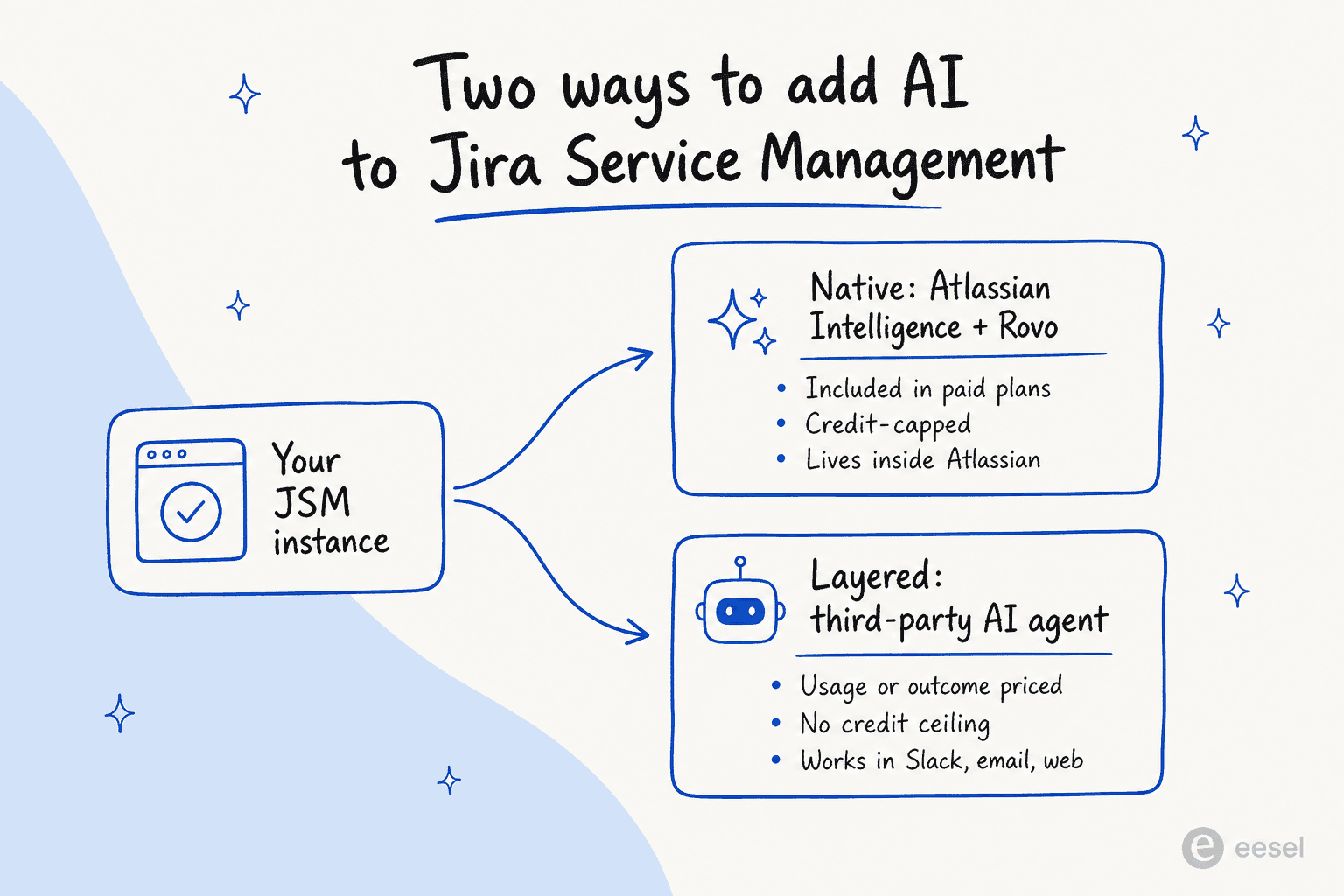
Before the list, it helps to be precise, because "AI for JSM" covers two different jobs that buyers constantly conflate.
The first is native AI inside Jira: the generative features Atlassian ships in the product itself, like the virtual service agent, work-item summaries, and AI-assisted triage. You do not install anything; you flip it on (and pay in Rovo credits).
The second is a layered AI agent: a separate product that plugs into your JSM instance through the API, reads your tickets and knowledge base, and acts on them. You keep Jira as your system of record and add a smarter brain on top. This is the AI plugin for Jira model, and it is how teams add autonomous resolution that Atlassian's built-in features do not quite reach.
The decision between the two usually comes down to how much you want the AI to actually do, and how predictable you need the bill to be.
How we picked
We leaned on first-hand testing of each product's interface, their own docs and pricing pages, plus what real admins say on Reddit, the Atlassian Community forums, and G2. Every tool here either runs natively in JSM or has a documented Jira / Jira Service Management integration, so this is not a generic "best AI agents" list with JSM bolted onto the title. We scored each on deployment effort, how much it deflects versus just assists, pricing transparency, and security posture, then wrote a plain verdict on who it fits.
The 7 best AI tools for Jira Service Management at a glance
Every item below follows the same shape: who it is best for, what it does, pros, cons, pricing, and our take. Here is the quick comparison first, the part most people screenshot.
| Tool | Best for | Deployment | Pricing model | Free tier | Lives in Slack / Teams | Security | Public pricing |
|---|---|---|---|---|---|---|---|
| eesel AI | Autonomous AI on JSM without enterprise sales | Layered (API, self-serve) | From $299/mo (500 credits) | 100 free credits, no card | Yes (native bots) | SOC 2, HIPAA (add-on) | Yes |
| Atlassian Rovo / Intelligence | Native AI for existing Atlassian shops | Built into JSM | Rovo credits (25-150/user/mo) | No (absent on Free) | Limited (no full native bot) | TLS 1.2+, AES-256, Atlassian Guard | Partly (credits) |
| Aisera | Fortune-500 IT + HR + CX consolidation | Layered (alongside JSM) | Quote-only, annual | No | Yes | SOC 2, ISO 27001, HIPAA, GDPR | No |
| Moveworks | Large-enterprise employee support | Layered (JSM integration) | Quote-only, per employee/yr | No | Yes | SOC 2, ISO 27001, HIPAA, GDPR, FedRAMP | No |
| Forethought | CX teams keeping their helpdesk | Layered (helpdesk-agnostic) | Quote-only, outcome-based | No (proof-of-value instead) | Yes (Slack) | SOC 2, GDPR | No |
| Kore.ai | Regulated enterprises building custom agents | Layered (platform) | Quote-only (~$50-150/mo entry) | $500 starting credit | Yes (Teams) | Enterprise-grade | No |
| Glean | Atlassian shops wanting cross-tool knowledge | Layered (native Jira connector) | Quote-only | No | Yes | SOC 2 Type II, ISO 27001, GDPR, TX-RAMP | No |
A note before we dig in: only one tool on this list publishes real pricing and lets you start without a sales call. Keep that in mind as the "quote-only" cells stack up.
1. eesel AI
Best for: teams who want an autonomous AI agent on Jira Service Management in minutes, on one fixed monthly price, without a sales cycle or a per-user credit ceiling.
eesel AI is an AI teammate platform that drops into the tools you already run, JSM and Jira included, reads your history, and starts working like a new hire you briefed in plain English. Instead of replacing Jira Service Management, it connects to it: it learns from your past tickets and knowledge base, then either drafts replies for agents to approve or resolves common requests on its own. InDebted's Head of IT, Jason Loyola, runs it exactly this way, as the first responder to Helpdesk tickets in Jira.
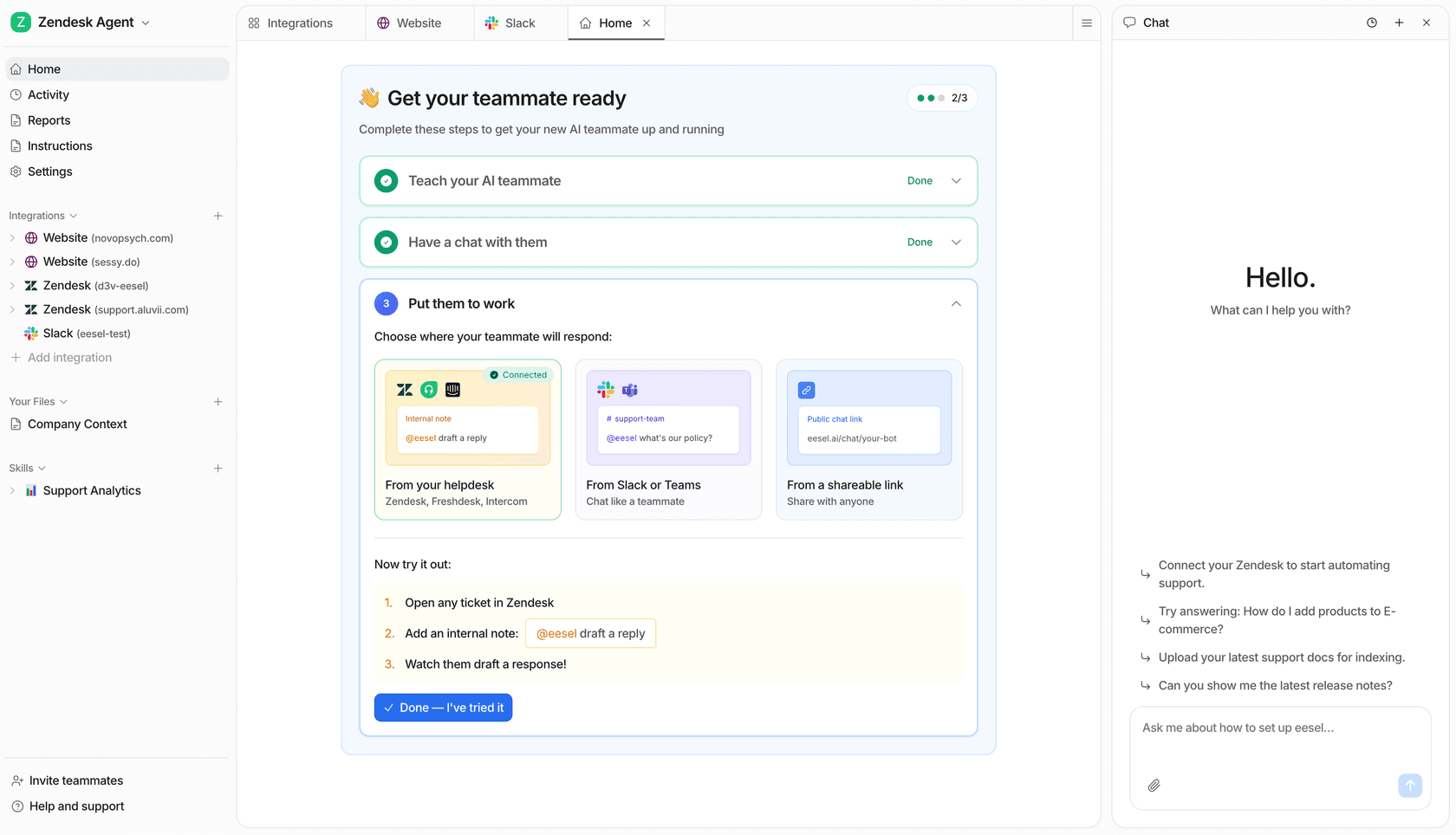
The thing that sets it apart for a JSM team is the onboarding speed and the control. You can point it at a slice of your tickets first (say, password resets and access requests), watch what it would have said in a simulation over past tickets, then widen the scope once you trust it. That "start narrow, prove it, expand" loop is the single most-requested thing we hear from buyers nervous about letting AI loose on a queue.
It is not the right tool for everyone. If your knowledge lives entirely inside Confluence and you never want a second vendor, Atlassian's native AI is the lower-friction start. And eesel is built around resolving and drafting support and IT tickets, so it is not a full ITSM platform replacement, change management, CMDB, and asset tracking still live in JSM.
Pros
- Live in minutes on your existing JSM project, no migration, no professional-services engagement.
- Transparent, fixed monthly pricing: credits sized to your volume (1 credit per ticket), not per seat or per resolution.
- Simulation mode lets you forecast deflection on real historical tickets before going live.
- Native presence in Slack and Teams for internal IT support, not just inside Jira.
- Coachable in plain language with confidence-based escalation rules.
Cons
- A layered tool, so it is a second product to manage alongside JSM (though it needs no Atlassian admin overhead).
- Not an ITSM suite; it handles the AI resolution layer, not asset or change management.
- Heaviest value shows up once you have enough past tickets and docs for it to learn from.
Pricing: One fixed monthly price sized to volume. 1 credit covers a ticket or a chat, however long, and plans start at $299/month for 500 credits (1,000 credits is $499/month). There are no per-seat fees and no platform fee, and every integration and channel is included. You start with 100 free credits and no credit card, and if you run out, agents pause until credits reset or you can turn on overage with a cap you set. Full detail on the eesel pricing page.
Our take: If your goal is to actually deflect Jira Service Management tickets rather than summarise them, and you would rather not sit through six sales calls to learn the price, eesel is the one we would reach for first. It is the rare option here that you can prove out this afternoon.
2. Atlassian Intelligence and Rovo
Best for: existing Atlassian shops that want AI inside Jira with zero new vendors, and can live within the credit caps.
This is the default, and for good reason: if you are on a paid JSM plan, you already have it. Atlassian Intelligence is the umbrella for generative features baked into Jira, while Rovo is the user-facing layer of Search, Chat, and Agents sitting on Atlassian's Teamwork Graph. (If you are unsure how those two relate, we untangle it in is Atlassian Intelligence the same as Rovo.)
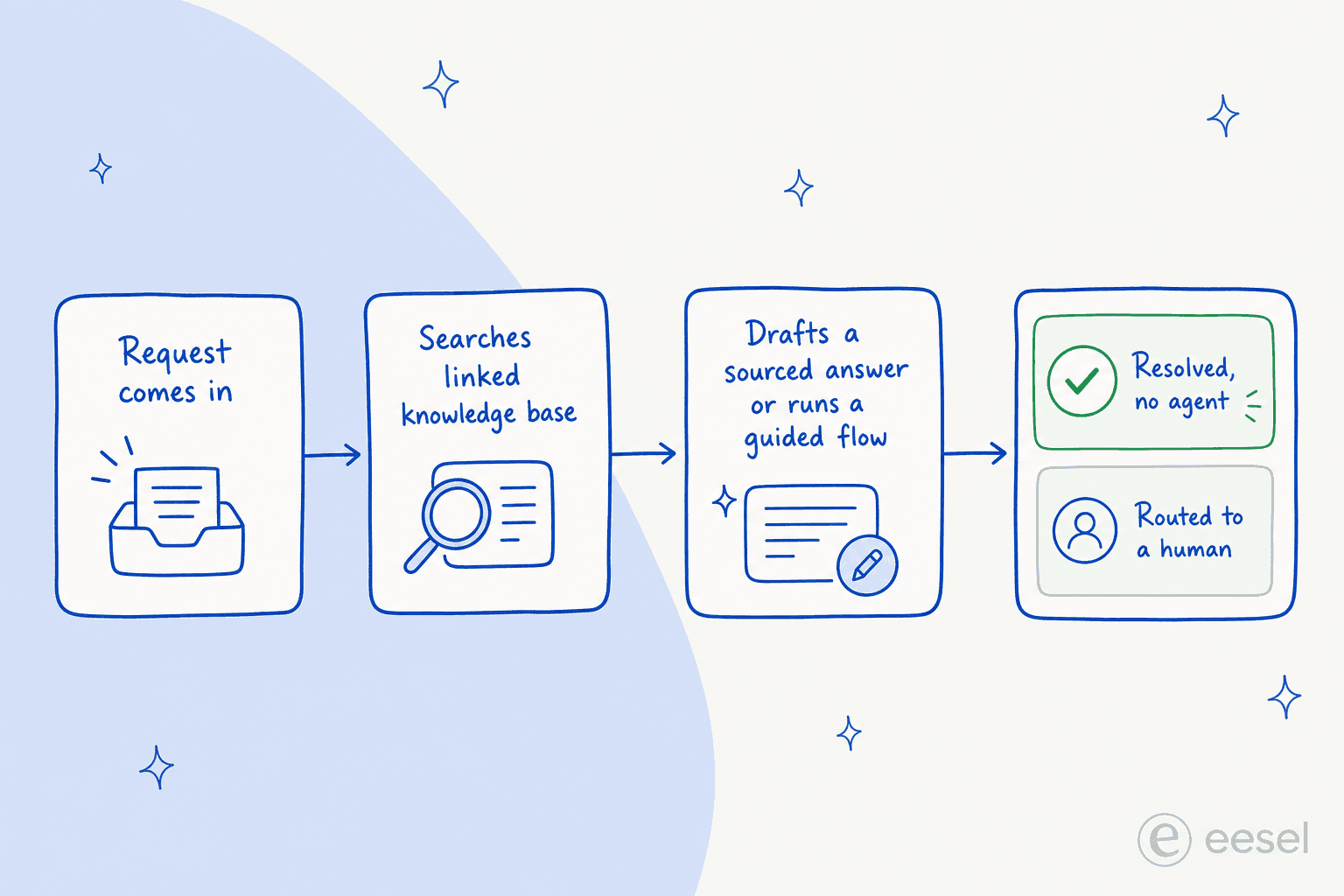
JSM has the deepest native AI surface of the Jira family because support work is so repeatable. The headline is the virtual service agent, which searches your linked knowledge base spaces, answers in natural language, and can run guided conversation flows to gather info and route requests. On top of that you get AI triage that suggests request types in bulk, customer sentiment analysis, work-item summaries, suggested replies drafted from similar past requests, and a full AIOps surface for incidents (alert grouping, incident timelines in Slack, auto-generated post-incident reviews).
Rovo itself reformats and improves work items right in the issue view:
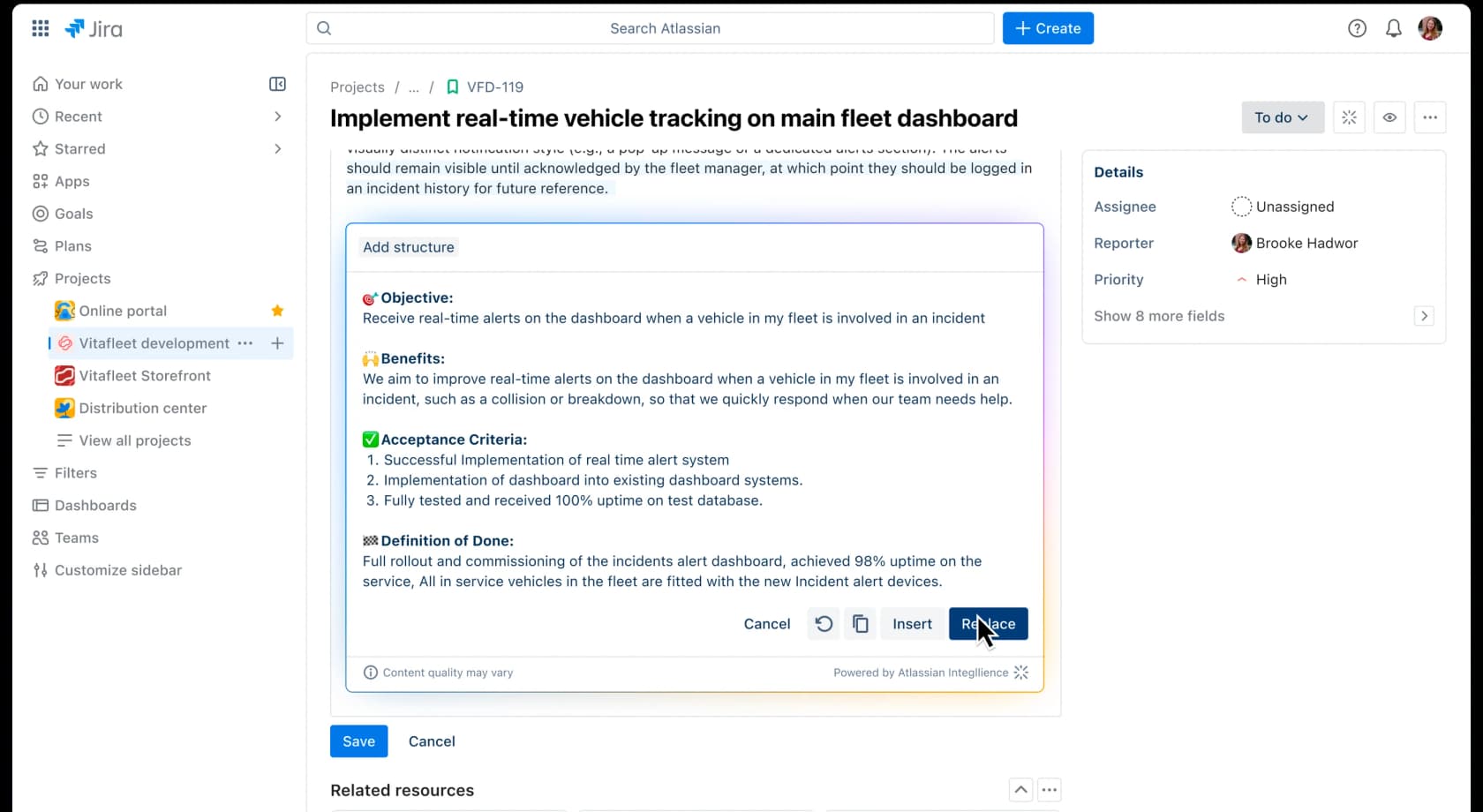
That is genuinely useful for single-document, in-product tasks. The trouble starts the moment you lean on it heavily. The loudest complaint is the credit economics. Rovo is "included," but every substantive action burns credits, and the ceiling arrives fast. One admin on Atlassian's own community forum ran a single code-review pass and watched it burn 965 of 2,000 credits:
"Rovo had a look at the PR and made a few suggestions and in doing so appeared to use 965 of my 2000 credits with 760 being marked as 'Code review in Bitbucket'... Either I'm doing something amazingly wrong or that's not value for money at all."
Chris Mingay, Atlassian Community, Jan 2026
The second issue is reach. Rovo lives inside Atlassian surfaces or a browser extension; there is no full native Slack or Teams bot, so employees who live in chat have to come to Jira. A JSM admin piloting it hit exactly that wall:
"Did you figure out how to connect the Rovo agent to Teams/Slack? I'm pilotting this right now, can only get Rovo added as an app to Teams..."
r/jira, "Been a JSM shop for 3 years"

Here is the deflection loop a layered or native agent runs when it works well:
Pros
- Included in paid Standard, Premium and Enterprise plans; no separate purchase.
- Deep, native JSM features: virtual service agent, triage, summaries, AIOps.
- Permission-aware retrieval that mirrors your existing Atlassian access controls.
- Smart Answers cite their sources, so answers are auditable.
Cons
- Credit caps are tight (25 per user/month on Standard) and overage adds up quickly.
- No full native Slack or Teams bot; employees must switch into Atlassian.
- Absent entirely from the Free plan.
- Full feature set is Cloud-only; Data Center needs a companion Cloud subscription.
- Answer quality is strongest only when knowledge lives in Confluence.
Pricing: Bundled into paid Jira / JSM Cloud plans, metered by Rovo credits (roughly 25 per user/month on Standard, 70 on Premium, 150 on Enterprise), with per-credit overage. We break the math down in our Atlassian Intelligence and Rovo pricing guide.
Our take: Turn it on, it is free with your plan and the summaries and triage are a real time-saver. Just do not expect "included" to mean "unlimited." If your team does heavy Q&A, lives in Slack, or wants real autonomous deflection, you will hit the credit wall and the context-switch wall fast, which is exactly the gap the rest of this list fills. For the fuller verdict, see our review of JSM's AI.
3. Aisera
Best for: Fortune-500 enterprises consolidating IT, HR, and customer service onto one cross-functional AI platform.
Aisera is an enterprise AI Service Experience platform whose Universal Agent orchestrates domain agents across IT, HR, finance, and customer service. It deploys alongside your system of record, JSM, ServiceNow, Salesforce, rather than inside it, which makes it a natural fit when a JSM service desk is just one of many systems a 5,000-person company wants one AI to span. It is heavily funded (around $171M raised at a $1.6B valuation) and was acquired by Automation Anywhere in November 2025, so its roadmap is increasingly bundled into Automation Anywhere's agentic platform. Customer proof is enterprise-scale: LifeScan reports auto-resolving 65% of incoming support requests for $2.2M in savings.
Pros
- True cross-functional scope (IT + HR + CX + finance) from one platform.
- Open-standards orchestration (A2A, MCP) and an LLM gateway with model choice.
- Strong compliance: SOC 2, ISO 27001, HIPAA, GDPR, plus analyst recognition in Gartner's ITSM AI quadrant.
Cons
- No public pricing, no free tier, no trial: contact-sales only.
- Built for the enterprise; too heavy a buy for a 50-500-seat service desk.
- Post-acquisition packaging is in flux under Automation Anywhere.
Pricing: Undisclosed. Both /pricing and /demo return 404; the motion is annual contract scoped to volume. See our notes on Aisera pricing and Aisera reviews.
Our take: A serious platform for a serious budget. If you are an enterprise unifying many systems and JSM is one node in that, Aisera belongs on the shortlist alongside ServiceNow's own AI and Moveworks. For a team that just wants AI on its Jira service desk, it is overkill, and the comparison to weigh is Aisera vs Moveworks, not Aisera vs a lightweight agent.
4. Moveworks
Best for: large enterprises that want one conversational front door for employee support across many internal systems.
Moveworks is an enterprise AI assistant for the whole workforce, a single chat front door where employees resolve IT, HR, and finance requests in natural language. It has a confirmed Jira Service Management integration, and it was acquired by ServiceNow for ~$2.85B (closed December 2025), so it now sits inside ServiceNow's agentic portfolio. The proof points are strong: CVS Health cut live-agent chats 50% within 30 days, and Amadeus gave back 16,000+ hours a month. It carries a 4.3 on G2 (126 reviews) and 4.5 on Gartner Peer Insights (116).
Pros
- Agentic reasoning across 100+ enterprise systems, JSM included.
- Genuinely omnichannel: chat, web, portal, mobile, in 100+ languages.
- Top-tier compliance including FedRAMP, rare among AI agents.
Cons
- Pricing is headcount-based and six-figure; billed per total employee, not per user.
- Built for thousands-of-employees orgs; a poor fit for SMBs.
- Some operators report generic autonomous replies on complex tickets, and current customers are nervous about the ServiceNow acquisition's effect on roadmap and support.
Pricing: Quote-only. The one concrete published figure is ~$150 per user/year (AWS Marketplace), with a reported $130,000 median annual contract and 3-year all-in costs commonly $1.5M-$3.5M for a 5,000-employee org.
Our take: Excellent if you are a large enterprise standardising employee support and you are already heading toward ServiceNow. If JSM is your hub and you want AI specifically on that service desk without a transformation project, the price-to-value math rarely works at this scale.
5. Forethought
Best for: customer support teams that want agentic AI but are committed to their current helpdesk.
Forethought is a standalone, helpdesk-agnostic AI platform built around a multi-agent system: Solve (the customer-facing agent), Triage (classification), Assist (agent copilot), Discover (insights), and Agent QA. Its strongest pitch is that you keep your stack and add Forethought on top, so a JSM customer-support project can gain agentic deflection without leaving Jira. It publishes bold benchmark claims, up to 98% resolution and 55% lower first-response time, from its 2025 AI in CX Benchmark Report, and counts Upwork, Carta, and Grammarly as customers.
Pros
- Helpdesk-agnostic: sits on top of JSM, Zendesk, Salesforce, and others.
- Clear multi-agent structure with a strong action-taking story (Autoflows, a Browser Agent for legacy systems).
- Broad channel coverage including voice, a 2025 flagship.
Cons
- No public pricing and no free trial; a proof-of-value engagement instead.
- More oriented to external CX than to internal ITSM, which is JSM's core strength.
- Outcome-based pricing plus platform fees make budgeting harder to predict.
Pricing: Quote-only, described as a blend of platform access fees and outcome-based cost. Secondary sources peg it in the ~$30K-$150K+/year range. See our Forethought pricing notes.
Our take: A solid choice if you run a mature CX org on a helpdesk you are not leaving and you want agentic resolution layered on. For an IT-first JSM service desk, it is less of a natural fit, and if the appeal is "add AI without switching," compare it to the cheaper, self-serve option in our best Forethought competitor rundown.
6. Kore.ai
Best for: regulated enterprises (banking, healthcare) that want to build and govern custom AI agents on a heavyweight platform.
Kore.ai is an enterprise agent platform (its latest generation is codenamed Artemis) with separate suites for customer service ("AI for Service") and employee experience ("AI for Work," covering IT, HR, and recruiting). It is a Leader in the 2025 Gartner Magic Quadrant for Conversational AI, raised a $150M round in 2024, and counts heavily regulated names like Morgan Stanley, Pfizer, and PNC Bank as customers. Its IT suite can front a JSM service desk, though Kore.ai is a build-it platform more than a turnkey agent.
Pros
- Deep, governable platform with pre-built vertical apps and a no-code builder.
- Strong analyst positioning and a regulated-enterprise customer base.
- Microsoft (Azure, Teams, Copilot) and AWS (Bedrock, Connect) partnerships.
Cons
- No public pricing; a sales-led, often $300K/year enterprise motion (per third-party trackers).
- An unusual billing unit: Automation AI is charged per 15-minute conversation session, so a 31-minute chat is three billable sessions.
- Platform depth means real build and configuration effort before value.
Pricing: Undisclosed publicly. In-product docs list Essential / Advanced / Enterprise tiers; third-party trackers cite roughly $50/mo (Essential) and $150/mo (Advanced), with enterprise deals commonly starting near $300,000/year. More in our Kore.ai pricing breakdown.
Our take: The right tool if you are a large, regulated org that wants to build governed agents and has the team to do it. If you just want AI answering Jira Service Management tickets next week, the build effort and the 15-minute-session billing make it a heavier lift than it needs to be; our Kore.ai alternatives list lighter options.
7. Glean
Best for: Atlassian-heavy organisations that want a permission-aware knowledge assistant spanning Jira, Confluence, and everything else.
Glean is an enterprise "Work AI" platform built on a shared Enterprise Context layer, with Search, Assistant, and Agents on top. For JSM teams its appeal is the native Jira connector alongside a native Confluence connector, so it reads across your whole Atlassian footprint (and 100+ other sources) and answers employee questions with inherited permissions. It is frequently evaluated head-to-head against Rovo for exactly this job, and in sales-side threads Glean reps claim they win those POCs:
"At Glean, if you get the opportunity to go head to head against Rovo, etc. in a formal POC, Glean wins. There's no comparison."
r/techsales, Glean Technologies thread
That is a biased source, an SDR talking up their own product, but it reflects how Glean is positioned: the best-in-class knowledge layer when Rovo is the "free with your license" default.
Pros
- Native Jira and Confluence connectors with strictly enforced, inherited permissions.
- Runs in a single-tenant cloud; strong compliance (SOC 2 Type II, ISO 27001, GDPR, TX-RAMP).
- Builds and orchestrates custom agents using natural language.
Cons
- Enterprise-only with no public pricing and no free tier.
- Oriented to knowledge search and assistance more than turnkey ticket resolution on a service desk.
- Secondary sources cite ~$40-$50 per user/month, but Glean does not confirm it.
Pricing: Quote-only; demo-gated with no published tiers. See our Glean pricing and Glean alternatives writeups.
Our take: If your problem is "employees cannot find answers across our sprawling Atlassian and SaaS stack," Glean is excellent and a genuine upgrade over Rovo's search. If your problem is "our JSM queue is drowning and we need an agent to resolve tickets," it is solving a slightly different job.
What it actually costs
Strip away the marketing and JSM AI tools fall into three pricing shapes, and they scale very differently.
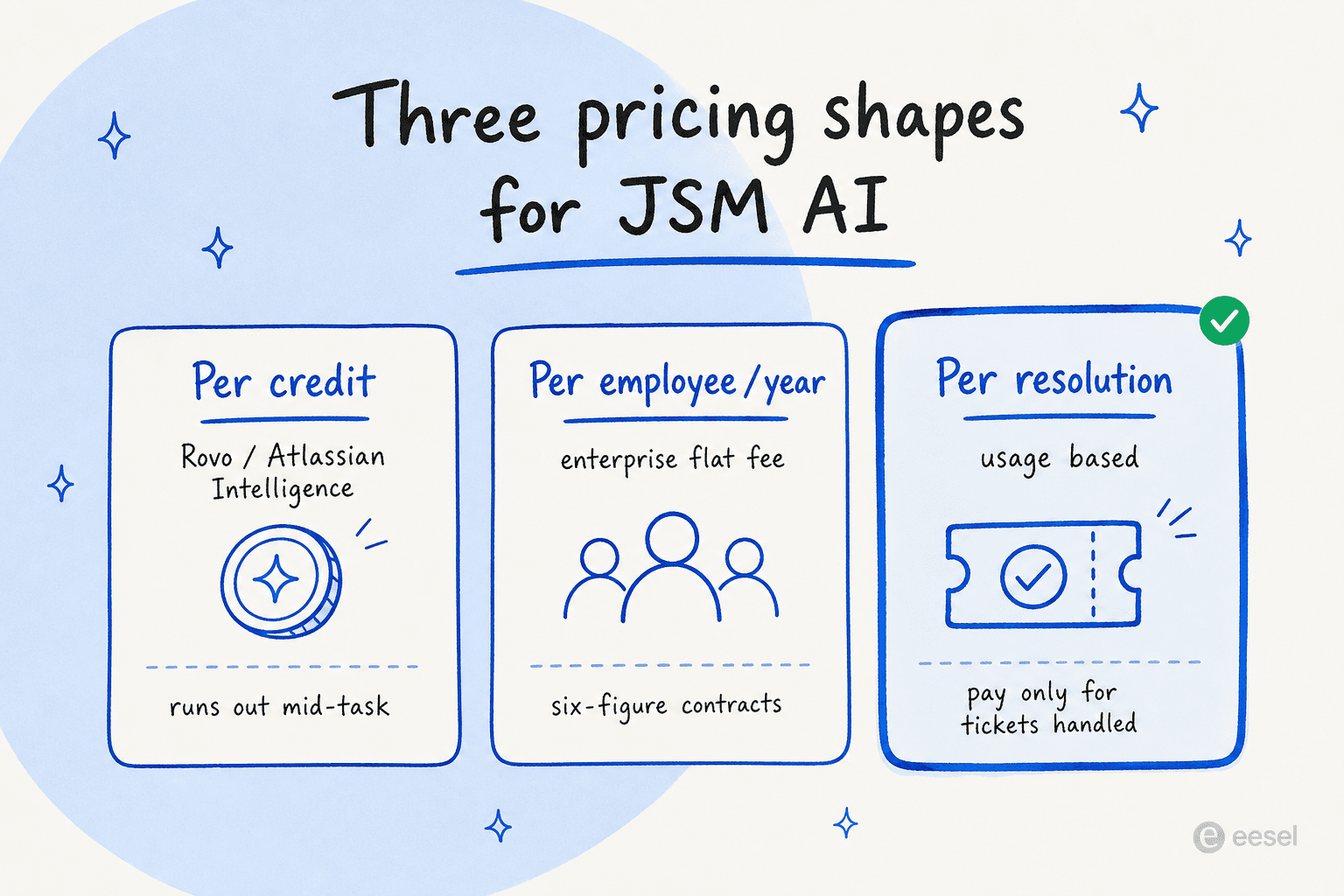
Per credit (Rovo). Feels free because it is bundled, until a few heavy users exhaust the monthly pool and overage starts. Predictable only if your usage is light.
Per employee per year (Moveworks, Aisera, Kore.ai). A flat enterprise fee covering everyone, six figures and up, with implementation on top. Great unit economics at 10,000 employees, brutal at 200.
Per ticket credit (eesel). One credit covers a ticket or chat, however long, and only tickets the agent actually works on count. A team routing 1,000 JSM tickets a month to an eesel agent pays $499/month on the 1,000-credit plan, and you can move up or down any time. There are no seats to true up.
That last model is why a worked example matters more than a sticker price. The same 1,000-ticket month that costs a predictable $499 on a fixed monthly plan can mean an awkward conversation about credit overages on a metered plan, or a $130K annual contract on an enterprise one. If you want to sanity-check the trade-off against headcount, our breakdown of AI agent versus human agent cost is a useful companion.
How to choose
A quick decision guide, because "it depends" is not an answer:
- You are a small-to-mid IT or support team on JSM and want AI working this week. Start with a layered agent on a fixed monthly plan. Turn on Atlassian's native triage and summaries (they are free with your plan), and add eesel for the actual resolution.
- You are an Atlassian-only shop with light AI needs and a tight budget. Rovo and Atlassian Intelligence may be all you need. Just watch the credits.
- You are a large enterprise unifying IT, HR, and CX across many systems. Look at Aisera or Moveworks, and weigh ServiceNow and Freshservice in the same bracket.
- Your real pain is findability across a sprawling stack. Glean is the knowledge layer to beat.
- You are committed to a CX helpdesk and want agentic deflection on top. Forethought, or its lighter alternatives, fits.
If you are still torn between staying native and layering on, our guides to JSM alternatives and whether JSM AI is worth it go deeper.
Try eesel for Jira Service Management
If you want AI that actually resolves Jira Service Management tickets instead of just summarising them, eesel AI is the fastest way to find out whether it works on your queue. It connects to your JSM project and knowledge base, learns from your past tickets, and you can run it in simulation over real historical tickets to forecast deflection before a single live reply goes out, then start narrow and widen as you trust it.

Unlike every other tool on this list except Atlassian's own, you do not need a sales call to begin: there are 100 free credits, no card, and transparent credit pricing with an optional overage cap you control. Try eesel and see your deflection number this week, not next quarter.
Frequently Asked Questions
What is the best AI for Jira Service Management?
Is Atlassian Intelligence the same as Rovo?
How much does AI for Jira Service Management cost?
Can I add AI to Jira Service Management without switching helpdesks?
What is the best free AI for Jira Service Management?
Does Jira Service Management AI actually deflect tickets, or just summarise them?


Article by
Riellvriany Indriawan
Riell is a designer and writer at eesel AI with about two years of experience researching CX platforms, AI chatbots, and helpdesk software. She combines her design background with a sharp eye for how these tools actually look and feel in practice — making her comparisons unusually visual and user-focused.