
If you're evaluating IT service management platforms, you've probably wondered whether Jira Service Management's AI features justify the investment. It's a fair question. Atlassian has packed a lot of artificial intelligence into JSM, but the advanced capabilities don't come cheap, and they're not available on every plan.
Let's cut through the marketing and look at what JSM AI actually delivers, what it costs, and whether it makes sense for your team.
What is Jira Service Management AI?
Jira Service Management is Atlassian's IT service management platform built on the familiar Jira backbone. The AI components, collectively called Atlassian Intelligence, use machine learning and generative AI to automate repetitive tasks, assist support agents, and improve the overall service experience.
The core idea is straightforward: reduce the manual work that bogs down IT teams. The virtual service agent handles routine inquiries so agents don't have to. Intelligent triage routes tickets automatically. AI-generated summaries save agents from reading through endless comment threads.
Here's the catch: most of these AI features are locked behind Premium and Enterprise plans. If you're on Standard, you get basic generative assistance, but the powerful automation that makes JSM AI compelling requires a significant jump in price.
Jira Service Management AI features and capabilities
Let's break down what you actually get with JSM AI and which plans include each feature.
Virtual Service Agent
The virtual service agent is JSM's flagship AI feature. It's a conversational AI that can answer employee questions, guide them through common requests like password resets, and even help with software access requests. The agent pulls answers from your connected knowledge base (typically Confluence) and can hand off to human agents when a request is too complex.
According to Atlassian's customer data, teams using the virtual service agent see up to 30% ticket deflection, meaning nearly a third of inquiries never reach a human agent. Thumbtack, one of Atlassian's customers, reported that their virtual agent handles employee requests 24/7, allowing their IT team to focus on higher-value work.
Availability: Premium and Enterprise only. Includes 1,000 assisted conversations per month; additional conversations cost approximately $0.30 each.
Atlassian Intelligence for agents
This is the agent-facing AI that helps your support team work faster. Features include issue summarization for condensing long tickets and comment threads, sentiment analysis that flags when customers are frustrated so agents can prioritize accordingly, response suggestions with AI-drafted replies based on ticket context and knowledge base articles, and content generation that helps agents write ticket descriptions, comments, and knowledge base articles.
These features are designed to shave minutes off every interaction. For a team handling hundreds of tickets weekly, that adds up quickly.
Availability: Premium and Enterprise plans.
Intelligent triage and automation
Rather than manually sorting and routing tickets, JSM's AI can analyze incoming requests and automatically categorize, prioritize, and assign them based on content, sentiment, and language. This reduces the time tickets spend waiting for initial review and helps meet SLA targets.
Availability: Premium and Enterprise plans.
Incident management AI (AIOps)
For IT operations teams, JSM includes AI-powered incident management capabilities. Alert grouping uses AI to identify related alerts and groups them together to reduce noise. Incident creation automatically generates incidents from alerts with AI-suggested titles and descriptions. Post-incident reviews use AI to draft incident summaries and post-incident review reports. Related resource surfacing suggests relevant documentation and assets during active incidents.
According to the Forrester TEI study commissioned by Atlassian, IT operations teams save an average of 55 minutes per incident when fully leveraging these AI capabilities.
Availability: Premium and Enterprise plans.
Rovo Agents
Rovo is Atlassian's newer agentic AI platform. Unlike traditional AI that suggests responses, Rovo Agents can take actions, invoke other agents, and help with complex workflows like root cause analysis during incidents.
Availability: Included in Standard (25 credits/user/month), Premium (70 credits/user/month), and Enterprise (150 credits/user/month).
Jira Service Management AI pricing breakdown
Understanding whether JSM AI is worth it requires looking at the full pricing picture. Here's what each tier costs and what AI features you get:
| Plan | Monthly Price (per agent) | Annual Price (per agent) | Key AI Features | Notable Limits |
|---|---|---|---|---|
| Free | $0 | $0 | Basic generative assistance | 3 agents max; 500 automation runs/month |
| Standard | $20 | ~$17 | Rovo Search, Chat, basic Rovo Agents | No Virtual Agent; 25 Rovo credits/user/month; 5,000 automation runs/month |
| Premium | $51.42 | ~$47 | Full AI suite: Virtual Agent, Intelligent Triage, AIOps, Summaries | 1,000 virtual agent conversations/month; 70 Rovo credits/user/month |
| Enterprise | Custom (annual only) | Custom | Everything in Premium plus advanced analytics | 1,000 virtual agent conversations/month; 150 Rovo credits/user/month |
Consumption-based costs to watch
If you exceed the included allowances, you'll pay overage fees:
- Virtual service agent: $0.30 per assisted conversation beyond the 1,000/month included
- Assets objects: $0.02 per object per month beyond plan limits (50,000 for Premium, 500,000 for Enterprise)
For a 10-agent team on Premium, you're looking at roughly $470-510 per month just for the base plan. Add overage costs if you exceed conversation limits, and the price climbs from there.
Source: Atlassian JSM Pricing
ROI and performance data
Atlassian commissioned Forrester Consulting to conduct a Total Economic Impact study on Jira Service Management. The results provide concrete numbers for evaluating ROI:
Quantified benefits
| Metric | Result | Impact |
|---|---|---|
| Ticket deflection | 30% | Fewer tickets reach human agents |
| Ticket handling efficiency | 30% improvement | Agents resolve issues faster |
| Employee time saved | 25 minutes per request | Self-service reduces wait times |
| IT operations time saved | 55 minutes per incident | Faster incident resolution |
| Engineer time saved | 12 minutes per incident | Less time understanding issues |
| Overall ROI | 275% over 3 years | For composite organization |
| Net present value | $6.97 million | For composite organization |
Real customer outcomes
Canva reported that JSM's automated incident reporting saves significant time: "Once an incident ticket is closed, it'll run an incident report and create action items that are tracked. If we didn't have that automation set up, it would have all been a manual process."
Atlassian's own HR team uses JSM's virtual agent to handle employee inquiries, saving 2,800 hours annually according to their Chief People Officer.
A director of IT operations at a home services company told Forrester: "Previously, our help desk chat relied on human responses, which was inefficient. Now, with the virtual service agent, we have 24/7 availability, responding to any question at any time."
Context for the numbers
It's worth noting that the Forrester study focused on organizations with 3,000 to 14,000 employees. If you're a smaller team, your results may vary. The 275% ROI figure assumes full deployment of AI features across a mature JSM implementation, not a quick win in the first month.
Limitations and considerations
JSM AI isn't the right fit for every team. Here are the drawbacks to consider before committing:
Steep learning curve
Multiple user reviews mention that JSM can feel overwhelming for non-technical users. The interface, while powerful, requires time to master. One G2 reviewer noted that "the UI can feel a little daunting to new users."
Complex setup
Getting the most out of JSM AI requires configuration. The virtual agent needs training on your knowledge base. Automation rules need to be built. Workflows need to be customized. For teams without dedicated Jira administrators, this can be a significant hurdle.
A Reddit user in the sysadmin community shared: "Setting up JSM felt like a heavy lift. Users had to spend a lot of time and effort customizing the platform just to support basic IT-service workflows."
Pricing escalates quickly
The jump from Standard to Premium is substantial: from roughly $20 to $51 per agent per month. For a team of 20 agents, that's an additional $600+ per month just to access AI features. And that's before any overage charges for virtual agent conversations.
Best for Atlassian ecosystems
JSM AI shines brightest when you're already using Confluence for documentation and Jira Software for development. If your knowledge lives in Google Docs, Notion, or other platforms, you'll get less value from the tight integrations that make JSM AI effective.
Per-agent pricing model
Unlike some AI support tools that charge per resolution or interaction, JSM uses per-agent pricing. This means you pay for every agent seat regardless of how many tickets they handle. For teams with seasonal fluctuations or part-time support staff, this can be inefficient.
Alternatives to consider
If JSM AI's pricing or complexity gives you pause, there are alternatives worth exploring.
eesel AI for Jira Service Management
If you're already using Jira Service Management but want to add AI capabilities without jumping to Premium, eesel AI integrates directly with JSM and offers a different pricing model based on AI interactions rather than per-agent seats.
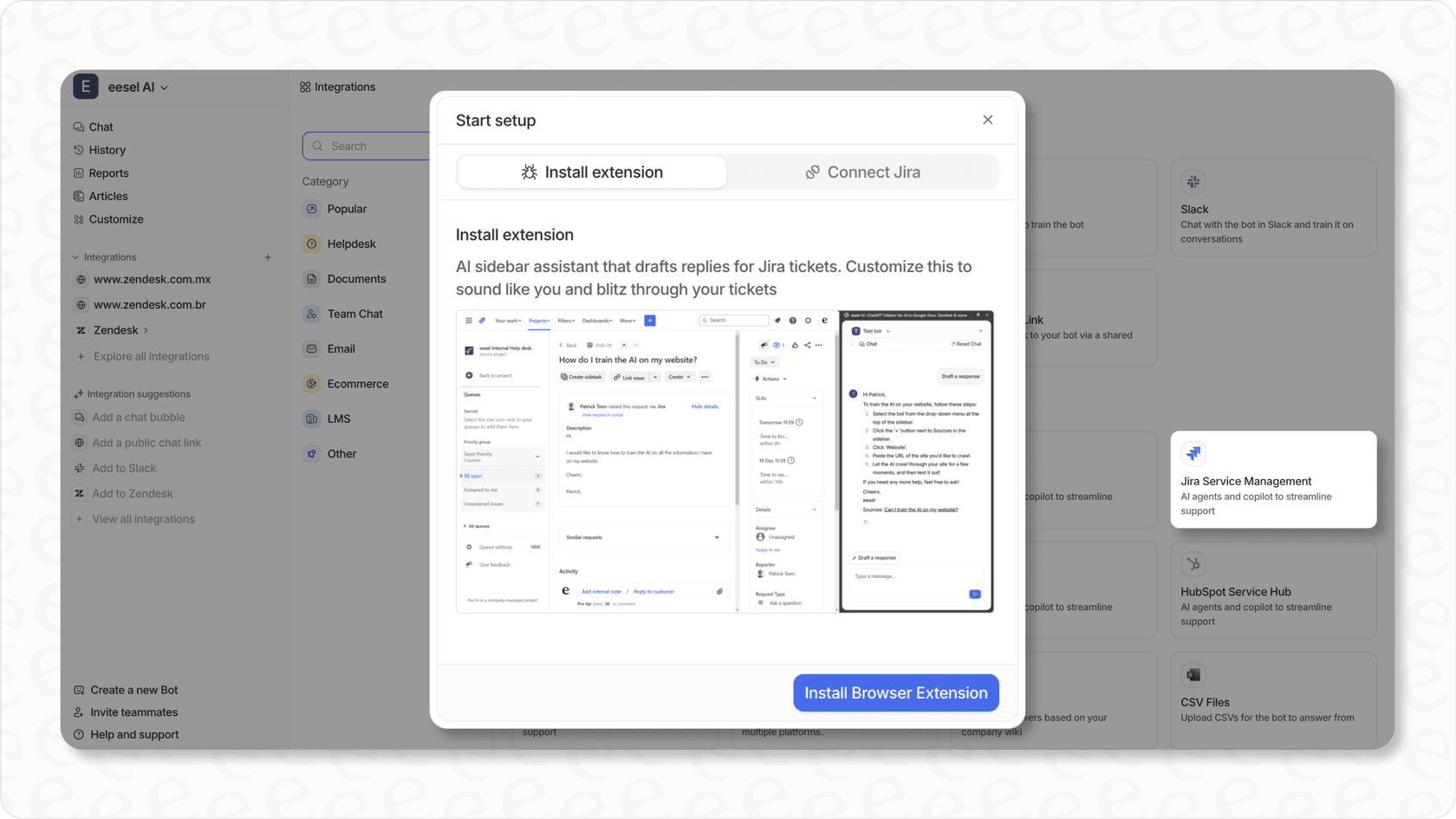
With eesel AI, you can train AI on multiple knowledge sources beyond Confluence, including Google Docs, PDFs, and wikis. You can run simulations on past tickets before going live to verify quality. You pay per interaction rather than per agent, which can be more predictable for growing teams. You can add AI capabilities to your existing JSM setup without a full plan upgrade.
For teams that want AI assistance but don't need the full Premium feature set, this can be a more flexible path. Our pricing starts at $299/month for up to 1,000 AI interactions, with no per-agent fees.
ServiceNow
For large enterprises with complex ITSM requirements and deep pockets, ServiceNow remains the heavyweight option. Its AI capabilities are robust but come with enterprise pricing and implementation timelines measured in months, not weeks.
Zendesk AI
If your focus is customer-facing support rather than internal IT service management, Zendesk AI offers strong conversational AI and agent assistance features. It's purpose-built for customer experience rather than IT operations. You can read more about it in our Zendesk AI review.
Is Jira Service Management AI worth it? The verdict
Whether JSM AI is worth the investment depends entirely on your team's profile. Here's a straightforward framework:
JSM AI is worth it if:
- You're already invested in the Atlassian ecosystem (Jira Software, Confluence)
- You have 20+ agents and can justify the Premium/Enterprise pricing
- You have technical resources to handle setup and configuration
- You need full ITIL-compliant ITSM, not just a help desk
- Your team handles enough ticket volume that 30% deflection moves the needle
- You have a mature knowledge base in Confluence for the virtual agent to draw from
JSM AI is not worth it if:
- You're a small team (under 10 agents) with straightforward support needs
- Your budget limits you to the Standard plan
- You don't have dedicated Jira administrators
- Your knowledge lives outside the Atlassian ecosystem
- You prefer simple, plug-and-play solutions over configurable platforms
- Your support volume is low enough that manual handling isn't a burden
The bottom line
For mid-to-enterprise teams already in the Atlassian ecosystem, JSM AI delivers measurable ROI. The 30% ticket deflection, faster incident resolution, and agent productivity gains can justify the Premium pricing for organizations with the scale to benefit.
For smaller teams or those outside the Atlassian world, the investment is harder to justify. The Standard plan's limited AI capabilities don't deliver the transformative experience that makes JSM compelling, and the jump to Premium may be overkill.
If you're somewhere in between, consider whether eesel AI's Jira Service Management integration might give you the AI capabilities you need without forcing a full plan upgrade. You can explore our ITSM solutions to see if our approach fits your workflow better.
The question isn't whether JSM AI works. It clearly does for the right organizations. The question is whether your organization is the right fit for JSM AI.