


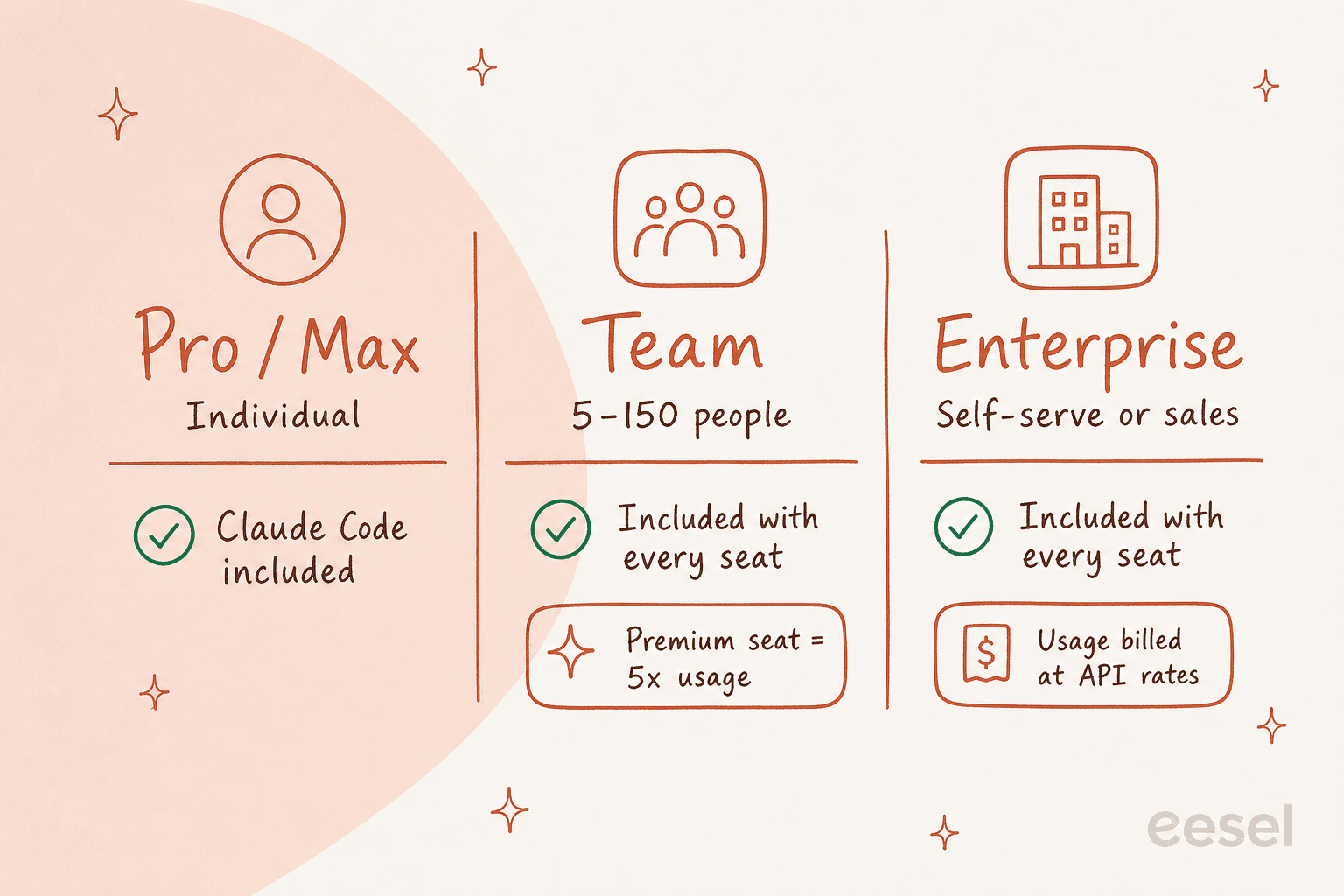
Anthropic has folded Claude Code into its paid plans, so rolling it out to a team is finally a real option instead of a pile of individual subscriptions. Claude Code is now included with every Team and Enterprise seat — the old "premium seat just to get access" gate is gone, and premium seats now simply buy more usage. Team seats run $20/seat/month (annual), premium seats $100, and Enterprise is $20/seat plus usage at API rates, with a new self-serve option so you don't have to call sales to start.
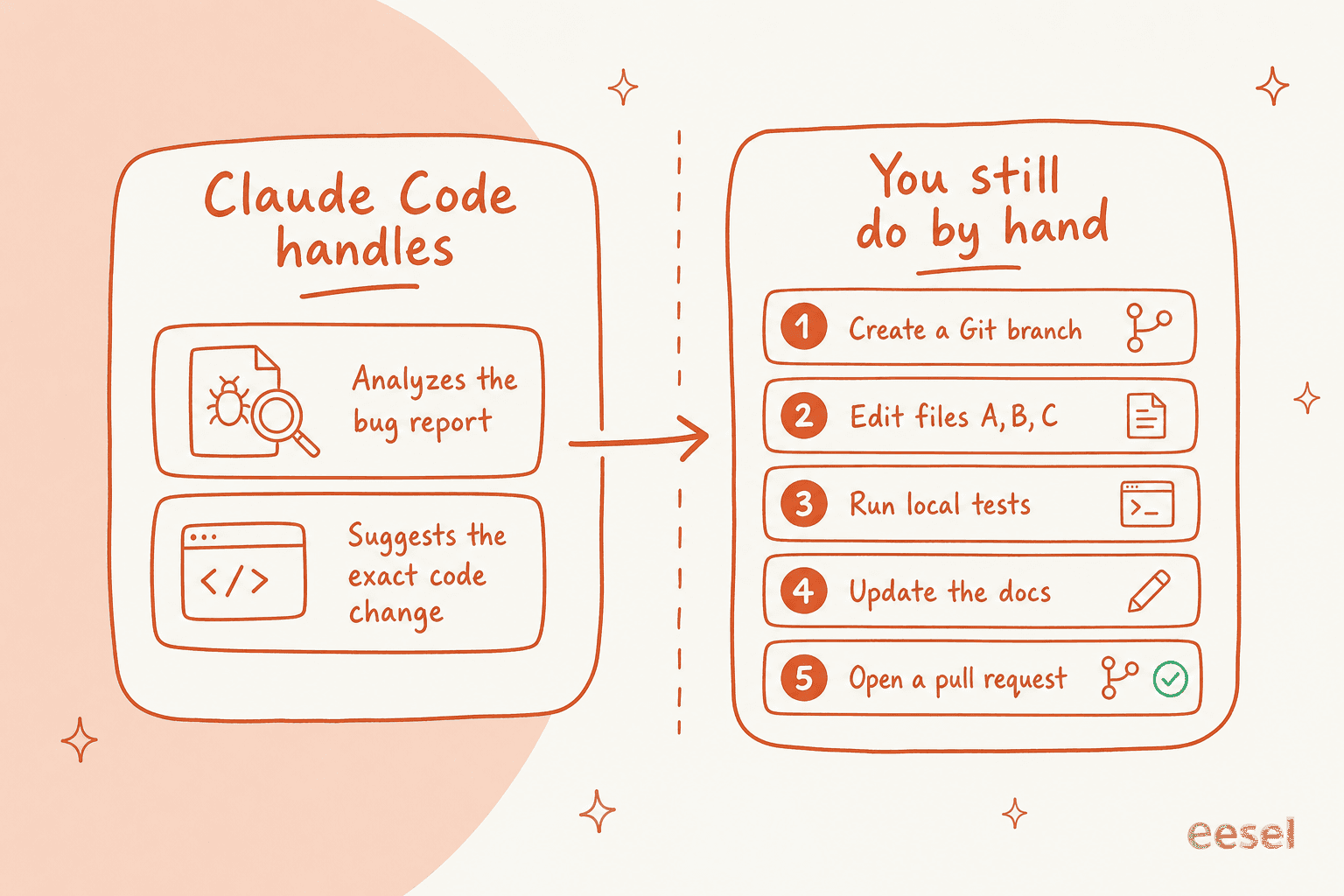
The catch hasn't changed: Claude Code is a brilliant coding assistant, not a workflow executor. It tells you the exact fix, then you still create the branch, edit the files, run the tests, update the docs, and open the PR yourself — the "homework problem." And usage-based billing makes monthly costs hard to forecast.
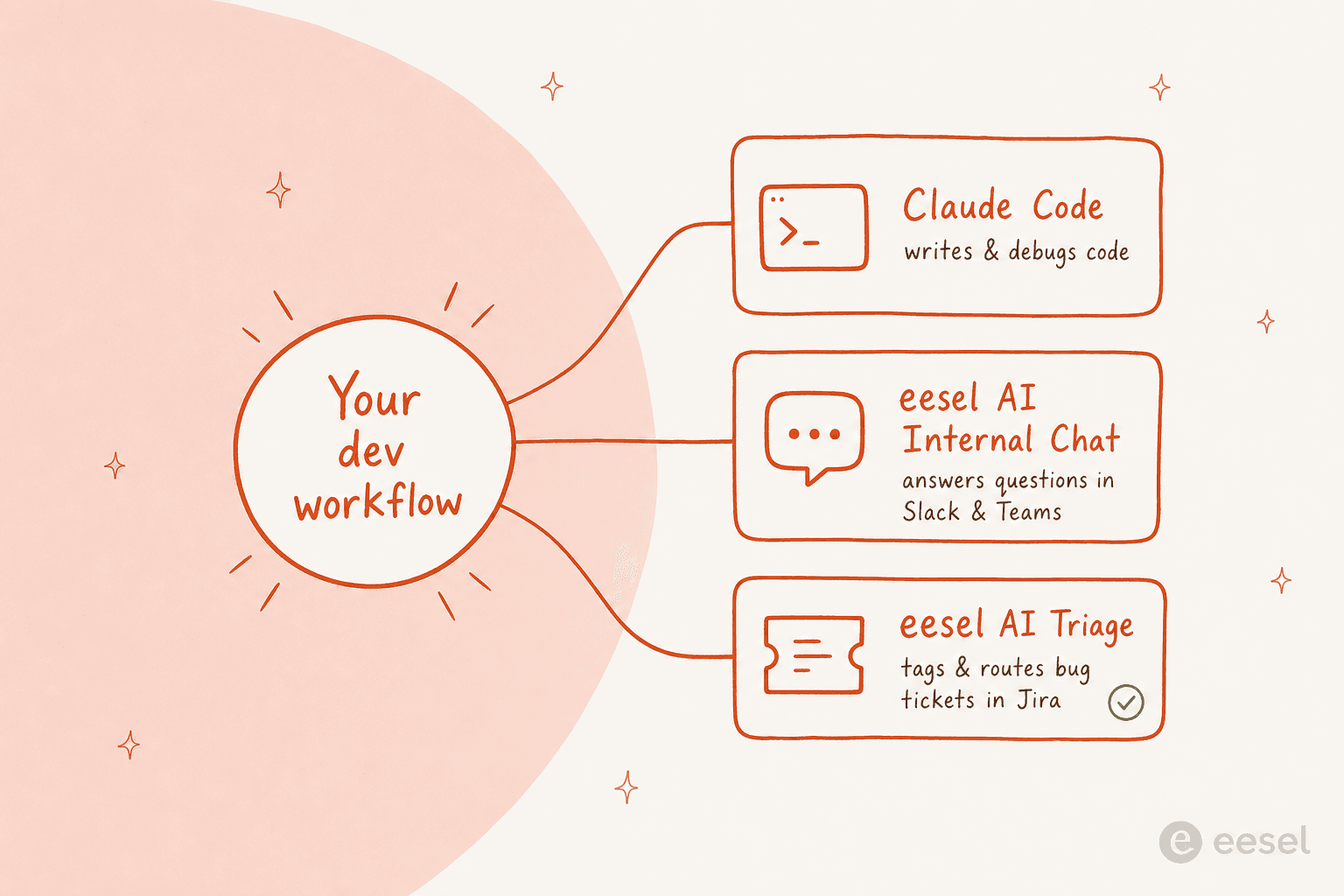
I run AI for support and operations at eesel, and I've watched plenty of strong engineering teams try to build their own support and knowledge automation directly on the Claude API — then come back, because maintaining it wasn't the job they wanted. Pair Claude Code for writing code with a finished platform like eesel AI for the work around it — answering teammates in Slack, triaging bug tickets in Jira — and you cover the whole lifecycle, at a fixed monthly price from $299 with no per-seat fees.
AI coding assistants like Anthropic's Claude Code are getting a lot of attention, and for good reason. They promise to speed up development and make life easier for engineers. But for a business, adopting a new tool isn't just about cool features. You have to think about licensing, costs that can spiral out of control, and some pretty serious security questions.
For a while, those issues made using Claude Code at a company-wide level almost impossible. That's changed.
This guide is a straightforward look at enterprise Claude Code in 2026. I'll cover the Team and Enterprise plans, walk through the real pricing, and talk honestly about the hurdles teams run into when they try to bring it on board.
What is enterprise Claude Code?
First, a quick refresher. Claude is a family of AI models from Anthropic, and they're particularly good at reasoning and agentic work — Opus 4.8 is currently their flagship for complex coding. Claude Code is a command-line tool that puts that power right in a developer's terminal. It's meant to be a coding partner that helps with complex, multi-step tasks, not just autocomplete. My Claude Code overview goes deeper if you're new to it.
Here's the change worth knowing about. Until August 2025, you could only get Claude Code on an individual Pro or Max plan. That was a massive headache for businesses — imagine trying to manage dozens of separate subscriptions, individual expense reports, and inconsistent security settings. It just didn't work.
Anthropic took note, and as of 2026 the situation is fully resolved: Claude Code is included with every Team and Enterprise seat, with the centralized management companies have been asking for. The old gate where you needed a "premium seat" just to unlock Claude Code is gone — premium seats now exist only to give heavy users more usage.
How enterprise Claude Code works: Plans, pricing, and features
Getting your team set up isn't quite as simple as flipping a switch, but it's far easier than it used to be. Let's walk through how each plan works for a business. The details below come straight from Anthropic's help center.
The team plan
The Team plan is a good fit for teams of 5 to 150 that need managed access to Claude and Claude Code but don't need every enterprise-level feature.
-
It offers centralized billing and a simple admin panel to add or remove users.
-
Claude Code is included with every seat — no separate upgrade needed just to access it.
-
Premium seats give heavier users roughly 5x the usage of a standard seat.
-
All usage, whether through the Claude apps or the Claude Code terminal and IDE integrations, is pooled together.
-
How the pricing works:
- Standard seats are $20/seat/month billed annually ($25 if billed monthly). Premium seats are $100/seat/month annually ($125 monthly).
- The plan includes a set amount of usage. If a developer burns through their allowance, an admin can enable usage credits to keep them working, billed at standard API rates. You can set spending limits per user to prevent surprises on the monthly bill.
The enterprise plan
For larger companies with strict security, compliance, and scaling requirements, the Enterprise plan is the right fit — and it now comes in self-serve and sales-assisted flavors.
-
It includes everything in the Team plan, plus SSO, SCIM, role-based permissions, and audit logs.
-
A Compliance API gives security teams programmatic, real-time access to usage data for monitoring.
-
It offers native integrations — including GitHub — to connect Claude to your repositories and knowledge bases.
-
You also get higher usage limits and a dedicated account manager.
-
How the pricing works:
- Enterprise is $20/seat plus usage billed at API rates. On usage-based Enterprise plans (including self-serve), there are no per-seat usage limits — you pay for what you consume. The full breakdown is in Anthropic's Enterprise billing article.
- The self-serve option means you can get started today without a sales call, which is a real change from the old contact-sales-only model.
Comparing the plans
Here's a quick table to see how the two options stack up in 2026.
| Feature | Team Plan | Enterprise Plan |
|---|---|---|
| Best For | Teams of 5–150 | Large organizations at scale |
| Claude Code access | Included with every seat | Included with every seat |
| Seat Management | Self-serve admin panel | Self-serve + SCIM |
| Security | SSO, central admin | SSO, SCIM, audit logs, IP allowlisting |
| Compliance | Standard | Compliance API, custom data retention, HIPAA-ready |
| Spend Controls | Usage limits + credits | Granular user/org limits |
| Pricing Model | $20/seat (std), $100 (premium) | $20/seat + usage at API rates |
| Getting started | Self-serve | Self-serve or sales-assisted |
| Support | Standard support | Dedicated account manager |
The real-world challenges of adopting enterprise Claude Code
Even with these business-friendly plans, rolling out enterprise Claude Code isn't always smooth sailing. I hear from developers and teams about a few practical problems worth knowing about before you jump in.
The AI gives you a fantastic answer, but then you're on your own to actually implement, test, and deploy that answer across a bunch of different files.

It boils down to what some people call the AI "homework problem." The AI gives you a fantastic answer, but then you're on your own to actually implement, test, and deploy that answer across a bunch of different files.
The gap between suggestions and workflow automation
Claude Code is an amazing suggestion engine, but it isn't a workflow executor. It's a subtle difference, but it matters a lot in practice.
The tool can analyze a bug report and tell you exactly which lines need to change. But it doesn't handle the rest of the process. A developer still has to manually:
-
Create a new branch in Git.
-
Open their editor and hunt down the right files.
-
Tweak file A, then file B, then file C.
-
Run local tests to make sure nothing else broke.
-
Update the documentation.
-
Open a pull request and ask for a review.
All that manual work still takes up a huge chunk of a developer's day. The AI helps with the thinking part, but not so much the doing part. (Tools like sub-agents and MCP integrations close some of this gap, but not all of it.)
Cost management and predictability
The new plans give you spending caps, but the "extra usage" model can still be tricky. It offers flexibility, which is great, but because overflow is billed at API rates, costs can get unpredictable — especially if you have a few power users or a team whose needs swing month to month. Setting a budget becomes a real exercise.
This is different from platforms that price per token. eesel AI, for instance, uses a fixed monthly plan from $299 for 500 credits, one credit per ticket or chat it actually handles, with no per-seat fees, no per-message charges, and optional overage with a monthly cap you set yourself. For teams in support and operations, a predictable monthly price (that stops at your cap) makes planning a whole lot simpler. If you're weighing the trade-off, my build vs buy breakdown is the honest version.
Security, compliance, and data privacy
Giving an AI tool access to your entire codebase is a big deal. Anthropic has strong, enterprise-level security, but your security team will still have questions:
-
How is our source code handled and stored?
-
What are the access controls? Can we block the AI from seeing our most sensitive code?
-
Does it meet our specific compliance needs (like SOC 2 or ISO 27001)?
Anthropic publishes solid policies on its trust center, but your team will still need to do its own review. That can be long and complicated, especially compared to AI tools that only connect to less sensitive, public-facing information like a help center.
Beyond coding: Integrating AI into the full development lifecycle
enterprise Claude Code is a phenomenal tool for the "coding" part of a developer's job. But modern software development is about so much more than writing code. There's managing bug reports, answering questions from other teams, and keeping documentation from going stale.
A truly effective AI strategy has to support the entire workflow, not just one piece of it.
Automating developer support and knowledge sharing
Think about how much time your senior developers lose answering the same questions over and over in Slack: "What's our deployment process?" or "Where are the API docs for the billing service?" It's a huge drain on productivity.
This is where a different type of AI tool helps. Instead of a coding agent, what you want is an internal knowledge assistant. A platform like eesel AI lets you build an AI Internal Chat bot for your team in minutes. You train it on your docs from Confluence, Google Docs, and other sources, and it works right inside Slack or Microsoft Teams — giving people instant, accurate answers so your senior engineers can get back to hard problems. (Confluence AI and Slack AI are worth comparing here too.)
Streamlining ITSM and bug tracking workflows
When a new bug gets filed, someone has to look at it, add the right tags, and route it to the right team. All that admin work slows down the actual fix.
AI is perfect for automating that overhead. eesel AI's AI Triage connects directly to your Jira Service Management instance. It can automatically categorize bug reports, assign them to the right engineering squad, and close out duplicates. Best of all, you can go live in minutes and run simulations on past tickets, so you roll out the automation with confidence. (See AI agents for Jira and enable AI in Jira for the setup.)
Choosing the right AI tools for the job
So, what's the takeaway? enterprise Claude Code has become a genuine, viable option for development teams. The Team and Enterprise plans fix the administrative and security problems that used to make it a non-starter, and including Claude Code in every seat removed the last access hurdle.
But it won't solve every problem. It's excellent for generating and debugging code, but it doesn't automate the entire development lifecycle. The "homework problem" is real, and usage-based pricing can make costs hard to pin down. If you're still comparing the field, my best AI coding assistant tools post and the Claude alternatives roundup both help.
A smart enterprise AI strategy is about using specialized tools for different parts of the job. Use a powerful coding assistant like Claude Code for writing and refactoring — lean on best practices and the right admin controls — but pair it with a workflow automation platform to handle the processes around it.
Your next step to complete AI automation
For boosting developer productivity right at the code level, checking out enterprise Claude Code is a solid move.
But if you want to automate the entire support and knowledge cycle — from answering developer questions in Slack to triaging bug reports in Jira — you need a platform built for end-to-end automation. eesel AI plugs into your existing tools in minutes, lets you test everything with simulations on real past tickets, and has a fixed monthly price from $299 for 500 credits (one credit per ticket) with no per-seat fees, so the bill is predictable. It's the part of the lifecycle Claude Code leaves as your homework.
Try eesel free and see how quickly you can get your internal support and bug triage automated.
Frequently asked questions
What exactly is enterprise Claude Code, and how does it benefit businesses?
enterprise Claude Code is Anthropic's AI coding assistant offered through managed Team and Enterprise plans. As of 2026 it's included with every Team and Enterprise seat, with centralized billing, user management, and enterprise security — making it viable for company-wide adoption instead of a pile of individual subscriptions. If you're comparing options, my AI coding assistant roundup is a good companion read.
How much does enterprise Claude Code cost per user?
On the Team plan, standard seats are $20/seat/month billed annually ($25 monthly) and premium seats are $100/seat/month annually ($125 monthly). Enterprise is $20/seat plus usage billed at API rates. The Claude pricing page is the source of truth, since prices change. For the cost trade-offs of running AI on the work *around* code, see my note on build vs buy.
What are the key differences between the Team and Enterprise plans for enterprise Claude Code?
The Team plan fits teams of 5–150 needing managed access and basic admin tools. The Enterprise plan adds advanced security — SSO, SCIM, role-based access, audit logs, and a Compliance API — plus higher limits and a dedicated account manager. Enterprise now has a self-serve option, so you can start without contacting sales. The admin controls in Claude Code are worth a look before you roll out.
What security and data privacy measures are in place for enterprise Claude Code?
Enterprise plans include SSO, SCIM, role-based permissions, audit logs, custom data retention controls, IP allowlisting, a HIPAA-ready offering, and a Compliance API for real-time monitoring (details on Anthropic's trust center). You should still run your own review of how source code is handled — the same diligence applies to any tool that touches an internal knowledge base.
Does enterprise Claude Code automate the entire software development lifecycle?
No. It excels at generating and debugging code and works well across the IDE integrations, but it doesn't run the full workflow — branch creation, testing, documentation, and pull requests are still on you. This is the "homework problem," and it's why teams pair it with workflow tools like AI triage for bug tickets.
How can teams control spending on enterprise Claude Code?
Both plans support granular user and org spend limits, so admins can cap "extra usage" billed at API rates. If predictable cost matters more than raw flexibility, a fixed-price tool like eesel for internal help desks uses a fixed monthly plan from $299 (500 credits, one credit per ticket) with optional capped overage, rather than per token. See how Enterprise usage is billed.
Should I build my own tool on the Claude API instead of buying one?
For coding, Claude Code is the finished tool. For the support and knowledge work around it, I've watched strong engineering teams try to build directly on the Claude API and then come back — maintaining it wasn't the job they wanted to do. My take on build vs buy and the AI agents for Jira guide both dig into when buying wins.