


Freepik is now Magnific
Joaquín Cuenca Abela, who co-founded Freepik in 2010 in Málaga, Spain after selling his previous company Panoramio to Google, announced the rebrand on April 28, 2026. The name change reflected something that had been building for two years: in May 2024, Freepik acquired Magnific AI, a Spanish AI image upscaler with a cult following among designers, and began integrating it into the platform. The rebranded Magnific is now a full AI creative suite - image, video, audio, and 3D generation across 30+ models from Google, OpenAI, ByteDance, xAI, Alibaba, Runway, and others - wrapped around the original 250M+ licensed stock asset library.
The company reached $230M in annual recurring revenue at the time of the rebrand, with 290+ enterprise customers including BBC, Puma, Amazon Prime Video, and Nubank. All of this was built without venture capital - Freepik was bootstrapped from 2010 until EQT acquired a majority stake in 2020. Andreessen Horowitz now ranks it #11 globally and #1 in Europe among generative AI web apps.
Practically speaking: old freepik.com URLs redirect to magnific.com, existing API keys work on both api.freepik.com and api.magnific.com for at least 6 months post-rebrand, and account credits transferred intact.
Freepik AI pricing: all plans in 2026
Here's every plan as of June 2026 from magnific.com/pricing. Prices exclude VAT.
| Plan | Monthly price | Annual (per month) | Credits/year | API | Best for |
|---|---|---|---|---|---|
| Free | $0 | $0 | ~20 images/day | No | Casual exploration |
| Premium | $20 | $14.50 | 240,000 | No | Hobbyists, light users |
| Premium+ | $45 | $33.75 | 600,000 + unlimited on ~10 models | No | Solo creators, freelancers |
| Pro | $280 | $210 | 4,000,000 + 20% off top-ups | No | High-volume professionals |
| Business | - | $55/seat (min 2 seats) | 1,080,000 shared pool | Yes | Teams, agencies |
| Enterprise | Custom | Custom | Custom | Yes (no cap) | Large organizations |
A few things that shape how useful these numbers actually are. Credits are valid for one year with no monthly reset - you can use them all in January if you want, or spread them evenly. What you can't do is carry them forward to the next subscription year. Top-ups are available at any time on all plans; Pro subscribers get a 20% discount on those extra purchases.
The Business plan's credit math deserves a second look. 1.08M shared credits sounds like a lot, but split across a team of 4 that becomes 270K credits per person per year - less than the individual Premium tier. The $55/seat/month cost (annual commitment, minimum 2 seats = $1,320/year minimum) buys you team collaboration features, Spaces sharing, basic SSO, legal indemnification, and API access - not raw credit volume.
What "unlimited" actually means
This is the part that has generated the most friction in the r/Freepik_AI community, and it deserves a straight answer.
In July 2025, Freepik announced unlimited AI image generation for Premium+ and Pro, eliminating credits across 30+ models. That lasted several months. Just before the Magnific rebrand in April 2026, unlimited access was partially walked back: credits were reintroduced for premium models, and only ~10 specific image models remained credit-free. Long-term subscribers who had locked into annual plans specifically for unlimited access felt burned.
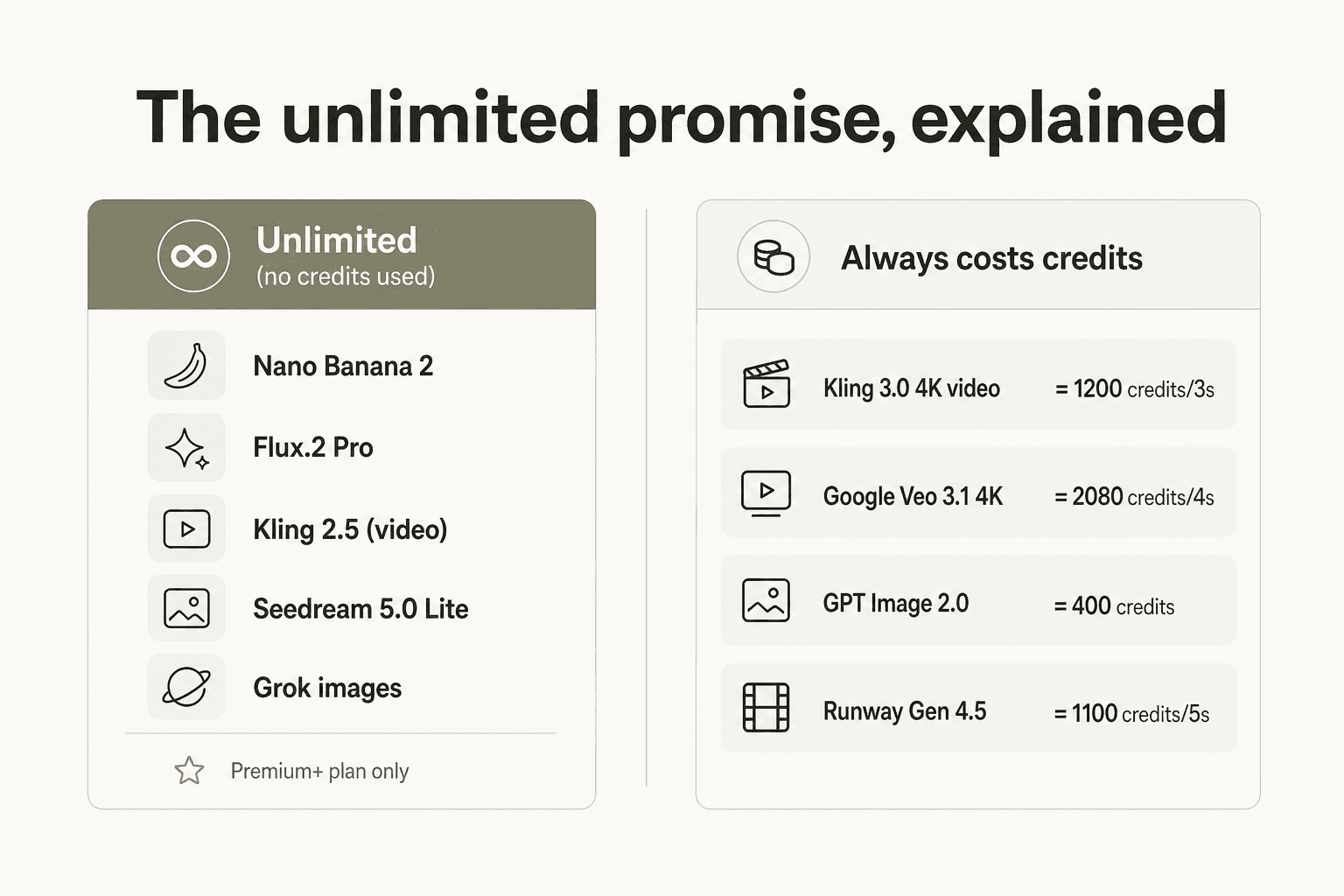
Here's what's actually unlimited (no credits deducted) on Premium+ and Pro:
- Nano Banana 2 (1K and 2K resolution)
- Flux.2 Pro
- Kling 2.5 (video - one of the few unlimited video models)
- Seedream 5.0 Lite
- Grok images
- Recraft V4.1 Pro
- MiniMax Hailuo 2.3 Fast (video)
And here's what always costs credits regardless of plan:
- Kling 3.0 4K video: 1,200 credits per 3-second clip
- Google Veo 3.1 4K with audio: 2,080 credits per 4-second clip
- GPT Image 2.0 Mid (2K): 400 credits per image
- Runway Gen 4.5: 1,100 credits per 5-second clip
- Custom AI character training: 3,000 credits per character
One r/Freepik_AI subscriber who discovered the rollback after locking in an annual Premium+ subscription put it plainly:
"All of your professional image tools are no longer unlimited, and those tools were the sole reason I subscribed. Unlimited image generation with subpar tools is like unlimited diarrhea: I do not want it."

The practical takeaway: "unlimited" on Premium+ covers the workhorse models. Nano Banana 2 and Flux.2 Pro are genuinely excellent for most image work - consistent, fast, good prompt adherence. If your pipeline is image-heavy and those models cover your style range, Premium+ delivers real value. The moment you need daily Kling 3.0 4K video or GPT Image 2.0, you're paying per clip regardless of tier.
The credit costs that actually move your budget
The pricing page lists credits per model, but what matters is the math at your actual usage level. Here's what the most popular models cost:
Video (where credits disappear fastest)
| Model | Credits | Per |
|---|---|---|
| Google Veo 3.1 4K with audio | 2,080 | 4-second clip |
| Kling 3.0 4K | 1,200 | 3-second clip |
| Seedance 2.0 (720p) | 1,128 | 4-second clip |
| Runway Gen 4.5 | 1,100 | 5-second clip |
| Happy Horse 1.0 (720p) | 495 | 3-second clip (promo) |
| Kling 2.5 (720p) | 140 | 5-second clip - unlimited on Premium+ |
| MiniMax Hailuo 2.3 Fast | 150 | 6-second clip - unlimited on Premium+ |
Images (wide range)
| Model | Credits | Per |
|---|---|---|
| GPT Image 2.0 Mid (2K) | 400 | image |
| Luma Uni-1.1 | 140 | image |
| Krea 2 | 80 | image |
| Nano Banana 2 (1K/2K) | 75 | image - unlimited on Premium+ |
| Flux.2 Pro (1K) | 50 | image - unlimited on Premium+ |
| Seedream 5.0 Lite (4K) | 50 | image - unlimited on Premium+ |
Audio
| Model | Credits | Per |
|---|---|---|
| ElevenLabs Music Generation | 600 | 30-second track |
| Google Lyria 3 | 160 | full song |
| SFX Generation | 15 | 3-second effect |
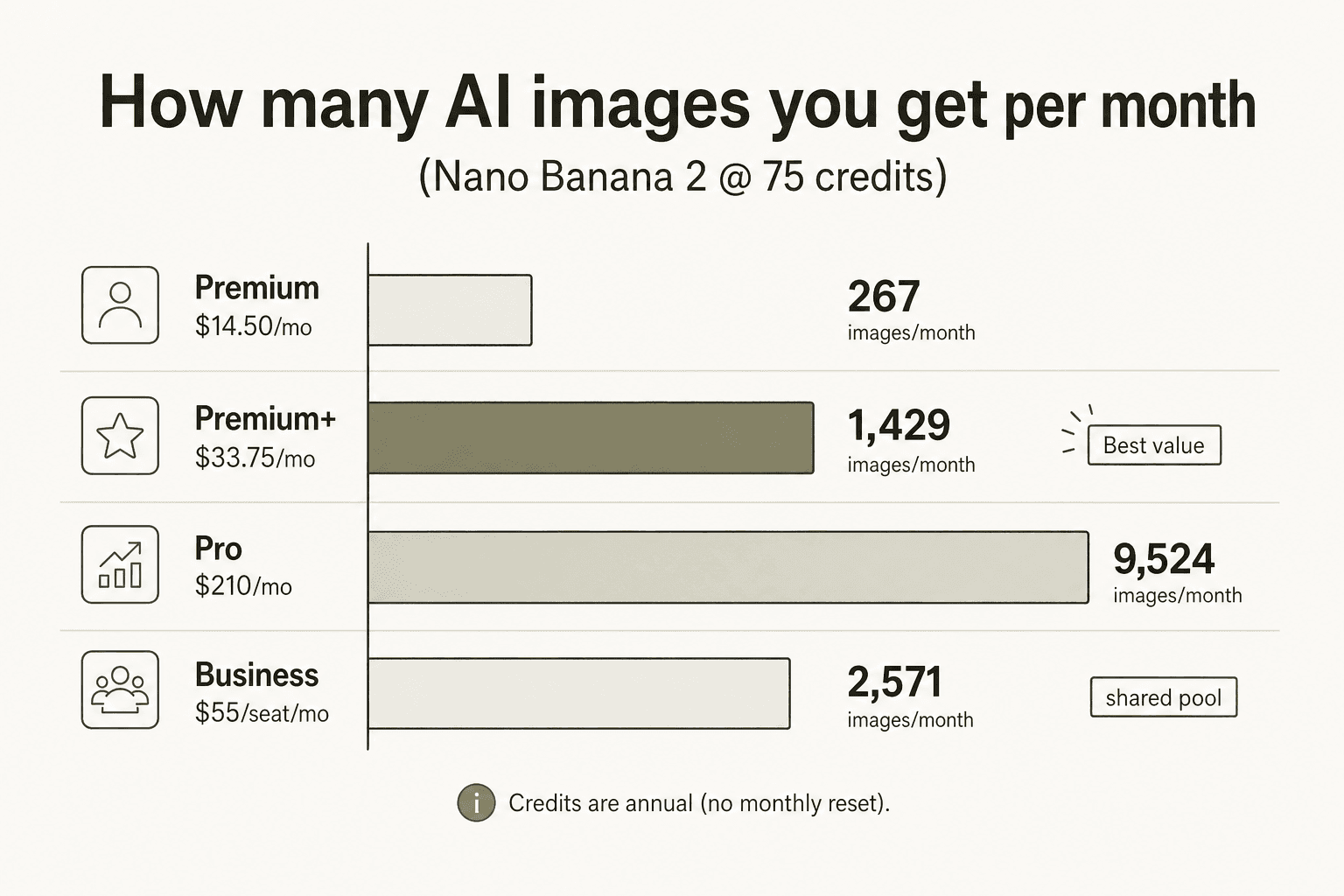
Premium's 240K annual credits work out to 20,000 per month - roughly 267 Nano Banana 2 images, or 16 Kling 3.0 4K clips, or 18 Veo 3.1 4K clips per month. Premium+'s 50,000 monthly equivalent gets you 667 images or 41 Kling 3.0 clips. If video volume is the goal and you need Kling 3.0 or Veo 3.1 quality, Pro at $210/month is the only individual plan where the math works at professional volume.
Also worth knowing: GPT Image 2.0 at 400 credits per image is 5x more expensive per generation than Nano Banana 2. The unlimited models cover a lot of real use cases well, but the premium models cost real money.
How fast do credits actually run out?
Here's the honest scenario analysis. These assume credits are drawn from the annual pool evenly (divide by 12 for a monthly view) and that the user is generating models that cost credits - no unlimited substitutions.
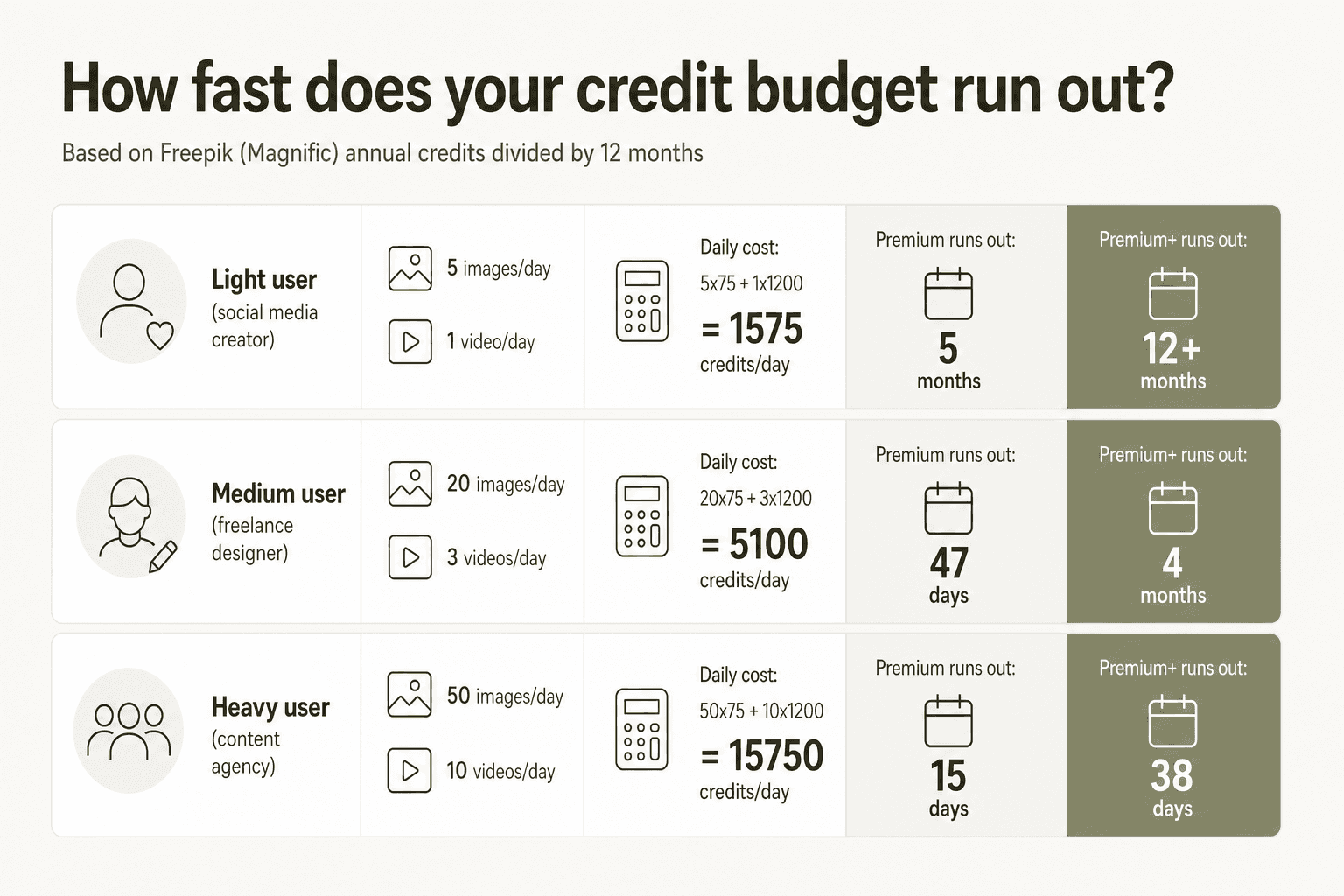
Light user - social media creator doing 5 images + 1 Kling 3.0 4K video per day:
- Daily credit cost: (5 × 75) + (1 × 1,200) = 1,575 credits
- Premium (20K monthly equivalent): runs out in 12-13 days
- Premium+ (50K monthly equivalent): lasts the month comfortably
Medium user - freelance designer doing 20 images + 3 Kling 3.0 videos per day:
- Daily credit cost: (20 × 75) + (3 × 1,200) = 5,100 credits
- Premium: depleted in under 4 days
- Premium+: depleted in about 10 days
Heavy user - content agency doing 50 images + 10 Kling 3.0 videos per day:
- Daily credit cost: (50 × 75) + (10 × 1,200) = 15,750 credits
- Premium+: runs out in 3 days
- Pro: runs out in about 8 days
This is why the community repeatedly reports "burning through credits in 2-3 days." It isn't exaggeration - it's just the arithmetic of daily video work at any tier below Pro.
If your workflow is mostly images on the unlimited models (Nano Banana 2, Flux.2 Pro, Seedream Lite), the credit drain problem largely disappears. Premium+ for image-heavy creators is genuinely well-priced. The problem only emerges when video enters the picture at meaningful daily volume.
Which plan is right for you?
Free - Testing the platform before committing. You get around 20 images per day, enough to evaluate image quality and learn the interface. No meaningful video access.
Premium ($14.50/month annual) - For hobbyists and occasional creators who want both the stock library and some AI image generation. If you generate under 200 images a month and rarely touch video, this covers you. The Magnific upscaler alone - which one power user rated 10/10 across a month of heavy testing - makes it worth considering even without the AI generation.
Premium+ ($33.75/month annual) - The sweet spot for solo content creators. You get unlimited Nano Banana 2 and Flux.2 Pro image generation, unlimited Kling 2.5 and Hailuo video generation for lower-resolution clips, the full stock library, Spaces canvas, and 600K credits for the heavier stuff. One author running book trailers and social media content called it "the best service out there bar none" for her use case. The caveat: her workflow was image-heavy, not Kling 3.0 4K video-heavy.
Pro ($210/month annual) - For professionals who need volume: agencies running daily video campaigns, studios generating thousands of images monthly, or anyone regularly training custom AI characters (3,000 credits each). The 4M annual credits and 20% top-up discount make the math work at professional scale. Also the only individual plan where intensive Kling 3.0 or Veo 3.1 video workflows are sustainable over a full month.
Business ($55/seat/month annual) - Teams that need shared credits, collaborative Spaces workflows, SSO, basic legal indemnification, and API access. The minimum 2-seat requirement matters: two Business seats cost $1,320/year for 1.08M shared credits. Two individual Premium+ annual plans cost $810/year for 1.2M individual credits. The Business plan premium buys team management features, not raw credit count.
Enterprise - Large organizations needing custom credit pools, 100 priority parallel generations per user, 3-year credit rollover, enterprise legal indemnification, and dedicated support through Magnific Studios. Contact their sales team via magnific.com/enterprise.
The gotchas worth knowing before subscribing
Failed generations still consume credits. Multiple users on Reddit have reported credits deducted for outputs that returned errors or unusable results, with no automatic refund. The platform's credit transparency has been a persistent complaint - not because credits are being taken without authorization, but because the failure-case policy is unclear.
AI content moderation is aggressive. Even clearly non-NSFW content - mythological battle scenes, historical action sequences, two characters fighting - is regularly blocked. One heavy user who documented this directly found that generating Hercules fighting the Nemean Lion was flagged as NSFW. For illustrators working in fantasy or action genres, this is a real constraint.
The refund policy is strict. Annual subscriptions don't come with mid-term refunds. At least one user who cancelled two weeks into an annual plan received nothing back. There's a 30-day satisfaction guarantee mentioned on the pricing page, but the terms apply to initial subscriptions, not mid-term cancellations on annual plans.
Business plan credits are shared, with no per-user caps. One high-volume team member can drain the shared pool. If team usage patterns vary significantly, this can create friction between users.
Plan changes have happened before. The July 2025 unlimited announcement and the April 2026 partial rollback are the clearest examples, but the community has documented multiple plan adjustments over the platform's history. If you're locking into an annual plan specifically for a feature or model tier, it's worth going in with eyes open on this pattern.
How Freepik/Magnific compares to alternatives
The one-line positioning of each major competitor, with full comparisons in our dedicated guides:
- Midjourney - better pure image aesthetics ($10/month for 200 images), simpler pricing, no video or audio, no stock library. Ranked S-tier in community tier lists for image quality alone.
- Runway AI - best for cinematic-quality video with granular camera control; Runway Gen 4.5 is exceptional for filmmaking use cases; no stock library; more expensive per video clip.
- Leonardo AI - daily token model (less feast-or-famine than annual credits), competitive image quality, good for character consistency; no stock library. Community often mentions Leonardo as the top Freepik alternative.
- Canva AI - better for design templates, presentations, and brand kits; limited serious AI generation depth; a different tool for a different job.
- Ideogram - exceptional for text-in-image generation and graphic design; narrower scope than Magnific.
Magnific's honest value proposition is breadth. You're not getting the best image model or the best video model or the best upscaler in isolation - you're getting all of them in one subscription, alongside a 250M+ stock asset library that reduces the need for other stock subscriptions entirely. For a generalist content creator covering image, video, audio, and occasional upscaling, it's hard to beat at Premium+ pricing. For a specialist who lives in one modality, the best single-purpose tool for that job will likely serve them better. For a fuller breakdown of user experience, see our Freepik AI reviews roundup.
Try eesel
If your team is using Magnific to generate visual content at scale, the workflow around those visuals - maintaining a knowledge base, answering team questions, automating repetitive responses, handling support volume - is just as much work as the asset production itself. eesel is an AI teammate that lives inside Slack, Zendesk, Freshdesk, or your existing helpdesk, learning from your team's existing content to handle questions, draft replies, and automate workflows without replacing the tools you already use.
Creative teams that produce content at volume need the operational side to keep pace. eesel handles that - and like Magnific, it connects to the stack you already have rather than asking you to swap everything out.