

You’ve sent the email. Maybe it’s a big sales proposal, an update for a client, or a job application you're pinning your hopes on. You hit send, and then… you wait. That silence can be a little nerve-wracking, and the thought of your message getting buried in a crowded inbox is all too real.
Gmail has a couple of built-in tools like Nudges that try to help with this. They act like a little digital tap on the shoulder, promising to keep important conversations from falling through the cracks.
But are they really enough when the stakes are high? This guide will walk you through what Gmail's follow up reminders can actually do, where they fall short, and how modern AI tools offer a much smarter solution for teams that can't afford to miss a thing.
What are Gmail Nudges and follow up reminders?
Email reminders in Gmail are there to help you keep track of conversations and hopefully prevent you from missing opportunities. They show up in a few different ways, each with a slightly different job.
First, you have Gmail Nudges. This is Google's AI-powered feature that automatically bumps emails to the top of your inbox when it thinks they need your attention. It uses machine learning to spot messages that probably need a reply from you (for incoming mail) or a follow-up from you (for sent mail). As Google’s own documentation explains, it’s meant to be a simple, hands-off reminder system that’s on by default.
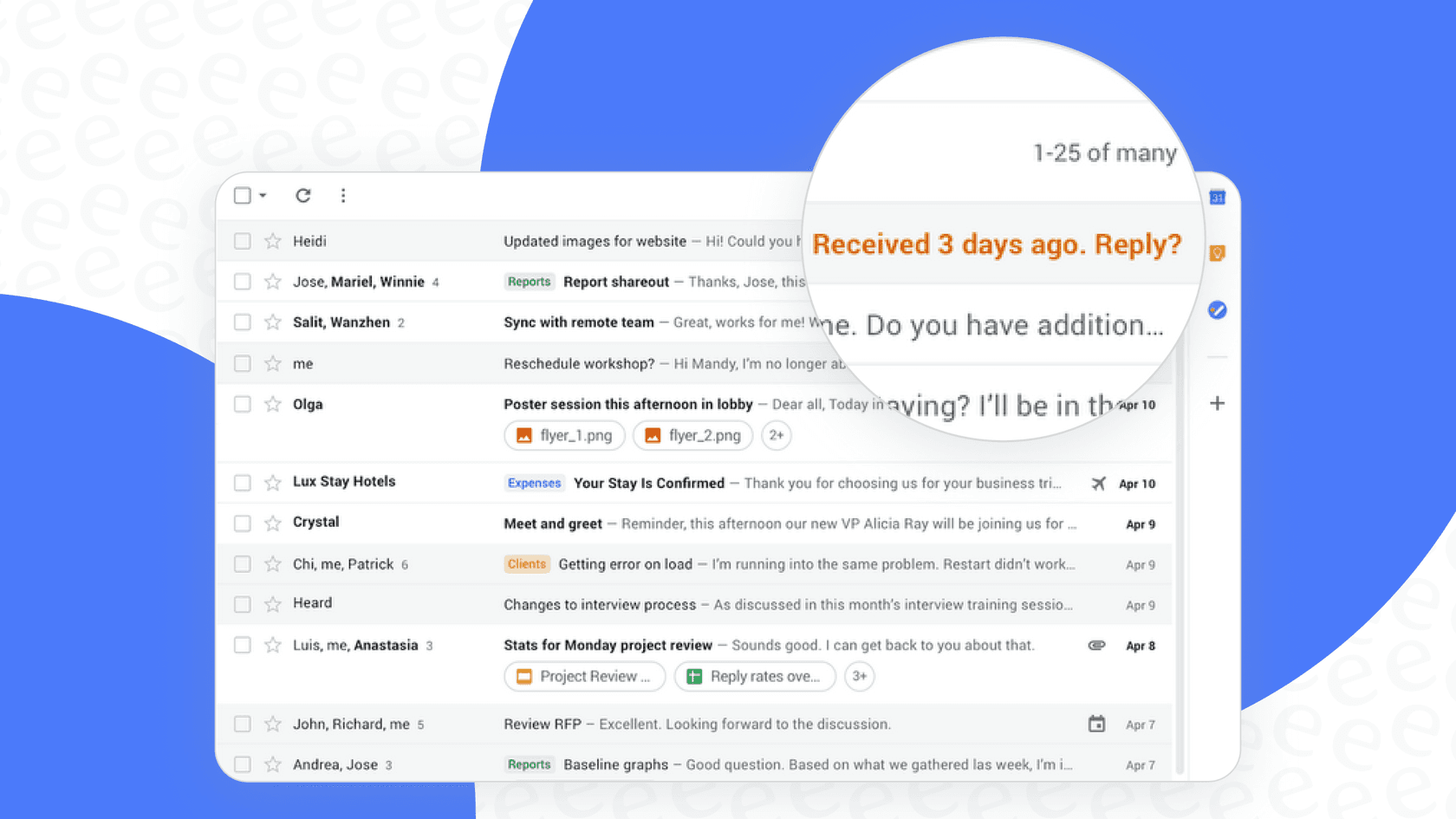
Besides the automatic Nudges, Gmail also gives you a couple of manual options:
-
Snooze: This lets you temporarily hide an email from your inbox. You pick a time, and it will pop back up then. Think of it as hitting the snooze button on an email instead of your alarm clock.
-
Schedule Send: This feature lets you write an email now and pick a later date and time for it to actually be sent. It's less of a reminder and more of a proactive follow-up you can set and forget.
Together, these make up Gmail's basic toolkit for keeping an eye on your email conversations.
The promise and reality of Gmail Nudges and follow up reminders
For personal emails or maybe a very small business, Gmail’s built-in features are a decent place to start. They can definitely help you remember to wish your uncle a happy birthday or follow up on a casual coffee meeting. But when your business relies on email, you start to see the cracks pretty quickly.
Gmail Nudges: The helpful but unpredictable assistant
The idea behind Nudges is great: a "set-it-and-forget-it" safety net. It’s supposed to quietly work in the background, automatically reminding you of email threads you might have forgotten.
The reality, however, is a bit messy. The biggest problem is that you have absolutely no control. You can't tell the AI when a Nudge should appear or what makes an email important; it just guesses for you. This leads to it being pretty inconsistent. It's a common complaint in user forums, where people point out that Nudges work sporadically, making them an unreliable system for anything critical. What Gmail’s AI thinks is important might just be noise to you.
At the end of the day, a Nudge is just a reminder. It tells you that you should follow up, but it doesn't help with what to say or give you any useful context. It’s a passive alert, not an active helper.
Snooze and Schedule Send: Manual reminders that fall short
At first glance, Snooze and Schedule Send seem to fix the control problem by letting you decide when things happen.
The problem is, this manual approach comes with its own headaches. The Snooze feature is a one-trick pony. It’s fine for a single email, but it doesn't do sequences or have any kind of smart logic. You can't, for instance, tell it to "remind me in 3 days only if they haven't replied."
Schedule Send is even more limited because it's not smart. A follow-up you scheduled for Friday morning will still go out even if the person replied on Thursday night. That can make you look disorganized or like you're not paying attention. Both features depend entirely on you remembering to set them for every single important email, which creates a lot of admin work that just doesn't work for a busy team.
| Feature | How it Works | Best For | Key Limitation |
|---|---|---|---|
| Nudges | AI automatically resurfaces emails that might need attention. | Casual, personal reminders where the stakes are low. | No user control; can be inconsistent and unreliable for business. |
| Snooze | Manually hide an email until a time you choose. | Clearing your inbox and setting a single, specific reminder. | Doesn't scale; no smart logic (like "if no reply"). |
| Schedule Send | Write an email now and schedule it to send later. | Timing an initial email or a single, planned follow-up. | "Dumb" automation; sends no matter if you've already gotten a reply. |
Why Gmail Nudges and follow up reminders aren't enough for business communication
When you go from managing your personal inbox to handling dozens of sales leads, support tickets, or job applicants, a system built on manual reminders starts to fall apart. An email "slipping through the cracks" is no longer just a small oops; it’s a lost sale, a frustrated customer, or a missed hiring opportunity. Forgetting to follow up just once can have a real impact on your bottom line or reputation.
The real issue is that a good follow-up needs more than just a reminder, it needs context. A great follow-up is based on the history of the conversation, sounds like your company, and gives the right information to move things forward. Gmail’s tools can’t help with any of that.
This is where you need to think differently about follow-ups. Gmail reminds you that you need to follow up, but it doesn’t help you with the what or the how. Modern AI tools are built to fill this exact gap by learning from your company’s collective brain.
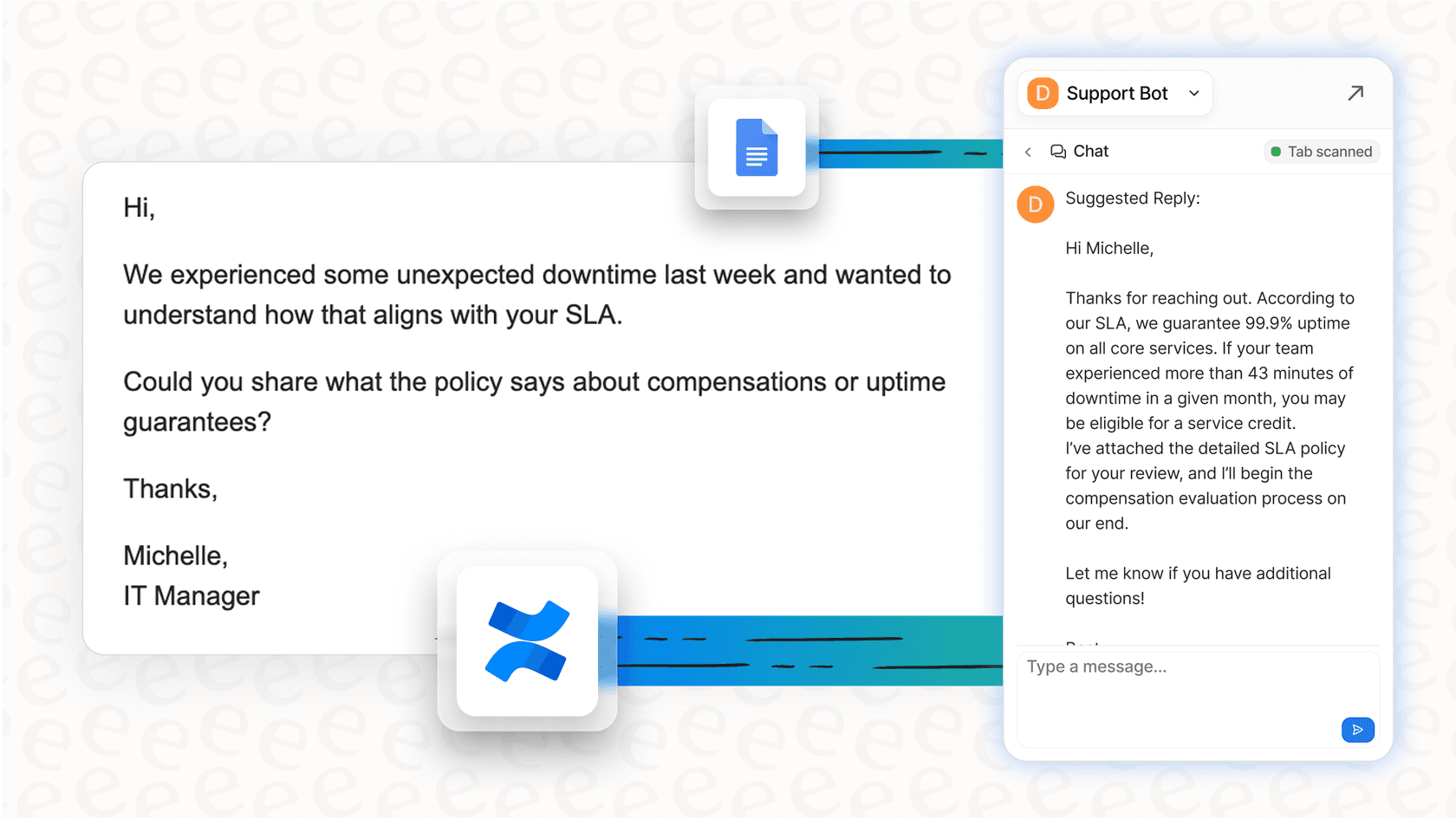
Imagine an assistant that could instantly draft the perfect follow-up based on your past successful chats. An AI Copilot, like the one from eesel AI, plugs right into your help desk and learns from your old tickets and knowledge sources to suggest replies in your team's unique voice. It’s the difference between a simple alarm and genuinely intelligent help.
The next level: True automation beyond basic reminders
Real automation isn't just about scheduling an email to send later. It's about building an intelligent workflow that understands what's going on and adapts in real-time. A truly smart follow-up system should have a few key things:
-
Conditional Logic: It only sends a follow-up if there's been no reply or if the email hasn't even been opened.
-
Contextual Understanding: It learns from your knowledge base (like past support tickets, help articles, and internal docs) to give relevant, helpful responses, not just canned templates.
-
Customizable Actions: It can do more than just send text. A smart system can tag a ticket, pass an issue to the right person, or even look up live order information.
How eesel AI improves on Gmail's reminder features
This is where a tool like eesel AI comes in, directly tackling the shortcomings of Gmail's native features by bringing real automation and intelligence to the table.
First, it learns from your unique business context. Unlike generic tools that spit out templates, eesel AI can be trained on your team's past support tickets, Confluence pages, and Google Docs. This means its follow-ups aren't just automated; they're written in your brand’s voice and use solutions that you already know work.
Second, it gives you full control. Remember how unpredictable Gmail Nudges are? With eesel AI’s workflow engine, you decide exactly which conversations get automated. You can create custom prompts to define the AI's tone and the specific actions it can take, which goes way beyond simple text replies.
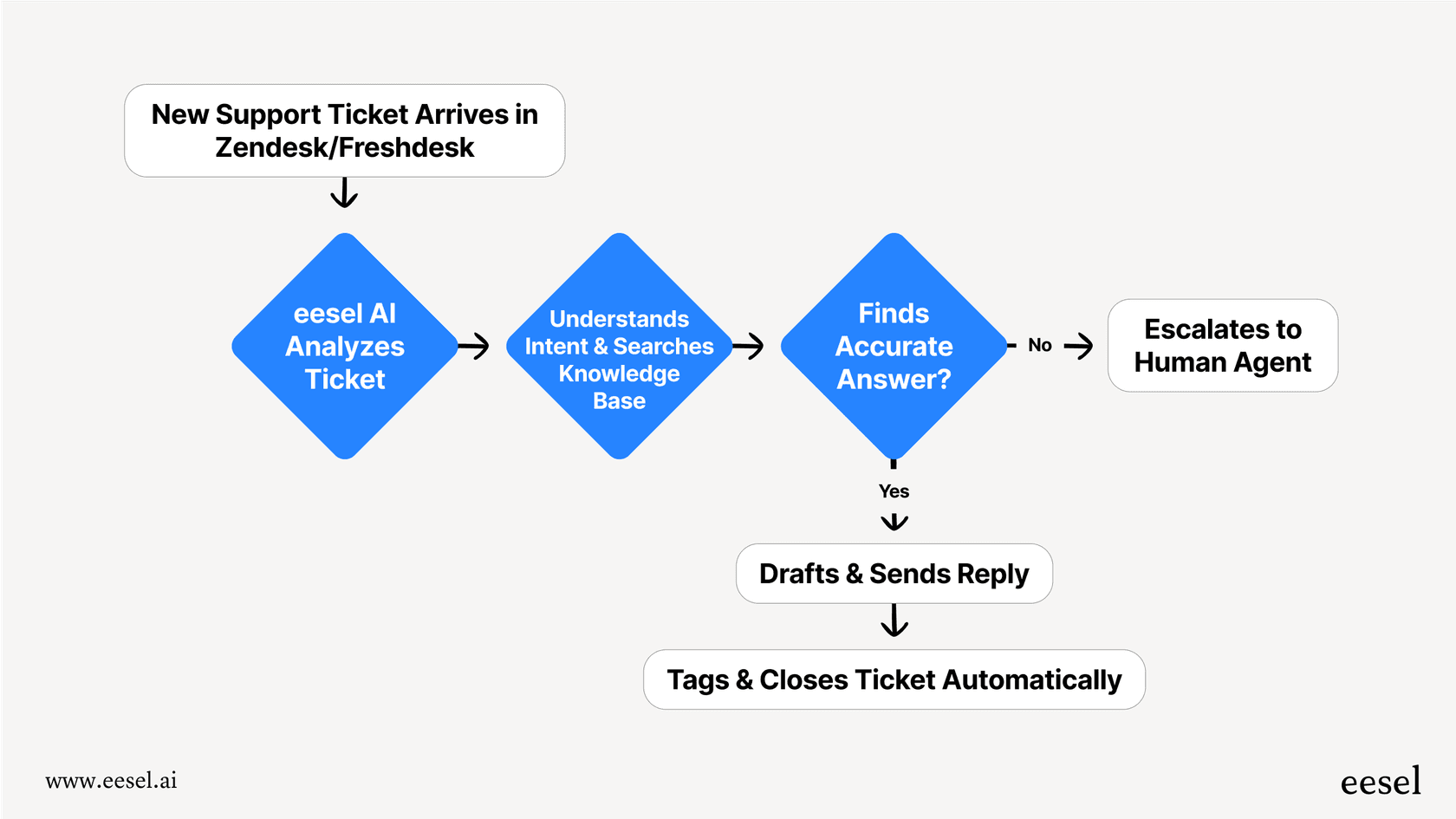
Finally, you can test with confidence. One of the biggest fears with automation is that it will mess up and annoy a customer. eesel AI’s simulation mode lets you test your follow-up agent on thousands of your past conversations before it ever talks to a live customer. You get a clear, accurate preview of how it will perform, so there's no guesswork or risk.

Stop reminding, start resolving: Moving beyond basic reminders
Gmail Nudges and its other reminder features are fine for managing a personal inbox, but they just don't have the control, intelligence, or power that professional teams need. Relying on manual, inconsistent reminders for important business communications leads to missed opportunities and a whole lot of extra work.
Real automation isn't about sending emails on a timer; it's about creating smart systems that understand context, learn from your data, and get things done right.
Don't let your most important conversations get lost in the shuffle. If you've outgrown basic reminders, it's time to see what a true AI agent can do for your team. Try eesel AI for free and see how you can turn your follow-up process from a manual chore into a powerful, automated engine.
Frequently asked questions
What are Gmail Nudges and follow up reminders, and how do they generally function?
Gmail Nudges and follow up reminders are built-in features designed to help you manage your inbox. Nudges automatically resurface emails Google’s AI thinks you need to reply to or follow up on, while tools like Snooze and Schedule Send offer manual ways to manage email visibility and sending times.
Can I control or customize when Gmail Nudges and follow up reminders appear for my emails?
With Gmail Nudges, you have very little control; the AI decides when they appear, making them unpredictable. Manual features like Snooze and Schedule Send offer some control over timing, but they lack advanced logic and require you to remember to set them individually.
Are Gmail Nudges and follow up reminders sufficient for critical business communication needs?
For personal emails or very small-scale use, Gmail Nudges and follow up reminders can be a decent starting point. However, for critical business communication, they often fall short due to their inconsistency, lack of control, and inability to provide contextual support beyond a simple alert.
What are the key shortcomings of relying on Gmail Nudges and follow up reminders for a busy team?
The main shortcomings include a lack of control over when Nudges appear, the absence of smart conditional logic (e.g., "only follow up if no reply"), and the significant manual effort required for Snooze and Schedule Send. This can lead to missed opportunities and inefficient workflows for teams.
How do advanced AI tools offer a better solution compared to using Gmail Nudges and follow up reminders?
Advanced AI tools go beyond simple reminders by offering conditional logic, contextual understanding from your business's knowledge base, and customizable actions. They can intelligently draft replies, adapt to real-time conversation status, and integrate into comprehensive workflows, unlike basic Gmail features.
Do Gmail Nudges and follow up reminders have smart features, like detecting if a recipient has already replied?
No, basic Gmail Nudges and follow up reminders do not incorporate smart conditional logic such as checking for a reply before sending a scheduled follow-up. For example, a manually scheduled email will still send even if the recipient has already responded, which can appear disorganized.