

Gorgias automation is not one feature, it is two systems stacked on the same ticket: a deterministic rules engine that tags, routes, and auto-replies, and an AI Agent that resolves conversations with skills, knowledge, and actions. Rules run first, AI Agent picks up after. Get the order of operations wrong and the classic failure is a customer getting two replies.
The automation itself is strong for Shopify brands, because the AI Agent can cancel an order, edit an address, or pause a subscription right inside the ticket. The catch is the bill: AI Agent is charged per resolved conversation ($0.90 on annual plans), and each resolution also counts as a billable ticket, so a fully automated ticket gets billed twice. If most of your volume is conversational rather than order-action, that math gets uncomfortable fast.
This guide walks through every Gorgias automation surface, what each one is for, what it really costs, and where it stops. If you want automation that learns from your past tickets and runs on a fixed monthly plan (1 credit per ticket or chat) no matter who resolves it, eesel AI layers on top of Gorgias and is built for exactly that.
What "automation" actually means in Gorgias
Here is the thing most guides skip: when someone says "Gorgias automation," they could mean any of four different things, and they behave very differently.
Gorgias splits automation across two engines that both act on a ticket. The first is Gorgias rules, the deterministic if-this-then-that layer that runs across every ticket in the helpdesk whether or not AI is involved. The second is the AI Agent, the conversational layer that reads the ticket, decides what the shopper wants, and resolves it. On top of those sit the older self-serve automations: flows, order management, and article recommendations.
The single most important fact to hold in your head: rules run first, and the AI Agent picks up only after rules finish processing. Per the Gorgias docs on rules and AI Agent, a rule can tag, assign, close, or even reply to a ticket before AI Agent ever sees it. That sequencing is where most setup mistakes come from.
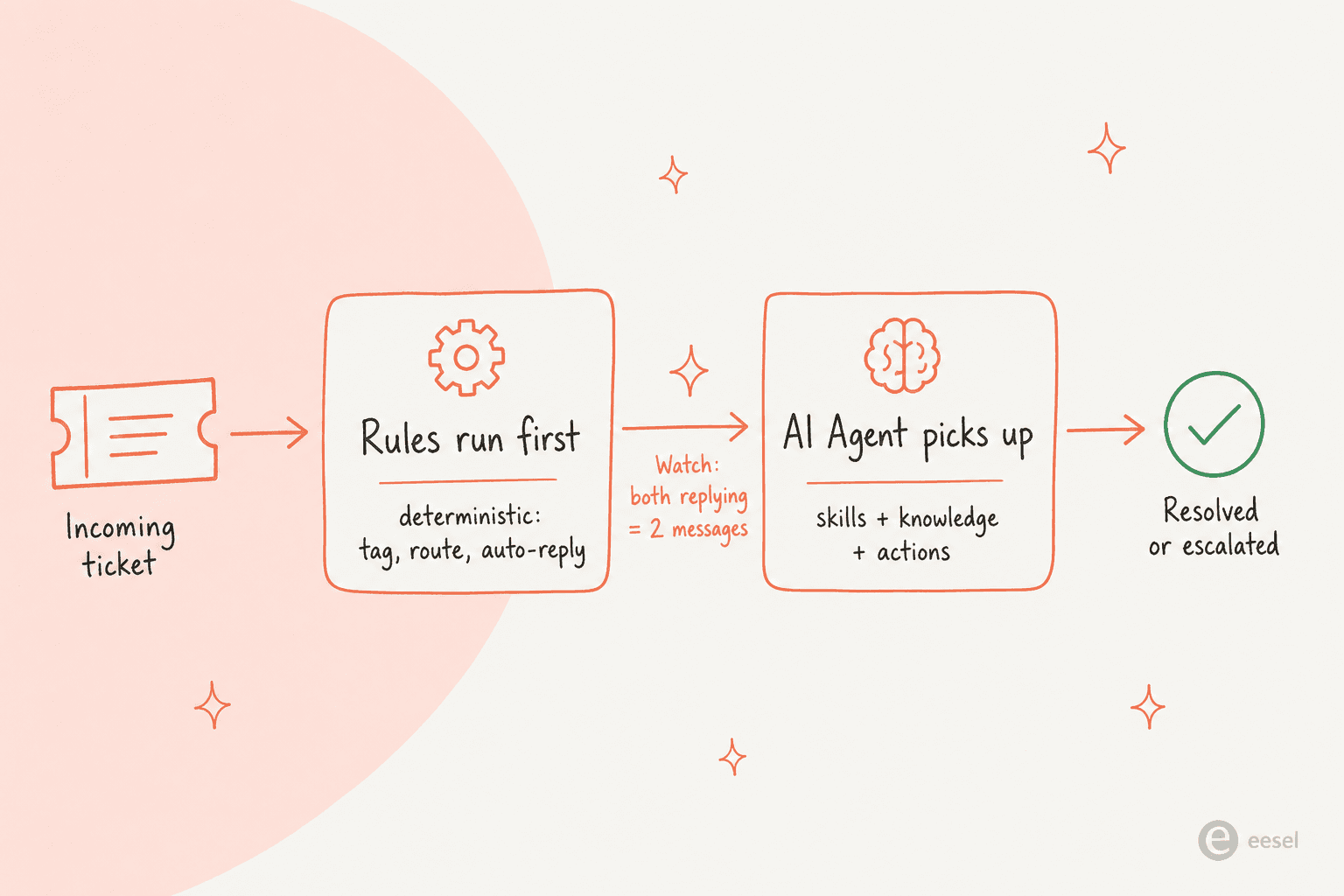
If you only remember one diagram from this post, make it that one. We will come back to the "two messages" warning in the rules section, because it is the bug nearly every new Gorgias account hits.
Gorgias rules: the deterministic layer
Rules are classic helpdesk automation, and they are the part of Gorgias that has nothing to do with AI. You build them at Workflows > Tools > Rules as a chain of triggers, conditions, and actions. A rule can tag a ticket, assign it, autofill a field, close it, reply to the customer, or apply a macro, all without a human touching it. If you have used Gorgias assignment rules or set up a Gorgias auto reply before, this is the same engine.
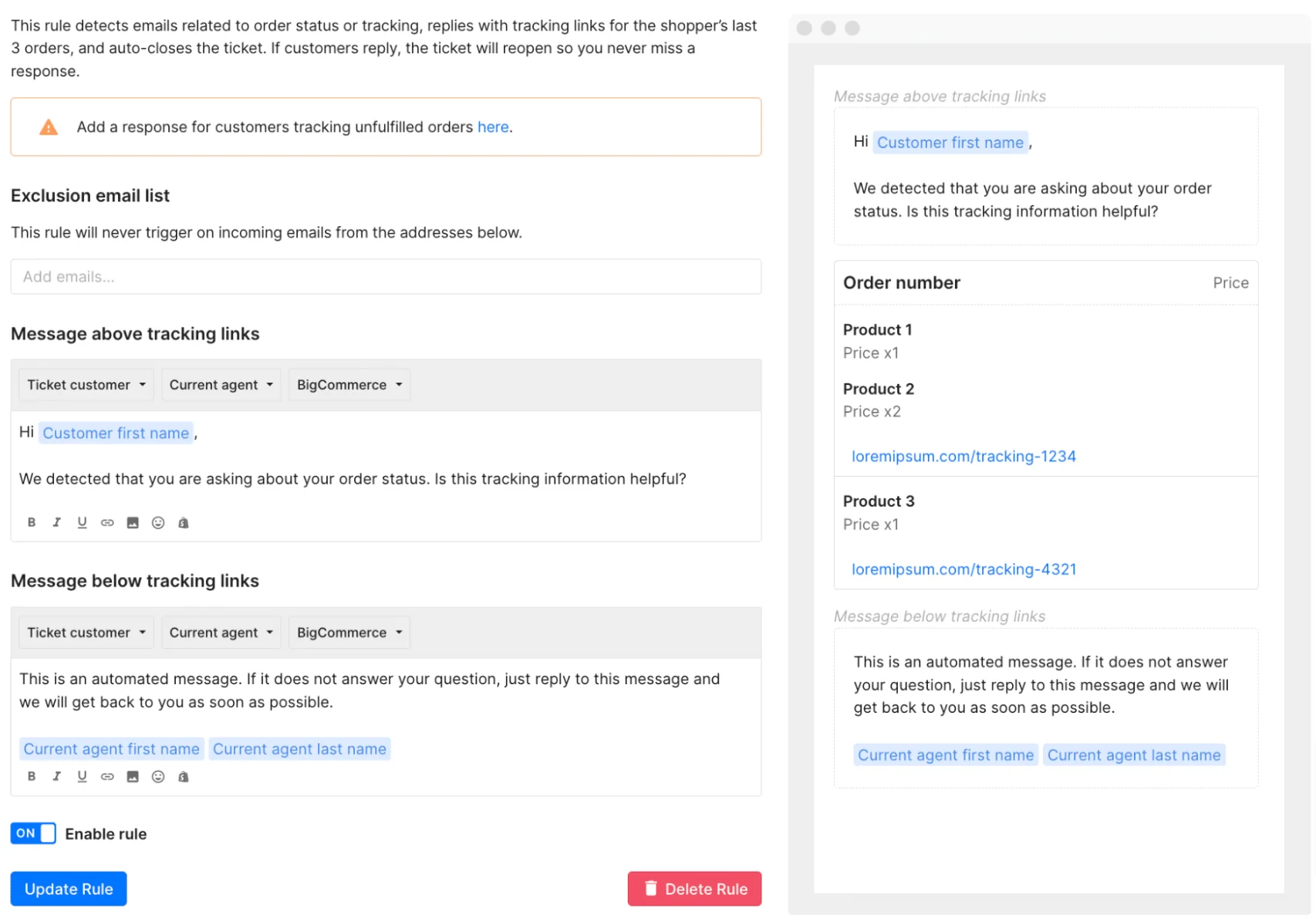
Here is a real example: the built-in rule for order-status emails. It detects emails about tracking, replies with tracking links for the shopper's last three orders, and auto-closes the ticket, reopening it if the customer replies.
The double-reply trap
Now the footgun. If a rule replies to the customer (or applies a macro) and the AI Agent also responds, the shopper gets two messages. This is the number-one conflict in Gorgias automation, and it happens because rules and AI Agent are separate systems that don't coordinate by default.
Gorgias has cleaned this up for newer accounts: those created after September 2024 no longer ship with the legacy autoresponder rules, and older accounts get them auto-disabled when AI Agent is enabled on email. But if you inherited an older Gorgias instance, this is the first thing to audit. The fix is either to turn the conflicting rule off, or add a condition so it skips tickets the AI Agent is handling. Our guide to Gorgias autoresponder rules covers the reconciliation in detail.
One quirk worth knowing: you can't write a rule condition like "assigned to AI Agent," because AI Agent isn't an assignee. Instead, AI Agent auto-tags every ticket it touches with tags like ai_handover and ai_ignore, and those tags are your reliable rule conditions. There are two pre-built templates that lean on this: "Prevent AI Agent from answering" (tags VIP or sensitive tickets ai_ignore) and "Re-open low CSAT AI Agent tickets."
Macros, and why your AI Agent ignores them
Quick but important clarification, because it trips people up. Gorgias macros are templated replies with variables, and they are for your human agents. The AI Agent does not use macros at all. Per the Gorgias docs, "AI Agent generates its own responses from your skills and knowledge, not from macros."
So if you have spent months building a beautiful macro library, that work doesn't transfer to AI automation. Macros stay useful for manual replies, and a rule can carry an "apply macro" action, but that "auto-reply rule" pattern is exactly what conflicts with AI Agent. The takeaway: macros and AI Agent are parallel tracks, not the same automation getting smarter.
The AI Agent: skills, guidance, and actions
This is the conversational, LLM-driven layer, and it is where most of the "automate 60% of support" marketing lives. The AI Agent plays two roles from one subscription: a support agent (post-purchase: returns, tracking, cancellations) and a shopping assistant (pre-purchase: recommendations, upsells, discounts). You direct its behaviour with three building blocks. If you want the full setup walkthrough, the Gorgias AI setup guide is the place to start.
Skills (the WHEN / IF / THEN model)
A skill is the primary way you direct the AI Agent. It bundles an intent (the trigger, like Return / Request), a set of instructions, and a knowledge toggle. You write the instructions in a WHEN / IF / THEN structure: WHEN a shopper asks to exchange an item, IF the order is older than 30 days, THEN do these steps. Each skill has a hefty 30,000-character limit, and the docs are clear that one skill should equal one request type to keep behaviour predictable.
Intents are detected automatically by Gorgias, so you don't create them, you link them. One catch: an intent can only belong to one skill, so linking Return / Request to a new skill removes it from any other. That single-ownership rule shapes how you organise everything.
Guidance (reference knowledge)
Gorgias guidance is for what the AI Agent should generally know, versus skills, which are for what it should do for a specific request. Think store locations, payment methods, loyalty rules. You get up to 100 enabled guidance entries per store, retrieved by relevance rather than by intent. Guidance can also carry conditions, like "IF the shipping address country is Canada, THEN share prices in Canadian dollars," and the docs recommend writing it in English even though the AI Agent reads 80+ languages.
Actions (where it actually does something)
Skills and guidance decide what to say. Actions are how the AI Agent does something in Shopify, Recharge, Loop, and friends. An action is one or more steps run top to bottom, and it only fires when the AI Agent calls it from inside a skill or guidance. When you build one, you configure four things.
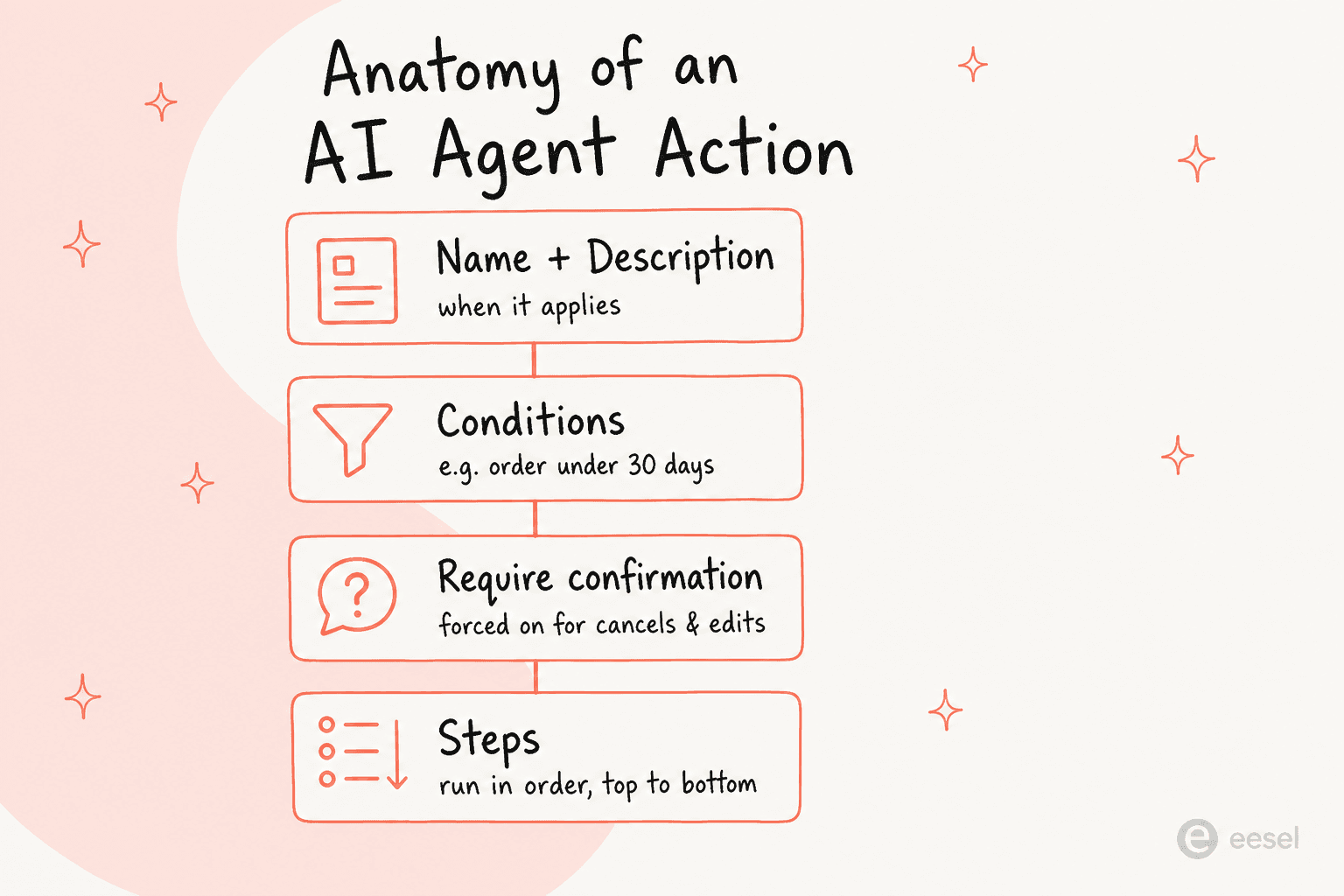
The description is load-bearing: the AI Agent reads it to decide whether the action applies to a request, so the docs recommend describing when it applies, what it doesn't do, and how customers phrase the ask. Conditions can read Shopify customer and order fields, like "only offer a return if the order is under 30 days old." And for anything irreversible (cancelling an order, editing an address, cancelling a subscription), require customer confirmation is automatically forced on, so the AI Agent gets explicit consent before it acts.
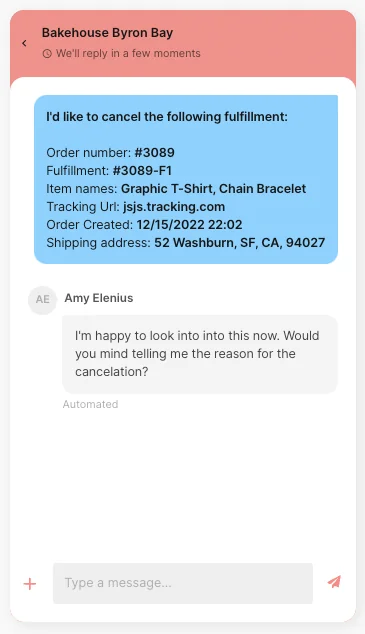
Here is a cancellation action in flight, with the AI Agent confirming the reason before it touches the order:
For apps Gorgias doesn't natively support, Advanced options opens a visual workflow builder with HTTP requests and branching logic. Two warnings worth tattooing on your hand: it is meant for people comfortable making HTTP requests (think Gorgias webhooks territory), and once you switch to Advanced options you cannot return to the basic editor. There is also a genuine testing hazard, actions run in test conversations can mutate real customer and order data unless you target a fake profile.
One really good touch: every AI response carries a Show reasoning trail, so when an action fires you can see exactly why.
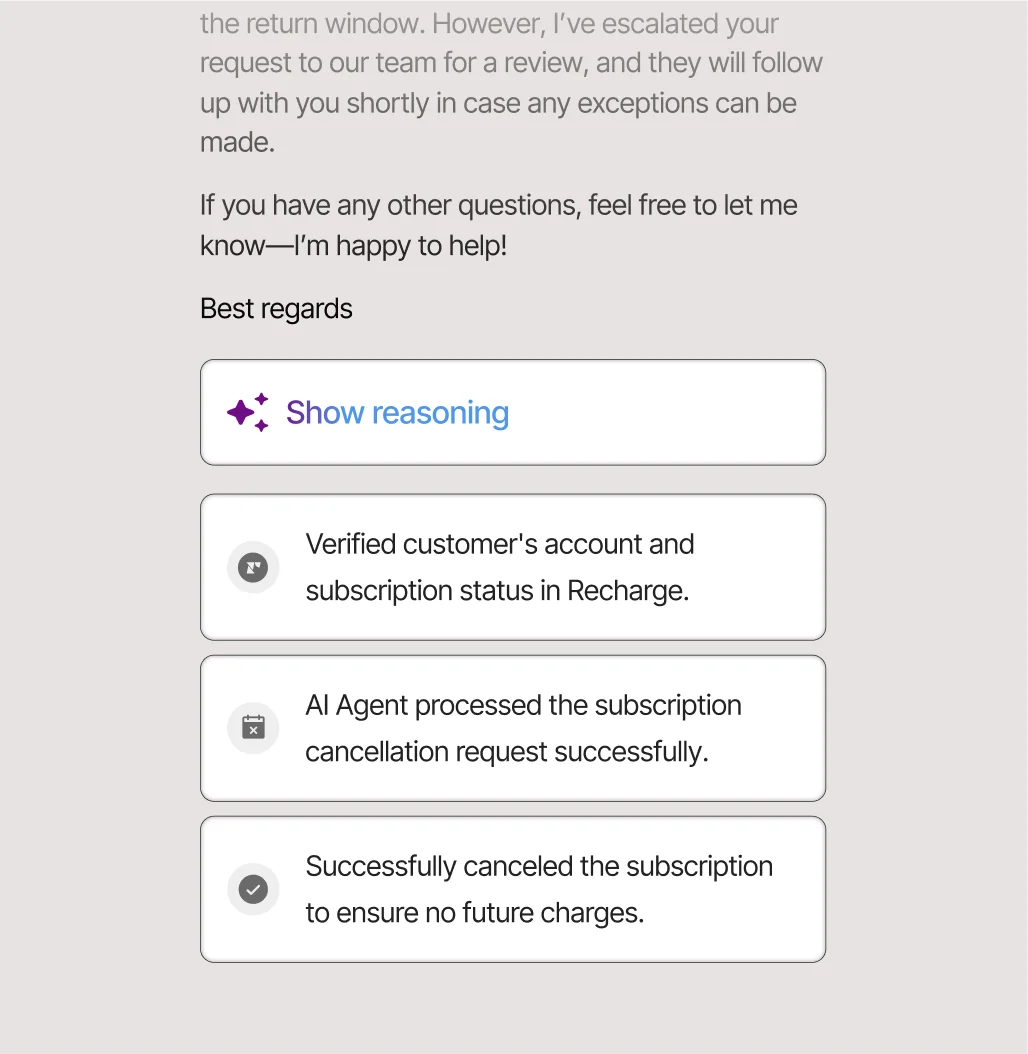
When an action can't complete every step, the AI Agent posts a failure note and hands the ticket to a human, and you investigate via the action event log. That fail-to-human behaviour is the safety net under the whole system.
Flows, order management, and article recommendations
Alongside the AI Agent sit three self-serve automations, all included with an AI Agent subscription, that often handle the first part of a conversation before the AI Agent steps in. If you want the deep dive, we have a full guide to Gorgias flows and order management.
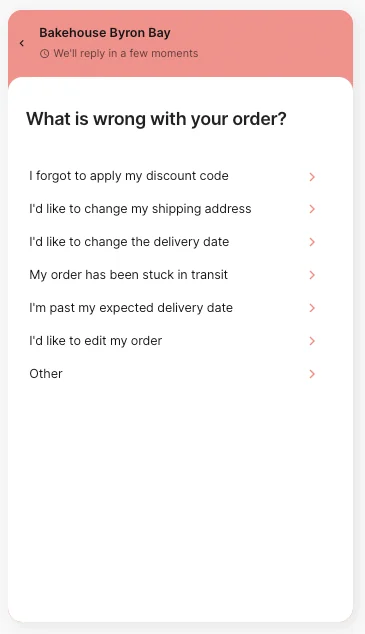
Flows are multi-step scripted conversations in the chat widget. A typical one greets the shopper with a menu of common issues and walks them down a branch.
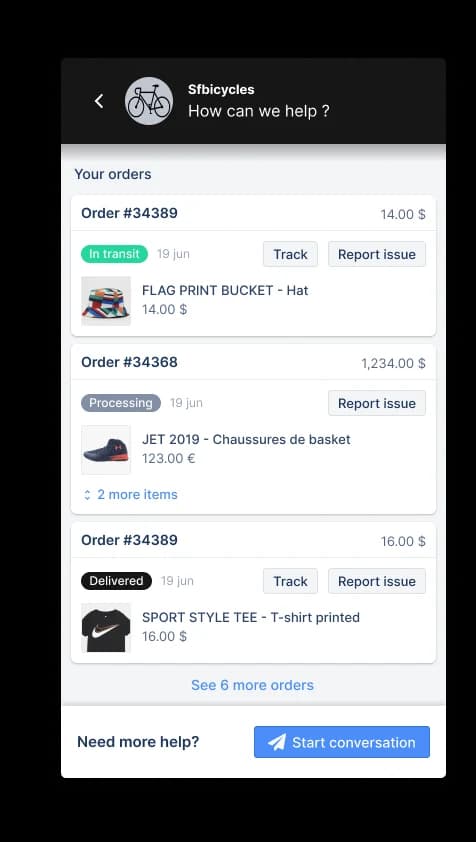
Order management is a widget module that lets shoppers self-serve order status, "I didn't get my refund," and similar, pulling live data straight from the connected store.
Article recommendations auto-surface a help-center article in the widget and resolve when the shopper clicks "Yes, this was helpful." Loop Earplugs put a real number on this one:
"AI-powered Article Recommendations save our team hours each week... We spend less time answering repetitive questions, and 70% of customers who receive article recommendations don't have any follow-ups."
Toby Moors, Customer Happiness Specialist, Loop Earplugs (Gorgias AI Agent)
The shopping assistant side does the same job for revenue, answering product questions and recommending the right item before purchase:
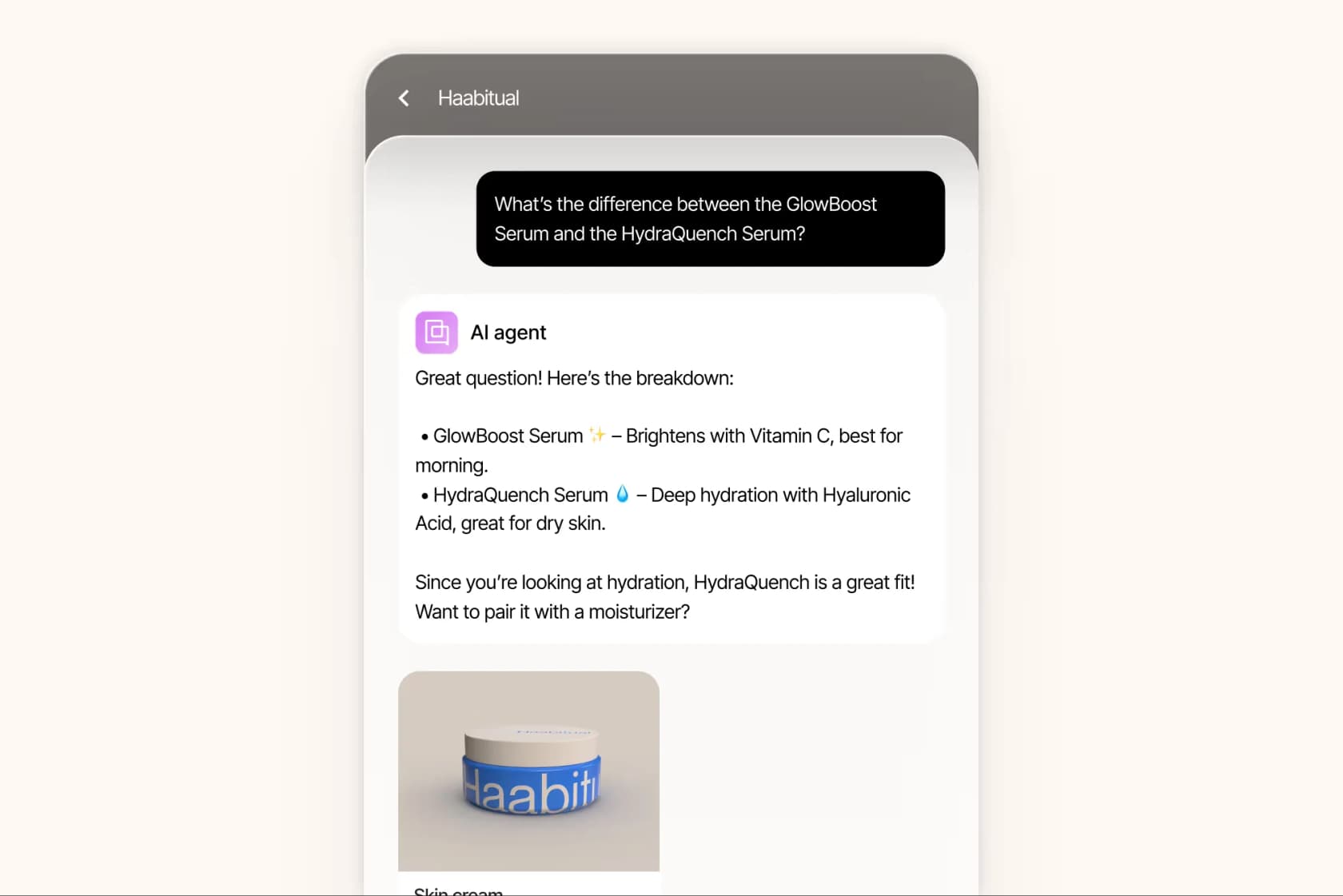
If any self-serve path ends with "No, I need more help," a ticket is created for a human or the AI Agent to pick up. It is a clean handoff, and it is also a billing event, which brings us to the part everyone underestimates.
What Gorgias automation actually costs
Gorgias prices the helpdesk on billable tickets, not seats, and the AI Agent is included on every plan, billed by usage. Here is the plan structure.
| Plan | Starting price (monthly) | Tickets/mo | Helpdesk overage | AI Agent resolutions included | User seats |
|---|---|---|---|---|---|
| Starter | from $10/mo | 50 | $0.40 / ticket | 0 | 3 |
| Basic | from $50/mo | 300 | $40 / 100 tickets | 60 | 500 |
| Pro (Recommended) | from $300/mo | 2,000 | $36 / 100 tickets | 600 | 500 |
| Advanced | from $750/mo | 5,000 | $36 / 100 tickets | 2,500 | 500 |
| Enterprise | Custom | 5,000+ | $32 / 100 tickets | Custom | 500 |
Pricing is from the Gorgias pricing page; annual billing includes two months free. For the full plan-by-plan picture, see our Gorgias plans comparison.
Now the part the plan table hides. The AI Agent costs $0.90 per resolved conversation on annual plans, $1.00 on monthly, and per the billing docs, each AI Agent resolution also counts as a billable helpdesk ticket. So two fees can stack on a single automated ticket.
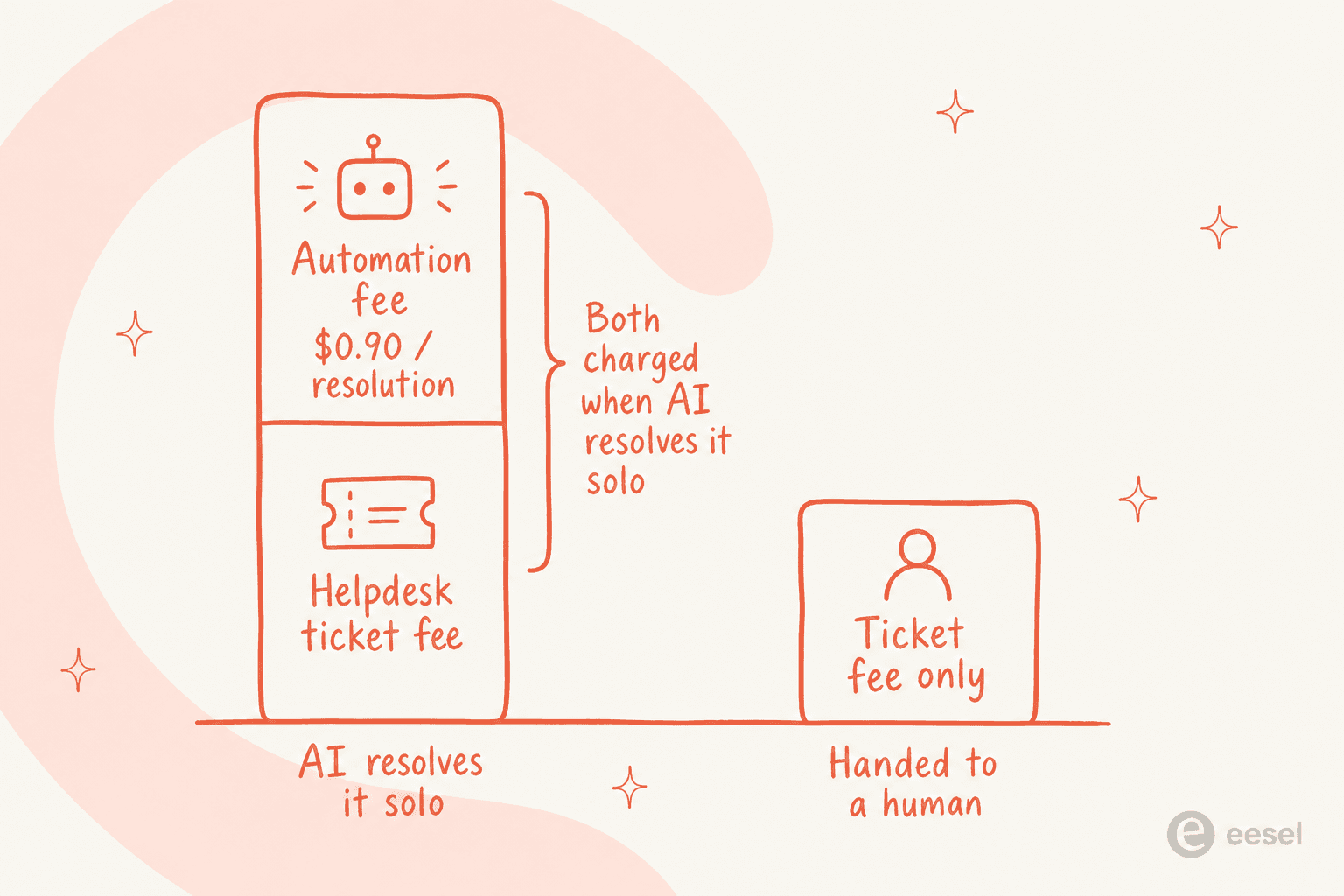
A fully AI-resolved ticket gets the ticket fee plus the automation fee. A ticket the AI hands to a human is the ticket fee only. And "resolved" has a specific meaning: the shopper "does not require the involvement of a human agent within 72 hours." Proactive greetings count too, if a shopper replies to a Search assist prompt and the AI Agent finishes the conversation, you pay both fees. For the full cost model with worked examples, our Gorgias AI pricing guide and pricing calculator break it down.
This is the single biggest objection in the community, and it is consistent across Reddit:
"Gorgias is awesome if you're super deep into Shopify workflows... The downside is the price adds up quick once your volume grows."
u/ShoddyPut8089, r/CRM

The community rule of thumb is that Gorgias automation pays off when roughly 40% or more of your tickets need direct Shopify actions like refunds, cancellations, and order edits. If most of your volume is conversational FAQ-style support, you are paying a premium per resolution for actions you rarely use.
Where Gorgias automation falls short
Gorgias is one of the best Shopify-native helpdesks out there, and we would happily recommend it to an order-heavy DTC brand. But an honest automation guide names the limits, so here they are.
- It is Shopify-first to the point of dependency. The AI Agent requires a connected Shopify store, and order actions, conditions, and variables draw from Shopify fields. Brands on WooCommerce, BigCommerce, or Magento can use the helpdesk and rules, but the slick order automation isn't really built for them.
- AI resolution is email, chat, and SMS only. It does not run on voice, and resolution on social DM channels (Facebook, Instagram, WhatsApp, TikTok) isn't documented the way email and chat are.
- It is not plug-and-play. Real configuration is required: writing skills, building actions with authentication, authoring guidance, and reconciling rules so they don't double-reply. The performance ceiling Gorgias itself markets is "automate 60% of email and chat conversations," which means the other 40% still needs people.
- Per-resolution billing scales with success. The better your automation works, the more resolutions you pay for. That is the opposite of how flat-rate tools price.
The deeper point a sharp Reddit commenter made is worth sitting with:
"What's usually overlooked is that most teams optimize for handling tickets faster, not for reducing them."
u/Andrutex, r/ecommerce
That is the real test for any automation setup: is it actually deflecting volume, or just making the same volume cheaper to push through? If you are weighing your options, our roundup of Gorgias alternatives and the Gorgias vs Zendesk for ecommerce comparison are good next reads.
Try eesel AI on top of your Gorgias setup
If the per-resolution math or the hand-built-skills setup gives you pause, this is where eesel AI fits. eesel is an AI teammate that sits on top of your existing helpdesk, Gorgias included, and learns from your past tickets, help docs, and macros on day one rather than asking you to author skills from scratch.
Two differences that matter for the problems above. First, eesel's simulation mode runs the agent against thousands of your real past tickets before it ever goes live, so you can see the coverage and exact resolution rate you would get, then ramp autonomy gradually. Second, pricing is one fixed monthly plan, from $299/month for 500 credits, with 1 credit per ticket however long and no per-seat fee and no separate automation charge, so a resolved conversation costs the same whether the AI handled it or not, and you are never billed twice on one ticket. It is not a replacement for Gorgias's native in-ticket Shopify actions, it is the AI resolution layer you point at the volume you actually want to deflect. You can start on the free plan (100 credits, no card) and run a simulation against your own history before committing.