


If you’re on the hunt for a customer support tool that’s all about people, you’ve probably run into Help Scout. It’s a go-to for growing teams trying to hold on to that personal touch as they scale. But what’s really going on under the hood?
This guide will walk you through the core Help Scout features, from its famous shared inbox to its newer AI tools. Getting a handle on how these parts work together, where they really deliver, and where they might fall short is the only way to know if it’s the right long-term fit for your team. Let's get into it.
What is Help Scout? Understanding its core features
Help Scout is basically a multi-channel help desk designed for businesses that want their support to feel more like a chat with a friend than a faceless transaction. The whole idea behind it is a shared inbox that feels like a souped-up email client, not a stiff, formal ticketing system.
It hits a sweet spot for teams who are drowning in a shared Gmail or Outlook inbox but aren’t ready to jump into the complexity and cost of a big enterprise platform. It’s all about bringing order to the chaos without making things feel robotic.
Core Help Scout features for communication and collaboration
These are the tools your team will be using every single day. Help Scout has built a really solid foundation for keeping your team and your customers on the same page.
The shared inbox: The heart of Help Scout's features
The shared inbox is where Help Scout truly comes into its own. It pulls every customer conversation, whether it’s from email or live chat, into one central place for the whole team to see. This alone is huge for making sure messages don't get lost or ignored.
It’s also full of little tools that make teamwork feel effortless:
-
Private Notes: You can drop internal comments on a conversation that the customer will never see. It's perfect for asking a colleague for a second opinion or giving them some quick background before you hand off a ticket.
-
@mentions: Need to pull someone into a conversation? Just @mention them in a note, and they’ll get pinged.
-
Assignments: You can assign conversations to specific people or teams, which clears up any confusion about who’s supposed to reply.
-
Organizational Tools: You can use tags to categorize conversations, build out a library of saved replies for common questions, and even "snooze" a conversation so it disappears and pops back up later when you can deal with it.
Beacon: Your embeddable support hub
Beacon is that little widget you see on websites that you can embed on your own site or in your app. It’s a really slick way to offer help right where your customers are, without forcing them to open a new tab and hunt for a contact page.
It’s a bit of a Swiss Army knife. Beacon can serve up live chat, a simple contact form, or articles from your knowledge base, all from one little button. You can even set different "modes" like Self Service, Neutral, or Ask First, which lets you nudge users toward finding answers on their own or encourage them to reach out directly.
Docs: A built-in knowledge base
Docs is Help Scout's own knowledge base tool. It lets you build a public help center where customers can look for answers themselves, any time of day. The editor is simple to use, and you get some nice options to match your brand’s look and feel with custom CSS.
The real magic is how it connects with Beacon. When a customer starts typing a question into the Beacon widget, it automatically suggests relevant articles from your Docs site. This can instantly solve their problem and cut down on the number of simple questions your team has to answer.
Customer management and context
To give a great answer, your team needs the full story. Help Scout has a customer profile sidebar that appears next to every conversation, showing their past interactions and other important details.
-
Customer Properties: You can save custom bits of information for each customer, like their subscription plan, account ID, or when they signed up. This info is always visible to your team right inside the conversation.
-
Company Management: This feature groups all contacts and conversations from the same company together. It’s a lifesaver for B2B support when you need to see the entire history with a single account.
While Help Scout does a good job of providing context from within its own system, teams often need information that lives elsewhere. To get a truly complete picture of a customer's issue, an AI tool like eesel AI can pull in knowledge from other places like Confluence, past tickets, and Google Docs to give your agents richer context without them ever leaving the help desk.
A closer look at the AI Help Scout features
Help Scout has started rolling out AI features to help teams move a bit faster. They’re handy for boosting productivity, but it’s good to know exactly what they can and can’t do.
AI Answers: Automated self-service
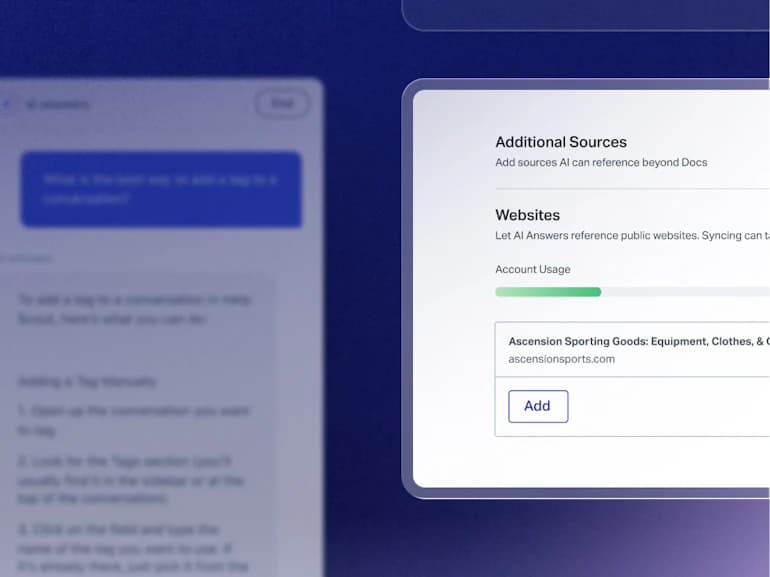
AI Answers is Help Scout’s chatbot. It sits inside the Beacon widget and uses OpenAI to give customers instant answers. It answers from the sources you add: your Docs sites, public website links, and uploaded files such as PDFs, Word and Excel documents, plus improvements you review and approve.
This works well for straightforward questions that your help center or added files already answer, so its helpfulness tracks how good those sources are. Past ticket history isn't one of the listed inputs. The eesel AI Agent also learns from your past support tickets, plus knowledge in tools like Confluence, Notion and Google Docs, which helps on questions that only live in those places.
Two details matter for testing. Help Scout's Test tab runs AI Answers through scenarios you write, and test conversations aren't billed. Its guardrails can also escalate topics you choose to a human.
AI Summarize and AI Assist
These are tools built for your agents to help them work more efficiently.
-
AI Summarize: With a single click, this tool will spit out a quick summary of a long, rambling conversation. It's really useful when you're passing a ticket to a teammate or doing a quality check.
-
AI Assist & Drafts: These tools help your agents write better replies, faster. Drafts writes a reply based on past conversations and your help content, while Assist can shorten, expand, edit or translate text you’ve already written. AI Assist is unlimited on every paid plan, and AI Drafts and AI Summarize start on Plus.
These three tools are built to help human agents, with the agent still sending the reply. Actions like tagging or assigning run through Workflows. For teams that want AI to take those actions as well, eesel AI can reply, tag, route and update ticket fields in your helpdesk, with each action set to run automatically, need approval, or stay off. Its simulation skill also tests answers against hundreds of your past tickets, scores each one and suggests instruction changes before you switch it on for customers.
Workflow automation and integrations
As you grow, you need to automate repetitive tasks and connect your tools. Here’s how Help Scout approaches this.
Workflows for rule-based automation
Workflows are Help Scout's automation tool, and they run on simple "if this, then that" logic. For instance, you could set up a workflow to automatically tag any conversation with the word "refund" or assign all emails from a VIP customer straight to a senior agent.
These are handy for basic sorting, and because they follow conditions you define, the routing is only as detailed as the rules you write.
Integrations with your key tools
Help Scout offers integrations with popular CRMs like Salesforce and HubSpot, and project management tools like Jira. It's worth pointing out that these important native integrations are only available on the Plus plan and above.
Help Scout has over 100 apps in its directory, and some of them connect through a tool like Zapier or Make, which can mean extra cost and another tool to manage. eesel AI connects directly to Help Scout and to knowledge sources like Confluence, Google Drive and Notion, with no middleware in between.
Explaining pricing for Help Scout features
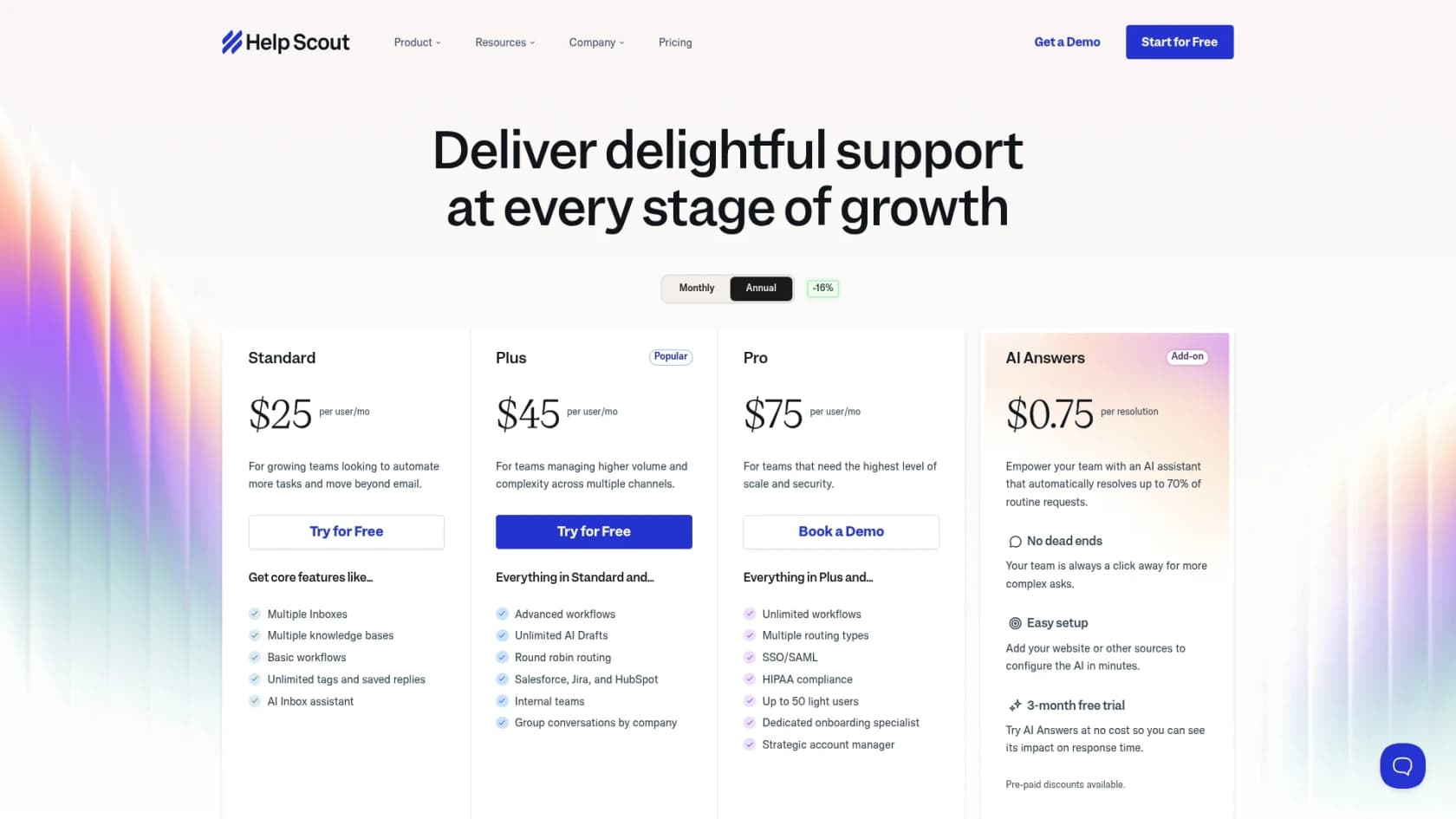
Help Scout’s pricing is split into three main paid plans (prices below are per user, billed annually), plus a Free plan for up to 5 users with 1 inbox and 1 Docs site. Monthly billing costs $30, $54 and $90 per user, and the AI chatbot is an add-on.
| Feature | Standard Plan | Plus Plan | Pro Plan |
|---|---|---|---|
| Price | $25 /user/mo | $45 /user/mo | $75 /user/mo |
| Inboxes | 2 | 5 | 10 |
| Users | Up to 25 | Up to 50 | Unlimited (min 10) |
| Workflows | Basic (150) | Advanced (500) | Unlimited |
| Key Integrations | No | Salesforce, HubSpot, Jira | Salesforce, HubSpot, Jira |
| AI Assist | Unlimited | Unlimited | Unlimited |
| AI Drafts | No | Unlimited | Unlimited |
| HIPAA/SSO | No | Add-on | Yes |
The most important detail here is how they price their chatbot. AI Answers is a paid add-on that costs $0.75 per resolution. A "resolution" is a conversation AI Answers resolves without human help. It doesn't count if the customer escalates, searches the knowledge base or asks for more help, and only one resolution is charged per conversation.
This per-resolution model means the bill follows your volume, though you can set a monthly spending cap, and every new account gets 3 months of free, unlimited AI Answers resolutions. eesel AI's pricing works differently: it's a fixed monthly plan, from $299 for 500 credits, and one credit covers a ticket or chat however many replies it takes. There's a free plan with 100 credits, and agents pause when credits run out unless you turn on capped overage.
Are the Help Scout features right for you?
Help Scout is a fantastic choice for small and mid-sized businesses that want a friendly, easy-to-use help desk with great collaboration tools. Its shared inbox is one of the best out there, and it’s simple enough that your team can get started without a ton of training.
But its weaknesses start to show when you want to lean more heavily on customer support automation. Its AI Answers learns from the Docs, website links and files you add rather than from past tickets, its agent-side AI leaves tagging and routing to rule-based Workflows, and per-resolution AI pricing rises with volume.
If you like your help desk but want AI that also learns from past tickets and takes actions, eesel AI is a next step to test. If you're ready to train an AI on all of your team's knowledge on a fixed monthly plan, see how the eesel AI Agent can plug into your tools in just a few minutes.
Frequently asked questions
What are the main benefits of the Help Scout features for small to mid-sized businesses looking for a personal touch in customer support?
Help Scout excels at offering a multi-channel help desk that prioritizes personal interactions, making it ideal for teams scaling without losing their customer-friendly approach. Its shared inbox simplifies communication, making support feel more like a direct conversation than a rigid ticketing system. This helps avoid the complexity and cost often associated with larger enterprise platforms.
Can the AI Help Scout features automate entire support workflows, or are they more for agent assistance?
The AI Help Scout features primarily serve as productivity tools for agents, offering capabilities like conversation summaries and drafting replies. Help Scout's customer-facing AI Answers does resolve questions on its own inside Beacon, while Assist, Drafts and Summarize stay on the agent side. Tagging and assigning run through rule-based Workflows. For AI that takes actions in the helpdesk, such as tagging, routing or replying, eesel AI is an alternative.
What is the pricing structure for the AI chatbot among the Help Scout features, and how does its cost model work?
Help Scout’s AI chatbot, AI Answers, is a paid add-on costing $0.75 per resolution. A "resolution" is a conversation AI Answers resolves without human help, where the customer doesn't escalate or ask for more. You can set a monthly spending cap, and new accounts get a 3-month free trial of unlimited resolutions. Because cost follows volume, a busy month still raises the bill.
How do the Docs and Beacon Help Scout features work together to provide self-service options for customers?
Docs allows you to build a public knowledge base where customers can find answers independently. Beacon is an embeddable widget on your website or app that serves as a support hub. When a customer types a question into the Beacon, it automatically suggests relevant articles from your Docs site, efficiently guiding them to self-service solutions before they need to contact an agent.
Are the native integrations for key tools like Salesforce and HubSpot available across all Help Scout features and plans?
Native integrations for essential tools such as Salesforce, HubSpot, and Jira are not available on all plans; they are specifically offered only on the Plus plan and above. Help Scout lists over 100 apps, and some of them connect through Zapier or Make, which can add cost and another tool to manage.