


Make (you might remember it as Integromat) is a beast of a tool for connecting your apps and automating workflows, all without needing to be a coding genius. It’s a go-to for businesses looking to get their processes in order, and for good reason. But let’s be real, its pricing, which is built around "operations" (Make now calls them credits), can be confusing and sometimes lead to a bill that’s a little higher than you expected.
If you’re trying to figure out if Make is the right investment, you're in the right place. We’re going to pull back the curtain on the complete picture of Make pricing: what your money actually gets you, the potential hidden costs to keep an eye on, and how it compares to more specialized AI solutions built for teams.
So what is Make, anyway?
At its heart, Make is a visual automation platform. It lets you build "scenarios," which is their name for automated workflows that link the different software you use every day. Think of it like a digital traffic controller, telling your apps how to communicate and what to do next, all without you having to write a single line of code.
The main draw is its ability to automate all those repetitive, manual tasks that drain your time. Whether it's syncing customer info from your CRM to a spreadsheet or scheduling social media posts, Make is designed to handle it. The drag-and-drop builder makes it feel approachable, but once you start building more complex workflows, you'll find there's a bit of a learning curve hiding just under the surface. It's often used by marketers, small business owners, and ops teams who need data to flow smoothly between tools like HubSpot, Google Sheets, and Slack.
A deep dive into Make pricing plans
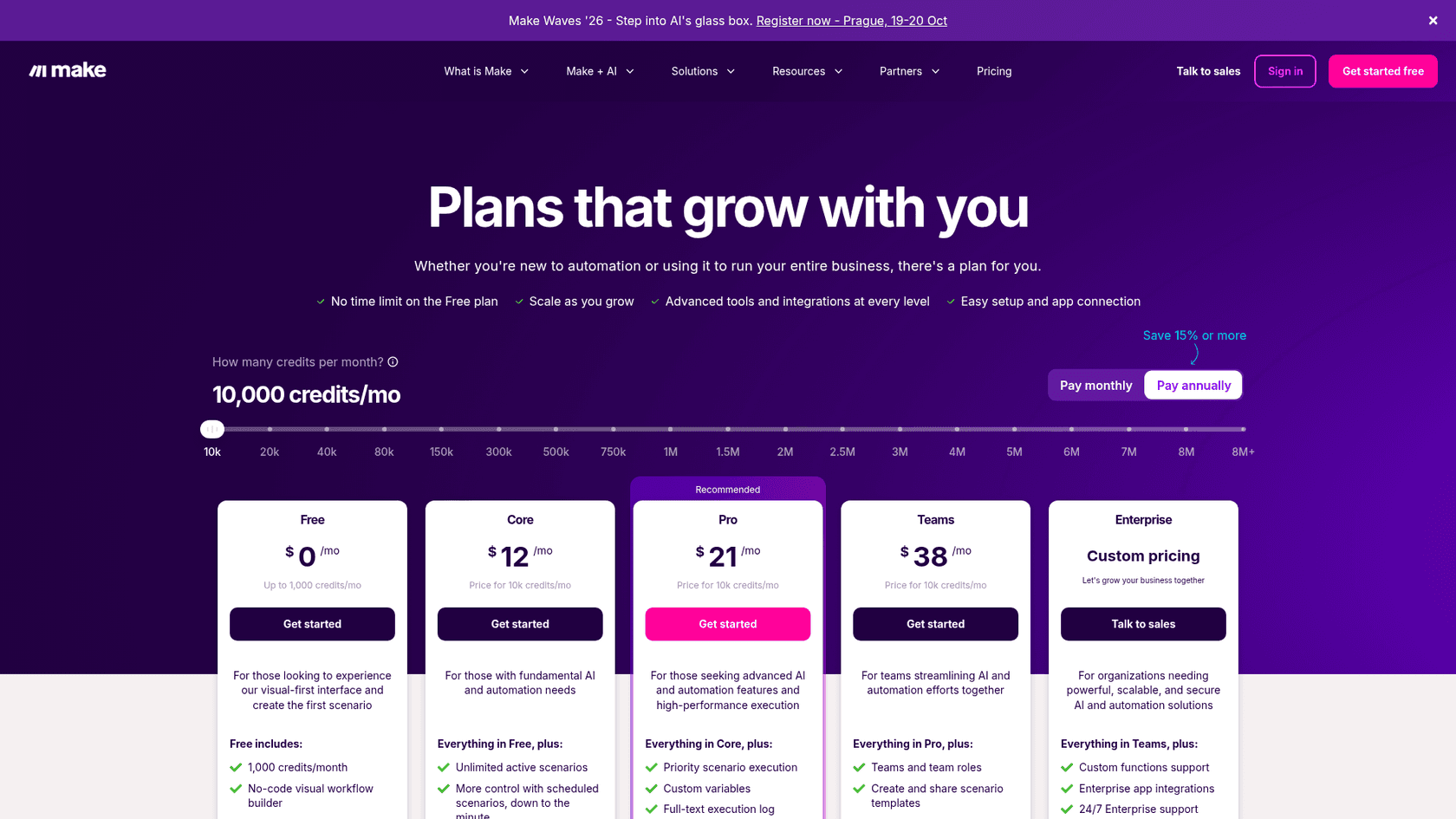
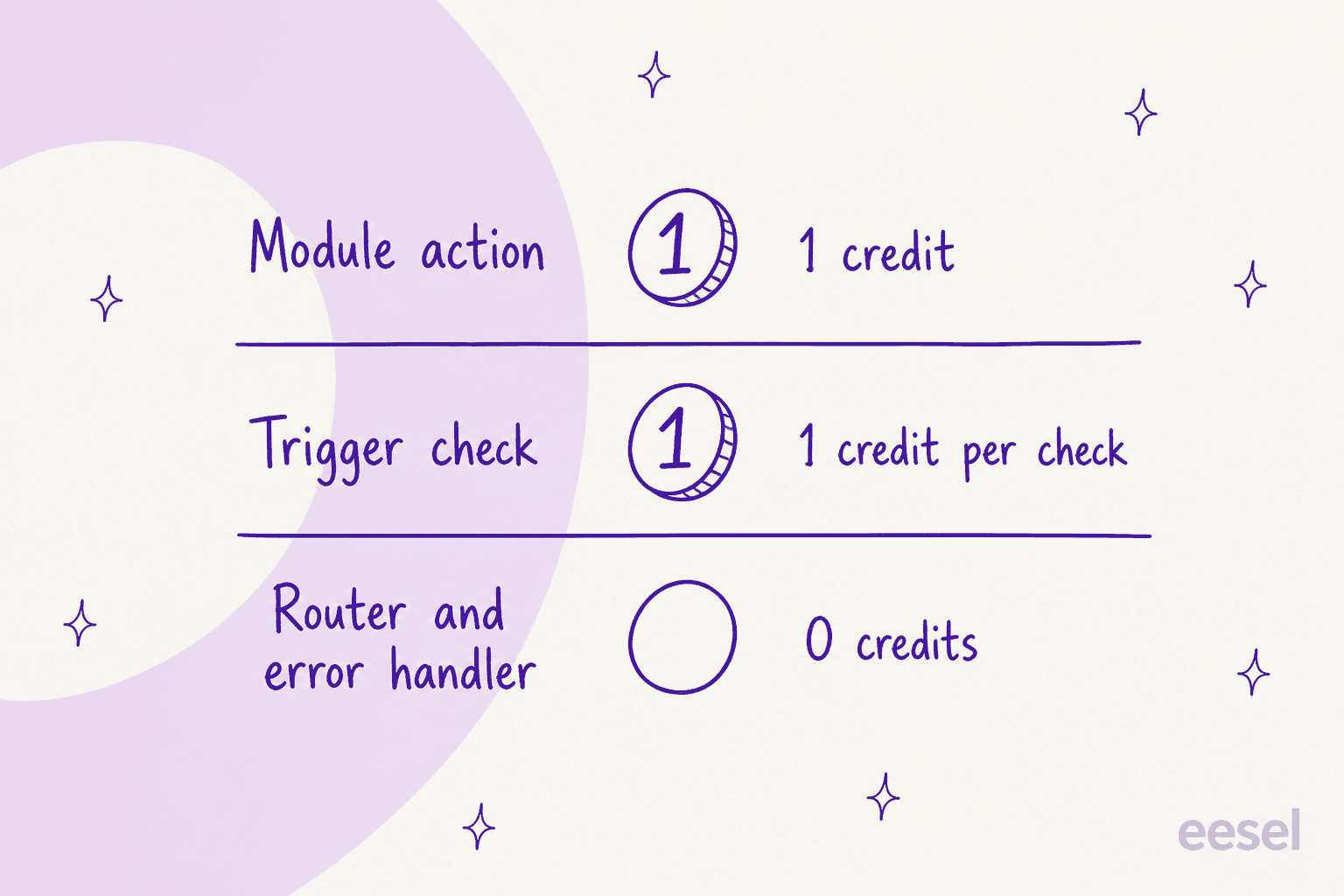
Before you can pick a plan, you need to understand how Make charges you. Their entire model is based on one thing: the "operation." Nailing down what this means is the key to keeping your costs under control and avoiding any surprises when the invoice arrives. Since August 27, Make's billing unit is the credit: Make replaced operations with credits without changing plan prices, and most actions still cost 1 credit. Its pricing page adds that router and error-handler modules use no credits.
Understanding the "operation" model in Make pricing: A hidden cost?
So, what in the world is an "operation"? According to Make, it’s any single action that a module in your workflow performs.
Let’s use a simple example. Picture a workflow that does the following:
- A new email hits your inbox (the trigger checking for the email is 1 operation).
- The workflow grabs the email's attachment and saves it to Google Drive (that's a second operation).
- Then, it pings a notification to a Slack channel (that's a third operation).
In this scenario, every email that triggers this workflow uses up 3 operations. Seems straightforward enough, right?
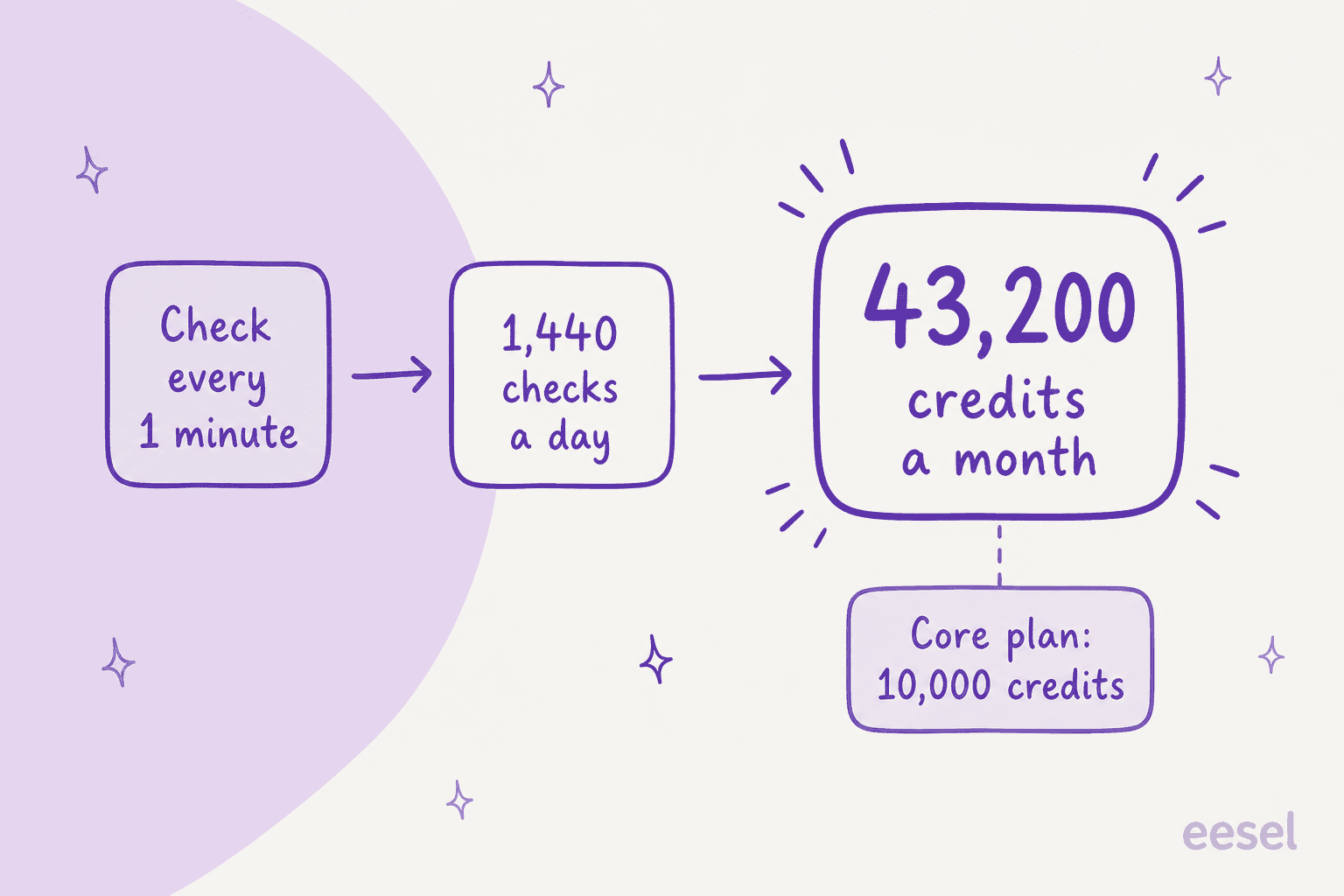
Well, here's the part that often trips people up. Many of Make’s triggers work by "polling", a technical way of saying they constantly check for new data on a set schedule, like every minute or every 15 minutes. The catch is that every single one of these checks counts as an operation, even if it finds nothing new.
This can become a massive cost drain for any task that needs to be fast. Take customer support, for instance. If you need your workflow to check for new tickets in your help desk every minute, that’s 60 checks an hour. That adds up to 1,440 checks a day and over 43,000 a month. That’s 43,000 operations burned just on the trigger, before your workflow has even lifted a finger. All of a sudden, that affordable-looking plan doesn't seem so affordable anymore.
Make pricing tiers explained
With that "operation" model in mind, let's look at the actual plans. The prices here are for annual billing at 10,000 credits a month, which will save you some cash compared to paying month-to-month.
| Plan | Price per Month (Billed Annually) | Credits/Month | Best For | Key Features |
|---|---|---|---|---|
| Free | $0 | 1,000 | Individuals testing out simple, non-urgent automations. | 2 active scenarios, 15-min interval, visual builder. |
| Core | $12+ | 10,000+ | Freelancers and solopreneurs with basic automation needs. | Unlimited scenarios, 1-min interval, API access. |
| Pro | $21+ | 10,000+ | Growing businesses needing more reliability and advanced features. | Priority execution, custom variables, full-text execution log search. |
| Teams | $38+ | 10,000+ | SMBs that need to collaborate on building and managing workflows. | Team roles & permissions, shared templates. |
| Enterprise | Custom | Custom | Large organizations with critical processes and security needs. | Advanced security (SSO), 24/7 support, overage protection. |
Key features included in Make pricing plans
The value you get from Make pricing is about more than just your operation count. It’s also about the tools that help you build smarter, more capable automations.
Visual scenario builder
Make's big claim to fame is its drag-and-drop interface. It lets you visually map out your entire workflow, connecting different modules and seeing how your data moves from one step to the next. It’s great for getting a handle on how things fit together, but I'll give you a word of warning: for really complicated, multi-step scenarios, it can start to look like a tangled plate of spaghetti. When something breaks, trying to find the problem in that mess can be a real headache.
Extensive app library
One of Make's biggest pluses is its huge library of over 3,000 pre-built app integrations. You can connect to just about any major tool your business depends on, from Google Workspace and Slack to HubSpot and Salesforce. If you happen to use a niche tool that isn’t on the list, you can usually still connect it using their generic HTTP/API modules. This gives you a lot of flexibility, but it does mean you’ll need a bit more technical comfort to get it set up.
Advanced logic and data tools
This is where Make starts to flex its muscles. It comes with some advanced tools that let you build some seriously customized workflows.
- Routers let you create different paths based on certain conditions. For example, if an email is from a VIP customer, you can send it down a different path than a standard inquiry.
- Iterators help you process multiple items one by one, like breaking down an order into its individual line items.
- Data transformers allow you to reformat information exactly how you need it before sending it to the next app in your workflow.
These are the features that put Make a step above simpler automation tools, but they also mean you should be prepared for a steeper learning curve.
AI and custom integrations
Make connects to outside AI services like OpenAI's ChatGPT through an app module, and it also ships its own Make AI Agents, which Make lists as available on all plans. You can build scenarios that send information to an AI model for processing and then use the AI's response in the next step of your automation.
AI usage is metered in credits too. With Make's own AI Provider, credits are based on tokens and operations, and with your own OpenAI or Claude connection you pay that provider directly for tokens on top of your Make credits. Make's agents are general-purpose and you assemble them on the canvas, which is a different job from a helpdesk teammate that arrives set up for tickets.
Limitations of Make pricing for support automation
While Make is a fantastic general-purpose tool, its model creates some real challenges for specific, high-stakes jobs like customer support automation or internal IT. When every second matters and you need your costs to be predictable, a one-size-fits-all tool can start to show its limits.
The Make pricing operation trap for real-time support
Let's come back to that polling issue. For a support team, instant responses aren't just a nice-to-have; they're the expectation. The Make pricing model gets incredibly expensive when you're constantly checking for new tickets, burning through your operation allowance just by waiting for something to happen.
This is where specialized tools have a big leg up. For example, an AI agent for customer service from eesel AI connects directly with your help desk (like Zendesk or Freshdesk) and uses fixed monthly credit plans, with 1 credit per ticket or chat (from $299 a month for 500 credits). Only tickets the agent actually works on count, so you're not paying for it to sit around and check for new tickets. It’s a much more transparent and predictable way to manage costs, which is exactly what a support team needs.
Lack of purpose-built support features
When you build a support automation in Make, you're piecing it together with generic blocks. It can work, but it's missing the essential, out-of-the-box features that support teams really need. For example, here is what I didn't find in Make's docs, and what eesel covers:
- Safe Simulation: eesel's Simulation skill tests an agent's answers against hundreds of your past tickets before it talks to live customers. Make lets you test a scenario run, but I found no ticket-history replay.
- Agent Assist (Copilot): A tool that lives inside your help desk and helps human agents write replies from your macros and past tickets is a helpdesk feature, and Make's docs describe scenario building blocks instead.
- Knowledge Gap Reporting: eesel's Update knowledge base skill finds the questions your help center doesn't answer and drafts the missing articles, while Make's docs list no equivalent report for what's missing from your knowledge base.
Platforms like eesel AI are designed from the ground up for these exact problems. They offer products like an AI Copilot to help your agents and a simulation mode to ensure you get quality and safety right before launch.
Complex setup and maintenance
Make promises a "no-code" experience, but creating and maintaining a solid, multi-step support workflow can quickly feel like you're managing a small development project. When a complex scenario breaks, figuring out what went wrong can be a time-consuming rabbit hole that pulls your team away from their real job: helping customers.
In contrast, a purpose-built tool like eesel AI offers a one-click integration. A support manager can connect their Zendesk, Freshdesk, or Intercom account and have an AI agent trained on their help docs and ticket history in minutes. No engineers, no complex visual maps, just fast, effective automation that's ready to go.
Is Make pricing the right fit for you?
So, what's the final verdict? Make is a powerful, flexible platform for general automation. Its pricing model can work well, but it has a layer of complexity that can lead to surprise costs, especially for tasks where speed is critical. It’s a great choice for teams automating internal processes or marketing workflows where a delay of a few minutes isn't a big deal.
However, for specialized, real-time jobs like customer support or ITSM, the "operation" pricing model and lack of purpose-built features create some major hurdles. For those situations, a dedicated AI platform doesn't just offer a better tool; it offers one that's more transparent, cost-effective, and powerful right from the start.
Ready to see how a purpose-built AI platform can transform your support with predictable pricing? Try eesel free with 100 credits or book a demo today.
Frequently asked questions
How does the 'operation' model actually affect Make pricing in a real-world scenario?
Make now bills in credits (formerly operations), and most module actions cost 1 credit, so you pay for every single action your workflow takes. The biggest impact is from triggers that constantly check for new data, as each check uses an operation, quickly adding to your monthly total even if no new data is found.
My company is growing fast; how does Make pricing scale as our automation needs increase?
Make's pricing scales by allowing you to purchase more credits (formerly operations) on any paid plan. However, as your volume grows, the cost of "polling" triggers for real-time tasks becomes a significant factor, which is why specialized tools can become more cost-effective.
With the different tiers available, how do I know which Make pricing plan is the right starting point for my small business?
The Core plan is a great starting point for most small businesses with basic automation needs. It gives you more credits and faster polling intervals (down to 1 minute) than the Free plan, but you should still estimate your potential operation usage before committing.
If I have a high-volume task like checking for new leads every minute, will Make pricing get really expensive?
Yes, it likely will. A trigger checking for data every minute will use over 43,000 operations per month just for the check itself, before any actions are even performed. This is a primary reason why the model can be costly for real-time needs.