

Microsoft Copilot has been popping up everywhere as the AI assistant built into the tools millions of us use daily. It's been sold as a new way to get more done, promising to draft emails, summarize meetings, and even create presentations from a simple prompt. The idea is exciting, and the hype is definitely real.
But this post is about taking a real look at what Microsoft Copilot is, what it’s genuinely good at, and where it falls short. We’ll break down its features to show you how it works as a personal productivity tool. More importantly, we’ll ask a key question: is a general-purpose AI the right choice for specialized, high-stakes jobs like customer support? Let's get into it.
What is Microsoft Copilot?
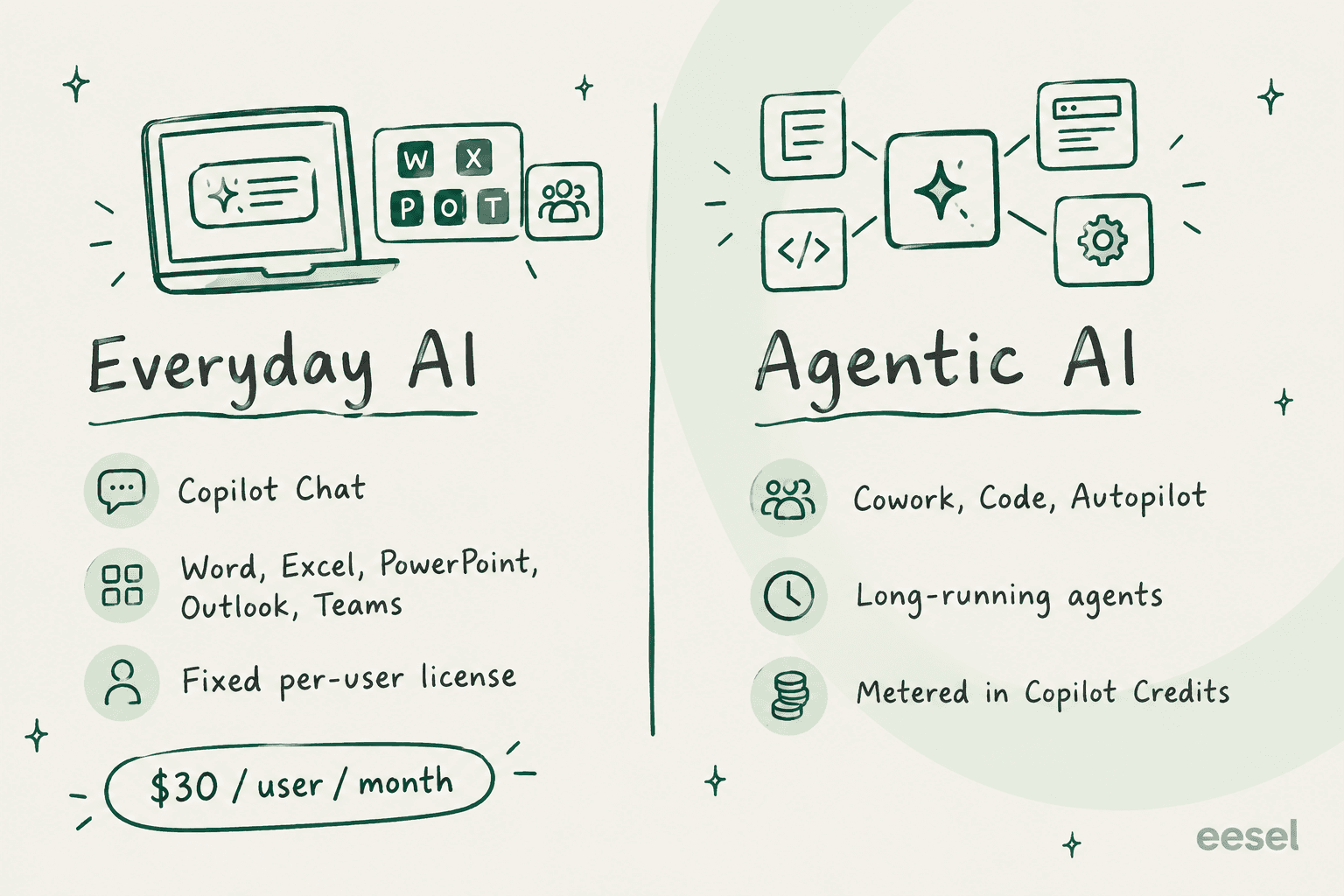
First things first, Microsoft Copilot isn't a single tool. It's more like a family of AI assistants, each tailored for a different job, and Microsoft 365 Copilot includes models from more than one lab, such as OpenAI's GPT-5.6 and Anthropic's Sonnet 5.
Here’s a quick rundown of the main versions you'll see:
- Microsoft Copilot (Free/Personal): This is the version for everyday personal use. Think of it as your go-to AI buddy for writing a blog post, creating a social media image, or just getting quick answers from the web. You can use it online or on your phone with its Android and iOS apps. Heavier use moves to Microsoft 365 Personal, Family or Premium, which costs $19.99 a month.
- Microsoft 365 Copilot (For Work): This is the business version that companies pay for. Its biggest advantage is how deeply it's connected to the whole Microsoft 365 suite, including Word, Excel, PowerPoint, Outlook, and Microsoft Teams. It securely taps into your company’s internal data, like emails, chats, and docs, to give you helpful, context-aware suggestions right where you're working. It costs $30 per user per month on top of a qualifying Microsoft 365 license.
- Specialized Copilots: Microsoft has also released versions for specific fields, like Security Copilot for cybersecurity pros and GitHub Copilot for developers.
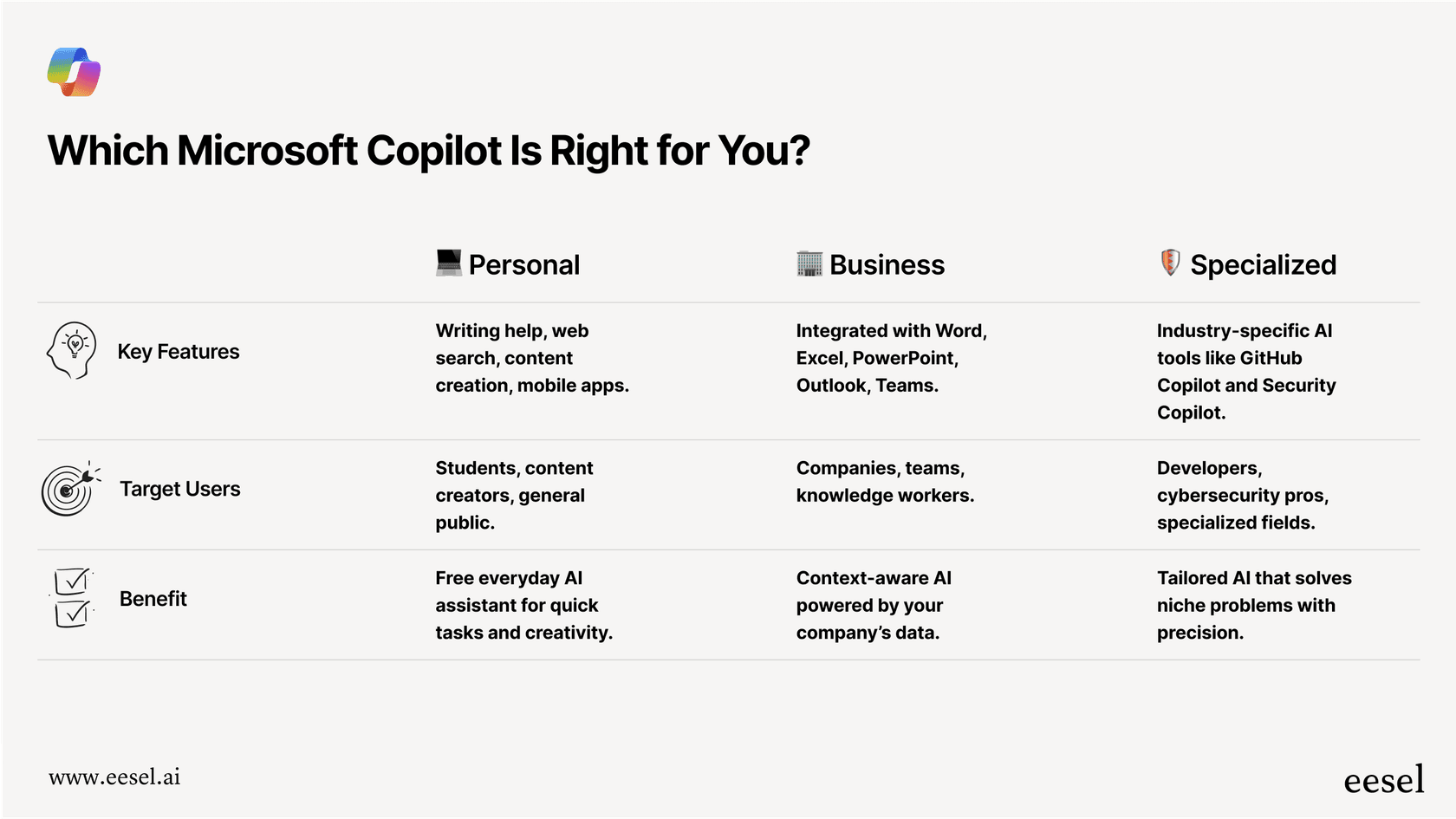
The common thread here is that Microsoft Copilot is built to use your data from inside the Microsoft world. For your own day-to-day work, that’s a huge plus. It can find that file you were working on last week or summarize an email thread without you having to switch apps. Pricing now follows the same split: Microsoft's pricing post keeps everyday AI on a fixed per-user license and meters agentic capabilities such as Cowork, Code and Autopilot in Copilot Credits.
Key features and use cases of Microsoft Copilot
Microsoft Copilot is at its best when it's helping you clear your daily to-do list faster. It was built to be a sidekick for office workers, and it’s pretty impressive in that role.
Boosting your productivity in Microsoft 365 apps
The real value of Microsoft 365 Copilot is how smoothly it works with the apps you already have open all day. It’s not another program you have to jump to; it’s just there.
- Microsoft Teams: We’ve all been stuck in back-to-back meetings. Copilot can be a real help here. It can join a meeting and give you a live summary of the discussion, list out action items, and note who’s responsible for what. If you show up late, you can just ask, "What did I miss?" and it will bring you up to speed using the meeting transcript.
- Outlook: If your inbox is a nightmare, Copilot can help you get it under control by summarizing long email chains and drafting replies in your style. It’s great for cutting through the noise so you can focus on what matters.
- Word & PowerPoint: Feeling stuck on a blank page? You can give Copilot a simple prompt like, "Write a project proposal for a new mobile app," and it will generate a solid first draft. In PowerPoint, it can take a Word document and turn it into a full slide deck, speaker notes and all.
- Excel: For those of us who aren't spreadsheet pros, Copilot is incredibly useful. You can ask it in plain English to analyze data, build formulas, or make charts. For example, you could type, "Show me the sales trends for Q3 in a bar chart," and it will just do it.
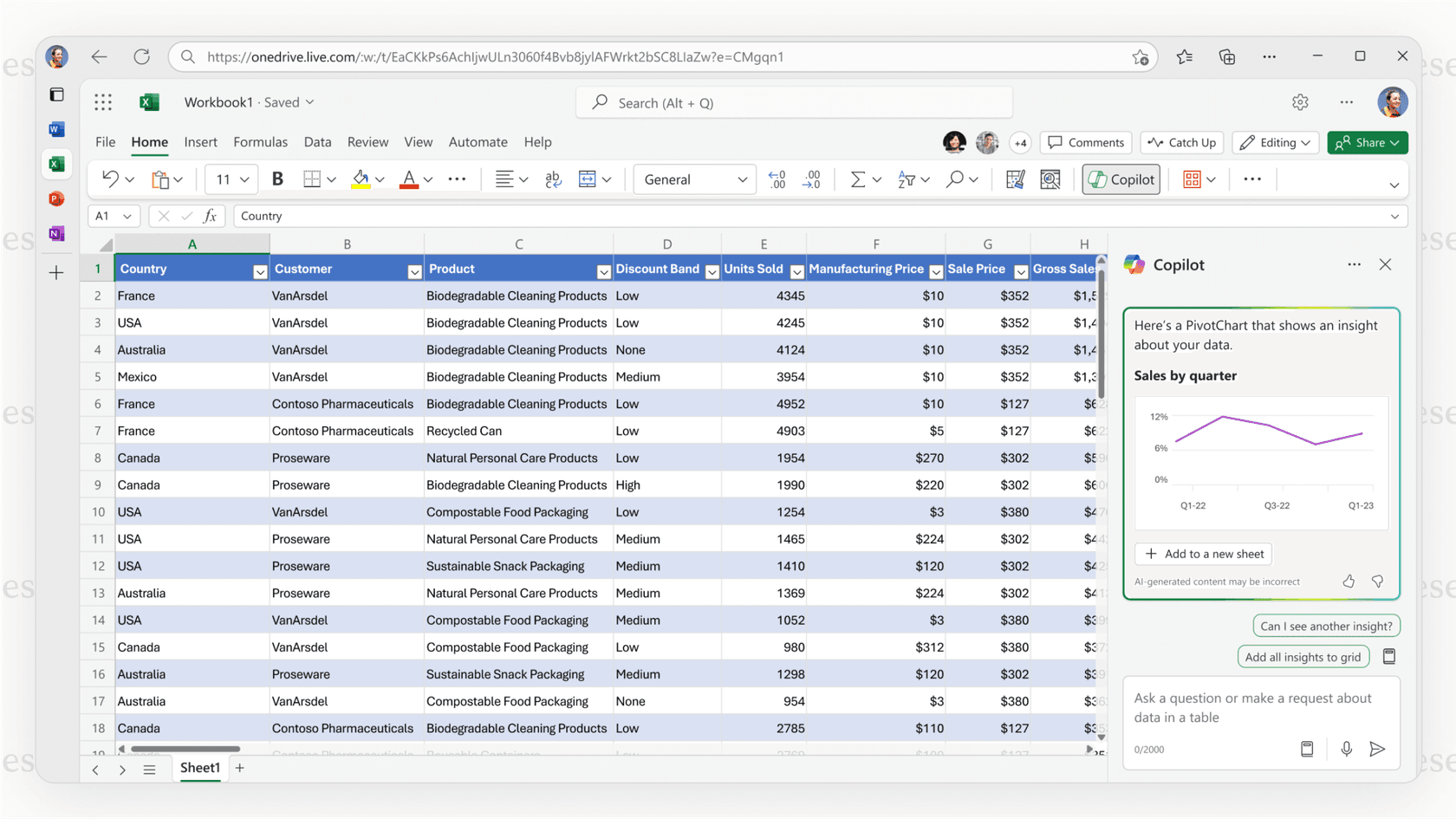
Microsoft Copilot as a central AI chat for your work life
On top of the individual app features, Microsoft 365 Copilot gives you a central, secure chat interface that works like a search engine for your job. It’s plugged into your company's data, so it understands the context of your projects, your team, and what you do.
For instance, a project manager could ask, "What were the key decisions made about the Q4 launch in my recent emails and Teams chats?" Instead of digging through different apps for an hour, they get a tidy summary in seconds. This knack for connecting the dots across your digital workspace is what makes Copilot such a solid productivity tool.
Limitations of Microsoft Copilot for customer support
So, Copilot is a fantastic tool for individual productivity. But what happens when you try to apply it to a specialized, customer-facing role like support? This is where a general-purpose tool starts to show its limitations.
Microsoft Copilot is a productivity tool, not a support agent
The first and most important thing to get is that Copilot is designed to help an employee, not to be an independent agent that solves customer problems. It can write a reply for a support agent to look over and send, but it can’t manage a ticket from start to finish on its own.
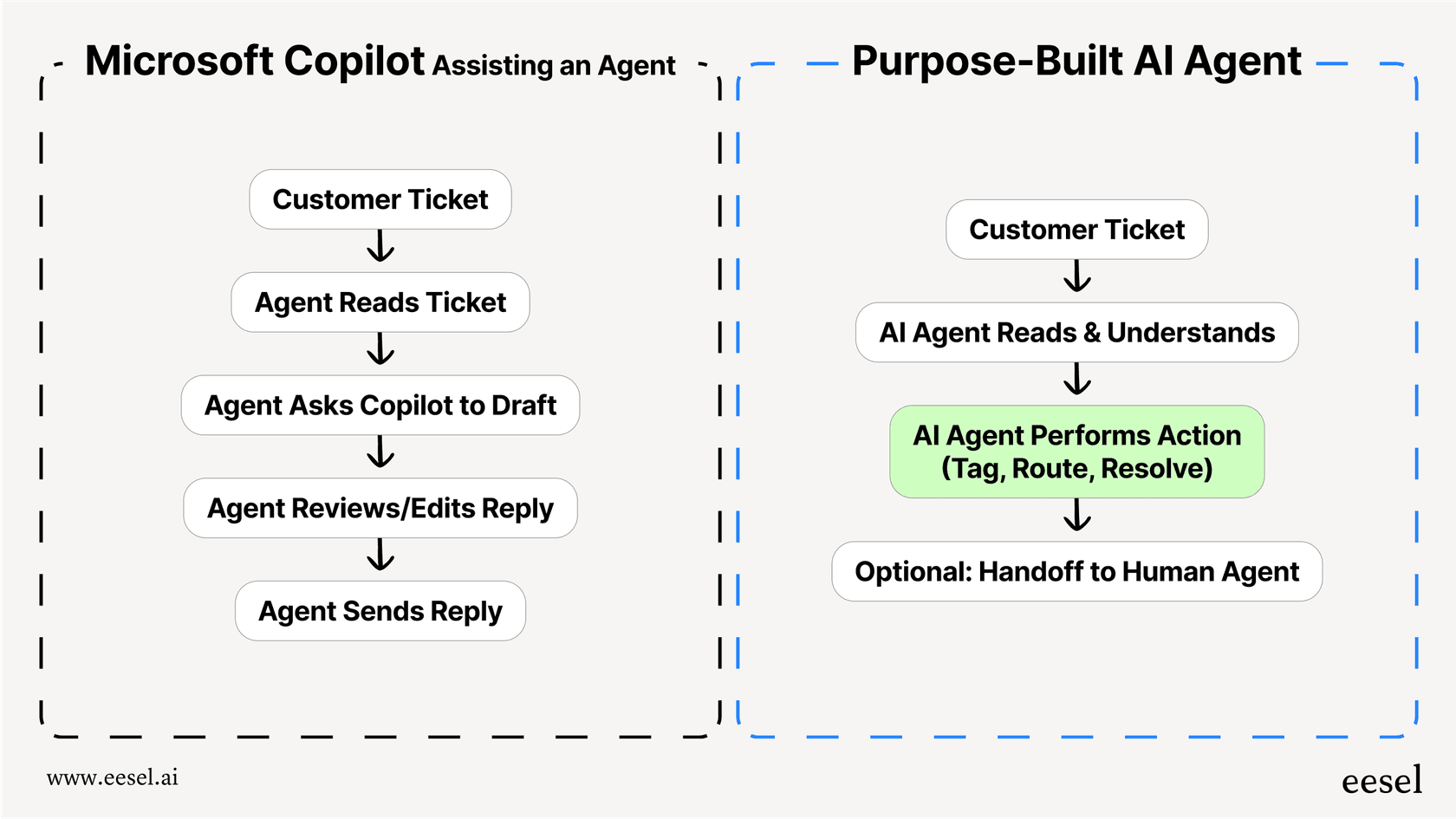
Microsoft lists Zendesk among its prebuilt Copilot connectors, which makes ticket content searchable, but I haven't seen Microsoft document Copilot tagging a ticket, routing it to the right team, or closing it when an issue is resolved on its own. Those are the jobs of a purpose-built AI agent with native Zendesk, Freshdesk, or Intercom integrations, letting your team focus on the trickier cases.
Training is stuck inside your Microsoft ecosystem
Using your Microsoft 365 data to answer internal questions is great, but that’s not what you need for customer support. Your company’s best knowledge for solving customer problems isn’t sitting in SharePoint; it’s buried in your old support tickets. That data holds every customer question, every good solution, and your brand's unique voice.
Microsoft lists over 100 prebuilt Copilot connectors, including Zendesk, Confluence and Google Drive, so Copilot can search those sources. Searching indexed content is different from learning from thousands of past Zendesk tickets what customers are really asking and how your best agents reply, which is what a support-trained agent does. Live order info from an e-commerce platform like Shopify or internal guides on Confluence are the kind of sources a support-specific agent connects to directly.
No safe way to test and simulate before going live
Maybe the biggest risk for any support team is rolling out a new tool without knowing how it will actually behave. Copilot Studio has agent evaluation for automated testing of agents, but replaying how an agent would have handled your last 5,000 customer tickets before it talks to a real person is a different job, and it's the one a simulation mode does.
Going live without a replay on your own tickets leaves more guesswork when dealing with customers, where one bad interaction can hurt your reputation. Without a way to simulate performance, it's harder to predict your resolution rate, find gaps in your knowledge base, or feel confident about automating customer conversations.
The better alternative: A specialized AI agent for support
Microsoft Copilot is a powerful generalist, but customer support demands a specialist. That's where a platform like eesel AI comes into the picture. It was designed from the ground up to handle the specific challenges of customer service and internal support automation.
| Feature | Microsoft Copilot | eesel AI |
|---|---|---|
| Primary Use Case | Individual employee productivity | Autonomous customer support automation |
| Help Desk Integration | M365 apps plus 100+ prebuilt connectors | One-click for Zendesk, Freshdesk, etc. |
| Knowledge Sources | Microsoft 365 data plus connectors (Confluence, Zendesk, Google Drive) | Past tickets, help centers, Google Docs, Shopify, etc. |
| Setup | Custom workflows are built in Copilot Studio | Radically self-serve, go live in minutes |
| Pre-launch Testing | Copilot Studio agent evaluation | Powerful simulation on historical tickets |
| Pricing Model | $30 per user per month, plus Copilot Credits for agents | Fixed monthly plans from $299/month (500 credits), no per-seat fee |
Here’s what makes a specialized tool a smarter choice for support teams.
Go live in minutes, not months While getting Copilot set up for custom workflows can be a long project, eesel AI is designed to be self-serve. You can connect your help desk with one click and start building your AI agent in a few minutes. No mandatory sales calls or demos needed to get going.
Unify all your knowledge, instantly eesel AI learns from your most valuable data: thousands of your past support tickets. This helps it pick up your brand voice and understand what customers mean from day one. It also easily connects to all your other knowledge sources, whether they're in Google Docs, Confluence, or Shopify, giving it a complete and accurate view.
Test with confidence This is a big one. eesel AI has a powerful simulation mode that lets you test your AI agent on thousands of your past tickets. You can see exactly how it would have replied, get an accurate forecast of your resolution rate, and spot which types of tickets are perfect for automation. This takes away the risk of letting an untested bot talk to your customers.
Total control and transparent pricing With eesel AI, you get fine-grained control to decide exactly which tickets get automated and which get passed to a human. Plus, the pricing is straightforward. Plans are one fixed monthly price sized to volume (from $299/month for 500 credits, with 1 credit per ticket or chat), not per-user seats, so your bill won't unexpectedly jump just because your team grows.
Microsoft Copilot: Choose the right tool for the job
Microsoft Copilot is, without a doubt, a huge step forward for personal and team productivity. It can help you and your team work faster and smarter every day.
But when it comes to high-stakes, specialized jobs like customer support, a general-purpose tool just isn’t the best fit. For tasks that need deep domain knowledge, specific workflows, and risk-free testing, a purpose-built platform will always be more effective, safer, and give you a better result.
While Copilot helps individual employees be more efficient, a specialized platform like eesel AI helps your entire support operation resolve issues faster, more accurately, and with a lot more confidence.
Ready to automate your support with an AI that's actually built for it? See how eesel AI can connect to your help desk and start resolving tickets in minutes. Start your free trial or book a demo today.
Frequently asked questions
What's the main difference my team would see using the business version of Microsoft Copilot versus the free one?
The biggest difference is data integration. The business version (Microsoft 365 Copilot) securely connects to your company's internal data in apps like Teams, Outlook, and SharePoint, providing contextually relevant answers for your work. The free version is for general personal tasks and doesn't access private company information.
How secure is my company's data if we start using Microsoft Copilot for our daily work?
Microsoft 365 Copilot is built with enterprise-grade security. It processes your data within your organization's secure Microsoft 365 environment and adheres to your existing privacy and data policies. Your internal information is not used to train the public AI models.
So, what's the biggest productivity win we can expect from using Microsoft Copilot across our team?
The main benefit is its seamless integration into the Microsoft 365 apps you use daily. It helps reduce context-switching by summarizing meetings, drafting emails, and analyzing data right where you're already working, which saves significant time on common tasks.
Could our support team use Microsoft Copilot to handle customer tickets directly?
It’s not designed for that purpose. Microsoft Copilot acts as a productivity assistant for your agents, not an autonomous tool to resolve tickets. It can search help desk content through prebuilt connectors such as Zendesk’s, but managing ticket workflows and learning from past customer conversations is what a purpose-built support agent is designed around.
If Microsoft Copilot isn't right for customer support, what should we be looking for in an alternative?
For customer support, look for a specialized AI agent that offers deep, one-click integrations with your help desk software. The right tool should also learn from all your knowledge sources, especially past tickets, and include a safe simulation mode to test its performance before going live.


Article by
Kurnia Kharisma
Kurnia is a software engineer and writer at eesel AI with two years of SEO experience, writing about AI tools, helpdesk software, and customer support. He pairs a developer's understanding of how these products are built with search-driven research into what actually ranks and resonates with the people searching for them.