


Let’s be real, modern teams are drowning in apps. If your workday feels like an endless cycle of switching between documents, task managers, and chat tools, you’re not alone. This constant app-hopping fragments our work and kills productivity. It’s exactly why platforms like Notion and ClickUp have exploded in popularity.
Both promise to be the "all-in-one" workspace that brings everything your team does under one roof. But while they’re chasing the same goal, their ways of getting there are completely different.
Choosing the right one isn’t about picking the tool with the longest feature list. It's about finding the platform that clicks with how your team actually works. This guide will give you a straight-up, side-by-side comparison of what they do best, who they’re for, and what they cost, so you can finally pick a side and get back to building something great.
What is Notion?
Think of Notion as a big box of digital Legos. It’s an incredibly flexible workspace made of "blocks" that lets you build your own custom workflows from the ground up. At its heart, it’s a mix of notes, documents, wikis, and databases all rolled into one interconnected space. People love it for creating a "second brain" for themselves or their company, a central hub where all knowledge can live and grow.
Because of this flexibility, Notion is a huge hit with individuals, freelancers, and small teams who want total control over how their workspace looks and feels. If you're happy to put in the time to build a system that’s perfectly tailored to your needs, Notion gives you all the pieces to do it.
What is ClickUp?
If Notion is a box of Legos, ClickUp is more like a high-performance model car kit. It’s a full-blown project management platform, designed from the get-go to manage work. It pulls your tasks, chats, goals, and docs into a structured environment that’s pretty much ready to go from the moment you sign up.
ClickUp’s main advantage is its powerful, built-in project management features. You get things like Gantt charts, Kanban boards, and calendars without having to build them yourself. This makes it a great fit for medium-to-large teams that need a serious, out-of-the-box solution for juggling complex projects, tracking progress, and hitting deadlines.
Notion vs ClickUp: A feature-by-feature comparison
While both platforms want to be the single source of truth for your work, they definitely have their own strengths and weaknesses. Let's break down where each one shines and where they might leave you wanting more.
Notion vs ClickUp: Project and task management
This is all about getting work done, and it’s where you'll see the two tools really diverge.
ClickUp was born to be a project management tool, and it shows. It gives you a structured setup with specialized views like Gantt charts, timelines, and workload management that you can use right away. Setting up recurring tasks, creating dependencies (so one task can’t start until another is done), and tracking time are all built-in features that feel natural to use. You can get a team up and running on a pretty complicated project in just a few hours.
Notion, on the other hand, asks you to build your project management system yourself using its database blocks. This gives you amazing customization, you can make a system that looks and functions exactly the way you imagine it. But there’s a catch. It takes a good amount of time to set up, and it can become a disorganized mess if you don't maintain it carefully. While Notion has basic boards, lists, and calendars, they don't have the muscle of ClickUp’s dedicated features. For instance, Notion offers dependencies on its Timeline view and repeating database templates, but you configure them yourself instead of getting ClickUp's ready-made versions.
Verdict: ClickUp is the clear winner for teams that need powerful, ready-to-use project management tools. Notion is a better fit for individuals or teams with simpler project needs who care more about total customization than having features ready-made.
| Feature | ClickUp | Notion |
|---|---|---|
| Gantt Charts | ✔️ Native | ? Timeline view with dependencies |
| Time Tracking | ✔️ Native | ? Not in Notion's project feature list |
| Advanced Dashboards | ✔️ Built-in | ? Dashboards and charts, set up by you |
| Task Dependencies | ✔️ Advanced | ? Dependencies and subtasks in databases |
| Recurring Tasks | ✔️ Intuitive setup | ? Repeating templates and automations, set up by you |
Notion vs ClickUp: Knowledge management and collaboration
A great workspace isn't just about managing tasks; it's about having one central spot for your team's collective brain, from project briefs and meeting notes to company policies.
This is where Notion really pulls ahead. It started life as a note-taking and documentation tool, and its ability to create beautiful, interconnected documents, wikis, and knowledge bases is second to none. The clean editor and easy page-linking make it simple to build a single source of truth that’s actually pleasant to use. Your team can build out a complete internal wiki where every piece of info is just a click or two away.
ClickUp Docs is a solid feature, but it feels more like an add-on. It’s perfectly fine for attaching notes to tasks or whipping up simple project briefs. However, it doesn't have the polish, flexibility, or organizational power of Notion. The experience can feel a little boxed in, and I find it less suited than Notion to being a standalone knowledge hub.
The problem with any "all-in-one" tool, though, is that knowledge rarely stays in one place. Important info still ends up scattered across Notion pages, Google Docs, Confluence spaces, old support tickets, and endless Slack threads. For a support team trying to find an answer, digging through all these different silos is a slow, frustrating process that leads to inconsistent customer experiences.
That’s where a tool like eesel AI can make a huge difference. It helps solve the "all-in-one" paradox by actually unifying your scattered company knowledge. eesel AI connects to all your sources, from Notion and Confluence to your helpdesk, giving your support team instant, accurate answers from one place, without ever leaving their workflow.
Notion vs ClickUp: AI, automation, and integrations
Both platforms have jumped on the AI bandwagon, offering tools to help automate work and write content.
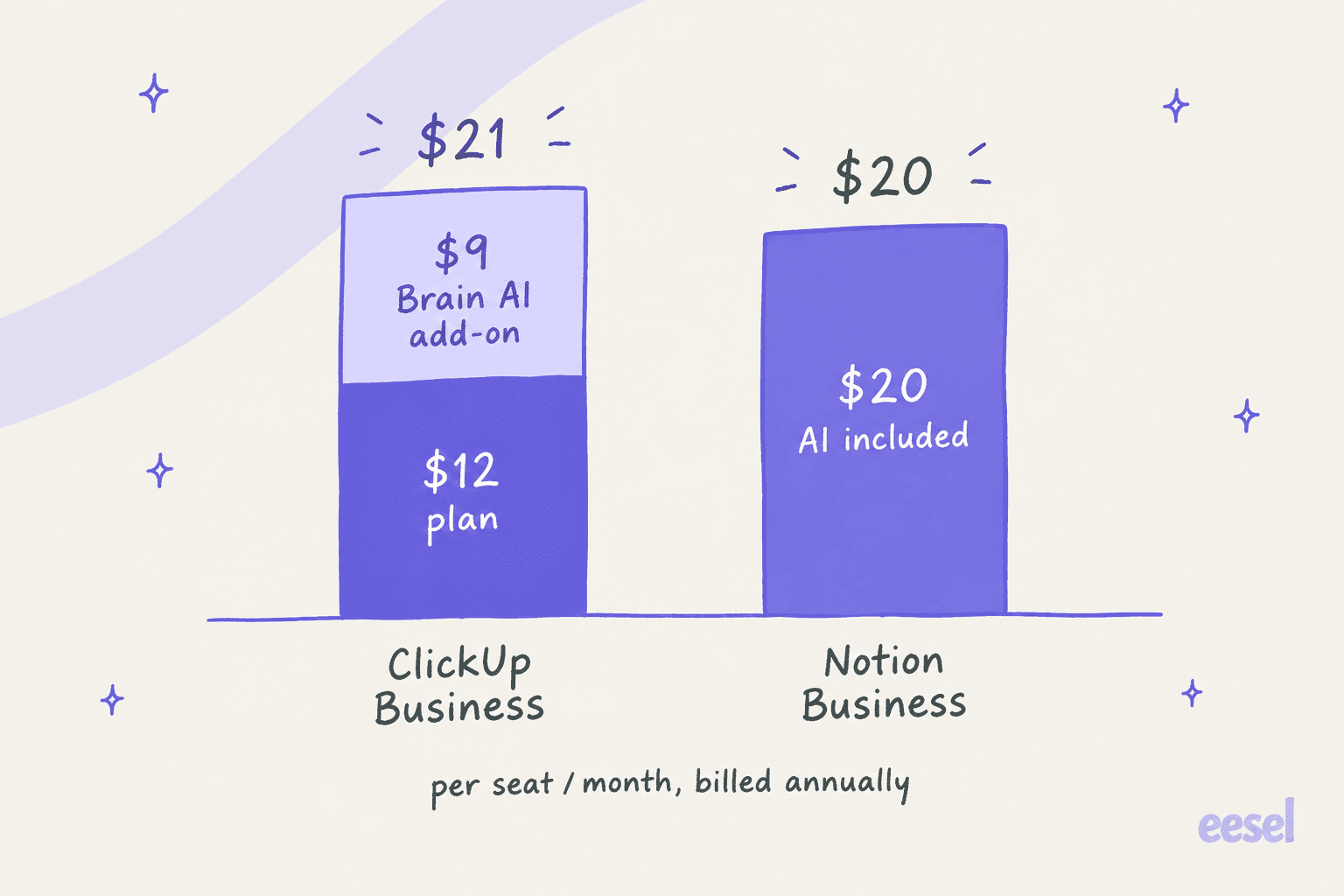
Notion AI is a pretty strong writing assistant. It's great for summarizing long documents, brainstorming ideas, or just cleaning up your grammar. ClickUp Brain does similar writing tasks but also adds the ability to search for information across some of the other apps you've connected. Both are handy assistants for general tasks, but neither is built specifically for specialized, multi-step jobs like customer support. On price, ClickUp Brain AI is an add-on from $9 per user per month billed yearly, and ClickUp bills it to every member of the Workspace, while Notion AI is included in the $20 Business plan.
When it comes to automation, ClickUp’s built-in builder is more straightforward. You can easily create "if this, then that" rules to handle routine tasks, like changing a task's status or assigning it to someone based on a trigger. Notion's automation options are a bit less direct and often require some technical know-how or third-party tools like Zapier to build more advanced workflows.
This is another spot where a specialized tool can really shine. While Notion and ClickUp use AI to help you create content, eesel AI uses your existing knowledge to power autonomous support agents that can take action. An eesel AI agent can do more than just find an answer; it can triage incoming tickets, look up order details from your Shopify store, and escalate tricky issues to a human agent. Best of all, it can go live in minutes safeguards, not months. By learning from your team's past support tickets, it understands your company's voice and solutions from day one. That's a contrast to the manual setup of building your own automations in Notion or ClickUp.
Notion vs ClickUp: Full pricing breakdown
Both tools have pretty generous free plans to get you started, but they lock different things behind their paid tiers. As your team grows, you'll probably need to upgrade to unlock more features and get rid of usage caps.
Notion pricing
Notion’s pricing is based on seats. The free plan is fantastic for individuals but has a content block limit for teams. The paid plans add more collaboration tools, unlimited uploads, and better security for larger companies.
| Plan | Price (Billed Annually) | Price (Billed Monthly) | Key Features |
|---|---|---|---|
| Free | $0 | $0 | Unlimited pages & blocks for individuals, limited block trial for teams, 10 guests. |
| Plus | $10 per seat/month | $12 per seat/month | Everything in Free, plus unlimited blocks for teams, unlimited file uploads, 30-day page history. |
| Business | $20 per seat/month | $24 per seat/month | Everything in Plus, plus SAML SSO, private teamspaces, bulk PDF export, 90-day page history, Notion AI. |
| Enterprise | Custom | Custom | Everything in Business, plus advanced security & controls, audit log, dedicated success manager. |
ClickUp pricing
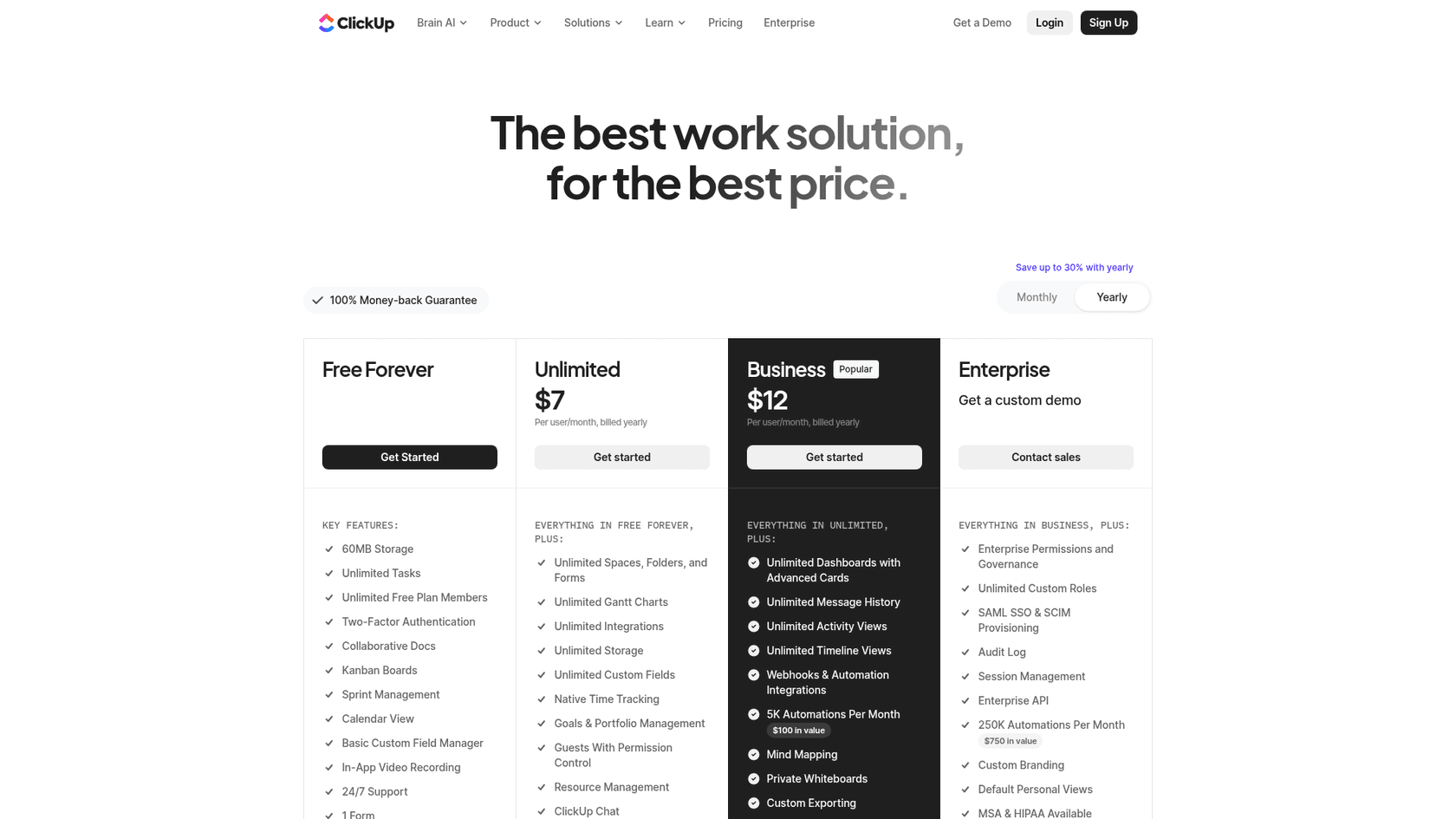
ClickUp’s pricing is also per-user and is all about unlocking more features and removing limits as you go up the ladder. The Free Forever plan is surprisingly capable for personal use or small teams but caps things like storage and how often you can use certain features.
| Plan | Price (Billed Annually) | Price (Billed Monthly) | Key Features |
|---|---|---|---|
| Free Forever | $0 | $0 | 60MB storage, unlimited tasks, collaborative docs, Kanban boards. |
| Unlimited | $7 per user/month | $10 per user/month | Everything in Free, plus unlimited storage, unlimited integrations, unlimited Gantt charts, guests with permissions. |
| Business | $12 per user/month | $19 per user/month | Everything in Unlimited, plus Google SSO, unlimited dashboards and timeline views, 5K automations per month. |
| Enterprise | Custom | Custom | Everything in Business, plus white labeling, advanced permissions, HIPAA compliance, dedicated success manager. |
Notion vs ClickUp: Making the right choice for your team
So, after all that, which one should you pick? Honestly, it boils down to how your team likes to work.
Choose Notion if: You’re an individual, a freelancer, or a small, creative team that wants a highly customizable hub for your knowledge. If you value flexibility over everything and enjoy building your perfect system from scratch, Notion is your blank canvas.
Choose ClickUp if: You're a growing team that needs a powerful, structured project management tool with all the bells and whistles ready on day one. If your main goal is to manage complex projects, track progress with detailed reports, and have a system that just works, ClickUp is the safer bet.
Ultimately, just getting your work organized in one place is a huge step forward. But the real goal is to make all that organized information useful and easy to act on.
Make your knowledge actionable with eesel AI
Having a beautiful knowledge base in Notion or a perfectly planned project in ClickUp is great, but it doesn't automatically solve your customers' problems. Your team still has to hunt for answers and manually type out a response to every single question.
eesel AI is the tool that activates all that knowledge, transforming your documentation into a 24/7 AI support agent. It bridges the gap between having information and actually using it.
-
Go live in minutes: Just connect your Zendesk helpdesk and knowledge sources with one-click integrations. No long setup process or developer time needed.
-
Unify all knowledge: eesel AI pulls information from Notion, Google Docs, past tickets, and over 100 other sources to give comprehensive, accurate answers every time.
-
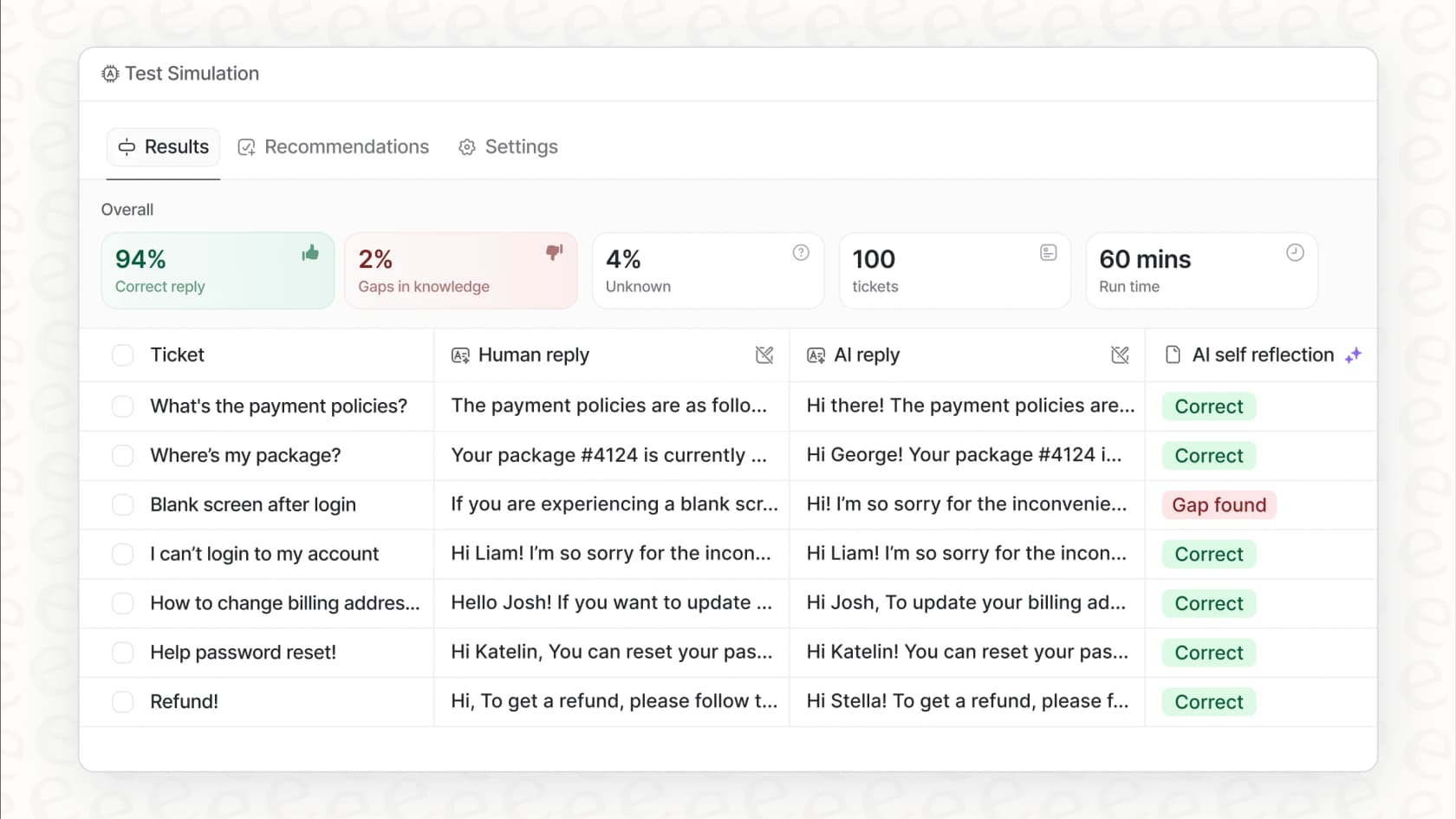
Test with confidence: Use our simulation mode to see exactly how the AI will perform on thousands of your past tickets before you turn it on for live customers. You get a clear forecast of your automation rate and can tweak responses with zero risk.
Ready to turn your knowledge base into your most effective support agent? Start your free eesel AI trial today and see it in action.
Frequently asked questions
How does the customization aspect influence the choice between Notion vs ClickUp for a new team?
Notion offers unparalleled flexibility, allowing teams to build custom workflows from scratch using its block-based system. ClickUp, while customizable, provides a more structured, out-of-the-box experience with pre-built features. Your choice depends on whether your team prefers to design every detail or get started quickly with robust templates.
For someone new to project management tools, which is easier to get started with: Notion vs ClickUp?
ClickUp is generally easier for beginners focusing on project management because it provides structured, ready-to-use features like Gantt charts and timelines. Notion has a steeper learning curve if you want to set up complex project management, as you'll need to build these systems yourself.
Which tool offers more robust out-of-the-box project management capabilities?
ClickUp is the clear winner for robust, out-of-the-box project management, offering native features like advanced task dependencies, time tracking, and various project views. Notion requires significant setup and workarounds to achieve similar levels of project management functionality.
How do Notion and ClickUp compare for building a company-wide knowledge base?
Notion excels as a knowledge management and documentation hub due to its flexible page linking, clean editor, and block system, making it ideal for creating interconnected wikis. ClickUp's Docs feature is functional for project briefs but lacks the depth and organizational power for a comprehensive, standalone knowledge base compared to Notion.
What are the main pricing differences users should be aware of when considering Notion vs ClickUp?
Both Notion and ClickUp offer free plans, but their paid tiers unlock different features and remove usage caps. Notion's paid plans focus on unlimited blocks, file uploads, and advanced security, while ClickUp's paid tiers primarily expand storage, integrations, and advanced project management capabilities like unlimited Gantt charts and automations.
Can both Notion vs ClickUp handle basic task management effectively for individuals?
Yes, both Notion and ClickUp can handle basic task management for individuals effectively. Notion allows you to create simple to-do lists and databases, while ClickUp provides a more structured environment with intuitive task creation and organization features.