


It seems like every week there’s a new AI tool promising to completely change the way we work. The excitement is real, but let's be honest, so is the hype. Trying to figure out what’s genuinely useful can feel like a full-time job. Perplexity Comet is the latest to make a splash, positioning itself as an "AI browser" that wants to be an active partner, not just a passive window to the internet.
But does it actually work as advertised? We’ve sifted through dozens of hands-on Perplexity Comet reviews, user comments, and expert takes to get you a straight answer. This isn’t another puff piece. It’s a real look at whether Comet is a revolutionary new tool or just a fascinating, flawed experiment that’s not quite ready for your daily workflow.
What is Perplexity Comet?
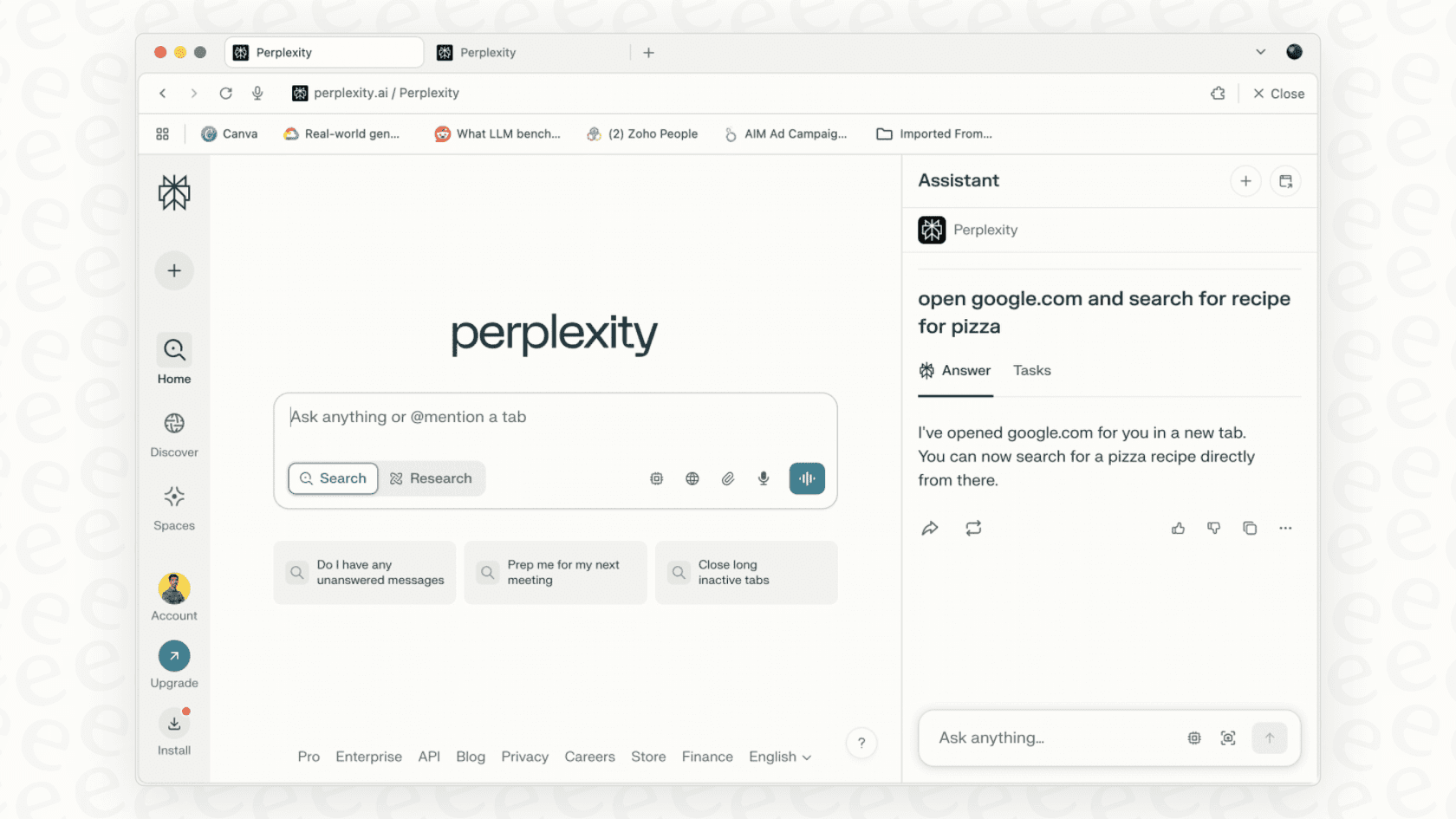
Perplexity Comet is an AI-powered web browser from the same folks behind the Perplexity AI search engine. Under the hood, it’s built on Chromium, which is the same foundation Google Chrome and Microsoft Edge use. That was a smart move because it makes switching over feel pretty painless. You can import your bookmarks, extensions, and history in just a couple of clicks.
But Comet isn't just a Chrome clone with a different logo. Its whole reason for being is something called "agentic browsing." It's a fancy term for a powerful idea: instead of you doing all the searching, clicking, and filling out forms, an AI agent does it for you. You could give it a task like, "find me a flight to San Diego and add the best option to my calendar," and the AI is supposed to take over and get it done. It’s a big, ambitious vision for how we use the web.
A deep dive into Perplexity Comet features
To see if Comet lives up to that vision, we need to look at what it’s actually like to use it day-to-day. Here’s what people are saying about its main features.
Everyday browsing and the user interface
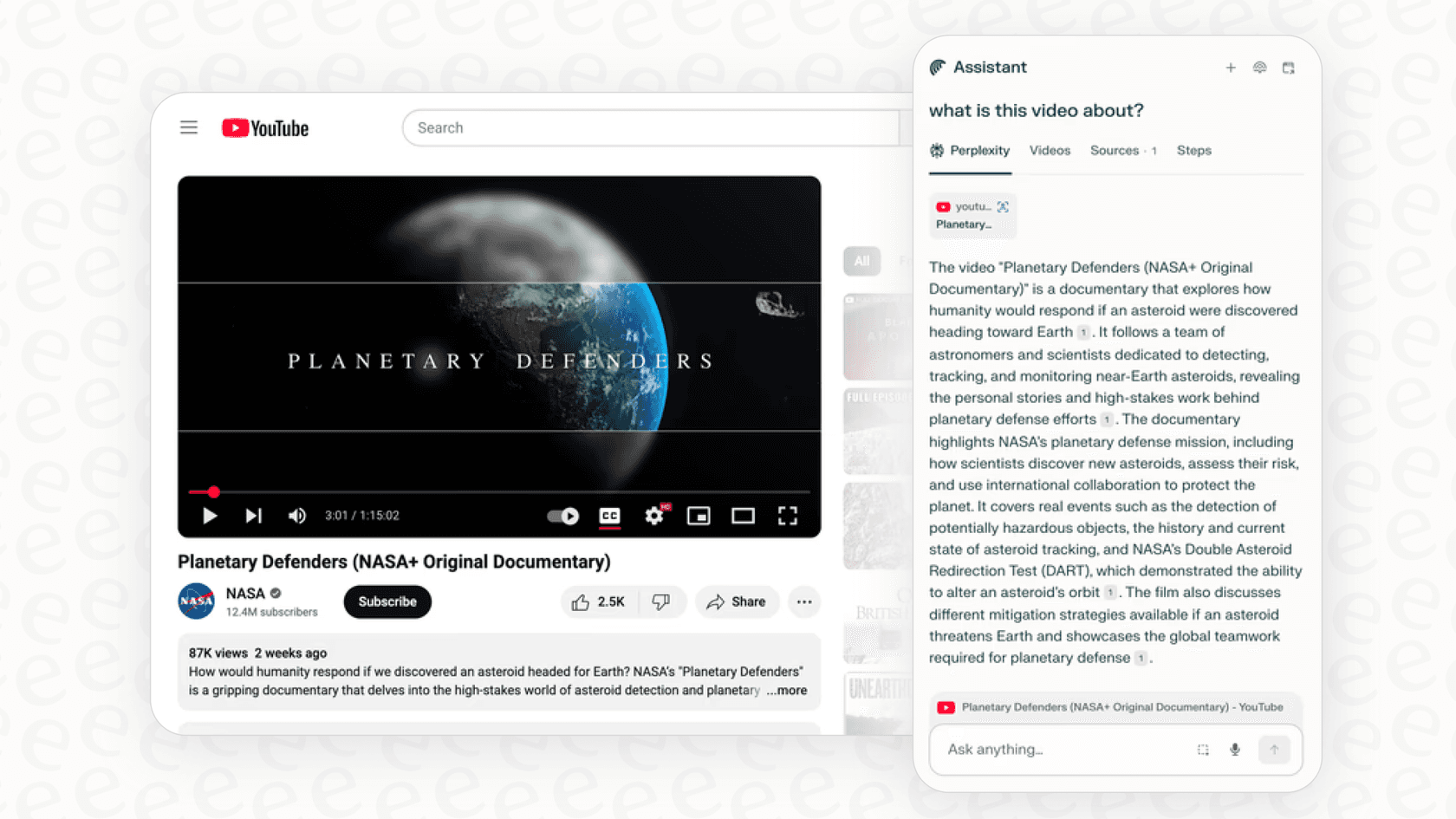
Most people seem to agree that Comet has a clean, simple interface that’s nice to look at. For just browsing the web, it feels familiar and zippy. One feature that gets consistent praise is the one-click summarization. Whether you're staring down a massive article or a long YouTube video, the assistant can whip up a concise summary in seconds, which is a genuine time-saver.
The default search is, of course, Perplexity's own engine. It’s great for asking complicated questions in plain English and getting back a synthesized answer with sources. But, a lot of reviews bring up a common frustration: for simple keyword searches (like "CNET Gemini"), it often buries the most relevant, recent links, forcing you to give up and just go back to Google.
The Perplexity Assistant: Your AI copilot
The Perplexity Assistant is really the core of the whole experience. It sits in a sidebar and, unlike having a separate ChatGPT window open, it knows exactly what’s on the page you’re looking at. Even better, it can see what’s in all your open tabs at once.
This leads to some seriously cool moments. Reviewers talk about opening a few tabs for competing products and asking the assistant, "Based on my open tabs, create a table comparing these on price and key features." A few seconds later, a perfectly formatted table appears. It’s also handy for drafting an email right inside Gmail or getting quick insights without having to switch tabs. For anyone who does a lot of research, this is a huge help.
Agentic automation: Where promise meets problems
This is where Comet tries to be revolutionary, and it's also where the cracks start to appear. When it works, it feels like magic. People have described watching it add a whole shopping list to a cart, book a dinner reservation, or automatically organize a chaotic mess of tabs into neat folders with a single command.
However, the general consensus across Perplexity Comet reviews is that these agentic features are wildly inconsistent. Users report the AI getting stuck in loops, making things up (like booking a hotel for the wrong dates), or just taking so long that it would have been faster to do it yourself. This really highlights the main problem for any AI agent trying to navigate the open web: it's a messy, unpredictable place. For every website it handles perfectly, there are ten others that trip it up, leaving you frustrated and wasting time.
The practical side: Performance, privacy, and pricing
Cool features are nice, but a browser has to be practical. This is where Comet runs into some of its biggest problems.
How does it perform? CPU and RAM usage
While standard browsing feels about as fast as Chrome, firing up the AI features comes at a cost. A detailed review from PCMag pointed out that using the Assistant can spike CPU usage to 20% and cause memory usage to swell to over 4GB with just a handful of tabs open.
This is a really big deal. For power users who live with dozens of tabs open, or for anyone on a laptop or older computer, this kind of resource hogging can slow your whole system to a crawl. A tool that's supposed to make you more productive ends up being the very thing that slows you down.
Privacy concerns with an all-seeing AI browser
For Comet to do its "agentic" thing, it needs an incredible amount of access to your digital life. It has to see your browsing history, read your emails, check your calendar, and maybe even handle your passwords. Understandably, this has raised some serious privacy red flags.
Poke around Reddit and other forums, and you'll see a lot of people saying they're hesitant to use Comet with their main accounts. Perplexity says a lot of the data is processed on your device, but its privacy policy also states it collects interaction data to "improve the service" by default. For many, that trade-off is just too much. Handing over the keys to your entire digital kingdom to an AI, especially one that's still so new, is a risk they're not willing to take.
How much does Perplexity Comet cost?
Maybe the single biggest roadblock for Comet is its price. While there’s a waitlist for Pro users to get limited access, the full-powered "Max Assistant" mode is locked behind a Perplexity Max subscription. And the price? A jaw-dropping $200 per month.
That price tag puts it completely out of reach for the average person and makes it a serious line item for any business, especially when you factor in the reliability issues. It’s priced for enterprises and die-hard tech enthusiasts with very deep pockets.
| Plan Tier | Monthly Price | Key Features for Comet | Target User | | :\u002d\u002d- | :\u002d\u002d- | :\u002d\u002d- | :\u002d\u002d- | | Free | $0 | Basic Perplexity search. No access to Comet browser. | Casual Search Users | | Pro | $20 | Access to Comet waitlist, multiple LLMs, file uploads. | Power Search Users | | Max | $200 | Full, prioritized access to Comet and its "Max Assistant" mode for complex tasks. | Early Adopters / Enterprises |
\u0026nbsp;
AI agents are the future, but is a browser the right place for them?
Let's be clear: Comet offers a pretty compelling glimpse into the future. The idea of an AI copilot that understands what you want and handles the boring multi-step tasks for you is where things are headed. But the biggest takeaway from all the Perplexity Comet reviews is that a general-purpose web browser might be the wrong place to expect reliable automation.
The web is just too chaotic. For important business workflows, you can't risk having your AI agent get stuck on a pop-up ad or confused by a website redesign. You need an agent that works in a controlled, predictable environment.
This is where a platform like eesel AI offers a much more practical approach. While Comet is a broad tool for one person's web browsing, eesel AI builds specialized, super-reliable AI agents for specific business tasks, like customer service and internal support. It solves Comet’s biggest problems:
- Reliability: Instead of getting stuck on a random checkout page, an eesel AI agent is built to perform precise actions within your business tools. It connects directly to your help desk (like Zendesk or Freshdesk) and your knowledge bases (like Confluence or Google Docs) to get tasks done with near-perfect accuracy. You have full control over what it does.
\u003cpre\u003e\u003cimg class="alignnone size-medium wp-image" src="https://website-cms.eesel.ai/wp-content/uploads/2025/10/05-eeselAI-Automation-Workflow-with-Helpdesk-Integration.png" alt="This workflow shows how eesel AI integrates with helpdesks for reliable automation, a contrast discussed in Perplexity Comet reviews.::" width="300" height="169" /\u003eThis workflow shows how eesel AI integrates with helpdesks for reliable automation, a contrast discussed in Perplexity Comet reviews.\u003c/pre\u003e

- Testing \u0026 Safety: Using Comet’s agentic features can feel like a roll of the dice. With eesel AI, there’s no guesswork. You can use its powerful simulation mode to test your AI agent on thousands of your own past support tickets. This lets you see exactly how it will perform and what your return on investment will be before it ever interacts with a single customer.
\u003cpre\u003e\u003cimg class="alignnone size-medium wp-image" src="https://website-cms.eesel.ai/wp-content/uploads/2025/09/eeselAI-screenshot-Testing-Simulation.png" alt="The eesel AI simulation mode allows for safe testing before deployment, a key advantage noted in comparison to tools covered in Perplexity Comet reviews.::" width="300" height="169" /\u003eThe eesel AI simulation mode allows for safe testing before deployment, a key advantage noted in comparison to tools covered in Perplexity Comet reviews.\u003c/pre\u003e

- Accessibility \u0026 Cost: You don’t have to pay $200 a month or sit on a waitlist. eesel AI is a self-serve platform that you can get up and running in minutes, not months. The pricing is clear, predictable, and designed for business value, not exclusivity.
The final verdict on Perplexity Comet
So, what's the final word? Perplexity Comet is a genuinely innovative and ambitious product. It does a great job of showing the incredible potential of AI agents and has some truly useful features for research and summarization right now. It's a fascinating look at what browsing the web might be like in a few years.
However, based on the current wave of Perplexity Comet reviews, it's not ready to be your main browser, especially not for important work. Its headline features are too unreliable, it uses too many system resources, and its price is way too high for most people.
If you love tinkering with cutting-edge tech and have the budget for it, Comet is worth keeping an eye on. But if you need to solve real business problems with a powerful AI agent today, you need a platform that’s specialized, secure, and reliable.
See how eesel AI delivers on the promise of AI automation for your support teams with a platform you can actually trust.