

What is Pika AI?
Pika is an AI video generation platform launched in April 2023 by Demi Guo and Chenlin Meng, two Stanford AI PhD students who built it on the tagline "Reality is optional." The company has since raised $135M across two rounds - including an $80M Series B in June 2024 at roughly a $470M valuation - and shipped ten model iterations in under three years.
The platform runs on a credit system and offers two distinct product surfaces: pika.art for AI video creation and editing, and pika.me for persistent AI agent identities. This post focuses entirely on pika.art pricing, which is where most users land.
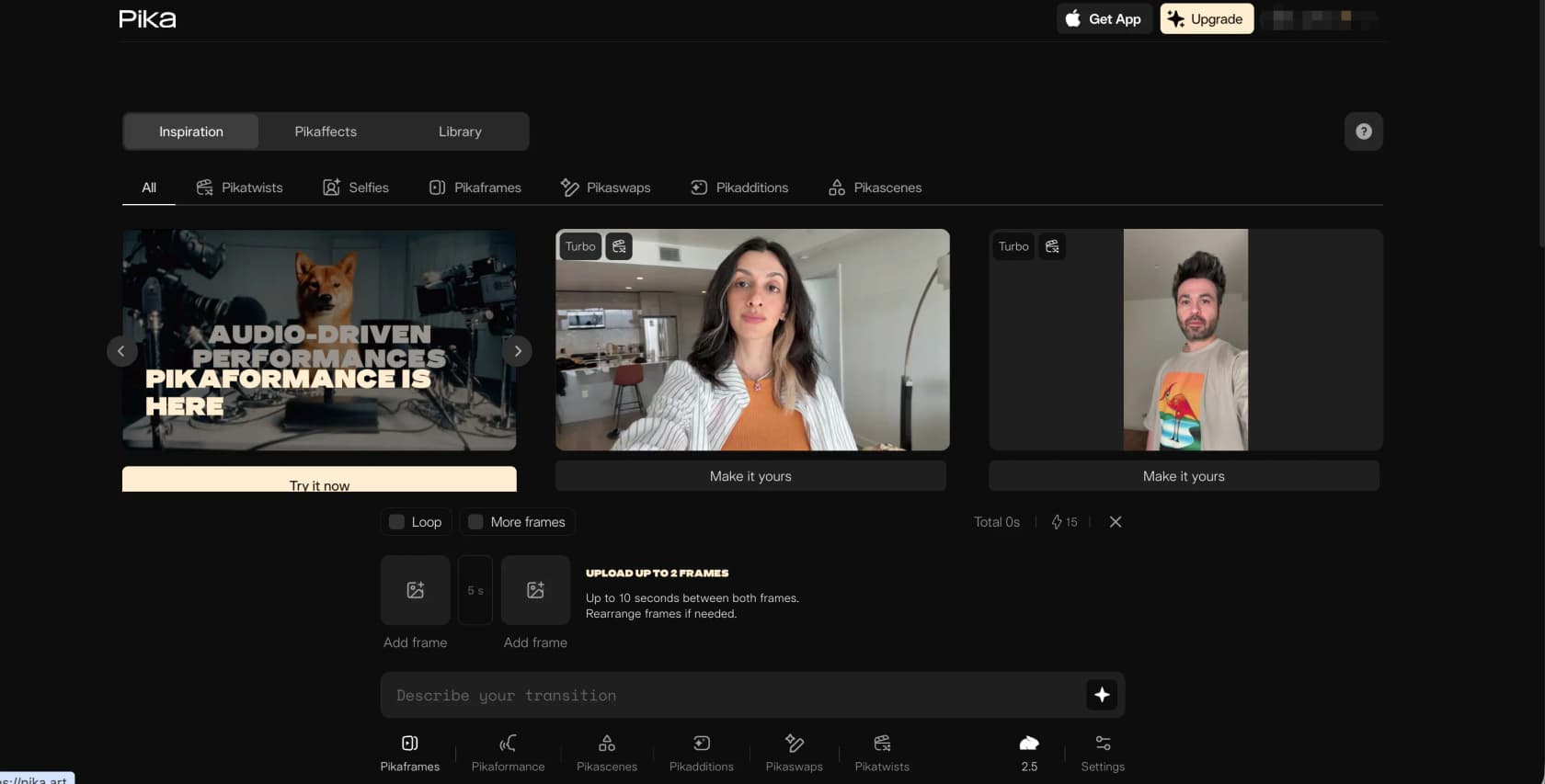
Pika 2.5 is the current flagship model. It supports text-to-video, image-to-video, and video-to-video editing, plus a suite of branded tools: Pikaffects (physics-defying effects like melt, explode, and squish), Pikadditions (insert characters or objects into real footage), Pikaswaps (replace objects in a scene), Pikaframes (interpolate between a start and end keyframe), Pikatwists (stylistic video transformations), and Pikaformance (audio-driven lip-sync at 3 credits/second). Community rankings on Reddit consistently place it as "best budget" in 2026 AI video tier lists - excellent for short social clips, less competitive for cinematic or narrative work. If Pika is not the right fit, our Pika AI alternatives guide covers the next best options.
Pika AI pricing plans (2026)
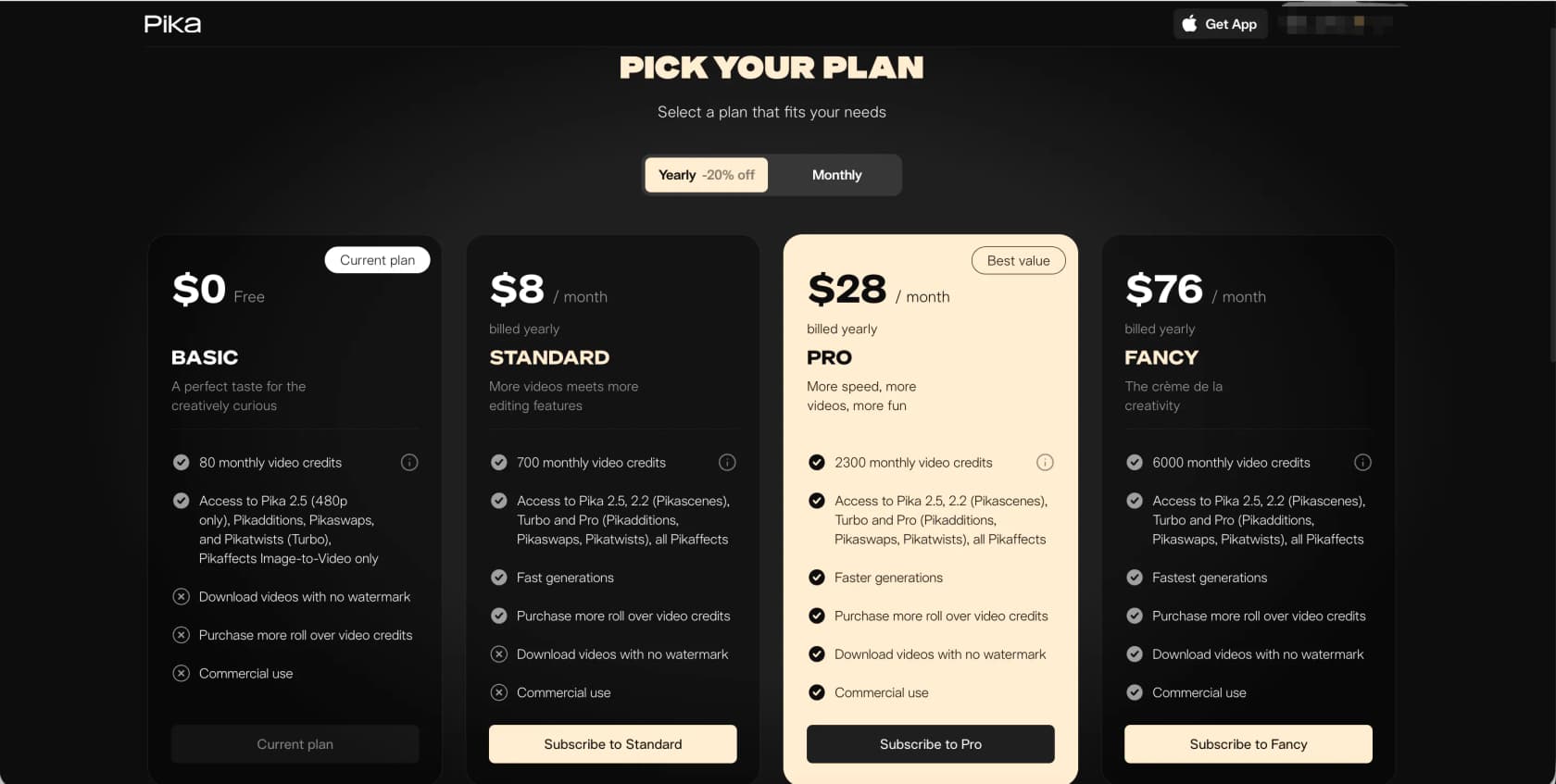
Pika offers four plans. All prices below are annual billing; monthly billing runs roughly 20% higher.
| Plan | Price (annual) | Credits/month | Watermark-free | Commercial use |
|---|---|---|---|---|
| Free (Basic) | $0 | 80 | No | No |
| Standard | $8/mo | 700 | No | No |
| Pro | $28/mo | 2,300 | Yes | Yes |
| Fancy | $76/mo | 6,000 | Yes | Yes |
On monthly billing: Standard is ~$10/month, Pro ~$35/month, Fancy ~$95/month.
The two columns that catch people off-guard: Standard does not include watermark-free downloads or commercial use rights. That is the single biggest gotcha in Pika's pricing. You can generate 700 credits' worth of content on the $8 plan, but every video you export is watermarked and cannot be used commercially. If you're making content for any professional or client purpose, Standard is essentially a higher-credit free tier - not a production plan.
Free plan restrictions beyond what the table shows:
- Pika 2.5 at 480p only (all paid plans unlock 720p and 1080p)
- Pikaffects limited to Image-to-Video only (no Video-to-Video Pikaffects)
- No Pikaframes (keyframe control is paid-only)
- Cannot purchase add-on roll-over credits
- Generation speed is standard (not fast)
How the credit system works
Every video generation on Pika costs credits. The number depends on the feature, resolution, and duration you choose. Credits are deducted whether the generation succeeds or fails - a consistent source of user frustration. Here is the full per-feature breakdown from pika.art/pricing:
Text-to-video and image-to-video (Pika 2.5)
| Quality | 5 seconds | 10 seconds |
|---|---|---|
| 480p | 12 credits (free) / 24 credits (paid) | 24 / 48 |
| 720p | 20 credits | 40 credits |
| 1080p | 40 credits | 80 credits |
Pikaffects
| Type | Credits |
|---|---|
| Image-to-Video (free tier) | 15 credits |
| Video-to-Video (paid only) | 18 credits |
Pikascenes, Pikadditions, and Pikaswaps
| Quality | 5 seconds |
|---|---|
| 480p | 20 credits |
| 720p | 35 credits |
| 1080p | 65 credits |
Pikatwists
| Model | Quality | Credits |
|---|---|---|
| Turbo | 720p | 60 credits |
| Pro | 1080p | 80 credits |
Pikaframes (keyframe interpolation, paid only)
| Quality | 5s | 10s | 10-15s | 15-20s | 20-25s |
|---|---|---|---|---|---|
| 720p | 20 | 40 | 60 | 80 | 100 |
| 1080p | 40 | 80 | 120 | 160 | 200 |
Pikaformance (audio-driven lip-sync)
3 credits per second on all plans. A 10-second performance = 30 credits.
How many videos does each plan actually buy you?
Using the most common generation - a 1080p five-second text-to-video clip at 40 credits - here is what each plan delivers per month:
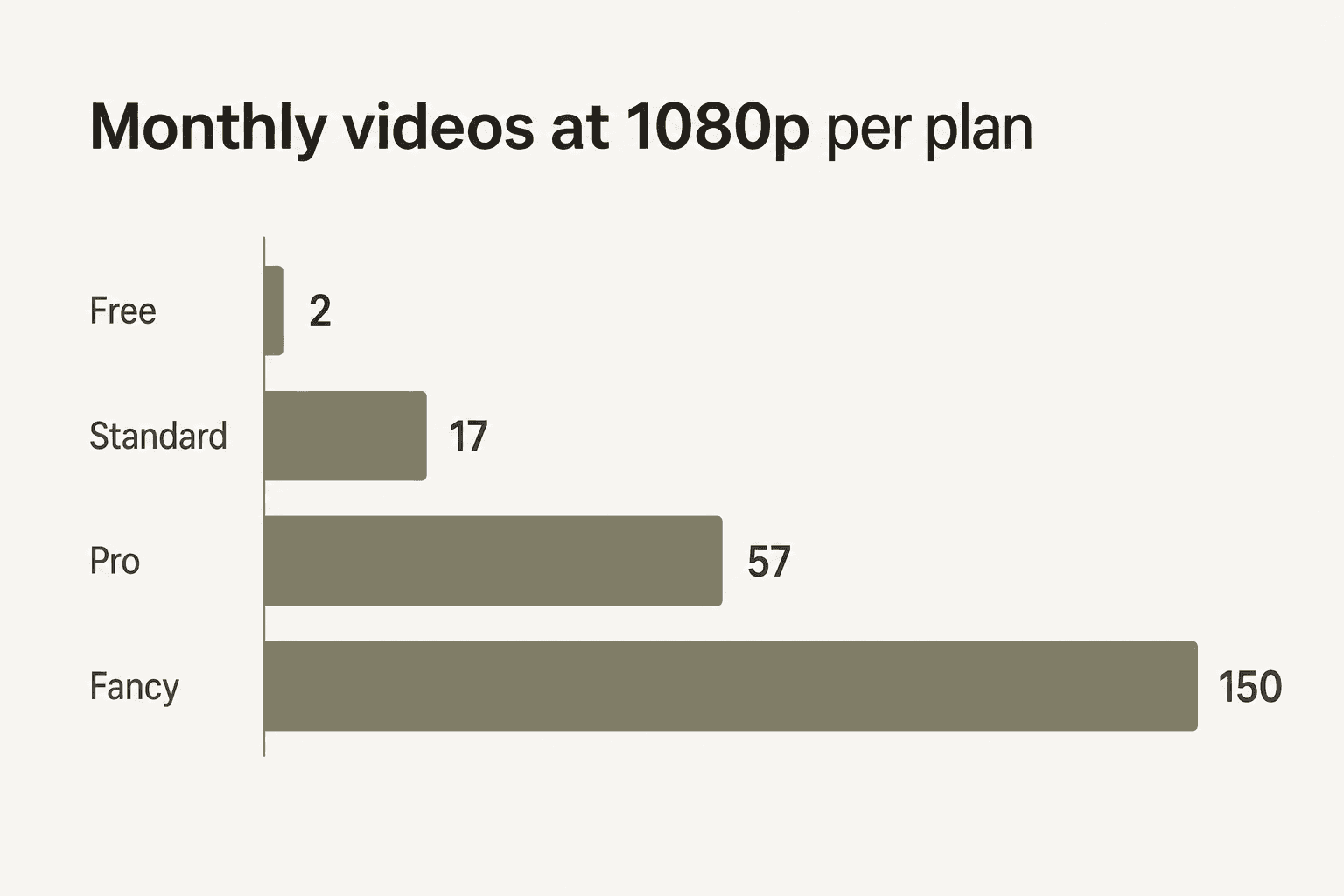
At 720p (20 credits each), those numbers double: Standard = 35 videos, Pro = 115, Fancy = 300.
The catch every Reddit thread about Pika AI mentions: AI video generation almost never succeeds on the first try. You will typically need 3-5 attempts to get one keeper. A creator targeting 20 final 1080p clips per month should budget for 60-100 generation attempts - and that math alone pushes past Standard's 700 credits.
"I have been absolutely loving the new pika video generator... Due to its unpredictable nature, realistically, to actually make anything worthwhile and satisfying, one must generate A LOT of duds and, let me tell you, you'll burn through those credits in a few minutes."

The free plan: useful for testing, not much else
The free Basic plan's 80 credits gets you:
- 6 attempts at a 480p Pikaffects clip (15 credits each)
- 4 attempts at a 480p video (20 credits each)
- 2 attempts at a 480p 5-second text-to-video clip (12 credits each)
80 credits disappears in a single session if you're trying anything creative. The free plan is best treated as a proof-of-concept demo rather than a real creative tool. No roll-over credits, no commercial use, no watermark-free exports. You cannot even buy add-on credits on the free tier.
One thing the free tier does offer that is legitimately useful: Pikaformance at 3 credits/second. A 10-second talking-head performance costs 30 credits and works at 720p on the free plan. That is a solid test if you are evaluating the lip-sync feature specifically.
Standard ($8/month): a strange middle ground
Standard gives you 700 credits and faster generation than the free tier. The problem is the commercial and watermark restrictions that carry over from the free plan.
A practitioner doing social media content for their own personal brand - TikToks, Instagram Reels, YouTube Shorts - can use Standard without the commercial restriction, since personal social media use does not typically require commercial licensing. But anyone producing content for a client, brand, or business purpose needs to step up to Pro at $28/month.
For personal social media use, Standard's 700 credits buys roughly 35 clips at 720p per month, which is respectable. The unlocked Pikaffects Video-to-Video (not on free) and access to all resolutions make it a meaningful upgrade from free. The ability to buy roll-over add-on credits also unlocks here.
The user who gets most value from Standard: a solo creator making personal social content who generates fewer than 35 videos per month at 720p and does not need commercial rights or watermark-free exports for any of them.
Pro ($28/month): where the platform gets serious
Pro at $28/month (annual) is the plan where Pika actually works as a production tool:
- 2,300 credits/month - enough for 57 clips at 1080p or 115 at 720p
- Watermark-free downloads - finally
- Commercial use rights - required for client work or branded content
- Faster generation - noticeably quicker queue times than Standard
- Add-on credits roll over - buy extra credits that persist across months
The jump from $8 Standard to $28 Pro is steep - 3.5x the price for 3.3x the credits, plus the commercial rights. For hobby creators who do not need commercial use, that gap is hard to justify. For anyone making content professionally, Pro is the minimum viable plan.
At $28/month, the effective cost per 1080p video (assuming a 3:1 attempt-to-keeper ratio) works out to roughly $1.47 per final published clip. That is competitive with stock footage subscriptions and considerably cheaper than hiring a motion designer for comparable work.
"I use Pika to create video assets for professional-level projects, including music videos, short films, proof-of-concept storyboarding, and cinematic test sequencing. It can get a bit pricey for the professional-level subscription. But it's still pretty competitive."
5-star App Store review, Pikaffects by Pika
Fancy ($76/month): for high-volume teams
Fancy gives you 6,000 credits at the fastest generation speed Pika offers. That is 150 clips at 1080p or 300 at 720p per month.
Who it's for: agencies or studios producing short-form video at scale, teams running multiple brand accounts, or anyone whose workflow genuinely needs more than Pro's 2,300 credits per month. At the Pro-to-Fancy step, you are paying 2.7x more for 2.6x the credits, so the unit economics are roughly flat. The main wins are speed and volume headroom.
For a solo creator, Fancy is overkill unless you are consistently burning through Pro's allocation. The community consensus on Reddit - "best budget" for social-media content - applies most cleanly to the Pro tier, not Fancy.
Add-on credits: the safety valve
All paid plans can purchase add-on credit packs that carry over indefinitely:
| Pack | Credits | Cost per 1,000 credits |
|---|---|---|
| $10 | 375 | $26.67 |
| $20 | 750 | $26.67 |
| $30 | 1,125 | $26.67 |
The catch: add-on credits run at $26.67 per 1,000 credits, versus $11-13 per 1,000 on any plan subscription.
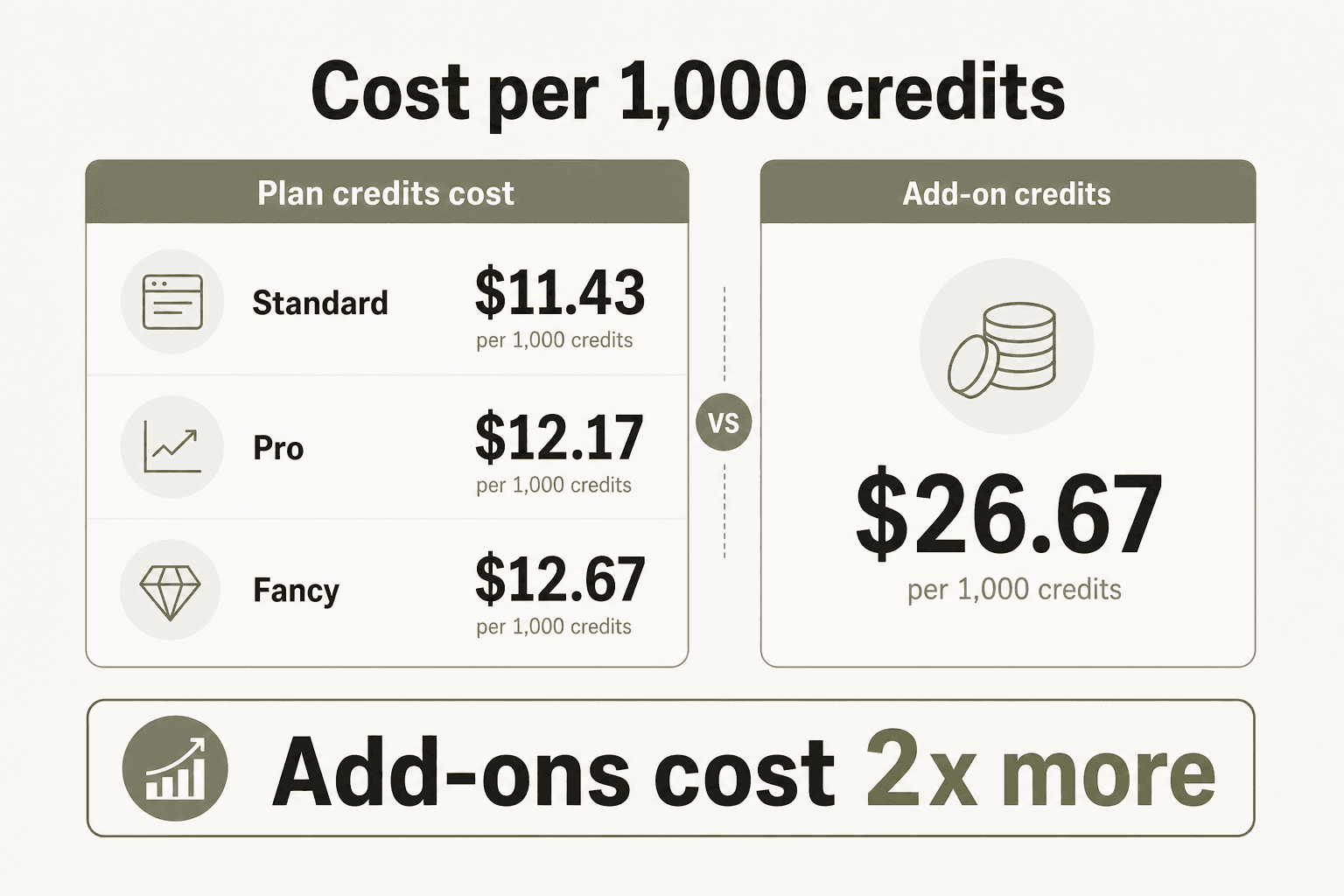
Add-ons cost roughly twice the per-credit rate of your plan subscription. The right use for them: occasional overflow in a month where you have a big project, not as a regular monthly top-up. If you are buying add-ons every month, you would save money upgrading to the next plan tier instead.
The math: a Pro subscriber who buys $10 in add-ons monthly is effectively paying $38/month. That is close to Pro's monthly billing rate ($35/month without the annual commitment). Annual commitment with disciplined add-on use is the cheapest path.
What the hidden costs actually add up to
The pricing page tells you the plan costs. Here is what it does not tell you as clearly.
Credits burned on failed generations. Every attempt costs credits, whether or not the output is usable. In practice, 30-50% of generations either fail outright or produce unusable output. A user on Trustpilot wrote: "Paid upfront for 50 credits. Managed to create 6 videos but for the past 3 weeks all I got were 'generation failed' and no response from support." Pika's Trustpilot score is 1.6/5 with 87% one-star reviews - driven almost entirely by billing confusion and unresponsive support, not by feature quality.
Annual commitment lock-in. Yearly billing saves 20% but locks you in for 12 months. Several users on Reddit describe regretting annual upgrades when the platform's output quality did not match their expectations after signing up based on promotional demos.
The "good video requires many attempts" multiplier. Jon Finger, whose Pikadditions demo earned 1,474 LinkedIn likes, noted in the comments: "I'm just clipping out sections... The rest is just typing what you want your characters to do and being patient with a lot of reruns and testing variations in language." Every iteration costs credits.
Worked example: a freelance social media creator
Say you need 20 published clips per month at 1080p for a client. Accounting for a 4:1 attempt-to-keeper ratio, you need roughly 80 generation attempts. At 40 credits each, that is 3,200 credits.
- Standard (700 credits): not enough - you would need ~$25 in add-ons, making real monthly cost ~$33
- Pro (2,300 credits): still 900 short - you would need ~$24 in add-ons, making it ~$52/month
- Fancy (6,000 credits): comfortably covered at $76/month
For this use case, Pro plus a regular $20-30 add-on each month is cheaper than Fancy ($48-58 vs. $76) while still meeting commercial requirements. Run your own numbers before assuming Fancy is the efficient choice at volume.
Who should pick which plan
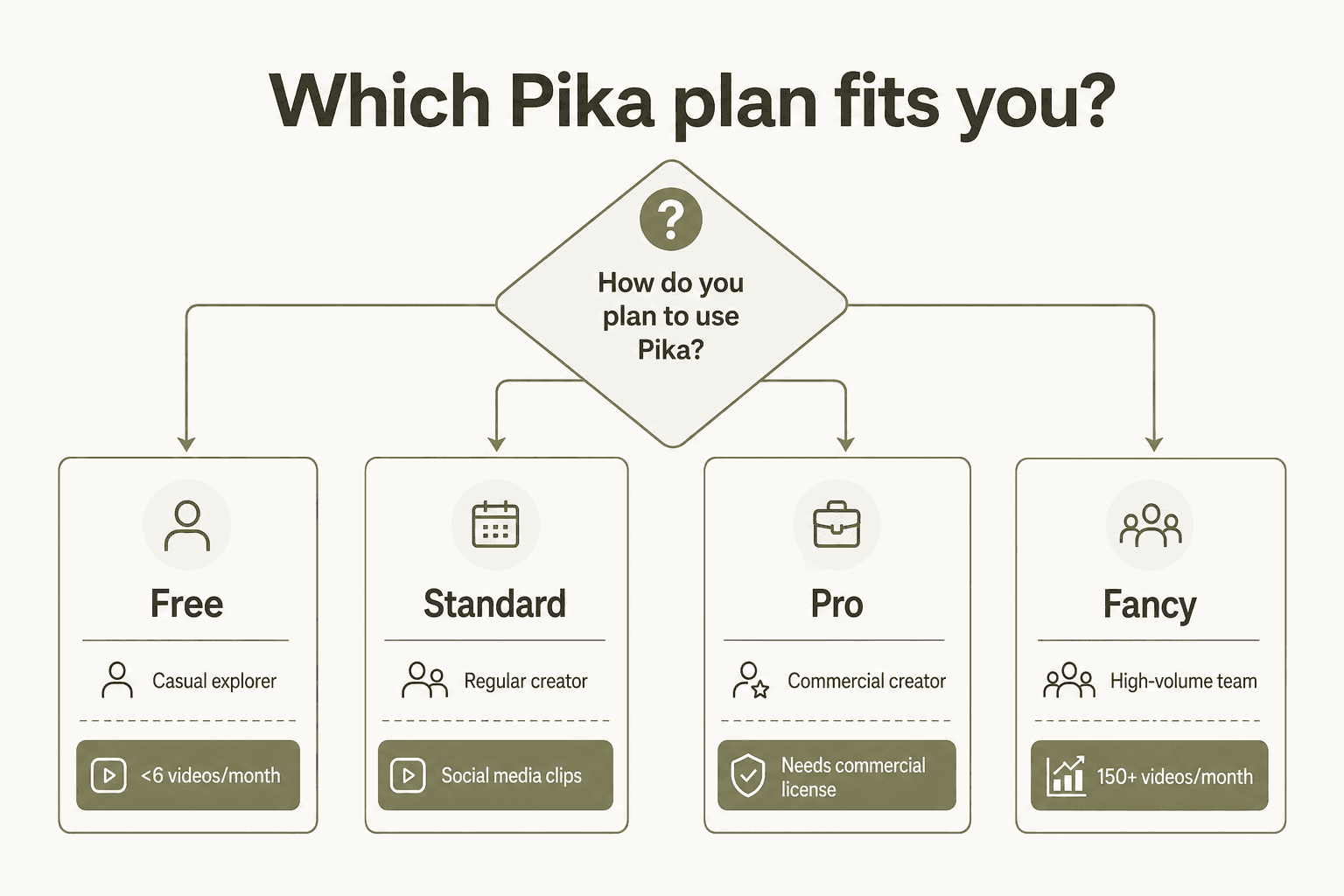
Free: You want to see what Pika does before committing. Realistic for testing a handful of Pikaffects clips or a Pikaformance lip-sync. Not usable for regular production.
Standard ($8/month): Personal social media use only - your own TikTok, Reels, or Shorts, with no commercial intent. You generate fewer than 35 clips per month at 720p and do not need to share watermark-free files with anyone.
Pro ($28/month): The minimum viable plan for any professional or commercial use. Client work, brand content, agency output - it starts here. Also the right choice for any creator who wants watermark-free videos for their own portfolio.
Fancy ($76/month): High-volume teams generating 100+ final clips per month, or anyone who genuinely burns through Pro's 2,300 credits regularly. The speed upgrade matters when you are running a production pipeline.
For the majority of Pika AI users doing individual professional or semi-professional work, Pro at $28/month is the most sensible entry point. It is the lowest tier where the product is fully unlocked. Standard, despite its appealing $8 price tag, has enough restrictions to make it feel like a paid version of the free tier rather than a genuine step up for commercial creators.
"Pika Labs stands out as an accessible and creative AI video generation platform... ideal for creators who want to produce expressive, short-form video content fast."
Fluck Soomro, December 2025, LinkedIn hands-on review

How Pika pricing compares to alternatives
For context, here is how Pika sits against the tools that community tier lists most often put alongside it:
| Tool | Starting paid price | Free tier | Commercial from | Max video length |
|---|---|---|---|---|
| Pika | $8/mo (Standard) | Yes, 80 credits | $28/mo (Pro) | ~25s (Pikaframes) |
| Runway Gen-4.5 | ~$15/mo | Yes | ~$15/mo | 16s |
| Kling 2.x | ~$8/mo | Yes | ~$8/mo | 10s |
| Sora (ChatGPT Plus) | $20/mo | No | $20/mo | 60s |
| HeyGen | $29/mo | Limited | $29/mo | Varies |
Pika is competitive on price at paid tiers, and its free plan is a genuine try-before-you-buy option. The main knock versus alternatives to Pika at similar price points is output consistency for longer or more narrative content - a limitation the community is candid about. For short-form social media clips where the quirky Pikaffects are the point, that trade-off is often fine.
The App Store rating for Pikaffects is 4.7/5 from 3,400+ ratings, which tells a clean story about the product itself when the billing machinery is out of the way. That disconnect between Trustpilot's 1.6/5 billing complaints and App Store's enthusiastic feature reviews is probably the most honest summary of Pika: genuinely good at what it does, frustrating to deal with when something goes wrong. For an honest deeper look at both sides, our Pika AI review covers the full picture.
Try eesel
If you're building a content production workflow that goes beyond video - blog posts, knowledge bases, automated content at scale - eesel is an AI teammate platform that runs autonomous agents inside your existing tools. The eesel blog writer agent researches, drafts, and publishes long-form content without a human in the loop, at $4 per post with no seat fees or platform minimum. It starts with 100 free credits - no card required.