Twig AI alternatives: 10 picks for support teams in 2026

Rama Adi

Katelin Teen
Last edited October 14, 2026

Why people go looking for Twig alternatives
Let me start with the thing that sent me down this road, because it is not really about Twig.
A few months back a swimwear brand ran twelve test chats through an eesel agent on Gorgias, with 151 documents connected. The agent did well. Twelve for twelve, no drama. Then they opened the billing page and immediately filed two cancellation requests, one of which just read "PLEASE CANCEL MY subscription". Nothing had broken. The product worked exactly as demoed. What broke was that the price only became real after the trust did, and in the wrong order those two things fight each other.
That is the exact shape of the Twig problem, and it has nothing to do with Twig being bad. It is that a buyer researching customer support automation ends up holding two incompatible pictures of the same company.
Here is picture one, straight from the company's own about page: "Twig is the autonomous AI support platform for B2B SaaS, fintech, and ecommerce teams. We triage, self-evaluate, and resolve Tier 1 support tickets end-to-end." It integrates natively with Zendesk, Salesforce and 27 other support tools. Its call to action is literally "See how Twig resolves tickets for $5 each". The careers page agrees, describing a company "building autonomous AI agents that resolve 70%+ of Tier 1 support tickets end-to-end" for 1,200+ support teams.
Picture two is the homepage: "Meet Sera. Your AI front desk that never sleeps." Books appointments, generates leads, answers questions. Four live demos run on that page: a dental front office, a mortgage lender, an auto dealership and an AI SDR. The industries page carries twelve verticals, and five of them are straightforwardly receptionist work, three of those using the word outright: an "AI Dental Receptionist" booking into Dentrix, an "AI Receptionist for Plumbers, HVAC & Electricians" dispatching into ServiceTitan, an "AI Medspa Receptionist" writing into Boulevard and Mindbody.
Both pictures are real. They point at two different buyers, holding two different definitions of an AI customer service chatbot. The company is small enough that this matters: Crunchbase lists Twig at 1-10 employees, founded in 2022 by Chandan Maruthi, backed by Race Capital and Path VC. A team that size pointing at both dental clinics and B2B SaaS support desks is making a bet, and you are entitled to ask which side of it your roadmap sits on.
The two rate cards, side by side
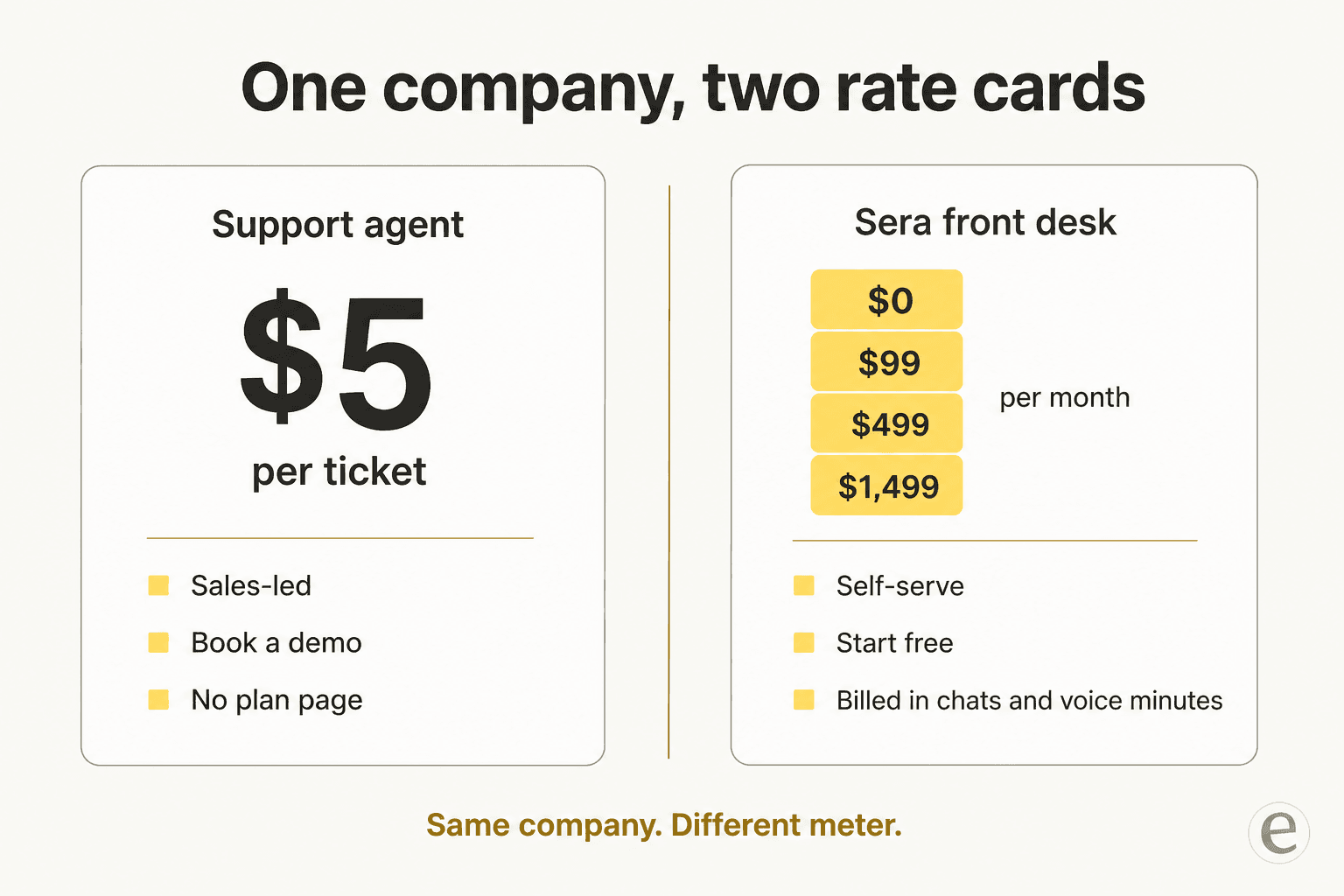
The pricing page is titled "Sera AI Receptionist Pricing" and it is perfectly clear about what it sells. Free gets 100 chats. Starter is $99 for 500 chats. Growth is $499 for 2,000 chats plus 300 voice minutes. Scale is $1,499 for 10,000 chats plus 2,000 voice minutes. Overages are $100 per 1,000 chats and $1 per voice minute, and I have to give Twig credit for the cleanest voice-minute definition I read all week: "Any inbound or outbound phone conversation Sera handles end-to-end… billed by the minute. Hang-ups under 10 seconds don't count."
Two things follow from that page. Voice does not appear until $499, so the "chat and phone" promise only fully lands two tiers up. And there is no annual billing and no per-seat line, which is refreshing, but also no ticket meter, which is the whole problem if tickets are what you have.
Meanwhile the $5/ticket figure lives on the compare page and the about page, and nowhere else. That page's stat strip reads $5 per ticket, 30 minutes setup, 70% auto-resolution, "Free tier available", and its only button is Book a Demo. So the honest reading is not that Twig hides its price. It is that Twig runs two motions: a self-serve receptionist with published tiers, and a sales-led support agent whose rate card has no plan page behind it. Worth knowing before you build a business case on the $5.
One more wrinkle in the same table: Twig's compare page calls its own model a "Transparent $5/ticket rate card" in the Maven AGI row and "Transparent pay-per-answer pricing" in the Sierra row. Ticket and answer are not the same unit when a thread runs eight replies deep, and the difference between the two is the whole subject of pay-per-resolution pricing. I would get that pinned in writing.
What $5 a ticket looks like next to everyone else
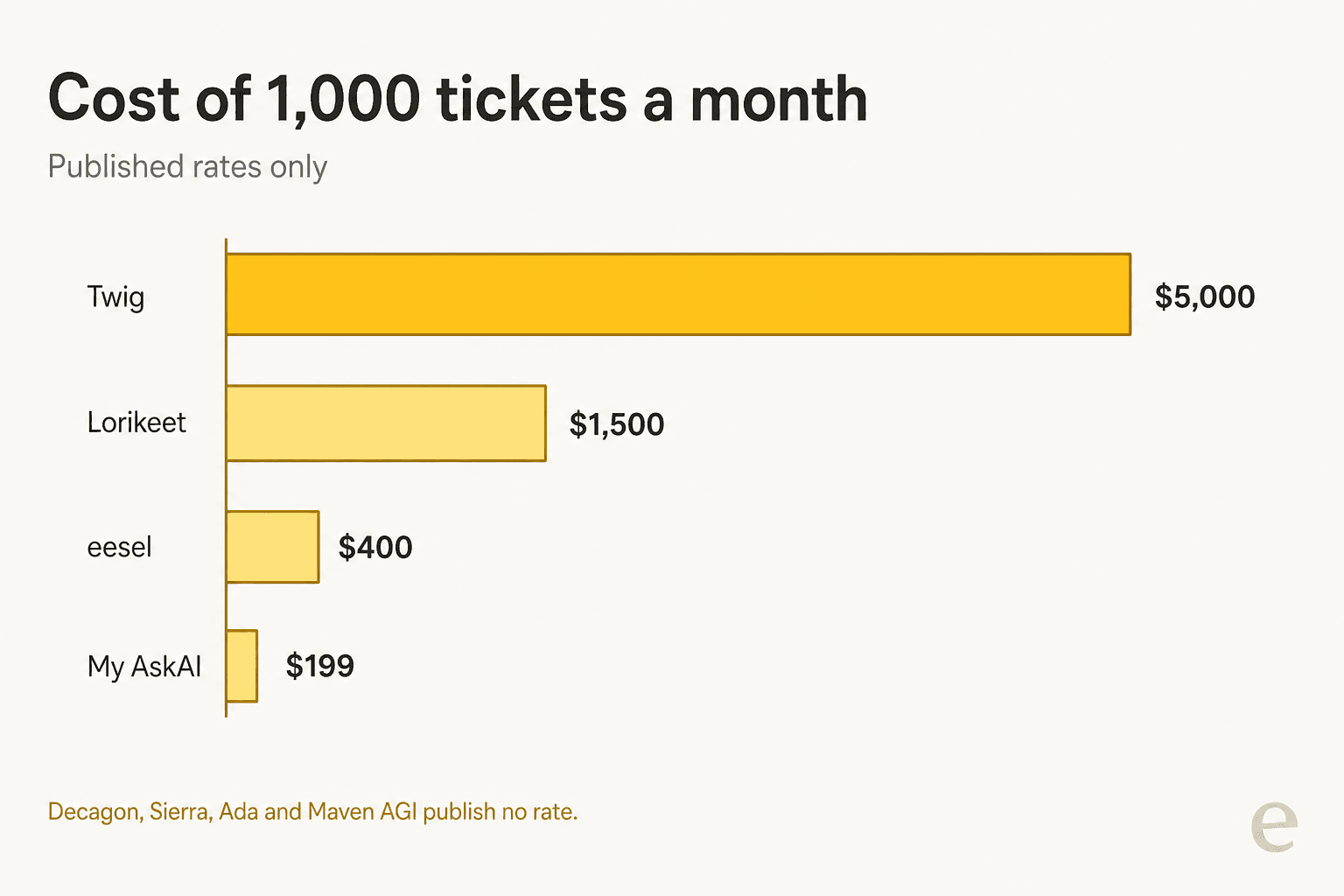
The sharpest framing of per-unit support pricing I have seen came from a Hacker News thread, and it converts the rate into something you can feel:
"These outcomes also skew heavily towards the easy stuff for LLMs to get. So tickets that take a human 1 min to respond to now cost you $0.99 ($60+/hour) and you are stuck only doing the hard tickets."

That is about a 99-cent rate. Twig's published rate is five times it. And the objection is not fringe. It turns up wherever operators talk shop about ticket deflection:
"the idea that $1-2 per resolution is 'not objectively expensive' is far from reality for most businesses. […] similar AI-powered support tools and chatbot services in the market typically charge a fraction of that, often in the range of $0.05 to $0.20 per ticket or interaction"

To be fair to the model, per-ticket has one real virtue over per-resolution: nobody has to argue about what counts as resolved. It cuts the other way too, though: a per-ticket meter bills spam, duplicates and failed attempts that escalate. Either way, the number is the number, and $5 is the top of the published field. If you want the arithmetic against a human baseline, we worked through cost per resolution and AI vs human cost separately.
What Twig actually ships today
This is where the research got more interesting than the marketing, and where I want to be careful to be fair.
The most concrete artefact I found is Twig's own demo shot of its Zendesk app. It shows an agent-assist sidebar rather than an autonomous resolver: a draft answer, an Accept button, a "tell how to rewrite" box, and a Citations section.
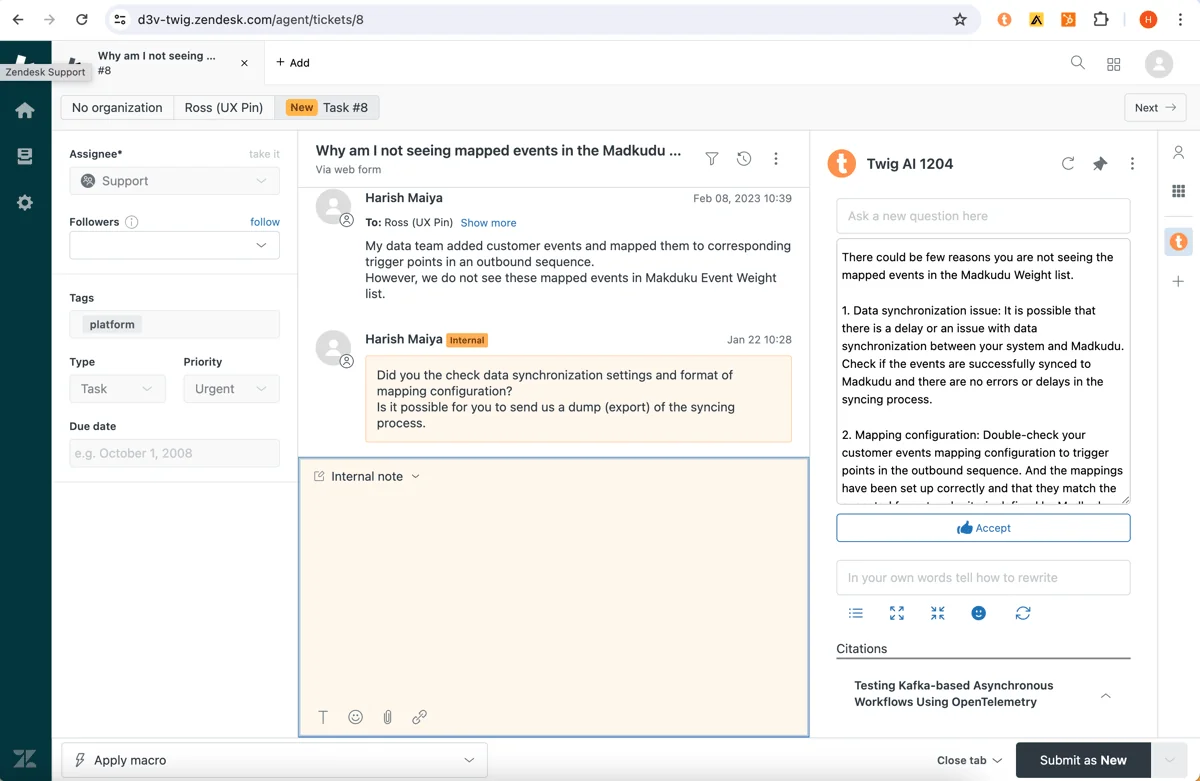
Source citations on every answer are a good design decision and I would not undersell it. A support lead can see where a claim came from before it goes out. That is the part of Twig I would keep.
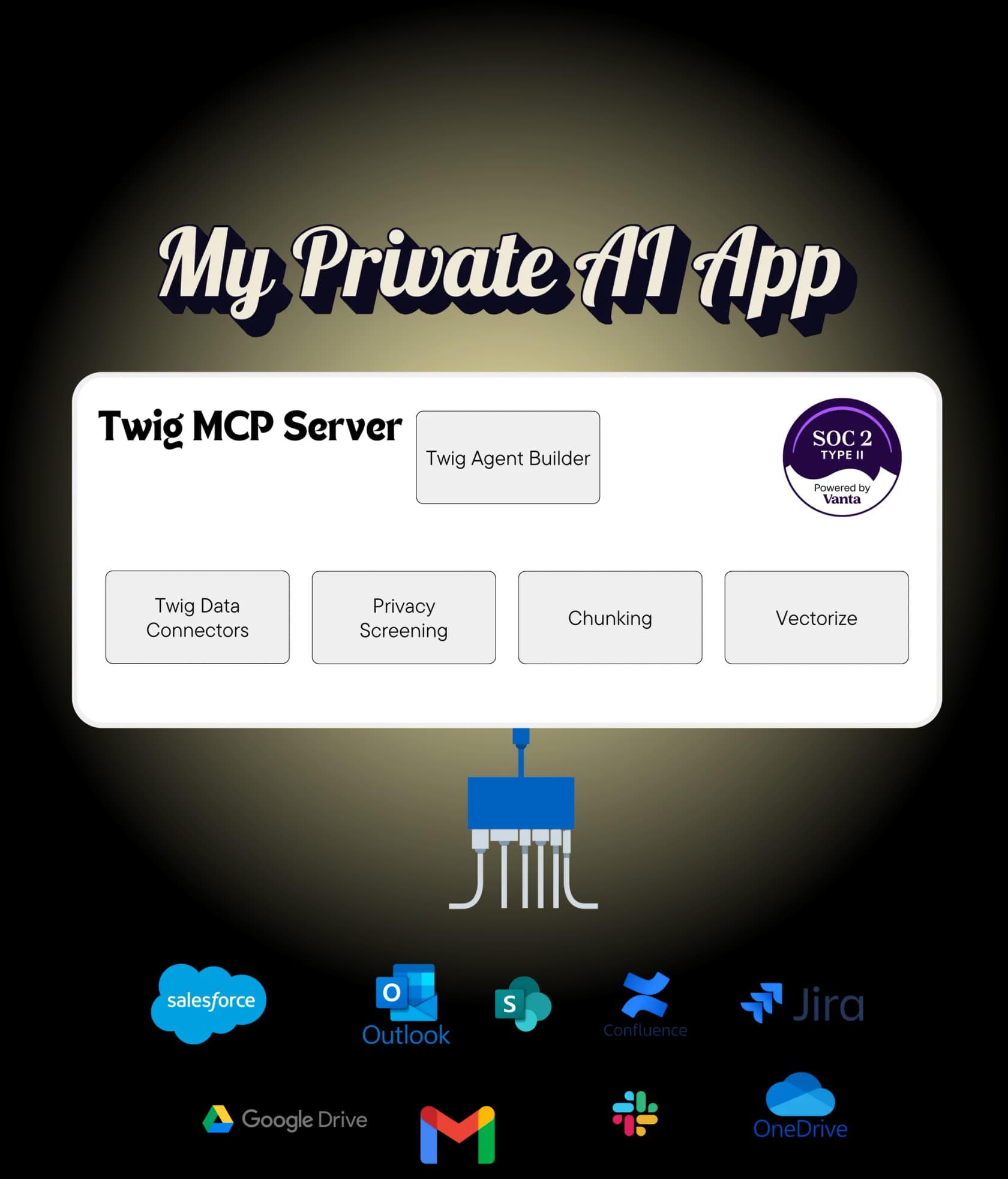
The product page documents the runtime as six steps: understand intent, triage to scenario, check agent config, generate response, self-evaluate, send. Deployment surfaces are a web widget, email, Slack and browser extensions. It claims "30+ Data Connectors", then names seven: Zendesk, Slack, Confluence, Google Drive, OneDrive, PostgreSQL and MongoDB. The developer docs do not close the gap; the index is 48 topics, 22 of which are a general-purpose book about RAG rather than product documentation, and no connector directory appears there at all.
There is also a separate MCP server, which is a nice touch and easy to misread. It runs one direction only: it lets Cursor or Claude read Twig's knowledge base through three tools, check_mcp_server_health, search_knowledge and ask_a_question. It does not let Twig act inside your other tools. Auth is a static bearer key plus an agent ID, with no OAuth.
Three more things a buyer should check rather than assume:
- Training inputs contradict themselves across the funnel. The SaaS industry page says "Twig ingests help center articles, product docs, past tickets, and internal wikis", but the use-case page behind it lists only "your knowledge base, help center, and product docs" with past tickets absent, and the homepage's training inputs are website, docs and FAQs. Past-ticket ingestion is the difference between an agent that sounds like your team and one that sounds like your help centre, and it is why we wrote a whole guide on knowledge base training. Get it confirmed.
- There is no documented dry run. Nothing on any Twig page describes simulating against your own history before go-live. The quality gate is per-response self-evaluation at runtime, and the pitch is "live in under 30 minutes". Those are different philosophies, not a bug, but you should know which one you are buying.
- Security is thin on the page, and one claim outruns it. The security page is about ninety words: SOC 2 Type 2, AES-256 at rest, TLS 1.3 in transit, SSO and SAML, RBAC, audit logs, PII redaction, and US or EU data residency, which is a solid list for a team of ten. But HIPAA appears nowhere on it, while the medspa industry card markets Sera as "HIPAA-compliant". The privacy page is still a placeholder reading "Privacy policy content coming soon". If you handle patient data, that is a question for the call, not the website.
The proof set has the same split. All six named customers, Basis Technologies, Wiser, Climb Credit, Vouched, Baby Led Weaning and TFX, are software, fintech or online-services teams. None is a dental practice or a dealership, none describes phone answering or appointment booking, and none publishes a hard number or a customer quote. The Basis study is the one to look at closely: the homepage claims "90% Faster First Response", the case study's own URL says 60%, and the page body contains no percentage at all.
On reviews, Twig sits at 4.9 out of 5 from 10 reviews on G2. Always print the count next to that score. Four of the ten came through G2 invites, three of those flagged as incentivized, and only one is dated after February 2025. Read them and you will notice they praise internal knowledge retrieval, RFP answering and finding product information, which is the older product, not the autonomous resolver or the front desk. I also went looking for third-party discussion on Reddit, Hacker News, X and LinkedIn and found none about this Twig, only the PHP templating engine of the same name. For a vendor asking $5 a ticket, that absence is worth weighing.
How I picked these ten
Short methodology, because a roundup without one is just a list.
I scraped each vendor's own pricing, docs and product pages rather than relying on comparison posts. Then I checked the four things that decide whether an AI helpdesk agent survives contact with a real queue: what the billable unit actually is, whether the agent learns from your past tickets or only your help centre, whether you can rehearse before customers arrive, and whether you can find out the price without a sales call. Triage quality matters too, which is why AI ticket classification sits in the table. Community evidence came only from Reddit, Hacker News, G2, Trustpilot and X, with permalinks.
The rehearsal question is the one I would not compromise on, and it separates this field more cleanly than any feature grid.
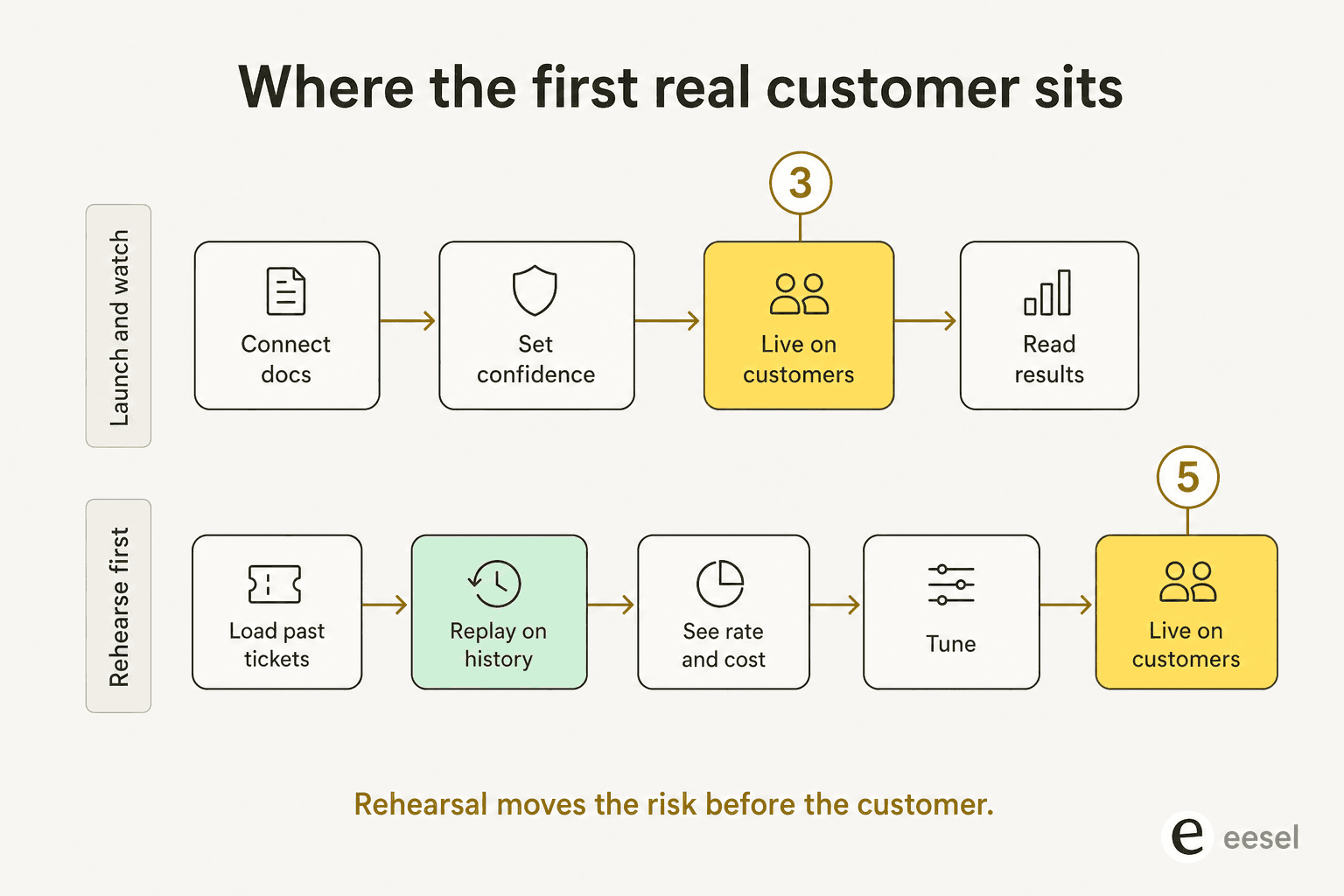
We learned this the hard way, over years of putting agents onto live queues: a confident-sounding bot that is wrong is worse than no bot, because it burns the goodwill you need to try again. So the sequence matters more than the model. One trial we ran on real Zendesk traffic scored 93% triage accuracy and 100% spam detection on an inbox that was 22% spam, but only 12% of its drafts went out unedited and 7% carried a factual error. You cannot see numbers like that from a demo. You can only see them by running the thing over your own history.
To be straight about it: eesel is not alone here. Lorikeet's simulation is excellent and in some ways more rigorous than ours. What is unusual is how few of the ten do it at all.
The 10 best Twig AI alternatives, compared
| # | Tool | Best for | Billable unit | Entry price | Self-serve | Trains on past tickets | Rehearsal before go-live | Voice | Helpdesk integrations | Security claims | Reviews (with count) |
|---|---|---|---|---|---|---|---|---|---|---|---|
| 1 | eesel AI | Teams that want to rehearse before spending | Per ticket or chat session | From $299/mo (500 credits), 100 free credits | Yes | Yes, automatic | Yes, replays real past tickets | No | Zendesk, Freshdesk, Gorgias, Front, Help Scout, HubSpot, Salesforce, JSM | SOC 2 Type II certified, GDPR, CCPA; HIPAA on request | 4.6/5, 60+ on G2 |
| 2 | My AskAI | Small teams that want the cheapest real deflection | Per resolved ticket | $199/mo, 1,000 tickets | Yes | Yes, "train on historic tickets" | Unspecified "ways to test" | No | 6 helpdesks incl. Zendesk, Freshdesk, Gorgias, HubSpot | SOC 2 Type II on Scale+ only | 4.9/5 from 19, vendor-aggregated |
| 3 | Lorikeet | Complex, regulated queues that must not improvise | Credits per resolution | $1,500/mo, annual | No | Not for answering | Yes, strongest of the ten | Yes | Zendesk, Front, Help Scout, Salesforce, HubSpot, Slack | SOC 2 Type 2, ISO 27001; HIPAA BAA on Scale+ | 3.2/5 from 1 on Trustpilot |
| 4 | Decagon | Enterprise CX writing agent logic in plain English | Per conversation or per resolution | Not published | No | Not documented | Simulations, not your history | Yes, 70+ languages | Zendesk, Salesforce, Genesys (from its own graphic) | Trust centre, no cert named on site | 4.9/5 from ~18 on G2 |
| 5 | Sierra | Enterprises that want to pay on outcomes | Resolved outcomes, blended | Not published, /pricing 404s | No | Transcripts for build, not retrieval | Simulations, scope unstated | Yes, 55+ languages | None named | SOC 2, ISO 27001, ISO 42001, HIPAA, PCI DSS, FedRAMP | 4.1-4.3/5 from 17 on G2 |
| 6 | Ada | Global brands needing 40+ language voice | Not published | Not published | No | No, KB and crawl only | Yes, but hand-written cases | Yes, 42 languages | 25 named, incl. Zendesk, Salesforce, ServiceNow, Gorgias | SOC 2 Type II, HIPAA, GDPR, PCI DSS, AIUC-1 | 4.6/5 from 173 on G2 |
| 7 | Maven AGI | Enterprises layering AI onto an existing helpdesk | Not published at all | Not published | No | "Interaction logs", unclear | Not documented | Yes | Zendesk, Salesforce, Freshdesk, Slack | SOC 2 Type 2, ISO 27001/42001, HIPAA, PCI DSS | ~16 reviews on G2, score not pinned |
| 8 | Thena | B2B accounts supported in Slack | Per user seat | $29/user/mo, annual | Yes | Not documented | None documented | No | Is the helpdesk; HubSpot, Salesforce, Jira, Linear | None named in text | Not published |
| 9 | Retell AI | Building a phone front desk you can cost out | Per call minute, by component | $0, $10 free credits | Yes | No, crawl and uploads | Yes, graded test cases | Yes, inbound and outbound | None live; Zendesk "coming soon" | SOC 2 Type II, HIPAA, GDPR | Not verified, do not quote |
| 10 | Synthflow | High-volume voice with owned telephony | Per call second | From $30,000/year | No | No, crawl and Zendesk KB | Yes, AI-generated scenarios | Yes, own SBCs | Zendesk KB import, Freshworks voice | SOC 2, GDPR, ISO 27001; HIPAA badge only | 4.5/5, 1,000+ (vendor badge) |
What a thousand tickets actually costs
The table gives you rates. This gives you your number. Move the volume to your own and see where the published prices land.
1. eesel AI
Best for: support teams who want to see how an agent handles their own tickets before paying for a single one.
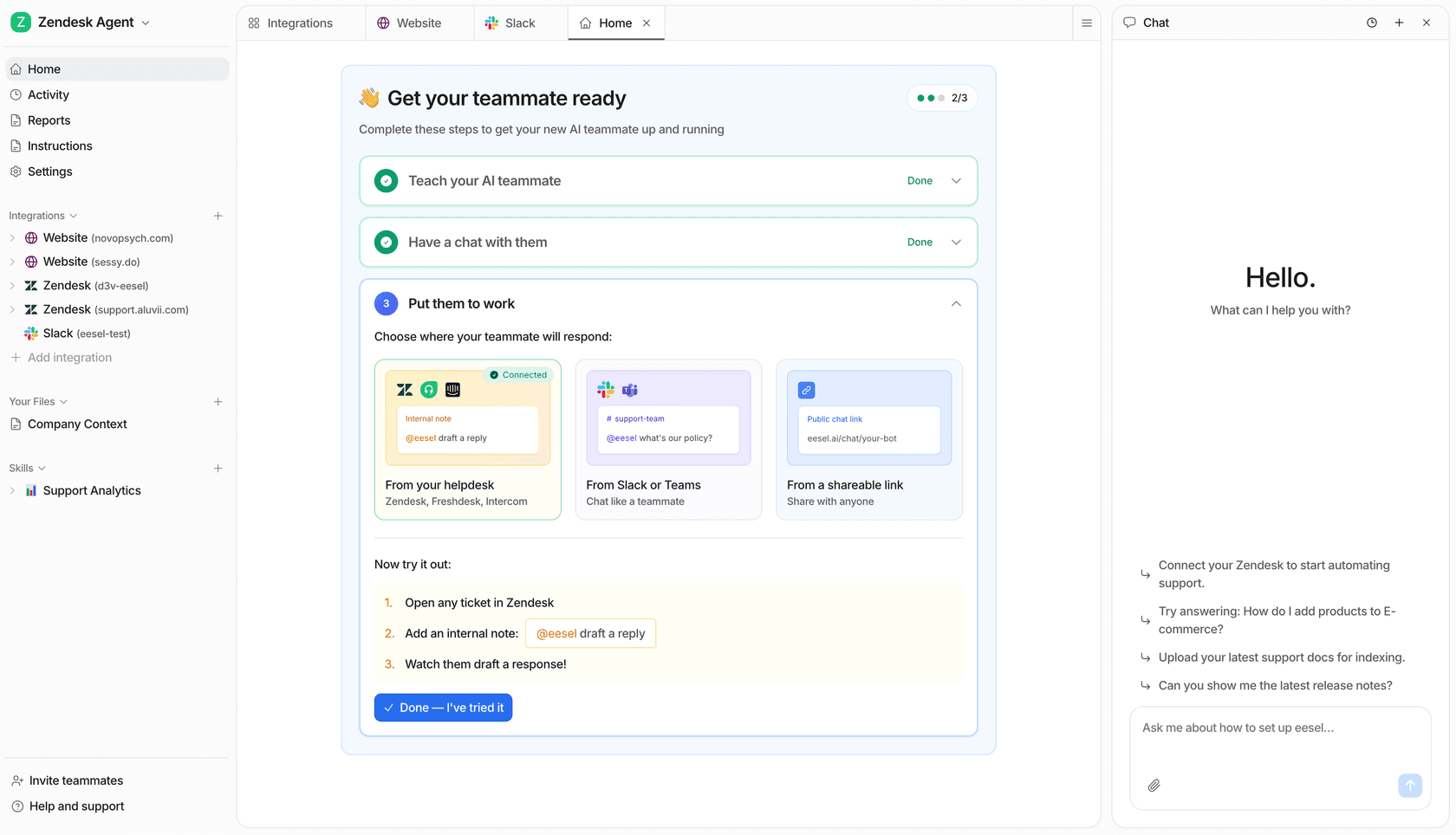
What it is. I work on this one, so take the enthusiasm with the appropriate salt and check the claims. eesel is an AI teammate that plugs into the helpdesk you already run, learns from the tickets you have already solved, and starts drafting or resolving from there. The bit I own is the integration layer, and the design principle behind it is worth saying plainly because it is where most of these products quietly differ: every integration is a set of sources, triggers and actions, and connecting one only grants access. Nothing happens until you switch on a trigger. A quick connection reads your public content without a sign-in; a full connection signs in properly and unlocks past tickets, triggers and actions.
That matters for the Twig question about training inputs. On Zendesk, eesel imports help centre articles, past tickets and macros automatically, with no manual training or data labelling, and the docs recommend pointing it at Solved and Closed tickets.
It is the same shape on Freshdesk and Gorgias, where it also reads Shopify order data, and on Front it pulls knowledge base articles, past conversations and canned responses.
Then the part I would actually sell you on. From the docs: "Ask your agent in chat to run a simulation. With a helpdesk connected it replays your real past tickets and compares its answers to what your team actually sent; without one it generates realistic test cases instead. Either way you get back specific gaps and suggested instruction changes, so you're editing from evidence rather than guessing." You get a per-theme breakdown, so you see "refund policy, 28%" and know exactly which gap to close.
Pricing. One fixed monthly price sized to volume, where one ticket or chat session is 1 credit no matter how many messages go back and forth. Blog generation is $4.00 per post. No platform fee, no per-seat fee. There is a free plan with 100 credits, no card. Paying a year upfront gets two months free, and if you run out you can turn on overage at $0.80 per extra credit with a monthly cap you set. SSO, data residency and priority support are add-ons.
| Credits per month | Price |
|---|---|
| 500 | $299/mo |
| 1,000 | $499/mo |
| 1,500 | $699/mo |
| 2,500 | $999/mo |
| 3,500 | $1,349/mo |
| 5,000 | $1,899/mo |
| More than 5,000 | Talk to us |
Only tickets the agent actually works on use a credit. Route only part of your queue and you only pay for that part, which is how a gradual rollout of AI ticket automation is supposed to work.
Pros
- Simulation over your real ticket history before go-live, and before any spend.
- Billed in a unit you already track, with the whole thread counted once.
- Nine helpdesks including Help Scout, Salesforce, HubSpot and Jira Service Management, plus Slack, Teams, WhatsApp and a Chrome copilot; 80+ languages.
- Public pricing, self-serve signup, no sales gate.
Cons
- SOC 2 Type II is certified, and HIPAA is available on request only. If you are a covered entity, this is a real blocker until you confirm it.
- No voice channel, so it does not replace Sera's phone answering at all.
- Failed tasks are still billed, because the compute was spent either way.
- Not the right tool if you want one vendor to own both your phone line and your inbox.
My take: if your tickets arrive in a helpdesk and you have any history to learn from, this is the one I would start with, mostly because the rehearsal step turns a leap of faith into a measurement. Gridwise reported 73% of its tier-1 deflection resolved in the first month, with the shape of the result visible inside a 7-day trial. Skip it if you need voice or an Enterprise-grade compliance pack today.
2. My AskAI
Best for: small teams for whom $5 a ticket is simply not happening.
What it is. The most direct answer to Twig's price. My AskAI bolts an agent onto the helpdesk you already have and answers tickets before a human sees them, and it is refreshingly blunt about the commercial model: "Pricing so good, we don't need to hide it behind a sales call." It is also the only vendor on this list besides eesel that documents training on your ticket history, listing "train on historic tickets" directly on the pricing page alongside automated self-learning from your agents' replies.
Pricing. Pro is $199/month for 1,000 tickets, then roughly $0.12 per extra ticket up to 5,000. Scale is $499/month for 2,000 tickets, then $0.10 each. Enterprise starts from $999/month. Annual billing takes 33% off. Headline claim: "60% AI resolution. Or your money back." 30-day unlimited free trial, no card.
Pros
- Cheapest published per-ticket economics on this list, at about $0.10 to $0.20 all-in.
- Trains on historic tickets and self-learns from agent replies.
- Real money-back resolution guarantee, which is rare.
- Really is self-serve, with a long free trial.
Cons
- Only six helpdesks are supported, and Help Scout is not among them.
- SOC 2 Type II sits on Scale and Enterprise, not on the $199 Pro plan.
- Branding removal and API/Slack/Teams access are each $49/month extras on Pro.
- Pre-launch testing is described only as "multiple ways to test", with no named simulation mechanism.
- No independent review corpus with permalinks; the 4.9/5 from 19 is vendor-aggregated across G2 and app stores.
My take: if you are a small team on Zendesk, Freshdesk, Gorgias or HubSpot and the goal is cutting cost per ticket, this is the sharpest value on the page. Move up a tier if you need SOC 2. Skip it if your helpdesk is not one of the six.
3. Lorikeet
Best for: regulated queues where the agent must follow the same steps every single time.
What it is. Lorikeet calls itself an "AI Customer Concierge for complex companies" and aims squarely at fintech and healthtech. The architecture is the interesting part: the agent makes exactly one agentic decision, which named Outcome the conversation should end in, and then that Outcome's actions fire in a fixed, deterministic order every time. It can also spawn sub-agents that phone, text or email third parties, like a doctor's office, to finish a job.
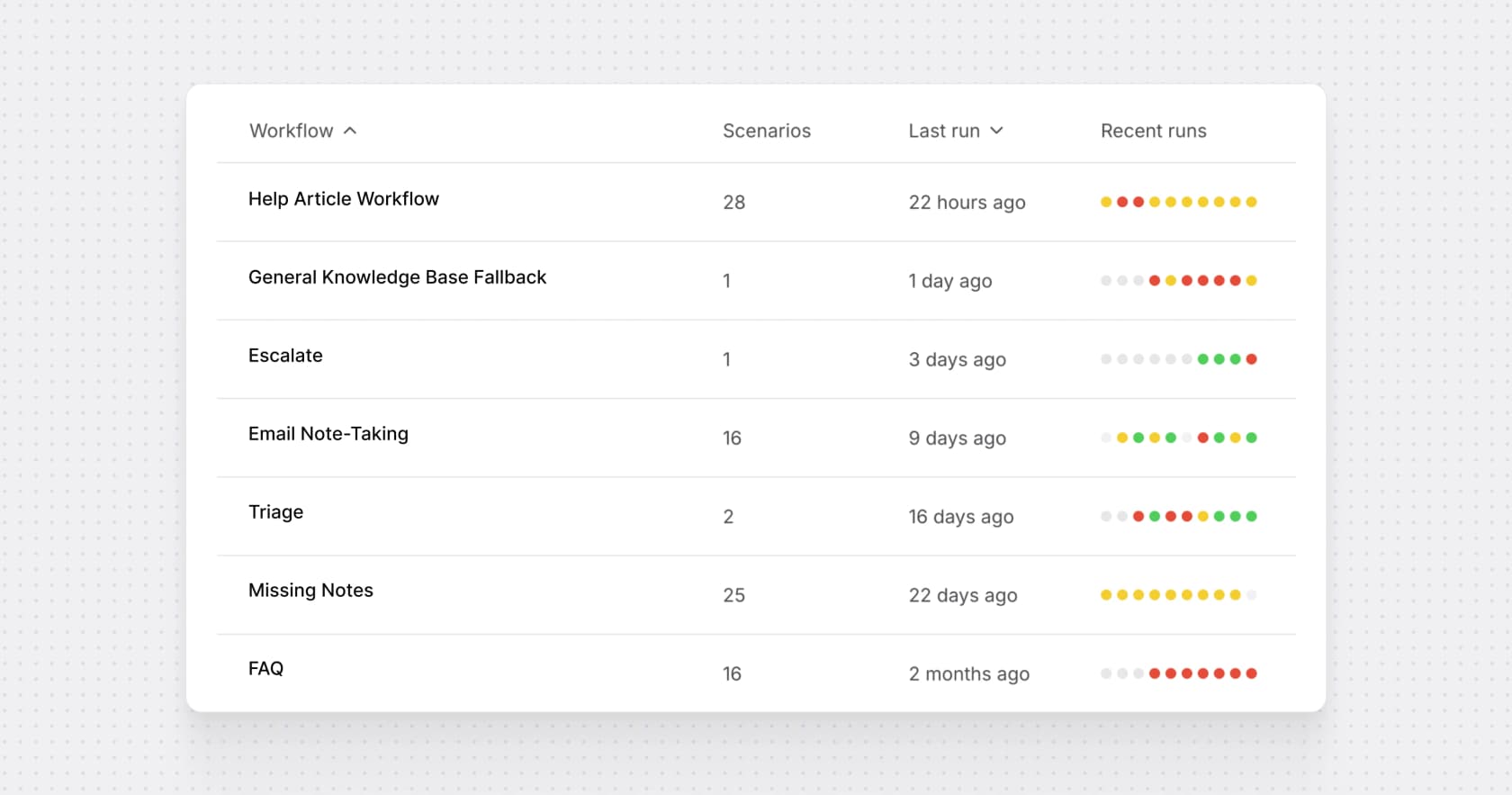
Its testing story is the strongest here, and I say that as a competitor. Bot-to-bot simulation runs an LLM-played customer through the real workflow with mocked API responses, creating real tickets underneath, and scenarios can be generated "from real production tickets that failed". Lorikeet says customers have run 58,000+ simulation tests, and testing is unlimited on every tier.
Pricing. Public rate card, sales-led purchase. Start is $1,500/month paid annually for 18,000 credits a year, aimed at under 5,000 monthly tickets. Scale is $4,000/month for 48,000 credits. A chat, email or SMS resolution costs 0.95 credits on Start and 0.80 on Scale; voice resolutions are 1.50 and 1.20. No per-seat charges, no implementation fees. And the line I wish more vendors would copy: "we only charge for successfully resolved tickets. If you're unhappy with how Lorikeet handled a ticket, you don't pay for that ticket."
Pros
- Deterministic action ordering, which is what auditors and risk teams actually want.
- Best-in-class simulation, including adversarial and prompt-injection testing.
- You do not pay for tickets it handled badly.
- ISO 27001 and SOC 2 Type 2 on the entry tier, HIPAA BAA on Scale.
Cons
- $18,000 a year is the floor, paid annually, and you pay it whether you hit the volume or not.
- No self-serve signup or free trial.
- Almost no independent review corpus: zero published G2 reviews and a single Trustpilot review, so you cannot triangulate the claims.
- Past tickets feed testing, not answer-time knowledge.
The one public review is an end user who met the bot inside another company's onboarding, and it is worth reading precisely because it is unflattering:
"I was forced to use the Lorikeet chatbot to resolve a complex issue in the Airwallex onboarding flow. It's by far the worst AI bot I've encountered in like ~2-3 years. [...] It kept recommending the solution that I literally said didn't work. It kept refusing to connect me to a human."

My take: if you are in fintech or healthtech and "the agent must do exactly this, every time" is a compliance requirement rather than a preference, Lorikeet is the most serious option on this list and I would shortlist it over Twig without hesitation. Skip it if $18k a year is more than your whole support tooling budget.
4. Decagon
Best for: enterprise CX teams who want non-engineers writing the agent's logic.
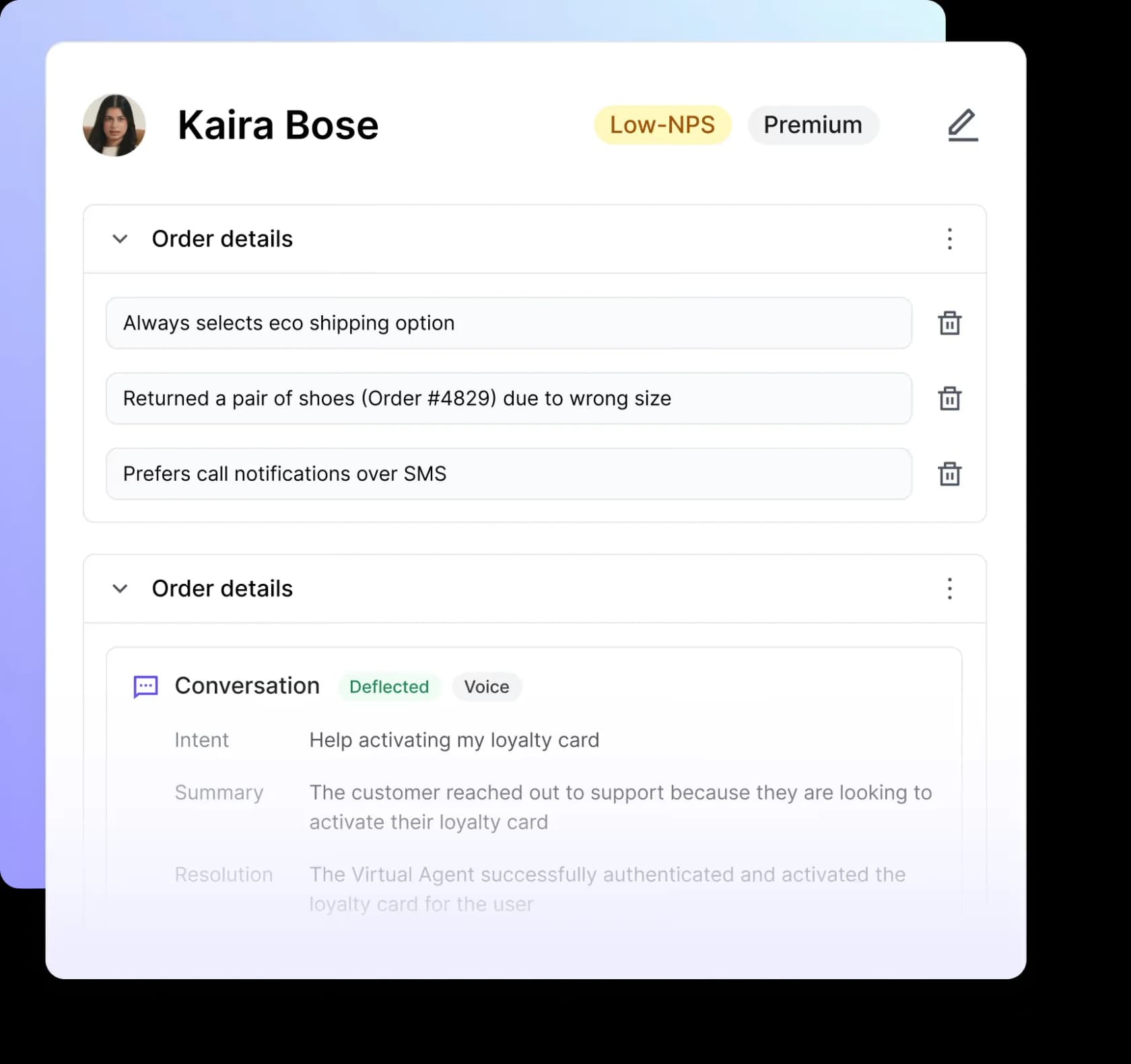
What it is. Decagon's central idea is the Agent Operating Procedure: natural-language instructions that compile into code to handle real situations, rather than a decision-tree builder or a developer SDK. One agent then deploys to chat, voice, email, SMS and custom API surfaces. Decagon Voice, built with ElevenLabs, covers 70+ languages with auto-detection. It also has a neat loop called Knowledge suggestions, which reads conversations where customers did not get a complete answer and drafts new knowledge-base articles from how humans resolved them.
Its co-founder is refreshingly direct about the evaluation problem, which is the same one I keep coming back to:
"Every AI agent needs a rigorous evaluation engine. You can't just test responses. We evaluate entire agent workflows to ensure real performance at scale"
Pricing. Decagon publishes the model and none of the rates. You pick per-conversation, charged whether or not the AI resolves it, or per-resolution at a higher fixed rate with escalations free. Its own pricing post says the vast majority of customers choose per-conversation. decagon.ai/pricing returns a 404, and the demo form qualifies on monthly ticket volume starting at under 9,999.
Pros
- CX staff can author multi-step logic in plain language, no engineer in the loop.
- One agent across chat, voice, email and SMS.
- Ticket-derived knowledge suggestions close documentation gaps over time.
- Very strong small-sample reviews at 4.9/5 from about 18 on G2.
Cons
- No published rate of any kind, and the pricing page 404s.
- Per-conversation billing charges for conversations it does not resolve.
- Simulation is authored scenarios, not a replay of your ticket history.
- No named compliance certification on its own site, only a trust centre pointer.
My take: a real step up from Twig on capability and channel breadth, and the AOP model is the most human-friendly authoring approach I looked at. But you are trading Twig's published $5 for no number at all, so only start this conversation if you are comfortable with a full enterprise cycle. Compare it directly against Sierra if you are already at that table.
5. Sierra
Best for: enterprises that want the vendor paid only when a job gets done.
What it is. Sierra treats the agent runtime as the whole product. You build agents as code through its Agent SDK, or let Ghostwriter generate one from raw material, and the accepted inputs are unusually practical: SOP documents, call and chat transcripts, whiteboard photos, audio recordings, or a plain-English description of the goal. The result deploys across chat, SMS, WhatsApp, email, voice and ChatGPT, with 55+ languages on voice and mid-conversation switching. Voice payments collect card details over DTMF through Level 1 PCI infrastructure.
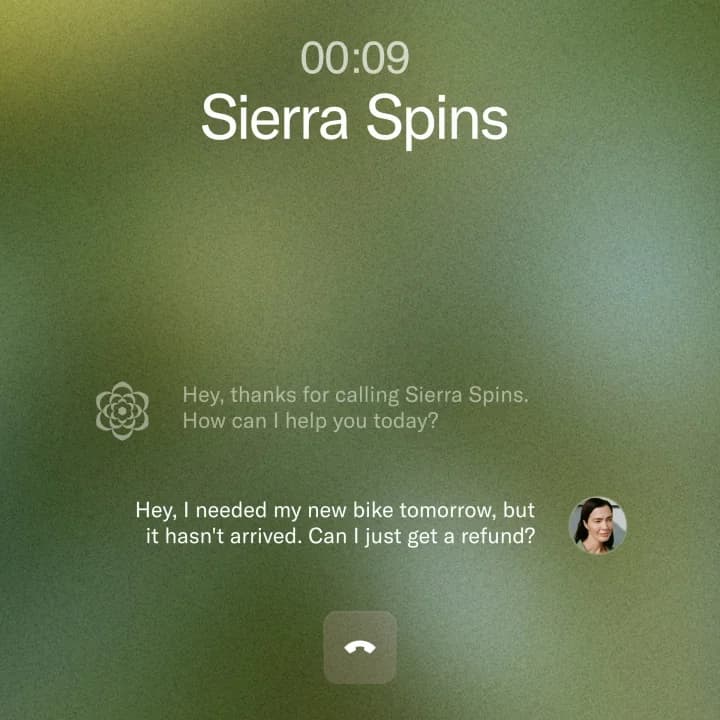
Pricing. Outcome-based, with no dollar figure published anywhere; sierra.ai/pricing is a 404. Its own definition: payment is tied to "a resolved support conversation, a saved cancellation, an upsell, a cross-sell", and "if the conversation is unresolved, in most cases, there's no charge". Note the hedge, and note that Sierra says greeter-style interactions "may align better with consumption-based pricing", so a real invoice can blend a per-conversation line in. Sierra is admirably candid about the complexity: "outcome-based pricing is more complex than seat-based or consumption pricing… People telling you it's simple are selling something."
Pros
- Incentives point at outcomes rather than volume.
- Ghostwriter collapses a multi-week build into an import.
- The deepest published compliance list here, including ISO 42001 and FedRAMP.
- Voice is first-class, not an add-on tier.
Cons
- No price of any kind, and invoices can blend two meters.
- No helpdesk is named anywhere, so which system receives an escalation is unpublished.
- Simulation exists but Sierra never says whether scenarios replay your own calls.
- Reviews are thin at 17 on G2, in the 4.1 to 4.3 range.
Reviewers who like it tend to like the same two things:
"Reliable AI Tool Boosting Patient Care Efficiency... I find Sierra incredibly reliable, which greatly improves my ability to efficiently perform tasks. The time-saving features are particularly beneficial."

My take: the most philosophically appealing pricing model on this list and the hardest to forecast, which is exactly the trade. Worth it at real enterprise scale where a procurement team can pin the outcome definitions down in a contract. Not worth it if you need a number this quarter. Their pricing and reviews are worth reading before the call.
6. Ada
Best for: global consumer brands who need voice in 40-plus languages.
What it is. Ada brands its category "Agentic Customer Experience" and is the best-documented product in this group, which I mean as real praise: its public docs state named connectors, hard limits and simulation constraints instead of hiding them. You get a multi-LLM Reasoning Engine, a Conversation Hub for channels, Playbooks (multi-step SOPs the agent reasons through), and Coaching, where a human reviews past transcripts and the agent applies the note. Voice supports 42 languages natively.
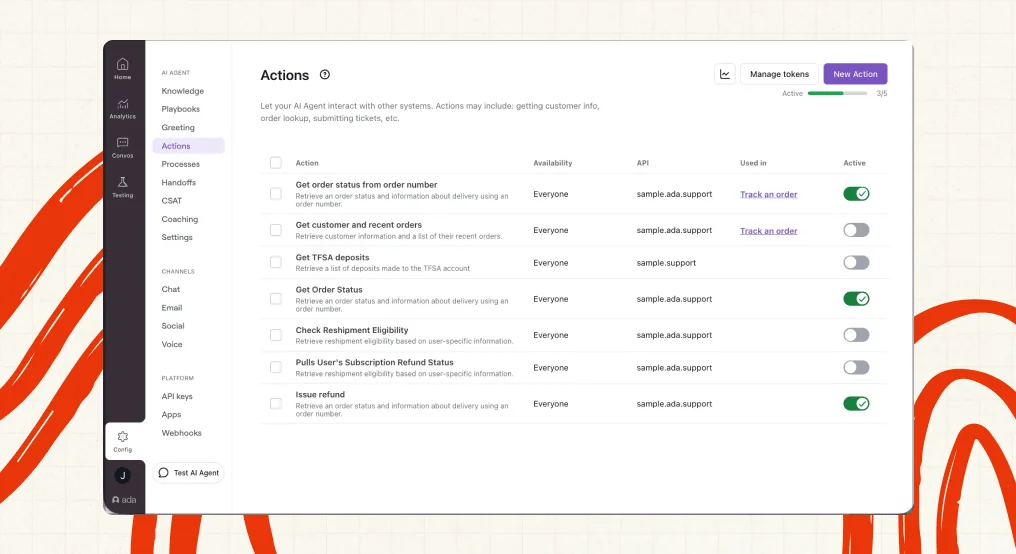
Pricing. None published. The pricing page is a consultation form whose qualifying question asks your expected annual contact volume, with bands running from under 100,000 up to more than 100 million. A former operator on Reddit gives the only real-world anchor:
"Used to work for a company paying ~300k+ for ADA, it's expensive af. I would stick with Zendesk messaging and answer bot. There are also cheaper AI options if you're adamant, but I would always ask for a month trial just to test things out."
Pros
- 25 named integrations including Zendesk, Salesforce, ServiceNow and Gorgias.
- The strongest compliance set here: SOC 2 Type II, HIPAA, GDPR, PCI DSS, AIUC-1, with zero data retention across LLM providers.
- Documentation states its own limits honestly, which is rarer than it should be.
- Largest independent review base on this list at 4.6/5 from 173 on G2.
Cons
- Knowledge comes from connected knowledge bases, a public-website crawl, articles authored in Ada, or its Knowledge API. There is no first-party Confluence, Notion, SharePoint or Google Drive connector, and no document upload, so an authenticated internal wiki needs a custom build.
- Simulation test cases are hand-written, capped at 40 turns, pass/fail only, and actions "are not mocked" but "execute against live systems".
- Playbooks are not supported in voice conversations.
- Trustpilot sits at 1.8/5 from 20 reviews, almost all end users who met an Ada bot on someone else's site rather than buyers.
My take: the safest enterprise choice if compliance and languages are the binding constraints, and a much deeper product than Twig. The knowledge-source list is the thing to check first, because if your answers live in Confluence you will be building a pipeline. Our Ada alternatives and Ada CX pricing pages go deeper.
7. Maven AGI
Best for: enterprises who want AI on top of the helpdesk they already run.
What it is. Maven positions Agent Maven as an intelligence layer between your enterprise data, the models and your team, explicitly sitting on top of Zendesk, Salesforce or Freshdesk rather than replacing them. All three are first-party integrations, it claims 100+ out of the box, and deployments are stated to go live in one to six weeks. OpenAI's own write-up says Maven is trained by ingesting "knowledge bases and interaction logs" from those platforms plus Slack and SMS.
Pricing. Nothing published, and unusually, not even the billable unit. mavenagi.com/pricing is a hard 404, as are five other likely paths, and the sitemap contains no pricing URL. One caution I want to flag because it is an easy trap: the $0.99 to $2.00 figures on Maven's own glossary are industry benchmarks it cites, not its rates. Anyone quoting them as Maven's price is misreading a glossary page.
Pros
- Layers onto your existing helpdesk instead of asking you to migrate.
- Very broad compliance set: SOC 2 Type 2, ISO 27001/27017/27018/27701/42001, HIPAA, PCI DSS, GDPR, CCPA.
- Omnichannel across voice, chat and email.
- Fast stated time to value at one to six weeks.
Cons
- No pricing page, no plan names, no billable unit, so you cannot model cost at all before a sales call.
- No simulation or dry-run capability documented.
- Whether "interaction logs" means your historical tickets are retrievable at answer time is not spelled out.
- No community quote with a permalink exists; its G2 profile has about 16 reviews and the score is not pinned.
My take: a credible enterprise option and the best fit if "don't touch our ticketing system" is a hard rule. But between the unpublished unit and the undocumented testing story, it asks for more trust up front than Twig does, and Twig at least tells you a number. Worth a look next to Decagon.
8. Thena
Best for: B2B teams whose customers ask for help in shared Slack channels.
What it is. This is the closest thing on the list to Twig's original B2B account-support niche, approached from the other end. Thena watches connected Slack, email, chat, Teams and Discord channels, uses AI ticket detection to work out which messages are actually requests, and opens tickets from them that agents work either inside Slack or in a web dashboard. It is the helpdesk, not a layer on one.
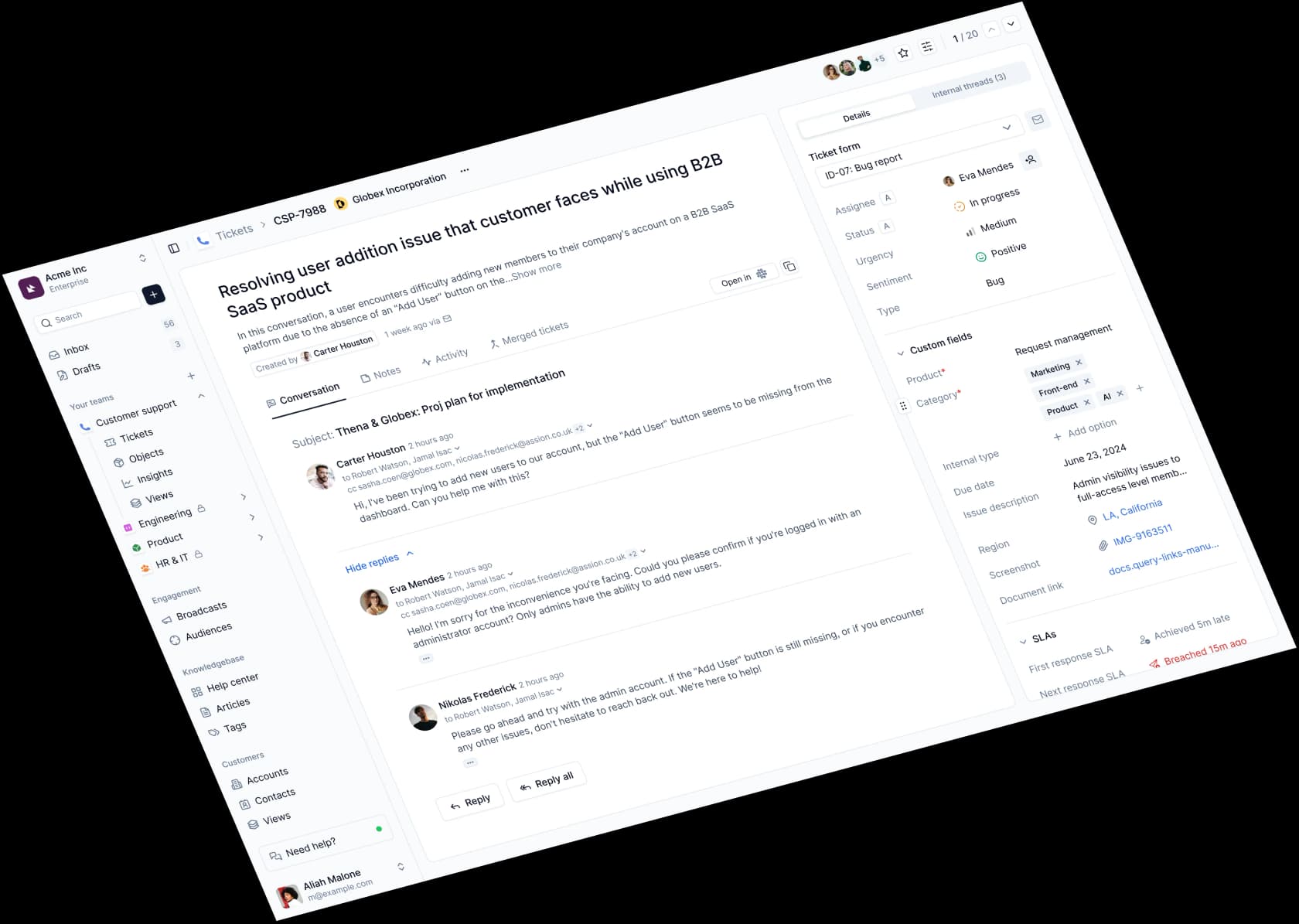
Pricing. Per user seat, which makes it the odd one out here. Starter is $29/user/month billed annually, up to 5 seats and 1,000 tickets a month, Slack and email. Standard is $79/user/month and adds AI web chat, an AI agent studio, MCP and APIs. Enterprise is $119 and adds MS Teams. Its framing is "From Starter to Enterprise, AI is the baseline". One discrepancy to check: the pricing page says Starter covers up to 5 seats, while the homepage card says 10.
Pros
- SLA policies, Insights, CSAT and custom fields are all on the $29 tier, where rivals gate SLA higher.
- No AI-resolution meter at all, so cost does not scale with deflection success.
- Self-serve signup with published prices on every tier, Enterprise included.
- Ships an MCP server exposing tickets to Claude, Cursor, Windsurf and Raycast.
Cons
- MS Teams is Enterprise-only at $119/user/month, so a Teams-first team has no cheap entry.
- Annual billing only; no monthly option exists.
- No training on past tickets and no pre-launch testing documented.
- No named security standard in text, and no published review score or count.
My take: if your support arrives as Slack messages from named accounts rather than tickets from strangers, this solves a problem Twig's front desk does not touch, and $29 a seat is easy to justify. It is not an autonomous resolver, so do not buy it expecting deflection, and it is a different animal from the conversational AI platforms above it. Pair it with Slack AI apps if internal Q&A is also on your list.
9. Retell AI
Best for: replacing Sera's phone answering with something you can cost out to the cent.
What it is. If the half of Twig you actually wanted was the front desk, start here, and read it next to the wider field of AI voice companies. Retell is a developer-facing orchestration layer for AI phone agents, stitching speech-to-text, an LLM and text-to-speech into a call and adding the phone-specific glue raw model APIs lack: model fallback, echo cancellation, endpointing and turn-taking, interruption handling, voicemail detection, warm transfer, IVR navigation and DTMF capture.
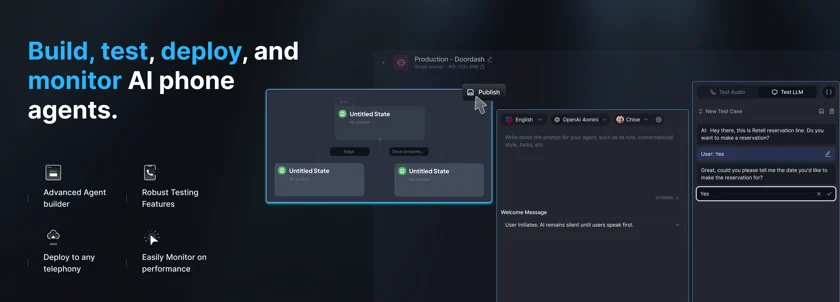
Pricing. The most transparent on this list, and the most work to read. Every component is billed separately: Retell Voice Infra at $0.055/min is unavoidable, text-to-speech runs $0.015 for most voices and $0.040 for ElevenLabs, the LLM line spans more than 100x from $0.003 to $0.345 a minute depending on model, telephony is $0.015/min on managed numbers and free over your own SIP trunk. Add-ons are itemised too: knowledge base +$0.005/min, PII removal +$0.01/min, AI quality assurance $0.10/min. Headline range is $0.07 to $0.31 a minute, and a realistic inbound support agent lands near $0.135/min, about $677 a month at 5,000 minutes. Start free with $10 in credits, no platform fee, no annual contract.
Pros
- Every component price published, so you can model an exact configuration before signing.
- Self-serve with free credits, no sales call; 20 concurrent calls and 10 knowledge bases free.
- Simulation with graded test cases is included on the free tier, plus live call monitoring and takeover.
- HIPAA, SOC 2 Type II and GDPR claimed at platform level.
Cons
- No live helpdesk integration at all; Zendesk and Google Drive are both "coming soon", so ticket creation runs through webhooks, Zapier or the API.
- Knowledge comes from a website crawl or file uploads only, never past tickets.
- Silence and hold time are billed, because the transcription engine stays active.
- The homepage says a self-serve BAA is on every plan while the pricing comparison gates the custom BAA to Enterprise. Assume a sales conversation if you are a covered entity.
Builders comparing voice platforms tend to single out the same thing:
"Finally tested Retell AI. At first, I expected the same issues, but the difference was in how it handled interruptions and off-script stuff."
My take: the best answer to Sera for anyone with a developer nearby, because it is the only vendor here that lets you compute your bill before you commit. The catch is real though: with no helpdesk connector, calls and tickets stay in separate worlds until you wire them together yourself. If your calls need to land in Zendesk specifically, Zendesk voice AI agents is the closer fit.
10. Synthflow
Best for: high call volumes where voice quality and owned telephony matter more than a low entry price.
What it is. Synthflow runs voice agents on its own Session Border Controllers and regional points of presence rather than a resold footprint. It publishes targets of sub-100ms round-trip latency and MOS above 4.2, and reports 65M+ calls across 30+ countries. Its Test Center runs simulated conversations before customers arrive, with built-in scenarios for response accuracy, script compliance, angry-user stress, filler words and task completion.
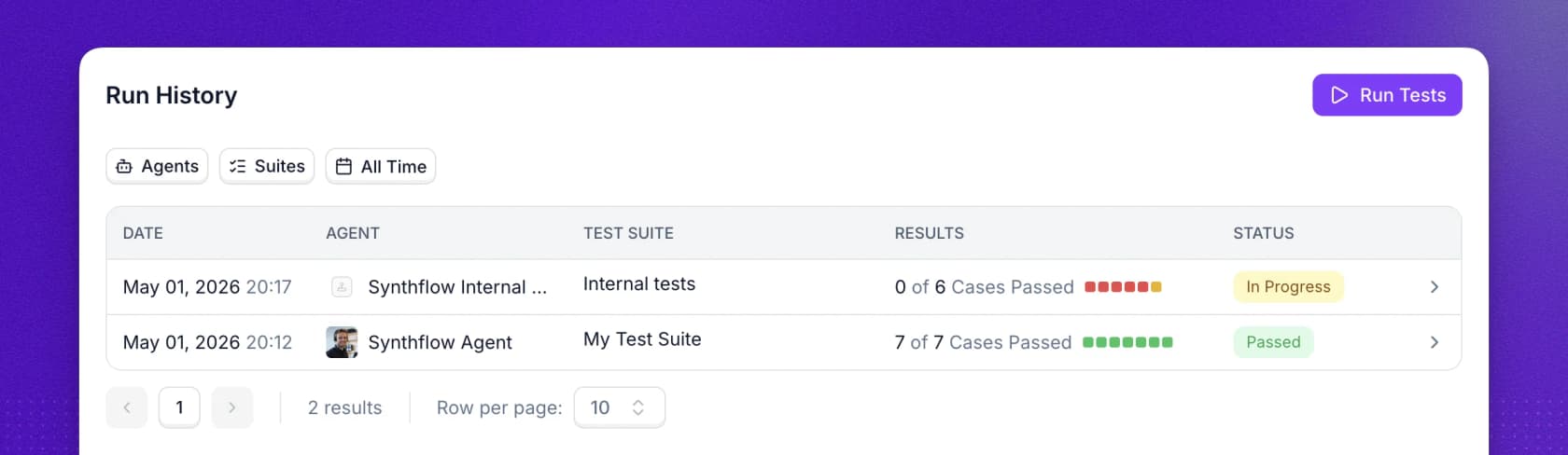
Pricing. Contracts start at $30,000 annually, and the old self-serve Pro, Growth and Agency plans are "no longer available for new subscriptions". The meter is published in unusual detail even though the rate is not: calls bill per second from connect, seconds aggregate across calls rather than rounding up per call, a successful transfer stops the meter, unanswered calls and voicemail hang-ups bill a flat 5 seconds, and chat converts at 5 AI messages to 1 voice minute. Test Center simulations may themselves be billable.
Pros
- Owns its telephony stack end to end, with real latency and call-quality targets.
- The per-second metering rules are documented more clearly than most vendors document their prices.
- Test Center simulation with custom evaluations against your own compliance checks.
- Native SIP integrations for Twilio, Telnyx, RingCentral and Vonage.
Cons
- No purchasable tier below $30,000 a year, and no per-minute rate or minute allowance published at any tier, so you cannot model call volume cost at all.
- Knowledge is PDFs, pasted docs and website crawls, plus Zendesk help-centre articles only, so it depends on your AI knowledge base tools being in good shape. No ticket read or write.
- HIPAA appears on marketing badges but is absent from the docs' own compliance rows, and no signable BAA is documented.
- The 4.5/5 from 1,000+ G2 reviews is read off a vendor badge, not verified on the profile.
My take: the right call if you are running serious call volume and voice quality is the thing that will make or break it. For a small practice replacing a receptionist, the $30k floor makes Sera at $499 look extremely reasonable, which is worth saying plainly. Simulation here tests invented scenarios, not your real calls.
So which one should you actually pick
Sort by the meter, not the marketing.
- Tickets in a helpdesk, small team, cost is the constraint. My AskAI at $199, or eesel from $299 a month for 500 credits if you want to rehearse first on the free 100-credit plan.
- Tickets in a helpdesk, and a wrong answer is a compliance event. Lorikeet, for the deterministic action ordering and the best simulation here.
- Enterprise volume, procurement can absorb a sales cycle. Ada if compliance and languages bind, Decagon if you want CX staff authoring the logic, Sierra if you want to pay on outcomes, Maven AGI if the helpdesk must not move.
- Slack-based B2B account support. Thena, at $29 a seat.
- A phone line answered and appointments booked. Retell AI if you have a developer and want to model the cost, Synthflow if volume and voice quality justify $30k a year. And in fairness, if you are a single dental practice, Sera's own $499 Growth plan is a perfectly sensible answer to that job.
Whichever way you go, two things are worth setting up before launch day rather than after: a real human handoff path so a bad answer does not become a bad ticket, and enough self-service solutions behind it that the agent has something correct to point at. Chatbot escalation is the part almost everyone tunes last and regrets tuning last.
If you want to widen the search past these ten, our roundups of best AI agents and best customer service AI cover the adjacent field.
One last thing on the trust question, because it applies to every phone agent above and is the failure mode nobody puts in a feature table:
"…the people it actually pissed off weren't the older customers, it was the 35 year olds who realized mid sentence they'd been talking to a machine with a human name. […] People forgive a robot for being a robot, they don't forgive it for pretending."
Worth remembering when a product ships with a human first name.
Try eesel for your Twig replacement
If your version of the Twig question is "something has to handle the tickets landing in Zendesk, Freshdesk or Gorgias, and I need to know what it will cost before I commit", that is the shape eesel is built for.
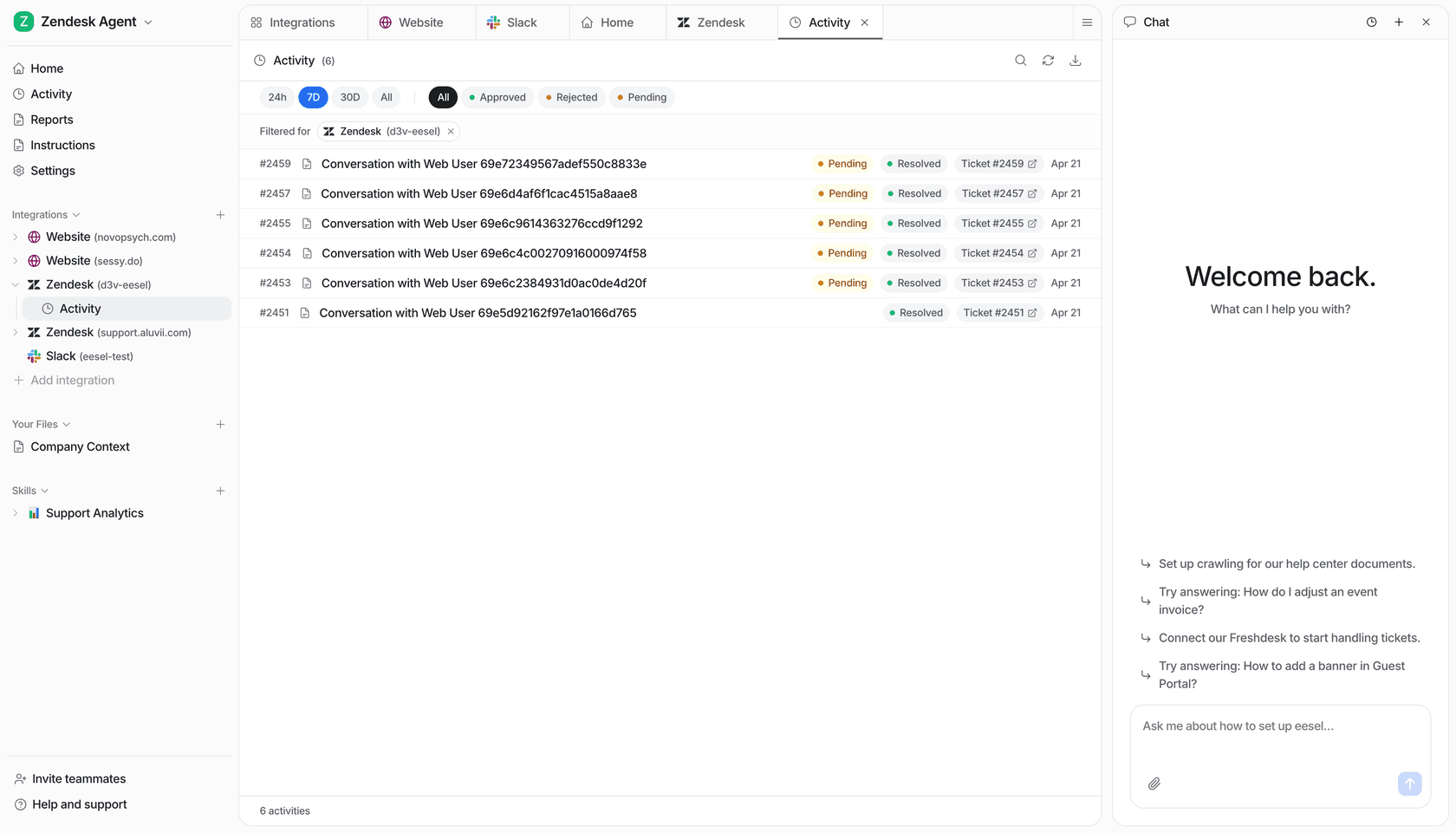
Connect your helpdesk and it learns from the tickets your team has already solved, not just your help centre. Then run a simulation: it replays your real past tickets, compares its answers against what your agents actually sent, and hands back the specific gaps to fix. You do that before a single customer sees an answer, and before you spend anything, because there is a free plan with 100 credits and no card required. After that plans start at $299 a month for 500 credits, with 1 credit per ticket, whole thread included, and no platform fee or per-seat charge. Route 200 of your 1,000 monthly tickets and you only use 200 credits.
Two honest caveats so this lands as advice rather than a pitch: there is no voice channel, so it will not answer your phone, and SOC 2 Type II is certified, with HIPAA available on request. If either is a hard requirement today, take one of the other nine.
Try eesel or book a demo and start with a simulation on your own tickets.