


If you're a developer, you’ve probably seen the constant stream of AI coding tools hitting the market. It feels like every other week there’s a new "AI-native" editor that promises to completely change how we work. One name that keeps popping up is Windsurf (now rebranded Devin Desktop), an editor that wants to do more than just guess the next line of code. It’s built around creating an integrated "flow" to keep you focused.
But with so much noise, it's hard to tell what's legit. Is Windsurf just another VS Code clone with a chatbot tacked on, or is there something genuinely different going on? This guide is for developers, engineering managers, and tech leaders trying to cut through the marketing. We’re going to give you a complete Windsurf overview, breaking down its core features, pricing, and the limitations you should know about. We'll also see how it stacks up against the competition to help you figure out if it's the right fit for your workflow.
What is Windsurf?
At its heart, Windsurf is what you’d call an "agentic" code editor. That's just a fancy way of saying it was designed from the ground up to have an AI that acts like a proactive partner, not just a passive tool. While it’s built on the solid foundation of VS Code, it has been completely re-engineered to work with its core AI, a system named Cascade, which Devin Local has since succeeded.
This is a pretty different approach from tools like GitHub Copilot, which are basically plugins you add to your current editor. Windsurf’s main goal is to create a single environment where the AI anticipates what you need next, hopefully cutting down on the time you spend bouncing between your editor, the terminal, and a dozen browser tabs. The company, formerly known as Codeium, was acquired by Cognition in July 2025, the maker of the Devin agent. The editor is now branded Devin Desktop, and Cognition says existing Windsurf users keep their plan and pricing.
Windsurf's core features
Windsurf’s real appeal isn't just one single feature, but how all its parts work together to create that "flow" state every developer is chasing. Let's break down the main pieces of the platform.
Cascade: The agentic coding engine
Cascade was the brain of the operation until Devin Local, a Rust rewrite that Cognition says is up to 30% more token efficient, became the primary local agent. Think of it as an AI pair programmer that actually understands your entire codebase, not just the single file you have open. It’s built to take on complex, multi-step jobs that are way beyond simple code completion.
Here are a few things it can do:
-
Multi-file edits: Let's say you rename a function. Cascade can automatically track down every instance of it across your entire project and update them, so you don't have to worry about breaking something.
-
Terminal integration: Cascade can run commands in the built-in terminal, read the output, and if it spits out an error, it can analyze the logs and suggest a fix on its own.
-
Iterative debugging: This is where the "agentic" part really comes into play. If Cascade tries a fix and the tests fail, it doesn't just give up. It looks at the new error and tries a different approach, looping through this process until the task is actually done.
It sounds amazing, but it’s not always a smooth ride. Some users have pointed out that the agent can be a bit of a flaky. In a post on dev.to, one developer mentioned getting frequent "cascade errors when trying to write files." That kind of inconsistency can be seriously frustrating when you’re trying to focus.
Codebase context and indexing
One of Windsurf's biggest strengths is its context engine. It uses a technique called Retrieval-Augmented Generation (RAG) to create an index of your entire local codebase. As you code, it pulls the most relevant snippets to give the AI the specific context it needs to generate code that's actually helpful.
This deep understanding is what powers features like "@-mentions" in the chat, where you can tag files or functions to focus the AI's attention. You could ask something like, "How does the "processPayment" function in "@/lib/payments.ts" talk to the user model in "@/models/user.ts"?" and get a specific, context-aware answer.
The only problem? This feature has to work perfectly to be useful, and some users have found it doesn't always hit the mark. The context retrieval has been described as "broken" at times, failing to see all the files in a directory you point it to. When the AI doesn’t have all the pieces of the puzzle, its suggestions can be incomplete or just wrong.
This whole situation really shows how important deep, contextual understanding is for any AI tool to work well. Windsurf is trying to do this for code, but the same problem exists everywhere else. A support agent’s "codebase" is a chaotic mix of helpdesk tickets, internal wikis, and random Google Docs. An AI that can't reliably pull from all that knowledge is going to fall flat.
The all-in-one developer flow
Windsurf is loaded with little features meant to keep you in your editor and out of other apps. The whole point is to stop you from having to jump between a dozen different windows to get something done.
Here are a couple of the more interesting ones:
-
Windsurf Tab: This is more than your standard autocomplete. Think of it as an "action key." You hit Tab, and it might auto-import a dependency, fill out a whole boilerplate function, or even suggest installing a package you’re missing.
-
In-editor Live Previews: Frontend devs can see a live preview of their UI right inside the editor. As you tweak the code, the preview updates in real-time.
-
One-Click Deploys: For small projects or quick prototypes, you can deploy your app straight from the IDE with a single click, which is handy for getting fast feedback.
Naturally, there are trade-offs. The live preview can be a bit of a resource hog, especially on bigger projects, so you might notice a performance dip. And to really get that seamless "all-in-one" experience, you have to commit to the full Windsurf Editor. The plugins for other IDEs just don't have all these integrated goodies.
Windsurf pricing and plans
Picking a new code editor is a big commitment, so you have to know what it's going to cost you. Windsurf has a few different plans, from a free option for solo devs to enterprise packages for large teams.
Here’s a full breakdown of their pricing:
| Plan | Price | What you get |
|---|---|---|
| Free | $0 | Light agent quota, limited models, unlimited inline edits, unlimited Tab completions |
| Pro | $20/month | Everything in Free, plus increased quotas with OpenAI, Claude, Gemini and open-source models, full model availability, Devin Cloud agents, extra usage at API pricing |
| Max | $200/month | Everything in Pro, with significantly higher quotas for power users |
| Teams | $80/month for the team plan + $40/month per full dev seat | Everything in Pro, plus up to 200 users, collaboration, centralized billing, admin dashboard, priority support |
| Enterprise | Custom | SAML/OIDC SSO, centralized admin controls, dedicated account management, dedicated deployment option |
Per the official pricing page, each paid plan has a usage allowance that refreshes daily and weekly, and extra usage is consumed at API pricing. SWE-2 is free in Devin Desktop and the CLI through October 16, 2026.
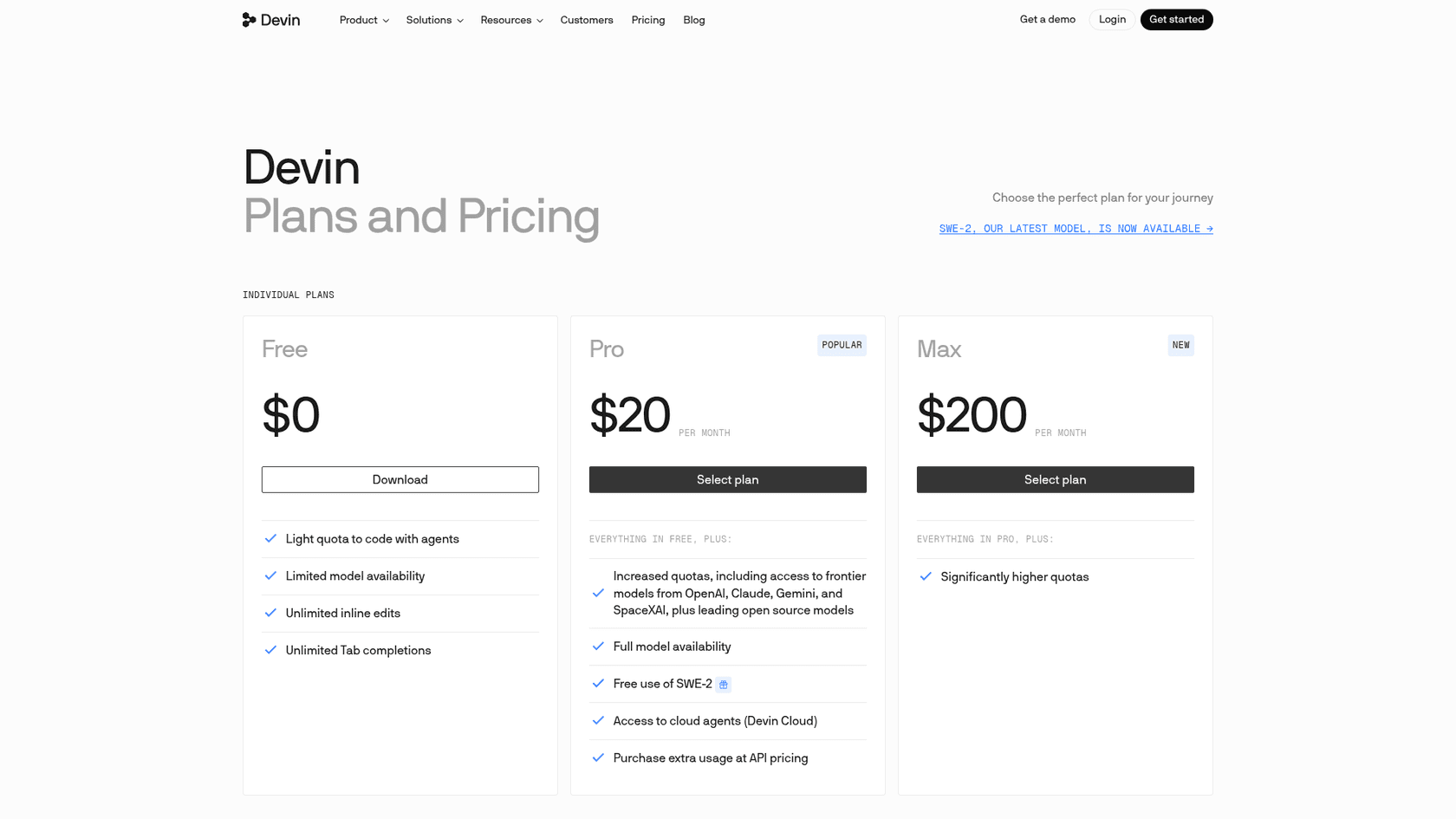
On the surface, the free tier looks pretty decent. In 2025, under the old credit system, some users raised issues. Multiple developers claimed that the free credits system was broken and that credits never got applied to their accounts. Those same users said that customer support went quiet once they realized they weren't on a paid plan. Those reports predate the current plans, so I would test the Free plan yourself before relying on it.
Those reports show why unpredictable credit systems and unclear pricing are deal-breakers when you’re trying to rely on a tool for your job. It’s why businesses need platforms with transparent costs. For instance, eesel AI sells fixed monthly credit plans, from $299/month for 500 credits, where one ticket or chat uses one credit. Overage is $0.80 per credit and can be capped, so a busy month has a ceiling. That kind of predictability is vital when you're running a business.
Windsurf vs. the competition
Windsurf isn’t the only player in the game. It’s constantly being compared to two other giants in the AI coding world: Cursor and GitHub Copilot. Each tool has a different philosophy, so the right one for you really boils down to how you like to work.
Here’s a quick comparison to show the main differences:
| Feature | Windsurf | Cursor | GitHub Copilot |
|---|---|---|---|
| AI Style | Autonomous & Proactive Agent | Prompt-Driven & Manual Control | Inline Autocomplete Suggestions |
| Primary Form | Full IDE + Plugins | Full IDE | Plugin in your existing editor |
| Multi-file Context | Yes (Core Feature) | Yes | Yes (workspace awareness, agent mode) |
| Live Preview & Deploy | Yes (as reviewed in 2025) | Not covered here | Not covered here |
| Key Limitation | Reports of flaky agent runs and context retrieval | Can feel less integrated, relies on user prompts | Started as an inline-suggestion plugin, so the editor itself is not agent-first |
| Best For | Developers wanting an all-in-one "flow" | Developers who want precise AI control | Developers wanting to speed up boilerplate writing |
Cursor is an AI-first editor that also feels like a full-fledged IDE. Its strength is giving you precise, manual control. You tell it exactly what to do through prompts, and it does it. It’s less about the AI trying to help you proactively and more about being a powerful tool you can call on for refactoring and generating code.
GitHub Copilot , on the other hand, is all about fast, inline suggestions. It lives inside your existing editor (like VS Code) and basically acts as a super-powered autocomplete. It’s great for getting through boilerplate and repetitive code quickly, and Copilot now also offers agent mode, a cloud agent and a CLI, drawing on a shared pool of GitHub AI credits.
Is Windsurf the right AI code editor for you?
So, after all that, is Windsurf worth your time? Well, it depends. Windsurf is an ambitious and powerful AI-native IDE. Its unique agentic approach can create a seamless developer flow, when it's working right.
Who it's for: This tool is probably best for professional developers and teams who are ready to pay for a Pro or Team plan. If you go that route, you get a published quota and priority support on Teams. If you want a deeply integrated AI partner that can handle complex tasks across multiple files and cut down on context switching, Windsurf is a pretty compelling choice.
Who should reconsider: If you just want a simple autocomplete plugin to type faster, stick with GitHub Copilot. If you prefer to be in the driver's seat and have full manual control over the AI, you’ll probably be happier with Cursor. And if you’re looking for a completely free tool for important projects, test the Free plan’s light quota against your workload first.
Beyond code: Unlocking knowledge for your whole company
Tools like Windsurf are exciting because they show what AI can do when it has deep, contextual knowledge of a specific area, like a software codebase. It can anticipate needs, automate boring tasks, and make people better at their jobs.
But that same problem, scattered knowledge and constant context-switching, exists in every part of a business, especially customer support and IT. Support agents spend all day jumping between a helpdesk like Zendesk, an internal wiki in Confluence, project updates in Jira, and endless conversations in Slack, all just to find one answer for a customer.
This is exactly the challenge eesel AI was built to solve. It acts like an AI agent for your entire company, bringing together all your scattered knowledge to give instant, accurate answers to your support, IT, and internal teams.
-
Unified Knowledge: Just like Windsurf indexes a codebase, eesel AI lists 39 integrations (helpdesks, wikis, chat tools) and can reach any other system with an API through Network Access, to create a single source of truth.
-
Self-Serve Setup: You don't need to block out six months for an implementation project. eesel AI is designed to be self-serve, so you can connect your helpdesk and start on the free plan (100 credits, no card) without talking to a salesperson.
-
Test with Confidence: Instead of guessing at a usage allowance, eesel AI has a powerful simulation mode. Its simulation skill tests answers against hundreds of your past tickets or generated test cases, scores each one, and suggests instruction changes before you turn it on for customers.
Ready to give your support and IT teams the same kind of AI advantage your developers are getting? Try eesel AI for free and see how quickly you can automate your frontline support.
Frequently asked questions
What makes Windsurf unique compared to standard AI coding assistants like GitHub Copilot?
Windsurf highlights its agentic AI design, meaning it acts as a proactive partner, not just a suggestion tool. Copilot began as a plugin for inline autocomplete, while Windsurf is a re-engineered IDE with its core agent built in (Cascade, now succeeded by Devin Local) to handle multi-step tasks across your entire codebase.
How does Windsurf's Cascade agent handle complex multi-file edits or debugging?
Cascade, now succeeded by Devin Local, is designed to tackle complex tasks by understanding your entire codebase. For instance, it can rename functions across multiple files or iteratively debug by running terminal commands, analyzing errors, and trying different fixes until the task is complete.
Who is Windsurf best suited for, and who should reconsider?
This overview suggests Windsurf is best for professional developers and teams willing to pay for Pro or Team plans, seeking a deeply integrated AI partner for complex tasks. Those looking for a simple autocomplete or full manual control over AI might prefer Copilot or Cursor, respectively.
What are the main concerns about Windsurf's free tier and customer support?
Some 2025 user reports, made under the old credit system, said free credits were not applied and that support went quiet for free accounts. The current Free plan is defined differently: a light agent quota, limited models, unlimited inline edits and unlimited Tab completions.
How does Windsurf's codebase context and indexing feature work?
The codebase context and indexing feature, utilizing RAG, allows Windsurf to build an index of your entire local project. This deep understanding enables the AI to pull relevant snippets, providing context-aware suggestions and answers, which is crucial for accurate and helpful code generation.
What "all-in-one" developer flow features does Windsurf offer to reduce context switching?
Windsurf offers features like Windsurf Tab, which can auto-import dependencies or suggest package installations. It also includes in-editor live previews for frontend development and one-click deploys for quick prototyping, all aimed at keeping you within the IDE.