


I work eesel's own support queue, so I read pricing pages the way a buyer does: looking for the line that turns a free plan into an invoice. When I re-checked all seven of these tools against their live pricing pages this week, the thing that stood out was how differently each one defines "free."
Three buckets, and they are not interchangeable. Recurring free AI that renews every month (Chatbase, 50 message credits; Zoho Desk Express, 30M tokens). A free help desk with the AI charged separately (Zoho Desk Free, HubSpot, Freshdesk, Help Scout). And free to start, then a fixed monthly price by volume (eesel). One tool sits outside all three: Shopify Inbox's AI agent has no listed fee, but only for Shopify stores already paying for a Shopify plan.
Zendesk itself has no free plan at all, and now publishes its AI rate openly: $1.50 per automated resolution committed, $2.00 pay-as-you-go, on top of seats. That is the number that sends teams looking.
My quick picks: Zoho Desk for a free-forever help desk, Chatbase for free AI that keeps renewing, and eesel if you already run a help desk and want a better agent on top without the migration or the per-seat bill.
Why teams go looking for free Zendesk alternatives
Zendesk is a serious platform: a Gartner Magic Quadrant Leader, 4.3/5 across 6,837 G2 reviews, and AI Agents that can hit 80%+ automation once they are dialed in. The problem is what it costs to get there, and the fact that there is no free door to walk through. You get a 14-day trial and a 6-month startup program for qualifying early-stage companies, then the meter starts.
Here is the current ladder, taken from the comparison table on Zendesk's pricing page rather than the plan cards, because the AI figures only appear in the table:
| Zendesk plan | Annual (per agent/mo) | Monthly (per agent/mo) | Automated resolutions included |
|---|---|---|---|
| Support Team | $19 | $25 | 5 per agent/month |
| Suite Team | $55 | $69 | 5 per agent/month |
| Suite Professional | $115 | $149 | 10 per agent/month |
Two details in that table matter more than the headline seat price. Paying monthly instead of annually costs roughly 30% more, and the included resolution allowance is capped at 10,000 a year regardless of headcount. Past your included allowance, each automated resolution is $1.50 committed or $2.00 pay-as-you-go. Stack the Copilot add-on at another $50/agent/month and the AI line can outgrow the subscription it sits on.
In fairness to Zendesk, its definition of the billing unit is one of the better ones in this roundup: you pay only when the AI agent resolves the request without escalating to a human. The complaint I hear is about the ceiling, not the definition.
Here is what that feels like in practice. I looked at one UK auto-fintech paying $799/month for Zendesk who handled about 40 AI interactions a month. That works out to roughly $20 per AI reply, a number that becomes impossible to defend at renewal once a finance team sees it. They churned, citing "too expensive." A US healthcare support team I spoke with put it more bluntly after testing Zendesk's native AI: they found it "largely inadequate and overpriced," and went shopping.
On r/Zendesk, the per-resolution pricing is the dominant 2026 complaint:
"No, it's just terrible and a rip off. You can't even export the data on like what people ask the bot... We stopped using it because ARs are a rip off, and it's a rushed product to get into the AI hype."

There is an adoption signal in Zendesk's own data too: at its ProductLab conference, a poll found only about 10% of AI agents built in the prior six months were still in use. So when people search for free Zendesk alternatives, they are usually solving two things at once: a way to start without a big upfront commitment, and a billing model that does not punish them for using the automation they bought.
"Free" means three different things, so read the fine print
Before the list, the single most useful thing I can tell you is that the word "free" is doing a lot of heavy lifting in this category. I sorted the tools into three honest buckets, because a "free help desk" with the AI locked behind a paid plan is not the same thing as free AI.
- Recurring free AI: you get AI usage for free every month, up to a cap that renews. Chatbase (50 message credits a month) and Zoho Desk's Express tier (30M AI tokens a month) live here.
- Free help desk, AI costs extra: the ticketing and inbox are free, but the autonomous agent sits behind a paid plan or a per-resolution fee. Zoho Desk Free, HubSpot, Freshdesk and Help Scout all sit here.
- Free to start, pay as you scale: only a small free plan (100 credits) to begin, then one fixed monthly price sized to your volume, so you never pay for seats. This is eesel's model.
Shopify Inbox fits none of the three cleanly. The app and its AI agent cost nothing, but you need a paid Shopify plan to use them, which is exactly why it is worth being precise about.
What each free tier actually gives you
This is the table I wish had existed when I started checking. Every one of these free plans meters something different, so comparing "3 users" against "50 conversations" against "100 contacts" tells you almost nothing on its own. All figures re-checked against the vendors' live pricing pages in August 2026 (Shopify Inbox in October 2026).
| Tool | What free costs | What it meters | The catch to know |
|---|---|---|---|
| Zoho Desk | $0 forever | 3 user licenses | Email ticketing only. No automation, SLAs, multi-department or AI features |
| Help Scout | $0 forever | 5 users, but 100 contacts/month | 1 Inbox and 1 Docs site. AI Answers is a paid add-on |
| HubSpot | $0 forever | 2 users | No help desk workspace and no autonomous agent |
| Chatbase | $0 forever | 50 message credits/month | Agents are deleted after 14 days of inactivity |
| Shopify Inbox | $0 app, needs a paid Shopify plan | No AI or conversation fee listed | Shopify stores only. No ticketing, and the agent only works in your store's chat |
| Freshdesk | $0 for 6 months | 2 agents | Not on the pricing page. Email-first only, no free AI sessions |
| eesel | 100 free credits | 1 credit per ticket or chat | Small free plan, paid from $299/mo, and you need a help desk underneath |
Two rows deserve a second look. Freshdesk's free plan is real but time-boxed and hidden. It does not appear on the pricing page at all; your admin activates it in-product under Plans and Billing, it tops out at 2 agents, it runs for 6 months, it is email-first Freshdesk rather than Freshdesk Omni, and it carries no complimentary AI sessions. Calling it "free forever" is the most common error in this category. And Help Scout's 5 free users are limited by contacts, not seats: a contact is anyone who received a reply, so a 5-person team can exhaust the free plan in a week if volume is high.
The 7 best free Zendesk alternatives at a glance
Here is the full comparison before the individual write-ups. I have gone past price to the four things that actually decide this: what is free, whether the AI is free, how the AI bills once you pay, and whether the tool replaces Zendesk or just sits on top of it.
| Tool | Free tier | Free AI included? | AI billing once paid | Replaces Zendesk or adds to it | Switching effort |
|---|---|---|---|---|---|
| eesel AI | 100 free credits, no card | Yes, within the credits | From $299/mo for 500 credits | Adds to it | None. It connects to the help desk you run |
| Zoho Desk | Free Forever, 3 agents | Only on Express $7 and up | Bundled by tier, $7 to $40 | Replaces | Full migration, import tickets and rebuild workflows |
| Chatbase | Free, 50 credits/month | Yes, 50 credits monthly | From $32/mo, or $0.04 per credit | Adds to it | Low. Train an agent and deploy it, Zendesk included |
| Help Scout | Free, 5 users | No | $0.75 per resolution | Replaces | Full migration, but the simplest destination here |
| Shopify Inbox | Free app, needs a Shopify plan | Yes, the Inbox agent (opt-in) | No AI fee listed | Runs alongside it (Shopify stores only) | Low. Install the app on your Shopify store |
| HubSpot | Free, 2 users | Copilot only, not the agent | 50 credits (about $0.50) per resolution | Replaces | Full migration, heavier off the CRM |
| Freshdesk | 2 agents for 6 months | No | $49 per 100 sessions | Replaces | Full migration, import tickets and rebuild workflows |
A note on reading that table: the AI billing column uses different units on purpose, because the vendors do. A Zendesk "automated resolution," a Help Scout "resolution," a Chatbase "message credit" and an eesel "credit" are not the same thing. Chatbase in particular meters messages, so one long conversation can burn several credits, while an eesel credit covers the whole ticket no matter how many replies it takes.
Which of these actually replace Zendesk?
This is the question the word "alternative" hides, and it splits the list into three groups with very different amounts of work attached.
Full replacements: Zoho Desk, HubSpot, Freshdesk, Help Scout. These are help desks in their own right, so picking one means moving your tickets, macros, SLAs and help centre across. You get a free tier, and you also get a migration project. Fine if Zendesk itself is the problem.
Layers on top: eesel, Chatbase. Zendesk stays where it is as your system of record, and you swap out only the part that got expensive. Nothing moves, nobody gets re-onboarded. This is the right group if your complaint is the AI bill rather than the platform.
Alongside it, for Shopify stores: Shopify Inbox. It is storefront chat with an AI agent, not a help desk, so it cannot replace Zendesk's ticketing and does not plug into it either. What it can do is answer shopper questions in your store's chat while Zendesk keeps the email queue.
How much work is the switch?
Every roundup tells you the free tiers. Almost none tell you what it takes to get your data out of Zendesk, so here is the part that bites. Zendesk exports tickets, users and organizations as JSON, CSV or XML, with four constraints worth knowing before you plan a cutover:
- Someone has to turn it on. Data export is off by default. Your account owner has to ask Zendesk support to enable it.
- It is plan-gated. Exports need Growth, Professional, Enterprise or Enterprise Plus, or Support Professional or Enterprise. The REST API is the fallback below that line.
- CSV quietly loses the good bits. It leaves out ticket comments and descriptions, custom fields, and multi-line and multi-select fields. Those comments are the conversation history you wanted to keep. JSON is safer, and Zendesk recommends it past about 200,000 tickets. XML caps out at 500MB.
- Tickets your Zendesk AI handled cannot be exported at all.
The export itself can take from a few minutes to more than a day, before the destination tool starts importing.
My honest read, from having watched a few of these: ticket history is the expensive part of any help desk migration and the part most likely to arrive incomplete. That is the practical argument for the layer-on-top group. If you want cheaper AI rather than a different ticketing system, you never touch an export file.
What it costs once you outgrow free
Free tiers are sized for two or three agents and a light queue, so the number that decides your budget is what happens after that. Plug your own two numbers into the calculator below. It uses the published rates from each vendor's pricing page, including the resolutions each plan includes before the meter starts.
At the default three agents and 500 AI conversations a month, Zendesk lands around $785 on its cheapest seat, against $299 for eesel's 500-credit plan, a fixed-price layer on the help desk you already run. Two things to take from that. Zendesk is expensive here because of the AI line rather than the seats, and I used its cheapest seat deliberately to be fair. And the ordering flips with volume: seat-priced tools like Zoho Desk win when your headcount is small and your AI volume is high, while a fixed-price layer wins when your AI volume is low relative to your headcount. Move both sliders before trusting anyone's ranking, including mine.
If you want literally $0 forever: the self-hosted route
None of the seven tools above is a free help desk at scale. If your budget is truly zero and you have someone who can run a server, open source is the honest answer. FreeScout is a free, open source help desk built in PHP and Laravel, with the source on GitHub and a footprint light enough for shared hosting (premium add-on modules are sold separately). osTicket is the other long-running option, open source and self-hosted.
The catch is what "free" is hiding. The software costs nothing; the server, the TLS certificate, the upgrades, the backups and your own hours are not free, and neither tool ships an AI agent. This suits a team that already runs infrastructure and wants ticketing without a subscription. For anyone else, the maintenance costs more than a paid plan.
1. eesel AI
Best for: teams who already run a help desk like Zendesk and want a capable AI agent on top, without ripping anything out or paying per seat.
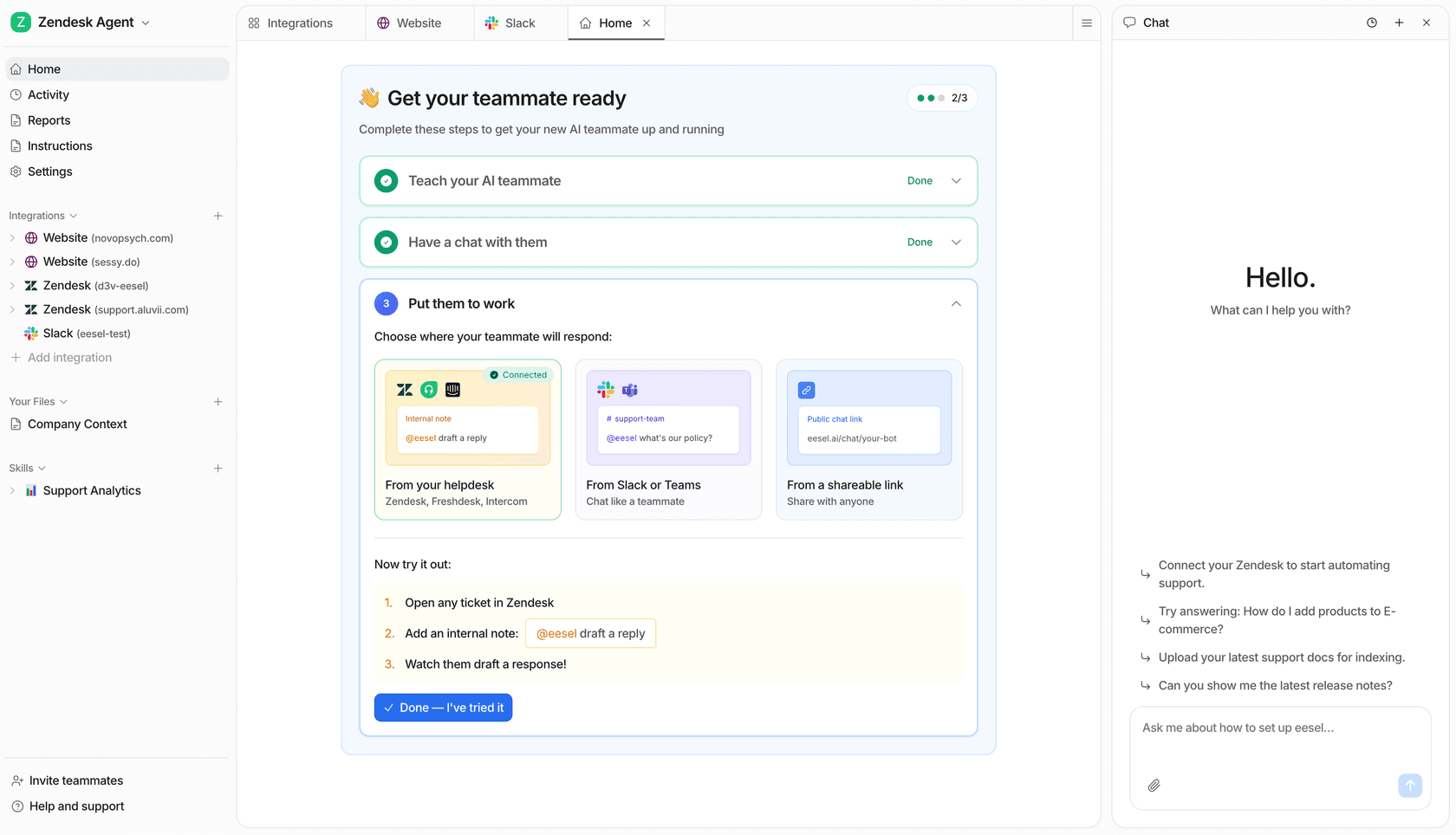
I will be upfront: eesel is the company I work for, and it does not have a free-forever plan. What it does have is a model built to dodge the things that make Zendesk's AI expensive. You start with 100 free credits and no credit card, then pay one fixed monthly price from $299/month for 500 credits, where one ticket or one chat is a single credit no matter how many back-and-forth messages it takes.
It also does not ask you to switch tools. It layers AI directly onto the help desk you already use, whether that is Zendesk, Freshdesk, Slack, Gmail, or one of 100+ others. So "free Zendesk alternative" is a slightly funny label here: you keep Zendesk as your ticketing system and swap out only the expensive native AI.
Features: an autonomous agent that resolves tickets and chats end to end, a copilot that drafts replies for human agents to review, training on your past tickets and existing knowledge, and a simulation mode that replays historical tickets so you can see the projected resolution rate before going live. You brief it in plain language, with no prompt engineering.
Pros: no per-seat fees and no platform fee on self-serve; optional overage with a monthly cap you set, otherwise agents pause until credits reset, so there are no surprises; and selective rollout, so you can route just 200 of 1,000 monthly tickets and only those use credits.
Cons: only a small free plan (100 credits), so free-forever shoppers may prefer Zoho Desk or Chatbase. It is also AI-first rather than a full ticketing system, so you need a help desk underneath it, which most teams switching from Zendesk already have.
Pricing: 100 free credits to start, then one fixed monthly price: 500 credits for $299/month, 1,000 for $499/month, 2,500 for $999/month, 5,000 for $1,899/month. Pay a year upfront and get two months free; SSO and HIPAA are available as add-ons. See the full eesel pricing page.
One cloud-infrastructure team on Zendesk's $799/month Business plan, running about 1,607 interactions, summed up a head-to-head this way: "I've tested many AI agent solutions, but so far Eesel is one of the best... Highly recommended" (Mikita Tsybulka, Gcore). Another team, Gridwise, reported eesel resolving 73% of their tier-1 requests in the first month.
Verdict: if your goal is a predictable monthly cost for AI on top of a help desk you already have, this is the pick. If you specifically need a tool that costs $0 forever, keep reading.
2. Zoho Desk
Best for: budget-conscious teams who want a free-forever help desk and are already in, or open to, the Zoho ecosystem.
Zoho Desk is the classic "most of what Zendesk does at a fraction of the cost" pick, and one of the few here with a true Free Forever plan: $0 for up to 3 user licenses with email ticketing. On Reddit it is consistently recommended as the cheaper Zendesk alternative.
Features: omnichannel inbox, Blueprint process automation, SLAs and escalations, and Zia, Zoho's in-house AI. Worth knowing: Zoho moved its AI down-tier in 2026, and the old "Zia is Enterprise-only" line no longer holds. AI Agents with 30M free tokens a month plus bring-your-own-key generative AI start on Express at $7; Answer Bot arrives on Standard at $14; built-in Zia lands on Professional at $23. Enterprise at $40 is now about Guided Conversations, live chat and multi-brand help centres.
Pros: hard to beat on price, with strong automation and Blueprint workflows that reviewers call "a game changer." It holds a 4.5/5 on Gartner Peer Insights across 2,403 ratings.
Cons: the Free tier is thinner than the seat count suggests. It is email ticketing with three users and no automation, SLAs, multi-department support or AI. Zia's answer quality also draws criticism; one Reddit user called it "a trainwreck of unhelpful responses." The UI has a real learning curve, with 112 "learning curve" mentions tagged on G2. Zia's knowledge sources are also limited to your KB articles plus optional open-domain data, so authenticated stores like Confluence are not connectable.
Pricing: Free Forever ($0, 3 users); Express $7/agent/month; Standard $14; Professional $23; Enterprise $40. Full detail in this Zoho Desk pricing guide.
Verdict: the strongest free help desk on this list, and much better value on AI than it was six months ago. Take the free ticketing, and price the specific Zia feature you need rather than assuming Enterprise.
3. Chatbase
Best for: teams who want free AI that keeps renewing, trained on their docs and bolted onto an existing site or help desk, Zendesk included.
Chatbase is not a help desk; it is a build-and-deploy AI agent platform. Its free plan gives you 50 message credits every month, one agent, one team member and a 400KB knowledge limit, with the catch that agents are deleted after 14 days of inactivity. You train an agent on your data and deploy it to your website, Shopify, Slack or Zendesk.
Features: train on documents, websites and databases; pre-built and custom actions to any API; multi-model support (OpenAI, Anthropic, Gemini, DeepSeek); smart escalation rules; omnichannel deploy.
Pros: the recurring free allowance is the most useful free AI here, setup is fast and no-code, and the multi-model flexibility is unusual at this price. It is a documented destination for cost-driven switchers; I have seen teams leave a $799/month Zendesk-plus-AI setup for Chatbase at roughly half the cost.
Cons: it leans toward FAQ deflection rather than dynamic, action-heavy support. As one operator put it:
"Chatbase is great for FAQs. But it doesn't really sell or push... it just answers."
The credit unit is also per message rather than per conversation, so a chatty ticket costs several credits. Users wanting live product or order data without re-training tend to look elsewhere; if that is you, these Chatbase alternatives and free Chatbase alternatives roundups dig deeper.
Pricing: Free ($0, 50 credits/month); Hobby $32/month; Standard $120/month; Pro $400/month; Enterprise custom. Extra credits are $40 per 1,000, and additional agents are $300 per agent per year.
Verdict: the best free standalone AI agent if your support is mostly FAQ-style and you are comfortable wiring it into your stack yourself.
4. Help Scout
Best for: relationship-driven small teams that want a clean, email-like shared inbox and only need light AI.
Help Scout is the low-clutter option, built around the idea that support should feel human. Its free plan covers up to 5 users, 1 inbox, 1 Docs site, and 100 contacts a month.
Features: shared inbox with collision detection, Docs knowledge base, the Beacon help widget, live chat, an AI Answers customer-facing agent (about 73% resolution by Help Scout's own figure), and an Inbox Assistant for drafting and summarizing.
Pros: the most-praised thing about Help Scout is how fast it is to learn; reviewers say new agents are productive in under an hour. Its AI billing definition is also the fairest here: a resolution only counts if the customer does not escalate, search the knowledge base or ask for more help, and you are charged once per conversation regardless of how many questions the AI answers.
Cons: the AI is a paid add-on rather than part of the free tier, at $0.75 per resolution on top of seat costs, which works out around +$750/month at 1,000 resolutions. The 100-contact monthly limit is also the real ceiling on the free plan, not the 5 seats. Help Scout also took a reputational hit over a pricing model change:
"HelpScout changed back to user-based pricing. Guess too many people cancelled including me... Helpscout lost all trust with this flip-flopping on pricing."
For teams comparing inbox-style tools, this guide to Help Scout AI workflows shows what is possible.
Pricing: Free ($0, 5 users); Standard $25/user/month; Plus $45/user/month; Pro $75/user/month. AI Answers is $0.75/resolution with a 3-month free trial.
Verdict: a lovely free inbox for a small team, but budget separately for the AI and watch the contact cap rather than the seat count.
5. Shopify Inbox
Best for: small Shopify stores that want a free AI agent answering shoppers in chat, alongside whatever help desk handles email.
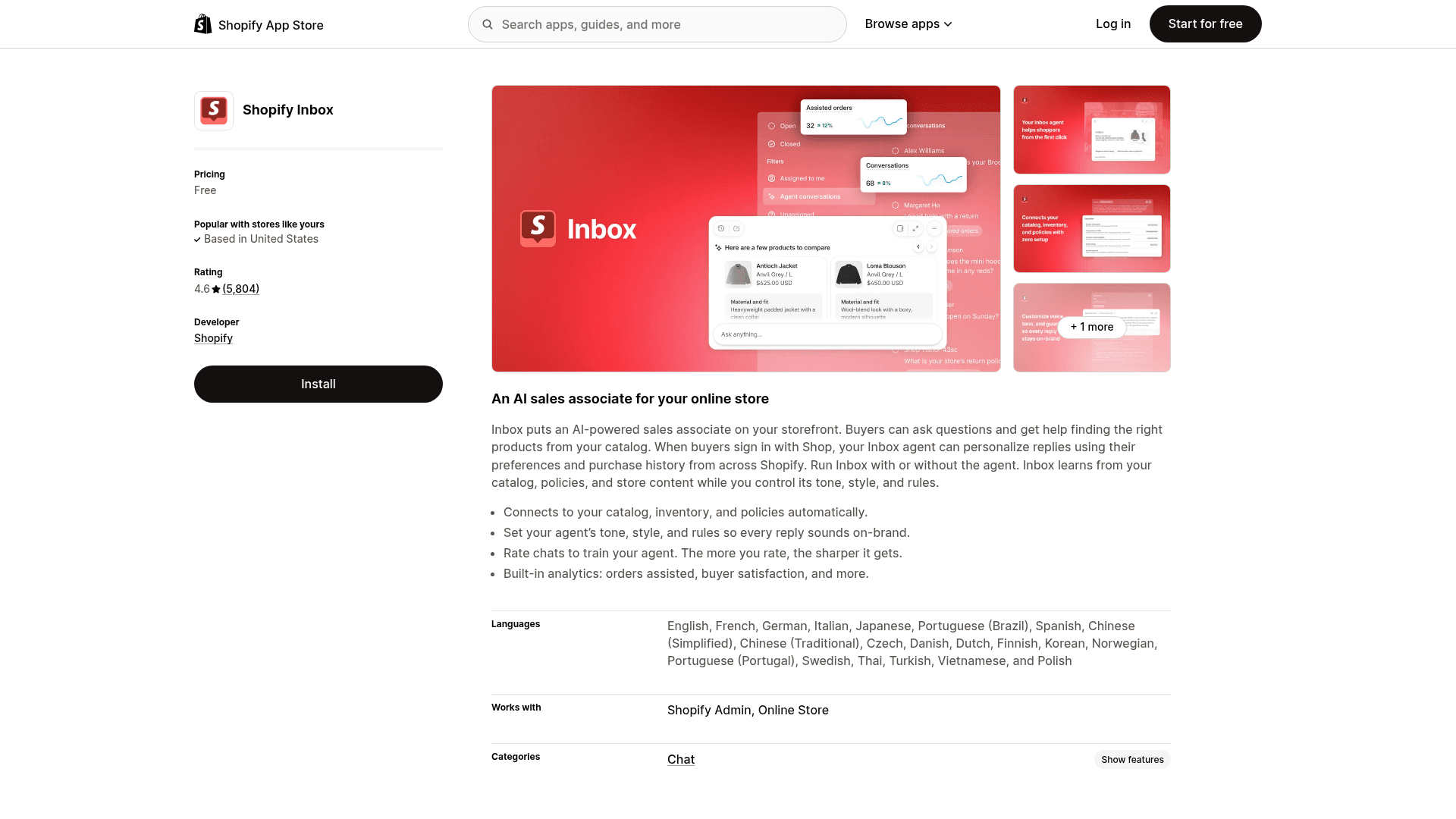
Shopify Inbox is Shopify's own chat app. The app is free on the Shopify App Store, and neither the listing nor Shopify's Help Center lists a per-conversation or AI charge. The condition is a big one: it only works for Shopify stores on the Basic, Grow, Advanced or Shopify Plus plan, so it is free in the sense that you already pay Shopify.
Its AI is called the Inbox agent, which Shopify describes as "An AI sales associate for your online store." It is opt-in, needs new customer accounts, and is off by default for stores that installed Inbox before the agent launched. It does not replace Zendesk, because it has no ticketing and only works in your store's chat widget, but it can take storefront questions off your plate while Zendesk keeps the email queue.
Features: the Inbox agent answers product, shipping, returns, sizing and store-policy questions from your catalog, policies, Knowledge Base facts and files, and storefront pages and blog posts; personal product recommendations from a shopper's preferences, sizes and purchase history; replies in the shopper's language (21 languages); handoff to your staff with the AI's context; AI-suggested replies for staff; and analytics on orders assisted and buyer satisfaction.
Pros: it costs nothing on top of your Shopify plan, it is made by Shopify so it connects to your catalog, inventory and policies with no setup, and it holds a 4.6/5 from 5,804 reviews on the Shopify App Store. Desktop, iOS and Android apps let your team answer on the go.
Cons: it only works for Shopify stores, and it is storefront chat rather than a help desk: no ticketing, and the agent cannot send email for you. Merchant reviews in October 2026 mention wrong answers and ask for actions beyond answering, like adding a note to an order, and Shopify's Help Center reminds merchants they are responsible for the accuracy of its answers.
Pricing: Free app, with no AI or per-conversation fee listed. Requires a Shopify plan (Basic, Grow, Advanced or Shopify Plus). See this Shopify AI chatbot roundup if you want to compare it with other Shopify options.
Verdict: the easiest free AI agent to switch on if you run a Shopify store, but it sits next to your help desk rather than replacing Zendesk.
6. HubSpot Service Hub
Best for: teams whose support, sales and marketing already live on HubSpot's CRM and want one connected customer view.
HubSpot Service Hub brings AI-powered ticketing on top of HubSpot's Smart CRM. Its free tier covers up to 2 users and gives you free Service, Sales and Marketing tools, though not the help desk workspace or the autonomous agent.
Features: Breeze Assistant copilot, the autonomous Breeze Customer Agent, knowledge base, customer portal, and CRM-grounded context the AI uses to personalize replies.
Pros: the CRM grounding means the AI knows your customer history, which is a real advantage on account-heavy support. HubSpot also now gives 14 days of unrestricted Customer Agent access when you buy a Professional or Enterprise seat, which is the most useful free AI trial in this roundup.
Cons: the autonomous Breeze Customer Agent is Professional and Enterprise only, and the credit math is the thing to check before committing. A resolution costs 50 credits, roughly $0.50, and Professional includes 3,000 credits a month, which works out to about 60 resolutions a month, or two a day, shared with every other Breeze action. Credits do not roll over, and running out silently stops the agent across every channel until reset. Professional also carries a required one-time $1,500 onboarding fee.
Pricing: Free ($0, 2 users); Starter $7/seat/month on a monthly commit, or $20 paying month to month; Professional $90/seat/month annual (plus $1,500 onboarding); Enterprise $150/seat/month (plus $3,500 onboarding).
Verdict: the right free starting point only if you are already committed to HubSpot. The free tier gives you CRM tools, not a deflecting agent, so factor the Professional jump and the onboarding fee into your plans.
7. Freshdesk
Best for: small teams who want a polished help desk from a major vendor and can treat the first six months as an extended trial.
Freshdesk, from Freshworks, is the tool most often mislabelled in free roundups. There is a Freshdesk Free Program and it is real, but it is not on the pricing page and it is not permanent: 2 agents maximum, 6 months maximum, email-first Freshdesk rather than Freshdesk Omni, no complimentary AI sessions, and your admin has to switch it on in-product under Plans and Billing. Treat it as a long trial rather than a free tier.
Features: shared inbox, omnichannel routing, SLA automation, the Command Center workspace, and Freddy AI (Agent for resolution, Copilot for agents, Insights for leaders).
Pros: clean, fast to deploy, and trusted by 74,000+ businesses including Klarna and PepsiCo. Every paid plan includes the first 500 Freddy AI Agent sessions, so you can size the AI before paying for it.
Cons: the free window closes at six months, and the AI is not part of it. Freddy AI Agent bills at $49 per 100 sessions after the included 500, or $0.49 a session, and Freddy Copilot is a separate $29/agent/month. Previewing your own bot burns sessions too, published or not. If you want the AI without the platform commitment, these Freshdesk AI free alternatives are worth a look.
Pricing: Growth $19/agent/month; Pro $55/agent/month; Enterprise $89/agent/month, all billed annually. Freddy pricing is a separate add-on.
Verdict: a strong help desk and a generous trial, but not a free-forever plan. Plan for the six-month cliff before you migrate your tickets in.
How to choose the right free Zendesk alternative
There is no single "best free" winner, because these tools solve slightly different problems. So instead of a leaderboard, here is the decision I would actually make in your shoes.
- Want free AI that keeps renewing? Chatbase, at 50 message credits a month, or Zoho Desk Express at $7 if you would rather bring your own model key.
- Want a free-forever help desk to build on? Zoho Desk's three-user plan is the most generous, as long as you know it is email ticketing only.
- Want the longest free run at a full-featured help desk? Freshdesk's 6-month Free Program, with the cliff diarised.
- Run a Shopify store and want free AI in your storefront chat? Shopify Inbox, as long as Zendesk or another help desk still handles email.
- Budget is truly zero and you run your own servers? FreeScout or osTicket, and accept that you are paying in maintenance instead.
- Already have a help desk and want the best AI on top? Layer eesel onto your existing setup from $299/month for 500 credits, and skip the migration entirely.
One more thing worth saying plainly: a free tool is only cheap while you stay inside the free tier. The moment volume grows, the billing unit matters far more than whether the entry plan was free, which is why the cost per conversation is the number to watch. For the wider field, these roundups of the best customer service AI and support automation tools go broader, and this guide to preventing AI hallucinations covers the quality side. If you are weighing a full platform move, the Zendesk alternatives guide and the Freshdesk vs Zendesk comparison are the next two reads.
Try eesel
If you already run Zendesk, or Freshdesk, or a shared inbox, and what you actually want is better and cheaper AI rather than a whole new platform, that is what eesel is for. It layers an autonomous agent and copilot onto your existing help desk through the Zendesk integration, trains on your past tickets, and simulates the resolution rate on historical data before you commit a live ticket. No migration, no per-seat fees, and one fixed monthly price from $299/month. Start with 100 free credits and no credit card, or open the eesel pricing page to run your own numbers.