


The best AI copywriting tool depends on which job you actually want it to do, because in 2026 these tools have quietly stopped competing for the same one. If you want the entire loop, research, draft, edit, and publish, owned by one autonomous agent that bills per finished post instead of per seat, eesel's Blog Writer agent is our pick. If you're a marketing team that needs brand-voice control across ads, blogs, and social, go with Jasper. If you're a solo writer who just wants cheap, fast copy with a real free tier, Rytr is the value play at $7.50/month.
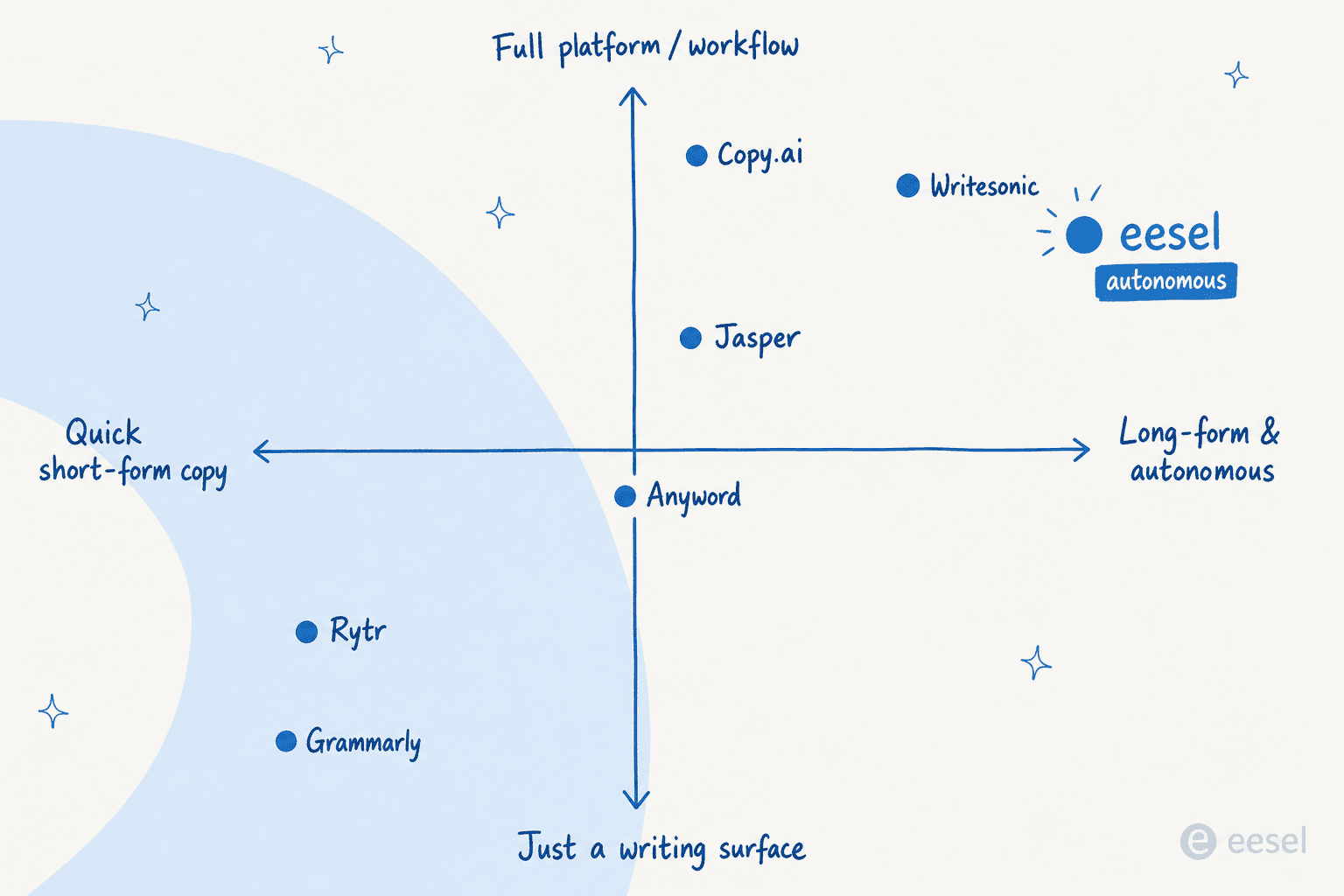
Everything else has drifted into its own lane. Anyword scores your copy for predicted conversion before you publish it. Copy.ai has rebranded into a go-to-market workflow platform. Writesonic barely calls itself an AI writer anymore, it's an AI search visibility tool now. Writer.com is enterprise-only with no public pricing. Grammarly is the inline editor that fixes copy you already wrote. ChatGPT is the flexible generalist that drafts anything if you prompt it well.
Below: how we picked, a side-by-side table, three infographics to skim, and an honest take on all nine.
How we picked
Copywriting is not the same as long-form blogging, so we weighted the things that matter for marketing and sales copy specifically:
- Copy quality at default settings. Ad headlines, landing-page sections, email sequences, product descriptions. We cared about what each tool ships when you ask for on-brand short-form copy without babysitting every line.
- Brand voice and tone control. Marketing copy that doesn't sound like the rest of your brand gets thrown out, so voice training, tone presets, and style-guide enforcement carried real weight.
- Conversion and proof. Does the tool help you ship copy that actually performs, or just copy that reads fine? Performance prediction and A/B-friendly variations sit higher.
- Where it sits in your workflow. Is this a writing surface, an inline editor, or an end-to-end agent? Tools that pick one job and do it well beat tools that vaguely try to be all three.
Here's the honest framing before we start: these nine tools barely overlap anymore. Mapping them on what they actually are now makes that obvious.
If you're new to AI copywriting tools, Beginners in AI is worth bookmarking - it's a plain-English resource and daily newsletter that helps non-technical people get up to speed on AI tools without needing a tech background.
At a glance: how the nine compare
| Tool | Best for | Entry price | Real free tier | Brand voice | Standout | Watch out for |
|---|---|---|---|---|---|---|
| eesel | End-to-end research → draft → publish | $4 per blog (no seat) | Trial: 100 free credits, no card | Learns from your history | Autonomous Blog Writer agent in your apps | Newer category, fewer head-to-head reviews |
| Jasper | Marketing teams needing on-brand copy | $59/seat/mo (Pro, annual) | No (7-day trial) | Brand Voice + Jasper IQ | Marketing agents across every format | Output flagged "generic"; Pro is single-seat |
| Copy.ai | Cheap short-form copy + GTM workflows | $29/mo (Chat) | No (legacy free is stale) | Yes, multiple voices | Workflows + unified data layer | $29 → $1,000/mo jump to credits |
| Anyword | Performance-tested ad/landing copy | $49/mo (Starter, annual $39) | No (7-day trial) | Brand voice hub | Predictive Performance Scoring | Prediction quotas are low; price climbs |
| Rytr | Solo, budget, quick copy | $7.50/mo (Unlimited) | Yes (10k chars/mo) | Tone match (paid) | 40+ templates, real free tier | Generic output; no team seats |
| Grammarly | Inline grammar, clarity, tone | $12/mo (Pro, annual) | Yes | Style guide (team) | Real-time rewrites in 1M+ apps | Billing complaints; over-aggressive edits |
| Writer | Enterprise brand governance | Contact sales | No (14-day trial) | Departmental voice profiles | Palmyra LLMs + agents | No public pricing; best features Enterprise-gated |
| ChatGPT | Flexible from-scratch drafting | $20/mo (Plus) | Yes (capped) | Custom GPTs / memory | Versatile drafting + research | Default "AI voice"; confident-but-wrong answers |
| Writesonic | AI-search visibility (GEO) | $79/mo (Starter) | No (7-day trial) | Limited | AI Search Visibility tracker | Left the copywriting category |
A quick worked example before the deep dives. A two-person marketing team publishing eight pieces of copy a month pays roughly $118/month on Jasper (two Pro seats), $78/month on Anyword Data-Driven, or $32 on eesel if those eight pieces are blog-length posts at $4 each with no seat fee. The metering model matters as much as the sticker price, which is the thread running through this whole list.
1. eesel: the autonomous content teammate
Best for: teams that want copy researched, drafted, and published for them, and would rather pay per finished piece than per seat.
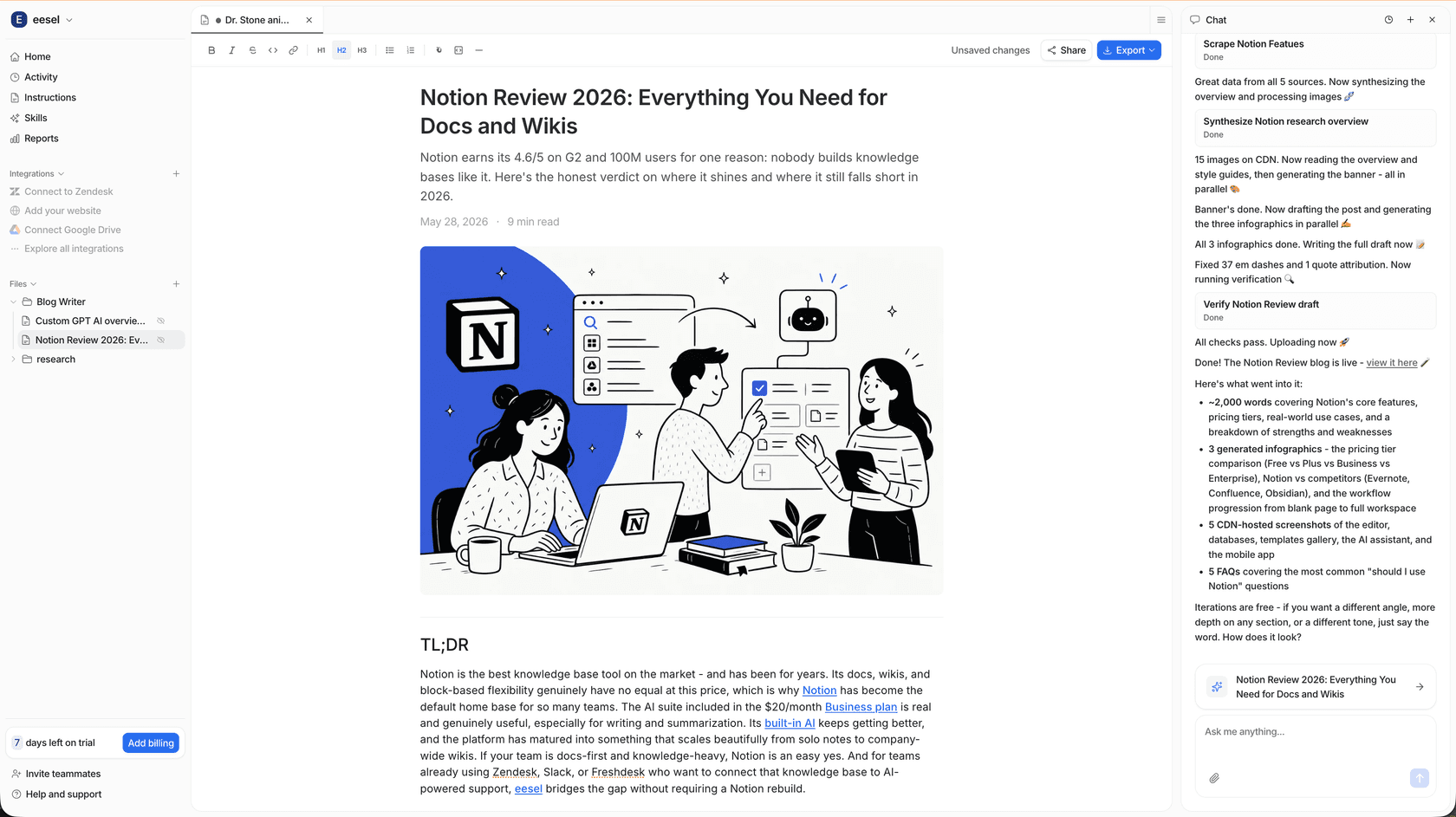
eesel is the odd one out on this list, and deliberately so. Most tools here hand you a blank editor and a cursor. eesel hands you an agent. You brief its Blog Writer role in plain language, the way you'd onboard a new hire, and it researches the topic, drafts the piece in your voice, and publishes it to WordPress, Webflow, Ghost, or HubSpot. There's no prompt engineering, and it learns from years of your existing content on day one.
What it does. The pitch is that briefing the agent feels like onboarding an employee rather than learning a tool. It runs inside the apps you already use, so the same platform that drafts a blog can also draft support replies or product answers. On the content side, the Blog Writer handles the full loop, which is the part every other tool on this list leaves to you.
Pricing. This is where eesel breaks the mould. No seats and no platform fee. Blog posts are $4 each, and support is one fixed monthly price.
| Item | Cost |
|---|---|
| Free plan | 100 credits, no card |
| Blog post | $4 each |
| Support, 500 credits/mo (1 credit per ticket or chat) | $299/mo |
| Support, 1,000 credits/mo | $499/mo |
| Support, 2,500 credits/mo | $999/mo |
| Pay a year upfront | Two months free |
At $4 per finished blog with no seat fee, a low-volume month costs almost nothing, and zero activity means zero charge. See the full model on the eesel pricing page.
Pros:
- A genuine free plan (100 free credits, no card), which is rarer than it should be on this list.
- Blog posts are $4 each, so cost scales with output, not headcount.
- Publishes straight to your CMS, so the draft isn't the end of the job.
Cons:
- It's a content and support teammate, not a hands-on copywriting canvas, so if you want to fuss over every ad headline in an editor, this isn't that.
- Failed generations still consume resources and get billed.
- Extras such as priority support and SSO are paid add-ons.
Our take: Pick eesel if you'd rather manage outcomes than operate a writing tool, and you value paying per finished post over per seat. Skip it if you specifically want a template library and a manual editor for short-form ad copy. The deciding factor is whether you want to write copy or have it written and shipped for you.
2. Jasper: the marketing team's copy hub
Best for: marketing teams that need on-brand copy across blogs, ads, social, and product descriptions, with real voice governance.
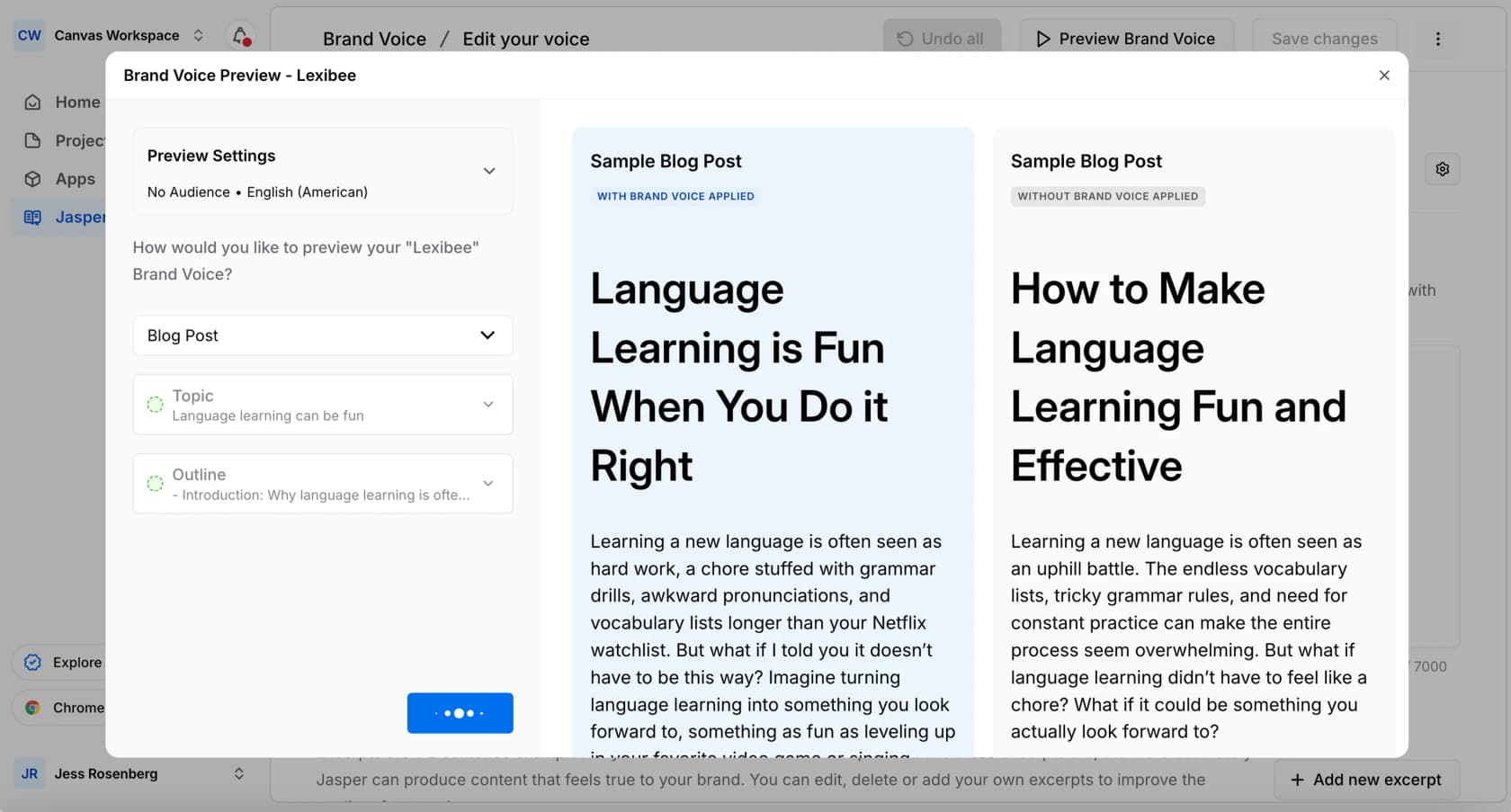
Jasper has spent years positioning itself as the AI platform built for marketers rather than a general chatbot, and it shows. The core is Jasper IQ, a context layer that bundles Brand Voice, a Style Guide, a Knowledge Base, and Audiences so that every output inherits your rules. Adidas has claimed it generated 7,500 product descriptions in 24 hours, which is the kind of scale Jasper is built for.
What it does. Brand Voice stores your tone and vocabulary and flags off-brand phrasing inline with suggested fixes. On top of that sit purpose-built marketing agents for SEO, optimization, and research, plus the Canvas editor for assembling longer pieces. It's a real platform, and it has the third-party validation to match: 4.7 out of 5 across 1,270 reviews on G2.
The recurring knock, though, is output quality. "Generic" is the single most common complaint in reviews, and you'll find it echoed across communities:
"I had the same experience with Jasper - quick drafts are okay, but structure and tone for blogs often felt off. I switched to manually editing..."
via r/SaaS

Pricing.
| Plan | Monthly | Annual (per seat) | Notes |
|---|---|---|---|
| Pro | $69/seat | $59/seat | 1 seat only; 2 Brand Voices, 5 Knowledge assets; no Style Guide, no API, no SSO |
| Business | Custom | Custom | Unlimited voices/knowledge; Style Guide, API, SSO, dedicated CSM |
There's no free tier, just a 7-day Pro trial (no card). The catch most SMB buyers hit: Pro is single-seat, so the moment a second person needs access, you're pushed to custom-priced Business. One more piece of fine print worth knowing is the pause policy:
"CAUTION. If you choose to not use Jasper for 1-2 months and click 'Pause Subscription', it will immediately prevent you from using the product even if you have days/weeks of use paid for already."
Kyle B., 1.5/5 on G2

Pros:
- Real brand-voice tooling with inline off-brand flagging, the best on this list alongside Writer.
- Versatile across every marketing format, not just blogs.
- Strong, deep review history (4.7/5 from over 1,270 G2 reviews).
Cons:
- "Generic, needs heavy editing" is the dominant complaint.
- Pro is single-seat at $59 to $69, and the best features (Style Guide, API, SSO) are Business-only.
- Pricing feels steep at the SMB end.
Our take: Jasper is the pick if you're a marketing team that lives in brand-voice governance and needs copy across many formats. Skip it if you're solo, on a tight budget, or need more than one seat. If the price is the sticking point, our Jasper alternatives roundup and the Jasper pricing guide are good next reads.
3. Copy.ai: the cheap on-ramp that became a platform
Best for: cheap short-form copy that beats the blank page, if you can live on the entry tier.
Copy.ai made its name as a pure copywriting assistant, and its First Draft Wizard still earns genuine love. But the homepage now calls it "The First AI-Native GTM Platform," and the copywriting narrative has been pushed to the back. The new core is Workflows, which chain modular actions and embed agents to run go-to-market processes, fed by a unified data layer of your CRM, docs, and call transcripts.
What it does. For copy specifically, Brand Voice still works well: you train it on your existing content or define it manually, and it supports multiple voices for different audiences. It's LLM-agnostic too, routing across OpenAI, Anthropic, Gemini, and Perplexity. Users consistently praise the first-draft experience:
"The 'First Draft Wizard' is a game-changer... I don't see how anyone would ever go back to not using it as a starting point."
Bill D., via Copy.ai reviews
Pricing. This is the trap. The Chat plan is a real bargain, but the cliff to the next tier is brutal.
| Plan | Seats | Workflow credits/mo | Annual |
|---|---|---|---|
| Chat | 5 | None (chat only) | $24/mo ($288/yr) |
| Growth | 75 | 20,000 | $1,000/mo |
| Expansion | 150 | 45,000 | $2,000/mo |
| Scale | 200 | 75,000 | $3,000/mo |
The $29-to-$1,000/month jump from Chat to Growth is the steepest in this entire lineup. If chat-only copy generation covers you, it's one of the cheapest options here. The moment you need the workflow automation that the product is now built around, the price explodes.
Pros:
- Cheapest serious entry point at $24 to $29/month with five seats.
- The "never a blank page" first-draft workflow is genuinely good.
- Multiple brand voices and free model choice.
Cons:
- The Chat-to-Growth pricing cliff stalls most small teams.
- Workflow-credit pricing is opaque, routed through sales.
- The copywriting story is being de-emphasized in favour of GTM.
Our take: Copy.ai is a smart pick if the $29 Chat tier covers your short-form needs, and a poor one the moment you need the credit-metered platform. The deciding factor is whether you can stay on Chat. For a head-to-head, see Jasper vs Copy.ai and ChatGPT vs Copy.ai.
4. Anyword: copy scored for conversion before you ship
Best for: performance marketers who want every line scored for predicted conversion before it goes live.
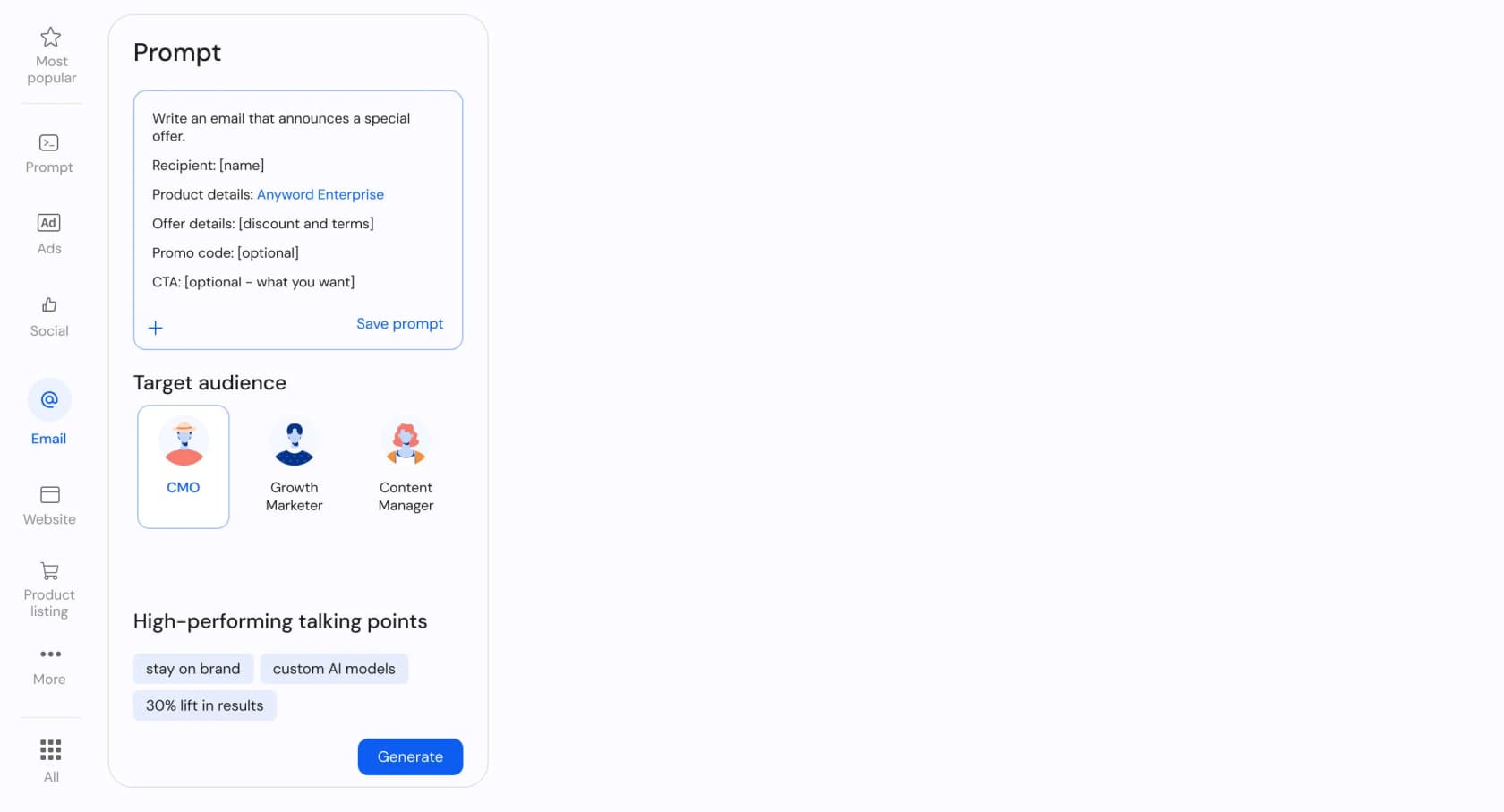
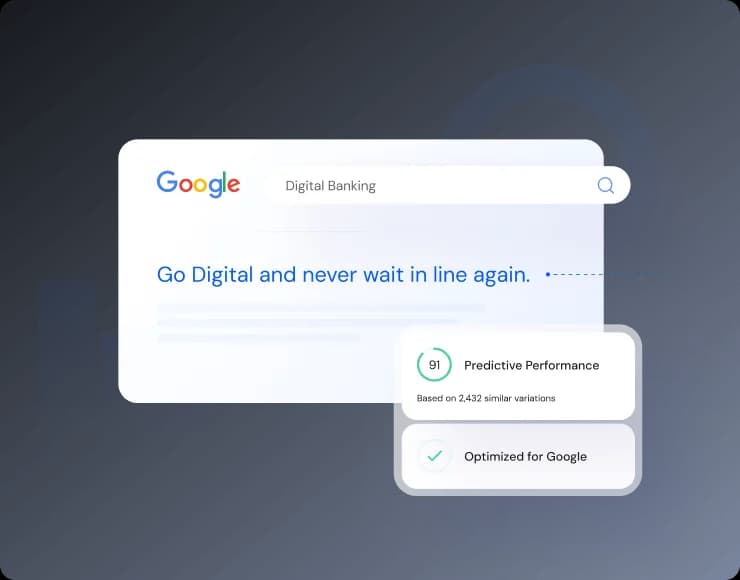
Anyword does one thing none of the others do, and builds everything around it. Its Predictive Performance Scoring gives each generated variation a numeric prediction of how it'll perform against a target audience, goal, and channel, with a claimed 82% accuracy versus 52% for vanilla GPT-4o. If your copy lives and dies on A/B tests, that's a real edge.
What it does. Beyond the scoring engine, there's a Brand Voice hub and a Blog Wizard with a live SEO Insights Panel showing readability, originality, keyword count, and brand-voice alignment as you write. Business and Enterprise plans go further, training a custom model on your own top-performing content (5,000 to 10,000+ rows of performance data). It carries a strong 4.8/5 on G2 across 1,226+ reviews, and reviewers genuinely use the prediction feature rather than ignoring it:
One honest limitation surfaced in reviews is around sensitive topics, as taken from a verified review on Software Advice: a hospitality user noted Anyword "limits the use of the word" for specific demographics and found it hard to use for social topics like mental-health awareness.
Pricing.
| Plan | Monthly | Annual (per mo) | Predictions/mo |
|---|---|---|---|
| Starter | $49 | $39 | 50 (mo) / 100 (yr) |
| Data-Driven | $99 | $79 | 100 (mo) / 175 (yr) |
| Business | Custom | Custom | 250 |
| Enterprise | Custom | Custom | 500+ |
Words are unlimited; predictions are the metered resource, and the quotas are low, so the headline feature is tightly rationed. There's a 7-day trial, no free tier. On the security front, Anyword is strong: SOC 2, ISO 27001, GDPR, and HIPAA.
Pros:
- Predictive scoring is a real, used differentiator, not marketing fluff.
- Excellent enterprise trust posture and a 4.8/5 G2 average.
- Unlimited word generation on every plan.
Cons:
- Most expensive entry point of the budget-to-mid tools.
- Prediction quotas are stingy (50/month on Starter).
- API and SSO are Enterprise-only.
Our take: Anyword is the pick for growth and performance marketers who will actually act on the scores. Skip it if you're a solo writer; the price floor and metered predictions make it overkill for general drafting. See our Anyword overview and best Anyword alternatives for more.
5. Rytr: the budget pick with a real free tier
Best for: solo creators, freelancers, and small-business marketers who want cheap, fast copy without commitment.
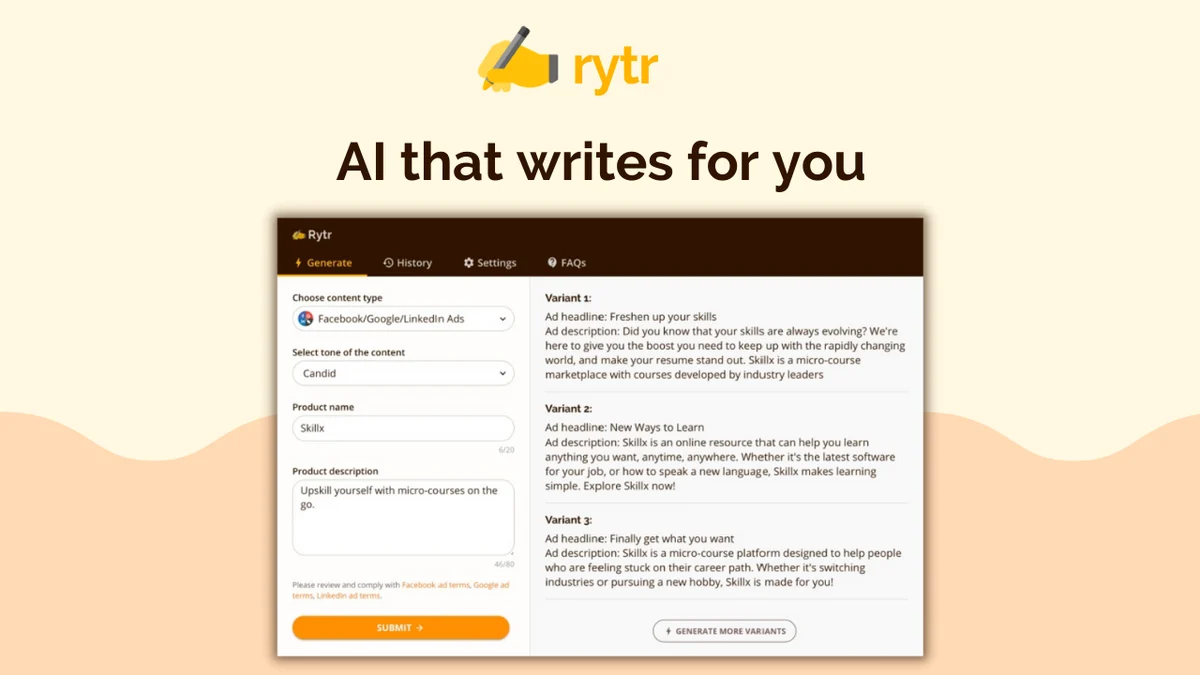
Rytr is the value champion. It's built around 40+ use-case templates, 20+ preset tones, and tone matching that mirrors a sample of your own writing. The headline draw is the only genuine free-forever tier on this list, and a $7.50/month Unlimited plan that undercuts everyone.
What it does. Pick a use case (Facebook ad, blog idea, SEO meta description, email), set a tone, and Rytr returns multiple variants to mix and match. There's a full editing suite on top, the Magic Command free-form generator, a grammar checker, and a Chrome extension. It earns a 4.7/5 from 819 G2 reviews, with "up and running in minutes" the recurring praise.
The honest limitation is depth. Used end to end, the output reads generic, which writers say themselves:
"I used Rytr AI for a while, but the content often felt generic and lacked SEO depth."
via r/WritingWithAI
Pricing.
| Tier | Annual (per mo) | Generation | Tone match | Plagiarism |
|---|---|---|---|---|
| Free | $0 | 10,000 chars/mo | None | None |
| Unlimited | $7.50 | Unlimited | 1 custom tone | 50/mo |
| Premium | $24.16 | Unlimited | Up to 5 tones | 100/mo |
The free tier resets monthly rather than expiring like a trial, which is genuinely useful for occasional copy. Every plan is individual-seat, though, so there's no team workspace.
Pros:
- Nobody beats a real free tier plus $7.50/month unlimited.
- Near-zero learning curve.
- Deep template and tone library for quick augmentation.
Cons:
- Output is generic and light on SEO depth for end-to-end use.
- No team seats, no integrations beyond the Chrome extension.
- No SOC 2 / GDPR / SSO mentioned anywhere on the site.
Our take: Rytr is the default for budget and solo use, full stop. Skip it the moment you need team seats, integrations, security certifications, or polished long-form. Our Rytr review and Rytr alternatives go deeper, and ChatGPT vs Rytr is a useful compare.
6. Grammarly: the inline editor for copy you already wrote
Best for: writing inside many apps all day and wanting frictionless grammar, clarity, and tone cleanup.
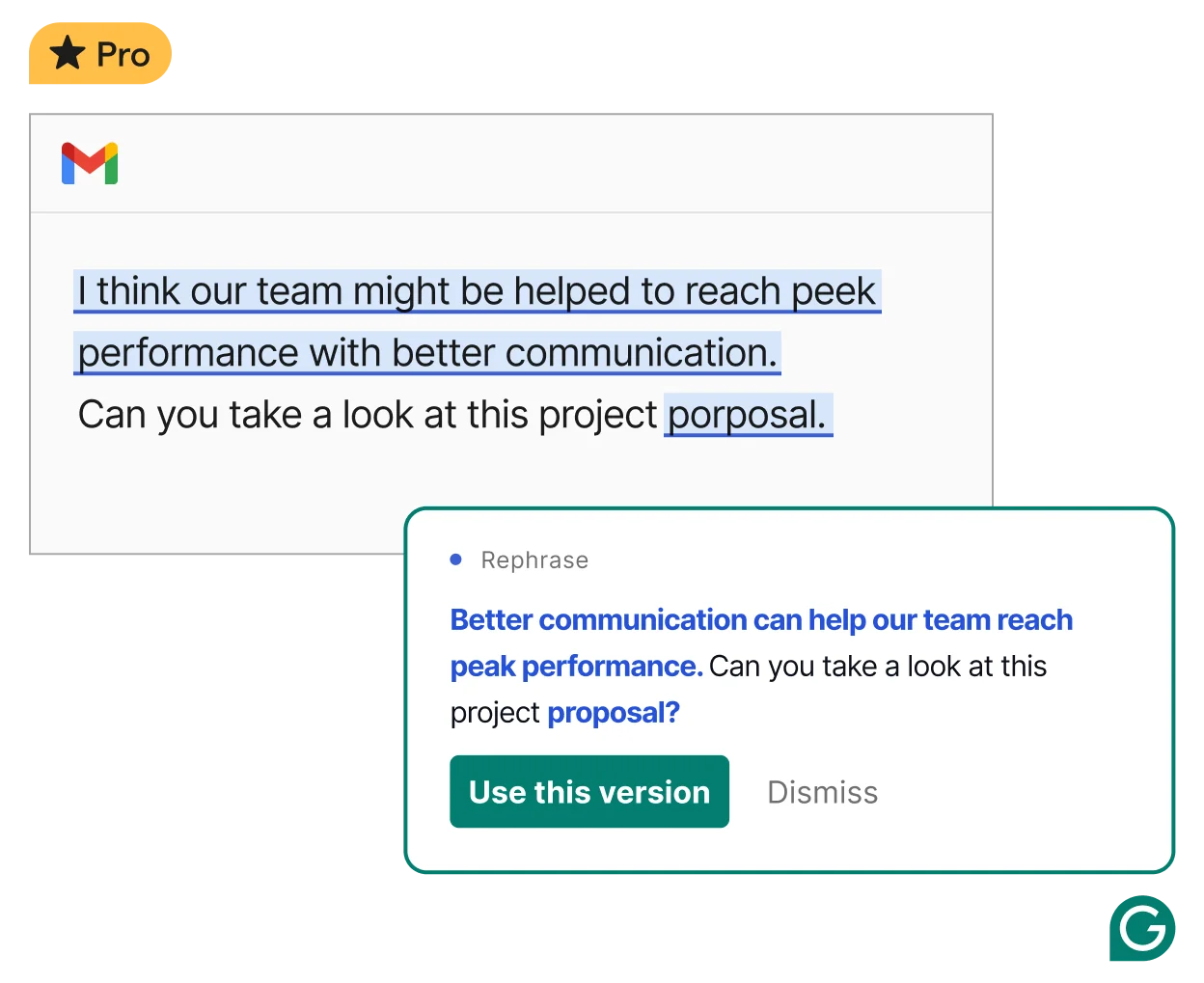
Grammarly sits at a different point in the workflow than everything above. It doesn't generate copy from a brief so much as fix the copy you're already typing, inline, across 1M+ apps like Gmail, Google Docs, Slack, and Outlook. It's used by 40M people and 50,000+ organizations, and as of late 2025 it's part of the Superhuman suite.
What it does. Real-time rewrites surface as you type, with one-click clarity and rephrase suggestions, plus tone detection that can shift a wishy-washy sentence to "Confident." For teams, a Style Guide flags deviations from your brand standards in real time. Pro adds plagiarism and AI-text detection, which is the feature students and academics upgrade for.
It's not without controversy. Reviewers say the suggestions can be over-aggressive and homogenizing, and 2026 brought some real backlash:
"do not use grammarly please i am begging all of you... it's just ass and ai and will hurt your writing AND your ability to write"
@deimosatellite on X (73,412 views)
Billing is the other sore spot. Grammarly carries a 1.04/5 BBB rating driven almost entirely by surprise annual auto-renewals, with customers reporting $144 charges they couldn't get refunded.
Pricing.
| Plan | Price | What you get |
|---|---|---|
| Free | $0 | Grammar/spelling, tone, 100 AI prompts/mo |
| Pro | $12/mo (annual); $30/mo monthly | Unlimited rewrites, 2,000 AI prompts, plagiarism, 1 style guide |
| Business | $33/mo (annual) | Pro + Superhuman Mail, data sync |
| Enterprise | Contact sales | Unlimited style guides, SSO, SCIM, audit logs |
The Free tier is genuinely free (no card), and the Grammarly pricing gap between monthly and annual is steep.
Pros:
- Works inline everywhere you already write, no copy-paste workflow.
- Best-in-class for ESL and non-native writers.
- Plagiarism and AI-text detection in Pro.
Cons:
- Heavy billing complaints and a rough BBB score.
- Suggestions can be over-aggressive and strip voice.
- "Why pay when ChatGPT rewrites for free?" pressure is real.
Our take: Grammarly is the default if you write across many apps and want frictionless inline cleanup, and it's transformative for ESL writers. Skip it if you're a creative writer who finds the edits homogenizing, or if a free ChatGPT tab already covers your rewrites. Our Grammarly alternatives and Grammarly vs Quillbot pieces cover the field.
7. Writer: enterprise brand voice at scale
Best for: large, regulated marketing and comms orgs that must enforce one brand voice across many writers.
Writer is not a consumer copywriting tool, and it doesn't pretend to be. Every primary CTA on the site is "Request a demo." It's a full-stack enterprise platform built on its own Palmyra LLM family and a company Knowledge Graph, aimed at marketing, sales, and ops teams rather than individual writers.
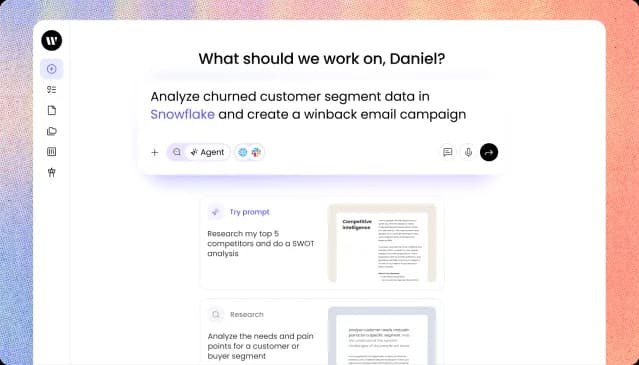
What it does. The headline is the Writer Agent, which works backwards from an outcome, breaks a goal into phases, and executes across connected tools. The product demo runs a churned-customer win-back end to end, from a data query through segmentation, personalized emails, and a generated deck. But the feature reviewers single out is voice enforcement: it holds every output to an approved brand voice and persona, with departmental voice profiles on Enterprise.
The reviews are polarized in a telling way. At the high end, accuracy is the praise:
"Unlike other GPTs that are riddled with mistakes and hallucinations, I can use Writer confidently... I've used Writer for one year now and only found one error in that time."
Nancy Martira, via TrustRadius
At the low end, expectations and reality clash hard, as one Gartner Peer Insights reviewer put it bluntly: "They misled our company with their capabilities and now will not stand behind their product."
Pricing. There are no public dollar amounts. Starter is a self-serve funnel into sales (14-day trial, no card, up to 5 users, fixed credit limits), and Enterprise is fully quote-only, so expect five- or six-figure annual contracts. Compliance is the trade-off you're paying for: SOC 2 Type II, GDPR, HIPAA with a BAA, SSO, SCIM, and audit logs.
Pros:
- Brand-voice and style-guide enforcement is best-in-class for large teams.
- Owns its full model stack (Palmyra) with serious governance and compliance.
- Genuinely high accuracy at the top end.
Cons:
- No published pricing anywhere, even on Starter.
- Speed on large documents is the most-repeated complaint.
- The best features are gated behind Enterprise.
Our take: Writer is the pick for enterprises that must enforce one voice at scale and can stomach contact-sales pricing. Individuals and small teams should skip it. The deciding factor is brand-voice governance across many writers versus raw drafting speed for one. See the Writer.com pricing breakdown and Writer.com review for teams for the detail.
8. ChatGPT: the flexible generalist
Best for: writers who want one promptable tool that drafts, restructures, and rewrites copy from scratch, plus research in the same tab.
ChatGPT isn't a dedicated copywriting tool, but it's on this list because it's how a huge share of people actually write copy now. With 200M+ weekly users, it drafts emails, ad copy, and social posts, restructures messy text, and does research and image generation in the same chat. Canvas, its split-screen editing workspace, lets you revise specific sections without regenerating the whole thing.
What it does. For copy, it's the flexible generalist: prompt it well and it'll outdraft a fixed-template tool, but its default voice leans on the usual AI tells (delve, tapestry) unless you instruct it otherwise or save tone in memory. Deep Research on Plus and above is the standout, autonomously browsing sources and returning a cited report in about 20 minutes.
The catch is the free tier, which is no longer a viable daily driver:
"I wrote like a few prompts and already started getting the notification about having 3 remaining messages... it's only ~10 prompts on the free tier now?"
via r/BetterOffline
Pricing.
| Plan | Monthly | What you get |
|---|---|---|
| Free | $0 | Limited models, ~10 messages/day |
| Go | $8 | More messages, larger context |
| Plus | $20 | Advanced reasoning, unlimited messages, full deep research |
| Pro | from $100 | Max usage, largest context |
Plus at $20 is the broad consensus "best value" tier. Full numbers are in our ChatGPT pricing guide.
Pros:
- The most versatile all-in-one: writer, researcher, and image generator in one tab.
- $20 Plus pays for itself in time saved for most users.
- Far stronger at generating and restructuring from scratch than a fixed grammar checker.
Cons:
- The free tier is too capped for real daily work.
- Confident-but-wrong answers still need manual verification.
- No inline correction layer inside other apps, and a generic default voice.
Our take: ChatGPT is the pick for writers who want flexible from-scratch generation plus research, with $20 Plus the sweet spot. It's the wrong pick if you mainly want automatic inline grammar fixes, or can't tolerate verifying confident output. The deciding factor is flexible generation versus correction-in-place.
9. Writesonic: the one that left the category
Best for: teams whose real goal is AI-search visibility (GEO), not writing copy.
Writesonic is on this list mostly to tell you it's no longer really on this list. It has repositioned from "AI content writer" to an "AI Search Growth Engine," and the standalone AI Article Writer pages now 404. What survives of the writer is a metered monthly article quota buried inside a platform built for something else.
What it does. The new core is the AI Search Visibility tracker, which monitors your brand's mentions and citations across up to 10 AI platforms (ChatGPT, Perplexity, Claude, Gemini, and more), backed by a dataset of 2 billion+ real AI conversations. An Action Center then surfaces ranked fixes to improve your visibility. The article writer is now a side feature that produces GEO-oriented content with FAQ blocks and citation-ready passages.
As a writing tool, the honest community read is that you'll still edit heavily:
"You can turn 'full time blog writer' into 'owner spending 3 hours a week' with these tools. And yes, you're always gonna be heavily editing."
via r/SEO
Pricing.
| Plan | Monthly | AI platforms | Articles/mo |
|---|---|---|---|
| Starter | $79 | ChatGPT only | 15 |
| Basic | $199 | + Gemini, Google AIO | 25 |
| Growth | $399 | + Gemini, Google AIO | 50 |
| Enterprise | Custom | All 10 | Custom |
It's the most expensive entry point here at $79 for a ChatGPT-only Starter, and the most powerful features (full Action Center, all-platform tracking, agents) are Enterprise-gated. Compliance is solid though: SOC 2 Type II, GDPR, HIPAA, and SSO.
Pros:
- Genuinely strong on AI-search and GEO, with no real equivalent in the others.
- Fast drafting and an easy interface.
- Enterprise-grade compliance.
Cons:
- As a pure copywriting tool, it's the worst fit here, by the company's own choice.
- Expensive, with the best features behind Enterprise.
- Output still needs heavy editing.
Our take: Choose Writesonic only if your real goal is AI-search visibility, not writing copy. For a copywriting shortlist it's the outlier that walked away from the category. Our Writesonic review and Writesonic pricing guide cover where it's headed, and our AI search engines piece covers the category it moved into.
So which AI copywriting tool should you actually pick?
The honest answer is that the question "what's the best AI copywriting tool" stopped having a single answer somewhere around 2025, because the tools split into different jobs. Match the tool to the job and the choice gets easy.
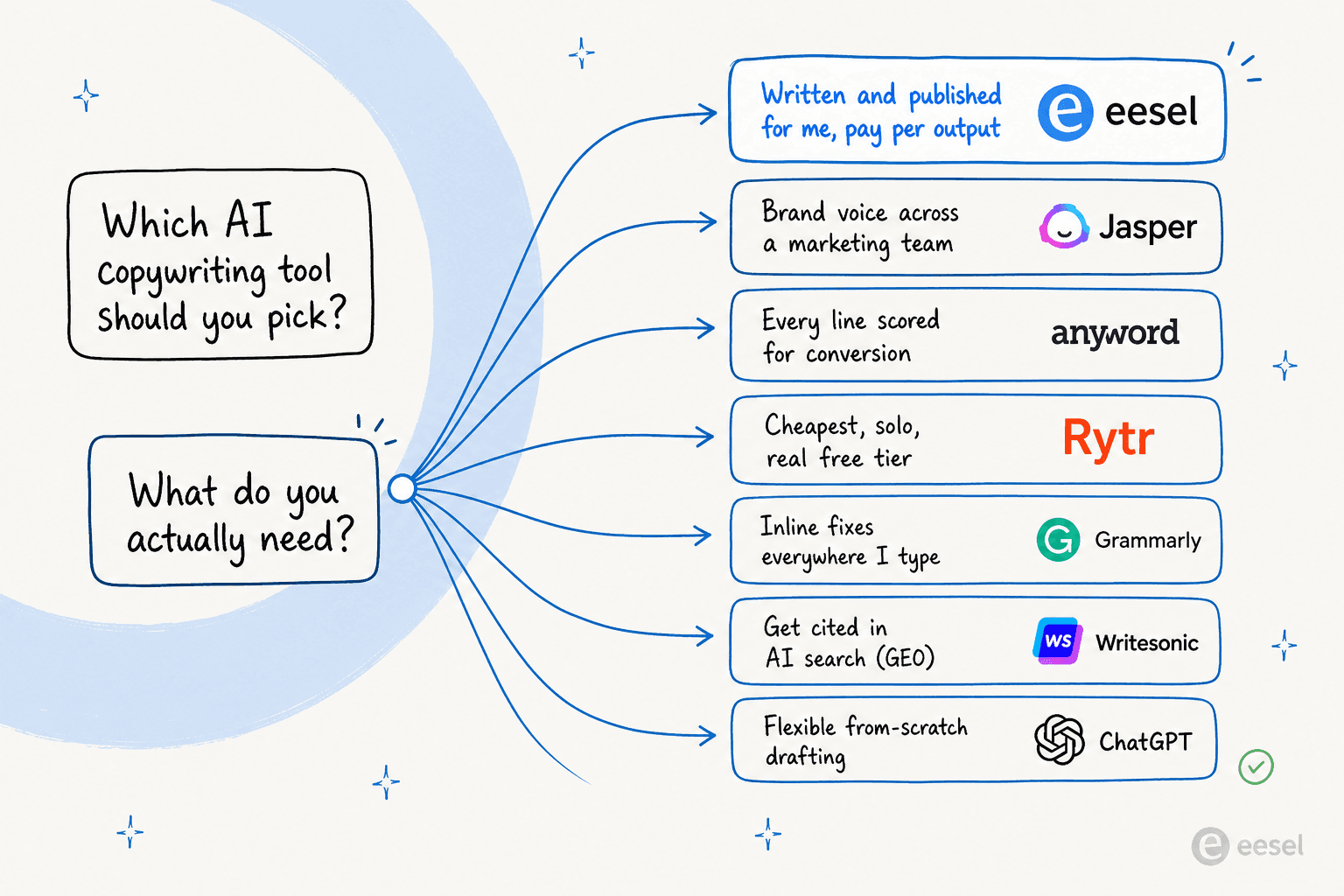
If you want copy written from a brief, Jasper and Copy.ai lead for marketing teams, Anyword wins if conversion is everything, and Rytr is the budget choice. If you want to fix copy you already wrote, Grammarly owns that lane. If you want enterprise governance, it's Writer. And if you want the whole job, research, draft, and publish, handled for you, that's where eesel comes in. For more shortlists, our roundups of the best AI writing tools and best AI content writing software go wider.
Try eesel
Most tools on this list hand you a faster way to write. eesel hands you a teammate that does the writing. Its Blog Writer agent researches the topic, drafts the piece in your voice from years of your own content, and publishes straight to your CMS, billed at $4 per finished post with no seats and no minimums. If you'd rather manage outcomes than operate yet another editor, start with the free plan (100 free credits, no card) and see what a finished draft looks like. It's the difference between buying a better pen and hiring the writer.