


I use Canva all the time. Seriously. It’s my go-to for whipping up a quick graphic for a blog post or a social media update. And its AI tools, like Magic Write and Text to Image, have definitely made things faster. But let's be honest, it isn't the perfect tool for every single job.
Sometimes the workflow just feels… off. I’ve spent way too much time generating text in one app, then painstakingly copying it over to a Canva design. Other times, I just need an AI tool that’s built for a specific task, not a generalist one.
That’s what sent me down this rabbit hole of finding the best Canva AI alternatives. In this guide, I’ll walk you through the top 5 tools I landed on. Each one shines in a different area, from pro-level design to surprisingly simple video editing. I also had a bit of a lightbulb moment: the real magic of AI in content isn't just about making pretty pictures, it can completely change how you handle things like customer support and internal knowledge.
What is Canva AI?
Before we jump into the alternatives, let's get on the same page about what we're comparing them to. When people mention "Canva AI," they're really talking about "Canva AI" (the suite Canva used to brand Magic Studio), its set of built-in AI tools. The whole point of these features is to speed up the creative process.
A few of the heavy hitters include:
-
Magic Write: An AI text generator that helps you write copy for your designs, whether it's a snappy Instagram caption or the text for a presentation.
-
Text to Image: You type in a description, and it spits out an image. Simple as that.
-
Magic Design: This one generates entire design templates based on a prompt or an image you upload.
-
Background Remover: Does exactly what it says on the tin, getting rid of the background in a photo with one click.
These are all great to have, but they're very focused on creating visual content inside Canva's world. If your business needs something different, like automating support articles or building complex data charts, you’ll find better-specialized tools out there.
Our criteria for the best Canva AI alternatives
To sort through the dozens of apps out there, I had to get specific about what I was looking for. Here’s the checklist I used:
-
Does the AI actually work? The tool had to have AI features that were more than just a gimmick. They needed to genuinely save time and make the final product better.
-
Is it easy to use? I wasn't looking for something that required a week-long training course. The tool had to be intuitive enough for anyone on the team to pick up quickly.
-
Is it a specialist? I was looking for tools that were amazing at one particular thing, whether that's photo editing, video creation, or something else entirely.
-
Is it worth the money? The price had to make sense for the features offered, with straightforward pricing plans.
-
Does it fix a broken workflow? This was a big one for me. I wanted tools that cut down on the manual copy-pasting and busywork that slows everyone down.
A quick comparison of the top Canva AI alternatives for 2025
Here's a quick rundown of the top contenders and where they shine.
| Tool | Best For | Standout AI Feature | Free Plan | Starting Price |
|---|---|---|---|---|
| eesel AI | Automating support & knowledge content | Learns from past tickets to draft replies | Yes, 100 free credits | $299/mo (500 credits) |
| Adobe Express | Professional design & Adobe integration | Generative Fill and Text to Template | Yes, generous free plan | $9.99/mo |
| Visme | Data visualization & infographics | AI-powered report and presentation generator | Yes, with limitations | $12.25/mo (annual) |
| Pixlr | Affordable photo editing & quick designs | AI-powered photo editing tools | Yes, ad-supported | $1.99/mo (annual) |
| Clipchamp | Easy video creation & editing | AI-powered auto-compose for video | Yes, with 1080p exports | Included with Microsoft 365 |
5 powerful Canva AI alternatives for 2025
Alright, let's dive into the details of what makes each of these tools a worthy alternative.
1. eesel AI
This might feel like a weird first pick for a Canva alternative, but hear me out.
While it won't help you design a logo, it's an automation powerhouse for a huge part of your business.If your main frustration is a clunky workflow (like that Redditor who was tired of copying from ChatGPT to Canva), then eesel AI gets to the heart of that problem, just for a different kind of content: customer support and internal knowledge.

Instead of your team manually writing out answers to the same questions over and over, eesel AI does it for them. It connects to all the places your company knowledge already lives, like old tickets in Zendesk, documents in Confluence or Google Docs, and your help center. It then uses all that info to generate accurate, on-brand answers automatically.
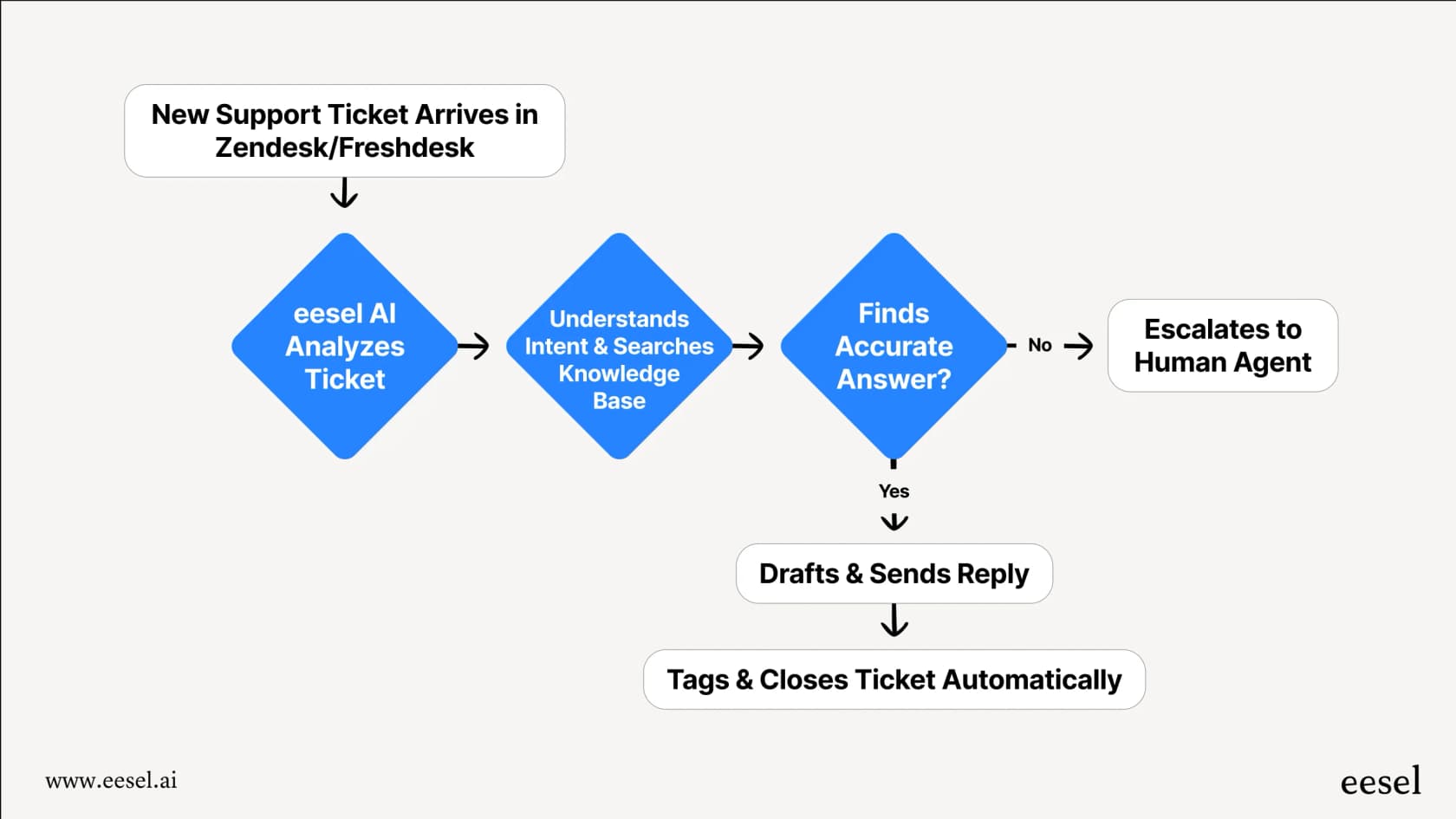
What really makes it stand out is its focus on workflow. You can get it up and running in minutes, not months. It’s completely self-serve and hooks into help desks like Zendesk or Intercom with a single click. You don't have to rip out your existing setup. My favorite part is that you can simulate how it would have performed on your past support tickets, so you can see how well it answers, and fix gaps, before you even turn it on. It’s perfect for teams that want to start using AI without taking a huge leap of faith.
-
Pros:
- You can actually get it live in minutes with a self-serve setup.
- It pulls information from all your sources, so your answers are always consistent.
- The simulation mode lets you test it out risk-free before you commit.
- You have full control to decide what gets automated and can customize the AI's personality.
-
Cons:
- It's not a tool for creating visual marketing content like social media posts.
- It's built specifically for customer service, IT support, and internal help desk teams.
-
Pricing:
- Free: $0/month with 100 credits to try everything, no card needed.
- Teammate plans: $299/month for 500 credits, up to $1,899/month for 5,000, where a ticket or chat counts as one credit. Every plan includes every integration, channel, and skill, with unlimited agents and seats.
- Larger volumes: Above 5,000 credits you talk to sales; annual plans get two months free.
2. Adobe Express
If you're looking for a direct, head-to-head competitor to Canva for visual design, Adobe Express is probably it. Backed by the powerhouse that is Adobe, it just feels a bit more professional and polished. Its AI features, all running on Adobe Firefly, are top-tier and designed to be commercially safe.
The absolute best part is how smoothly it works with the rest of the Adobe world. If you’re already a Photoshop or Illustrator user, you can shuffle assets and projects between them and Express without any headaches. The AI Generative Fill is genuinely amazing for adding or removing things from images, and the Text to Template feature can create some beautiful, fully editable layouts from a simple text prompt. The free plan is also really generous, so it's easy to give it a spin.
-
Pros:
- Powerful and commercially safe AI features from Adobe Firefly.
- Plays nicely with Photoshop, Illustrator, and other Adobe apps.
- The interface feels clean and, for some jobs, more capable than Canva's.
-
Cons:
- It can feel a little more intimidating than Canva if you're a complete beginner.
- The really good stuff is locked behind the paid plan.
-
Pricing:
- Free: A generous free plan with basic tools and a limited number of generative AI credits.
- Premium: Starts at $9.99/month. Includes access to millions of assets, more AI credits, premium tools, and brand kits. A 30-day free trial is available.
3. Visme
Canva is fine for a basic pie chart, but if your job involves creating data-heavy presentations, reports, or infographics that need to look sharp, Visme is in a different league. It was built from the ground up to turn boring data into visuals that people can actually understand.
Visme’s AI tools can generate an entire presentation or report from a text prompt, complete with charts and your company's branding. It offers a much bigger toolbox for data visualization than Canva, including things like interactive maps, animated charts, and even connections to live data sources. It also has solid features for team collaboration, which makes it a great pick for marketing and business teams.
-
Pros:
- Specialized tools for making professional infographics, charts, and presentations.
- The AI features are geared toward making content for work, not just social media.
- You can create interactive and animated content, which is a nice touch.
-
Cons:
- It's not the best tool for general-purpose social media graphics.
- The interface can feel a bit crowded with all the features available.
-
Pricing:
- Basic: A free plan with limited templates, assets, and 500MB of storage.
- Starter: $12.25/month (billed annually at $147). Unlocks all premium templates and assets, plus PDF, JPG, and PNG downloads.
- Pro: $24.75/month (billed annually at $297). Adds advanced download formats (PPTX, HTML5, Video), Brand Kit, analytics, and privacy controls.
4. Pixlr
If you mostly use Canva's AI for photo editing and want something powerful that won't break the bank, Pixlr is a fantastic option. It's a collection of photo editing tools that run right in your web browser, offering everything from simple one-click AI touch-ups to more advanced, Photoshop-style editing with layers.
Pixlr is cleverly split into a couple of different apps: Pixlr Express for quick, AI-driven edits and Pixlr Editor for when you need more control. This makes it approachable for beginners but still deep enough for pros. Its AI tools, like the background remover and generative fill, work surprisingly well for something at this price. The template library isn't as big as Canva's, but for anyone focused on tweaking images, it's a budget-friendly winner.
-
Pros:
- Super affordable, and the free plan is very usable.
- Combines simple AI edits with more advanced, layer-based tools.
- It's all browser-based, so it's fast and you don't have to install anything.
-
Cons:
- The interface is a little clunky, and the free plan has ads.
- It has fewer templates compared to the bigger design platforms.
-
Pricing:
- Free: A solid free version, but it is ad-supported.
- Plus: $2.49/month ($1.99/month billed annually). Provides an ad-free experience, unlimited saves, and 80 monthly AI credits.
- Premium: $9.99/month ($7.99/month billed annually). Includes 1,000 monthly AI credits, private mode for AI generations, and access to a large library of fonts and templates.
5. Clipchamp
Canva has tacked on some video features, but at its heart, it's not a video editor. If video is your main thing, Microsoft's Clipchamp is a much better choice. It’s another browser-based editor that makes creating professional-looking videos for social media, YouTube, or work presentations incredibly straightforward.
Clipchamp's AI is designed to take the pain out of video editing. Its auto-compose feature is pretty cool, it can look at your clips, images, and music and automatically stitch together a polished video. It also offers AI-generated voiceovers and automatic subtitles, which are massive time-savers. The free plan is surprisingly good, letting you export watermark-free videos in 1080p, something most competitors make you pay for.
-
Pros:
- A much more powerful and user-friendly video editor than Canva.
- Great AI features like auto-compose and automatic subtitles.
- The free plan is excellent, with 1080p exports included.
-
Cons:
- It's all about video; its graphic design tools are pretty basic.
- You'll need a paid plan to access the premium stock library.
-
Pricing:
- Free: A generous free plan with unlimited watermark-free exports in up to 1080p HD resolution and access to free stock assets and AI tools.
- Premium: Included with Microsoft 365 Personal and Family subscriptions. This unlocks 4K UHD exports, premium stock assets, premium filters and effects, and a brand kit tool.
How to choose the right Canva AI alternatives for your business
Okay, so how do you actually pick one from this list? Instead of trying to find one tool that does everything, think about the specific job you need to get done most often.
Here’s a simple cheat sheet:
-
If you need professional-looking marketing visuals, Adobe Express is your best bet.
-
If you make a lot of data reports and charts, go with Visme.
-
If your main job is editing photos on a budget, Pixlr is a great choice.
-
If you’re all about making videos, Clipchamp is the clear winner.
-
If you want to automate your support answers and knowledge base, eesel AI is the tool for that job.
Why the best Canva AI alternatives look beyond visuals
Canva is a fantastic tool for visual design, but the world of AI content creation is so much bigger than that. The best Canva AI alternatives aren't just copycats; they are specialized tools that are incredible at specific things, from professional design and video editing to data visualization.
And as I found out, the AI tools that make the biggest difference are often the ones that solve a real, nagging workflow problem. If you’re really looking to streamline how your business creates content, think about automating the text-heavy, repetitive work that comes with customer support and internal docs.
Ready to see how AI can automate your support content? Give eesel AI a try for free and see how much time you can get back.
Frequently asked questions
Why should I consider exploring Canva AI alternatives for my business?
While Canva is excellent for general design, specialized Canva AI alternatives can often provide deeper functionality and better workflow solutions for specific tasks. They excel in areas like professional photo editing, advanced data visualization, video creation, or even automating customer support content.
How do the recommended Canva AI alternatives specialize compared to Canva's broader approach?
These alternatives move beyond general visual creation to focus on niche content needs. For instance, eesel AI automates support content, Adobe Express offers pro-level design with Adobe Firefly, Visme specializes in data visualization, Pixlr in photo editing, and Clipchamp in video production.
Are there any free or budget-friendly Canva AI alternatives mentioned in this guide?
Yes, several options offer free plans or are highly affordable. Adobe Express, Pixlr, and Clipchamp all have generous free tiers, and eesel AI has a free plan with 100 credits to test its support automation capabilities.
Which of these Canva AI alternatives would be best if my primary need is video creation?
For video creation, Clipchamp is highlighted as the best choice among the Canva AI alternatives. It offers powerful, user-friendly video editing with strong AI features like auto-compose and automatic subtitles, even providing 1080p exports on its free plan.
Can these Canva AI alternatives genuinely improve my existing content creation workflows?
Absolutely. Many of these Canva AI alternatives are chosen specifically because they streamline workflows and reduce repetitive tasks. Tools like eesel AI, for example, automate drafting support answers, eliminating the need for manual copy-pasting from other AI generators.
How can I determine the most suitable Canva AI alternatives for my specific business requirements?
The best approach is to identify the specific content creation job you need to get done most often. Focus on tools that excel in that particular area, whether it's professional design, data reports, photo editing, video, or support automation. Often, a combination of specialized tools works best.