


Why people are leaving Gemini in the first place
Let me be fair to Gemini before I pile on, because it earns it. The free tier gives you Gemini 3.5 Flash plus some access to 3.1 Pro, the AI Plus plan dropped to $4.99/month (with 400 GB of storage thrown in), and on raw speed it tends to outrun the competition. Reddit users keep saying versions of "I genuinely cannot believe I wasted so much time and money on ChatGPT," and for big-document research and math it's frequently the sharper tool. If you want the full picture, we've written a complete overview of Gemini and a breakdown of its pricing.
So why the exodus? A few real, repeated complaints.
The first is that the paid tier doesn't always feel paid. One subscriber laid it out bluntly:
"I subscribed to Gemini AI Pro back in December 2025... since February 1st, 2026, my experience has turned into a technical nightmare. The 'Pro' mode has completely disappeared... my friends who have free, non-subscribed accounts still have the Pro toggle. It is absolutely mind-blowing that as a paying customer, I have less feature access than someone using the service for free."

The community's verdict on whether the subscription is worth it gets summed up in one line that has stuck around: "Buying a Google Gemini subscription feels like paying for tap water at a restaurant."
The second is trust. People keep reaching for words like "loose." As one daily user put it, Gemini "ignores instructions, drifts off into weird tangents, and hallucinates with way more confidence than I'm comfortable with." And the third is forgetfulness on long chats, plus the on-and-off usage limits that, to be fair, every major model has been tightening lately.
Here's the deeper thing almost nobody says out loud, though: a lot of the frustration isn't really about Gemini. It's that people are trying to use one general chatbot for a specific job it was never shaped to do, like answering the same customer questions a hundred times or pulling an answer out of their own messy docs. That mismatch is the real reason "Gemini alternatives" is such a busy search. Keep it in mind as you read.
How I picked these seven
I weighted four things: how good the underlying models actually are (not benchmark theatre, real-world output), price and how honest the "unlimited" claims are, whether it brings something Gemini doesn't, and what real users say once the honeymoon ends. I leaned on primary sources (every vendor's own pricing and docs pages) plus a stack of 2026 Reddit threads where people compare these head to head. Where a tool integrates with something we build, I'll say so, because you should weigh my take accordingly.
Here's the whole field at a glance, then I'll go one by one.
| Tool | Best for | Free tier | Cheapest paid (mo) | Standout model (2026) | Live web search + citations | Open weights | Data / privacy note |
|---|---|---|---|---|---|---|---|
| ChatGPT | The all-round default | Yes (GPT-5.5 Instant, capped) | $20 (Plus) | GPT-5.5 / GPT-5.5 Pro | Yes | No | Trains on your chats by default; opt-out available |
| Claude | Coding, reasoning, writing | Yes (rate-limited) | $17 (Pro, annual) | Fable 5 / Opus 4.8 | Yes (now built in) | No | No training on your content by default |
| Perplexity | Research you can cite | Yes (generous) | $17 (Pro, annual) | Routes Gemini, GPT, Claude + Sonar 2 | Yes (its whole point) | No | Enterprise: never trains on your data |
| Microsoft Copilot | If you live in Microsoft 365 | Yes | $16.67 ($199.99/yr Premium) | "Latest OpenAI models" (GPT-5X) | Yes | No | Enterprise data protection |
| Mistral | EU data residency, speed, cheap API | Yes | $14.99 (Pro) | Medium 3.5 / Large 3 | Yes | Yes | EU-hosted, GDPR, opt-out training |
| DeepSeek | Free, cheap API, open weights | Yes (uncapped chat) | $0 (API from $0.14/1M in) | DeepSeek-V4 | Yes (in app) | Yes (MIT-family) | China-hosted app; run weights yourself |
| eesel | AI over your own tickets and docs | Free plan (100 credits, no card) | From $299/mo (500 credits) | Runs on frontier models, grounded in your data | Grounded in your knowledge | No | No training on your data; HIPAA on Enterprise with a signed BAA |
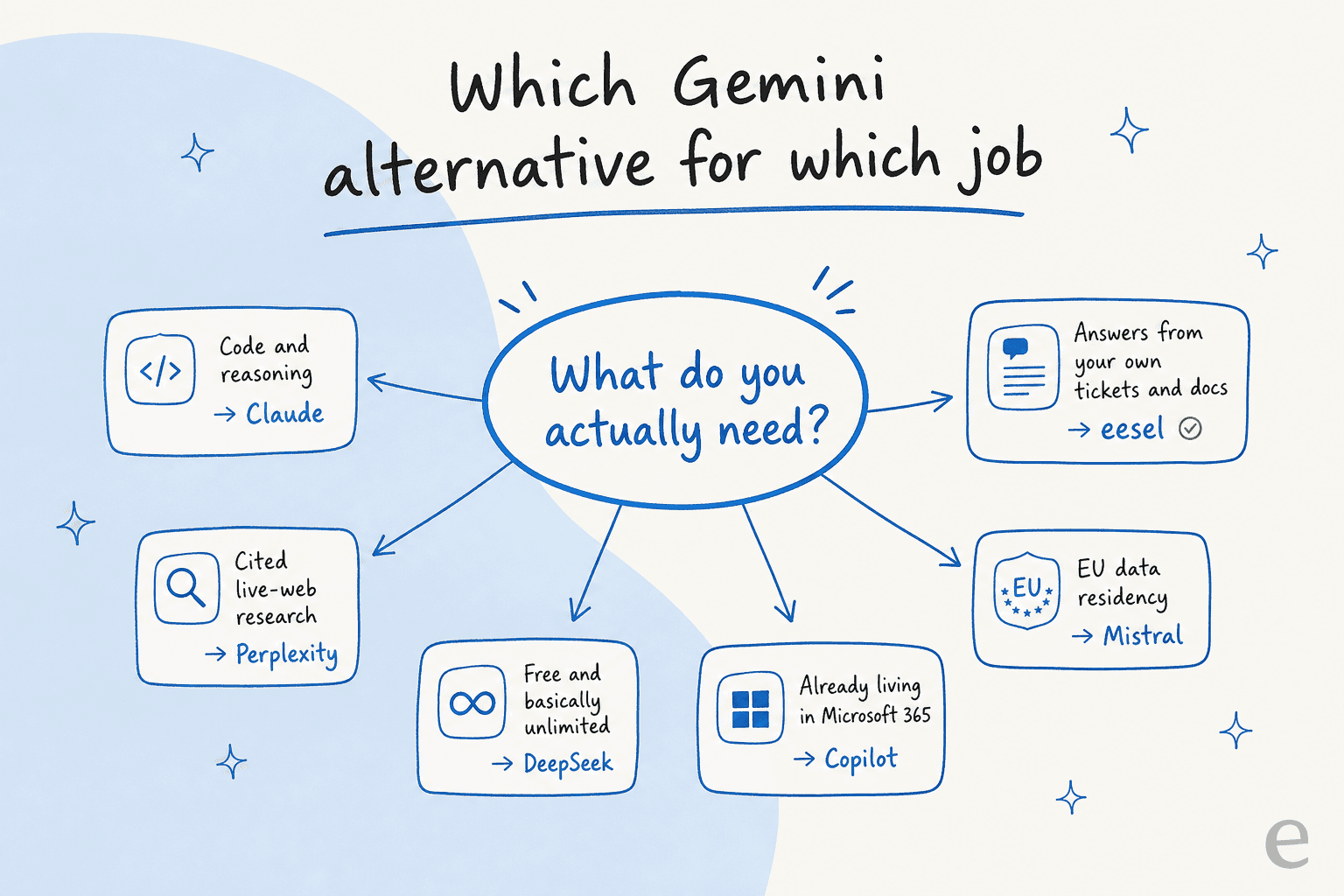
If you're a visual thinker, here's the same decision in one picture.
1. ChatGPT
Best for: the person who wants one tool that does a bit of everything, well.
ChatGPT is still the one to beat. It's the assistant most people picture when they hear "AI chatbot," and after a lot of time in it, I think that reputation is earned rather than just inertia. The current headline model, GPT-5.5, is strong across writing, code, and analysis, and it's the only mainstream option here with first-class image and video generation built in. If Gemini frustrated you but you don't have a specialised need, this is the safe landing spot. We keep a fuller ChatGPT overview if you want to go deeper.
The free tier is real, too: you get GPT-5.5 Instant (capped), Canvas, Search, and Projects without paying. The catches are a small 27K context window on free and message limits that heavy users hit fast.
ChatGPT pros:
- The most versatile single tool here: writing, code, data, voice, and native image/video.
- A properly useful free tier with Canvas and Search included.
- The biggest ecosystem of custom GPTs, apps, and integrations.
ChatGPT cons:
- Free content is used to train OpenAI's models by default; the opt-out exists but isn't the default, which matters for unpublished or client work.
- "Unlimited" on Plus is qualified by "reasonable use," so the real ceiling is fuzzy.
- The strongest reasoning models (GPT-5.5 Thinking, GPT-5.5 Pro) are gated to paid tiers.
Pricing: Free; Go (~$8/mo, may include ads); Plus ($20/mo); Pro (from $100/mo). Full detail on OpenAI's pricing page.
Our take: Pick ChatGPT if you want one dependable generalist and don't want to think about which tool does what. Skip it if your needs are sharp (pure coding, cited research, or your own-knowledge support), because a specialist will beat it there. For most people leaving Gemini, this is the default, and there's nothing wrong with the default.
2. Claude
Best for: coding, reasoning, and writing that doesn't read like a robot.
Claude has a lot going for it. If you ask developers which model they trust with logic-heavy work, the answer comes back fast and loud, and after living in it I'm in that camp too. Anthropic's current lineup centres on Fable 5 (their most capable model, with a 1M-token context window) alongside the Claude 4.x family, Opus 4.8, Sonnet 4.6, and Haiku 4.5. It's also the option people reach for when they want writing that sounds human rather than "AI-smelly."
The clearest real-world read came from one developer comparing all three:
"Claude: strictly for coding. Gave the best code solutions and works on the first try. Claude made Gemini look like a mid developer, and it also made the code change from Perplexity look like it came from a junior developer."
The big 2026 change is that Claude finally got built-in web search, which was the main reason people kept a second subscription around. If you want the head-to-head, we've compared Gemini vs Claude directly.
Claude pros:
- The consensus pick for code and reasoning, with a strong writing reputation to match.
- Paid plans default to no model training on your content.
- Web search now closes the gap that used to send people back to Gemini.
Claude cons:
- The recurring knock is price ("Claude too expensive") and usage limits that bite on Pro.
- No native image or video generation, so creative folks keep a second tool.
- Occasional downtime when a new model launches and everyone piles in.
Pricing: Free; Pro ($17/mo annual, $20 monthly); Max (from $100/mo); Team ($20/seat). API is usage-based, with Fable 5 at $10/$50 per million tokens. See Anthropic's pricing.
Our take: Pick Claude if you write code, do logic-heavy work, or care about prose quality, and you're willing to pay for the better tier. Skip it if you need image generation or you're a light user who'll resent the limits. The deciding factor is simple: if your work has a "right answer," Claude is the one I'd trust to get there first.
3. Perplexity
Best for: research where you need to see the sources, not just trust the answer.
Perplexity is built differently from the rest, and that's the point. Where Gemini and ChatGPT answer from a model with search bolted on, Perplexity is search-first: every answer ships with inline, clickable citations you can verify. That single design choice is the reason people keep it around, and it's the cleanest counter to Gemini's "confidently wrong" problem.
"My problem with Gemini is simple: I don't trust it with anything that matters... It ignores instructions, drifts off into weird tangents, and hallucinates with way more confidence than I'm comfortable with... Perplexity is not perfect, but it's predictable enough that I can build real routines on top of it."
There's a sneaky value angle here too. Perplexity Pro's model picker lets you reach Gemini 3.1 Pro, GPT-5.4, and Claude Sonnet 4.6 from one subscription, so a single $17/month plan can replace what would otherwise be three. We dig into this more in our Perplexity review and pricing breakdown.
Perplexity pros:
- Inline citations on every answer, the strongest trust signal of any tool here.
- One subscription bundles Gemini, GPT, and Claude behind a single model picker.
- Spaces and the Comet browser make it feel like a research workstation, not a chat tab.
Perplexity cons:
- The loudest 2026 complaint is tightened Pro limits, with users reporting a fallback to the basic Sonar model after "maybe 10 messages a day" on advanced models, plus aggressive upgrade popups.
- Model routing is opaque; the model you picked isn't always the one that runs.
- Some users now rate raw Gemini accuracy higher than Perplexity's.
Pricing: Free (generous); Pro ($17/mo annual, $20 monthly); Education Pro ($5/mo); Max ($167/mo annual). Enterprise from $40/seat. Details on the Perplexity Pro page.
Our take: Pick Perplexity if your job is fact-finding and you need to defend where an answer came from, or if you want multiple frontier models for one fee. Skip it if you're a heavy advanced-model user who'll hit the new caps, in which case going direct to a model provider may serve you better. Watch how the limits settle over the next few months before committing annually.
4. Microsoft Copilot
Best for: people who already live inside Word, Excel, Outlook, and Teams.
Microsoft Copilot is the most situational pick on this list, and I mean that as useful information rather than a knock. Its whole advantage is context: because it sits inside Microsoft 365, it can summarise the Teams call you missed or draft from the email thread you're staring at, because it already has access to them. No other tool here gets that for free.
A Product Manager summed up the trade-off about as well as anyone:
"I use ChatGPT for creative or research-heavy tasks because it just thinks better, but prefer Copilot for drafting presentations or summarizing Teams calls because it already has the context."
The honest caveat is that the value collapses if you're not deep in the Microsoft ecosystem. And one structural fact worth knowing: the standalone Copilot Pro tier is gone, folded into Microsoft 365 Premium, so the consumer paid path is now a Microsoft 365 subscription. If you're weighing it against Google's stack, our Gemini vs Copilot comparison goes deeper.
Microsoft Copilot pros:
- Unbeatable context if your work already lives in Microsoft 365.
- Enterprise security and compliance apply automatically, no extra config.
- A properly useful free web tier to try before you commit.
Microsoft Copilot cons:
- Outside the Microsoft ecosystem it offers little over ChatGPT at a similar price.
- Real-world data handling is weak: it struggles with spreadsheets over ~150 rows and sessions degrade after 20-30 exchanges.
- Adoption is the quiet problem: only about 35.8% of licensed users actually use it.
Pricing: Free (web/mobile); Microsoft 365 Personal ($99.99/yr); Premium ($199.99/yr, the former Copilot Pro); Copilot Business ($18-21/user/mo); Enterprise ($30/user/mo). See Microsoft's pricing.
Our take: Pick Copilot if Microsoft 365 is your daily home and you want AI that already knows your files. Skip it if you're not in that ecosystem, because you're paying for an integration you won't use. The deciding factor is entirely "where do you already work."
5. Mistral (Le Chat, now Vibe)
Best for: European and privacy-conscious teams who want EU data residency and a cheap, fast option.
Mistral is the European answer, and for a specific buyer it's the obvious one. The France-based lab builds open-weight models and an enterprise platform with EU hosting and GDPR compliance baked in, and its consumer chat product (previously Le Chat, now rebranded Vibe) is fast and friendly to use. The pitch isn't "we beat ChatGPT," it's "we're good enough and your data stays in Europe."
That framing comes straight from its users:
"Mistral does 80% of what the others do... 100% worth paying for them and keeping the money in Europe, at the sacrifice of a bit of performance."
Practitioners rate it higher than the consumer reviews suggest; one widely-shared take called Mistral "highly underrated" on the strength of its open models and per-token economics. The honest counterweight is that for hard reasoning it still trails the frontier, which Mistral's own community will tell you. Our Mistral vs Gemini piece covers the head-to-head.
Mistral pros:
- EU data residency and GDPR compliance solve a real problem for European buyers.
- Consistently praised for speed, and the API is cheap (Small 4 at $0.10/$0.30 per million tokens).
- Open-weight models you can self-host, so no lock-in.
Mistral cons:
- The capability ceiling trails Claude and ChatGPT on advanced reasoning; one blunt user verdict was "currently it's just cheap."
- Platform bugs (context bleeding, vision misfires) show up distinct from raw model quality.
- The Le Chat to Vibe rebrand means a lot of recent reviews refer to a name that's no longer on the site.
Pricing: Free; Pro ($14.99/mo); Team ($24.99/user/mo); Education ($5.99/mo); Enterprise (custom). API is per-token with a 50% batch discount. See Mistral's pricing.
Our take: Pick Mistral if EU hosting or open weights are non-negotiable, or if you want a cheap, fast model for everyday tasks. Skip it if you need frontier-grade reasoning for hard technical work. The deciding factor is whether "where the data lives" outranks "the last 20% of capability" for you. For many European teams, it really does.
6. DeepSeek
Best for: anyone who wants frontier-ish quality for free, or developers who want a dirt-cheap API.
DeepSeek is the value play, and it's a serious one. The Chinese lab ships open-weight models through a free consumer chat and a startlingly cheap API. The current flagship, DeepSeek-V4, has a 1M-token context window, and the web chat is free with no metered message cap, which is exactly where it pulls ahead of Gemini's rationed free tier. In a week-long student test across DeepSeek, Gemini, and Claude, the verdict on free use was direct:
"Winner: DeepSeek - for pure math it's remarkable, and the free tier has no usage limits."
For developers, the API is the headline: deepseek-v4-flash runs $0.14 per million input tokens and $0.28 output, a fraction of most hosted frontier models, with automatic context caching dropping cache-hit input to around $0.0028.
Now the part I won't paper over. The single most-repeated caveat isn't about quality, it's about where your data goes:
"DeepSeek is a Chinese company, and data is stored on servers subject to Chinese law. For math problems and general questions, it's perfectly fine. I wouldn't share anything personal or sensitive with it."
DeepSeek pros:
- Free chat with effectively no usage cap, plus a frontier-class reasoning model.
- The cheapest serious API here by a wide margin.
- Open weights (MIT-family), so you can self-host and dodge the hosting concerns entirely.
DeepSeek cons:
- The first-party app is hosted in China under Chinese data law, a hard no for sensitive or business data.
- Live web search and current-events research lag Gemini's Google-backed grounding.
- No official, published free-tier limits, so "unlimited" is a community impression, not a guarantee.
Pricing: Web and app chat are free. API from $0.14/$0.28 per million tokens (Flash). See DeepSeek's pricing.
Our take: Pick DeepSeek for free personal use on non-sensitive tasks (math, code, general questions), or as a cheap API backend, ideally self-hosted. Skip the official app for anything you wouldn't post publicly. The deciding factor: it's the best free model here, as long as you're deliberate about what you feed it.
7. eesel: the alternative for when you don't actually want a chatbot
Best for: answering customers and teammates from your own tickets and docs, not the open web.
Here's the reframe I promised at the top. Every tool above is a general assistant: you go to it, you type, it answers from the public web and whatever you paste in. That's perfect for a thousand things. But a huge slice of "I need a Gemini alternative" searches are really "I keep asking Gemini to answer support questions or dig through our internal docs, and it doesn't know any of our stuff." That's not a model problem. It's a shape problem.
I'll disclose my bias plainly: I work on eesel, so weigh my take accordingly. But this distinction is the whole reason the product exists. We've spent years putting AI on live support queues, and the pattern that comes up over and over is teams trying to bolt a general chatbot onto a job it was never built for. A few technical customers even churned on us to wire models like Claude straight into their own stack, before learning the hard part isn't the model, it's everything around it. One who came back, Karel at GENERAL BYTES, put it well:
"We could try to write our own LLM application but we didn't want to invest our time into that. We wanted something that we would not have to maintain."
The difference is what the AI is grounded in.
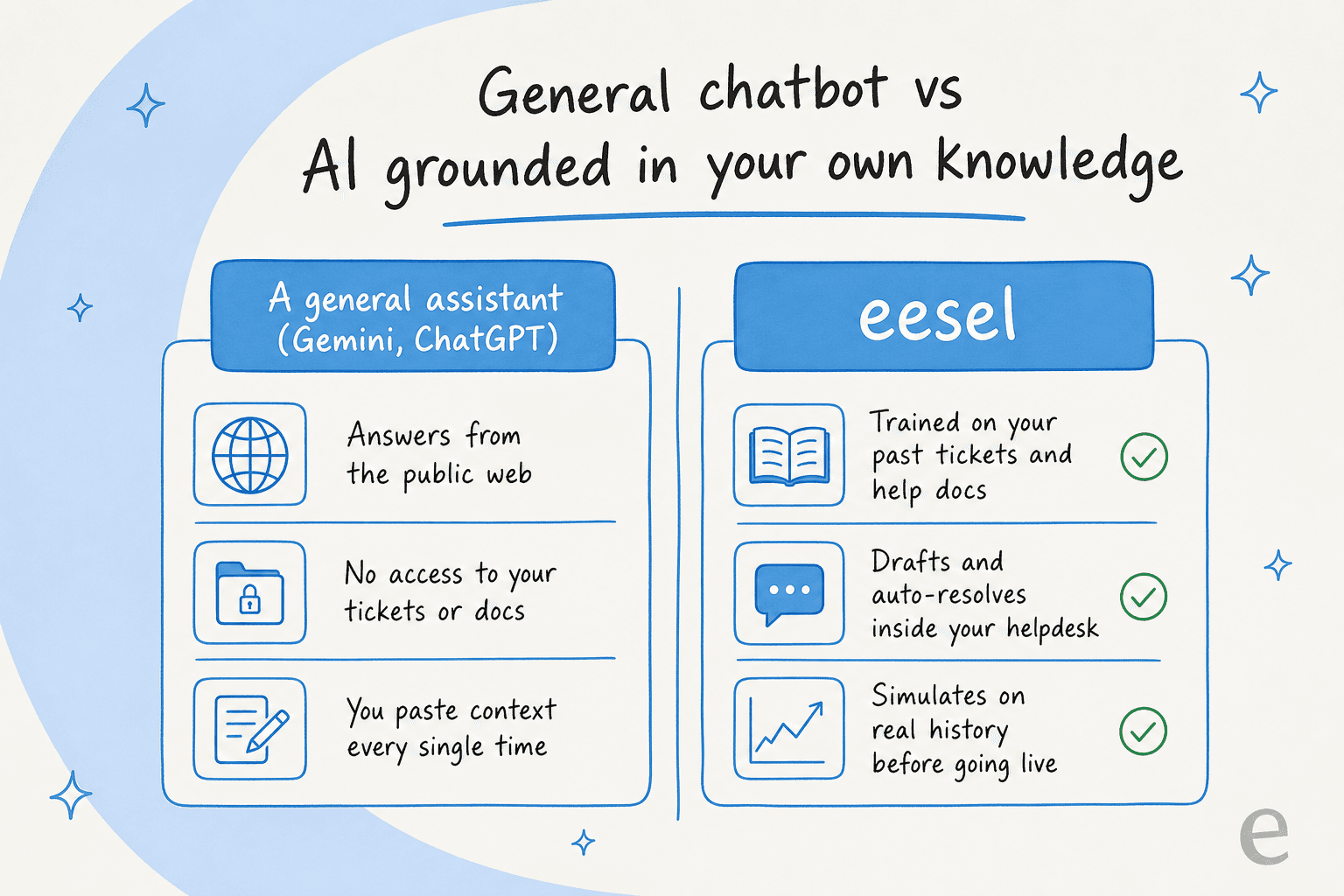
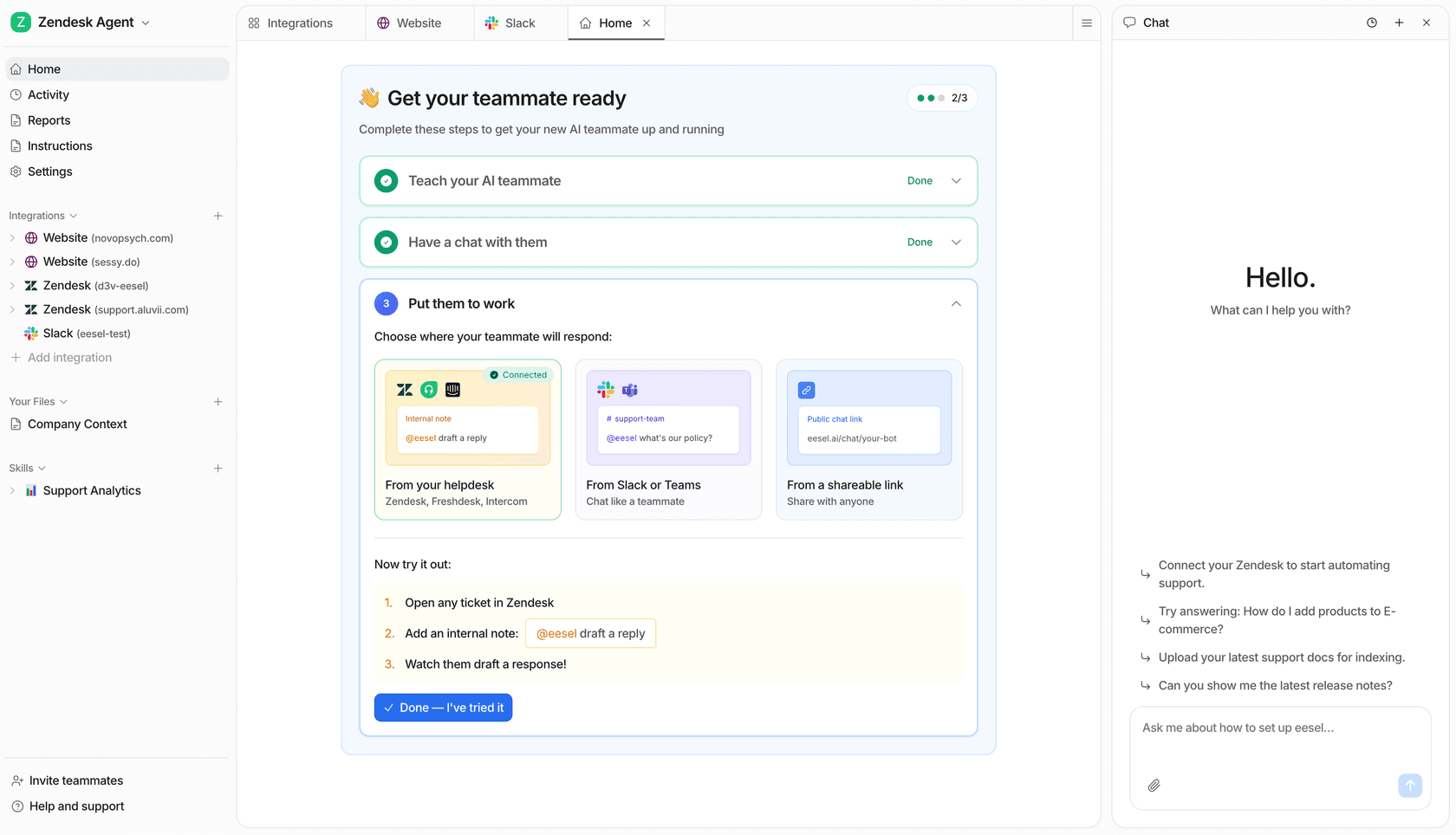
Instead of answering from the open web, eesel trains on your past tickets, help docs, and macros, then works inside the helpdesk you already use (Zendesk, Freshdesk, Gorgias, HubSpot, and more). It drafts or auto-resolves tickets, and because we've watched a confident-sounding bot quietly give wrong answers, it simulates every rollout against your historical tickets first, so you see the coverage and accuracy before it ever talks to a customer. Gridwise, for example, had eesel resolving 73% of their tier-1 requests in the first month.
eesel pros:
- Grounded in your own tickets and docs, so answers are about your product, not the internet's best guess.
- Lives inside your existing helpdesk and tools; no rip-and-replace.
- Simulation mode shows accuracy and coverage on real past tickets before go-live.
eesel cons:
- It's not a general chatbot; if you want to brainstorm a poem or write Python, use one of the six above.
- It's aimed at teams with a support or internal-Q&A workload, not solo casual use.
- SOC 2 is in progress rather than certified (EU residency and a HIPAA/BAA option are available on Enterprise).
Pricing: Free plan with 100 credits, no card. Paid plans start at $299/month for 500 credits (1 credit per ticket or chat), with no per-seat fees. SSO, data residency and priority support are add-ons. See eesel's pricing.
Our take: Pick eesel if your real job is answering the same questions from your own knowledge at volume. Skip it if you just want a chat box for general tasks. The deciding factor is the one this whole post hinges on: do you want to chat with the internet, or get reliable answers from your own knowledge?
So which Gemini alternative should you actually choose?
If you came here for a single name, I'm sorry to disappoint, because the honest answer is that the one-app era is over. The performance gap between models for specific tasks is too wide now to crown one winner. Here's how I'd actually decide:
- Want a safe generalist? ChatGPT. It does the most things well.
- Code or hard reasoning? Claude.
- Research you can cite? Perplexity.
- Deep in Microsoft 365? Copilot.
- Need EU hosting or open weights? Mistral.
- Want it free? DeepSeek, carefully.
- Answering your own customers or staff? A purpose-built tool like eesel, not a chatbot at all.
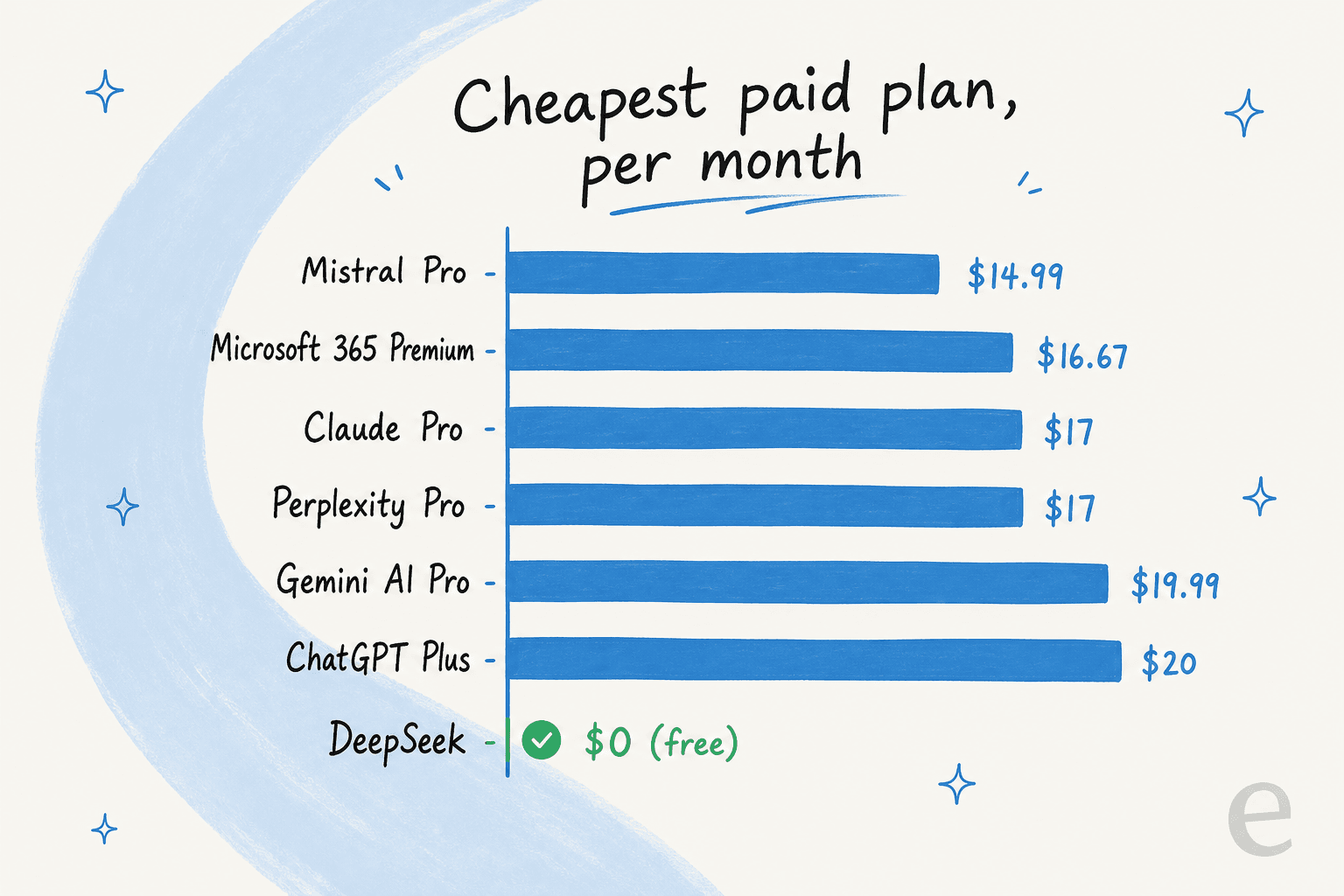
And on price, here's the reassuring bit: switching away from Gemini almost never costs you more. Most paid plans cluster within a few dollars of each other.
The trap to avoid is the one I keep seeing: forcing a general chatbot to do a job it was never shaped for, then blaming the model when it can't answer questions about your business. If that's you, the fix isn't a different chatbot. It's a different kind of tool.
Try eesel
If the reason you're hunting for a Gemini alternative is that you keep asking it about your own product, your own tickets, or your own docs, that's exactly the gap eesel was built to fill. It learns from your past tickets and help center, plugs into the helpdesk you already run, and lets you simulate accuracy on real historical tickets before it goes live, so you're never guessing. You can connect your knowledge across 100+ integrations and start with a free trial, no credit card.
Try eesel free, or see how the AI helpdesk agent works.