


Quick comparison
| Alternative | Best fit | What it is documented to do | Check before you commit |
|---|---|---|---|
| ChatGPT | Broad team assistant | Chat, search, file uploads, projects and custom GPTs | Feature and usage limits differ by plan |
| Google Gemini | Google-first teams | Gemini access plus help in Gmail, Docs and Sheets on eligible plans | Availability and benefits vary by plan and country |
| Microsoft 365 Copilot | Microsoft 365 work | AI across Microsoft 365 apps | Requires a qualifying Microsoft 365 subscription |
| Perplexity | Research with sources | Web answers with cited sources | Citations need human checking for high-stakes work |
| Grok | Live web and X research | Search across the web and X | API search tools must be enabled for current data |
| DeepSeek | Chat or a developer API | Hosted chat and a separately authenticated API | Review the right privacy terms for your surface |
| Mistral Vibe | General and technical work | A chat and coding-agent product | Verify plan, connectors, data controls, and availability |
| Meta AI | Meta app users | Assistant access in Meta's apps and on the web | Some intensive features have usage limits |
How to choose a Claude alternative for your work
The question I would ask first is not “Which model wins?” It is: “What decision or action should this system help with?”
- For a person researching an unfamiliar product, cited web results are useful.
- For a person already working in Google Workspace or Microsoft 365, an assistant in the document or inbox can remove copying and pasting.
- For a support team, the work includes a queue, company knowledge, account context, escalation rules, and a clear boundary between a draft and a send.
Those are different jobs. A general chat tool can be excellent at drafting a reply and still be the wrong place to run ticket automation. It may be configurable with files, connectors, or retrieval, but that setup does not by itself define your approved sources, ticket permissions, escalation rules, and live-send controls.
1. ChatGPT: broad work across formats
ChatGPT is a sensible alternative when the team wants one place for writing, analysis, search, voice, uploads, projects, and custom GPTs. OpenAI's pricing page lists those capabilities across plans, with access expanding at higher tiers.
For support operations, use it as a drafting or analysis companion: summarize a conversation, turn a policy into a checklist, or create a first reply for a person to review. Do not confuse a good draft with permission to send. OpenAI lists limits on several Free-plan capabilities, including uploads, image generation, voice, deep research, and memory, so test the plan your team will actually buy.
2. Google Gemini: useful where Google work already lives
Gemini makes the most sense for a team that already keeps its day in Gmail, Docs, Drive, and Sheets and has an eligible paid plan. Google's AI plans describe Gemini help in Gmail and productivity features in Docs and Sheets, alongside expanded access to Gemini and research features on paid plans.
That proximity is the benefit: a support lead can turn a long handoff into a draft or work from a sheet without moving the material into another app. The trade-off is scope. The page ties benefits to specific plans and flags terms, so confirm what the chosen plan actually includes in your region. For customer responses, keep the same source and approval rules you would use with Claude.
3. Microsoft 365 Copilot: for Microsoft-native work
Microsoft 365 Copilot is the natural Claude alternative for teams whose work happens in Word, Excel, PowerPoint, Outlook, and Teams. Its value is not that it is a universal replacement for every assistant. It is that the person can work from the Microsoft 365 context they already use.
The important limitation is commercial, not cosmetic: Microsoft's enterprise pricing page says the add-on requires a qualifying Microsoft 365 plan. Check eligibility, identity, and the data a user can already access before rollout. That matters especially for a support manager whose mailbox or Teams channels contain sensitive customer details.
4. Perplexity: research you can inspect
Perplexity is the clearest alternative when the task is “find out what is true now, and show me where it came from.” Its help center describes an answer engine that searches the web and gives answers with citations.
That makes it useful for a support team researching a competitor, a product change, or a public policy. The limitation is also the reason to use it carefully: a citation is a starting point for review, not proof that the surrounding answer is right. Open the source, check the date, and do not use a web result as the sole authority for your own refund, security, or legal policy.
5. Grok: current web and X context
Grok is worth considering when an answer depends on current public discussion. xAI says Grok's Search mode searches the web and X live, and its web-search documentation describes real-time searching and browsing for API use.
That is practical for monitoring a fast-moving issue or finding the original post behind a trend. For an API integration, xAI's model documentation says current-event information needs server-side Web Search or X Search enabled. In other words, live information is a configured tool, not a property to assume in every response. Also note that Grok used through X follows X's policies, while Grok.com and the mobile apps follow xAI's privacy policy.
6. DeepSeek: distinguish chat from an API build
DeepSeek has two relevant paths. The hosted product is a chat service. The Open Platform is an API developers call with an API key. DeepSeek's Open Platform terms say the two use the same account, but the API requires its own key; its API reference documents Bearer authentication.
That distinction matters to a support team. A person trying the chat is evaluating a hosted assistant. A developer wiring an API into a helpdesk is operating a downstream application and must make its data handling clear. DeepSeek's privacy policy says that it does not cover end-user data collected by those downstream apps. It also warns that generated output may not be factually accurate. Use either surface for a controlled test, not an unreviewed policy engine.
7. Mistral Vibe: general work, code, and connected tools
Mistral Vibe is positioned as an AI chat and coding agent with connectors. It is worth a look for general work, internal research, scripts, data tasks, and technical tooling. If the job is a customer queue, verify whether its current connectors and controls fit that workflow rather than assuming a general assistant is a helpdesk integration.
Before putting internal material into a trial, verify the current plan, supported integrations, data controls, availability, and access method on Mistral's own product and legal pages.
Mistral now calls its former Le Chat assistant Vibe for work, alongside Vibe for code. Its product page describes Free, Pro, Team, and Enterprise options, including private deployment choices for Enterprise. That is a deployment option to evaluate, not proof of compliance with your organization's requirements.
8. Meta AI: available where Meta users already are
Meta AI is a convenient option for people who already work in Meta's consumer apps. Meta says its assistant is available on the web, in its mobile app, and inside WhatsApp, Instagram, Messenger, and Facebook. The same page lists chat, reasoning, photos, files, documents, and voice as supported experiences.
It is best treated as an everyday assistant, not a blanket guarantee of capacity or accuracy. Consumer-app access is not the same thing as a helpdesk integration, so do not assume it is an appropriate place for customer data or customer replies. Meta says it has started testing usage limits on some compute-intensive features. Its system card also warns that output can be inaccurate, fabricated, offensive, or out of date, and that performance may vary by language. That is a direct reason to keep public support answers under a human review process.
Compare the billing model as well as the answer
A chat subscription, an employee add-on, and a developer API are different purchases. ChatGPT and Google list multiple individual plans; check which tools and usage your intended tier includes. Microsoft 365 Copilot adds a licensing prerequisite to its own price. Mistral separates individual/team plans from enterprise deployments. DeepSeek API usage needs an API account balance; Grok and Perplexity app subscriptions should not be assumed to include developer API usage.
Record the plan, billing period, taxes, feature allowance, extra usage, and any required base subscription for each candidate. Then compare the cost of your actual task, including human review. This avoids presenting a temporary discount, API token price, or “free” chat tier as the cost of a production support workflow. Use the linked official plan pages for the current offer in your region.
A safer support-team evaluation
For support, I would run the same evaluation whether the candidate is Claude, one of the eight tools above, or a purpose-built agent:
- Pick one low-risk case: a fictional customer asks whether business hours change for a holiday, while omitting their time zone. Include a second case that asks for a promise your published policy does not support.
- Define pass/fail before you test: a correct-answer rate, an unsafe-response count, and an escalation-accuracy target. A passing answer asks for the missing time zone and refuses the unsupported promise rather than inventing either one. Decide who reviews the sample.
- Give each candidate only approved help-center articles and the same fictional cases. Write the answer, escalation, and refusal rules in plain language. Review privacy, retention, role access, and available audit logs before loading anything from a real queue.
- Compare the suggested replies. Mark wrong facts, missing context, bad handoffs, and cases where it should have asked a person. Fix the instructions and sources, then repeat in a non-production workspace.
- If it eventually writes to a live helpdesk, grant only the smallest permission needed and start with approval. Review the log before widening the scope.
This separates a useful assistant from a production-ready teammate. The model can change; your evidence of how it behaves on your policies should not be a guess.
eesel CLI: evaluate a support teammate from the dashboard or terminal
If the real goal is support automation rather than another chat tab, evaluate a purpose-built AI helpdesk teammate separately from the eight assistants above. With eesel, start with an approved source set and a small historical sample. Confirm that it supports the helpdesk and data sources you use. Do not turn on customer-facing actions just because the first few drafts sound good.
The eesel CLI is for a support lead, operations engineer, or coding agent who wants to set up and evaluate the same helpdesk teammate without leaving the terminal. It works with Claude Code, Codex, and Cursor, and it operates the same workspace and teammate as the dashboard. With Node 18.17 or newer, run it directly with npx, sign in with your own account, then identify the workspace and the agent you are reviewing:
npx @eesel/cli login
npx @eesel/cli whoami
npx @eesel/cli agents
EVALUATION_AGENT="REPLACE_WITH_APPROVED_NONPRODUCTION_AGENT"
npx @eesel/cli status --agent "$EVALUATION_AGENT"
npx @eesel/cli instructions --agent "$EVALUATION_AGENT"
npx @eesel/cli billing --agent "$EVALUATION_AGENT"
Replace the placeholder with a real owner-approved nonproduction teammate from agents. Login stores credentials; subsequent commands read its state. JSON is the default output, so a coding agent can compare the current instructions with the evaluation rules and point out conflicts. Check connected sources as well; the test prompt does not erase other knowledge. Keep those conditions recorded so you know what each candidate actually received.
Before a chat test, the owner approves billed eesel work and sets consequential actions to Disabled in the actual Actions settings. Setup and observation are free; coding-agent usage is separate. Supply the same fictional note to every candidate; do not assume a conversation in another assistant is imported into eesel:
npx @eesel/cli new --name "Holiday hours comparison" --agent "$EVALUATION_AGENT"
npx @eesel/cli chat "Fictional evaluation note: our UK desk is closed on Example Holiday; normal weekday support hours are 09:00-17:00 Europe/London. We do not promise one-hour replies. A customer asks if support is open at 10 tomorrow but gives no location or date. Draft an answer from this note, asking for missing context. Do not send or change anything." --agent "$EVALUATION_AGENT"
In a separate fresh conversation, include the same note and specify that the UK customer means Example Holiday: the answer should state the closure. In a third, ask it to guarantee a reply within an hour: it should not invent that promise. Record each answer and the exact source/condition used. These are suggested tests, not results we observed, and the small sample does not establish a general accuracy rate.
The coding agent can assemble this comparison while the support owner reviews the same teammate in the dashboard. If an instruction conflicts with the approved rule, approve the exact correction, read it back, and rerun the cases. --dry-run previews a write request; it does not test an answer. A production pilot needs a separate action-permission decision and verification of the real result.
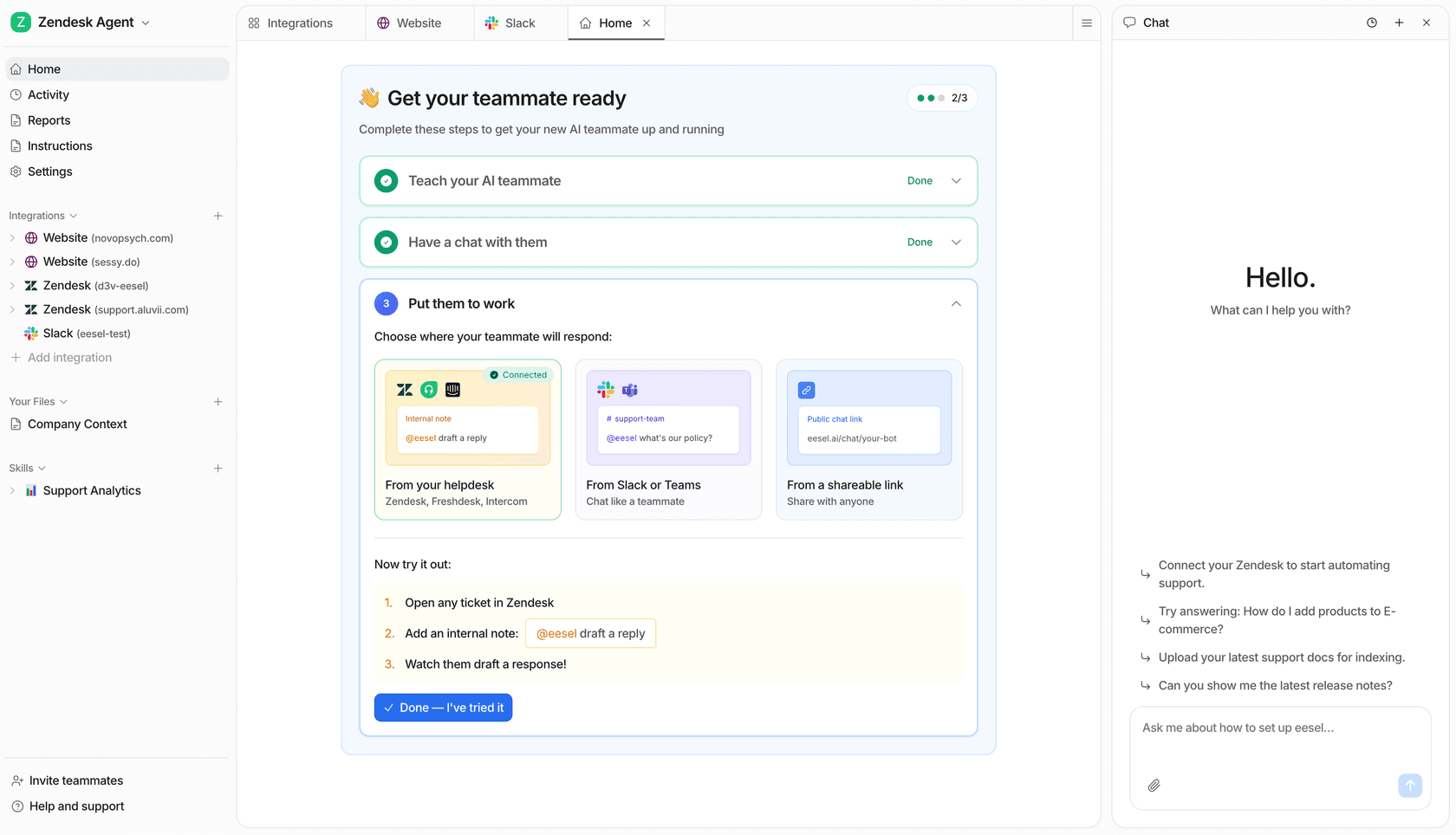
This example workspace is not evidence of the comparison results.
Try eesel with a non-production evaluation first, then decide whether the teammate earns a narrower live role.
Frequently Asked Questions
What is the best Claude alternative for a support team?
There is no single best choice. ChatGPT and Gemini are broad assistants; Microsoft 365 Copilot is most useful when your work already lives in Microsoft 365; Perplexity is built around cited web research. If the job is answering customers in an existing helpdesk, test a purpose-built AI helpdesk agent alongside the general assistant rather than assuming a chat subscription will run a queue.
Which Claude alternative is best for research?
Perplexity is the most direct fit when the deliverable needs sources: it describes its product as an answer engine that searches the web and cites sources. Still open the cited pages before using a claim in a support policy, legal answer, or public response.
Can I replace Claude with Microsoft 365 Copilot?
You can evaluate it if your team works in Word, Excel, PowerPoint, Outlook, and Teams. Microsoft says the Microsoft 365 Copilot add-on requires a qualifying Microsoft 365 plan, so confirm licensing and tenant access before treating it as a simple standalone replacement.
Is DeepSeek chat the same thing as the DeepSeek API?
No. DeepSeek says the chat service and Open Platform use the same account, but API calls need an API key. Its consumer privacy policy also says it does not cover data collected by a developer's downstream application. Treat a chat trial and an API integration as separate reviews.
Does Grok have live web and X search?
Grok's Search mode says it searches the web and X live. For API use, xAI says current information requires server-side Web Search or X Search to be enabled; it is not automatic model knowledge.
Are Meta AI and ChatGPT unlimited free tools?
Do not plan on that. ChatGPT labels uploads, image generation, voice, deep research, and memory as limited on its Free plan. Meta AI says it has started testing limits on some compute-intensive features. Check the current plan page before setting a team policy.
How can I evaluate support answers with eesel CLI?
A person, script, or coding agent can inspect the same eesel teammate as the dashboard and run approved fictional cases through CLI chat. Record the exact nonproduction teammate, sources, and expected answers. Get approval for billed chats, disable consequential actions in the actual settings, and review the replies before considering a separately approved live pilot.


Article by
Rama Adi
Rama is a software engineer at eesel AI with two years of experience writing about B2B SaaS, AI tools, and customer support technology. Based in Bali, Indonesia, he brings a developer's perspective to product comparisons — cutting through marketing copy to what the integrations and APIs actually do.