


Why people look for Suno alternatives
Suno deserves its position. v5.5 is genuinely impressive - blind-test listeners consistently struggle to identify AI vocals, and the Series D at $5.4B signals that sophisticated money agrees. But if you spend any time on r/SunoAI, you notice the same friction points coming up again and again.
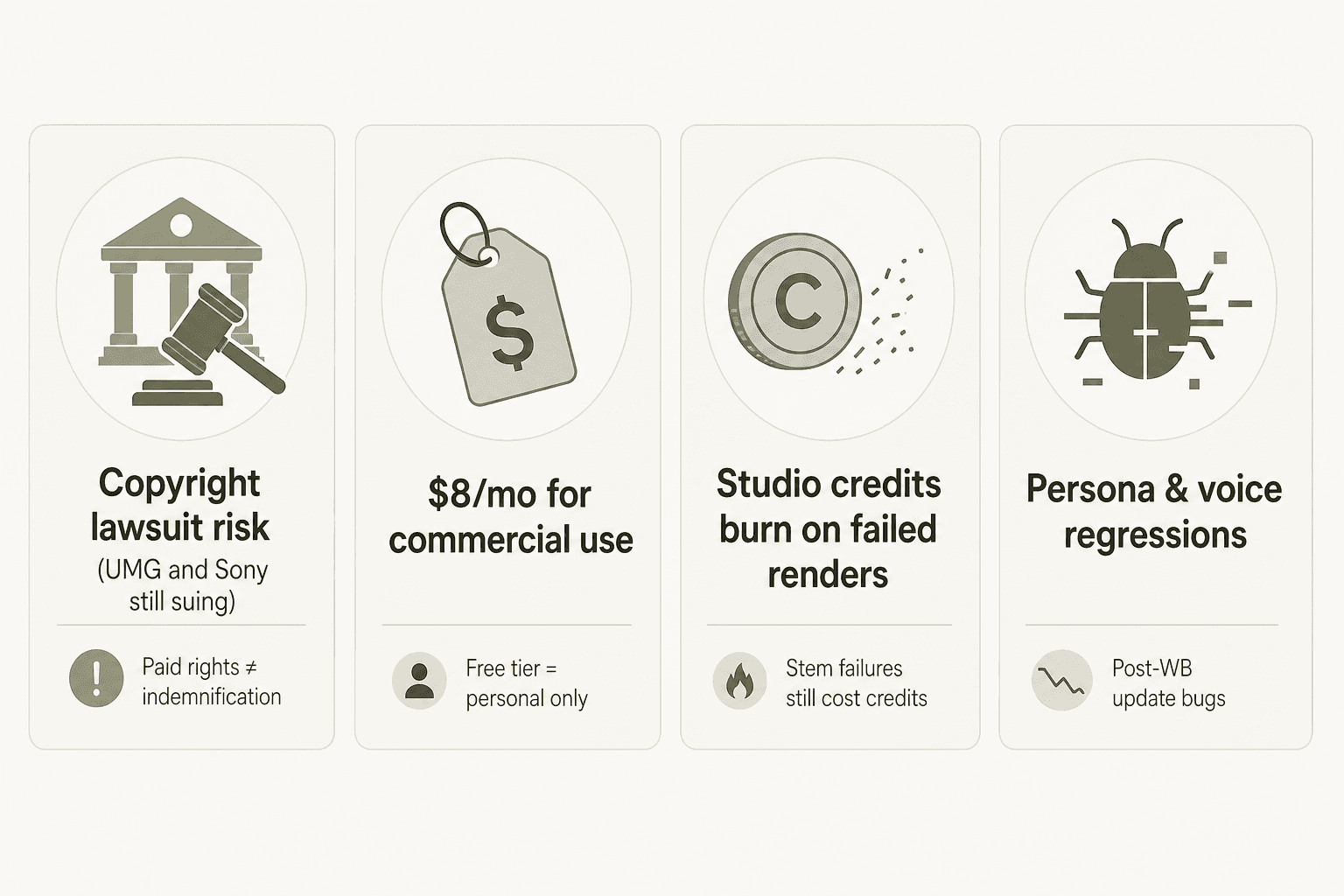
The copyright overhang is real. Warner Music settled and signed a licensing deal with Suno in November 2025 - but UMG and Sony are still actively suing. Suno's terms of service indemnification runs user → Suno, not the other way: commercial rights on a Pro subscription don't include copyright indemnification, so the legal risk on output sits with you.
The free-to-commercial jump is abrupt. The free tier is genuinely useful for hobbyists - 50 credits per day, around 10 songs. But it's strictly personal use only. The moment you want to publish anything to Spotify or use a track in a client video, you're on a $8/month Pro plan. For many casual creators, that's fine; for others, tools with more generous commercial tiers make more sense.
Studio credit burns sting. Suno Studio (the Premier-only browser DAW) is impressive - multitrack timeline, 12 stems, MIDI export, Warp Markers. But the most common complaint on forums is that failed stem regenerations still deduct credits, and drum stems reportedly come back with reverb that wasn't in the original track. If you're doing production-level work, those burns add up.
Persona and voice regressions followed the Warner deal. Late-May 2026 community threads reported that saved Personas and cloned Voices revert to genre-default voices regardless of settings - a regression users attribute to the post-WMG platform update.
None of this disqualifies Suno. But it does mean that depending on your use case, one of the alternatives below might be a better fit from day one.
How we picked these alternatives
We looked at eight tools that cover the full spread of use cases: high-quality audio generation, DAW-friendly workflows, developer/API use, ethically-sourced training data, built-in distribution, and tools for creators who've never made music before. For each one, we dug into pricing pages, help centers, official feature documentation, and community discussions - and verified everything against the product directly.
The comparison table below captures every meaningful dimension a buyer should care about.
The best Suno alternatives in 2026 at a glance
| Tool | Best for | Vocals / lyrics | Free tier | Paid from | Commercial rights | Stems | MIDI export | Distribution | Ethical training |
|---|---|---|---|---|---|---|---|---|---|
| Udio | Audio quality | Yes | 100 credits/mo | $10/mo | Paid plans | Limited | No | No | Yes (licensed) |
| Stable Audio | Developers | No (instrumentals only) | 10 tracks/mo (30s) | $11.99/mo | Creator license | No | No | No | Yes (fully licensed) |
| AIVA | Composers / MIDI | Limited | 3 downloads/mo | ~€11/mo | Pro plan only | No | Yes (all plans) | No | Undisclosed |
| Mureka | DAW integration | Yes | 1/day | $7.17/mo | Paid plans | Yes (Pro) | No | No | Undisclosed |
| Soundful | Brands / businesses | No | 1 MP3/mo | $4.99/mo | All paid plans | Yes (Pro) | Yes (STEM packs) | SoundCloud | Yes (proprietary) |
| Loudly | Distribution + creation | Yes (MANTA 1) | Yes (limited) | Not public | All plans | Yes | No | 50+ platforms | Yes (consent-based) |
| Boomy | Absolute beginners | Basic only | 25 saves, no downloads | $9.99/mo | Paid plans | No | No | 40+ platforms | Undisclosed |
| Sonauto | Free community | Yes | Yes | Not public | Unclear | No | No | No | Undisclosed |
1. Udio
Best for: users who want the closest Suno experience with better audio quality
If Suno is the default recommendation for AI music, Udio is what you switch to when you want more. Launched in April 2024, it's the only other platform that generates full-length vocal songs with comparable production polish - and community reviewers consistently rate its audio output above Suno's, especially for complex arrangements and subtle vocal styling.
The real differentiator heading into 2026 is licensing. In October 2025, Udio became the first AI music platform to sign a licensing deal with Universal Music Group, followed by a Warner Music Group deal in November 2025. Neither label acquired Udio - these are licensing arrangements that let Udio generate music in the voices and styles of real artists, with artist permissions. That's meaningfully different from where Suno sits, which still has active litigation from UMG and Sony.
Features
Udio's editing toolkit is deeper than it looks at first glance:
- Extend - lengthen any clip forward or backward
- Styles - use any Udio song or uploaded audio as a sonic reference; blend two style references together
- Voices - extract the vocal character from any Udio-native song, save it, and apply to new generations; Voice Blending (mixing two vocal references) is subscriber-only
- Inpaint - edit specific waveform segments without regenerating the whole track
- Remix - re-generate with altered parameters while preserving structure
- Upload your own audio - subscribers can use external audio as a style reference (downloads from those tracks aren't published on Udio.com but can be shared via URL)
- Lyrics editing - edit or specify lyrics before or after generation
The free tier gives 100 credits per month (10 per day), which is enough to experiment but pushes heavy users to paid plans quickly.
Pros
- Best audio quality among vocal AI music generators
- Label licensing deals (UMG + WMG) reduce copyright exposure
- Extensive post-generation editing suite
- Free tier genuinely useful for exploration
Cons
- Download access was temporarily removed during the UMG transition (Oct 2025); post-transition download terms still unclear
- Label partnerships could shift platform direction toward label interests over creator freedom
- No MIDI export or stems (unlike AIVA or Soundful)
- Smaller community than Suno
Pricing
| Plan | Monthly | Annual | Credits/mo |
|---|---|---|---|
| Free | $0 | $0 | 100 (10/day) |
| Standard | $10 | $8/mo ($96/yr) | 2,400 |
| Pro | $30 | $24/mo ($288/yr) | 6,000 |
| Add-on credits | - | - | 100 for $3 / 1,000 for $25 |
Verdict: If you're a Suno user frustrated by the copyright uncertainty, Udio is the natural move. Same genre of tool, comparable quality, and meaningfully cleaner legal footing on the training side. We'd reach for it first.
2. Stable Audio
Best for: developers, producers, and anyone who needs instrumentals without copyright ambiguity
Stable Audio, from Stability AI, is the odd one out on this list: it doesn't generate vocals or lyrics. What it does instead is produce studio-quality instrumental audio - up to 6 minutes, 44.1 kHz stereo - from text prompts or audio-to-audio input, with a training dataset that's 100% licensed (sourced from the AudioSparx catalog and other fully licensed sources). That's a hard differentiator in a space where "we used licensed data" is rarely more than a marketing claim.
The open-weights release of Stable Audio 3.0 Small and Medium on Hugging Face is the most interesting development for technical users. Self-hosting removes the per-generation cost and gives teams full control over inference - something no other major AI music tool offers at this fidelity.
Features
- Text-to-audio - up to 6 minutes of stereo audio from descriptive prompts
- Audio-to-audio - upload a reference clip alongside a text prompt to guide style, timbre, and feel
- Inpaint (API) - modify specific track segments without regenerating
- Open-weights (SA 3.0) - Small and Medium models on Hugging Face for local inference
- Developer REST API - text-to-audio, audio-to-audio, inpaint endpoints; SA 2.5 at $0.20/generation, SA 3.0 at $0.26/generation
- Enterprise fine-tuning - custom model training on proprietary audio libraries via direct contract
The community note worth flagging: audio-to-audio style capture is the feature most users report doesn't reliably perform as expected. Prompt specificity matters a lot - genre, mood, instruments, BPM, and era all help significantly.
Pros
- 100% licensed training data - clearest commercial safety story on this list
- 6-minute track length (vs 8 minutes in one shot for Suno, but with no per-generation length limit on longer tracks via API)
- Open-weights models available for self-hosting
- API-first with full developer documentation
Cons
- No vocals or lyrics - pure instrumental and sound effects
- No stems or MIDI export
- Free tier limited to 10 tracks/month at 30 seconds (personal license only)
- Audio-to-audio style capture is inconsistent in practice
- Smaller consumer community than Suno or Udio
Pricing
| Plan | Price | Tracks/month | License |
|---|---|---|---|
| Free | $0 | 10 (30s preview) | Personal only |
| Pro | $11.99/mo | 250 | Creator (commercial) |
| Studio | $29.99/mo | 675 | Creator (commercial) |
| Max | $89.99/mo | 2,250 | Creator (commercial) |
| Enterprise | Custom | Custom | Enterprise |
| API | - | - | SA 2.5: $0.20/gen; SA 3.0: $0.26/gen |
Verdict: For anyone building on top of AI music - an app, a game, a branded audio library - Stable Audio's API and open-weights models are the professional choice. Producers who only work instrumentally will find the audio quality exceptional. Skip it if you need vocals.
3. AIVA
Best for: composers who need MIDI, serious style control, and clean copyright ownership
AIVA (Artificial Intelligence Virtual Artist) is the oldest serious AI music platform on this list - founded in Luxembourg, backed by enterprise partners including NVIDIA, Vodafone, and TED, and very much a "composer's workstation" rather than a prompt box. The product has been through more iteration cycles than any other tool here, and it shows in the sophistication of the generation profiles and the quality of the in-browser editor.
The single most important feature for professional creators is MIDI export, available on all plans including Free. That's something no other platform on this list does. It means you generate a track in AIVA, export the MIDI, and open it in Logic, Ableton, or any other DAW - where it becomes a composition starting point, not a final output.
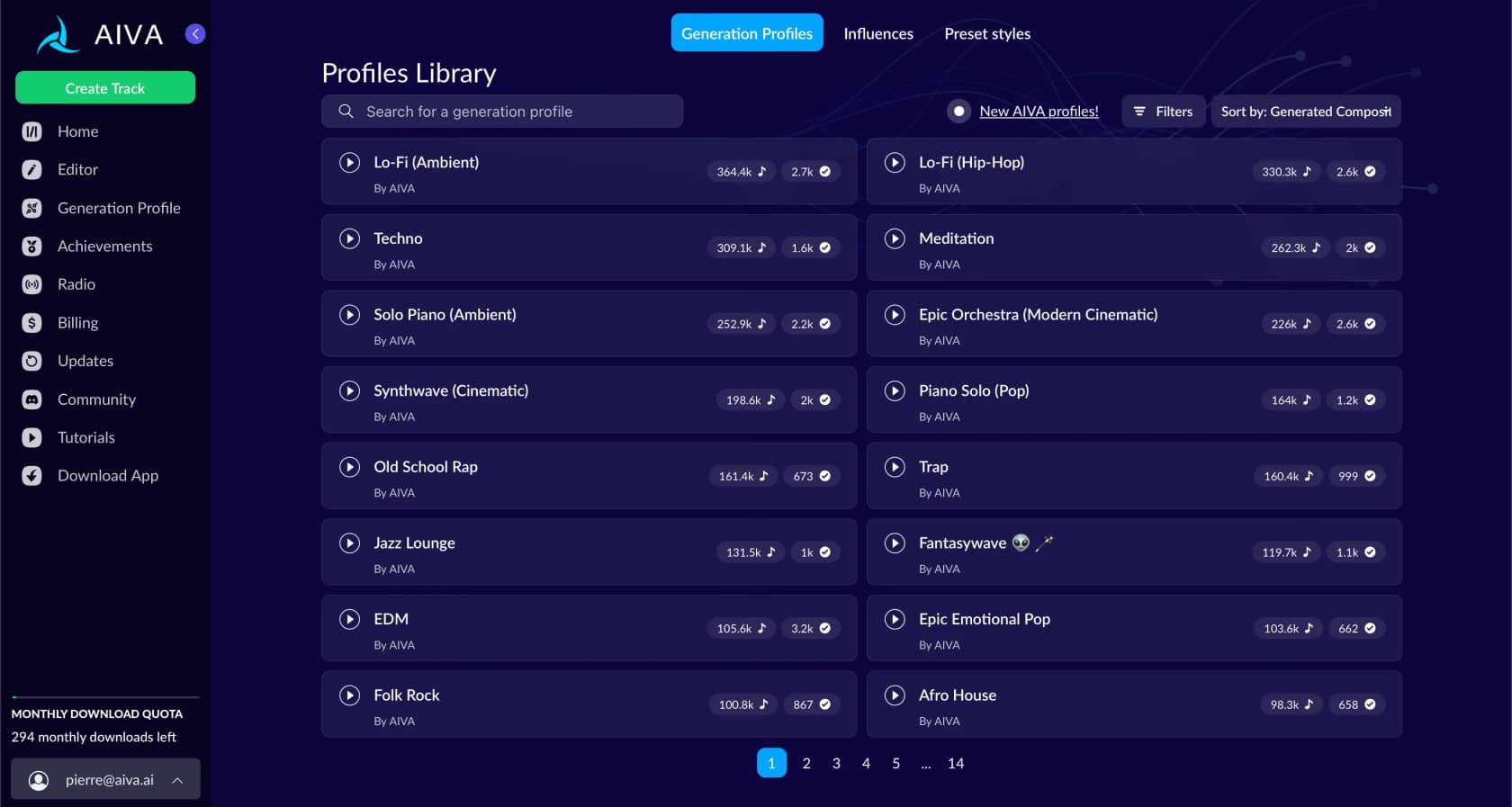
AIVA's Profiles Library - over 250 generation styles, from Lo-Fi (Ambient) to Synthwave (Cinematic) to Epic Orchestra - is the entry point. Each profile has tens to hundreds of thousands of uses documented, so you get a realistic sense of output quality before committing.
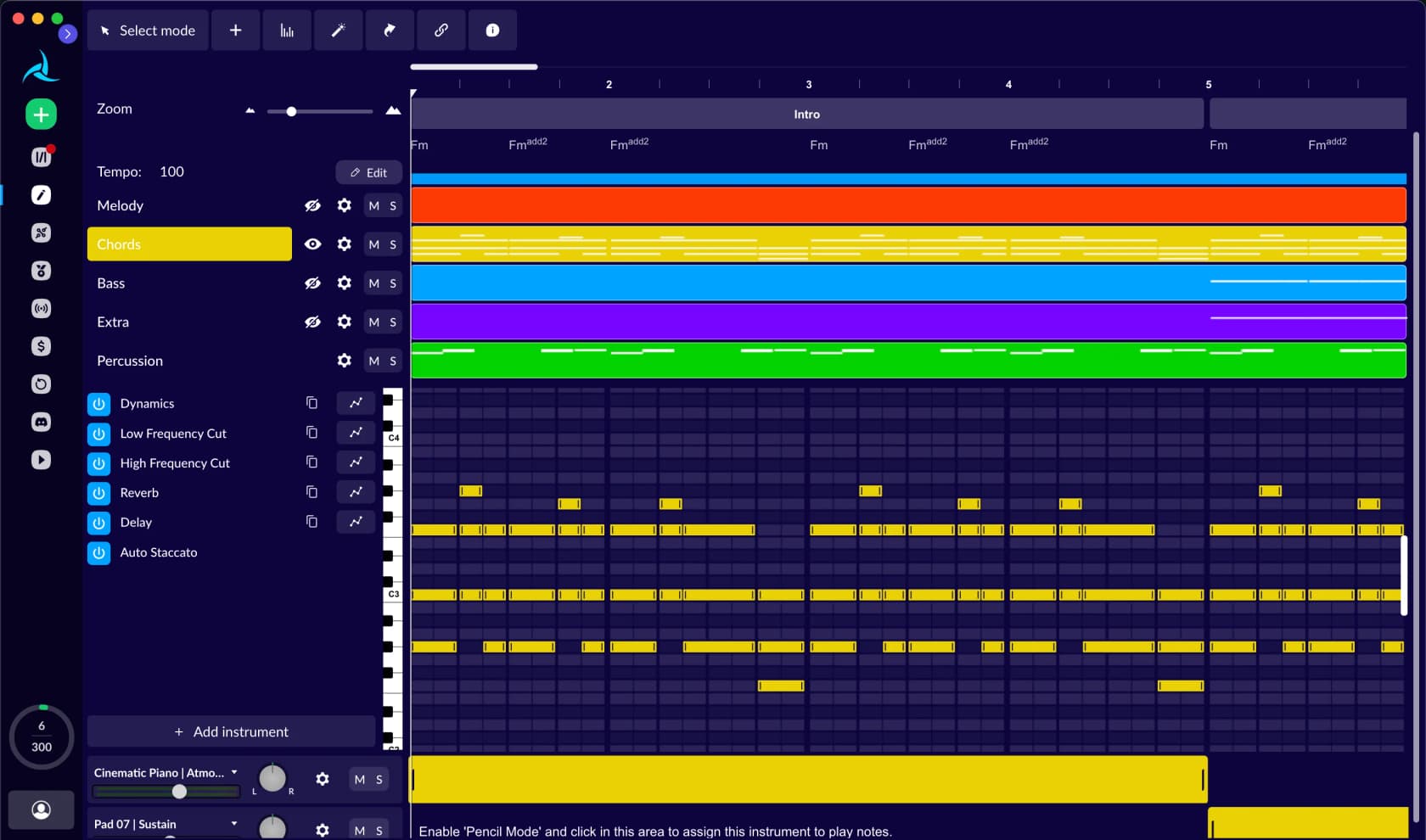
The in-browser editor goes deeper than most: multitrack view with Melody, Chords, Bass, Extra, and Percussion lanes, plus Dynamics, Reverb, Delay, and EQ controls per track. You can rearrange sections, add or remove instruments, and adjust the chord progression - all without leaving the platform.
Features
- 250+ genre styles including cinematic, orchestral, ambient, pop, electronic, jazz, metal
- Custom style model creation - upload audio or MIDI as an influence to steer generation
- In-browser multitrack editor (rearrange sections, adjust instrumentation, EQ per track)
- MIDI export on all plans (including Free)
- Multi-format download - MP3 and MIDI on Free/Standard; WAV on Pro
- Track duration up to 3 minutes (Free), 5 minutes (Standard), 5 minutes 30 seconds (Pro)
- Monetization licensing: Free tier = none; Standard = YouTube/Twitch/TikTok/Instagram only; Pro = unrestricted
- Full copyright ownership on Pro plan - Free/Standard copyright stays with AIVA
Pros
- MIDI export on every plan - the only tool here with this
- Proper in-browser DAW with a genuine piano roll and mixing controls
- 250+ genre styles, deeper than any other platform
- Enterprise credibility (NVIDIA, TED) makes it easier to justify to procurement
- Student and school discounts available
Cons
- Free tier is extremely stingy: 3 downloads/month, mandatory AIVA credit
- Copyright stays with AIVA until Pro plan - Standard is a hard limit for monetization
- Pro plan is €33/month annually (~€49 monthly) - the most expensive on this list at commercial-rights tier
- No vocal or lyrics generation (AIVA generates instrumental compositions)
- No mobile app; web-only
Pricing
| Plan | Annual price | Monthly price | Copyright |
|---|---|---|---|
| Free | €0 | €0 | AIVA owns |
| Standard | ~€11/mo (billed annually) | ~€15/mo | AIVA owns (YouTube/Twitch/TikTok/Instagram monetization only) |
| Pro | ~€33/mo (billed annually) | ~€49/mo | Creator owns (unrestricted commercial) |
| Enterprise | Custom | Custom | Negotiated |
Verdict: If your workflow involves a DAW and you think of AI as a composition accelerator rather than a final-output machine, AIVA is the pick. The MIDI export alone separates it from every other tool on this list. Just budget for the Pro plan if you need clean copyright ownership.
4. Mureka
Best for: producers who want AI generation inside their existing DAW
Mureka is doing something none of the other tools on this list do: bringing generation directly into your DAW via a desktop plugin. The tagline - "Stop Jumping Between Tools. Start Talking to One" - captures it well. Instead of generating in a browser, downloading, and importing, you prompt Mureka from inside Ableton or FL Studio, and the generated audio lands on a track.
The platform supports multilingual UI (English, Simplified and Traditional Chinese, Japanese, Korean, Spanish, Portuguese, German, French, Italian, Russian) and has particularly strong traction in East Asian markets.
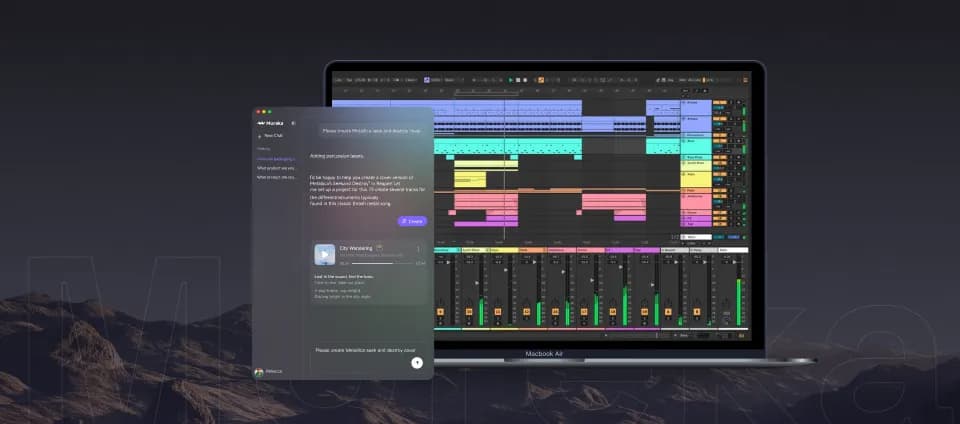
The generation model lineup is tiered: V7.5-all (entry-level), V7.6 (finer prompt control), V8 (publish-ready, emotional vocals), V9 (flagship, studio-grade, advanced prompt control), and O2 (all-in-one smart model). Each model costs different amounts of "gold" credits per generation (10–20 gold per song depending on model).
Features
- Text-to-music with vocals, lyrics, and instrumental modes
- Lyrics-first creation - input your own lyrics, Mureka builds the melody and vocals around them
- Reference audio upload - use an existing track as a style guide (Pro)
- Vocal customization - gender (male/female), style presets, hum-a-melody input (Pro)
- Multiple model tiers (V9, V8, O2, V7.6, V7.5-all) with different quality/credit costs
- Style tags across genres (Downtempo, Aggressive, Bold, Groovy, Bedroom Pop, Vaporwave, Drill, etc.)
- Remix existing tracks
- Stem downloads - separate instrumental, vocal, and track stems (Pro)
- AI speech / text-to-speech tool
- Voice cloning for commercial projects (Pro)
- Desktop DAW plugin
- API platform for developers
- Broad language support
Pros
- Desktop DAW plugin is a genuine production workflow change
- Strong vocal quality across models (V8 and V9 especially)
- Multilingual - strong support for non-English markets
- Stem export available on paid plans
- API platform for integration into build pipelines
Cons
- Free tier is very limited - 1 generation per day with gold credit system
- Multiple model tiers with different gold costs can be confusing for new users
- Pricing page returns 404 - all plan details come from in-app modals, not a public page
- No independent review data available (Reddit blocked, G2 not scraped)
- Company background (founding, funding, team) is not publicly documented
Pricing
| Plan | Price | Songs/month |
|---|---|---|
| Free | $0 | ~1/day (gold-limited) |
| Pro (monthly) | $9/mo | 500 songs |
| Pro (annual) | $7.17/mo ($86/yr) | 500 songs |
| Basic Music & Speech (annual) | $8/mo ($96/yr) | 400 songs or 200 min speech |
| Pro Full (annual) | $24/mo ($288/yr) | 1,600 songs, stems, voice cloning, region editing |
Verdict: Mureka is the clearest answer if you're a producer and DAW integration is the deciding factor. The plugin removes the friction of switching contexts. If you don't use a DAW and just need browser-based generation, Udio is a better default.
5. Soundful
Best for: brands, agencies, and content teams that need royalty-free music at volume
Soundful approaches AI music differently from everyone else on this list. Where Suno and Udio are built on language-model-style generation, Soundful uses a producer-led AI trained on music theory and in-house production work - not scraped from copyrighted recordings. Every template was built by human producers; the AI generates unique variations from them.
The result is music that sounds less spontaneous than Suno's output but trades off raw creativity for reliability and legal cleanliness. Soundful explicitly claims its AI is not trained on copyrighted music - a meaningful differentiator in enterprise procurement conversations. The client list reflects this: Activision, Adobe, American Airlines, Capital One, Dell, Deloitte, Meta, Microsoft.
Over 37.6 million tracks have been generated on the platform (displayed as a live counter on the homepage).
Features
- 150+ genre styles and templates (25+ on Free; 150+ on paid plans)
- Three creation modes: Similar (same template, new variation), Track (choose template freely), Loop (shorter samples)
- Global Tracks - pre-generated royalty-free tracks available to all users
- STEM packs - individual stems + MIDI + mixed/mastered WAV (Pro and above)
- SoundCloud distribution (Pro plan and above)
- Copyright purchase - Music Creator Plus subscribers can buy full copyright ownership for $50+/track
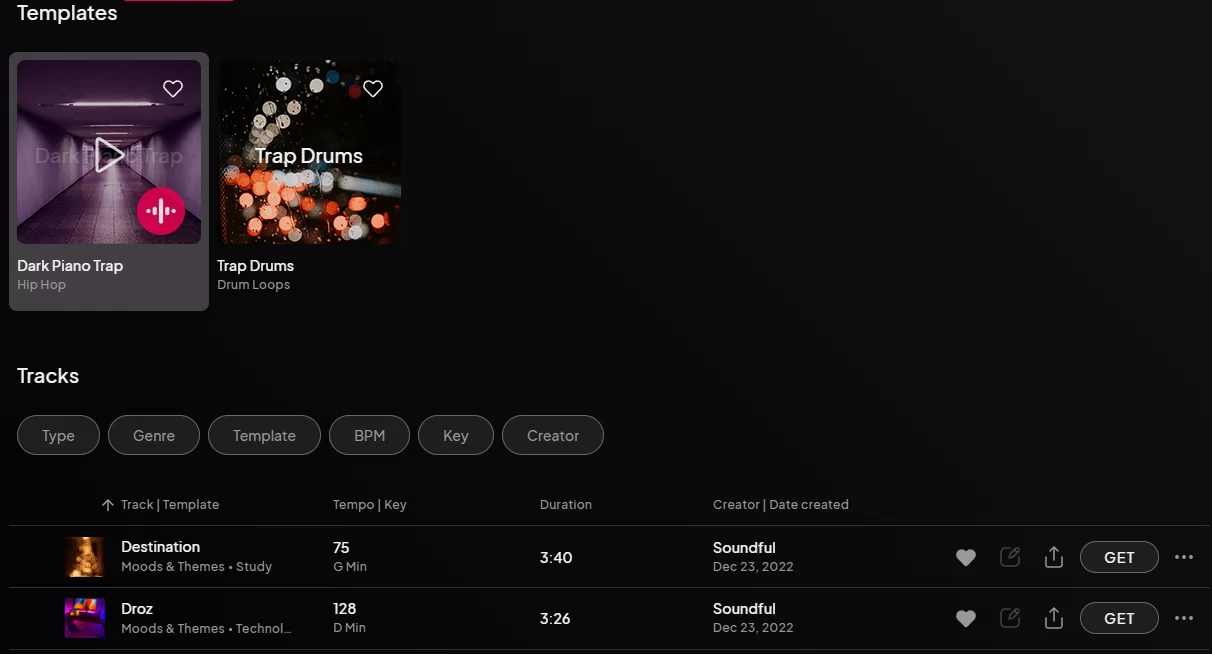
- My Library - personal dashboard sorted by genre, template, BPM, key
- API integration (Business/Enterprise tier only) - 1,000 API pulls/month, $1/pull beyond
- Brand Experience service - full sonic branding consultancy for enterprise clients
Pros
- Ethically trained AI on proprietary data (not scraped from copyrighted recordings)
- Trusted by Fortune 500 companies - easier to justify to procurement
- Generous generation (preview unlimited, downloads counted against quota)
- STEM packs on Pro include MIDI - useful for DAW composers
- Strong enterprise product: sonic identity, agency program, custom sound design
Cons
- Template-based generation offers less creative freedom than Suno's prompt-based approach
- No vocals or lyrics (purely instrumental/background music)
- No mobile app ("best experienced on desktop")
- Free tier gives just 1 MP3 download per month
- Copyright ownership requires an additional purchase on top of subscription ($50+/track)
- Reddit/community discussion is sparse - harder to gauge real-world user satisfaction
Pricing
| Plan | Price | Monthly downloads |
|---|---|---|
| Free | $0 | 1 MP3 |
| Plus | $4.99/user/mo | 100 MP3 & WAV |
| Pro | $9.99/user/mo | 400 MP3 & WAV + 20 STEM packs |
| Business | $45.99/user/mo | 750–3,000 MP3 & WAV + API |
| Enterprise | Custom | Custom |
Verdict: Soundful is the strongest choice for brands and content teams that need reliable, royalty-free background music at volume and want to be able to tell their legal team exactly where the training data came from. It's not the right tool if you want vocals, spontaneous creativity, or a Suno-like prompt experience.
6. Loudly
Best for: independent artists who want to generate, customize, and distribute music from one platform
Loudly is the most complete pipeline on this list: AI generation, browser-based studio editing, stem/sample pack export, and direct distribution to 50+ streaming platforms including Spotify, Apple Music, TikTok, and YouTube - all in one dashboard, with 100% of royalties passed back to the artist.
The ethical AI claim is backed by specifics: Loudly's proprietary music dataset was built via artist consent and copyright compliance, with rights transferred to customers. That's harder to fake than a vague "licensed data" claim.
Two AI models do the heavy lifting. VEGA 2 handles instrumental generation via parameter controls (genre, sub-genre, duration, instruments, energy, tempo, key, structure, blend). MANTA 1 handles text-to-music with lyrics and optional vocal gender selection - you input a prompt up to 3,000 characters, and it generates a track with vocals.
Features
- AI Music Generator (VEGA 2) - instrumental generation with genre, instrument, and structural controls; supports audio clip upload as starting point
- Text-to-Music (MANTA 1) - up to 3,000-character lyric/concept prompt with vocal gender selection
- AI Song Remixer - remix any track in seconds; newly launched
- Loudly Studio - in-browser workstation with audio FX, undo/redo, and export
- Sample Packs - generate and download DAW-compatible sample packs from any AI or catalog track (email delivery as ZIP)
- Music Stems - individual instrument stems compatible with Ableton, FL Studio, Logic, Pro Tools
- 4,500+ royalty-free catalog tracks for editing and sample extraction
- Distribution to 50+ platforms - Spotify, Apple Music, TikTok, YouTube, Amazon, Tidal, Deezer, Tencent, Instagram, and more
- 100% royalties - Loudly takes no revenue cut; PayPal processing fee applies on withdrawals
- Three artist profiles per plan - release under multiple stage names
- $10 minimum withdrawal via PayPal
Pros
- Full pipeline: generate → edit → distribute in one platform
- 100% royalty retention - stronger than Boomy's 80% split
- 50+ distribution platforms
- Ethical AI with artist-consent dataset
- Stems and sample packs included
- Multiple AI models (instrumental + vocal)
Cons
- Pricing page returns 404 - plan details require signing up to see
- Free tier generation limits not publicly documented
- No Reddit or community review data captured - harder to verify real-world satisfaction
- SmartLink feature (dynamic release sharing page) is listed as "coming soon"
- $10 minimum payout threshold applies
Pricing
Plan details are embedded within feature pages rather than a dedicated pricing page as of June 2026 - check loudly.com for current pricing during signup.
- Free tier available, no credit card required
- Personal and Pro plans both include stems access
- Annual plan required to unlock royalty withdrawals
Verdict: If your goal is to take AI-generated music from idea to streaming royalties in the shortest path, Loudly is the strongest end-to-end option on this list. The 100% royalty model beats Boomy's 80/20 split, and the distribution breadth (50+ platforms) is comparable. The opacity around pricing is frustrating - you'll need to sign up to see real numbers.
7. Boomy
Best for: non-musicians who want finished tracks in 30 seconds with zero learning curve
Boomy has been doing this longer than almost anyone: founded in late 2018 by Alex Mitchell, a classically-trained violinist, it predates the current wave of AI music tools by years. The pitch is deliberately simple: select a genre, click a button, get a fully produced song in under 30 seconds. No prompts, no style parameters, no music knowledge required.
The trade-off is audio quality. Reviewers consistently note that Boomy's output sounds algorithmic - more formulaic than Suno's, certainly less dynamic than Udio's. 85% of Boomy users have never made music before, per founder Alex Mitchell, which tells you exactly who this tool is for.
The distribution and royalty model is the main hook: submit to 40+ streaming platforms including Spotify, Apple Music, TikTok, and YouTube, and receive 80% of streaming royalties. Boomy retains copyright on all recordings, but 80% of royalties is a meaningful pass-through for creators who just want passive income from background music.
Features
- One-click AI song generation in under 30 seconds
- Genre/style selection to guide the AI
- Post-generation editing: add/remove instruments, adjust tempo, volume, echo, reverb, brightness
- Vocal layering (basic)
- WAV export (25/month on Creator, 250/month on Pro)
- DSP distribution to 40+ platforms
- 80% streaming royalty collection via PayPal
- Song library (25 saves on Free, 500 on Creator, unlimited on Pro)
- Community browsing of other users' creations
Pros
- Lowest learning curve on this list - genuinely no music knowledge needed
- 30-second generation time
- DSP distribution included on paid plans
- 80% royalty pass-through for streaming income
- Affordable pricing starting at $9.99/month
Cons
- Audio quality is noticeably algorithmic - the weakest among vocal generators here
- Boomy retains copyright on all recordings regardless of plan
- Free tier gives 25 saves but no downloads or commercial use
- No G2, Trustpilot, or Reddit review data available - hard to verify current user satisfaction
- No major feature releases detected in 2024–2026 - innovation cadence appears slower than Suno/Udio
Pricing
| Plan | Monthly price | WAV downloads/mo | DSP distribution |
|---|---|---|---|
| Free | $0 | 0 | No |
| Creator | $9.99 (disc. from $14.99) | 25 | Yes |
| Pro | $29.99 (disc. from $39.99) | 250 | Yes |
Current discounts are 33% off Creator and 25% off Pro as of June 2026. Royalties paid via PayPal.
Verdict: Pick Boomy if you've never made music, want tracks finished in under a minute, and care more about streaming distribution and passive royalties than audio quality. Skip it if you care about owning your recordings - Boomy retains copyright on everything.
8. Sonauto
Best for: free community-driven exploration, especially with the new v3-preview model
Sonauto is the most community-centric tool on this list. The platform has an active public feed with Staff Picks, trending songs by play count (top tracks hitting 39K–69K plays), and community groups organized around genres. It's less polished than Suno and less feature-rich than Udio, but if you want a no-cost, no-pressure environment to experiment with AI music generation, it's a legitimate starting point.
The v3-preview model is the most interesting development: full-length songs up to 4.5 minutes, described as supporting "thousands of new styles." Community adoption is fast - nearly all recent top posts are tagged v3-preview. The caveat is that Sonauto itself notes the preview model occasionally produces lower-quality results.
Features
- Text-to-song generation via Simple and Advanced modes
- Model selector with v2, v2.1, v2.2, and v3-preview (up to 4.5 minutes)
- Genre/mood/instrument tag system
- Community feed - trending, Staff Picks, Top Posts (today / all-time)
- Playlists and community groups with membership counts
- Public artist profiles
- Public song pages with play count, likes, and comments
Pros
- Genuinely free community tier - no signup required to browse
- v3-preview generates full-length tracks up to 4.5 minutes
- Active, international community (Spanish, Latin, Japanese, Finnish, and Bulgarian tracks in top posts)
- Genre-agnostic - top posts span pop, rock, EDM, hip-hop, metal, jazz, chiptune, and more
- No pressure: low-stakes environment for experimentation
Cons
- Pricing is entirely opaque - /pricing and /plans both return 404; plan details require signing up
- Commercial licensing terms not publicly documented - significant risk for anyone wanting to monetize
- No mobile app
- No Reddit discussion footprint - hard to find independent user reviews
- Generation quality is below Suno and Udio for professional use
Pricing
Sonauto does not publish a public pricing page. Plan names, credit limits, and monthly costs are not publicly available as of June 2026. Commercial licensing terms are undisclosed. Visit sonauto.ai and sign up to view current pricing.
Verdict: Sonauto is a good free starting point for experimentation, especially with v3-preview generating longer tracks. But the pricing opacity and unclear commercial licensing make it unsuitable for any professional or monetized workflow until those are documented publicly.
How to pick the right Suno alternative
The most common mistake is picking based on brand recognition rather than workflow fit. Here's how we'd think through it:
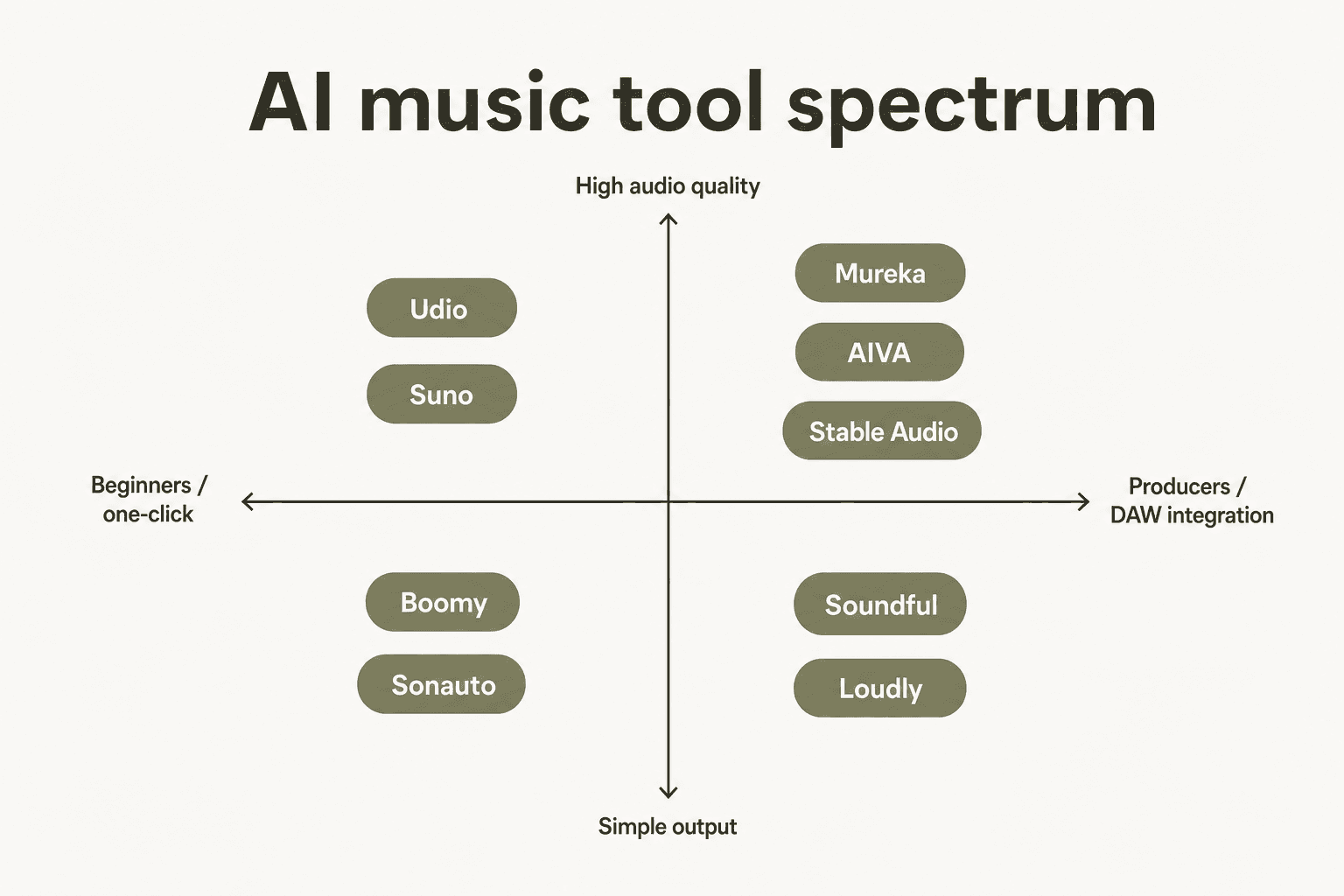
Start with the vocals question. If you need full songs - vocals, lyrics, production - your real options are Suno, Udio, Mureka, Loudly, and Boomy. Stable Audio, AIVA (mostly), and Soundful produce instrumentals. That immediately narrows the field.
Then ask about the output. Are you using the track as a finished product (social content, streaming, client work), or as a composition starting point you'll bring into a DAW? If you're using it finished, distribution support matters - Loudly and Boomy both route directly to streaming platforms. If you're bringing it into a DAW, AIVA's MIDI export and Mureka's DAW plugin are the distinguishing features.
Factor in copyright risk honestly. If you're producing content commercially, the copyright situation on your tool's training data matters. Stable Audio has the clearest position (100% licensed, first-party documentation). Soundful makes the same claim for its proprietary approach. Loudly and Udio both have consent-based datasets. Suno and Boomy are less explicit on training data.
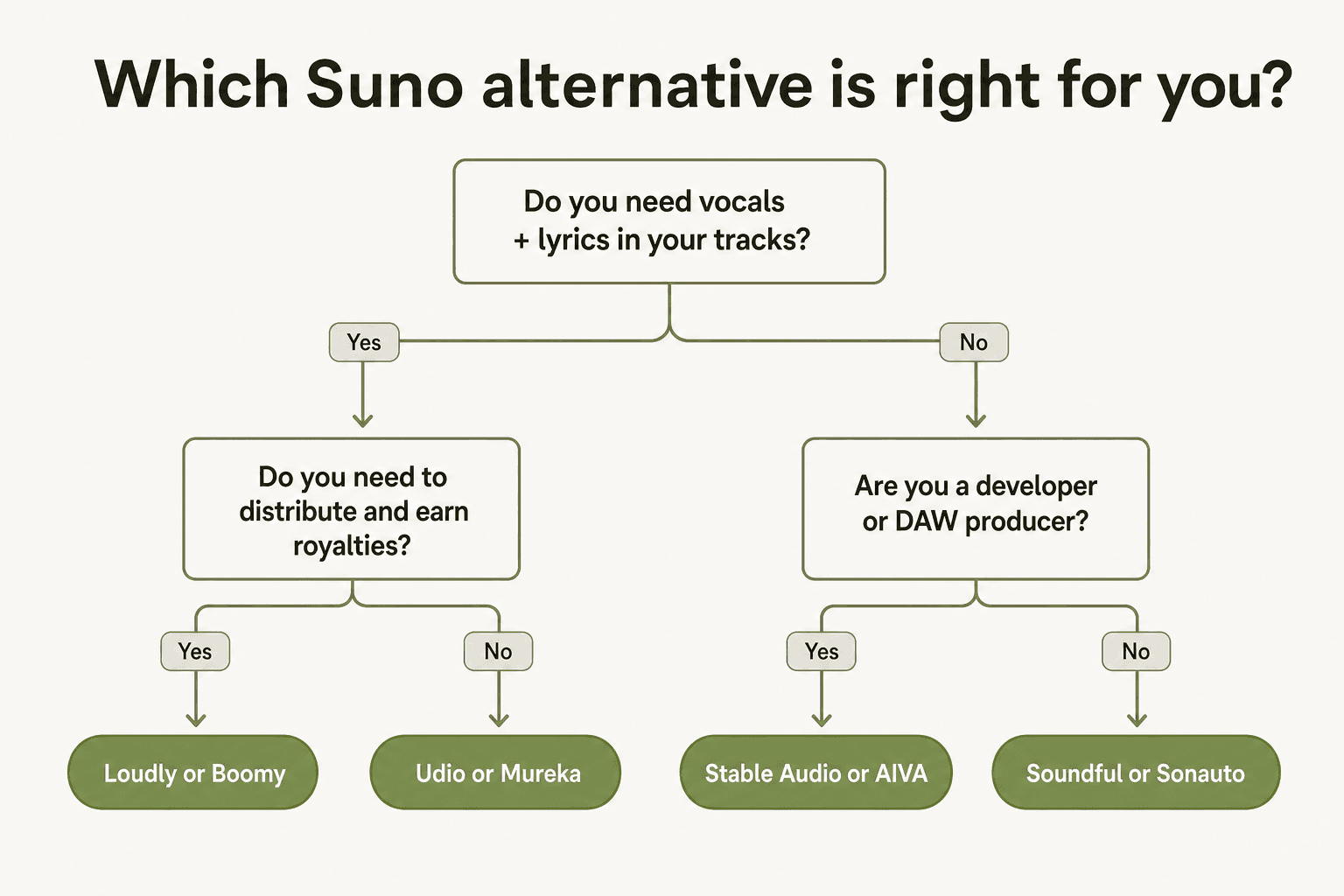
For most creators coming from Suno, we'd recommend trying Udio first - it's the closest peer in terms of quality and creative workflow, with meaningfully better copyright footing. If your work is production-oriented and involves a DAW, add Mureka or AIVA to the shortlist. If your primary goal is streaming distribution with no music knowledge required, Loudly or Boomy are the practical choices. And if you're a developer building on top of AI music, Stable Audio's API and open-weights models are in a class of their own.
Also worth reading: our Suno review and Suno pricing breakdown if you're still on the fence about whether the incumbent fits your needs.
Try eesel
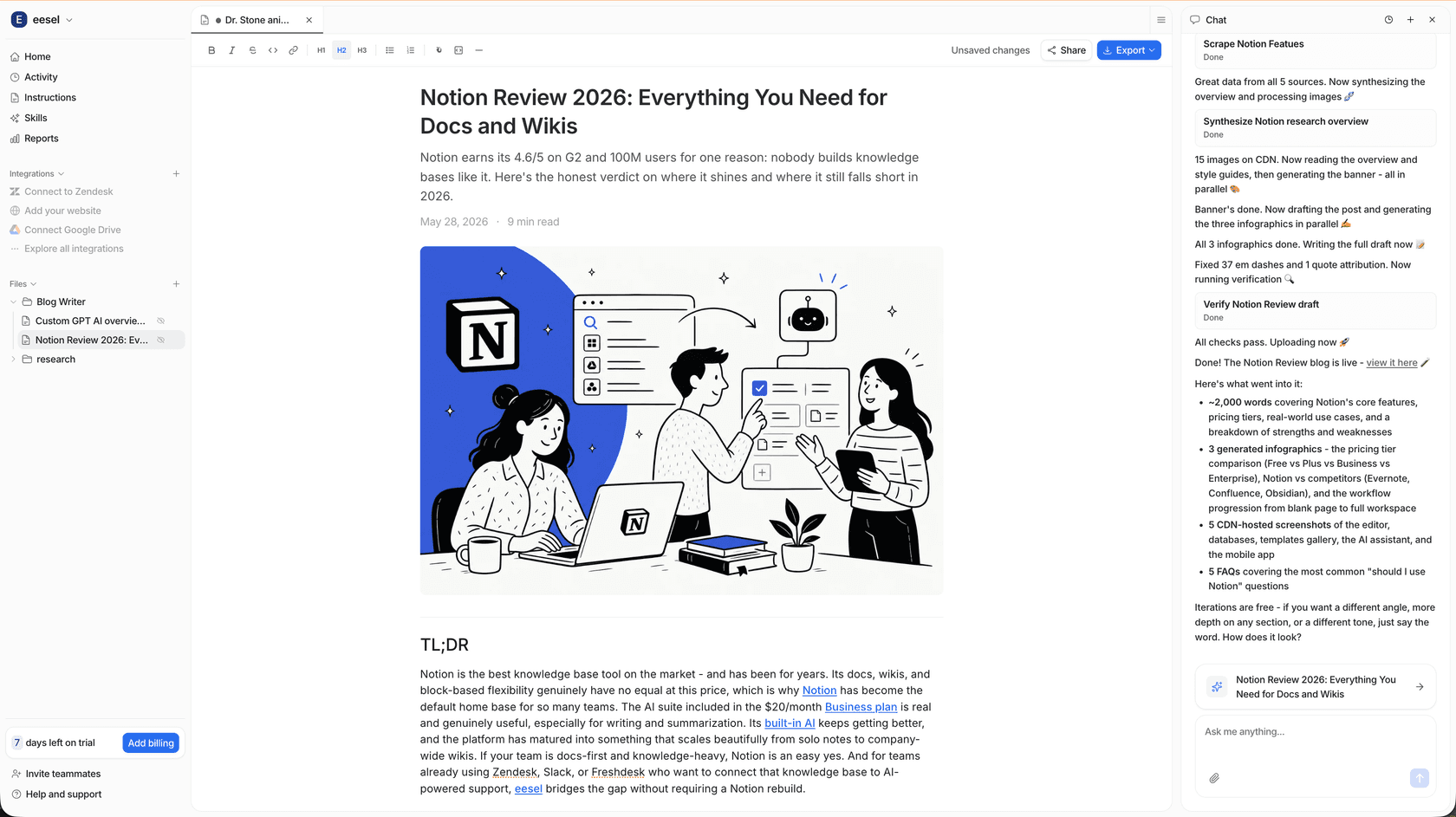
If you're a content team generating music, videos, and written content with AI - eesel can help automate the writing side of the workflow. eesel's Blog Writer agent researches, drafts, and publishes long-form content autonomously, working inside tools your team already uses. It's the same kind of "brief it once, get the output back" experience that AI music tools have brought to audio - applied to written content at scale.
eesel's pricing starts with 100 free credits (no card required), and there are no seat fees - paid plans start at $299/month for 500 credits (1 credit per ticket or chat), and blog posts are $4 each.