

What is ChatGPT Atlas?
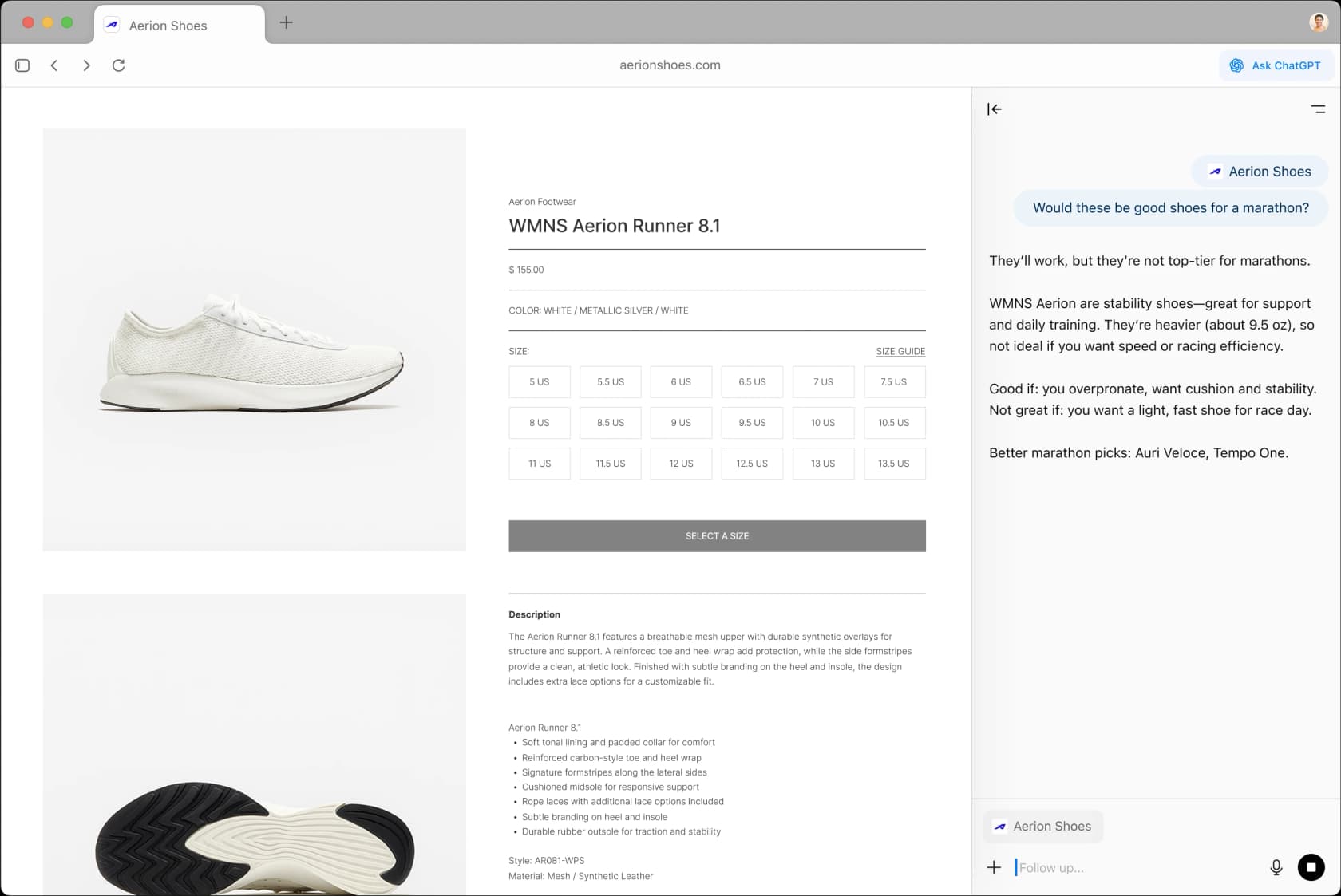
ChatGPT Atlas is OpenAI's AI-native web browser for macOS, launched October 21, 2025. Built on Chromium by Ben Goodger (the original architect of Google Chrome) and Darin Fisher, it embeds ChatGPT as a persistent sidebar that can read and interact with any webpage you visit - no copy-pasting, no tab-switching.
The experience is a browser window split between your web content and a ChatGPT sidebar. Ask it about the page you're reading, compare products, rewrite selected text, or recall something you browsed last week via optional browser memory. On Plus and Pro plans, Agent Mode (powered by OpenAI's Operator) lets ChatGPT act for you: navigating pages, filling forms, adding items to carts, completing multi-step tasks across sites.
It's a well-designed product. The fine print is the problem.
Why Atlas users are looking for alternatives
Three friction points come up consistently across Reddit, X, and direct testing.
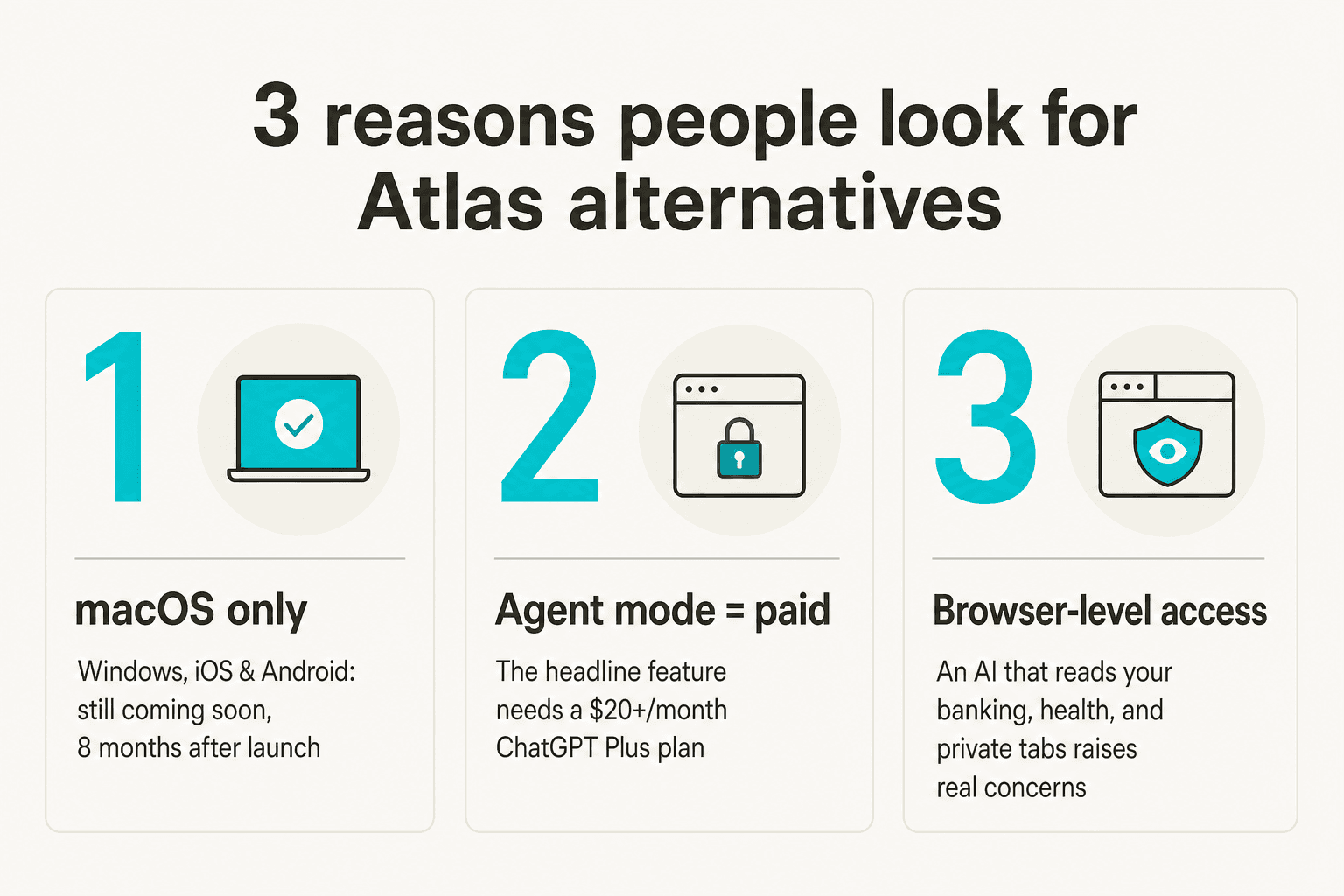
Platform lock-in. Atlas is macOS-exclusive. Windows was promised at launch in October 2025 and still hasn't arrived. If your team works across Mac and Windows - or if you're on iOS or Android - Atlas simply isn't available to you.
The agent mode paywall. Agent Mode is Atlas's only feature that meaningfully differentiates it from "ChatGPT with a browser wrapper." It requires ChatGPT Plus ($20/month) at minimum, or Pro ($200/month) for the full capability. The headline feature is an upsell on top of a browser OpenAI is already positioning as a gateway to ChatGPT.
Privacy at the browser level. Simon Willison, a respected voice in AI tooling, put it plainly on X (672 likes): "I remain unconvinced by the entire category of 'browser agents' - the security and privacy challenges still feel insurmountable to me." Atlas can see everything you visit - banking pages, medical portals, private messages. Per-site toggles exist, but many users aren't comfortable with the fundamental tradeoff.
And beyond the tradeoff: agent mode itself is still rough in practice. Community testing found Atlas "consistently gets lost and clicks on the wrong things" on complex multi-step workflows, with tasks timing out around the 8-minute mark.
The 6 best ChatGPT Atlas alternatives
The table below covers the core comparison dimensions. We'll go deep on each below.
| Alternative | Platforms | Free AI tier | Agent / automation | Starting paid plan | Best for |
|---|---|---|---|---|---|
| Perplexity Comet | Mac, Win, iOS, Android | Full browser (free) | Yes (Pro plan) | $20/month | Research-first, any platform |
| Dia | Mac only | Heavily limited | Partial (Skills) | $20/month | Design-focused macOS power users |
| Brave Leo | Mac, Win, Linux, Android, iOS | Rate-limited AI | None yet | $14.99/month | Privacy-first users |
| Microsoft Edge Copilot | Win, Mac, iOS, Android | Full sidebar (free) | Yes (M365 paid) | $9.99/month | Windows & Microsoft 365 teams |
| Opera AI | Win, Mac, Linux, Android, iOS | Fully free AI | None | $0 | Zero-cost AI browsing |
| eesel | Any (lives in your tools) | $50 trial credit | N/A (tool-native AI) | $0.40/task | Support/ops teams needing AI in their stack |
1. Perplexity Comet
Best for: research-first workflows on any platform
Perplexity Comet is the most direct competitor to ChatGPT Atlas - another AI-native browser built from the ground up with an AI assistant as the core product. Unlike Atlas, Comet runs on Mac, Windows, iOS, and Android, and the full browser is free with no subscription required.
Built by Aravind Srinivas and the Perplexity team, Comet launched in July 2025 for Max subscribers before going free to everyone globally on October 2, 2025 - the same week Atlas launched. When existing Perplexity users installed Comet, question volume increased 6–18x in the first day. Comet for iOS hit #3 Overall on the US App Store within 48 hours of the March 2026 launch.
Comet's AI assistant understands content across open tabs simultaneously - not just the current page. Ask it to synthesize a dozen research tabs, compare pricing across five vendor pages, or draft an analysis from sources you've been gathering all morning. Perplexity Computer (the agentic task layer, available to Pro subscribers) handles multi-step actions: form-filling, booking, research compilation.
Community testing consistently rates Comet's agent reliability higher than Atlas's. One developer who tested both posted on r/AI_Agents that Comet completed the same multi-site research flows faster and with fewer failures. The enterprise tier ships with CrowdStrike integration, MDM deployment, audit logs, and prompt injection protection - none of which Atlas offers yet.
Brendan Lore, AI Manager at Atrium Hospitality, described the value: "Comet is the first tool that lets our teams navigate that complexity without drowning in tabs. It pulls context from one brand portal, cross-references a competitor set in another, and drafts the analysis - all before our morning revenue call."
Pros:
- Cross-platform: Mac, Windows, iOS, Android
- Free browser, no subscription required to use
- Cross-tab context AI (reads all open tabs simultaneously)
- Perplexity Computer for agentic task completion
- Strong enterprise offering (SOC 2, HIPAA, prompt injection protection, MDM)
Cons:
- Frontier models (GPT-5.4, Claude Sonnet 4.6) require the Pro subscription
- Default AI is Perplexity's own Sonar - less familiar to ChatGPT-native users
- No "browser memory" comparable to Atlas's opt-in browsing history summarization
Pricing:
| Plan | Monthly | Annual | What you get |
|---|---|---|---|
| Free | $0 | $0 | Full Comet browser + basic AI search (Sonar model) |
| Pro | $20/mo | $17/mo | Frontier models + Perplexity Computer credits for agent tasks |
| Max | $200/mo | $167/mo | High-volume Computer credits + advanced models |
| Enterprise Pro | $40/seat/mo | - | Comet Enterprise + SOC 2, HIPAA, MDM, CrowdStrike |
Our take: Perplexity Comet is the strongest like-for-like replacement for ChatGPT Atlas - and the cross-platform support alone addresses Atlas's biggest limitation. You don't need an existing Plus subscription to get the best features, and the agentic layer is more reliable in practice. Compare it head-to-head: Perplexity Comet vs Brave Leo.
2. Dia
Best for: macOS users who want the most polished AI-native browsing experience
Dia is the AI browser from The Browser Company, the team behind Arc. In September 2025, The Browser Company was acquired by Atlassian for $610M, with Atlassian product integrations (JIRA, Confluence) on the roadmap. Dia is generally available on macOS 14+ (M1 chip required) with no waitlist as of mid-2026.
Dia's strongest differentiator is cross-context search - the AI pulls simultaneously from open tabs, connected Google Workspace files, and Slack conversations to answer a single question. Ask "what did we agree on Q3 pricing in Slack last month?" and Dia finds it. Ask "which of my open tabs has the best deal on this item?" and it synthesizes all of them.
Standout features include Morning Brief (a daily AI agenda combining Gmail, calendar, and open research), Skills (reusable AI workflows scoped to your browser - "always summarize meeting notes in this format"), Splits (multiple contexts side by side), and Profiles (separate environments per project or client). The Browser Company team brought strong design DNA from Arc - Dia is visually the most polished AI-native browser in this comparison.
The catch is the free tier. Users consistently report hitting the AI daily quota after as few as 2 prompts. The practical entry point is Dia Pro at $20/month.
Pros:
- Most polished design of any AI browser in this list
- Cross-context search: tabs + Google Workspace + Slack simultaneously
- Morning Brief, Skills, and Profiles deliver real workflow utility
- Atlassian integrations (JIRA, Confluence) on the roadmap
- No waitlist - GA on macOS 14+ with M1 chip
Cons:
- macOS only (Windows on waitlist, no announced date)
- Free tier AI quota is extremely limited (~2 prompts/day per community reports)
- $20/month required to use the product properly
- Platform longevity risk - small team, enterprise tier still maturing, no Windows yet
Pricing:
| Plan | Monthly | What you get |
|---|---|---|
| Free | $0 | Browser + severely limited AI daily quota |
| Dia Pro | $20/mo | Unlimited AI chat + custom Skills + priority support |
| Dia for Work | Not yet public | Enterprise tier; contact for pricing |
Our take: Dia is the right pick for macOS users who want the most design-forward AI-native browser and don't mind paying $20/month for it. The cross-workspace context (tabs + Slack + GSuite simultaneously) is the most impressive feature in any browser on this list. Skip it if you're on Windows, if you're price-sensitive, or if you need a stable long-term platform bet today.
3. Brave Leo
Best for: users who care about privacy as much as AI depth
Brave Leo is the privacy-first answer to AI browsers. Our full Brave Leo review has the complete picture - here's the short version: Leo routes every prompt through Brave's reverse proxy so model providers (Anthropic, Meta, Mistral) never see your IP address, and chats are discarded immediately after generation with nothing retained on Brave's servers.
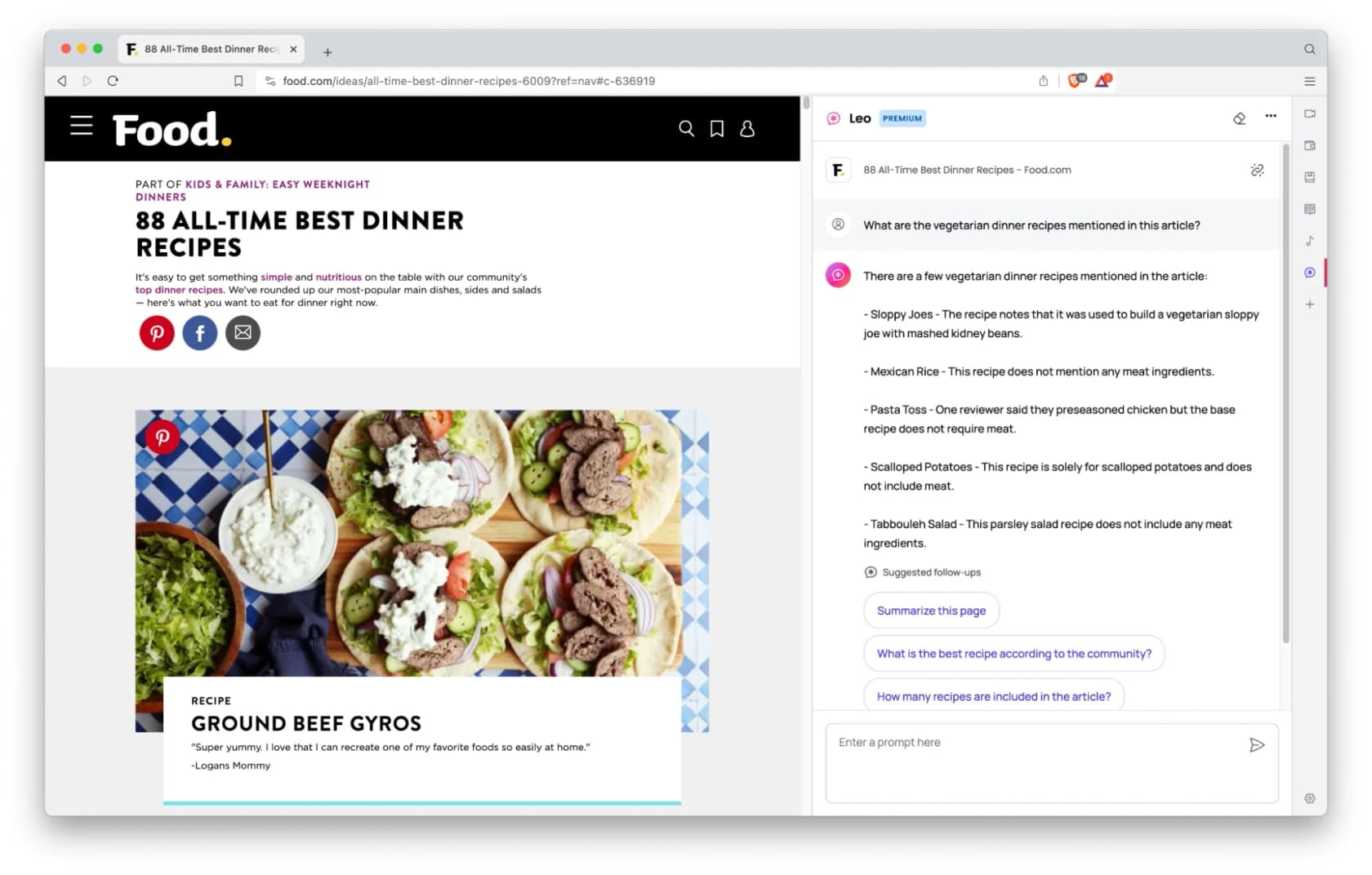
Leo runs on macOS, Windows, Linux, Android, and iOS - the broadest cross-platform coverage of any AI browser in this comparison. The free tier gives you Llama 3.1 8B, Qwen 3 14B, and Claude Haiku (rate-limited, no account required). Leo Premium ($14.99/month or $149.99/year at ~$12.50/month effective) unlocks Claude Sonnet 4 and DeepSeek R1 with higher rate limits and a 7-day free trial covering up to 5 devices.
What makes Leo genuinely useful day-to-day: Multi-Tab Context (ask questions spanning all open tabs), Tab Organizer (auto-group tabs by topic), Brave Search integration (cited real-time sources baked into responses), and BYOM (Bring Your Own Model - connect any external API or a local Ollama model). Local-only chat history means conversation logs never leave your device.
The community is candid about the limitations. Leo is ultimately a wrapper over third-party models. At $14.99/month it competes directly with Perplexity Pro at $17/month - some users find the privacy advantage not worth the feature gap. Read the Brave Leo reviews for the unfiltered view, and Brave Leo vs ChatGPT for a direct head-to-head.
Agentic browsing entered early testing in December 2025 but has no confirmed GA date as of June 2026.
Pros:
- Strongest privacy model of any AI browser (reverse proxy, zero retention, no model training)
- Cross-platform: Mac, Win, Linux, Android, iOS
- Multi-tab context + Brave Search integration with citations
- Free tier with three capable models, no account required
- BYOM: connect any external API or local model
Cons:
- No autonomous agent mode yet
- $14.99/month Premium faces comparison to Perplexity Pro at $17/month
- No proprietary LLM - competitive moat is privacy architecture, not raw AI quality
Pricing:
| Plan | Monthly | Annual | Models included |
|---|---|---|---|
| Free | $0 | $0 | Llama 3.1 8B, Qwen 3 14B, Claude Haiku (rate-limited) |
| Leo Premium | $14.99/mo | $149.99/yr (~$12.50/mo) | Claude Sonnet 4, DeepSeek R1, higher rate limits, early access |
Our take: If privacy is your primary filter, Brave Leo is the only browser-native AI tool that genuinely earns the label. The reverse proxy architecture is meaningfully stronger than anything else in this list on that dimension. The tradeoff is no agent mode yet. See also: Brave Leo pricing breakdown and Opera Aria vs Brave Leo for the budget split.
4. Microsoft Edge Copilot
Best for: Windows users and teams already in the Microsoft 365 ecosystem
Microsoft Edge Copilot is the AI browser most Windows users already have - Edge ships as the default browser on Windows 11, and Copilot is built directly into its interface. The full Copilot sidebar - chat, page summaries, Vision, shopping tools - is entirely free. No subscription needed to use the AI, making Edge the only major AI browser here where the full-featured baseline costs nothing on Windows.
The standout feature is Multi-Tab Context - Copilot reads all open tabs simultaneously. Cross-tab synthesis is the most-cited reason users choose Edge over Chrome on Reddit: "which of these 5 apartments is the best value?" across 5 open tabs, or "summarize my 30 research tabs into a brief" - both handled. Copilot Vision (currently US-only) extends this to real-time screen understanding: Copilot sees what's on your screen, answers questions about it, and can respond by voice.
For M365 users, the enterprise story is compelling. Microsoft 365 Copilot Business ($18/user/month through September 2026, normally $21) connects Copilot in Edge to internal SharePoint documents, email, and Teams conversations - the "Work IQ" layer. Your AI can answer "what did our team decide last quarter?" from inside the browser without copy-pasting anything. See our full Microsoft Edge Copilot review for the enterprise evaluation. Also worth reading: Opera Aria vs Microsoft Edge Copilot.
The community gripe is LLM quality. On Reddit, Copilot is repeatedly described as "a cautious middle-management AI" - thorough but over-hedged, less willing to commit than ChatGPT or Claude. For research tasks it works well; for analytical or creative work, you'll notice the guardrails.
Pros:
- Full Copilot sidebar is entirely free - no subscription required
- Multi-tab context (strongest Windows implementation available)
- Enterprise M365 integration: SharePoint, email, Teams via Work IQ
- Cross-platform: Windows, macOS, iOS, Android
- Agentic browsing with human-approval checkpoints
Cons:
- Copilot Vision is US-only as of June 2026
- LLM quality described as overly cautious vs ChatGPT/Claude
- Work data grounding (the best enterprise feature) requires M365 Copilot subscription
- Forced AI integration prompted community backlash mid-2026
Pricing:
| Plan | Monthly | What you get |
|---|---|---|
| Edge browser (free) | $0 | Full browser + full Copilot sidebar, no cap |
| M365 Personal | $9.99/mo | Copilot with M365 personal apps |
| M365 Copilot Business | $18/user/mo (promo Jul–Sep 2026) | Work IQ: SharePoint + email + Teams grounding + Enterprise Data Protection |
| M365 Copilot Enterprise | $30/user/mo | Enterprise controls, agent management, compliance |
Our take: For Windows users, Edge Copilot is the obvious starting point - you likely already have it, and the free sidebar beats most competitors at any price. The M365 enterprise story is genuinely compelling. The weak link is LLM quality compared to Comet or Dia. If you're on macOS and not in the M365 ecosystem, it's not the right call.
5. Opera AI
Best for: a fully capable AI browser at zero cost
Opera AI (formerly Opera Aria, rebranded November 2025 as part of the Opera One R3 update) is the most surprising entry in this list: it's entirely free, including all AI features, with no account or subscription required. Text generation, image generation (5/day without account, 100/day with a free Opera account), Tab Island context, and voice I/O - all free.
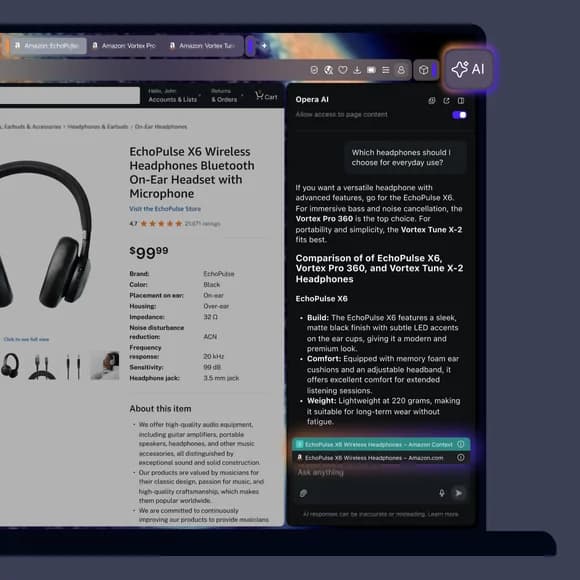
The AI engine dynamically routes between OpenAI (GPT) and Google (Gemini) models depending on the task. Standalone ChatGPT and Gemini sidebar panels are also available as separate companions. The standout feature is Tab Island context awareness: Opera groups related tabs into Islands, and Opera AI synthesizes content across an entire Island simultaneously - ask about the car you've been researching across seven tabs, and it reads all seven.
Our Opera Aria review and Opera Aria vs ChatGPT have the full breakdown. The headline limitation is the ownership question: Opera is approximately 69% owned by a Chinese consortium (Kunlun Tech), the most-cited concern in r/browsers. The company has published data policies, but the ownership structure generates persistent skepticism in privacy-focused communities - especially compared to Brave Leo's architecture. Two security vulnerabilities were disclosed and patched in 2024-2025.
There's no autonomous agent mode in Opera One. Opera Neon - a separate paid product - is Opera's agentic browser.
Pros:
- Completely free including all AI features - no paid tier required
- Multi-model: dynamically routes GPT + Gemini; ChatGPT and Gemini sidebar panels separately available
- Tab Island context: AI synthesizes across a group of related tabs simultaneously
- Image generation (100/day with free account)
- Available on Windows, macOS, Linux, Android, iOS
Cons:
- ~69% Chinese ownership (Kunlun Tech) - a real privacy concern for some workflows
- No autonomous agent mode in Opera One
- AI accuracy and memory consistency vary per community reports
- Two security vulnerabilities disclosed in 2024-2025 (both patched)
Pricing:
| Plan | Price | What you get |
|---|---|---|
| Opera One (free) | $0 | Full browser + all AI features including Tab Island context |
| Opera Neon | Separate product | Standalone agentic browser - different from Opera One |
Our take: If zero cost is the hard requirement, Opera AI wins. The AI is capable, Tab Islands is a clever cross-tab feature, and no credit card is required. The Kunlun Tech ownership is real and worth factoring in for sensitive work. For the free-browser comparison: Opera Aria vs Brave Leo and Opera Aria reviews.
6. eesel
Best for: support and operations teams who want AI across their work tools - not just the browser
This entry requires a reframe. If you're looking at ChatGPT Atlas alternatives because you want AI to help you work faster, the browser might be the wrong boundary to optimize.
Most of where actual work happens isn't a browser tab - it's Zendesk, Freshdesk, Slack, Notion, Google Docs, your email inbox. A browser AI helps you while you're on the web. eesel puts AI directly inside those tools - answering questions from your company's knowledge base, handling support tickets, drafting replies, and routing escalations without your team switching to a browser at all.
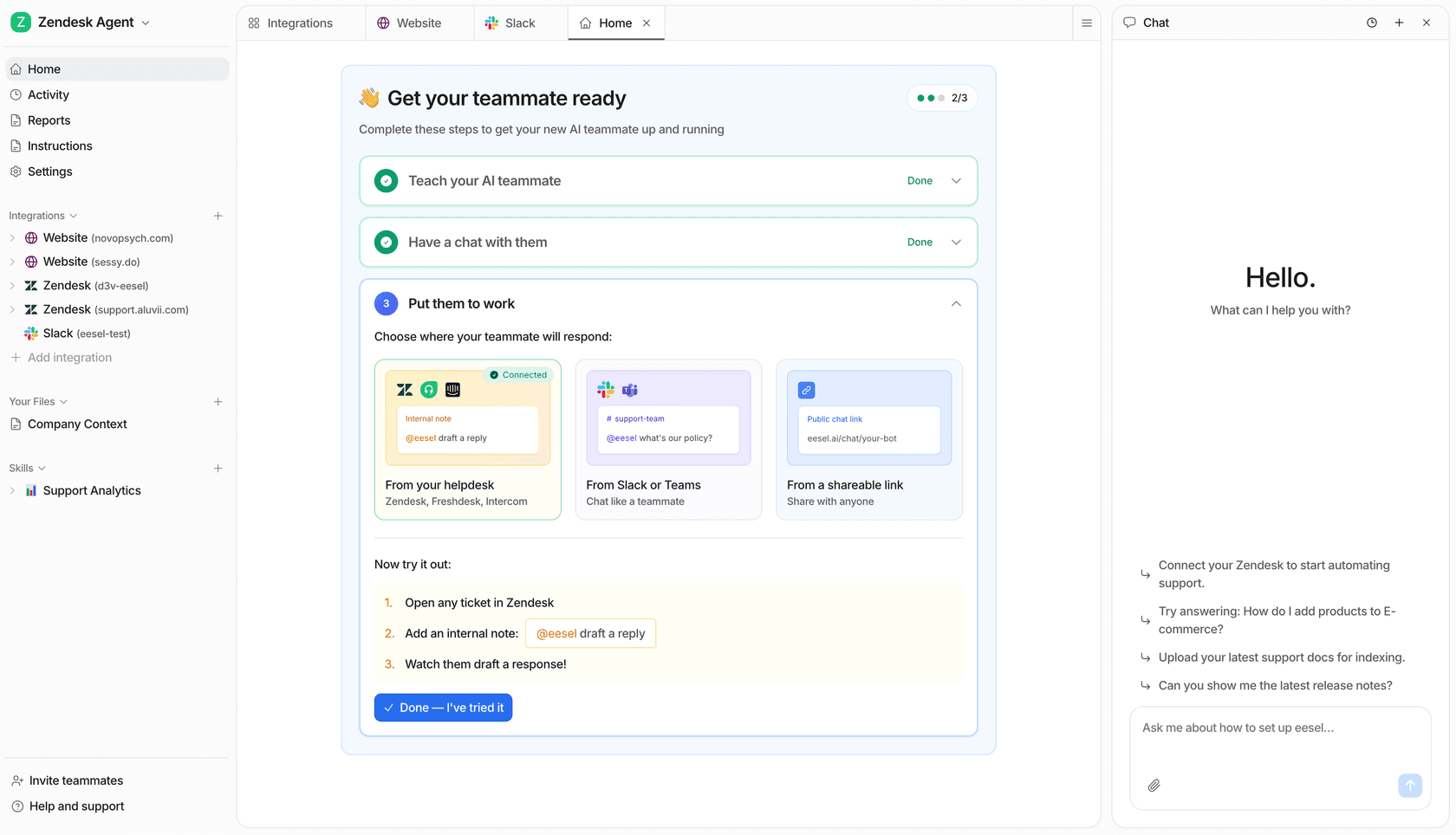
The concrete scenario: your support team fields 2,000 tickets a month in Zendesk. ChatGPT Atlas helps a rep while they're browsing the web. eesel handles the ticket itself - reads it, finds the right answer in your knowledge base and historical tickets, drafts the response, and either flags it for review or sends it autonomously depending on your confidence threshold. Gridwise saw 73% of tier-1 requests resolved in their first month. Design.com handles 50,000+ tickets per month on Freshdesk through a multi-agent eesel setup. Smava runs a fully automated Zendesk agent processing 100,000+ German-language tickets per month on eesel.
The setup is designed to be low-friction. Connect eesel to your helpdesk and knowledge sources, run Simulation Mode (eesel processes your historical tickets to show what it would have handled and where the gaps are), tune coverage, then go live. The AI helpdesk agent comparison shows how eesel stacks up against the other tools in that space.
To be direct about the category difference: eesel is not a browser and doesn't replace your browser. If you want "AI while I'm on the web," Comet, Brave Leo, or Edge covers that well. If you want "AI in my support inbox" or "AI in my team's knowledge base" - that's eesel's lane.
Pros:
- Works inside Zendesk, Freshdesk, Slack, Notion, Google Docs, HubSpot, Gorgias, Front, email, and 100+ more
- Learns from your historical tickets and help docs on day one - no training pipeline setup
- Simulation Mode: see exactly what eesel handles before going live
- 80+ languages, multilingual ticket handling out of the box
- Usage-based pricing - no per-seat fees, no platform minimums
- Enterprise: HIPAA, SOC 2, SSO, signed BAA, dedicated support
Cons:
- Not a browser - doesn't help while web browsing
- Needs a helpdesk or internal knowledge base to deliver best results
- Free trial credit ($50) runs out quickly on complex configurations
Pricing:
| Plan | Price | What you get |
|---|---|---|
| Pay-as-you-go | $0.40 per task | Per-ticket helpdesk conversation or equivalent task |
| Annual commit | 25% less (~$0.30/task at ≥$300/month commitment) | Reduced rate for annual volume |
| Enterprise | $1,000/mo flat + usage | Dedicated SE, HIPAA, BAA, SSO, higher KB limits |
Free trial: $50 in usage credit, no credit card required.
Our take: eesel isn't a ChatGPT Atlas alternative in the browser sense - it's the alternative when the browser is the wrong tool for the job entirely. For support, IT, and operations teams where the work happens inside a helpdesk or knowledge base, the ROI case is concrete and measurable from day one.
How to pick the right one
Three questions narrow the field quickly.
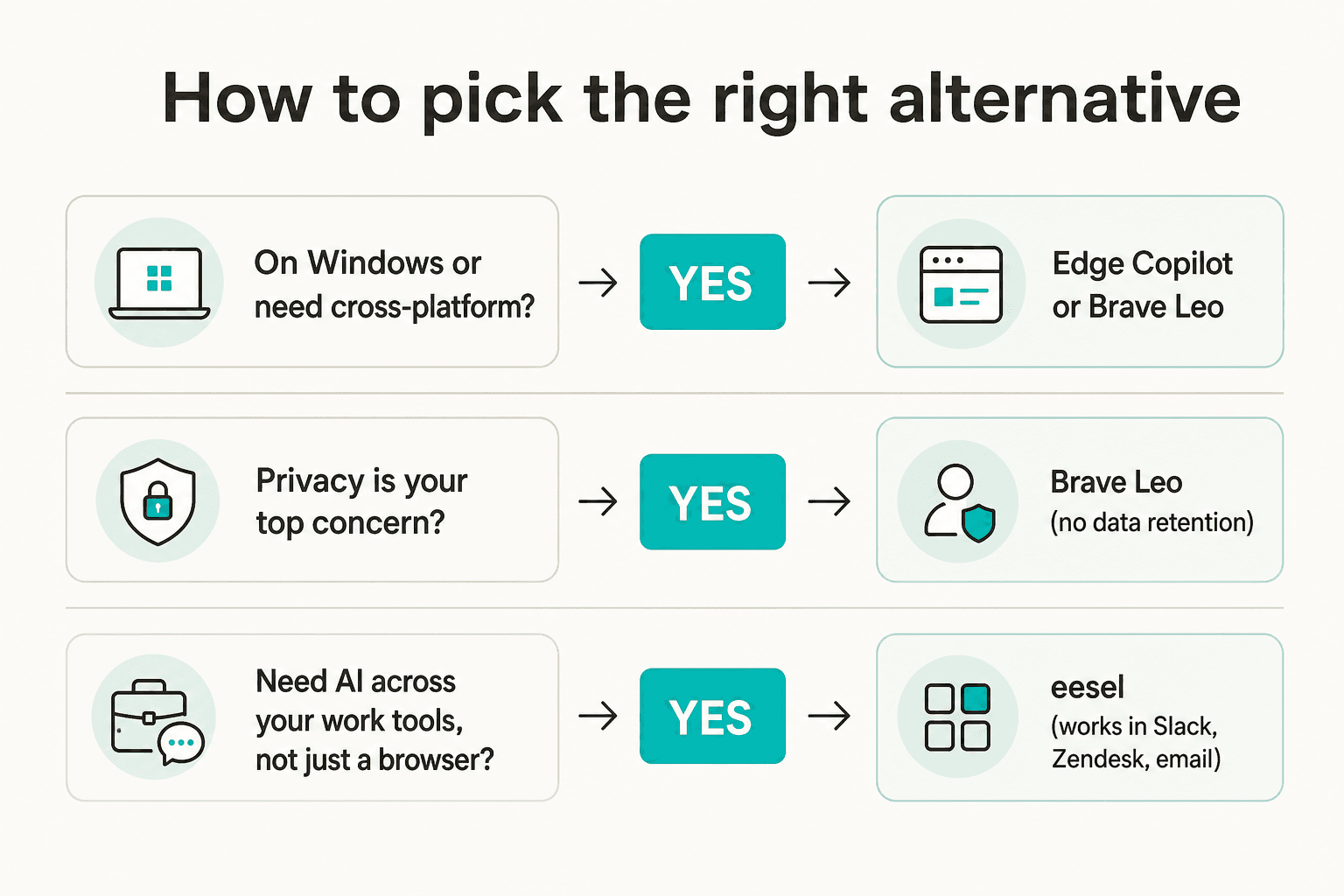
On Windows, Android, or need cross-device support? Perplexity Comet (full AI browser, every platform, free) or Edge Copilot (Windows-native, entirely free sidebar). Opera AI also works everywhere at zero cost if features matter less than price.
Privacy is the primary filter? Brave Leo, without debate. The reverse proxy architecture and zero-retention model are meaningfully stronger than what any other option in this list offers. See the Brave Leo review for the architecture detail.
Want AI working inside your support tools, not just your browser? eesel - and the ROI comparison starts before a user ever opens a browser tab.
For macOS users who want the best AI-native browser and are willing to pay for it: it's a two-horse race between Dia (most polished design, deepest cross-context integration) and Perplexity Comet (broader cross-platform reach, more reliable agent layer) - with Comet the safer long-term bet given Dia's Windows gap and small-team risk.
Try eesel
If your team spends more time answering support tickets, chasing answers in Slack, or keeping a knowledge base up to date than they do browsing the web - eesel is a better productivity investment than any AI browser.

eesel connects to your helpdesk (Zendesk, Freshdesk, HubSpot, Gorgias), your knowledge base (Notion, Confluence, Google Docs), your team chat (Slack), and 100+ other tools. It learns from your historical tickets and help docs on day one. Simulation Mode shows you exactly what it handles before you go live.
Start with $50 in free usage credit - no credit card required. Try eesel.
Frequently Asked Questions
Is ChatGPT Atlas available on Windows?
What is the best free ChatGPT Atlas alternative?
Does Perplexity Comet cost money?
Which AI browser alternative is best for privacy?
What's the difference between ChatGPT Atlas and eesel?


Article by
Riellvriany Indriawan
Riell is a designer and writer at eesel AI with about two years of experience researching CX platforms, AI chatbots, and helpdesk software. She combines her design background with a sharp eye for how these tools actually look and feel in practice — making her comparisons unusually visual and user-focused.