
What "reducing tickets with AI" actually means
There are two different things hiding inside this goal, and conflating them is where most projects go wrong.
The first is deflection: answering a question before it turns into a human ticket. The second is prevention: fixing the thing that made the customer ask in the first place. A support lead put the distinction perfectly in a discussion analyzed by Corebee.ai:
"I don't believe in ticket deflection. I believe in making tickets unnecessary. There's a difference. Deflection redirects the customer. Making tickets unnecessary fixes what caused the question."
AI is brilliant at the first and increasingly useful for the second (it can spot the recurring question that signals a broken onboarding flow). But you have to know which one you're doing. If you only chase deflection, you'll suppress tickets without solving problems, and they come back through email, chat, and a one-star review. This whole guide is built to keep both goals in view at once.
Worth saying upfront: this is achievable. Companies deploying AI in customer service in 2025 cut support costs by 30% on average, with the top quartile reporting 53% reductions. Klarna's AI assistant now handles two-thirds of all customer service, equivalent to roughly 700 full-time agents. The upside is real. The path to it is just less glamorous than "turn on a chatbot."
Step 1: Audit your tickets to find the "easy 60%"
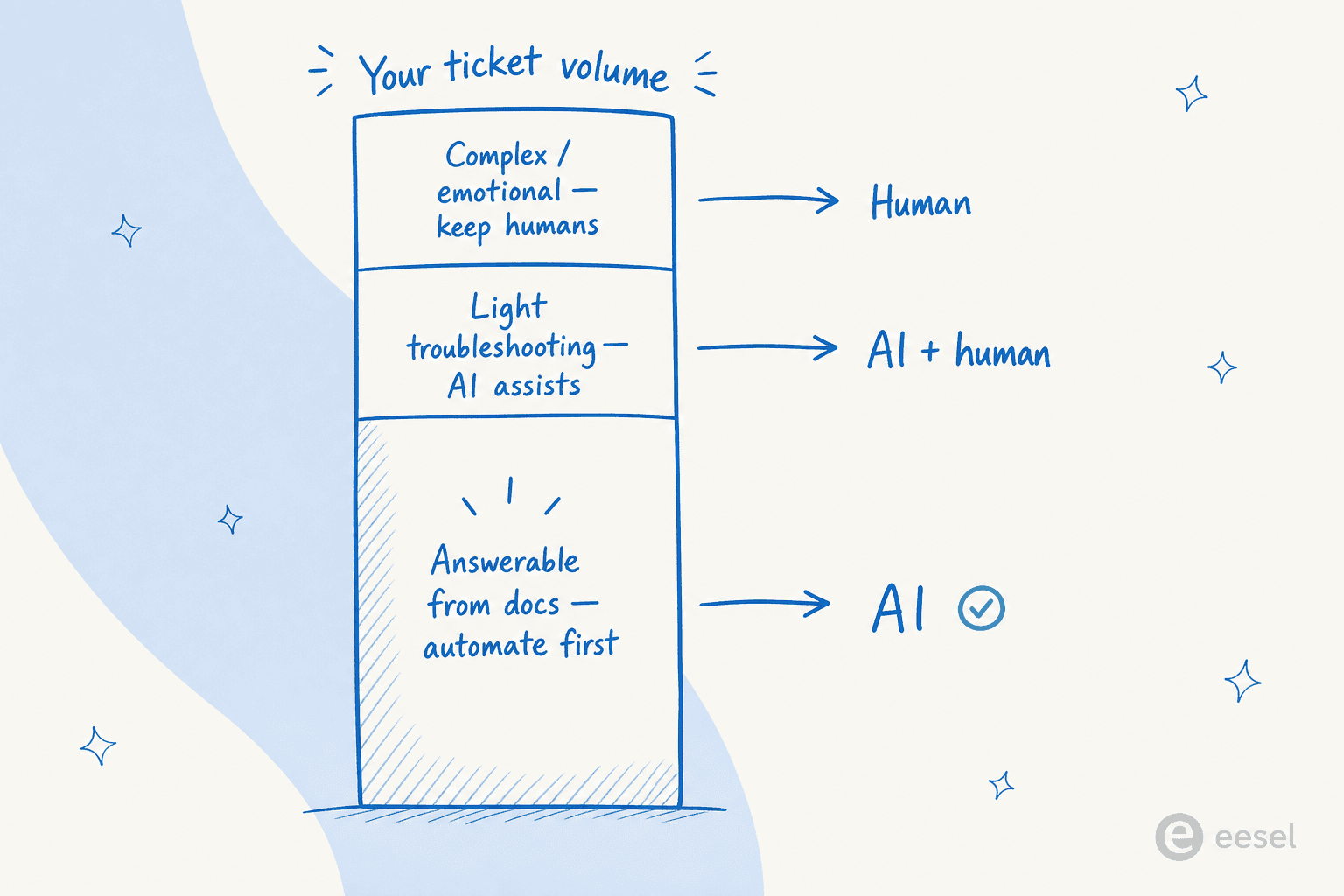
Before you evaluate a single AI helpdesk tool, open your last 200-400 tickets and categorize them. You're looking for the small number of question types that make up the bulk of your volume. Almost every support operation has the same rough shape:
- 40-60% are answerable from existing documentation: password resets, "where's my order?", billing cycle questions, integration FAQs, account settings.
- 20-30% need light troubleshooting but follow familiar patterns: known bugs, configuration errors, feature explanations.
- 10-20% are genuinely complex or emotionally charged: escalations, data loss, billing disputes, churn threats.
That first bucket is your automation opportunity. The last bucket is where humans stay, full stop.
Rate each candidate by volume, effort to resolve, how often the answer changes, emotional charge, and whether it needs sensitive account data. Start with high-volume, low-effort, stable, low-emotion, low-data-risk topics. The point of this step is to resist the urge to point AI at your entire ticket surface on day one. An agent that clearly knows its scope and routes everything else out produces better outcomes than one that attempts everything and fails.
If you've never done this categorization, it's also the most valuable input for any support ticket analysis you do later, so it pays for itself twice.
Step 2: Fix your knowledge base before you touch AI
This is the step people skip, and it's the one that decides everything. Modern AI deflection works by retrieving from your documentation and synthesizing a grounded answer, so the knowledge base is the ceiling on quality. Pylon's analysis found that well-structured documentation lifts genuine resolution by 15-25%, and AI trained on thorough docs can hit a 96% success rate on the queries it was designed to cover.
ClarityArc says it bluntly: a deflection agent is a knowledge retrieval system with a conversational interface, and its quality ceiling is set by the knowledge it retrieves from. The model is almost never the bottleneck. Your docs are.
A practitioner on r/automation captured the failure mode well:
"Your help center only documents the questions someone already bothered to write up. A KB-only bot nails the easy 60% and then either stalls or makes something up on the rest."
u/Koalabs_PAI, r/automation

So, before launch:
- Document your top 20 questions as full articles. If you can't answer a question in writing, the bot can't either.
- Feed it resolved ticket transcripts, not just polished FAQ articles. Past tickets cover the "how do I actually use this" questions that never make it into formal docs. The ability to train AI on your own historical tickets is consistently the most-requested capability we hear from teams.
- Set a refresh cadence: who owns the KB, how often articles are reviewed, what triggers an update. Outdated docs are the number-one cause of confident-but-wrong AI answers.
One thing AI quietly fixes here: it can pull from scattered sources at once. A bilingual SaaS team we worked with wanted their AI to answer across their user guide, Slack, internal KB, and past tickets simultaneously, and then auto-draft new articles from the knowledge gaps it found. That's the difference between a bot that depends on a perfect KB and one that helps you build a better one. For the deeper version of this, see our take on AI-powered knowledge base benefits and knowledge base management.
Step 3: Deploy the cheap wins before the chatbot
There's a reflex to jump straight to a customer-facing AI agent. Resist it for a week. Two lower-risk automations usually clear a surprising chunk of volume first.
Saved replies and macros for your top 10-20 questions cost nothing and improve quality immediately. Many high-performing teams handle 30-40% of ticket volume with saved replies and use AI for the rest. Writing those replies also forces you to produce accurate, tested answer copy, which becomes training material for the AI later. It's not a compromise; it's groundwork.
Workflow automation runs silently and reduces coordination overhead without touching the customer experience:
- Auto-tag tickets by topic for reporting.
- Route by customer tier (enterprise accounts to senior agents).
- Escalate tickets open past 24 hours without a reply.
- Auto-close tickets with no customer response in 7 days.
This is also where AI triage earns its keep before it ever talks to a customer: it can read each incoming ticket, classify it, and leave a suggested reply as an internal note for an agent to send. Your ticket automation and classification get faster without any deflection risk at all, because a human still presses send.
Step 4: Deploy AI on a narrow scope, routed by confidence
Now the customer-facing agent. The single most important design decision here is confidence-based routing: the agent answers autonomously when it's sure, offers a human when it's unsure, and hands off cleanly when it's out of its depth.
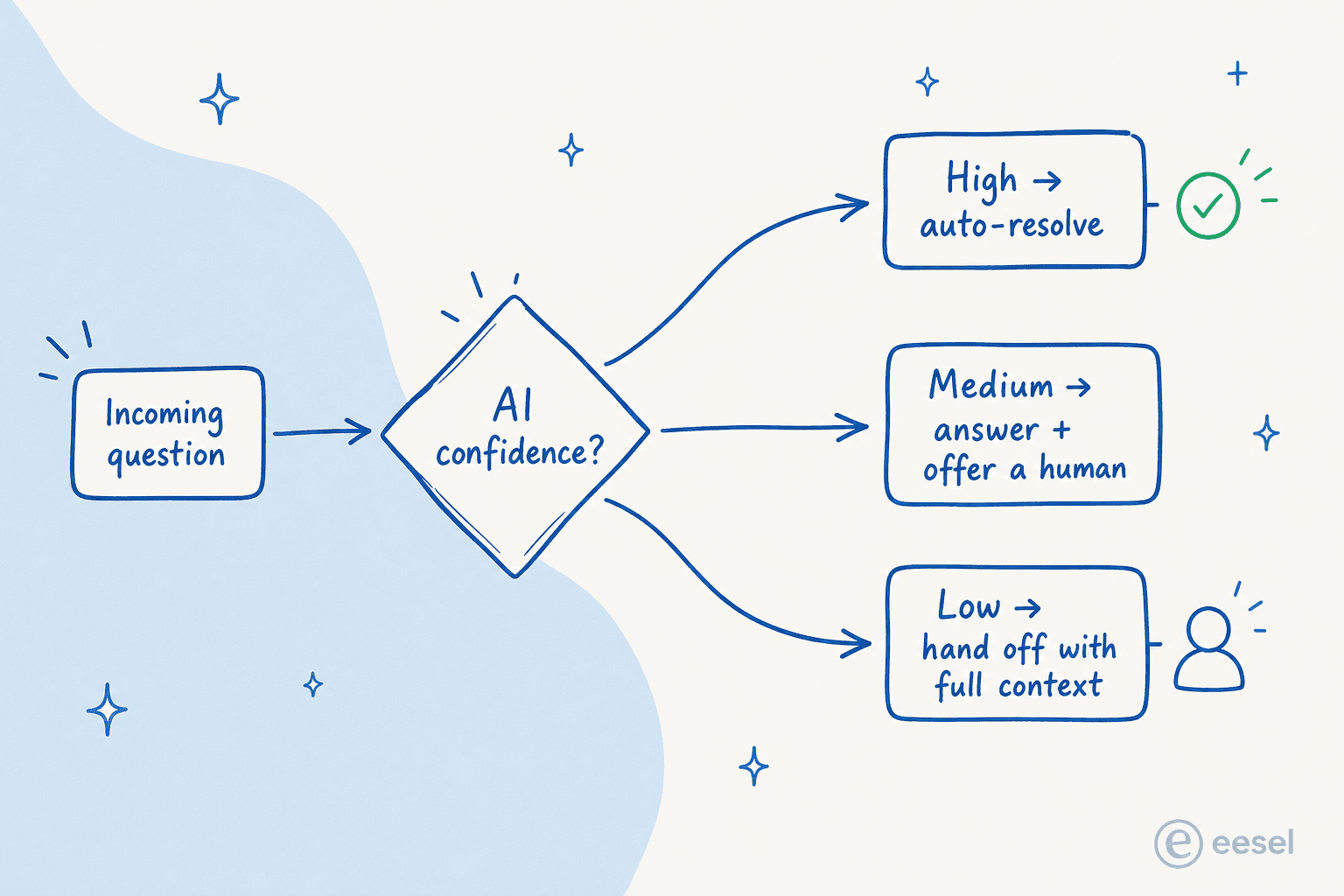
This is exactly the control buyers ask for. As one DTC supplements CX lead we spoke with put it: "The AI will never be able to answer 100% of the questions. I need an AI who is only handling the tickets that it's confident to handle and all the other ones, leave them alone." That instinct is correct, and it's backed by data. There's a warning buried in the confidence-score mechanism: LLM confidence measures token probability, not factual accuracy, so a model can be 95% "confident" about a hallucinated answer. Never gate purely on raw confidence; pair it with knowledge base coverage signals and explicit topic-scope rules.
A few practical rules for the rollout:
- Start with your top 3-5 question categories, not the whole inbox. Pilot on 10-20% of traffic and measure resolution rate, escalation rate, and CSAT against a control group before expanding.
- Add signal-based escalation triggers on top of confidence: the customer explicitly asks for a human, repeats the same question three times, trips a frustration/anger sentiment score, or mentions billing disputes or cancellation.
- Exclude the untouchables outright: legal and compliance requests, VIP accounts flagged for human-only handling, and anything with churn-risk signals.
The reason this matters: agentic AI that can actually take actions (look up an order, reset a password, start a refund) averages 44% deflection versus 33% for systems that only surface information, and best-in-class deployments push past 86%. But the same power is dangerous without guardrails. One team processing millions of agent tasks let an autonomous agent auto-close 34 tickets that should have escalated, including three live production incidents, and it cost them a $280K annual contract. Scope and routing aren't bureaucracy; they're what makes autonomy safe.
This is also where running AI inside your existing helpdesk pays off, rather than bolting a rigid chatbot onto it. eesel works natively on top of Zendesk, Freshdesk, Front, Help Scout and more, so the agent has the ticket history and account context it needs to route well.
Step 5: Make the path to a human flawless
The most common complaint about AI customer service isn't that the bot is dumb. It's that it traps people. The top customer fear about AI support is simply that it gets harder to reach a human, and a bot that dead-ends a frustrated customer costs you more goodwill than it ever saves in ticket count.
A SaaS founder put the consequence starkly in Corebee's analysis of 50+ support discussions:
"Optimizing for ticket deflection with AI almost ruined our churn rate. Stop using bots as bouncers."
Their deflection rate hit 75%. Their high-LTV customers churned because they felt blocked from a human. So the non-negotiables for every AI surface:
- A customer can request a human at any point, with the option visible, not buried.
- When the AI escalates, it transfers the full conversation transcript plus the account context it already gathered, so the customer never repeats themselves.
- The agent recognizes when it's out of its depth and escalates rather than guessing.
That handoff quality isn't a nice-to-have. Implementing proper human handoff increases customer satisfaction by up to 35% and reduces churn by around 20%. The cleanest version looks like a real chat we saw on an SEO tool's website: the agent answered two documentation questions, then handed off to a human the instant the user typed "Can I talk to a human?" No loop, no fight. That's the bar.
Step 6: Measure true deflection, not the vanity number
Here's the metric that quietly ruins programs. Gartner found that AI deflects more than 45% of customer queries, but only around 14% reach full self-service resolution. The gap, roughly 31 percentage points, is "false deflection": the ticket was suppressed, not solved.
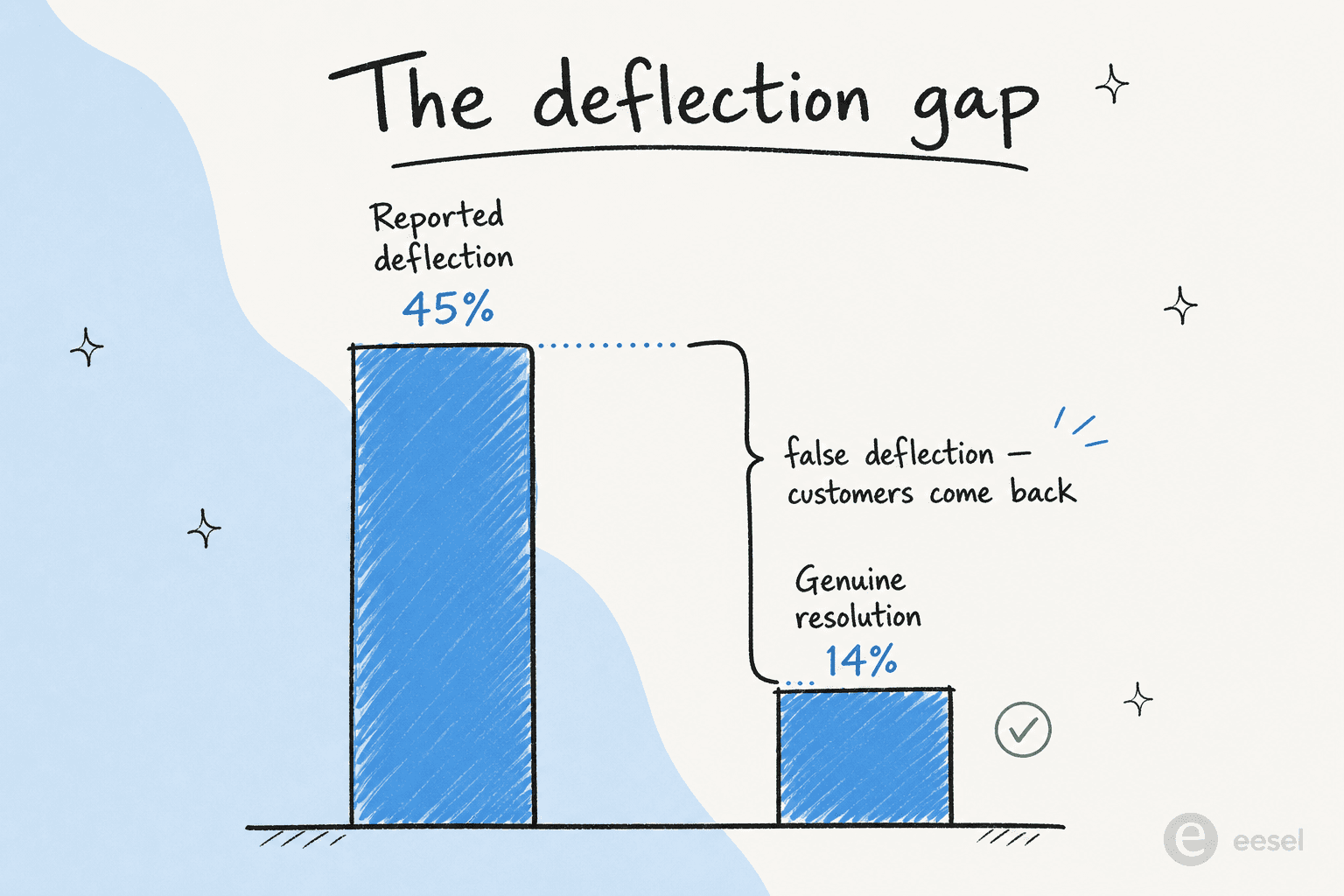
The reason this is so dangerous is that the dashboard looks fantastic right up until CSAT and churn tell the real story. As one team lead put it, deflection rate is "such a cursed metric on its own because it optimizes for fewer tickets, not better outcomes." A study of 100,050 support interactions found AI bots are 37% more likely to move issues away from resolution than humans when they're tuned to maximize deflection rate.
So track the metrics that catch the lie:
| Metric | Why it matters |
|---|---|
| True deflection rate | % of contacts where the customer did NOT return with the same issue within 48 hours |
| Re-contact rate (48h) | The direct signal for false deflection; rising = bots closing, not solving |
| Escalation rate by query type | High in one category = a knowledge gap or wrong scope |
| Cost per true resolution | The P&L number that matters, not cost per deflection |
| CSAT, split AI vs human | If the gap is within 5-10 points, the deployment is healthy |
The economics are why this is worth getting right: an AI-handled ticket runs roughly $0.50-$1.05 versus $8-$12 for a human-handled one, a 12x-24x difference. But that math only holds if the deflection is real. A few extra reviews of random bot conversations each week, plus the re-contact metric, is how you keep it honest. Our deeper dive on AI customer service metrics covers the full measurement framework.
Common mistakes that send tickets right back up
Even teams that do the steps above trip on a predictable set of mistakes:
- Deploying before the KB is ready. Thin docs mean the AI fails or hallucinates. Write the content first.
- Treating deflection rate as the only success metric. Pair it with CSAT and re-contact rate, every time.
- No human escalation path. The fastest way to torch trust. One click to a human, always.
- Over-automating high-emotion tickets. Disputes, data loss, and churn threats need a person. Route them there with sentiment detection.
- Deploy once, maintain never. Quality decays as your product changes. Assign explicit ownership and audit the KB quarterly.
- Choosing a tool before knowing your ticket topology. A FAQ bot and an action-capable AI agent are different products at different prices. Step 1 tells you which you need.
The throughline: every one of these is a process failure, not a model failure. The hard part of reducing tickets with AI was never the AI. It's the scoping, the docs, and the discipline to measure honestly.
Try eesel
If you've read this far, you already know the recipe: scope tightly, ground the AI in your real knowledge, route by confidence, and keep the human one click away. eesel is built to do exactly that on top of the helpdesk you already use, whether that's Zendesk, Freshdesk, Front, or Help Scout, so there's nothing to rip out.
The differentiator that matters most for this use case: eesel trains on your past tickets and scattered docs from day one, and its simulation mode lets you test the agent on your real historical tickets before it ever replies to a customer, so you can see your likely deflection rate before going live. One eesel customer reported resolving 73% of their tier-1 requests in the first month. Pricing is one fixed monthly price with no per-seat fees, and there's a free plan with 100 credits so you can run it on your own tickets before paying anything.