

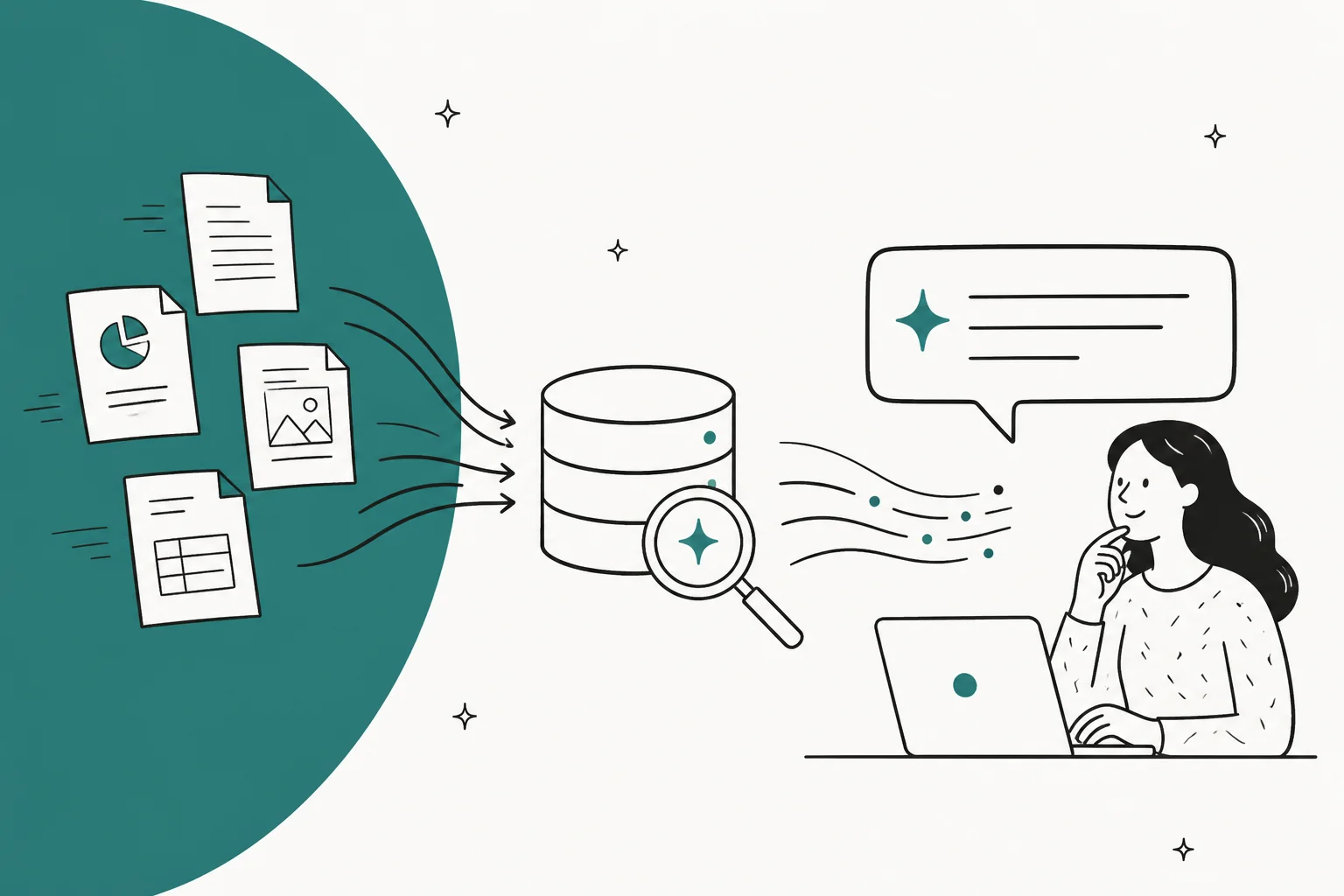
An AI knowledge base is your existing documentation, indexed so a model can search it at question time and answer from what it retrieves rather than from what it memorised in training. The plumbing is called retrieval-augmented generation, and it is largely a solved problem you can buy.
Here is the part nobody budgets for. The retrieval stack is not what breaks these projects. The content behind it is. Anthropic's own testing shows a well-tuned hybrid retrieval pipeline still fails to surface the right passage 1.9% of the time, and that is the good end of the range. Every practitioner thread I read says the same thing in blunter language: stale, contradictory, wrong-audience docs are what produce wrong answers, and no amount of reranking fixes a manual that was written for admins when the questions are coming from customers.
I build AI agents at eesel, and across thousands of live rollouts the pattern holds. The teams that succeed do two unglamorous things first: they pick an authoritative subset instead of connecting everything, and they run the agent against their own historical tickets before a single customer sees an answer. This guide covers what an AI knowledge base is, how retrieval actually works, what you can put in one, how to build and maintain it, how to tell if it is working, and how permissions decide who sees what.
If you build yours on eesel, those first steps can be scripted. With the eesel CLI, an AI coding agent can connect the sources you approve or upload the authoritative subset, then ask it real questions and check that the answers cite the right document. Adding a source doesn't mean it's searchable yet, so wait until it shows as ready before testing.
What an AI knowledge base actually is
An AI knowledge base is a collection of an organisation's documents, indexed so that a language model can search it at the moment a question is asked and compose an answer from the passages it retrieves.
That definition is doing more work than it looks. The important word is retrieved. A language model on its own answers from patterns baked into its weights during training, which is why it knows nothing about your refund policy and will happily invent one. An AI knowledge base changes the shape of the transaction: the question triggers a search over your content, the top passages get pasted into the model's prompt, and the model is asked to answer using only those passages.
AWS describes the goal as referencing "an authoritative knowledge base outside of its training data sources" before generating a response, and the appeal is that you get current, company-specific answers "without the need to retrain the model." AWS's analogy for an ungrounded model is an over-enthusiastic new employee who refuses to stay up to date and answers confidently anyway. That is the behaviour you are trying to fix.
Three things follow from that, and they explain most of what comes later:
- The answer can only be as good as the passage retrieved. If the search returns the wrong paragraph, the model writes a fluent answer built on the wrong paragraph.
- The content is now load-bearing in a way it was not before. A stale article that nobody clicked was harmless. A stale article the model quotes is a wrong answer with your logo on it.
- You can update it without touching the model. Fix the document, and the next answer changes. That is the whole reason this architecture won.
The same architecture serves two quite different audiences. An internal knowledge base answers staff questions across scattered wikis and drives. A customer-facing one sits behind a chat widget or a helpdesk. The retrieval mechanics are identical; the governance is not, which we will get to.
Traditional knowledge base vs AI knowledge base
The honest framing is that an AI knowledge base is not a replacement for a knowledge base. It is a new interface on top of one. You still need the articles.
| Traditional knowledge base | AI knowledge base | |
|---|---|---|
| What the user gets back | A ranked list of article links | A composed answer to the question asked |
| Matching method | Keyword matching on titles and body text | Semantic similarity plus keyword matching over passages |
| Unit of retrieval | The whole article | A chunk, usually a few hundred tokens |
| Who does the reading | The user | The model |
| Failure mode when content is wrong | User reads it and often notices | Model quotes it fluently and the user does not |
| Failure mode when content is missing | Zero results, obviously empty | Model may answer from training data anyway |
| Cost of a duplicate article | Mild annoyance | A competing source of truth the retriever may prefer |
| Maintenance pressure | Low. Nobody notices a stale page | High. Every stale page is a candidate answer |
Read the last three rows again, because they are the whole argument. Every weakness a normal knowledge base could tolerate becomes a live defect once a model is answering from it. A commenter on r/CustomerSuccess put the duplicate-article problem better than any vendor page I have read:
"The biggest win is usually not "better prompting." It is making the bot retrieve from a smaller, cleaner, current corpus. Otherwise every old PDF becomes a hidden competing source of truth."

This is also why knowledge base management stops being a back-office chore the moment you switch the AI layer on. The tooling changes too, which is why we keep a separate roundup of knowledge management software for teams shopping at the platform level.
How retrieval works, in five stages
Here is where the acronyms live. RAG, or retrieval-augmented generation, is the umbrella term for the whole pipeline below. If you want the fuller comparison of when to use it against a plain model, we wrote that up as RAG vs LLM.
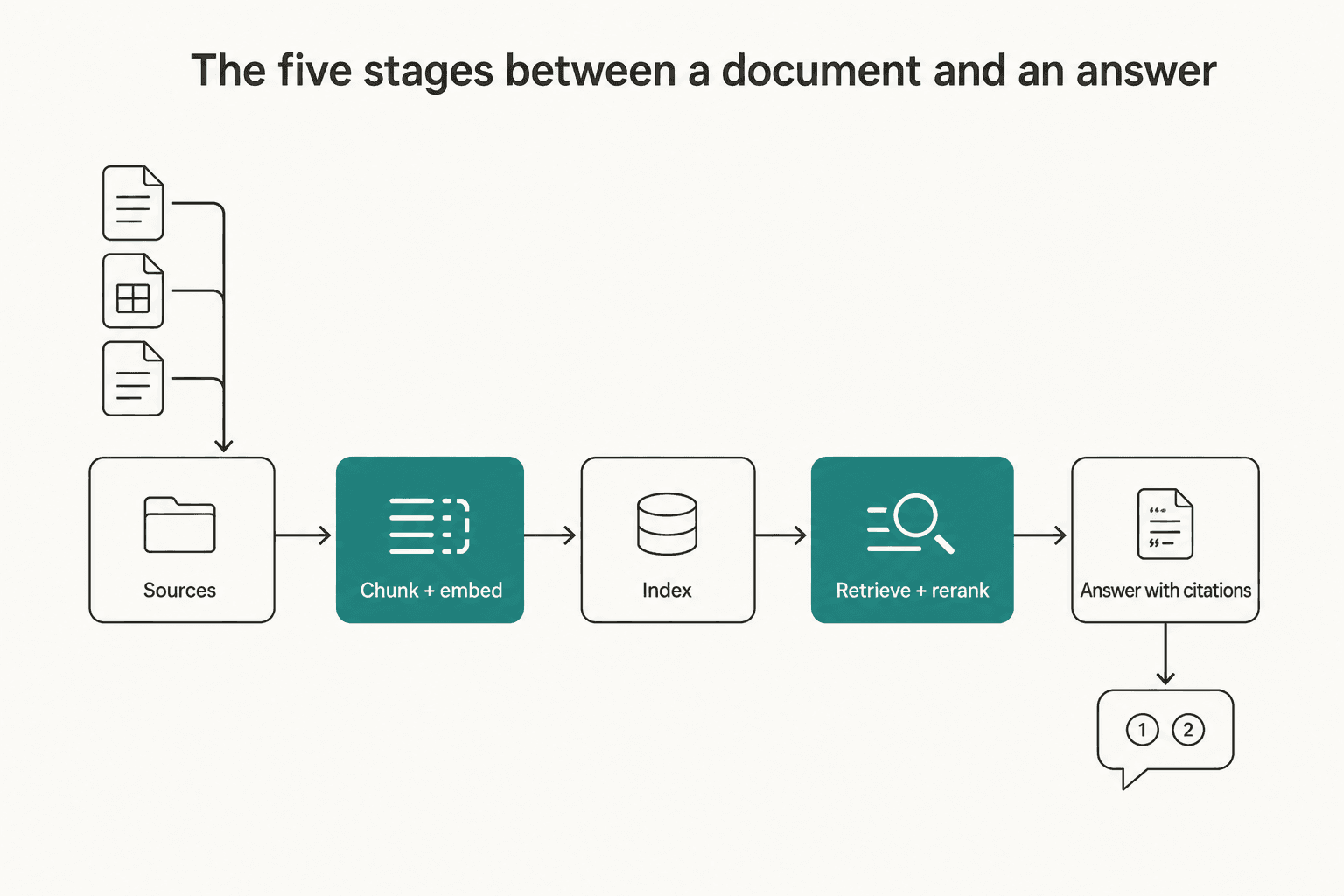
Stage 1: sources
Everything you connect. Help center articles, PDFs, a website crawl, Confluence spaces, Google Drive, and if your tool supports it, solved tickets. What each vendor will actually accept differs a lot, and that section is below.
Stage 2: chunking and embedding
Documents get split into chunks, usually a few hundred tokens each, and each chunk is converted into a vector of numbers that encodes its meaning. Similar meanings land near each other in that vector space, which is what makes "how do I get my money back" find an article titled "Refund policy."
Chunking is where more engineering time goes than anyone expects. One practitioner running production systems since late 2023 put the ranking plainly:
"Query expansions and non-naive chunking give the biggest bang for the bug, with chunking being the most resource intensive task, if the input data is chunk (pun intended)."

The reason chunking is hard is that splitting a document throws away the context around each piece. Anthropic's example is the cleanest illustration I have seen: in a corpus of SEC filings, a chunk reading "The company's revenue grew by 3% over the previous quarter" names neither the company nor the period, so a question about a specific firm in a specific quarter may never find it.
The fix, which Anthropic calls contextual retrieval, is to prepend a short generated description to each chunk before indexing it, so the chunk becomes self-describing. The generated context runs 50 to 100 tokens, and the one-time preprocessing cost works out to $1.02 per million document tokens on their stated assumptions.
The support-desk version of that same failure is everywhere. A macro that says "you can change this in Settings" without naming the product, plan or region is exactly the SEC chunk problem wearing a different hat.
Stage 3: the index
The chunks and their vectors go into a searchable store. Most systems keep two indexes side by side: a vector index for meaning, and a keyword index for literal string matches.
That second one matters more than the marketing suggests. BM25, the standard keyword ranking function, is what catches an exact match on an order number, a SKU, or an error code. Anthropic's worked example is a user searching a support database for "Error code TS-999," where a pure embedding search finds general error-code content but can miss the literal string.
Stage 4: retrieval and reranking
The query runs against both indexes, and the two result lists are merged. Azure AI Search does this with Reciprocal Rank Fusion, which scores each result as 1/(rank + k), with Microsoft recommending a small k such as 60. It works purely on ranks rather than raw scores, because BM25 and vector similarity sit on incompatible scales and cannot be added together directly.
Then, optionally, a reranker re-scores the merged shortlist. Anthropic's reranking setup pulls the top 150 chunks and cuts down to 20 before anything reaches the model. Azure's semantic ranker works on only the top 50 results that progress from the initial query.
This is the stage where the measurable gains live, and Anthropic published the numbers rather than the vibes.
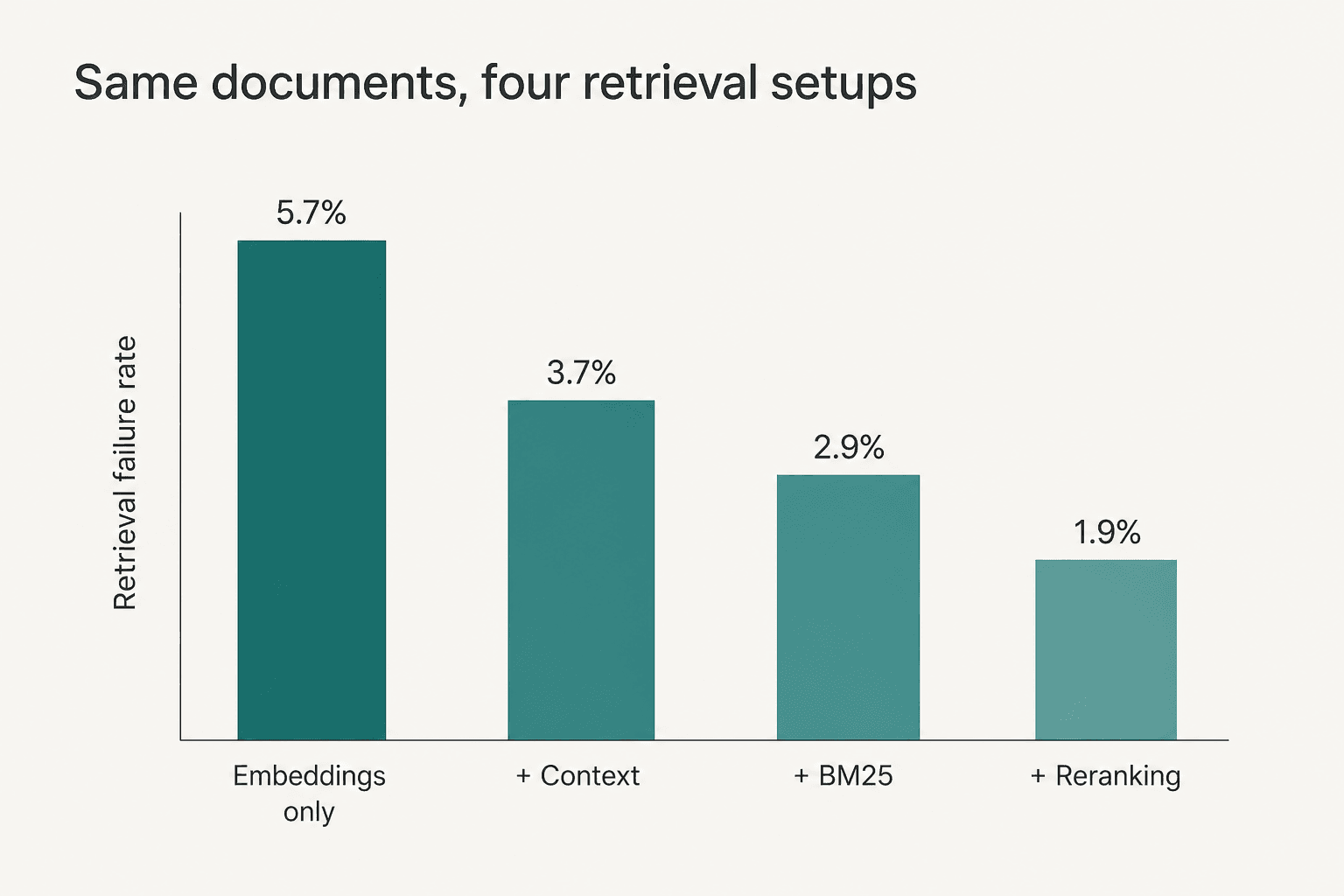
Measured as the share of relevant documents that fail to appear in the top 20 chunks, contextual embeddings alone cut the failure rate 35% (5.7% to 3.7%), adding keyword matching took it to 49% (5.7% to 2.9%), and adding a reranker reached 67% (5.7% to 1.9%).
Sit with that last figure for a second. A stack with every technique stacked on top of each other still misses the right passage roughly 1 in 50 times. That is the ceiling engineering buys you, on a clean research corpus. Your knowledge base is not a clean research corpus.
We went deeper on when to reach for each of these in RAG vs hybrid search. The products that package the whole stack for you are covered in knowledge retrieval tools.
Stage 5: generation with citations
The surviving chunks get pasted into the prompt with an instruction to answer from them, and the model writes the reply. Good implementations return which passages were used, so a human can check the work.
Worth knowing: below a certain corpus size this entire pipeline is optional. Anthropic notes that a knowledge base smaller than 200,000 tokens, roughly 500 pages, can simply be pasted into the prompt with no retrieval infrastructure at all. If your entire policy set is forty pages, you do not need a vector database. You need a long prompt.
What changes about search behaviour
Two things change for the person asking, and both cut against the tidy demo.
The first is that people stop typing keywords and start typing sentences. "refund" becomes "I ordered on the 3rd and it still says processing, can I just cancel." That is good for semantic search and bad for any system relying on article titles matching query terms, which is roughly why the keyword index has to stay in the mix rather than being replaced by it.
The second is that a query with no good answer no longer looks like a query with no good answer. A traditional search returns zero results and the user knows. A model with a thin retrieval result may still write a confident paragraph. One Hacker News commenter auditing stale config files named the consequence precisely:
"A model reading a CLAUDE.md that says "use UserService.createUser()" when that function was renamed three weeks ago isn't just getting irrelevant context — it's getting a confident lie."
I have watched this happen on live queues. A customer of ours in vehicle telematics had a help center line saying the product supports all vehicle models, and the bot dutifully told customers with unsupported cars that yes, their model was covered. Nothing was wrong with the retrieval. It found exactly the right sentence. The sentence was marketing copy that had never been written to be answered from.
So the practical rule: the setting that matters most is what happens when confidence is low. A knowledge base with a hard decline-to-answer threshold and a clean escalation path is worth more than one with a better embedding model and no floor.
What you can actually put in one
This is where vendor documentation gets interesting, because the published limits vary by an order of magnitude and almost nobody reads them before signing.
| Zendesk | Freshdesk | Notion | Guru | |
|---|---|---|---|---|
| Max file size | Not stated (CSV import only) | 35 MB per file | 10 MB (Drive uploads) | 50 MB across all sources |
| File count cap | n/a | 200 per agent, 200 per account | Not stated | Not stated |
| Web source cap | 20 crawlers, 5 URLs each | 10 URLs per agent, 25 per account | No web crawler | n/a |
| Pages per site | 4 levels deep | Up to 3,000 pages | n/a | Not stated |
| Formats | CSV, ASCII only | .pdf, .docx, .txt | Google types, PDF, .docx, .pptx, .xlsx, .csv | PDF, Word, PowerPoint, Excel, .txt, images |
| Re-sync cadence | ~24h external, CSV never auto | Manual resync only | ~1h Drive, up to 3h to index | Multiple times per day |
| Past tickets as a source | Not documented | Not documented | Not in connector list | Yes, 10+ helpdesks |
| Plan gate | Suite Team and up | Growth, Pro, Enterprise (not Free) | Business or Enterprise | Not stated by plan; role-based |
A few of these deserve calling out, because they change project plans.
Past tickets are the real dividing line. Of the four, Guru is the only one that lists helpdesk tickets and conversations as an ingestible source. Zendesk, Freshdesk and Notion all document articles, files, web pages and connectors, with no ticket history in the published source list. That matters because your solved tickets are the only record of how your team actually answers questions, as opposed to how someone once documented that they should be answered.
Freshdesk publishes the tightest caps. Its knowledge doc sets 10 URLs per AI agent and 25 per account, 200 files, 35 MB per file, and formats limited to .pdf, .docx and .txt. Limits can be extended by emailing support, evaluated case by case. There is no scheduled re-sync either, only a manual "Resync and relearn" action. Teams pushing more content than that usually end up scripting it through the Freshdesk knowledge base API instead.
Zendesk's CSV path is brittle by design. The Advanced import doc says CSV files cannot be reimported automatically, the file must be ASCII only, and a Markdown cell over 2,000 characters on a single line "fails without showing any warnings." Its web crawler also cannot reach SSO-protected sites, with CSV as the documented workaround. Zendesk's own guidance on source count is qualitative rather than numeric: keep it "within a reasonable limit," since too many sources "can in some cases lead to reduced accuracy and increased latency."
Notion caps how far back it can see. Notion's connectors reach one year from the setup date, initial ingestion can take up to 72 hours, and new content up to 3 hours to appear in search.
Working inside one of these specifically? The per-tool detail lives on its own pages:
- Helpdesk side: Zendesk knowledge management for the article-and-sync model.
- Freshworks side: Freddy AI for how the conversational layer reads solution articles.
- Ecommerce side: the Gorgias knowledge base guide covers a tighter, store-shaped setup.
- Document tools: Confluence AI knowledge base, and the wider Atlassian knowledge base picture.
Where AI knowledge bases fall down
The benefits are real and reasonably well known: faster answers, fewer repetitive tickets, staff who stop pinging each other for the same policy, coverage outside business hours. We catalogued them in AI knowledge base benefits, and I am not going to relitigate them here.
The failure modes are less discussed and much more useful, so here they are, roughly in order of how often I see them.
1. The docs answer a different question than the one being asked
This is the big one and almost nobody screens for it. A customer of ours running a bus-tracking service had a knowledge base written entirely for the administrators who configure the system. The tickets were coming from riders asking where their bus was. Every article was accurate, current, well-written, and useless for the actual question distribution.
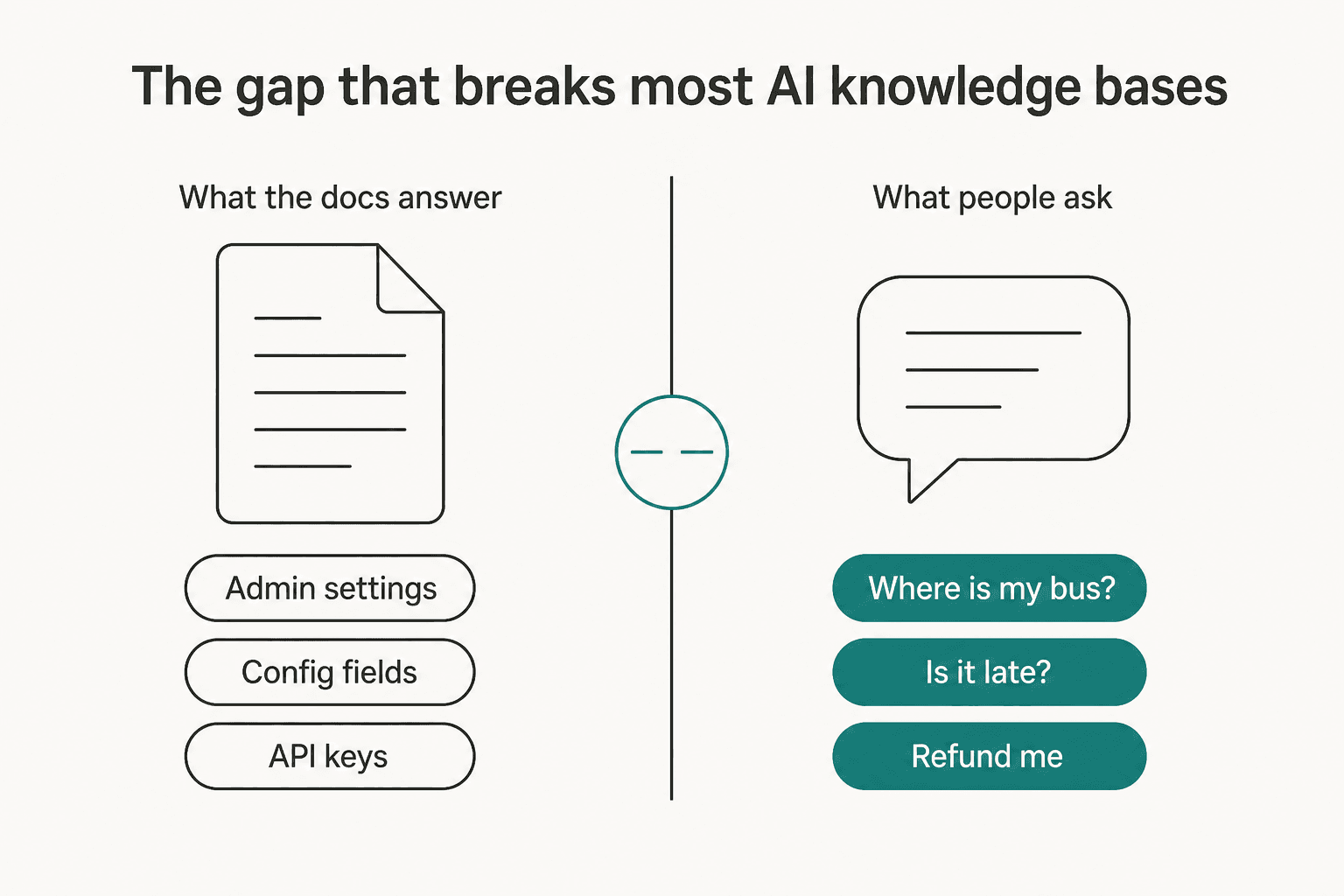
You can only detect this by comparing your article set against your real ticket history. Not against what you assume people ask.
2. Contradiction, where the retriever cannot tell which version is current
A thread on r/Rag describes the shape exactly: outdated documentation about decommissioned systems still in the index, so a question like "which system do we currently use for X" returns the legacy one. Humans handle this with a heuristic vector search does not have. A commenter in r/learnmachinelearning described it as checking the date and trusting a doc updated in the last year or two over one from 2019.
3. Documentation debt, inherited wholesale
The bluntest version came from r/Rag:
"It fails because people treat business information like a junk closet and just throw everything in a drive, sharepoint, teams, slack or whatever. They hear rag is how you let an llm know about your business, so they dump all the same garbage into it and expect magic."
The word one Hacker News commenter used for this, "documentation debt," is the right one, because like technical debt it compounds quietly and gets paid all at once.
4. No floor under confidence
Covered above, but worth restating as a limit rather than a tuning knob. If the tool has no threshold below which it declines, a thin retrieval result becomes a fabricated answer. We have had paying customers whose bots invented product claims and sent them to real people, which is precisely why confidence-based routing became non-negotiable in our own product.
5. Over-provisioned access
The AI reads whatever the connector can see. If the service account has broad access, so does every answer.
Which part of your AI knowledge base is actually broken?
Pick the symptom you are seeing. The fix is almost never the one people reach for first.
<div class="aikb-tabs">
  <label for="aikb-1">Answers are confidently wrong</label>
  <label for="aikb-2">It cites an old policy</label>
  <label for="aikb-3">It says it does not know, constantly</label>
  <label for="aikb-4">It misses exact codes and order IDs</label>
  <label for="aikb-5">It surfaced something private</label>
</div>

<div class="aikb-panel" id="aikb-p1">
  <h4>Fix the source sentence, not the prompt</h4>
  <p>Retrieval probably worked. Find the passage the answer came from and read it as if you were the model: absolute claims like "supports all models" or "always free" get quoted literally. Rewrite the source to state its actual boundaries.</p>
  <p class="aikb-not">Not the fix: a stricter system prompt telling it to be careful.</p>
</div>
<div class="aikb-panel" id="aikb-p2">
  <h4>Shrink the corpus before you tune anything</h4>
  <p>You have competing sources of truth. Archive superseded documents out of the index rather than leaving them in with a note at the top, and designate one authoritative page per topic. Freshness metadata helps only if the retriever is told to weight it.</p>
  <p class="aikb-not">Not the fix: adding more documents so the good one has company.</p>
</div>
<div class="aikb-panel" id="aikb-p3">
  <h4>Compare your articles against real tickets</h4>
  <p>Genuine coverage gaps look like this, and so does an audience mismatch. Pull your last few hundred tickets, cluster them by theme, and check which themes have no article written for the person who actually asks. Write those, then re-test.</p>
  <p class="aikb-not">Not the fix: lowering the confidence threshold so it answers anyway.</p>
</div>
<div class="aikb-panel" id="aikb-p4">
  <h4>Turn on keyword matching alongside the vectors</h4>
  <p>Pure semantic search is bad at literal strings. Error codes, SKUs, plan names and order numbers need a BM25-style keyword index running in parallel, with the two result sets fused. Most managed platforms have this, often off by default.</p>
  <p class="aikb-not">Not the fix: a bigger or newer embedding model.</p>
</div>
<div class="aikb-panel" id="aikb-p5">
  <h4>Audit the connector's access, not the AI</h4>
  <p>The agent inherits whatever its service account or the asking user can see. Check whether permissions sync per user, how fast a revocation propagates, and whether any connector is set to allow everyone. Fix the sharing settings at the source.</p>
  <p class="aikb-not">Not the fix: an instruction telling the model to keep secrets.</p>
</div>
How to build one
Six steps, in the order that saves the most rework. This is the sequence I would follow with any team starting today.
1. Start from questions, not documents
Pull your last few hundred tickets or internal queries and cluster them by theme. This gives you the actual question distribution, which is the only thing that tells you whether your existing content is aimed at the right reader. Skipping this step is how the bus-tracking problem happens.
2. Pick an authoritative subset
Do not connect everything. Choose the smallest set of documents that covers the top themes, with exactly one canonical page per topic. Hacker News named the decision precisely: you either throw most of it away or you designate the authoritative stuff somehow. The instinct to connect the whole Drive is the single most common early mistake.
3. Connect the sources and check what actually landed
Add the sources, then verify ingestion rather than assuming it. Most platforms surface a per-source status and a content preview. Check that the PDFs parsed, that the tables did not turn into soup, and that nothing silently failed a format or size cap from the table above.
4. Write the behaviour rules
Separate from the knowledge itself, you need instructions: tone, escalation conditions, what to never promise, and what to do when it does not know. In our own product this is a plain markdown document that stays in the agent's context, distinct from the searchable knowledge, and the split is worth copying whatever tool you use. Knowledge is retrieved when relevant; behaviour is always on.
5. Test known-bad questions before anyone sees it
This is the step that separates the rollouts that work. A support lead on Reddit described a vendor test worth stealing wholesale:
"The demo test I would use: give it one stale policy, one current policy, one duplicate FAQ, and one ambiguous customer question. If the vendor cannot show exactly which source won and how an admin fixes the losing path, I would assume the team still owns most of the cleanup burden."
The stronger version, if your tool supports it, is to run the agent over hundreds of real historical tickets and score its answers against what your team actually sent. That is what our simulation step does, and it produces a gap report rather than a vibe.
6. Roll out on a ladder, not a switch
Start where mistakes are cheap. Test in a dashboard, then let it draft replies a human approves, then let it answer autonomously on the themes it has proven out, keeping everything else escalating. Most teams that go straight to autonomous end up switching it off within a fortnight.
If you want a walkthrough for a specific stack rather than the general shape, these pick up where this section stops:
- The generic version of steps 3 to 5 is written out in training on your knowledge base.
- Rolling your own on a general model? Start with a ChatGPT knowledge base, or the narrower knowledge base GPT build.
- Internal IT and service teams have their own shape, covered in Jira AI knowledge base.
- If your content is anchored to the CRM, see HubSpot knowledge base software.
- Brand new to the article layer underneath all of this? Read Zendesk knowledge base basics first.
How to keep it current
The launch is the easy part. Every practitioner source I read landed on maintenance as the real cost, and the vendor docs quietly agree: sync cadences range from about an hour to manual-only, and permission updates can lag content updates by a full day.
Four habits that hold up:
- Archive aggressively, out of the index. Superseded content should leave the retrievable corpus, not sit in it with a warning banner the model will not weight.
- Close the loop from tickets back into articles. The questions that escalate are your content backlog. Some tools will draft the missing article from the resolved conversation, which turns the gap report into work rather than a chart.
- Watch out for verification theatre. A G2 reviewer described editing a Guru card purely for formatting and having it auto-marked verified, because edit access sat inside the verification group. A freshness signal that anyone can trip without reading the content stops meaning anything.
- Make it somebody's job. The same G2 review set notes that a verification-first knowledge base "works best when everyone on the team is consistent about updating and verifying cards," and degrades for everyone when they are not.
Support teams have a specific version of this maintenance loop, written up in AI knowledge management. The broader organisational picture is in AI for knowledge management.
How to tell if it is working
Deflection rate is the metric everyone reports and the least useful one on its own, because a bot that confidently answers wrong deflects beautifully. The providers who sell this infrastructure split the measurement in two, and so should you.
Retrieval quality asks whether the right passages were found at all. Microsoft's Azure AI Foundry names this Retrieval, scored 1 to 5 by an LLM judge, plus a Document Retrieval composite covering ranking metrics like NDCG. AWS Bedrock calls the equivalents Context relevance and Context coverage, scored 0 to 1. Microsoft's own framing is the cleanest line in the Azure evaluator docs: if retrieval quality is poor and the answer needs corpus-specific knowledge, there is less chance the model gives a satisfactory answer.
Generation quality asks whether the answer was actually supported by what was found. Azure calls this Groundedness and pairs it with Response Completeness, framing the two as precision and recall. AWS uses Faithfulness, plus Citation precision and Citation coverage, and is explicit that the citation pair must be read together.
| What you want to know | Azure AI Foundry | AWS Bedrock |
|---|---|---|
| Were the right chunks found | Retrieval, Document Retrieval | Context relevance, Context coverage |
| Is the answer supported by them | Groundedness | Faithfulness |
| Does it address the question | Relevance | Correctness, Helpfulness |
| Does it miss anything | Response Completeness | Completeness |
| Do the citations point correctly | Not published | Citation precision, Citation coverage |
| Does it dodge the question | Not published | Refusal |
Two practical notes. No provider publishes a minimum evaluation set size, so treat any "you need at least N test questions" claim with suspicion. Anthropic's guidance is directional instead: more questions with slightly lower signal and automated grading beats fewer hand-graded ones. And AWS caps a single evaluation job at 1,000 prompts, which is a ceiling rather than a target.
The cheap version of all this, if you are not running formal evals: keep a fixed list of thirty questions you know the right answers to, including five you know the knowledge base cannot answer, and re-run it after every content change. The five unanswerable ones are the important half.
Permissions and governance
Everything above assumes one reader. The moment an AI knowledge base spans internal content, the question becomes whose answer this is.
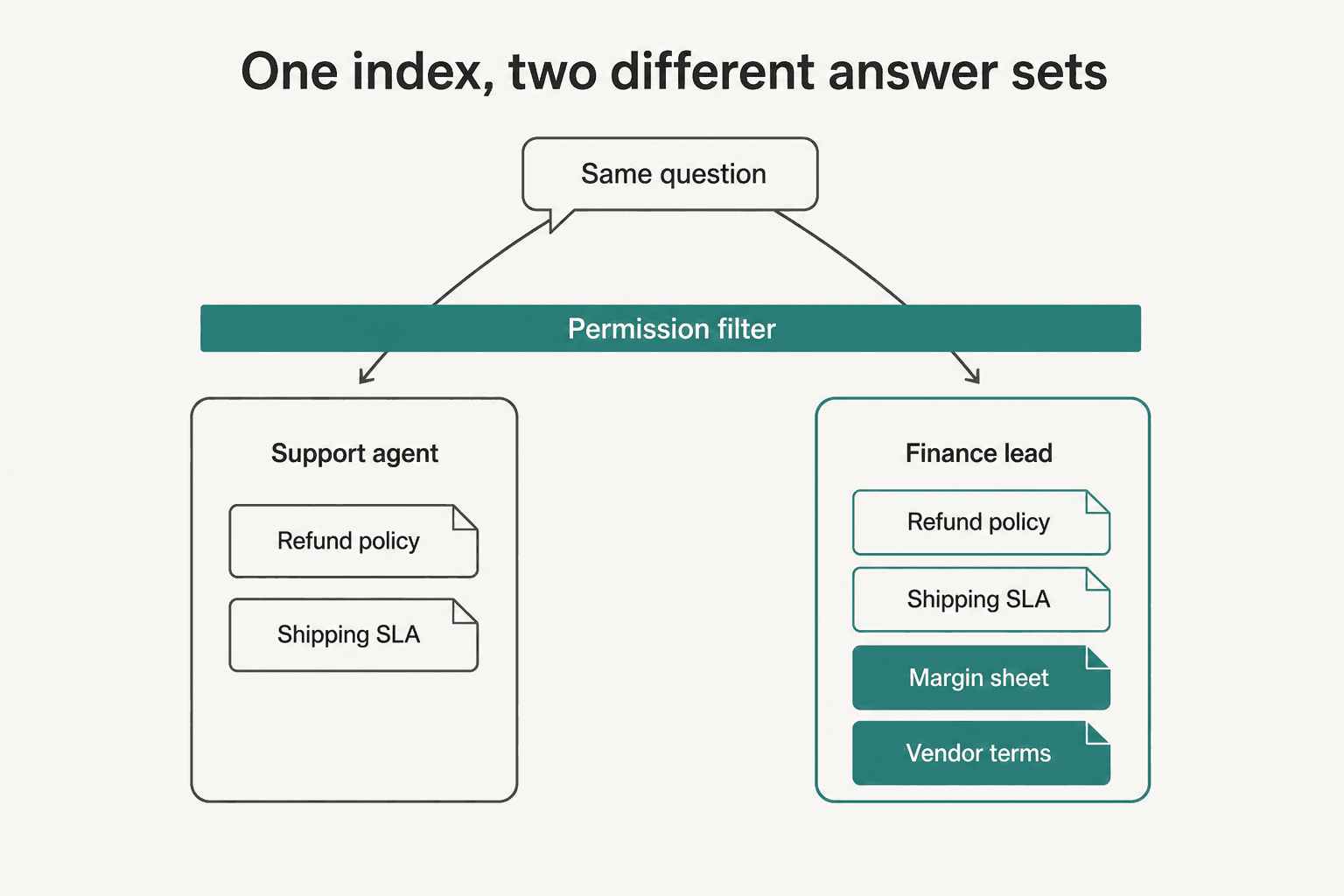
The mechanism is called permission-aware retrieval. The connector pulls content, metadata and the source system's access control list; at query time every candidate document is checked against the asking user's identity before it can reach the model. Microsoft calls the mechanism permission-based filtering, and Glean describes resolving permissions at query time rather than from static snapshots.
Three things buyers consistently miss.
Permissions and content run on different clocks. Microsoft's indexing docs say ACL changes "might take up to 24 hours to reflect," and, more importantly, that permission updates occur during a full crawl, not an incremental one. A fast incremental schedule makes the index feel current while revoked access quietly persists until the next full crawl.
Oversharing is inherited, not created. Microsoft is unusually direct about the root cause: by default SharePoint sets sharing to the most permissive option. An AI layer does not cause the oversharing; it makes years of it searchable in natural language. That is why Microsoft treats an oversharing assessment as a pre-deployment step rather than a post-launch report.
Defaults inside the AI tool can void the whole thing. Microsoft notes that if a connection's access is set to "Allow everyone" instead of "Only people with access," all items in the index become visible to everyone and no permissions are enforced. Atlassian's equivalent exposure is that unrestricted Rovo content may appear for all users.
The community read on all of this is less procedural and more direct:
"the safer approach is making the agent inherit each user's existing permissions, limiting every connector to least privilege, and logging every retrieval, because giving one shared agent broad Slack or Confluence access will eventually leak something. permissions are the product."
I should be fair here: nobody in the sources I read described an actual named leak from an AI knowledge base. This is anticipated risk, reasoned from how access sprawl already works with humans, not an incident report. It is still the diligence question I would ask hardest, and Glean suggests a concrete test for it: give two users with different access levels the same query and check the results differ. If they match on restricted material, permissions are not being enforced.
A short word on software options
I have deliberately kept this page about the category rather than the shopping list, because the two questions want different pages.
The short version: your choice mostly comes down to where your content already lives, whether you need solved tickets as a source, and whether the tool lets you inspect which passage won before customers see anything. Native helpdesk AI is the path of least resistance if all your content is already in the help center. Dedicated knowledge platforms win on source breadth. Support-focused AI agents win when ticket history matters more than article count.
The actual comparison lives on its own page. We tested and priced the tools side by side in AI knowledge base software, which is the right page to open when you are choosing rather than learning.
A few narrower cuts of the same question, if one of them is yours:
- A shorter shortlist, ranked, sits in AI knowledge base tools.
- Deploying this as a customer-facing bot is its own decision, covered in AI knowledge base chatbot.
- Evaluating a specific vendor? We wrote up Decagon setup in detail.
- The drafting-assistant flavour is different again: see Front AI Compose.
- Smaller support stacks are covered in the Helpcrunch knowledge base guide.
- Internal IT desks should read the Freshservice knowledge base version instead.
- Building it yourself against an API? Start with the Zendesk Knowledge (formerly Guide) API.
- Wiring a bot onto a company wiki is walked through in Confluence AI bot.
Try eesel as your AI knowledge base layer
If everything above sounds like a lot of cleanup before you learn whether this works, that is the problem eesel is built around. It connects your help center, your docs in Notion, Confluence or Drive, and, unlike most native helpdesk AI, your solved tickets, so the agent learns how your team actually answers rather than only how someone once documented it.
The part that matters for this post is the order of operations. Before it touches a live customer, you run it over hundreds of past tickets and get a gap report: which themes it handles, where your documentation is thin, what to write next. Fill the gaps, re-run, and only then decide what it is allowed to answer on its own. Low confidence routes to a draft for review rather than a guess.
Setup runs in minutes rather than a quarter, and pricing is a fixed monthly price (from $299/month for 500 credits, 1 credit per ticket) rather than per seat, with 100 free credits so you can test it against your own history before committing. Start with the eesel helpdesk agent. If you would rather see the mechanics first, the setup docs walk through connecting a source and running a simulation.