


What makes Kling AI different?
Kling AI is built by Kuaishou Technology, one of China's largest short-video platforms, and launched globally in 2024. By early 2026 it claimed 60 million creators and 30,000 enterprise clients, driven largely by what users consistently describe as the smoothest motion of any AI video generator on the market.
The Kling AI platform covers text-to-video, image-to-video, native 4K video (launched April 2026), motion control with cinematic camera moves, native audio generation, AI digital humans, virtual try-on, and a full developer API - all under one subscription. Unlike Runway AI or Pika AI, which launched as focused video tools, Kling has grown into a broader multimedia platform, which partly explains why its pricing structure is more complex than it first appears.
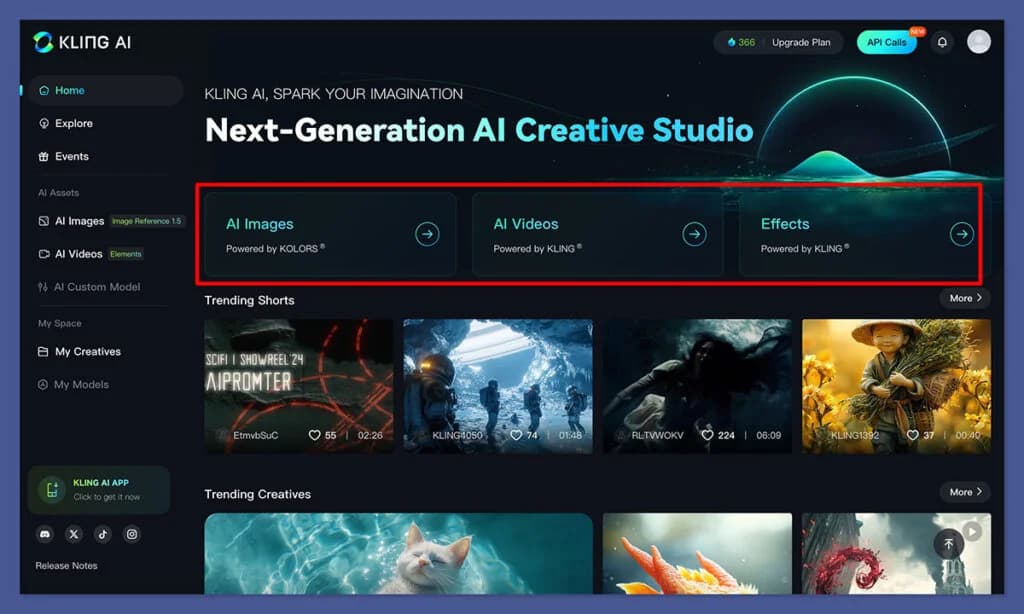
Kling AI pricing plans: the complete picture
All prices below are from the international site (kling.ai, USD). Kling also has a separate Chinese domestic site (klingai.com) with CNY pricing and different promotional structures.
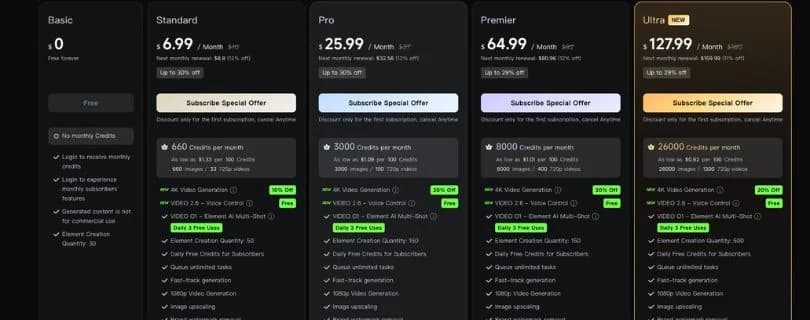
| Plan | Monthly price | Annual total | Effective monthly | Credits/month | Best for |
|---|---|---|---|---|---|
| Free | $0 | - | $0 | ~1,980 (daily, 24h expiry) | First-time testing only |
| Standard | $10 | $79.20 | $6.60 | 660 | Hobbyists, occasional use |
| Pro | $37 | $293.04 | $24.42 | 3,000 | Regular creators, small teams |
| Premier | $92 | $728.64 | $60.72 | 8,000 | Professional creators, agencies |
| Ultra | $180 | N/A (monthly only) | - | 26,000 | High-volume studios |
A few things worth flagging before going deeper:
- No credit rollover. Subscription credits expire at the end of each billing month. If you generate 600 of your Standard plan's 660 credits and forget about the remaining 60, they disappear.
- First-subscription discounts are temporary. Each plan offers up to 30% off for the first billing period only, dropping back to the standard rate at renewal. The $10/month Standard plan, for example, may come in at $6.99 for the first month before reverting.
- Annual billing saves 34% on Standard, Pro, and Premier - but Ultra has no annual option at all as of mid-2026.
The free plan: 66 credits a day, gone in 24 hours
The free plan gives all logged-in users 66 daily credits that expire after 24 hours. That sounds reasonable until you look at what those credits buy.
With VIDEO 3.0, a 5-second 720p clip with no audio costs 30 credits (6 credits/second × 5 seconds). The free plan's daily allotment covers two such clips - and that assumes your first attempt produces a usable result. In practice, most generations require multiple iterations to get the motion and content right.
The free tier also carries significant restrictions:
- Maximum resolution capped at 360p–540p (paid plans unlock 1080p)
- Watermarks cannot be removed
- No commercial usage rights
- Professional Mode limited to 3 trial generations
- Video Extension limited to 2 trial uses
Put simply: the free plan exists for evaluation, not production. Community consensus on Reddit is blunt - 66 daily credits is "not practical" for any real output, and users frequently report free-tier generations getting stuck at 99% before failing.
Standard plan ($10/month): occasional creators only
At $10/month - or $6.60/month on the annual plan - Standard gives you 660 credits per month. That unlocks:
- Watermark removal
- Commercial use rights
- Up to 1080p resolution
- Unlimited Professional Mode and Video Extension
- Fast-track generation (no queue waiting)
- Image upscaling
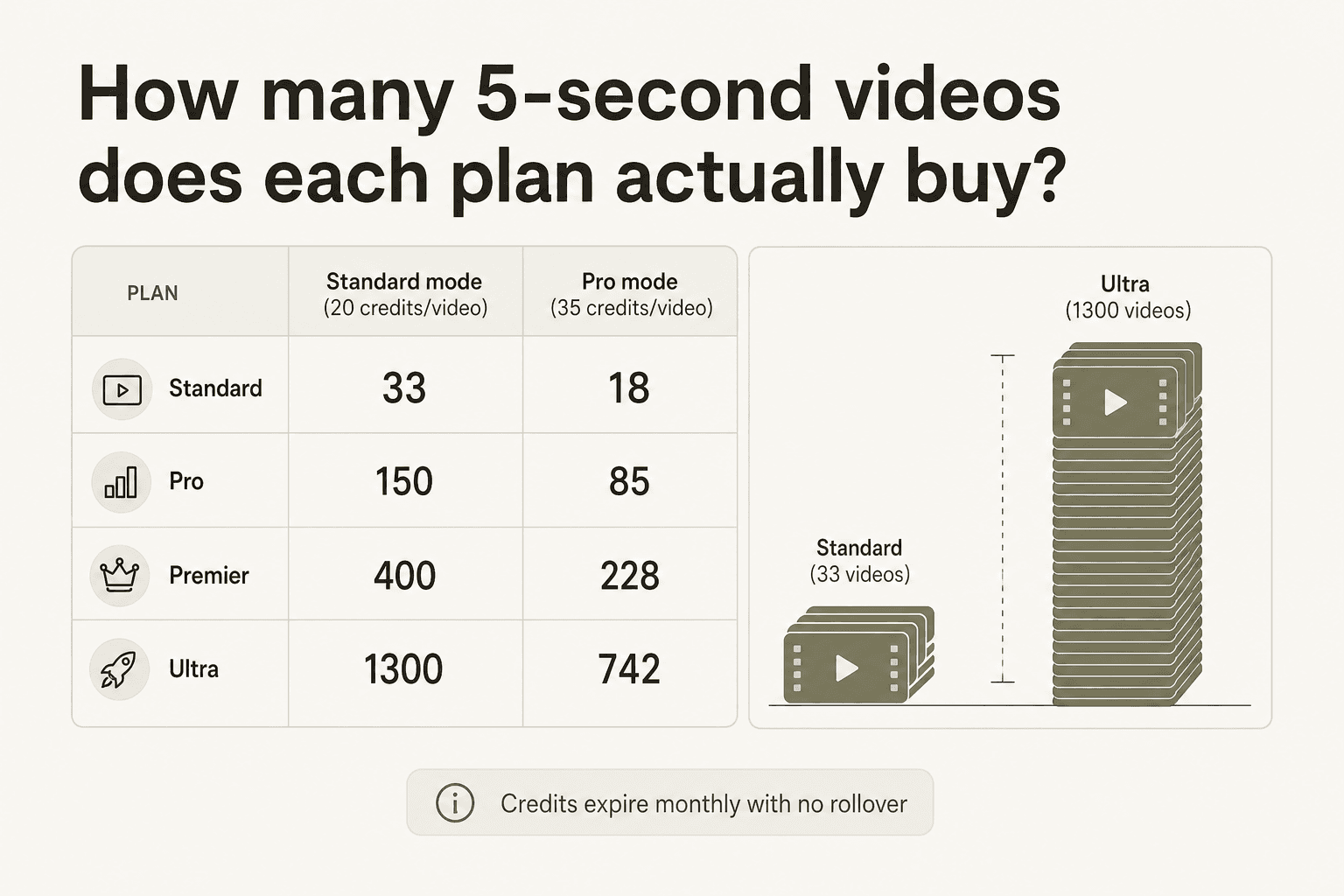
The math on 660 credits: at 30 credits per 5-second 720p clip, Standard covers 22 such videos per month. Move to 1080p with no audio (40 credits per 5-second clip), and you're down to 16 videos. Add native audio at 1080p (60 credits per 5-second clip) and you get just 11 videos.
If your first attempt always succeeded, that's workable for casual use. But every project requires iteration - most creators burn through 3–5 attempts per final clip. In real terms, Standard produces something closer to 4–7 finished videos per month.
Best for: Hobbyists, social media experimenters, anyone generating one or two short AI clips per week as a side activity.
Pro plan ($37/month): the practical creator tier
Pro is where Kling's feature set starts to feel fully unlocked. At $37/month ($24.42/month annual), you get 3,000 credits - roughly 4.5× the Standard allotment - plus:
- Priority processing over Standard users
- Full Batch Generation access
- Priority access to new features
- IMAGE 3.0 Omni and O1 free for all subscribers
With 3,000 credits, a regular creator generating 5-second 1080p clips with no audio (40 credits each) gets 75 attempts per month - enough to finish a 15–20 video monthly output with room for iteration. At the 720p native audio rate (45 credits), the same budget runs to 66 attempts.
The jump from Standard ($10) to Pro ($37) represents a 270% price increase for a 355% credit increase - better value per credit, and the only tier where processing priority meaningfully reduces queue times during peak hours.
Best for: Content creators publishing regularly to TikTok, YouTube Shorts, or Instagram Reels; small production teams making 10–30 short AI videos per month.
Premier plan ($92/month): for serious production teams
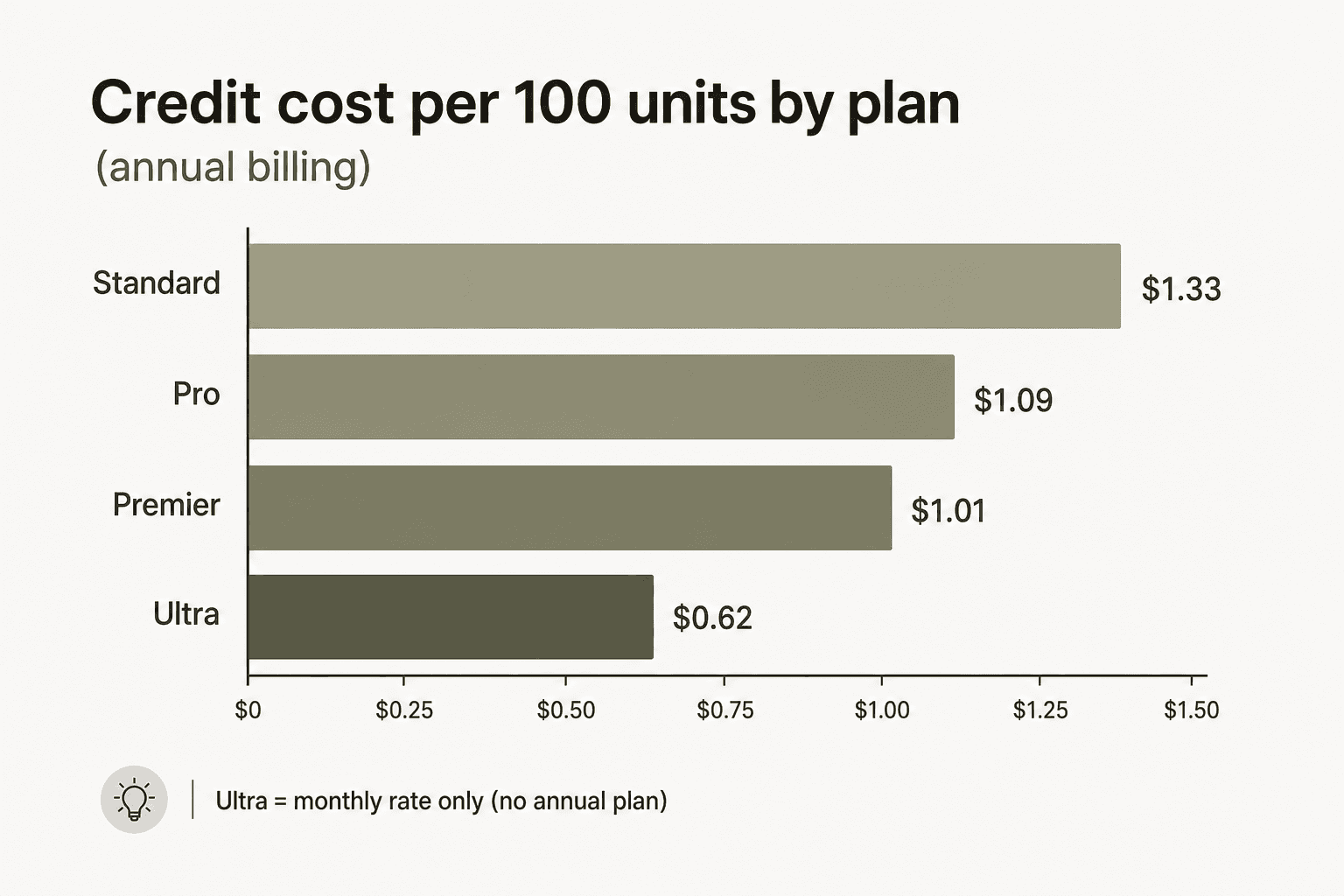
Premier doubles down on credits: 8,000 per month at $92/month ($60.72/month annual). The credit-per-dollar math continues to improve - 8,000 credits / $60.72 = $1.01 per 100 credits on the annual plan, vs. $1.09 for Pro.
Premier adds High Priority processing (above both Standard and Pro) and is the floor for teams running batch generation at volume.
At 40 credits per 5-second 1080p clip, Premier's 8,000 monthly credits cover 200 attempts - enough to reliably finish 50–80 polished short clips per month, depending on iteration rate. For an agency producing branded social content at scale, that starts to pencil out.
Best for: Content agencies, advertising studios, production companies with regular AI video output requirements; any team where queue time is a genuine workflow cost.
Ultra plan ($180/month): high-volume, but watch the price trajectory
Ultra provides 26,000 credits per month - more than 3× Premier - and the cost per 100 credits drops to $0.62, the cheapest on the consumer side. It adds Highest Priority processing and beta access to unreleased features.
What it doesn't have: an annual billing option. As of June 2026, Ultra is monthly-only, which means no 34% discount and no ability to lock in a rate.
That last point matters because Ultra's price history is a cautionary data point. When the tier launched in August 2025, it was priced at $128/month. By January 2026 it had risen to $180/month - a 41% increase in roughly six months. Whether that trajectory continues is unknown, but paying for an annual plan would have been impossible anyway.
"Kling AI introduced a new $128/month Ultra plan with more than 3 times higher credit volume."
@testingcatalog (X, August 2025)
26,000 credits at 40 credits per 5-second 1080p clip covers 650 attempts - or roughly 130–200 finished clips per month at a realistic iteration rate of 3–5 takes per final output.
Best for: Studios running sustained AI video production pipelines where Kling's motion quality is a business-critical differentiator and $180/month is a rounding error against project budgets.
How Kling AI's credit system actually works
Credits are consumed per second of generated video, not per generation. This is important because it means a 10-second clip costs exactly twice what a 5-second clip costs - and higher resolution and native audio multiply that per-second rate.
VIDEO 3.0 credit consumption rates
| Mode | 720p | 1080p |
|---|---|---|
| No Native Audio | 6 credits/s | 8 credits/s |
| Native Audio | 9 credits/s | 12 credits/s |
| Voice Control add-on | +2 credits/s | +2 credits/s |
Worked examples
- 5-second 720p, no audio: 5 × 6 = 30 credits
- 5-second 1080p, no audio: 5 × 8 = 40 credits
- 5-second 720p, native audio: 5 × 9 = 45 credits
- 5-second 1080p, native audio: 5 × 12 = 60 credits
- 10-second 1080p, native audio: 10 × 12 = 120 credits
- 15-second 1080p, native audio: 15 × 12 = 180 credits
One detail that community discussions frequently surface: failed consumer-side generations still consume credits. There is no publicly documented auto-refund policy. On the API side, the reverse is true - failed API tasks do not deduct credits. This asymmetry is a meaningful cost variable if your workflow involves complex prompts with a lower success rate.
What does each plan actually produce in a month?
Here's what each tier realistically delivers, assuming 1080p no-audio clips (40 credits each) at a 3-attempt-per-final-clip iteration rate:
| Plan | Credits | Attempts | Finished 5s clips | Cost per finished clip |
|---|---|---|---|---|
| Standard | 660 | 16 | ~5 | $2.00 |
| Pro | 3,000 | 75 | ~25 | $1.48 |
| Premier | 8,000 | 200 | ~67 | $1.37 |
| Ultra | 26,000 | 650 | ~217 | $0.83 |
The cost-per-clip figures assume every subscription credit is used for video generation - which in practice won't be the case, since image generation and other features draw from the same pool.
The indie filmmaker @alanxtruc broke this down from production experience in a post that reached 329,000 views on X:
"No subscription plan offers enough credits for that kind of production. Even the 728 dollar yearly plan only provides 96,000 credits over twelve months. If you need 1000 clips now, you have to buy credits. Even with bulk discounts, the cost still comes to about 1000 dollars, on top of your subscription, just to generate the footage. So yes, the quality is excellent and the model deserves real praise. But for now, this clearly belongs to funded professional productions, not independent creators."
@alanxtruc (X, April 2025)
That framing - excellent output, but pricing that gates real production volume behind significant spend - is the most consistent signal across every community discussion about Kling AI pricing.
Add-on credit packs: when your subscription runs out
When monthly credits are exhausted, standalone credit packages can be purchased separately. Unlike subscription credits, add-on credits are valid for two years - they don't expire at month end.
| Package | Price | Credits | Cost per 100 credits |
|---|---|---|---|
| - | $5 | 330 | $1.52 |
| - | $10 | 660 | $1.52 |
| - | $20 | 1,320 | $1.52 |
| - | $50 | 3,500 | $1.43 |
| - | $100 | 7,500 | $1.33 |
| - | $200 | 16,000 | $1.25 |
| Bulk | $1,200 | 96,000 | $1.25 |
There are a few things to note here. First, small add-on packages ($5–$20) cost more per credit than any subscription tier - you're paying a premium for the flexibility. Second, the $100+ packages are roughly cost-equivalent to Standard plan credits bought at full annual rate, but they don't expire monthly. For irregular creators who occasionally need a burst of generation capacity without a subscription commitment, the $100 package is the most defensible entry point.
The two-year validity also makes add-ons a useful hedge for one-off projects. If you need 500 credits for a specific campaign and don't want to commit to a monthly plan, a $50 pack covers that without the rollover anxiety of a subscription.
Annual plan discounts: how much do you actually save?
The annual plan consistently saves 34% versus the monthly equivalent across Standard, Pro, and Premier.
| Plan | Monthly × 12 | Annual total | Annual saving |
|---|---|---|---|
| Standard | $120 | $79.20 | $40.80 |
| Pro | $444 | $293.04 | $150.96 |
| Premier | $1,104 | $728.64 | $375.36 |
For Pro users, that $150.96 annual saving is the equivalent of roughly 4 months of subscription credits - meaningful enough to warrant the commitment if Kling is a regular part of your workflow.
Ultra has no annual billing option as of mid-2026. This means Ultra subscribers effectively pay $2,160/year with no discount available, compared to $1,429.99/year on the Ultra gift card (a workaround some community members have flagged as a way to lock in current pricing before it rises again).
Kling AI API pricing: a completely separate billing system
The Kling developer API (kling.ai/dev) operates on prepaid resource packages entirely distinct from consumer memberships. A consumer plan subscription gives you no API access, and API credits don't transfer to the web interface.
API resource packages
| Package | Price | Units | Validity |
|---|---|---|---|
| Trial (small) | $9.80 | 100 units | 30 days |
| Trial (large) | $98 | 1,000 units | 30 days |
| Standard 1 | $700 | 5,000 units | 180 days |
| Standard 2 | $2,100 | 15,000 units | 180 days |
| Standard 3 | $4,200 | 30,000 units | 180 days |
| Large | $7,560 | 60,000 units | 180 days |
Per-generation API costs at standard rates
- VIDEO 3.0 Omni Standard, 5s no audio: ~$0.42
- VIDEO 3.0 Omni Standard, 10s no audio: ~$0.84
- VIDEO 3.0 Omni Pro, 5s no audio: ~$0.56
- VIDEO 3.0 Omni Pro, 10s no audio: ~$1.12
- 4K mode, 5s: ~$2.10
- 4K mode, 10s: ~$4.20
- Image generation (1K/2K): $0.028 per image; 4K: $0.056 per image
One critical difference from the consumer interface: failed API tasks do not consume credits. This makes the API significantly more economical for experimental workflows - you only pay for what generates.
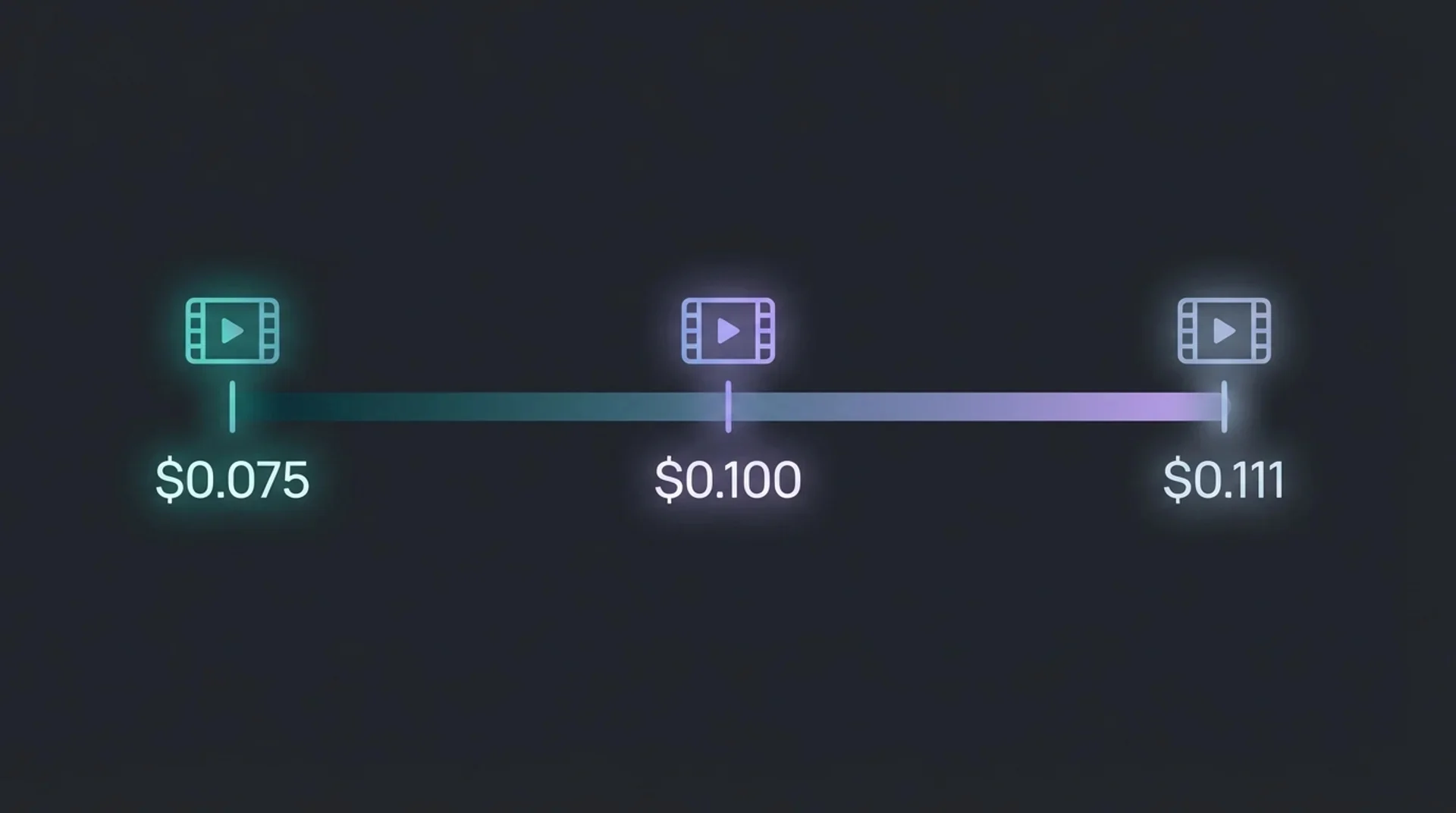
Third-party API resellers (via services like EvoLink as of April 2026) offer pay-as-you-go access at slightly different per-second rates: from $0.075/s for Kling 3.0, $0.1111/s for Kling O1, and $0.1134/s for Kling 3.0 Motion Control - useful for developers who want consumption billing without committing to prepaid packages.
The API pricing page itself is JavaScript-heavy and login-gated; official per-generation rates are most reliably found in the Kling AI developer docs (kling.ai/dev) or third-party summaries.
The 2024 API pricing structure drew sharp community criticism. One Reddit post titled "Kling AI API price structure! CRAZY!" highlighted the gap in the original structure:
"So basically Kling AI API price structure is NOTHING between $8 and $4,200 !!! Like if I want to do 100–200 pictures per month, I have to get their $4,200 package and I lose the credits after 3 months."
u/Nice-Laugh-7293 (r/KlingAI_Videos, October 2024)

The current structure is somewhat more accessible with the $9.80 and $98 trial tiers, but it still requires a significant prepaid commitment for serious API development work.
Kling AI vs. Runway, Pika, and Sora: how the pricing compares
The core question for most buyers isn't "what does Kling cost?" but "what does Kling cost relative to what it can do, compared to the alternatives?"
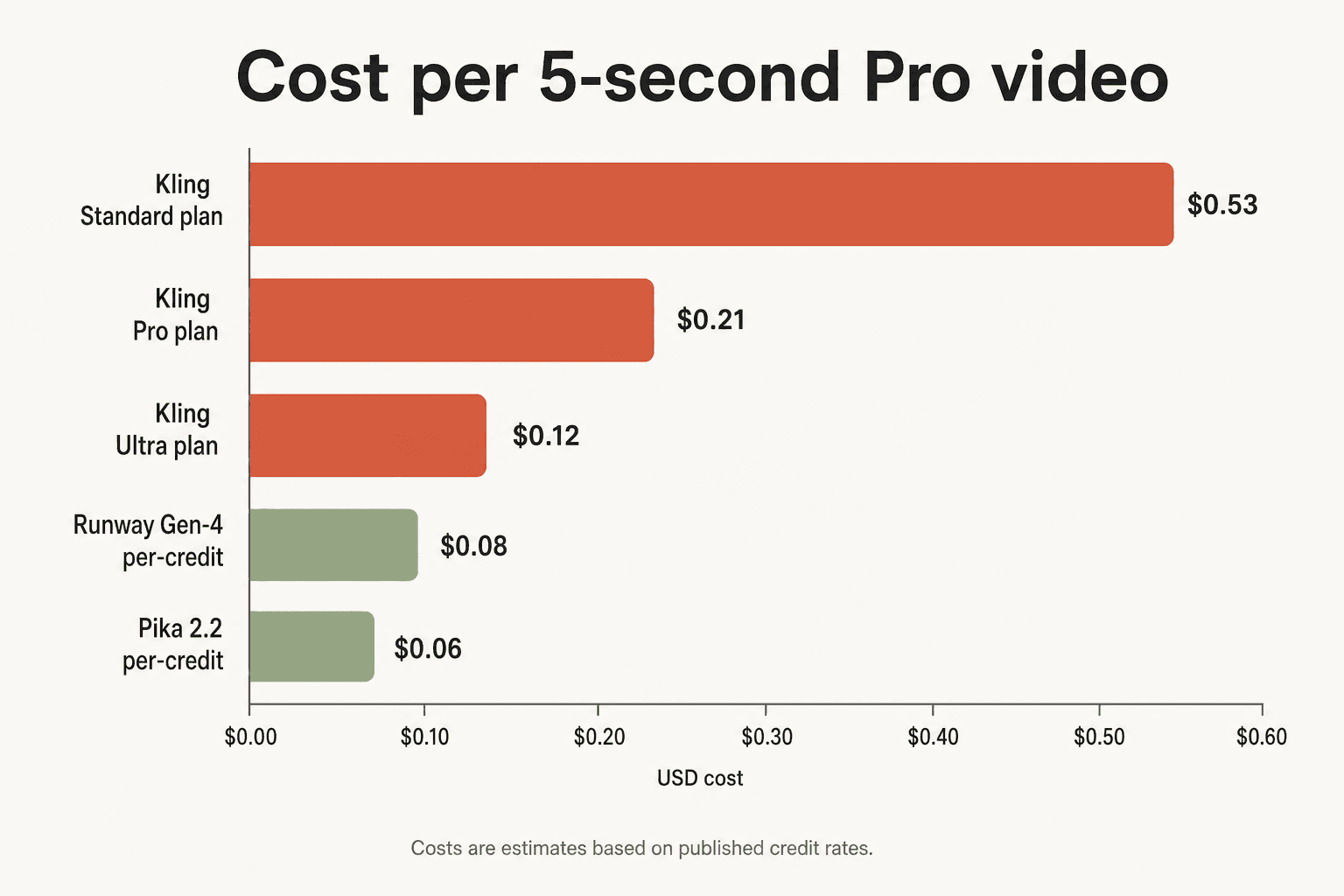
Kling vs. Runway
Runway AI pricing takes a different approach: the Pro plan at $95/month includes 2,250 credits per month, but Runway Gen-4.5 offers an unlimited generation mode at higher tiers. For high-volume users, Runway's unlimited option can outperform Kling on a per-video cost basis, particularly for short social clips where generation speed and queue time matter. For motion quality and character consistency in longer narratives, Kling is generally rated higher. A detailed breakdown is available in our Runway AI review.
Kling vs. Pika
Pika AI pricing starts at a lower entry point for casual users, with Pika's Unlimited plan at around $16–$20/month covering most light-use cases. Kling's output quality - particularly smooth motion physics - is broadly considered superior, but Pika's pricing is more accessible for creators not running production-scale workflows. See our Pika AI review for a detailed comparison.
Kling vs. Sora
Sora 2 pricing is available as part of ChatGPT Pro ($200/month) or directly via API through OpenAI. Sora's strength is photorealism and long-form coherence; Kling's advantage is smooth motion, native audio integration, and a more developed feature ecosystem including motion control and digital humans.
Kling vs. Midjourney / image generators
For teams primarily generating images rather than video, Midjourney pricing and comparable tools offer better value - Kling's image generation credits are efficient (about 0.8 credits per photo at standard quality), but the platform is primarily optimized for video.
Kling vs. HeyGen (digital humans/avatars)
For AI video focused on talking head presentations, HeyGen pricing is purpose-built for that use case and worth comparing directly. Kling's Digital Humans 2.0 feature competes technically, but HeyGen's workflow is more refined for presenter-style content.
Community view on alternatives
By mid-2026, a growing segment of heavy users have shifted to "hub" platforms that bundle multiple AI video models:
"The hub approach is actually how most serious users have landed, having access to Kling for smooth motion, Veo for photorealism, and Runway for camera control in one place and choosing based on the shot rather than being locked into one model subscription."
u/ztacey4 (r/productreview, May 2026)
For a deeper look at what else is out there, our guide to Kling AI alternatives covers the leading options tested head-to-head. You can also find broader context in our rundown of Runway AI alternatives and Pika AI alternatives.
Community verdict: is Kling AI pricing worth it?
The community consensus splits cleanly by use case.
For professional and agency use: Kling at Premier or Ultra is broadly considered worth it when the motion quality and feature depth - particularly 4K output, native audio, and character consistency across shots - are commercially necessary.
"If you use Kling daily for client work, Premier can be worth it. Otherwise, cheaper tools like Freepik or Pika handle most projects."
u/snideswitchhitter (r/KLINGAIVideo, November 2024)
For independent creators: The pricing model is widely seen as prohibitive. The core objection is not to Kling's quality - nearly everyone acknowledges the output as exceptional - but to what one long-form critique called "predatory" escalation: features that used to cost 10 credits costing 50, standard quality modes getting locked out of key capabilities, and no credit rollover.
One of the most widely shared critiques on r/KlingAI_Videos frames it this way:
"KLING's payment plans are awful. It's like if Photoshop suddenly started charging you every time for using a brush, fill or eraser tool... Predatory insane costs of small amounts of credits and all kinds of hidden costs with each update through the ever-increasing cost of generations that just don't allow for creative freedom and expression."
u/Jack_P_1337 (r/KlingAI_Videos, December 2025)
A cost estimate from a seasoned user puts the real production economics in perspective:
"100 credits is somewhere around 1 dollar depending on the plan... Let's say starting from 50 dollars per minute of generated 'final' video if you make a few attempts with cheaper models and then one attempt with more expensive one for each 5 or 10 second clip. There is no theoretical upper limit if you end up needing much more tries per video clip."
u/Aplakka (r/KlingAI_Videos, October 2025)
That $50/minute estimate for finished footage - assuming a realistic iteration rate rather than imaginary perfect first attempts - is the number that most changes how creators evaluate whether a Kling subscription makes business sense.
Who Kling AI pricing works for (and who should look elsewhere)
Kling AI pricing makes sense if:
- You're a content agency or studio generating AI video at volume (100+ finished clips per month) where the Premier or Ultra credit pools are actually consumed
- You're a developer building video generation features into a product and can absorb the API package pricing
- Kling's motion physics, native 4K output, or character consistency are genuinely differentiating for your output compared to cheaper tools
- You use AI video daily for paid client work, where the per-clip cost is a fraction of project value
Consider Kling AI alternatives if:
- You generate fewer than 20–30 finished clips per month (Standard and Pro credits will frustrate you)
- You primarily need talking head video (see Synthesia pricing or HeyGen alternatives instead)
- You're editing raw footage with AI tools rather than generating from scratch (CapCut pricing or CapCut alternatives may be more relevant)
- Budget is the primary driver and output fidelity is secondary - Pika AI and Luma AI pricing offer competitive quality at lower monthly commitments
Try eesel
Managing an AI-powered content workflow - whether that involves Kling, Runway, Midjourney, or any combination of tools - means your team constantly fields the same questions: which plan are we on, how many credits are left, what does this feature cost, where's the how-to doc for that workflow?
eesel connects to all the tools your team already uses - Slack, Notion, Google Docs, your help desk - and gives everyone instant AI-powered answers from your actual internal knowledge. No more digging through old Slack threads to find the prompt library or the billing account login.
Teams using eesel report significantly less time spent on internal knowledge retrieval, with answers that come from your actual docs rather than a generic chatbot's training data.
Frequently asked questions
Does Kling AI have a free plan?
Yes. The free plan gives all logged-in users 66 credits per day, but these expire within 24 hours and cannot be accumulated. Output is limited to 360p–540p, carries a watermark, and has no commercial use rights. It's suitable for testing the interface but not for any production work.
Do Kling AI credits roll over?
Subscription credits do not roll over - they expire at the end of each billing month. Add-on credit packages purchased separately are an exception: those credits are valid for two years from purchase.
Is there an annual plan discount for Kling AI?
Yes - Standard, Pro, and Premier all offer annual billing at a 34% discount compared to equivalent monthly payments. Ultra currently has no annual billing option.
How is the Kling AI API priced differently from the subscription?
The API uses prepaid resource packages ($9.80 trial through $7,560 for 60,000 units) and is billed entirely separately from consumer memberships. A subscription gives you no API access, and API credits cannot be used in the web interface. Notably, failed API generations do not consume credits - unlike the consumer interface, where failed generations still deduct credits.
How does Kling AI pricing compare to Runway?
Runway AI pricing starts at $15/month (Basic) and reaches $95/month for the Pro plan with 2,250 credits. Runway's higher tiers offer an unlimited generation mode that Kling does not have. For pure volume generation at the Pro level, Runway can be more economical; for motion quality and native audio in a single pass, Kling is generally rated higher. The right choice depends heavily on what your output requires.