Gobii AI alternatives in 2026: 10 options before it shuts down

Rama Adi

Katelin Teen
Last edited August 20, 2026

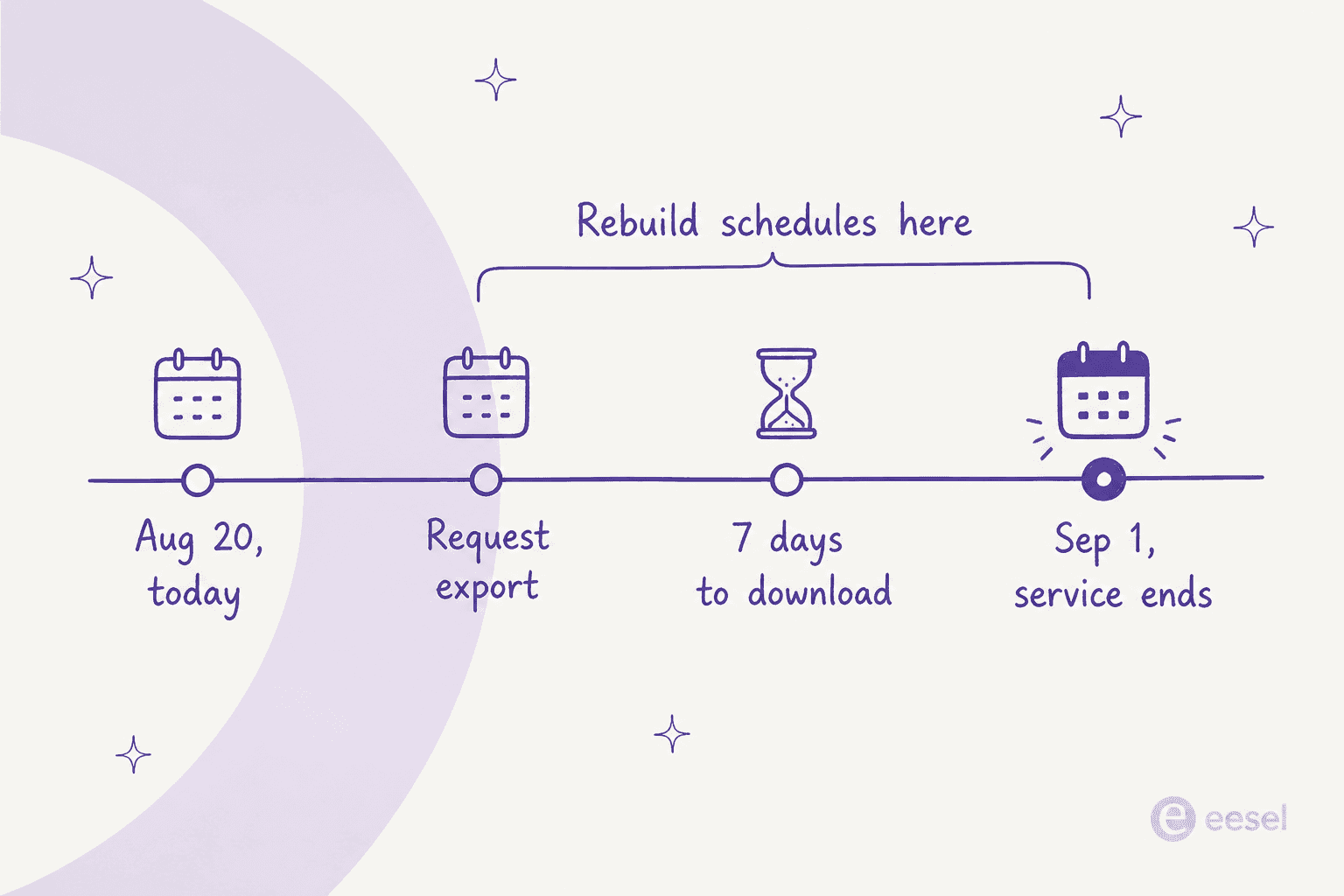
Gobii's final day of operations is September 1, 2026. Its homepage points departing customers at Manus, Hermes, ChatGPT and Gemini, and its repo ships first-party migration adapters for all four. Two of those four destinations no longer exist under the names Gobii used: OpenAI retired ChatGPT agent mode, and Google's "Gemini Agent" help article now redirects to Gemini Spark.
The bigger trap is in Gobii's own export documentation. The ZIP carries your instructions, memory, history and files. It does not carry credentials, channels or webhooks, and schedules arrive turned off. So the hard part of this migration is not the model. It is rebuilding the trigger and the delivery path, and you have seven days to download the ZIP once you request it.
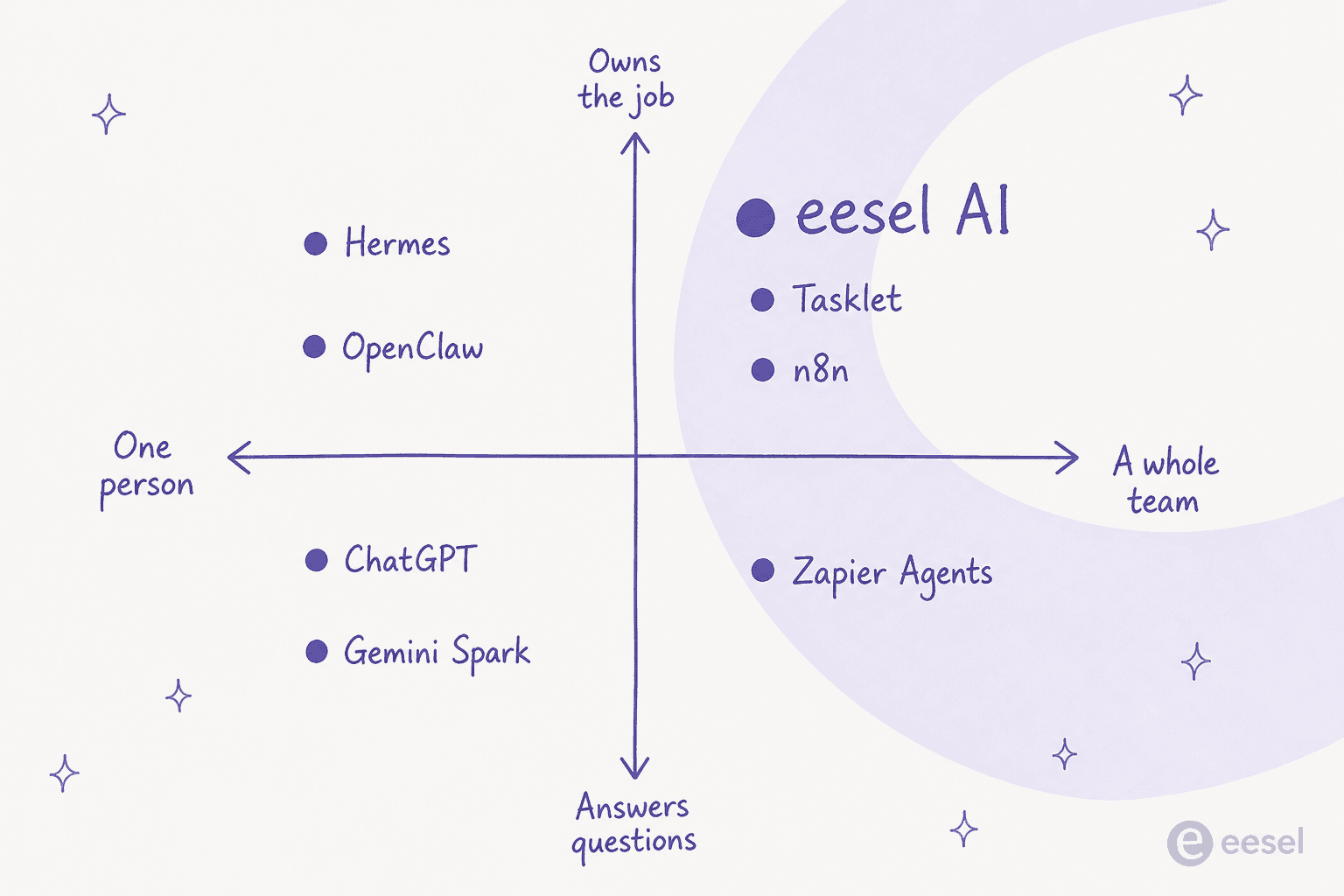
My picks, sorted by what you actually lose: if the agent was answering customer email or tickets, move to eesel AI and get a real dry run against your past tickets first. If it was a scheduled research-and-report job, Manus or Tasklet. If it logged into websites and clicked, Tasklet or self-hosting Gobii. If it was really a workflow with an LLM in the middle, n8n. If it was your personal assistant, Hermes or OpenClaw.
What actually happened to Gobii
There is no blog post, no acquisition note, no long farewell. If you go to gobii.ai today you get one page, under the kicker "Company update", with the headline "Gobii is winding down." and the line "Our final day of operations will be September 1, 2026."
The notice is short and decent about it. It commits to "working through the appropriate next steps, including any applicable refunds" for customers with active paid subscriptions, and promises an export tool with "brief instructions for transferring your agents to Manus, Hermes, ChatGPT, Gemini, and other platforms."
That export tool shipped. I went looking for it in the open-source repo, and you can see the whole last week of the company's engineering in the commit log: seven top-level directories all carry the same August 17 commit message, "Export Agent", and the final commit on main merged a branch called update_export_link.
I want to be clear about what Gobii was, because it matters for picking a replacement. This was not a chatbot. The last archived version of the homepage led with "Your Gobii AI team, always on" on its last archived homepage, and the sub-line "Email them. Text them. They work 24/7." Every agent got a name, an email address and a phone number. It drove a real browser, kept its own SQLite state, and woke on a cron schedule or an inbound event. The repo's own README calls it "an AI employee platform for running durable autonomous agents in production".
So the category is AI employees, not assistants. That distinction is going to do a lot of work in a minute.
What you were paying, for the record
The final rate card, captured on July 28, is worth writing down because you are about to compare it against something. From the last archived pricing page:
| Plan | Price | Tasks included | Overage | API rate limit | Contacts per agent |
|---|---|---|---|---|---|
| Free (self-hosted) | $0 | Bring your own models | n/a | Not published | Not published |
| Pro | $50/month | 1,000/month | $0.10 per task | 600 req/min | 20 |
| Scale | $250/month | 10,000/month | $0.04 per task | 1,500 req/min | 50 |
| Team | $50 per seat/month | 1,000 pooled credits per seat | "Metered overage available" | 2,000 req/min | 50 |
| Enterprise | Quote only | Custom | Custom | Custom | Custom |
One thing about that "task" unit, because it will shape how you read every price below. The pricing page defined a task as "a single automation job submitted to Gobii", where "each submission counts as one task against your quota." In practice the running agent burned task credits per unit of work, at a rate set by an intelligence dial that ran from Lite up to Ultra Max. Gobii admitted this itself in an October 2025 post titled "we listened: agents were using credits too fast", where the fix included granting everyone an extra month of credits and lowering "task usage by an additional 50%."
A 50% cut in task usage only means something if a job consumed a variable number of credits. Keep that in mind when a replacement quotes you a per-run number.
The three things your export drops
This is the section I would read twice.
Gobii's export documentation is unusually honest, and it is the most useful thing the company published on its way out. The headline caveat, verbatim from the export docs: "An export is a migration kit, not a perfect clone. Agent platforms use different models, tools, memory systems, and file limits, so you will still need to review the imported information and reconnect services."
What travels is the easy half: identity/instructions.md, memory/current-state.md, the conversation transcript, your files, your skills, and a tools/capabilities.json describing what the agent could do.
What does not travel is the half that made the thing an employee:
- Credentials. "The export does not include managed passwords, API keys, OAuth tokens, or other credential values," per the docs.
- Channels. Apps, MCP servers, webhooks, email and messaging channels, and browser access all have to be reconnected on the other side.
- Schedules. They are included "for reference but are turned off for import," says Gobii.
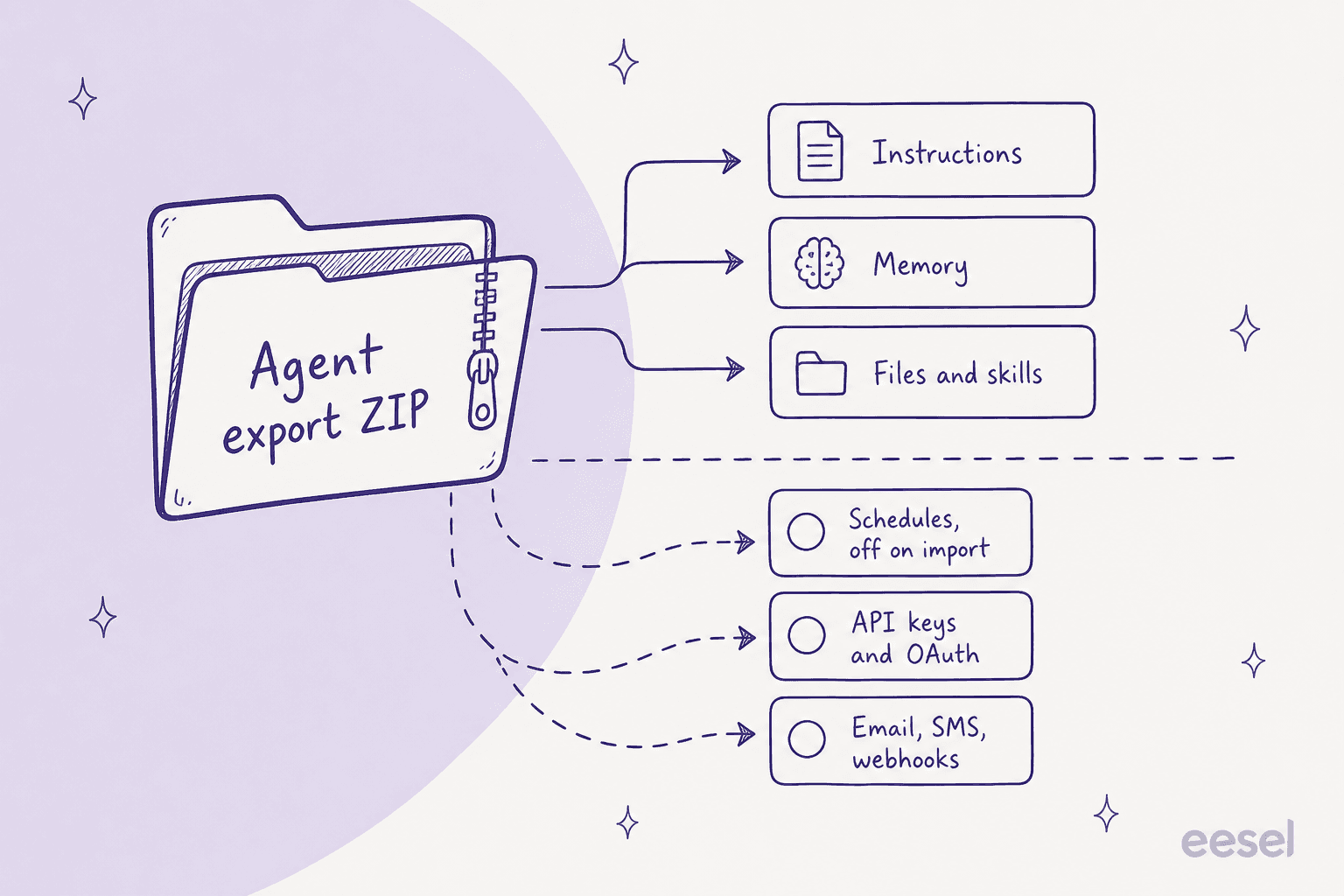
Read that list again and notice what it is. It is the entire reason you used Gobii instead of a chat window. The prompt was never the hard part. The schedule, the channel and the login were the product.
Which means the obvious way to shop for a replacement, comparing which one feels smartest in a chat box, is exactly the wrong way. Gobii's four suggested destinations are ranked by reasoning quality. You should be ranking by whether the thing can hold a cron entry, own an inbox, and log into a site.
There is also a clock inside the clock. The export docs say the download "remains available for seven days", and organization-wide exports need owner, admin or agent-management authority, so an ordinary team member cannot pull the org's agents. If you are reading this in late August, request the export today and rebuild against a local copy.
I have watched this exact scramble before
I build integrations at eesel, which means I spend most of my week on the unglamorous side of this problem: the token that expires, the webhook that fires twice, the schedule that silently stopped. eesel has been putting AI agents on live support queues for years now, across customers running everything from 10,000 to 100,000 tickets a month, so forced migrations land on my desk fairly often.
The one I think about when I read Gobii's notice was a B2B semiconductor motion-control hardware team, roughly 250 Zendesk tickets a month across English, German, Chinese and Hebrew. They were not unhappy with their incumbent AI vendor. The vendor changed how it did business, and they had to replace it anyway. Nothing about their tooling had gone wrong. The decision was just taken away from them.
What made that migration survivable was not finding a smarter model. It was that I could point the new agent at their own historical tickets and see, before go-live, whether it answered the way their team did. That is the check I would insist on for any customer-facing Gobii agent you are about to move, and most of the options below cannot offer it.
How I picked these ten
Four criteria, in this order:
- Can it hold a durable schedule? Not "can you ask it to do something later." Can it wake on its own, on a cadence you set, while nobody is logged in.
- Can it own a channel? An email address, a phone number, a webhook endpoint, or a ticket queue. Something that can be reached rather than only prompted.
- Can it get past a login? Gobii's flagship customer story is an agent with its own user account on an internal database. Several replacements explicitly refuse to sign in to anything.
- What does one run actually cost? Not the sticker. The unit.
I have left out anything that is only a chat window with a nice UI, because that is not what you are replacing. I have also included self-hosting Gobii itself as option ten, because the MIT licence makes it a real choice and almost nobody mentions it.
The comparison table
| Tool | Best for | Durable schedule | Owns email | Owns SMS | Inbound trigger | Logs into sites | Billing unit | Entry price | Self-host | Team sharing | Dry run before go-live |
|---|---|---|---|---|---|---|---|---|---|---|---|
| eesel AI | Agents that were answering customer email or tickets | Yes, hourly to custom cron | Via helpdesk and Gmail | No | Webhook and helpdesk events | Via integrations, not browser | 1 credit per ticket or chat | From $299/mo (500 credits), 100 free credits | No | Yes | Yes, replays your past tickets |
| Manus | Scheduled research and deliverables | Yes, 20 scheduled tasks | Inbound via Mail Manus | No | Yes, browser operator | Credits | $20/month | No | Team plan, quote only | No | |
| Tasklet | The closest like-for-like rebuild | Yes, schedule, event and webhook | Via Gmail and Outlook | No | Webhook and app events | Yes, computer use | Credits | $25/month | No | Yes, shared agents | No |
| OpenClaw | One person who wants every channel back | Yes, but the Gateway must stay up | Inbound via Gmail webhooks | Yes, Twilio plugin | Webhooks and Gmail PubSub | Yes, driven Chrome profile | Free, bring your own model | $0 | Yes, MIT | No, single operator | No |
| Hermes Agent | Self-hosters who want cron plus messaging | Yes, five-field cron | Yes | No | Messaging channels | Yes, Playwright | Free, or hosted seat | $0 self-host, $49/month hosted | Yes, MIT | No, single user | No |
| n8n | Agents that were really workflows | Yes, schedule trigger | Via nodes | Via nodes | Yes, webhooks | Via community nodes | Workflow execution, unlimited steps | Free self-hosted, Cloud from 2.5K executions | Yes | Yes, on paid tiers | No |
| Zapier Agents | Trigger breadth over reasoning depth | Yes | Via Gmail action | Via SMS action | Yes, thousands of triggers | No, read-only page fetch | Activity, one per action | Free 400/month, Pro $33.33/month | No | Enterprise only | No |
| ChatGPT | Individuals doing scheduled prompts | Tasks, hourly minimum | Connector action, prompts first | Not published | No, tasks do not support webhooks | No, cloud browser refuses logins | Message and credit allowances | $8/month Go, $20/month Plus | No | Business seats | No |
| Gemini Spark | Individuals in supported countries | Yes, 50 schedules, hourly | Draft, forward, reply | No | Yes, Gmail monitors | Local Chrome only | Compute-based limits | $19.99/month AI Pro | No | No, personal accounts only | No |
| Self-hosted Gobii | Keeping exactly what you had | Yes, but the scheduler is opt-in | Yes, IMAP profile | Yes | Yes, webhooks | Yes, browser-use | Your model bill | $0 plus infrastructure | Yes, MIT | Yes | No |
A note on that last column, because it is the one nobody puts in a comparison table. Nine of these ten cannot show you how the agent will behave on your real work before it starts doing that work. For an internal research job that is a shrug. For anything a customer sees, it is the whole risk.
Which one fits your agent?
Before you read ten write-ups, answer one question. The destination follows from what your Gobii agent actually did, not from which vendor has the best homepage.
1. eesel AI
Best for: Gobii agents that were answering email or tickets from actual customers.
I work on this one, so treat the enthusiasm accordingly. I am putting it first because of a specific overlap rather than loyalty: Zendesk sat in Gobii's own catalogue of pretrained workers, which means some meaningful share of the agents now looking for a home were pointed at a support queue. That is the one job where a general agent platform is the wrong answer.
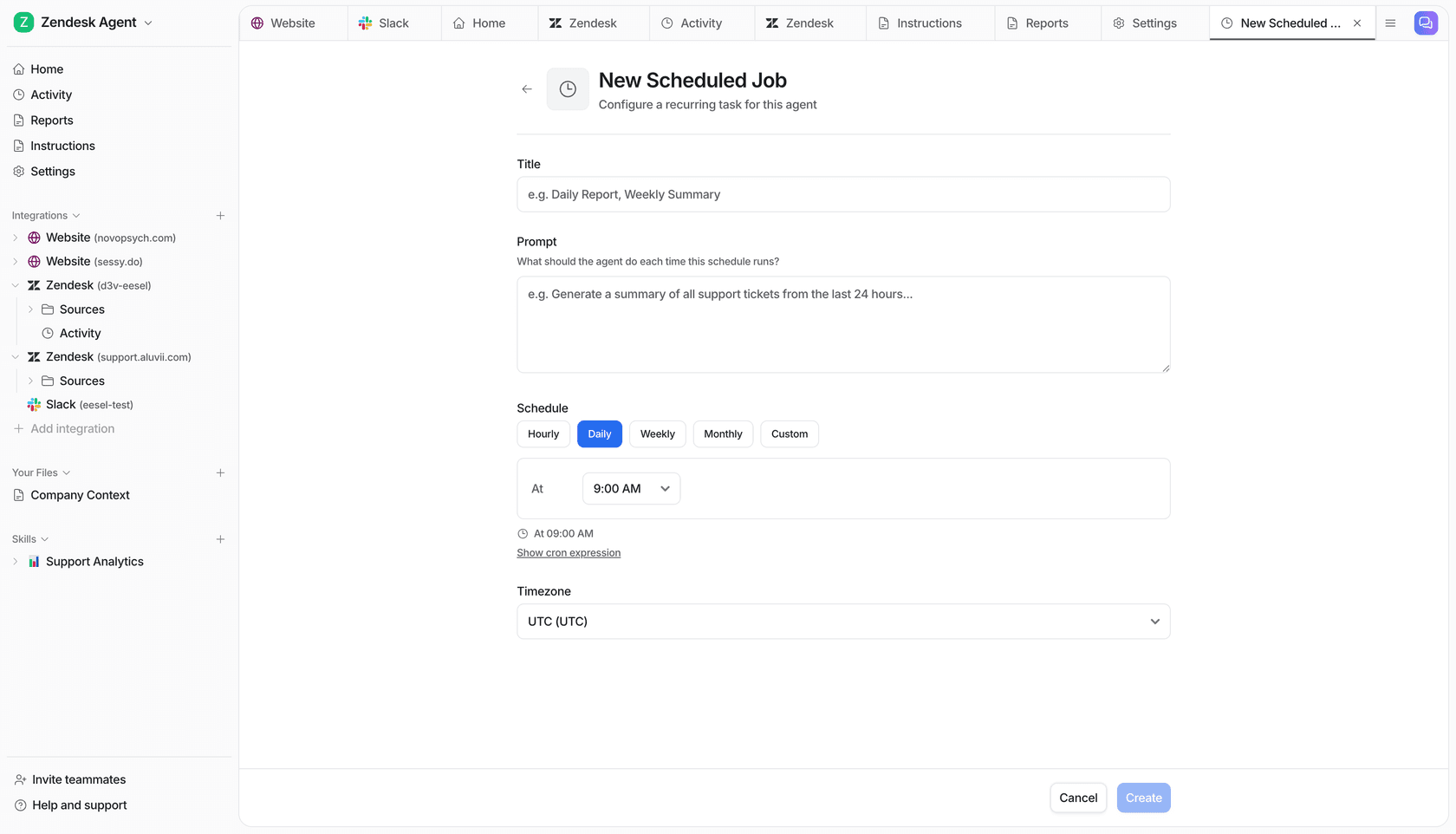
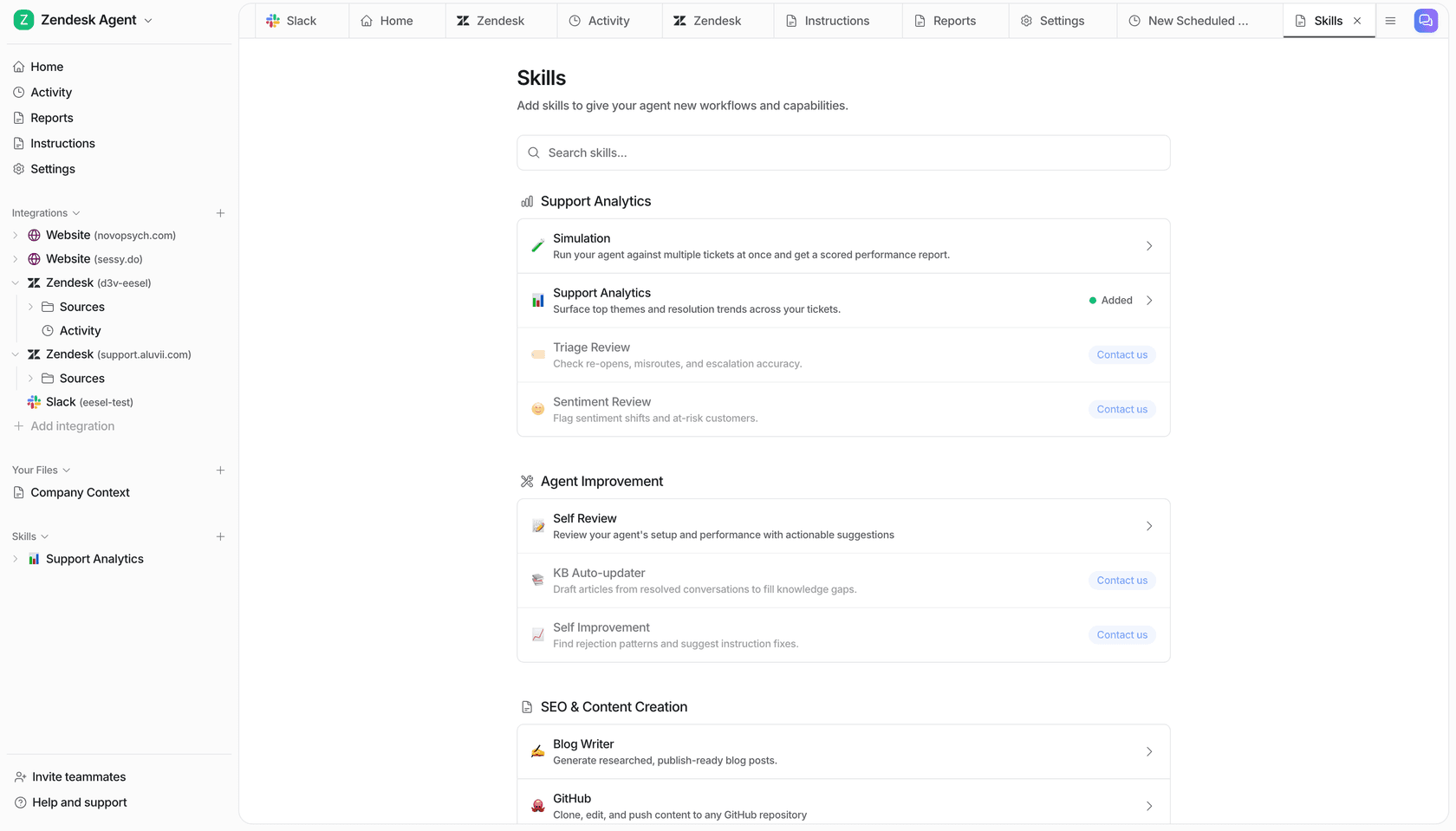
What it actually does. eesel connects to the helpdesk you already run, learns from your past tickets and help centre, and answers or drafts. Agents are configured per integration, get scheduled jobs with hourly, daily, weekly, monthly or raw cron cadence, and pick up skills for things like analytics reviews and knowledge-base upkeep.
How it handles Gobii's three drops. Schedules are a first-class object, so this is the part you rebuild in a few clicks rather than a few days. Channels come from the integration list rather than from a phone number of its own: Zendesk, Freshdesk, Gorgias, Front, Help Scout, HubSpot, Salesforce and Jira Service Management. Credentials get reconnected per integration.
The thing nobody else on this list has. eesel's Simulation skill replays hundreds of your own past tickets and scores the answers against what your team actually sent, then hands back the gaps. That is the check I would not skip on a customer-facing agent, and I say that as the person who has watched a confident-sounding bot answer wrongly at volume.
"In the first month, eesel is resolving 73% of our tier 1 requests... results quickly during our 7-day trial."

Pricing. One fixed monthly price sized to volume, where 1 credit covers one ticket or chat however long it runs. Blog post generation stays $4 per post. Questions asked in the dashboard are mostly free. No seats, no platform fee. The free plan is 100 credits, no card. Paying a year upfront gets you two months free, and SSO, priority support and data residency are available as add-ons. Full detail on the pricing page.
| Monthly credits | Price |
|---|---|
| 100 | Free |
| 500 | $299/mo |
| 1,000 | $499/mo |
| 2,500 | $999/mo |
| 5,000 | $1,899/mo |
| Blog post | $4 each |
Pros: real scheduled jobs, a genuine pre-launch dry run, per-ticket billing with a hard spend cap, no seat maths.
Cons: it is not a general-purpose agent. There is no browser operator, no agent phone number, and no way to point it at "go research 200 leads." If your Gobii agent was doing sales prospecting, this is not your tool. It also does not integrate with Zoho Desk, Crisp, LiveAgent or Helpshift.
My take: the right move if the work touched customers, and the wrong move if it did not. Narrower than Gobii on purpose. If you want the wider field first, my roundup of the best AI employees covers the general platforms.
2. Manus
Best for: scheduled research jobs that ended in a deliverable.
Gobii names Manus first, and it is the most defensible of its four suggestions. One thing to know going in: Manus is now part of Meta, and the site footer reads "© 2026 Meta." If Gobii's shutdown has you nervous about platform risk, that cuts both ways.
What it actually does. You hand it an open-ended goal and it plans and executes the whole thing on its own cloud machine, then returns a finished artefact: a report, a deck, a site. Its tagline is "Less structure, more intelligence."
How it handles Gobii's three drops. Schedules are the good news: every paid plan carries 20 scheduled tasks and 20 concurrent tasks, which is the closest published parity with Gobii's always-on agents on this list. Channels are thinner, though Mail Manus lets you hand work off by email and there is a Slack integration. The Manus browser operator drives a real browser, so authenticated work is at least possible.
Pricing. Credit-based, from the pricing page: $20/month for 4,000 credits, $40/month for 8,000, $200/month for 40,000, plus 300 daily refresh credits on every paid plan. Team and Enterprise are quote-only. There is no fixed credits-per-task rate published, so complex jobs cost more and you find out by running them.
Pros: genuine autonomy on long tasks, 20 scheduled slots on the cheapest paid plan, a real browser, credible output quality.
Cons: credit burn is unpredictable in exactly the way Gobii's was, so you are swapping one opaque meter for another. No agent phone number. No team tier with a public price. And the Meta acquisition means the roadmap is not really its own any more.
My take: the default pick for scheduled research-and-report agents, and the one destination where Gobii's own adapter is likely to save you real time. Read my Manus pricing breakdown before you commit to a tier, and Manus alternatives if the credit model worries you.
3. Tasklet
Best for: the closest structural rebuild of what you had.
Gobii does not mention Tasklet anywhere, which is a shame, because on the three criteria that matter it is the nearest match on this list.
What it actually does. You describe a responsibility in plain English and it builds the agent. Its own framing is "Not a chatbot. A 24x7 teammate," which is almost word for word Gobii's pitch. Every agent gets an isolated cloud sandbox at 2 vCPU and 14.8 GB.
How it handles Gobii's three drops. This is where it earns the placement. Triggers come in three types: schedule, event and webhook, which covers Gobii's cron-plus-inbound-event model exactly. Channels run through Gmail, Outlook, Slack and Teams connections rather than an address of its own. Its "computer use" mode opens a browser and works through authenticated UIs, on the explicit promise that "if a human can do it through a browser, your agent can too."
Pricing. Credit-based, from the pricing page: Free at $0 with 300 bonus credits a day and a 10-execution cap per trigger, Starter at $25/month for 10,000 credits, Pro at $100/month for 40,000, and Custom from $250/month for 100,000 and up. Unlimited agents and integrations on every plan. Monthly credits do not roll over.
Pros: the only non-self-hosted option here with schedule, event and webhook triggers plus authenticated browser work. Unlimited agents on the free tier. SOC 2 compliant.
Cons: no published credits-per-task rate and no published overage policy, so the same cost fog as Gobii. No annual discount. Community footprint is thin, with no independent reviews on G2, Capterra or Trustpilot to check against.
My take: if you want the smallest possible change in how your automation is shaped, start here. See my Tasklet review for the longer look. The wider field is in Tasklet alternatives.
4. Hermes Agent
Best for: teams that liked self-hosting Gobii and want a smaller stack.
Gobii's second named destination, and the one with the best story for anyone who was self-hosting already. Hermes Agent is Nous Research's MIT-licensed agent, pitched as "the AI agent that remembers, learns, and works 24/7."
What it actually does. Persistent memory in MEMORY.md and USER.md, a learning loop that turns a repeated task into a reusable skill after three or more attempts, Playwright browser automation, sandboxed Python, and isolated subagents.
How it handles Gobii's three drops. Schedules are proper cron scheduling with one-shot, interval and five-field cron, and the docs describe it as fail-closed on safety. Channels are the strongest on this list: email, Telegram, Discord, Slack, WhatsApp, Signal, GitHub and Notion, all sharing one memory. Credentials are yours because the whole thing is yours.
Pricing. The software is free under MIT. FlyHermes, a third-party managed cloud, publishes $49/month or $39/month billed annually, with model API access included and a 14-day first-account guarantee. The monthly usage allowance on that plan is never quantified anywhere on the page.
Pros: the most complete channel coverage here, real cron, MIT licence, a documented migration path from OpenClaw.
Cons: single-user by design, so there is no team workspace or shared agent to replace Gobii's Team tier. The project's own pricing page concedes that self-hosting is "powerful. It's also work," and it is candid that the software is free while your time is not. Community discussion is Hacker-News-only, with recurring gripes about a verbose CLI and slow startup.
My take: the right destination for one technical person replacing one technical person's agent. The wrong one if Gobii was serving a team. My Hermes Agent alternatives piece has the fuller comparison.
5. n8n
Best for: agents that were really workflows with a language model in the middle.
Gobii published a "n8n vs Gobii" comparison page while it was alive, so it clearly saw the overlap. Here is the uncomfortable question that page was answering: was your agent doing genuine reasoning, or was it doing a fixed sequence with an LLM step in it? One Hacker News commenter put the same doubt to Gobii's founder directly, saying it "mostly ends up orchestrating API calls and cron jobs".
If that description stings a little, n8n will do the job for less.
What it actually does. A visual workflow builder with about 400 integrations and an AI agent node built on LangChain. You wire triggers to steps explicitly.
How it handles Gobii's three drops. Schedules and webhooks are the native primitives, so this is the easiest rebuild of the trigger layer on the list. Channels are node-based. Credentials are a first-class store.
The billing unit is why it is here. n8n's pricing page sells "workflow executions with unlimited steps" at 2.5K, 10K and 40K per month across its tiers, and the self-hosted Community Edition is free and unmetered. One full run of any length is one execution. Compare that to Zapier below and the same agent produces a very different invoice.
Pros: unbeatable price at the self-hosted end, the trigger model maps cleanly onto Gobii's, huge integration surface, 198,000-plus GitHub stars and a real community.
Cons: you are assembling, not delegating. Standing up one support-shaped agent takes roughly eleven components, agent memory does not persist between sessions without bringing your own Redis or Postgres, and Max Iterations defaults to 10 so a single message can be ten model round-trips on your key. In a chat, every customer message is its own execution, which quietly changes the arithmetic. And n8n's own Docker page warns that self-hosting is "for expert users."
My take: the value pick, with a real ceiling. If the agent's judgement mattered, you will feel the difference. Worth reading alongside AgentKit versus n8n. The Make versus n8n comparison covers the no-code end.
6. Zapier Agents
Best for: trigger breadth when you cannot rebuild integrations by hand.
Gobii also published a head-to-head against Zapier Agents, and the honest reason to consider it is coverage. Nothing else here connects to as many things out of the box.
What it actually does. Agents that sit on top of Zapier's trigger and action library, with live data sources, web browsing and a Chrome extension.
The billing unit is the story, and it is not friendly to always-on work. Zapier's own usage documentation is refreshingly explicit: "an activity is any billable action that your agent takes," and that includes using a trigger, answering from a knowledge source, running an action, browsing or scraping the web, and running a web search. Their own worked example is a daily agent that checks an inbox, summarises, writes to Trello and pings Slack: four activities every morning, or seven if two emails match.
Run that agent for a month and you are at roughly 120 activities. The Free plan gives 400 activities a month with a 10-activity cap per run, and Agents Pro is $400 billed annually, or $33.33/month, for 1,500 activities with a 40-activity cap per run. So the free tier holds about three simple daily agents, and Pro holds about a dozen.
Pros: the widest trigger and action surface of anything on this list, generous free tier for one or two agents, activities are metered separately from Zapier tasks.
Cons: the per-action meter punishes exactly the multi-step autonomy you used Gobii for. The per-run activity cap means a long job stops and asks for your input mid-flight, which is the opposite of always-on. Its web browsing does not sign in to sites. Agent sharing is Enterprise-only.
My take: good for a handful of shallow, wide agents; bad for a few deep ones. If breadth is the draw, my Zapier AI piece and AgentKit versus Zapier are the next reads.
7. ChatGPT
Best for: an individual who mostly wants scheduled prompts, not an employee.
Here is the finding that most changed how I read Gobii's shutdown notice. Gobii's export ships a first-party adapter for ChatGPT. OpenAI's own help centre now opens with: "ChatGPT agent is no longer available. Use ChatGPT Work for longer, multi-step tasks and finished deliverables."
The thing Gobii is pointing its customers at was withdrawn. That is not anyone's fault exactly, and the adapter still moves your instructions and memory across usefully. But if you were planning to land on agent mode, plan again.
What it actually does now. Scheduled Tasks, plus ChatGPT Work for long multi-step jobs, plus a cloud browser, plus Workspace Agents on business plans.
How it handles Gobii's three drops. Schedules exist as Tasks, and they do run while you are offline, but the caps are tight: three active tasks on Go, five on Plus, ten on Business, fifteen on Pro and Enterprise. The floor is that "tasks cannot run more than once per hour," and unattended tasks "may automatically pause after a period of inactivity." Channels are the weak point: "scheduled tasks don't currently support webhooks," there is no documented inbound-email trigger, and no published agent SMS capability at all. Outbound email goes through a connector write action classed as an important action, so it prompts you by default.
The login problem. The cloud browser "does not accept credentials, use autofill or password managers, sign in to websites, or complete payments." Set that against Gobii's flagship deployment, where Open Core Ventures created a dedicated login for its agent, and the mismatch is stark.
Pricing. Free at $0, Go at $8/month, Plus at $20/month, Pro at $100 and $200/month, and Business at $25 per user monthly or $20 annually with a two-seat minimum. Enterprise is quote-only. Note that the SSO FAQ still shows $30 per user, contradicting the plan page.
Pros: the reasoning is excellent, the price is low, tasks do run offline, and Gobii built you an adapter.
Cons: the hourly floor, the small active-task caps, no webhooks, no SMS, and a browser that refuses to log in. This is a good assistant and a poor employee.
My take: fine if the agent was a scheduled prompt. Not a replacement for an always-on worker with an inbox. See ChatGPT agents for the mechanics and ChatGPT customer service alternatives if the work was support-shaped.
8. Gemini Spark
Best for: individuals on AI Pro, in a country where it is switched on.
Same naming problem as ChatGPT, one step subtler. Gobii's adapter targets "Gemini," and Google's old Gemini Agent help article now redirects to the Gemini Spark article. Spark is the successor and the thing you should be evaluating.
What it actually does. Spark runs scheduled tasks and monitors in the cloud, drives a local Chrome or a remote browser, and acts inside Google Workspace apps.
How it handles Gobii's three drops. Schedules are the best published numbers on this list: a cap of 50 active schedules with 15 concurrent running tasks, and hourly as the documented minimum interval. Channels are genuinely interesting, because a Gmail monitor fires a task "when you receive an email that satisfies a Gmail filter," which is a real inbound-email trigger. But Google's own example verb is draft, not send, and Spark is designed to ask for confirmation "before... sending communications." SMS is a flat no: the connected-apps table lists Messages as Gemini-chat-only, not Spark. No webhook trigger is documented anywhere.
The two catches that decide it. Spark requires a personal Google Account, so a work or school account cannot use it, which rules it out as a Gobii Team replacement outright. And it is "available wherever Gemini Apps are supported, except in the European Economic Area, Nigeria, Switzerland, and the United Kingdom." If you are in London or Berlin, Gobii sent you to a door that does not open.
"I'm in the UK so I'll be waiting at least a year for this (assuming Google doesn't forget about its existence in that time)."

Pricing. Free at $0, Google AI Plus at $4.99/month, AI Pro at $19.99/month, and AI Ultra at $99.99 or $199.99/month. Spark needs AI Pro or above. Workspace Business runs $7.00, $14.00 and $22.00 per user per month, but Spark does not appear in the business feature table at all.
Pros: the highest published schedule cap here, a real inbound-email trigger, and deep Workspace reach if you live in Google.
Cons: personal accounts only, geoblocked across the UK and EU, no SMS, no webhooks, human confirmation before sending, and Google's own warning that "monitors are still not ideal for tracking fast-moving data."
My take: a decent personal replacement in a supported country, and structurally unable to replace a team deployment. My Gemini pricing page has the plan detail. For the wider field, see Gemini alternatives.
9. OpenClaw
Best for: one person who wants their agent in every chat app they already use.
Gobii's README carried a whole "Gobii vs OpenClaw" table, arguing for itself as "cloud-native, secure, always-on agent operations for teams" against OpenClaw's "local-first gateway and personal assistant runtime." That framing is fair, and it is also the reason OpenClaw is ninth here rather than second: it is deliberately a different category.
What it actually does. You run one Gateway process on your own machine and it bridges your messaging apps to an AI assistant, across WhatsApp, Telegram, Slack, Discord, Signal, iMessage, Teams, Matrix and roughly a dozen more.
How it handles Gobii's three drops. Schedules exist through its tools and cron layer. Channels are its entire reason for existing, and it beats everything else here on breadth. Credentials stay on your hardware.
Pricing. Free, MIT licensed, npm install -g openclaw@latest. There is no first-party hosted plan, so your cost is your model provider plus the box.
Pros: the widest channel list anywhere, an enormous and fast-moving community, genuinely free, and full local control.
Cons: it is explicitly a single-user personal assistant. The docs treat inbound DMs as untrusted input. There are no teams, queues, roles or shared agents, so it cannot stand in for Gobii's Team tier. And it moves so fast that pinning a stable version is its own small job.
My take: excellent for the personal half of what Gobii did, unsuitable for the team half. Start with my OpenClaw review. Then check OpenClaw pricing for the real total cost.
10. Self-hosting the Gobii platform
Best for: keeping precisely what you already had, if someone will own the box.
The option Gobii's own notice does not mention. The platform is MIT licensed, the repo is still public and unarchived, and as of today it shows 488 stars, 84 forks and a last commit on August 18, 2026. Release 2.31.0 landed on August 11. Nothing about the shutdown appears in the README.
This is the only entry that scores yes on all three of Gobii's drops, because you are not migrating at all.
What it actually takes. I read the compose.yaml, and the honest version is heavier than the quick-install line suggests. The self-hosting docs ask for Docker with at least 12 GB of RAM allocated. The Compose file defines thirteen services: Postgres 16, Redis 7, a sandbox-compute server, a web tier on gunicorn, three separate Celery worker roles, bootstrap, migrate and collectstatic jobs, plus optional Flower, MinIO and OpenTelemetry profiles. Seven named volumes back it.
The trap that matters most for this post. The scheduler is an opt-in profile. A default docker compose up --build starts the app, the workers, Redis, Postgres and the migrations, but not Celery beat. So the one capability you self-hosted to preserve, your durable schedules, does not fire until you add --profile beat. Inbound email is a separate --profile email. Getting your cron agents back is a deliberate act, not a default.
Two more things worth knowing before you fork it. The NOTICE file carves out a proprietary/ directory gated behind a GOBII_PROPRIETARY_MODE setting, usable "only for customers who hold a current, valid proprietary software license from Gobii, Inc." It also reserves the Gobii marks and visual identity, so a fork keeps the code but not the name. And behind those 7,479 commits sit four human accounts. If you are betting on a community pickup, that is the number to look at.
Pricing. Free, plus your infrastructure and your model bill. Bright Data zones for search and scraping are configured but not created for you.
Pros: perfect fidelity, no migration, no data movement, full control, and the same browser-use runtime you already trust.
Cons: a 12 GB floor and thirteen services is a real operational commitment, the scheduler is off by default, some features need a commercial licence that nobody is selling any more, and security patches now depend on volunteers.
My take: the best option if you already ran it yourself and have the ops muscle, which is exactly the profile of Gobii's own investor: Open Core Ventures said "one hard requirement for anything in our Ops stack is self-hosting capability." For everyone else, one of our customers put the counterargument better than I can:
"We could try to write our own LLM application but we didn't want to invest our time into that. We wanted something that we would not have to maintain."
Karel, GENERAL BYTES
What I would actually do with the time left
If I had a Gobii agent in production today, in this order:
- Request the export now. The download lives for seven days, and org-wide exports need admin authority, so find out today whether you have it. Do not wait until the last week of August to discover you are an ordinary member.
- Write down the trigger, not the prompt. For each agent: what woke it, how often, what address or number it used, and which logins it held. That list is your actual migration plan. The prompt is in the ZIP already.
- Split the agents by job before you pick a vendor. Customer-facing work and internal ops work should almost certainly not land in the same place. This is the mistake I would expect most teams to make in a rush.
- Rebuild the schedules by hand and check them the next morning. Every option here ships them off. Assume nothing fired.
- If anything touched customers, test before you point it live. A confident wrong answer at volume is worse than a paused agent, and one of the very few tools on this list can dry-run against your own history.
Gobii's own honest note on the whole exercise is the right one to end on, from the export docs: "Keep the original agent available until the replacement passes your checks." You have until September 1 to do that.
Try eesel AI
If the Gobii agent you are replacing was answering customer email, chats or tickets, that is the narrow case where a general agent platform will cost you more than it saves. eesel plugs into Zendesk, Freshdesk, Gorgias, Front, Help Scout, HubSpot, Salesforce or Jira Service Management, learns from the tickets you have already resolved, and runs on the same scheduled-job model your Gobii agents used, hourly through to raw cron.
The difference that matters given your deadline: before it answers a single live conversation, eesel's Simulation skill replays your past tickets and scores its answers against what your team actually sent, so you find the gaps in an afternoon instead of in your CSAT. Billing is one fixed monthly price from $299 for 500 credits (1 credit per ticket or chat), with no seats and an optional overage cap you set, and the first agent is usually live within about half an hour.
Free to try, 100 credits on the house, no card needed. If the work was not customer-facing, one of the other nine above is the better call, and I would rather you got that right than picked eesel.